On this page
- What is an ADA compliant website?
- Does my website need to be ADA compliant?
- ADA compliant website requirements: WCAG 2.1 and 2.2 AA in plain English
- ADA compliant website checklist: the most common failures and fixes
- How to check if your website is ADA compliant
- Accessibility overlays: why a widget won't make you compliant
- ADA website lawsuits and demand letters: the real risk
- How to make your website ADA compliant: audit, fix, maintain
- How to brief a web designer or developer on accessibility
If a customer who is blind, deaf or unable to use a mouse can't request a quote, book an appointment or check out on your site, you're losing that customer, and you may have a legal problem. An ADA compliant website is one that people with disabilities can use as fully as anyone else.
The law is murkier than most vendors admit. The Americans with Disabilities Act sets no technical standard for business websites, and courts still disagree about online-only businesses. But the Department of Justice says the ADA covers web content, plaintiffs filed thousands of website accessibility suits in federal court last year, and recent federal rules for state and local governments and for HHS-funded healthcare providers both require WCAG 2.1 Level AA.
The short version: build and test to WCAG 2.2 Level AA, check your site with a keyboard and a screen reader instead of trusting a scanner, and be wary of any product that promises instant compliance. This is general information, not legal advice; if you've received a demand letter or a lawsuit, talk to a lawyer before you reply.
What is an ADA compliant website?
It's a site people with disabilities can use without someone else's help, and that's a large audience: more than 1 in 4 US adults have some type of disability, according to the CDC. In practice, that means:
- A blind visitor using a screen reader hears what each image shows, what each button does and what each form field needs.
- Someone who can't use a mouse reaches every link, menu and field by keyboard and can always see where they are.
- A visitor with low vision can zoom to 200% and still read everything.
- A deaf visitor gets accurate captions on your videos.
"ADA compliant" isn't a certification. With no technical standard in the law for business websites, there's nothing official for an "ADA certified" badge to certify against. What you can show is that your site conforms to WCAG at a stated level, with test results to back it up.
Does my website need to be ADA compliant?
If your business serves the public, assume yes. Here's what the statute, DOJ and the courts say.
Businesses open to the public (Title III)
Title III of the ADA bars disability discrimination in "the full and equal enjoyment of the goods, services, facilities, privileges, advantages, or accommodations of any place of public accommodation." The statute's list covers most local businesses: restaurants, stores, banks, hotels, theaters, gyms, private schools, day care centers, and the offices of lawyers, accountants and healthcare providers. There's no size threshold; the 15-employee cutoff people quote comes from Title I, which covers employment.
Title III was written in 1990 and doesn't mention websites. DOJ's 2022 web accessibility guidance says that since 1996 the Department has "consistently taken the position that the ADA applies to web content," including the goods and services businesses offer online. It also says DOJ has no regulation setting detailed standards for businesses, which have flexibility in how they comply, and it calls existing standards such as WCAG and the federal Section 508 Standards "helpful guidance."
How courts treat websites
Courts haven't agreed on how far Title III reaches online, and the Supreme Court hasn't decided the question. A 2022 Congressional Research Service analysis sorts the decisions into three approaches:
- Covered if you serve the public, with or without a physical location.
- Only physical places count, so an online-only business isn't a public accommodation.
- Covered when the site connects to a physical place. In Robles v. Domino's Pizza (2019), the Ninth Circuit applied the ADA to Domino's website and app because their inaccessibility "impedes access to the goods and services of its physical pizza franchises." The Supreme Court declined to review the case.
Florida has its own twist. In Gil v. Winn-Dixie, a federal trial court in Florida found the grocer's website violated the ADA and ordered WCAG 2.0 conformance, a published accessibility policy and staff training. The Eleventh Circuit, which hears Florida's federal appeals, overturned that ruling in 2021, holding that a website isn't a place of public accommodation, then vacated its own opinion as moot that December. That leaves no binding Eleventh Circuit ruling on websites.
The practical reading: if customers use your website to order, book or get services from a physical location, expect it to be treated as covered, even under the Ninth Circuit's narrower test. For online-only businesses, the answer depends on where they're sued.
State and local governments (Title II)
State and local governments do have a technical rule. DOJ's 2024 Title II rule requires their web content and mobile apps, including content contractors provide for them, to meet WCAG 2.1 Level AA. An April 2026 interim final rule pushed the deadlines back a year: April 26, 2027, for governments serving 50,000 or more people, and April 26, 2028, for smaller governments and special districts. DOJ also plans further rulemaking on the rule's substance, so check ada.gov before planning around those dates. If you sell websites, apps or online services to a city, county or state agency, expect WCAG 2.1 AA in the contract.
Healthcare providers with HHS funding
A separate HHS rule under Section 504 of the Rehabilitation Act applies WCAG 2.1 AA to the websites, mobile apps and kiosks of organizations that receive federal financial assistance from HHS, a group HHS says includes doctors, dentists, hospitals and clinics. Recipients with 15 or more employees had until May 11, 2026; smaller ones have until May 10, 2027.
| Your situation | What applies | Technical standard | Deadline |
|---|---|---|---|
| Business open to the public | ADA Title III and DOJ guidance | None in the law; WCAG 2.1 or 2.2 AA is the practical benchmark | None set; claims can come at any time |
| Online-only business | Title III, depending on the court | Same as above | Same as above |
| State or local government | DOJ's 2024 Title II rule | WCAG 2.1 AA | April 26, 2027 (50,000+ people); April 26, 2028 (smaller, special districts) |
| Vendor to a government | Your client's Title II duty, through your contract | WCAG 2.1 AA | Your client's date |
| HHS-funded healthcare provider | HHS's 2024 Section 504 rule | WCAG 2.1 AA | May 11, 2026 (15+ employees); May 10, 2027 (fewer) |
ADA compliant website requirements: WCAG 2.1 and 2.2 AA in plain English
WCAG, the Web Content Accessibility Guidelines, is the W3C's set of testable success criteria, at three levels:
- Level A is the minimum: text alternatives for images, full keyboard access, captions on prerecorded video and similar basics.
- Level AA adds criteria such as 4.5:1 text contrast, a visible keyboard focus indicator and text that resizes to 200%. It's the level the DOJ and HHS rules require, and the one to target.
- Level AAA is the strictest. W3C itself says it's "not recommended" as a policy for entire sites, because some content can't meet every AAA criterion.
WCAG 2.1 (2018) is the version those rules name. WCAG 2.2 (October 2023, updated December 2024) is the current version, and W3C encourages using the latest. Content that conforms to 2.2 also conforms to 2.1, so build to 2.2 AA; if a contract requires 2.1, your tester may still need to report on 4.1.1 Parsing, a criterion 2.2 dropped as obsolete. WCAG 3 is an incomplete draft that W3C doesn't expect to finish for a few more years.
The six Level A and AA criteria new in 2.2 mostly affect phones, forms and logins:
- Focus Not Obscured (2.4.11, AA): sticky headers, cookie banners and chat bubbles can't completely hide the element with keyboard focus.
- Dragging Movements (2.5.7, AA): anything done by dragging, like a slider, also works with a single tap or click.
- Target Size (2.5.8, AA): buttons and links are at least 24 by 24 CSS pixels, or spaced so they don't crowd each other.
- Consistent Help (3.2.6, A): help options repeated across pages, such as your phone number or chat, sit in the same relative position.
- Redundant Entry (3.3.7, A): people don't have to re-type what they already entered in the same process.
- Accessible Authentication (3.3.8, AA): logins don't rely on memory tests or puzzles alone, and password managers and paste aren't blocked.
ADA compliant website checklist: the most common failures and fixes
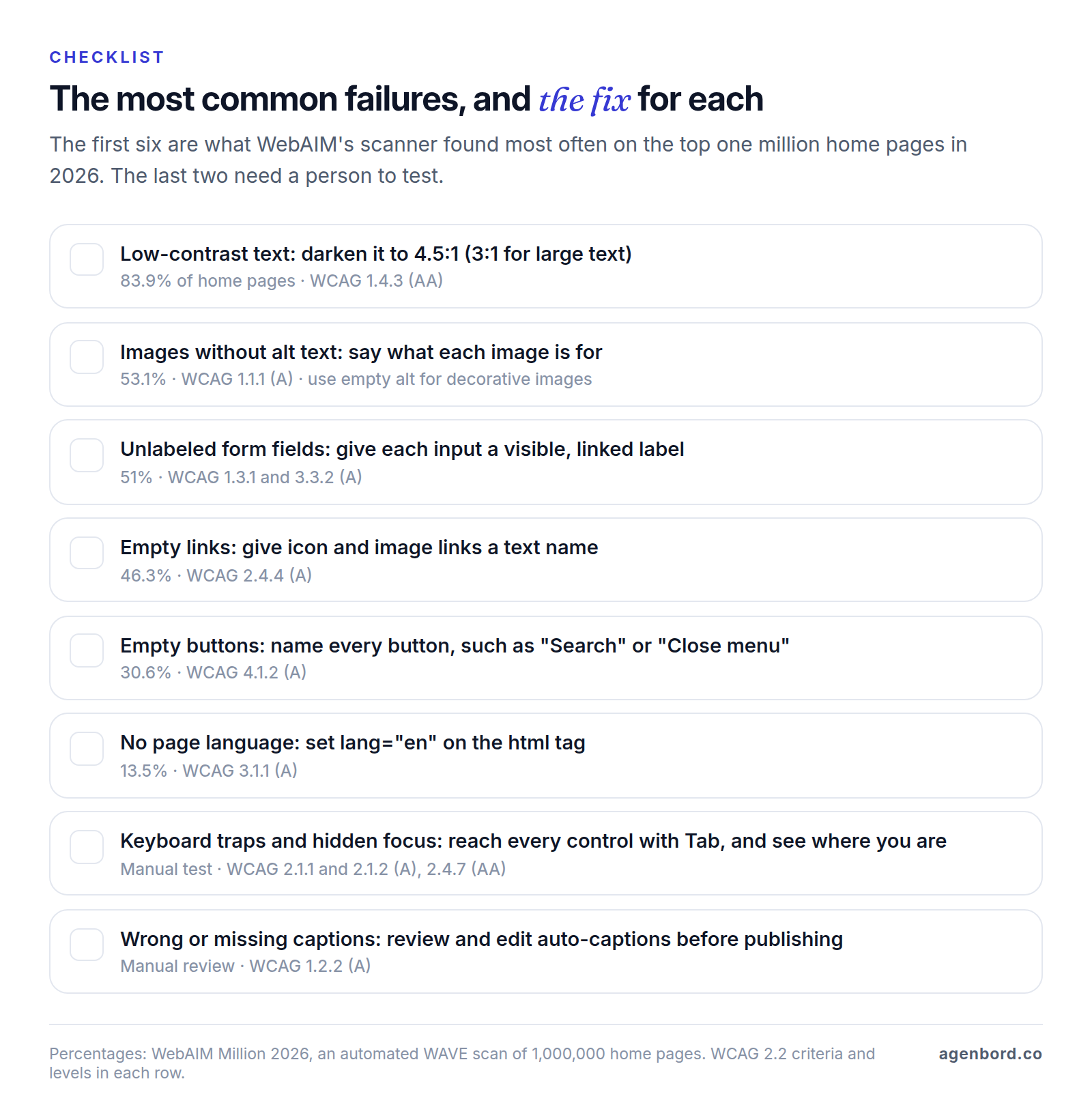
WebAIM, based at Utah State University, scans the top one million home pages every year with its WAVE tool. In its 2026 report, 95.9% of home pages had detectable WCAG failures, and 96% of the errors fell into six categories. Those six can usually be fixed once in a template or theme; the rest of this list takes a person to find.
Low-contrast text
This is the most common failure, on 83.9% of home pages. Body text needs a contrast ratio of at least 4.5:1 against its background; large text (18pt, or 14pt bold) needs 3:1, and icons and form controls people need to see generally need 3:1 too. Check color pairs in WebAIM's contrast checker and fix them in your theme's color settings so every page inherits the change.
Missing alt text
53.1% of home pages had images without a text alternative. Alt text says what the image is for in context: "Technician installing a heat pump," or "Book a consultation" for a button made of an image. Your logo's alt text is your company name, and purely decorative images get an empty alt="" so screen readers skip them.
Unlabeled form fields and unclear errors
Contact, quote and checkout forms are where leads and sales happen, and 51% of home pages had inputs with no label. Every field needs a visible label linked to it in code; placeholder text vanishes as you type. When a submission fails, say in text which field is wrong and how to fix it, rather than just turning a border red. This overlaps with conversion optimization work, because clear labels and specific errors make forms easier for everyone.
Empty links and buttons
Icon-only links and buttons (a magnifying glass, a menu icon, social icons, a close X) often have no text, so a screen reader announces just "link" or "button." Empty links showed up on 46.3% of home pages and empty buttons on 30.6%. Give each one an accessible name, such as "Search" or "Open menu." Vague text is the cousin problem: five "Read more" links are indistinguishable when a screen reader lists a page's links.
Headings, structure and page language
Screen reader users move through a page by headings the way sighted visitors skim, so use one H1 and real H2 and H3 headings in order, not bold text styled to look like headings. Mark up the header, navigation, main content and footer so people can jump between regions, and declare the page language (lang="en"), which screen readers use for pronunciation and 13.5% of home pages leave out.
Keyboard access and visible focus
Scanners can't tell you whether your site works without a mouse. Press Tab from the top of a page: each link, button and field should get a visible outline in a sensible order, and menus, pop-ups and date pickers should work from the keyboard without trapping you. A frequent culprit is CSS that hides the browser's focus outline for looks. A "skip to main content" link saves keyboard users from tabbing through your menu on every page.
Captions and media
Prerecorded video with sound needs synchronized captions (Level A), and Level AA adds audio description of important visuals the narration doesn't cover. Auto-captions are a start, but YouTube itself says they "might misrepresent the spoken content," so edit them. Anything that moves, blinks or scrolls on its own for more than five seconds, like an auto-rotating carousel, needs a pause control.
Zoom, reflow and touch targets
At 200% zoom, text should grow without overlapping or getting cut off. At 320 CSS pixels wide, which W3C equates to a 1280-pixel window zoomed to 400%, content should reflow into one column without sideways scrolling; content that needs two dimensions, like maps and data tables, is exempt. On phones, targets need to be at least 24 by 24 CSS pixels or spaced apart.
PDFs and documents
PDF menus, forms and brochures are part of your site, and a scanned page is just an image to a screen reader. An accessible PDF has real text, tags for headings and lists, a logical reading order and alt text; test it with Acrobat Pro's accessibility checker or the free PAC checker. Often the better fix is turning the PDF into a web page.
How to check if your website is ADA compliant
No tool can certify that you're "ADA compliant," and tools test only part of WCAG. As W3C puts it, evaluation tools "can not determine accessibility, they can only assist."
Free automated checkers
- WAVE (WebAIM): an online checker plus Chrome, Firefox and Edge extensions that mark issues on the page.
- axe DevTools (Deque): a free browser extension built on axe-core, an open-source engine developers can also run in automated tests.
- Lighthouse: built into Chrome DevTools. Its accessibility score is a weighted average of automated audits; manual checks don't count, so a perfect score isn't a clean bill of health.
How much do they miss? Deque says axe-core finds on average 57% of WCAG issues automatically. When the UK's Government Digital Service tested 10 tools on a page seeded with 143 accessibility failures, the best single tool caught 41%, and 29% weren't flagged by any of them. That test dates from 2017, but DOJ's guidance makes the same point: "A 'clean' report does not necessarily mean everything is accessible." Scan every template and every step of your key journeys, not just the home page; WCAG conformance applies to full pages and to every page in a process, such as a checkout.
Manual checks anyone can run
- Keyboard only. Put the mouse away and Tab through your home page, a service page and your contact or checkout form. You can reach and use everything, focus is always visible and nothing traps you.
- Zoom and narrow. Zoom to 200%, then shrink the window to phone width. Nothing overlaps, disappears or needs sideways scrolling.
- Screen reader. Turn on VoiceOver (Command-F5 on a Mac) or NVDA, which is free for Windows. Listen to the page title, jump by headings, and fill in your form with one deliberate mistake: is the error announced?
- Media and documents. Captions are accurate and in sync, sound that starts on its own can be paused, and linked PDFs pass a checker.
- Third-party tools. Repeat the keyboard and screen reader checks on your chat widget, booking calendar, payment form and cookie banner. Visitors experience them as part of your site.
For sites that carry real revenue, add a professional audit: a written report that ties each issue to a WCAG criterion, page and severity, based on testing with assistive technology. The UK team's own advice was to combine automated tools with manual checks, an accessibility audit and user testing.
Accessibility overlays: why a widget won't make you compliant
An overlay is a script that adds an accessibility toolbar to your site (bigger text, higher contrast, readable fonts) and tries to detect and patch problems automatically. It's often marketed as a quick route to compliance.
The trouble is that promise. Software can't know what an image means to your business, what a form error should say or how your booking flow should work from a keyboard; those fixes live in your templates and content. DOJ's guidance says automated checkers and overlays "can be helpful tools" but "need to be used carefully."
The FTC has tested the promise. In January 2025 it announced an order requiring accessiBe, maker of the accessWidget overlay, to pay $1 million to settle allegations that it misrepresented the tool's ability to make any website WCAG compliant and failed to disclose its ties to publishers of supposedly independent reviews. The order, finalized in April 2025, bars accessiBe from claiming, without reliable evidence, that its automated products can make websites WCAG compliant.
Some visitors may like an overlay's toolbar, though browsers and operating systems already offer zoom, contrast and text settings. If you keep one, run your keyboard and screen reader tests with it switched on, and budget for the real fixes anyway.
ADA website lawsuits and demand letters: the real risk
Seyfarth Shaw, a law firm that tracks ADA Title III litigation, counted 3,117 website accessibility lawsuits in federal court in 2025, up 27% from 2,452 in 2024. New York led with 1,021, and Florida was close behind with 961, almost double its 470 the year before. Those counts leave out state-court cases and demand letters that never become lawsuits.
What a claim involves:
- The demand letter. A plaintiff's law firm writes that a person with a disability, for example a blind person who uses a screen reader, couldn't use your site. It lists barriers, asks you to fix the site and resolve the claim, and sets a deadline. Some plaintiffs skip the letter and sue.
- What's at stake under the ADA. A private Title III plaintiff can win a court order requiring you to fix the site and, if they prevail, reasonable attorney's fees and costs, but not money damages. DOJ can seek civil penalties in its own cases.
- What state law can add. California's Unruh Civil Rights Act treats any ADA violation as a violation of state law, with statutory damages of at least $4,000 per offense plus attorney's fees.
If you receive a letter or a complaint:
- Don't ignore the deadline, and talk to a lawyer who handles ADA Title III cases before you respond.
- Don't install an overlay and call the site fixed.
- Have the site tested against WCAG 2.2 AA, including every issue the letter names, and plan the fixes with your lawyer's input on timing.
- Keep dated records of the audit, each fix and each retest.
- Ask your insurance broker whether your policy covers the claim.
How to make your website ADA compliant: audit, fix, maintain
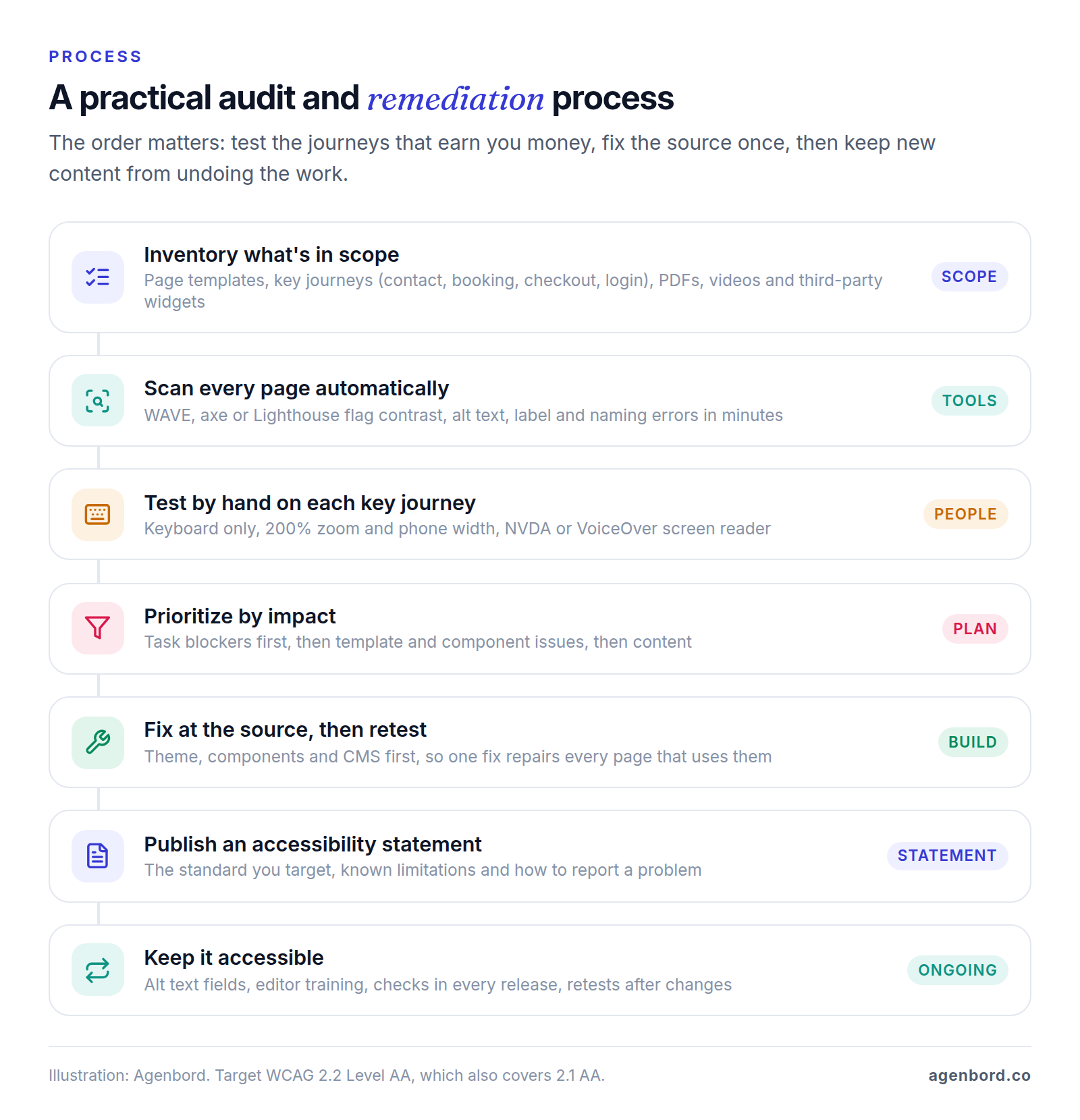
- Inventory what's in scope. List your page templates, the journeys that make you money (contact, quote, booking, purchase, login), your PDFs and videos, and every third-party widget. Count templates, not pages: fix the service-page template once and every service page improves.
- Audit against WCAG 2.2 AA. Run automated scans of every page, then keyboard, zoom and screen reader tests of every template and key journey, written up with each issue's WCAG criterion, location, severity and fix.
- Prioritize by impact. Task blockers come first (a form you can't submit by keyboard, an unlabeled checkout field, a pop-up that traps focus), then template and component issues, then content such as alt text, captions and PDFs.
- Fix at the source, then retest. Most fixes belong in the theme, component library or CMS. A design system with accessible buttons, forms and menus means each fix lands everywhere.
- Publish an accessibility statement. W3C recommends at least a commitment to accessibility, the standard you apply (such as WCAG 2.2 AA) and contact details for people who hit a problem; known limitations are worth adding, and its free generator drafts one. Don't claim full conformance unless an audit supports it.
- Keep it accessible. Every new image, plugin or landing page can undo the work. Add an alt text field editors must fill in or mark as decorative, give editors a one-page guide, put automated checks in your release process and retest after redesigns.
Fix your current site or rebuild?
Fix in place when the theme is sound and the issues are mostly content and a handful of components: alt text, labels, colors, focus styles, captions. Rebuild when the problems come from the theme or page builder itself (inaccessible menus, sliders and forms on every page), when a redesign is due anyway, or when your platform makes fixes hard to keep. On WordPress, an "accessibility-ready" theme tag means the theme passed WordPress's own minimum review, which the theme handbook says "does not mean that the theme meets the WCAG guidelines AA-level."
What remediation costs
There's no honest flat price before an audit. Cost depends on how many unique templates and custom components you have (menus, sliders, booking and checkout flows), how many PDFs and videos need work, and whether third-party tools need replacing. If you rebuild, our website design and development projects typically run from $3.5k for a small business site (3–5 weeks), $8k–$25k for a custom site or redesign (5–10 weeks) and $15k+ for e-commerce or complex sites, with accessibility checks against WCAG 2.2 before launch. The website cost calculator gives a quick estimate, and our guide to small business website costs covers the yearly bills after launch.
How to brief a web designer or developer on accessibility
Accessibility belongs in the scope, not on a launch-week wish list. Put these in your brief or contract:
- The target: WCAG 2.2 Level AA for every template, component and key journey, including logged-in areas such as a customer portal.
- Design: contrast-checked colors, visible focus states, error states for every field, and layouts checked at 200% zoom and phone width.
- Build: native HTML first (real buttons, links, headings and labels), ARIA only where native elements can't do the job, and no hidden focus outlines.
- Testing before launch: automated scans plus keyboard, zoom and screen reader testing of key journeys, with the results handed to you.
- Content tools: alt text fields, heading guidance, a caption and PDF workflow, and short training for your editors.
- Third-party tools: an accessibility check of every widget you plan to embed, plus an Accessibility Conformance Report (a completed VPAT) from vendors that publish one.
- After launch: accessibility defects fixed like any other bug within the warranty period, and no overlay offered as a substitute.
If you're still choosing who builds it, our guide to choosing a development partner covers what to ask before you sign.
Sources
- U.S. Department of Justice, ADA.gov - Guidance on Web Accessibility and the ADA, March 18, 2022 (accessed October 2026)
- ADA.gov - Fact Sheet: New Rule on the Accessibility of Web Content and Mobile Apps Provided by State and Local Governments (accessed October 2026)
- Federal Register - Extension of Compliance Dates for Nondiscrimination on the Basis of Disability; Accessibility of Web Information and Services of State and Local Government Entities, April 20, 2026 (accessed October 2026)
- HHS - Fact sheet: New Requirements on the Accessibility of Web Content, Mobile Apps, and Kiosks (accessed October 2026)
- Cornell Law School LII - 42 U.S.C. § 12181, Definitions (accessed October 2026)
- Cornell Law School LII - 42 U.S.C. § 12182, Prohibition of discrimination by public accommodations (accessed October 2026)
- Cornell Law School LII - 42 U.S.C. § 12111, Definitions (Title I employer threshold) (accessed October 2026)
- Cornell Law School LII - 42 U.S.C. § 12188, Enforcement (accessed October 2026)
- Cornell Law School LII - 42 U.S.C. § 2000a-3, Civil actions for injunctive relief (accessed October 2026)
- Cornell Law School LII - 42 U.S.C. § 12205, Attorney's fees (accessed October 2026)
- Congressional Research Service - The Americans with Disabilities Act in Cyberspace: ADA Applicability to Websites, LSB10844, October 20, 2022 (accessed October 2026)
- U.S. Court of Appeals for the Ninth Circuit - Robles v. Domino's Pizza, LLC, No. 17-55504, January 15, 2019 (accessed October 2026)
- Supreme Court of the United States - Docket No. 18-1539, Domino's Pizza, LLC v. Robles (accessed October 2026)
- U.S. Court of Appeals for the Eleventh Circuit - Gil v. Winn-Dixie Stores, Inc., No. 17-13467, April 7, 2021 (accessed October 2026)
- Justia - Gil v. Winn-Dixie Stores, Inc., No. 17-13467 (11th Cir. Dec. 28, 2021), opinion vacated as moot (accessed October 2026)
- W3C - WCAG 2 Overview (accessed October 2026)
- W3C - Web Content Accessibility Guidelines (WCAG) 2.2 (accessed October 2026)
- W3C - What's New in WCAG 2.2 (accessed October 2026)
- W3C - Understanding Conformance (accessed October 2026)
- W3C - Understanding SC 1.4.3 Contrast (Minimum) (accessed October 2026)
- W3C - Understanding SC 1.4.10 Reflow (accessed October 2026)
- W3C - Understanding SC 2.5.8 Target Size (Minimum) (accessed October 2026)
- W3C - Understanding SC 3.3.8 Accessible Authentication (Minimum) (accessed October 2026)
- W3C - WCAG 3 Introduction (accessed October 2026)
- W3C - Selecting Web Accessibility Evaluation Tools (accessed October 2026)
- W3C - Developing an Accessibility Statement (accessed October 2026)
- WebAIM - The WebAIM Million, 2026 report (accessed October 2026)
- WebAIM - WAVE Web Accessibility Evaluation Tools (accessed October 2026)
- WebAIM - Contrast Checker (accessed October 2026)
- GOV.UK Accessibility blog - What we found when we tested tools on the world's least-accessible webpage, February 24, 2017 (accessed October 2026)
- Deque - Axe DevTools browser extensions (accessed October 2026)
- GitHub - dequelabs/axe-core (accessed October 2026)
- Chrome for Developers - Lighthouse accessibility scoring (accessed October 2026)
- Chrome for Developers - Introduction to Lighthouse (accessed October 2026)
- NV Access - About NVDA (accessed October 2026)
- Apple Support - Turn VoiceOver on or off on Mac (accessed October 2026)
- Apple Support - Turn on and practice VoiceOver on iPhone (accessed October 2026)
- Google - Get started on Android with TalkBack (accessed October 2026)
- YouTube Help - Use automatic captioning (accessed October 2026)
- Adobe - Create and verify PDF accessibility, Acrobat Pro (accessed October 2026)
- PAC - PDF Accessibility Checker (accessed October 2026)
- FTC - FTC Order Requires Online Marketer to Pay $1 Million for Deceptive Claims that its AI Product Could Make Websites Compliant with Accessibility Guidelines, January 3, 2025 (accessed October 2026)
- FTC - accessiBe Inc., File No. 2223156, case page (accessed October 2026)
- Federal Register - accessiBe; Analysis of Proposed Consent Order To Aid Public Comment, January 6, 2025 (accessed October 2026)
- Seyfarth Shaw, ADA Title III blog - Federal Court Website Accessibility Lawsuit Filings Bounce Back in 2025, March 2026 (accessed October 2026)
- Justia - California Civil Code § 51 (Unruh Civil Rights Act) (accessed October 2026)
- Justia - California Civil Code § 52 (accessed October 2026)
- CDC - Disability Impacts All of Us (accessed October 2026)
- WordPress Theme Handbook - Accessibility (accessibility-ready tag) (accessed October 2026)
- ITI - Voluntary Product Accessibility Template (VPAT) (accessed October 2026)
- Section508.gov - Laws and Policies (accessed October 2026)
Prices, plans and regulations change. Figures were checked on October 2, 2026; follow the links for the latest. Nothing here is legal, tax or financial advice.
About the author
Founder, Agenbord
Muhammad Hamza is the founder of Agenbord, the Fort Lauderdale software company behind the construction ERP Smart Construction and a WhatsApp-first billing platform. He writes practical guides on buying, building and automating business software.