On this page
- What should be on an HOA website?
- Florida HOA and condo website requirements, in brief
- Best HOA website builders and platforms (October 2026)
- HOA website with online payments: how dues get paid
- HOA website with resident access: logins, roles and privacy
- Accessibility: build to WCAG 2.2 AA
- Who should own the HOA website? Domain, accounts and board turnover
- How to build or replace an HOA website, step by step
An HOA website does two jobs. For buyers, real estate agents, vendors and new residents, it's the association's front door: who runs the community, how to reach them, what the rules are and how to pay. For owners, it's the records office: governing documents, budgets, minutes, notices, requests and their own account. Most decisions about the site come down to putting each thing on the right side of the owner login.
For most homeowners and condo associations, the right platform is an HOA website builder or the website built into their HOA software, at prices from free to a few hundred dollars a month as of October 2026. Associations with a management company often get an owner portal through the manager's platform, and then mainly need a public site the association itself controls. In Florida, HOAs with 100 or more parcels and condo associations with 25 or more units must post specified records online in an owner-only area.
We design and build websites and owner portals for associations, and we'd still steer most boards to an off-the-shelf platform first. Whatever you choose, register the domain and every account in the association's name, so the site survives the next election.
What should be on an HOA website?
When you're unsure which side of the login something belongs on, use one rule: if it names an owner, shows what someone owes or is an official record, it goes behind the login.
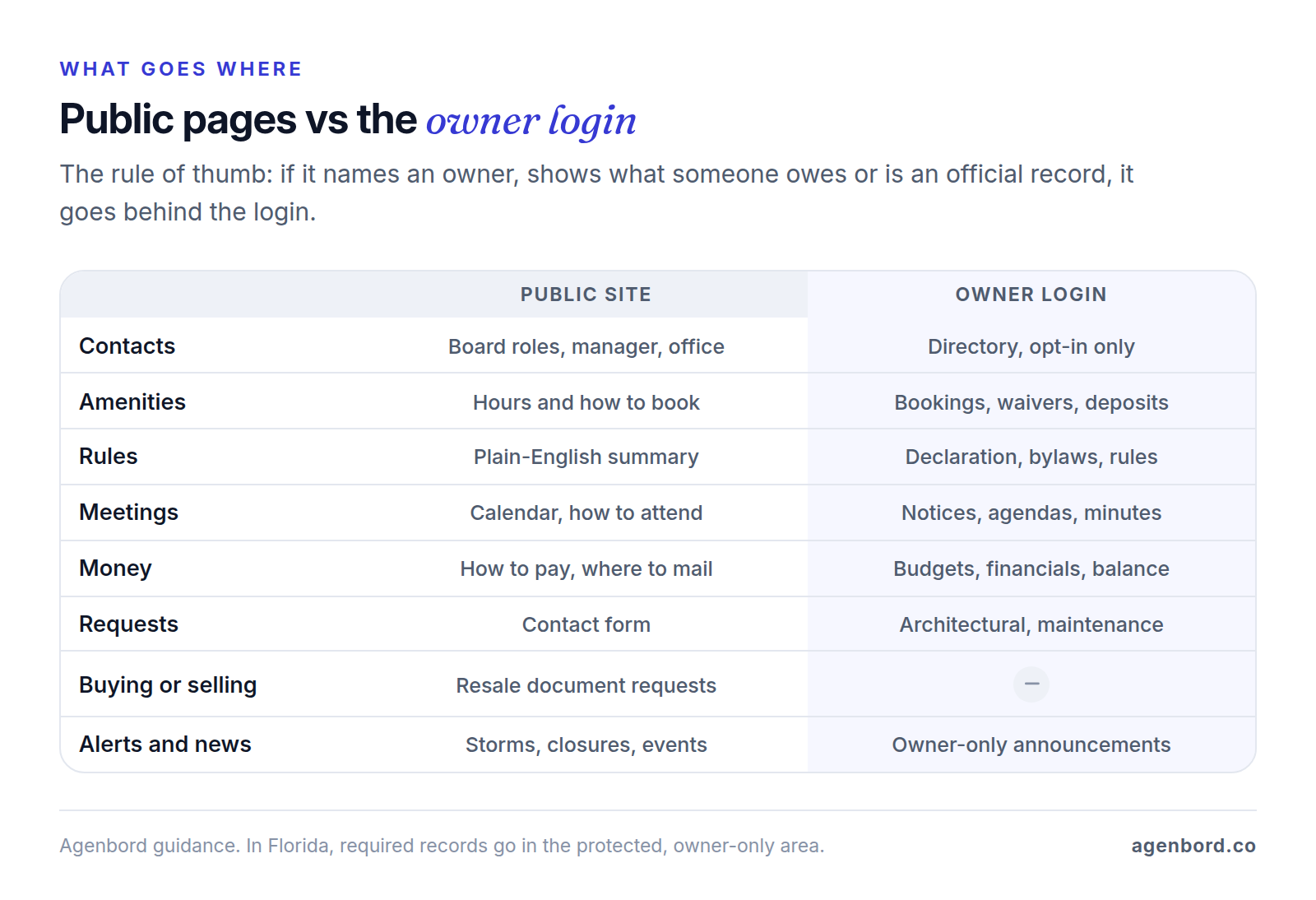
Use the two lists below as your sitemap. Builders such as PayHOA, HOA Start and Wix supply the design templates; the page structure is what makes the site useful.
Public pages
- Home and alerts: a short description of the community, plus storm, safety and road-closure notices.
- About and contacts: board roles, the management company and office hours, with role-based email addresses (board@, architecture@) on the association's domain instead of volunteers' personal phones.
- Amenities: hours, guest rules and how owners book the clubhouse, courts or pool.
- Rules summary: a plain-English digest of the rules people ask about most (parking, trash, pets, leasing, exterior changes), with a note that the governing documents control.
- Meeting calendar: dates, locations or video links, and how owners attend and speak.
- How to pay: accepted methods, the online payment link, the mailing address for checks and who to call about a balance.
- Buying or selling: how buyers, agents and title companies request resale documents, plus a welcome page for new owners.
The owner-only area
- Governing documents: the declaration of covenants (often called the CC&Rs), bylaws, articles of incorporation, rules and every amendment, as searchable PDFs.
- Money: budgets, financial reports, the reserve study if you have one, and insurance policies.
- Meetings: notices, agendas, board packets, approved minutes and recordings.
- Directory: owners who opt in, each controlling what neighbors see.
- Requests: architectural review applications with plans and photos, common-area maintenance requests and amenity bookings, each with a status owners can check.
- My account: balance, payment history, autopay and receipts.
- Board-only folder: drafts, legal advice and anything owners shouldn't see, behind a separate permission.
The two halves can live on different platforms, such as a public site on the association's own domain with an "Owner login" button that opens your HOA software's or your manager's portal, as long as owners reach everything from one address they can remember.
Florida HOA and condo website requirements, in brief
In Florida, the law fills in part of the owner-only area for you. Our guide to Florida HOA and condo website requirements covers it in detail; the short version:
- HOAs (chapter 720): associations with 100 or more parcels had to post specified records on a website or mobile app by January 1, 2025 (section 720.303).
- Condominiums (chapter 718): associations managing 25 or more units, without timeshare units, must post required records on a website or app, generally within 30 days of receiving or creating them (section 718.111). The site can be the association's own or one run by a third-party provider.
- What goes up: both statutes list governing documents and rules, budgets and financial reports, contracts and bids, director certifications, conflict-of-interest documents, and notices and agendas for owner meetings at least 14 days ahead, in plain view on the homepage or on a "Notices" page linked from it. HOAs add current insurance policies. Condos add board meeting notices, 12 months of approved board minutes and of recordings of meetings held by video conference, inspection reports, the structural integrity reserve study and building permits.
- Access and privacy: the records sit in a protected area that only owners and association employees can open, any owner who asks in writing must get a username and password, and protected details such as Social Security, driver license and credit card numbers must be redacted before anything is posted.
Other states set their own records rules, so check your state's statute and your governing documents. This is general information, not legal advice; your association's attorney should confirm what you must post and when.
Best HOA website builders and platforms (October 2026)
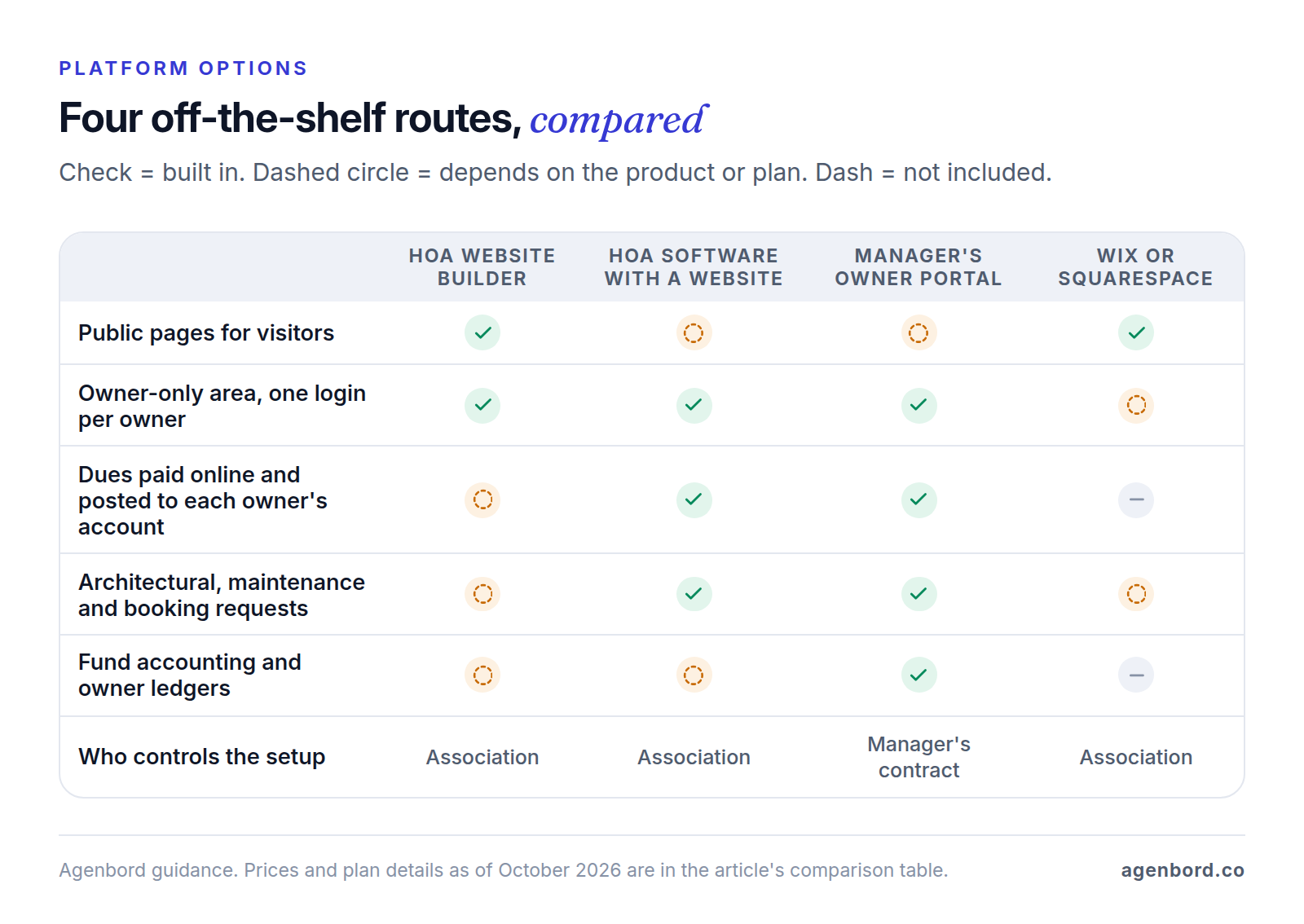
You have five routes. Prices are list prices from each vendor's site as of October 2026.
| Route | Examples and prices | Good fit | Watch for |
|---|---|---|---|
| HOA website builder | HOA Express: free up to 50 households; Inform $15 and Engage from $21 a month, billed yearly, for up to 25 households. HOA Start: priced by number of homes on request, billed annually | Self-managed HOAs that want a website and owner area first | On HOA Express, online payments, email blasts and multiple admins come with Engage |
| HOA software with a website | PayHOA: builder included, $49–$249 a month billed yearly up to 500 units. TownSq: builder $10 a month per community on top of Pro, $90 a month for up to 300 units, billed monthly. ManageCasa: website included on Premium, an add-on on Base and Growth | Boards that want dues, requests and records in the same system as the site | The site lives inside the software: switch platforms and you rebuild it |
| Management company portal | Vantaca, AppFolio and similar platforms, sold to managers and quote-based | Professionally managed associations | The portal follows the manager's contract |
| General builder | Wix: free plan on a wixsite.com address, paid plans from about $17 a month billed yearly. Squarespace: $19–$99 a month billed annually, with a 14-day free trial | A polished public site, with records and payments elsewhere | No owner ledgers or request workflows; you assemble logins and forms |
| Custom website (our pricing) | Public site from $3,500 (3–5 weeks); custom site or redesign $8,000–$25,000 (5–10 weeks); custom owner portal $25,000–$60,000 (8–14 weeks) | Management companies, master associations, workflows no platform handles | Hosting, plus maintenance at about 15–20% of the build a year |
HOA website builders
HOA Express is the website-first option. Its free plan covers communities of up to 50 households with pages, documents, a calendar, news and pages restricted to signed-in residents, and its security features include approving each new registration and letting members hide their address or phone number from the directory. Paid plans add a custom domain and a resident directory (Inform), then online payments, email and text blasts, custom forms and more than one website admin (Engage).
HOA Start bundles its website builder (your choice of design, colors and custom domain, with drag-and-drop editing) with communications, forms, violations, architectural requests, reservations, payments and accounting in one plan, with optional guided onboarding. It doesn't publish prices; you request a quote for your number of homes.
HOA software with a built-in website
If you want the site, dues and requests in one system, the website often comes with the software. PayHOA includes its website builder on every plan at no extra cost, with templates, a free PayHOA web address or your own domain, document storage and an AI assistant that answers homeowners' questions from the documents you upload. TownSq sells its community website builder as a $10 monthly add-on per community, and ManageCasa includes a website on its Premium plan. Our HOA management software guide compares these platforms' accounting, payment fees and features.
The trade-off is lock-in: change platforms and you rebuild the website, so own the domain to keep the address.
Your management company's portal
Most platforms built for management companies include an owner portal. Vantaca Home, for example, covers payments, documents, architectural and reservation requests, violation status, statements and a directory in a web portal and native app, and AppFolio lists online portals for homeowners and board members. Both sell to managers and quote on request.
The catch is control. The portal belongs to the manager's contract, so when you change managers, the portal changes too. Keep a public site and domain the association owns, with an "Owner login" link to whichever portal is current, and agree in the contract how documents and history come back to you when it ends.
General builders: Wix and Squarespace
A general builder makes a polished public site, and Wix's free Members Area app adds member logins, members-only pages and controls over who sees member profiles. What you don't get is the association side: owner ledgers, posting deadlines and architectural review workflows. You'd assemble those from forms and add-ons, or run them in HOA software and link out. Our small business website cost guide covers builders' yearly bills and how hard their sites are to move.
Free HOA website options, and their limits
- HOA Express Free: a real website for up to 50 households, but no online payments, email blasts, custom domain or second admin.
- HOAMessenger Free: a private resident portal and mobile app with document hosting, amenity scheduling and electronic payments, but only 90 days of visible history, transaction fees paid by residents, and a public landing page only on its Admin plan ($319 a month billed yearly).
- Wix Free: a wixsite.com address with Wix branding and no way to take payments.
Free still costs something: a domain of your own (about $11–$12 a year for a .com or .org at Porkbun's regular prices), a volunteer's time and the risk that the whole site sits in one person's account. It works for a small self-managed HOA with annual dues. Once you collect dues online, hold reserves or fall under Florida's posting rules, budget for a paid plan.
A custom website
Custom work pays off for a management company that wants a branded public site for every association it runs, for master associations with sub-associations and shared amenities, and for workflows such as gate access or rental registration that platforms don't handle. Even then, keep the owner portal and accounting on the platform and make the custom work the public site and the connections between systems.
HOA website with online payments: how dues get paid
The website rarely processes payments itself. The "Pay dues" button sends owners to one of three places:
- Your HOA software's payment page. Payments post to each owner's account automatically, with autopay and receipts. Each platform sets its own fees: PayHOA charges the association $2.45 per ACH payment and 3.5% + $0.50 per card payment unless the board turns on a convenience fee for owners, and HOA Express charges 1.4% on bank payments and 3.2% + $0.80 on cards, which the community can pass on or absorb.
- Your management company's portal. The manager posts and reconciles the payments. Ask what owners pay for each payment method.
- A payment processor such as Stripe. Stripe's standard pricing is 2.9% + 30¢ per domestic card payment and 0.8% for ACH Direct Debit, capped at $5. It's an inexpensive way to take payments on a site you control, but nothing updates owner balances: someone has to record every payment in the books by hand.
ACH vs card payments
ACH, a bank transfer from the owner's account, costs far less on large payments. Here's the fee on one $1,200 annual assessment at each provider's standard rates:
| Route | Bank transfer (ACH) | Card |
|---|---|---|
| Stripe | $5.00 | $35.10 |
| PayHOA | $2.45 | $42.50 |
| HOA Express | $16.80 | $39.20 |
If every owner in a hypothetical 100-home HOA paid that $1,200 by card on PayHOA, the association would pay $4,250 in fees, against $245 if everyone paid by ACH.
ACH has trade-offs. On Stripe, an ACH debit can take up to 4 business days to confirm, it can fail for insufficient funds or a wrong account number, and owners can dispute a debit from a personal account for up to 60 calendar days. So offer both methods, and set them up like this:
- Make ACH autopay the default, and show the fee for each method before the owner pays.
- Decide who pays processing fees and write it into the collection policy. If you pass fees on, confirm with your attorney that your governing documents and state law allow it.
- Never take card or bank numbers by email or a plain web form; use the platform's or processor's hosted payment page.
HOA website with resident access: logins, roles and privacy
The owner-only area is only as private as its access rules:
- One login per owner, not a shared password. A community-wide password can't be taken back from one household when it sells, and it can't tell you who opened what. Florida's statutes point the same way: an owner who asks in writing gets a username and password.
- Verify, then approve; remove at sale. Check each sign-up against the owner roll before approving it (HOA Express, for example, can require approval of new registrations), and remove access when a sale closes.
- Give tenants their own role. Florida's statutes describe the protected records area as open only to owners and association employees. If tenants get logins to book amenities, give them a role that can't open the records library, and confirm the setup with your attorney.
- Keep some records off the site. Florida's statutes also list records owners can't inspect at all; the HOA statute's list includes privileged legal records, personnel and medical records, personal identifying information, and passwords and other security measures. Keep those in a board-only folder or off the website entirely.
- Redact before posting. Florida requires protected information to be redacted before records go online. Check contracts, bids, insurance documents and minutes for phone numbers, email addresses and account numbers, and use a tool that permanently removes text, such as Acrobat Pro's Redact tool, rather than drawing a black box on top.
- Make the directory opt-in. Florida allows a directory of owners' names, addresses and phone numbers, but owners can have their phone numbers left out by asking in writing, and other contact details need the owner's written consent. Let each owner choose field by field.
- Lock down admin accounts. Give each director and manager a named admin login (no shared "admin" account), turn on two-step verification for every admin and keep the activity log if the platform has one.
- Test the file links. Copy a document link, open it in a private browser window and confirm it asks you to log in.
- Ask what the AI sees. If an assistant answers questions from your documents, ask which documents it draws on and who can see its answers.
Accessibility: build to WCAG 2.2 AA
Owners with disabilities need notices, budgets and minutes as much as anyone, and association records can be hard to use: decades-old scanned declarations, image-only minutes and meeting videos without captions.
The legal picture is unsettled. The Justice Department says the ADA applies to the web content of businesses open to the public, but it has no detailed technical rule for them, and whether that reaches a private association's members-only pages is a question for your attorney. The practical target doesn't change: WCAG 2.2 Level AA. Our guide to ADA-compliant websites covers the standard, testing and the legal background; this is general information, not legal advice.
On an HOA site, that means:
- Scanned PDFs. A scan is a picture to a screen reader. Adobe's advice is to use OCR to recognize the text, then check the result with Acrobat's accessibility checker. For the rules owners use most, a web page beats any PDF.
- Logins. WCAG 2.2's Accessible Authentication criterion (3.3.8, AA) means sign-in can't rest on memory tests or puzzles alone, so let password managers fill in passwords and allow pasting.
- Forms and calendars. Labeled fields on architectural and maintenance forms, errors explained in text, and booking calendars that work with a keyboard.
- Phones. Buttons and links at least 24 by 24 CSS pixels, or spaced apart (2.5.8, AA).
- Meeting recordings. Captions, edited if they were generated automatically.
- Third-party pieces. Test the payment page, booking widget and portal login with a keyboard too. Owners experience them as part of your site.
Who should own the HOA website? Domain, accounts and board turnover
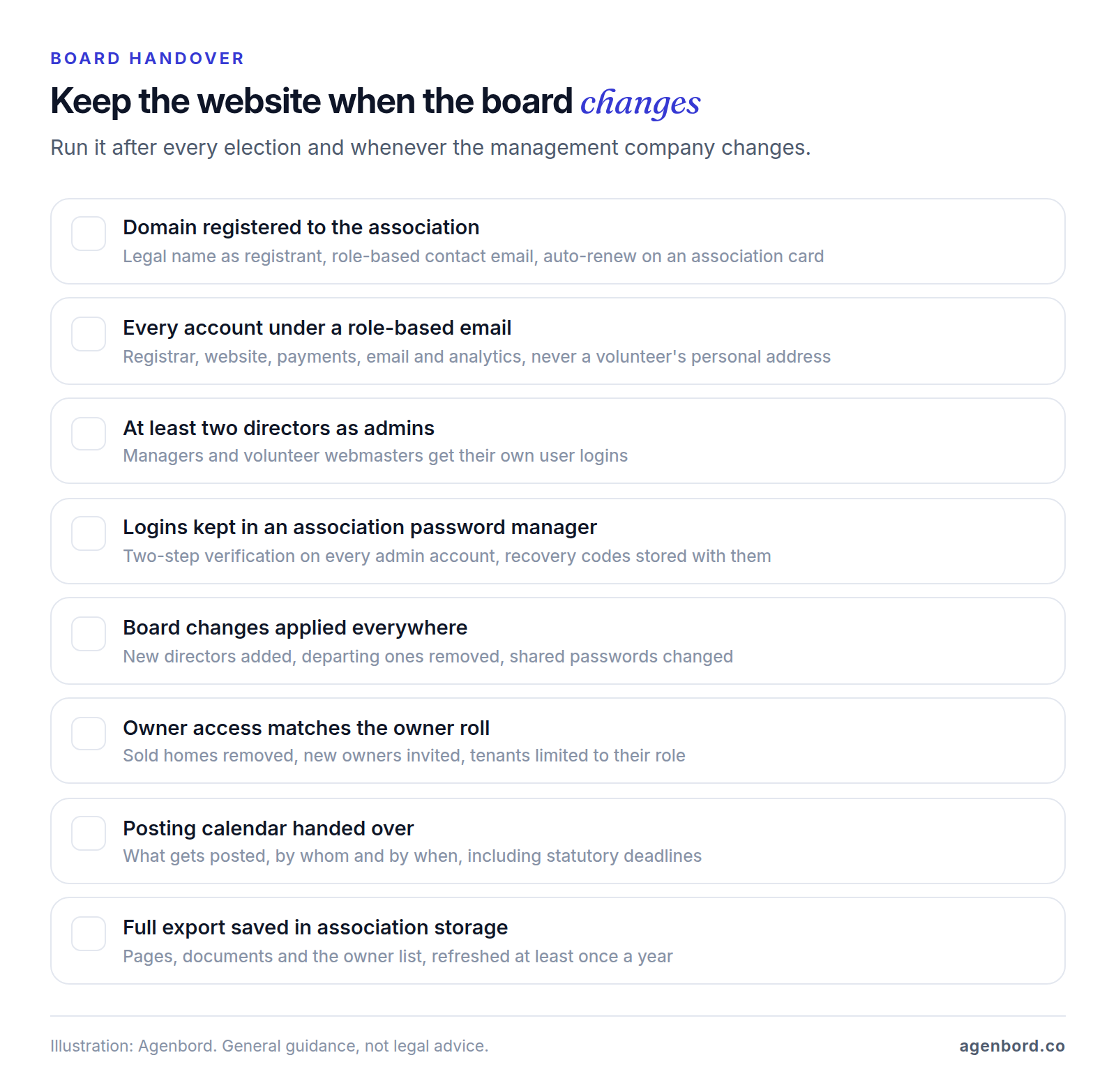
The association. Volunteers move, boards turn over and management contracts end, and the website should survive all three.
- The domain. Register it in the association's legal name with a role-based contact email, turn on auto-renew with an association payment card and lock it against transfers. ICANN expects registrants to keep their contact details accurate and to answer their registrar within 15 days, which fails when the contact is a former treasurer's inbox.
- The accounts. The website, payment, email and analytics accounts belong to the association too, under the same role-based address, with at least two directors as admins (on HOA Express, that takes the Engage plan). Managers and volunteer webmasters get their own user logins, not the keys to the accounts, and every login and recovery code lives in a password manager the association controls.
- Changing providers. Export pages, documents and the owner list before access ends, then point the domain at the new site, and keep required documents online during the switch.
How to build or replace an HOA website, step by step
- Agree on the job. Decide what the site must do (public information, Florida posting, payments, requests) and name a webmaster and a backup, for example a director and a committee member.
- Start from what you already pay for. If your HOA software or management company includes a website or portal, test it before buying anything else.
- Secure the domain and accounts in the association's name before anyone builds a page.
- Test two platforms with real content. Upload a scanned declaration, register a test owner, submit an architectural request and make a test payment, all on a phone.
- Gather and clean the documents. Collect the latest recorded versions, run OCR on scans, redact personal information, name files consistently ("2026-03 Board Minutes") and sort them into categories that mirror your state's list or your governing documents.
- Build the public pages, then the owner area. Set up roles, import the owner list, start the directory with every field hidden and set up ACH autopay first.
- Test as three people. A visitor (no private links or files reachable), an owner (their own account, not the board folder) and someone using only a keyboard.
- Launch with invitations. Email each owner a personal invitation explaining how to sign in and request access, announce the site at the next meeting and keep a phone number for owners who'd rather not log in.
- Keep it current. Keep a posting calendar, check documents and links each quarter and run the handover checklist after every election.
If you're replacing a site, keep the old one up until the new one is live, redirect old page addresses to their new homes and, in Florida, keep the required records online throughout.
What it costs and how long it takes
| Route | Up-front | Yearly running cost | Time to launch |
|---|---|---|---|
| HOA builder or HOA software website | $0 | Free on HOA Express up to 50 households; $588–$2,988 on PayHOA up to 500 units, billed yearly | Set by how fast you prepare documents |
| General builder, built yourself | $0 | From about $200 for a paid plan billed yearly ($19–$99 a month on Squarespace), plus a domain | Set by your content |
| Public site (our pricing) | From $3,500 | Hosting at $20–$100 a month, plus maintenance at 15–20% of the build | 3–5 weeks |
| Custom site or redesign (our pricing) | $8,000–$25,000 | Same basis | 5–10 weeks |
| Custom owner portal (our pricing) | $25,000–$60,000 | Hosting at roughly $50–$500 a month, plus 15–20% maintenance | 8–14 weeks |
On a builder, the pages are the quick part; collecting, scanning and redacting records is the slow part. For a professional build, our website cost calculator gives a budget range before you talk to anyone.
If a builder or your HOA software covers what you need, use it, and spend the effort on clean documents, one login per owner and a handover the next board can follow.
Sources
- Florida Legislature - Florida Statutes section 720.303 (2026), HOA official records and website (accessed October 2026)
- Florida Legislature - Florida Statutes section 718.111 (2026), condominium official records and website (accessed October 2026)
- HOA Express - Pricing (accessed October 2026)
- HOA Express - Security features (accessed October 2026)
- HOA Express Help Center - About online payment fees (accessed October 2026)
- HOA Start - Pricing (accessed October 2026)
- HOA Start - HOA website builder (accessed October 2026)
- PayHOA - Pricing (accessed October 2026)
- PayHOA - Communications features and website builder (accessed October 2026)
- PayHOA Help Center - Payment fees (accessed October 2026)
- TownSq - Pricing (accessed October 2026)
- ManageCasa - Pricing (accessed October 2026)
- HOAMessenger - Pricing (accessed October 2026)
- Vantaca - HOA management software FAQ (accessed October 2026)
- AppFolio - HOA property management software (accessed October 2026)
- Wix - Plans and pricing (accessed October 2026)
- Wix App Market - Wix Members Area (accessed October 2026)
- Squarespace - Pricing (accessed October 2026)
- Stripe - Pricing (accessed October 2026)
- Stripe Docs - ACH Direct Debit (accessed October 2026)
- ICANN - Registrants' benefits and responsibilities (accessed October 2026)
- Porkbun - .com domain pricing (accessed October 2026)
- Porkbun - .org domain pricing (accessed October 2026)
- U.S. Department of Justice, ADA.gov - Guidance on Web Accessibility and the ADA (accessed October 2026)
- W3C - What's New in WCAG 2.2 (accessed October 2026)
- Adobe - Create and verify PDF accessibility, Acrobat Pro (accessed October 2026)
- Adobe - Redact sensitive content in Acrobat Pro (accessed October 2026)
Prices, plans and regulations change. Figures were checked on October 2, 2026; follow the links for the latest. Nothing here is legal, tax or financial advice.
About the author
Founder, Agenbord
Muhammad Hamza is the founder of Agenbord, the Fort Lauderdale software company behind the construction ERP Smart Construction and a WhatsApp-first billing platform. He writes practical guides on buying, building and automating business software.