On this page
- Self-managed boards vs management companies
- What HOA management software does: the modules
- How much does HOA management software cost?
- HOA management software compared (October 2026)
- What to look for in HOA management software
- Switching software or management companies
- When a custom association portal makes sense
HOA management software is the system a homeowners or condo association uses to run its business: bill and collect assessments, keep the books by fund, enforce the rules, review architectural requests, reach owners and keep its records. Which product fits depends on who does the work. A volunteer board needs simple dues collection, a clean ledger and an owner portal it can learn quickly. A management company running dozens of associations needs fund accounting across all of them, bank integrations and workflows its staff can run at scale.
Prices split the same way. As of October 2026, tools for self-managed boards publish prices from free to a few hundred dollars a month, scaled by community size. Most platforms built for management companies quote on request, and some set minimums of $400–$500 a month. Payment processing fees can cost the association more than the subscription, so decide early who pays them.
We build custom software, including association portals, so we'll also cover when a custom build is worth paying for. For most boards, it isn't.
Self-managed boards vs management companies
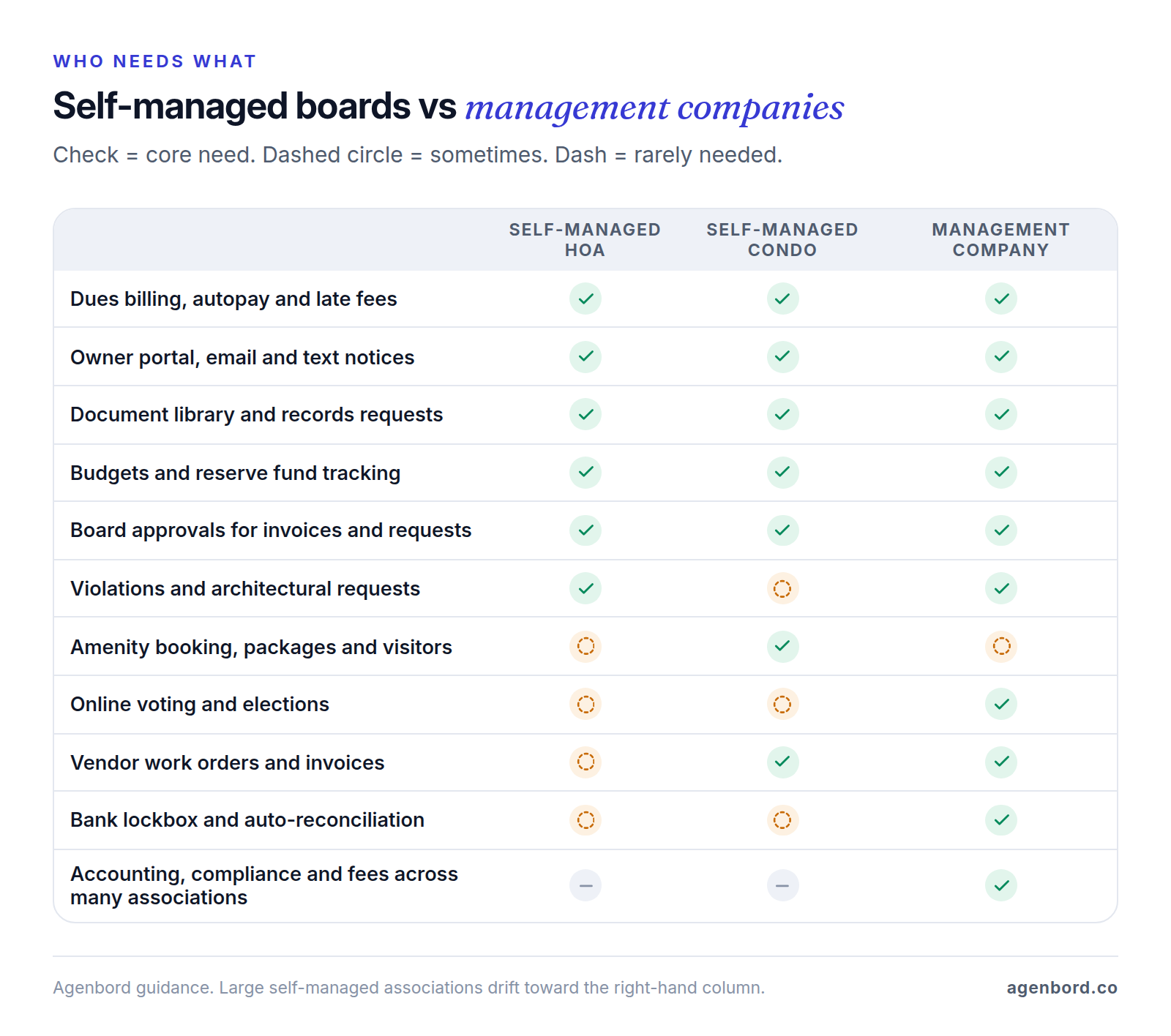
HOA software is sold to two different buyers, and most products are designed for one of them. Decide which one you are before you book demos: a 60-home self-managed HOA and a company managing 80 associations should never be comparing the same shortlist.
Self-managed HOA software: what volunteer boards need
A self-managed board needs the basics done well, with as little admin as possible:
- Dues collection with autopay, reminders and late fees that post on their own.
- Owner communications by email and text, with a record of what was sent.
- Documents in an owner-only library, plus a log for records requests.
- Violations and architectural requests tracked as cases, not email threads.
- Budgets and reserves the treasurer can report on without a side spreadsheet.
- Board approvals for invoices and requests, so no single volunteer moves money alone.
- A website or portal the next board can inherit.
Ease of use beats feature count: directors change every year or two, so pick the tool a new treasurer can run from a handover document.
What management companies need
A management company is buying the operating system for its whole business. On top of everything a board needs, it requires:
- Fund accounting across many associations, each with its own funds, bank accounts and month-end close.
- Owner ledgers and board financial packages: accurate balances for thousands of owners, and a monthly report each board approves.
- Bank lockbox and reconciliation. A lockbox is a bank service: owners mail checks to a post office box the bank processes, and the bank sends a file that posts each payment to the right owner. Direct bank feeds and automatic matching handle electronic payments.
- Vendor and work order management: insurance certificates and tax forms on file, and invoices routed to the right board for approval.
- Compliance tracking: meeting notices, posting deadlines, insurance renewals and annual filings across the portfolio.
- Fee billing for management fees and billable work such as resale documents.
Platforms built for this tier, including Vantaca, CINC Systems, Enumerate, FRONTSTEPS and AppFolio, sell through demos and quotes. Some property management platforms also sell association editions; if you manage rentals too, our property management software guide covers that side.
Condo association management software: extra needs
Condos share walls, lobbies and amenities, so condo software adds building operations: amenity booking, packages, visitor passes and front-desk logs. Condo Control, for example, lists package management, incident reports, key tracking and e-voting with proxy and fractional voting, and FRONTSTEPS sells visitor management as a separate product, Dwelling. Florida condos also carry stricter reserve rules, covered below.
What HOA management software does: the modules
Underneath, every product is a database of lots or units, owners, charges and payments, with workflows on top. Here is what each module does and what to ask in a demo.
Assessments, dues and late fees
Assessments are the regular charges every owner pays, plus special assessments for one-off costs. The software should post charges to each owner's ledger on schedule, send reminders, accept bank transfers (ACH) and cards with autopay, and apply late fees by your rules.
Collections are where state law comes in. In Florida, for example, an HOA's administrative late fee can't exceed the greater of $25 or 5% of the late installment, and the association must give the owner 45 days' written notice before recording a lien for unpaid assessments (section 720.3085). Treat this as general information, not legal advice: have your attorney set the rules, then check that the software can be configured to match them and keeps a dated record of every notice.
Fund accounting: operating vs reserve
Associations keep their money in funds. The operating fund pays the year's running costs, such as landscaping, insurance and utilities. The reserve fund saves for large, predictable replacements like roofs and paving, usually guided by a reserve study. Fund accounting keeps each fund's income, spending and balance separate, so reserve money can't quietly cover operating bills.
Some states write this into law. Florida condo budgets must include reserve accounts, and owners in associations that must obtain a structural integrity reserve study can't vote to waive or reduce the reserves for the components it covers, or spend them on anything else (section 718.112). In a demo, ask for a balance sheet by fund, an interfund transfer, a budget-versus-actual report a volunteer can read, and the year-end reports your CPA needs, for example for Form 1120-H, the tax return homeowners associations can file to claim certain tax benefits.
Violations
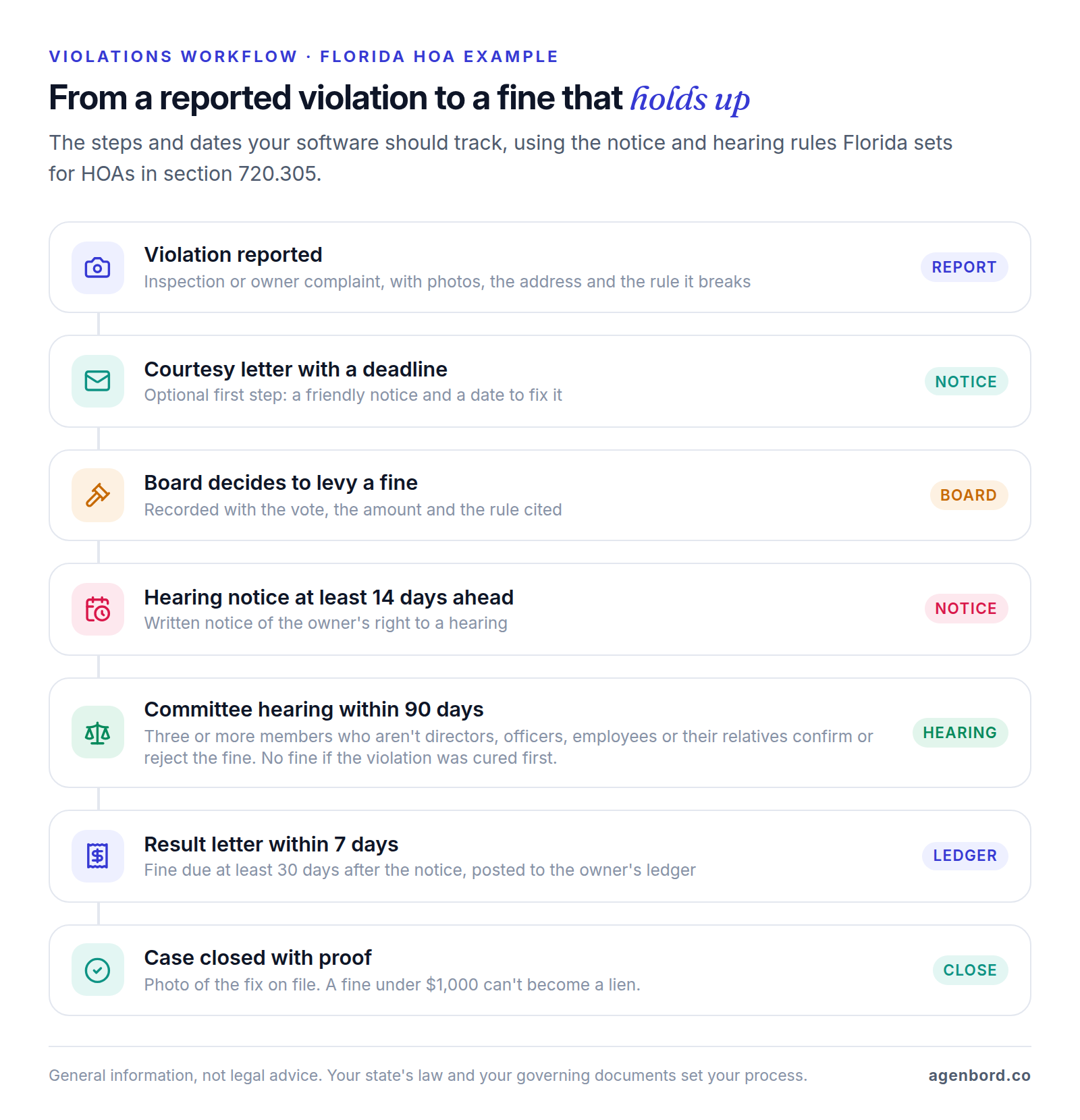
A violation workflow turns a neighbor's complaint into a documented case: who reported it, photos, the rule it breaks, each letter and deadline, any hearing, the fine, and proof of the fix. That record is what makes enforcement consistent and defensible.
The steps depend on your state and governing documents, and the dates matter. In Florida, before an HOA can fine an owner, the owner gets at least 14 days' written notice of the right to a hearing before a committee of at least three people who aren't directors, officers or employees (or their close relatives). The hearing must happen within 90 days of the notice, no fine can be imposed if the violation is cured first, and a fine under $1,000 can't become a lien (section 720.305).
Architectural review requests
Owners who want to change the outside of their home (a fence, a paint color, solar panels) submit an architectural request, often called an ARC request. The committee checks it against the design guidelines and approves it, approves it with conditions or denies it. Software should collect plans and photos through a form, route the request to the committee with a due date (especially if your governing documents set a deadline for decisions), record each vote and condition, send the decision letter and keep the approval on the lot's record for future boards.
Amenity booking
Owners reserve the clubhouse, courts or guest suite online, and the system applies your rules: hours, capacity, deposits and blackout dates. Look for waivers signed at booking and deposits that post to the owner's ledger.
Communications and voting
Email, text and print-and-mail from one place, sent to everyone or a filtered group (one street, one building, owners with a balance), with a log of what went to whom and when. Mail still costs money: PayHOA, for example, charges $1.25 per first-class letter.
Online voting is included in some plans and an add-on in others; TownSq charges $250 per voting event. Whether an election can run online depends on your state and bylaws. Florida allows online voting in HOAs and condos only after the board adopts a resolution and each owner consents electronically or in writing, and the system must authenticate voters and send each one a receipt (sections 720.317 and 718.128).
Document library and records requests
An owner-only library holds governing documents, rules, budgets, financial reports, minutes, contracts and insurance policies, with permissions so directors see more than owners. Records requests need their own log, because states set deadlines. In Florida, owners must be able to inspect official records within 10 business days (HOAs) or 10 working days (condos) of a written request, and most official records must be kept for at least seven years (sections 720.303 and 718.111).
Many Florida associations must also post official records on a website or app, behind an owner login. Our guide to Florida HOA and condo website requirements explains which associations that applies to and what to post, and our HOA website guide covers what to put on the site and which platforms do it.
Owner directory
The directory lists who owns each lot or unit, with mailing addresses, emails, phone numbers, tenants and vehicles. It drives billing, notices and voting, so it has to be right, and a sale should update it without retyping. Let owners control what neighbors can see.
Accounting integration
Some products keep a full general ledger themselves: PayHOA, ManageCasa, Buildium and AppFolio all list association accounting. Others start from communication and payments; TownSq puts its fully integrated accounting on the quote-based Enterprise plan. If your CPA keeps the books in separate accounting software, ask exactly what syncs (payments, deposits, owner balances) and how often, or whether someone will export files every month.
How much does HOA management software cost?
What you actually pay comes down to three things: the pricing model, your community's size and the payment fees.
Pricing models
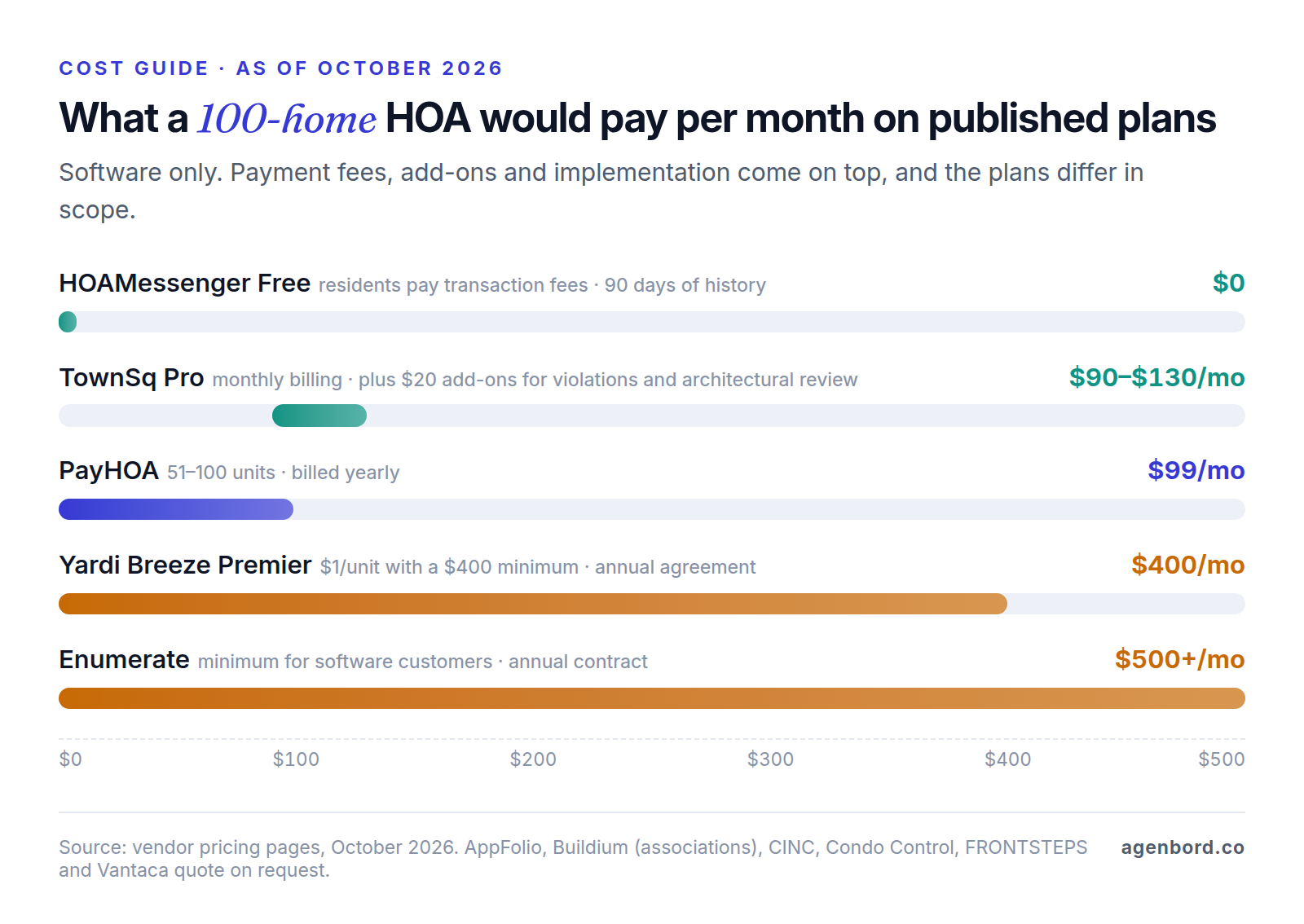
- Tiers by community size. Most self-managed tools step up with unit count. PayHOA runs from $49 a month for up to 25 units to $249 for 401–500 units, billed yearly ($54 to $275 month to month), then $0.55 per unit with a $275 minimum.
- Per unit with a minimum. Yardi Breeze Premier charges associations $1 per unit per month with a $400 minimum on an annual agreement, and no onboarding or training fees. Below 400 units, you pay the minimum.
- Quote-based, often with minimums. Enumerate publishes a $500 monthly minimum for software customers, plus an annual contract and a one-time implementation fee for data migration. AppFolio's Core plan has a 50-unit minimum and a minimum spend. Vantaca, CINC, FRONTSTEPS, Condo Control and Buildium (for associations) quote on request.
- Add-ons. On TownSq's Pro plan ($90 a month for up to 300 units), violations tracking and architectural review cost $20 a month per community each; Advanced includes both.
Free HOA management software, and what you give up
Two kinds of free are worth knowing:
- Free website plans. HOA Express's free plan gives communities of up to 50 households a website with pages, documents, a calendar and news, but no email blasts or online payments. Its Engage plan adds both, from $21 a month billed yearly for up to 25 households.
- Free software funded by payment fees. HOAMessenger's free plan includes electronic payments, violation tracking, amenity scheduling and document hosting, but keeps only 90 days of history, and residents pay the transaction fees. Its Premium plan ($20 a month billed yearly) adds double-entry accounting, vendor bill pay and budgeting, and lowers those fees.
Free can work for a small HOA with annual dues and a treasurer who keeps the books elsewhere. Once you hold reserves, fine owners or answer records requests, pay for full history and real accounting.
Payment processing fees: who really pays
Every online payment has a processing cost, and each platform sets a default for who bears it. PayHOA charges the association $2.45 per ACH payment and 3.5% + $0.50 per card payment, unless the board turns on a convenience fee that passes the cost to owners. HOA Express charges 1.4% on bank payments and 3.2% + $0.80 on cards, and lets the community pass fees on or absorb them. On a $300 quarterly assessment, the gap is wide:
| Payment method | PayHOA | HOA Express |
|---|---|---|
| Bank transfer (ACH) | $2.45 | $4.20 |
| Card | $11.00 | $10.40 |
For a hypothetical 100-home HOA billing quarterly, that's 400 payments a year: about $980 if every owner pays by ACH on PayHOA, or $4,400 if everyone pays by card, against a subscription of $1,188 a year ($99 a month billed yearly). Decide who pays before launch, write it into the collection policy and steer owners toward bank transfers and autopay. If you pass fees on, confirm with your attorney that your governing documents and state law allow it.
HOA management software compared (October 2026)
Prices are list prices from each vendor's pricing page as of October 2026. "Built for" is our read of each product's focus.
| Platform | Built for | Published price | Watch for |
|---|---|---|---|
| HOAMessenger | Small self-managed HOAs on a tight budget | Free plan; Premium $20/mo billed yearly; Admin plan with bookkeeping help $319/mo billed yearly | Free plan keeps 90 days of history; residents pay transaction fees |
| HOA Express | Small HOAs that want a website first | Free website plan (up to 50 households); Engage from $21/mo billed yearly | Online payments and email blasts on Engage only |
| PayHOA | Self-managed HOAs and condos | $49–$249/mo billed yearly, up to 500 units; 30-day free trial | Association pays processing fees unless it passes them on |
| ManageCasa | Self-managed HOAs and small managers, including rentals | Base $45/mo, Growth $80/mo, Premium $130/mo billed yearly at the smallest size | Lockbox integration and open API on Premium only |
| TownSq | Boards and managers who want a resident app first | Pro $90/mo, Advanced $145/mo (up to 300 units, monthly billing) | Add-ons on Pro; voting $250 per event; integrated accounting on Enterprise |
| Condo Control | Condos and co-ops, self-managed or managed | Quote-based: up-front plus ongoing cost | Get both costs and the onboarding scope in writing |
| Buildium | Managers with rental and association portfolios | Association pricing by phone | Ask for the full fee schedule, including payments |
| Yardi Breeze Premier | Managers with mixed portfolios | $1/unit/mo, $400 minimum, annual agreement | The minimum applies below 400 units |
| AppFolio | Mid-size and large management companies | Quote-based; 50-unit minimum and minimum spend on Core | Compare what's on Core versus Plus and Max |
| Enumerate | Management companies and larger self-managed associations | Quote-based; $500/mo minimum | Annual contract and implementation fee |
| Vantaca | Management companies running many associations | Quote-based | Built for professional managers, not self-managed boards |
| CINC Systems | Management companies | Quote-based | Check which of its 38 direct bank integrations fit your banks |
| FRONTSTEPS | Management companies and gated communities | Quote-based | Separate products for accounting (Caliber) and visitor access (Dwelling) |
So what's the best HOA management software? For a self-managed HOA, the one your treasurer can close a month in and your owners will actually pay through, at a total cost (subscription plus payment fees) the budget can carry. For a management company, the one whose accounting, banking and portfolio reporting hold up in a scripted demo with your own data. Those are different shortlists.
What to look for in HOA management software
Start with your situation:
- A small HOA with annual dues and little in reserves: a free or low-cost plan such as HOA Express or HOAMessenger, with the books kept carefully elsewhere.
- A self-managed HOA with reserves, violations and architectural requests: a platform with real accounting, such as PayHOA or ManageCasa.
- A self-managed condo with amenities or a front desk: add building operations to the list, as Condo Control and TownSq Advanced do.
- A management company: shortlist from the quote-based platforms above and compare accounting, bank integrations and implementation support.
Then run the same scripted demo with every finalist, using a few of your own owners, invoices and violations, and score it. Adjust the example weights to your community.
| Criterion | Board weight | Manager weight | Ask the vendor to show you |
|---|---|---|---|
| Accounting by fund | 25% | 20% | A balance sheet by fund, a bank reconciliation and a budget-versus-actual report |
| Dues and payments | 20% | 10% | An owner setting up autopay on a phone, a late fee posting, and the fee on each ACH and card payment |
| Violations and architectural requests | 15% | 15% | One violation from report to closed, with letters and a hearing step, and one request through a committee vote |
| Owner portal and messages | 15% | 10% | The owner's view on a phone, and an email and text blast with a delivery log |
| Records and board tools | 15% | 10% | The owner-only library, a records-request log and a board approval of an invoice |
| Data export and three-year cost | 10% | 10% | A full export with transaction history and documents, and a quote that includes payment fees and add-ons |
| Portfolio operations | n/a | 25% | Lockbox posting, reconciliation across associations, a compliance calendar and management fee billing |
Score each criterion from 1 to 5, multiply by the weight and add it up. Before you sign, call two references your size, read the term and cancellation clauses, and confirm in the contract that the association owns its data and can export it at any time.
Switching software or management companies
Most transitions go wrong on balances and records, not features. Work through this list:
- Cut over at a month end, ideally the fiscal year end, after a final reconciliation in the old system.
- Export everything before access ends: owner ledgers with full history, open balances and prepaid assessments, vendor files and open invoices, budgets, violation and request history, minutes and documents. Keep the files; Florida, for one, requires most official records to be kept for at least seven years.
- Carry over fund balances, not just bank balances: operating and reserve balances and amounts owed between funds, reconciled to the bank on cutover day.
- Verify every owner's balance: send each owner an opening statement from the new system and resolve disputes before late fees switch back on.
- Plan for autopay: owners may need to re-enter bank or card details, so tell them the date the old payment method stops.
- Update remittance details: a new lockbox address, coupons and statements, so mailed checks don't go astray.
- Transfer the website, domain and admin accounts to the association, and keep required documents online during the switch.
- Run one month in both systems and compare the board's financial package line by line before switching the old one off.
When you change management companies, also read the termination and records-turnover terms of the current contract early, and ask for data in a usable digital format, not a stack of PDFs.
Board continuity: accounts that outlive volunteers
Boards turn over, and anything tied to a volunteer's personal account leaves with the volunteer. Set things up so the association owns everything:
- Use role-based email addresses on a domain the association owns (treasurer@, board@), not personal email.
- Make the association the account holder for the software, bank portal, domain and website, with at least two directors as administrators.
- Keep passwords in a shared password manager owned by the association.
- Store documents in the platform's library or association-owned storage, never in a personal drive.
- Run a handover after every election: add new directors, remove departing ones, reassign admin roles and change shared passwords.
When a custom association portal makes sense
Most boards should buy. A self-managed HOA or condo gets more from a published-price platform and a careful setup than from any custom build, and rebuilding fund accounting adds risk with no upside. Our build-vs-buy framework covers the general decision. Custom work pays off in three situations, and it usually sits on top of your accounting platform rather than replacing it:
- Master associations. Sub-associations, shared amenities and cost-sharing formulas the platforms model poorly, with owners who need one login across both levels.
- Workflows no platform handles well. Marina slips or golf memberships billed alongside assessments, gate and access-control integration, or short-term rental registration.
- One branded portal for everything. A management company that wants its own brand across every association, combining a public website, Florida records posting, payments and requests, with data pulled from its accounting platform.
Check API access before scoping anything; ManageCasa, for example, lists open API access on its Premium plan only. Sometimes the higher tier is the cheapest "custom" option.
For budgeting, our typical ranges are a small website from $3,500 (3–5 weeks), a single workflow automation from $1,500, an internal tool from $12,000, and a custom owner portal at $25,000–$60,000 over 8–14 weeks. Add hosting of roughly $50–$500 a month and maintenance of about 15–20% of the build cost per year. We price custom software as a fixed-price proposal with a written scope, and you own the code. Our page on HOA and condo association portals shows what we build for associations and management companies, and our recurring billing platform automates the same cycle (monthly invoices, digital payments and self-updating customer ledgers) for businesses that bill monthly, including housing communities.
If none of those situations applies, spend the money on the right platform tier, a clean migration and a handover checklist your next board can follow.
Sources
- PayHOA - Pricing (accessed October 2026)
- PayHOA - Features (accessed October 2026)
- PayHOA Help Center - Payment fees (accessed October 2026)
- HOA Express - Pricing (accessed October 2026)
- HOA Express Help Center - About online payment fees (accessed October 2026)
- HOAMessenger - Pricing (accessed October 2026)
- ManageCasa - Pricing (accessed October 2026)
- TownSq - Pricing (accessed October 2026)
- Condo Control - Pricing (accessed October 2026)
- Condo Control - Home page (accessed October 2026)
- Buildium - Pricing (accessed October 2026)
- Buildium - Association management software (accessed October 2026)
- AppFolio - HOA property management software (accessed October 2026)
- AppFolio - Pricing (accessed October 2026)
- Yardi Breeze - Pricing (accessed October 2026)
- Yardi Breeze - Association management software (accessed October 2026)
- Enumerate - Pricing (accessed October 2026)
- Enumerate - Home page (accessed October 2026)
- Vantaca - HOA management software FAQ (accessed October 2026)
- CINC Systems - Home page (accessed October 2026)
- CINC Systems - Management and accounting (accessed October 2026)
- FRONTSTEPS - Home page (accessed October 2026)
- FRONTSTEPS - Caliber (accessed October 2026)
- Florida Legislature - Florida Statutes section 720.303 (2026), HOA official records (accessed October 2026)
- Florida Legislature - Florida Statutes section 718.111 (2026), condominium official records (accessed October 2026)
- Florida Legislature - Florida Statutes section 718.112 (2026), condominium budgets and reserves (accessed October 2026)
- Florida Legislature - Florida Statutes section 720.3085 (2026), HOA assessments and liens (accessed October 2026)
- Florida Legislature - Florida Statutes section 720.305 (2026), HOA fines and hearings (accessed October 2026)
- Florida Legislature - Florida Statutes section 720.317 (2026), HOA electronic voting (accessed October 2026)
- Florida Legislature - Florida Statutes section 718.128 (2026), condominium electronic voting (accessed October 2026)
- IRS - About Form 1120-H, U.S. Income Tax Return for Homeowners Associations (accessed October 2026)
Prices, plans and regulations change. Figures were checked on October 2, 2026; follow the links for the latest. Nothing here is legal, tax or financial advice.
About the author
Founder, Agenbord
Muhammad Hamza is the founder of Agenbord, the Fort Lauderdale software company behind the construction ERP Smart Construction and a WhatsApp-first billing platform. He writes practical guides on buying, building and automating business software.