On this page
- What is a client portal?
- Client portal features that matter, and what to check
- Client portal software options by type (October 2026)
- Client portal security and compliance basics
- How to choose client portal software
- How to add a client portal to your website
- When to build your own client portal
- What building a client portal involves
Client portal software gives each client one secure login where they upload documents, check where their work stands, sign, pay and message your team. It replaces the email attachments, "any update?" calls and print-sign-scan routines that slow down accounting and law firms, agencies, consultants, contractors, property managers and insurance agencies.
The short answer: start with the portal in the software you already run. TaxDome, Karbon and Canopy include one on every plan, Clio from its Core plan, MyCase on every plan (limited on Basic), and JobTread gives customers free portal logins. If yours has no portal, standalone tools such as SuiteDash, Assembly (formerly Copilot), Clinked, Moxo and ShareFile have entry prices from free to $5,000 a year, checked on each vendor's site in October 2026.
We build custom portals, and we'd still tell most firms to buy one. The last two sections cover when building pays off, what a build involves and what it costs.
What is a client portal?
A client portal is a private, logged-in area on the web, often with a phone app, where each client sees only their own work: the files you've exchanged, the status of their job, what they need to sign or pay, and the conversation with your team. Client portal software gives you all of that (logins, permissions, file storage, messaging and payments) under your brand, without building it.
What goes in one depends on the business:
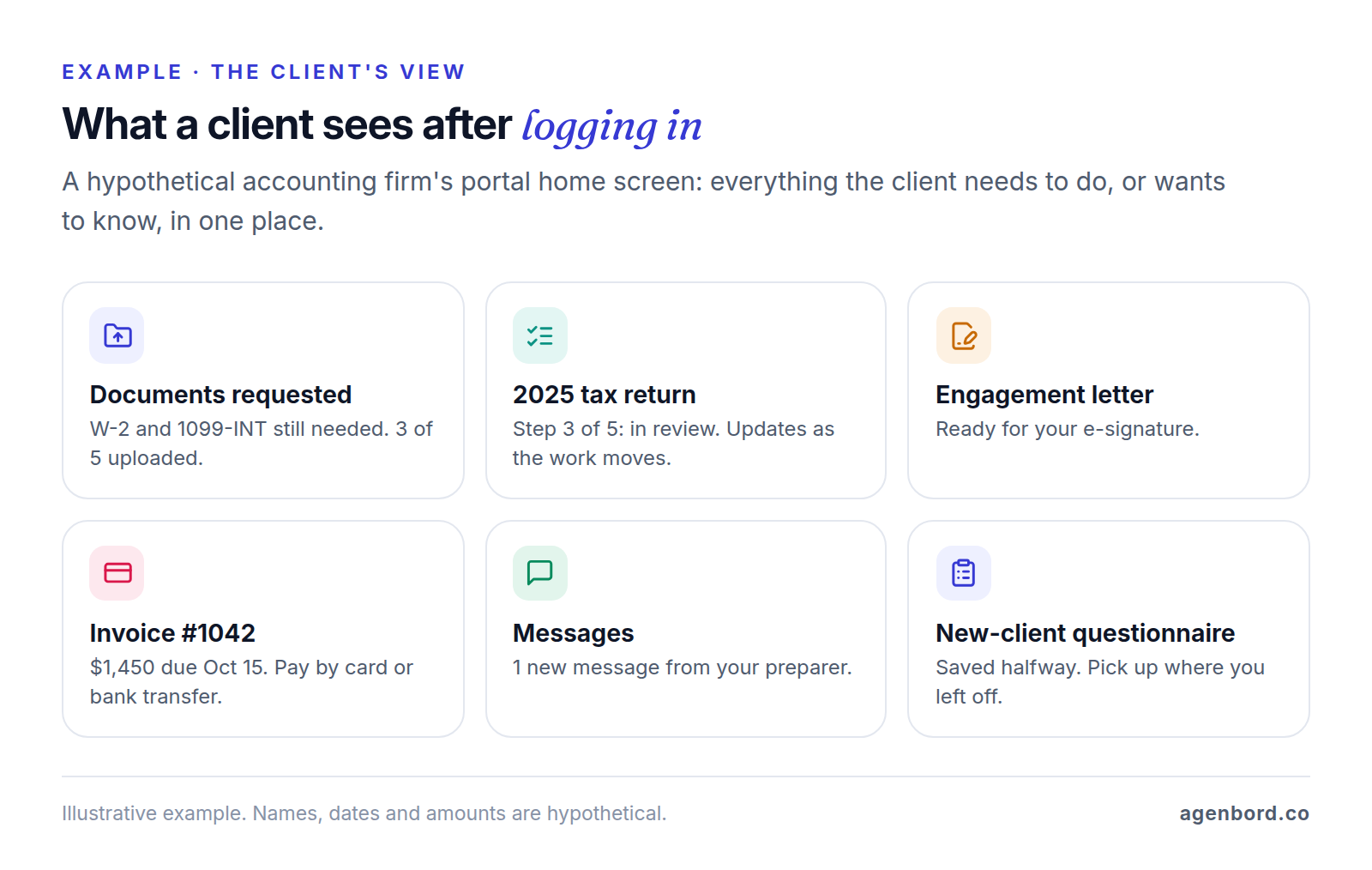
- Accounting and tax firms: document requests, organizers, engagement letters, returns to review and sign, invoices.
- Law firms: matter updates, secure messages, documents to review, bills and online payment.
- Agencies and consultants: deliverables, approvals, project status, reports and invoices.
- Contractors: selections, change orders, daily logs with photos and progress payments.
- Property managers: owner statements and payouts, tenant payments and maintenance requests.
- Insurance agencies: policy documents, ID cards, certificates of insurance and renewal paperwork.
Why you need a client portal (and when you don't)
A portal earns its place by replacing four habits:
- Email attachments. Tax returns, IDs, bank statements and contracts sit in inboxes on both sides and get forwarded and re-sent. A portal keeps one copy behind a login and records who opened it.
- Status calls. A client who can see "Step 3 of 5: in review" doesn't need to ring for an update.
- Chasing. Document requests with automatic reminders, e-signatures and online payment replace the reminder emails, the printer and the check in the mail.
- Scattered history. Every file, message and approval lands on the client's record, so a colleague can pick up the account without a handover meeting.
You may not need one yet if you have a handful of clients, exchange few sensitive documents and rarely get status calls. A portal also adds a login for clients who live in their email, so it only works if everything they need is in it.
Client portal features that matter, and what to check
Most portal software lists the same features. The differences are in the details, so test these in a trial instead of reading them off a feature page.
| Feature | What it does | What to check |
|---|---|---|
| Secure login and MFA | One account per person, plus a second factor such as a code or an authenticator app | Can you require MFA for every client and staff login, or only offer it? Assembly enforces MFA on its Advanced plan, Clinked on Premium. |
| File exchange | Uploads, downloads and requests for specific documents | Request lists with automatic reminders, version history, storage limits, and what happens to files when a client leaves |
| E-signature | Clients sign engagement letters, contracts and forms | Included or bought per signature? TaxDome includes unlimited e-signatures; Karbon sells credits from $100 per 100. |
| Status tracking | Shows where each job stands | Does it update when your team moves the work, or does someone have to remember? |
| Messaging | Secure threads per client or matter | Do notifications say "you have a new message" without the content? Is the history saved to the client record? |
| Invoices and payments | Clients view and pay invoices by card or bank transfer | Processing fees and who pays them (Canopy lists 3.30% + $0.20 per card payment and 1%, capped at $10, for ACH), and whether payments sync to your accounting |
| Intake forms | New-client questionnaires, organizers and checklists | Conditional questions, save-and-resume, and answers that land in the client record without retyping |
| Permissions | Controls who sees what | Several contacts per client (a spouse, a CFO, a bookkeeper) with different access, and staff limited to their own clients |
| White-labeling | Your logo, colors, domain and email sender | Which plan includes a custom domain and sender address, and whether a branded mobile app costs extra |
| Audit trail | A log of logins, views, downloads, signatures and changes | Who can see it, whether you can export it and how long it's kept; Moxo advertises a 7+ year audit trail |
| Mobile experience | Phone-friendly pages or an app | Can clients scan, upload and sign from a phone? Clio for Clients, for example, turns phone scans into PDFs. |
Two rows deserve more weight than the rest: permissions and the audit trail. A portal's whole promise is that one client never sees another client's documents, and that you can prove who did what. In the demo, ask the vendor to set up a client with two contacts who should see different things, then show you the log entry when one of them downloads a file.
Client portal software options by type (October 2026)
There's no single best client portal software; the right one depends on where your client data already lives. Short of building, you have four routes: the portal in your practice-management software, a standalone portal tool, a project management tool with client access, or a no-code builder or website add-on. Prices are list prices from each vendor's site as of October 2026.
Portals built into practice-management software
If the software you run your business on includes a portal, test it first. The client's documents, invoices and status already live there, so there's nothing to sync and no second system for staff to keep updated.
| Industry | Software | What the portal includes | Published price (October 2026) |
|---|---|---|---|
| Accounting and tax | TaxDome | Client portal, client mobile app and unlimited e-signatures on every plan; unlimited clients | $800–$1,200 per seat per year on a one-year term, less on two- or three-year terms |
| Accounting and tax | Karbon | Karbon for Clients on every plan | $59 (Team) or $89 (Business) per user per month, billed annually |
| Accounting and tax | Canopy | Branded client portal and client requests on every plan | $74, $109 or $149 per user per month, billed annually |
| Law | Clio | Clio for Clients on Core and above, not on Starter | Starter $49 per user per month; Core and above quote-based |
| Law | MyCase | Client portal on every plan, limited on Basic | $50, $100 or $130 per user per month billed annually ($60–$150 monthly) |
| Construction | JobTread | Free, unlimited portal logins for customers, vendors and subcontractors | $199 a month plus $20 per internal user for users 2–10; 20% off annually |
| Construction | Buildertrend | Client updates, selections, change orders, payments and daily logs | Quote-based |
A few things the table doesn't show:
- Accounting firms pay per staff seat with all three. TaxDome's Essentials plan is for solo users, and a white-labeled client app is an add-on. Karbon's Team plan caps contacts at 1,000, so bigger client lists need Business. Canopy adds a custom domain and portal permission controls on higher tiers.
- Law firms: Clio for Clients covers secure messages, document sharing and online bill payment, and comes with a mobile app. For the intake side, see our client intake software guide.
- Contractors get the portal as part of a full construction platform, so judge it alongside estimating, scheduling and job costing. Our construction ERP guide covers that wider decision.
- Property managers get tenant and owner portals as modules of their property management platform. Our property management software guide compares the vendors and pricing models.
- Insurance agencies should ask their agency management system vendor whether it includes or sells a client self-service portal before buying a separate tool.
If your firm's portal falls short, adding to it usually beats replacing it. Our professional services page shows how we build portals and intake automation around a practice-management system rather than instead of it.
Standalone client portal software
When your core software has no portal, or you want one portal in front of several tools, these are the main standalone options:
| Tool | Best fit | Published price (October 2026) | Price scales with | Watch for |
|---|---|---|---|---|
| SuiteDash | Small firms that want an all-in-one, white-labeled portal | $19, $49 or $99 a month; $180–$960 a year | Nothing: unlimited clients and staff | A long list of features to configure; storage from 100 GB to 2 TB by plan |
| Assembly (formerly Copilot) | Agencies and consultants that want a branded portal they can extend with apps | Free for 5 active contacts; paid plans billed annually | Active contacts (50, 500 or unlimited) and internal users | Enforced MFA, an audit log and a HIPAA BAA start on Advanced |
| Clinked | Firms that want a secure, branded document workspace | From $11 per user per month; Standard $239 a month for 100 members (monthly prices, 20% off yearly) | Members | Ask whether clients count as members; enforced 2FA starts on Premium, $599 a month |
| Moxo | Firms running structured onboarding, approval or document workflows | Team plan $5,000 a year | Unlimited seats; 100 "flows" a year | Ask how flows are counted; SAML SSO starts on the quote-based Scale plan |
| ShareFile | Accounting and finance firms focused on secure file exchange | From $16.50 per user per month billed annually, 3-user minimum | Staff users; client users are unlimited | E-signature and request lists start on Premium ($26); HIPAA with a BAA on Premium and up |
| HoneyBook | Solo consultants and creative businesses | Starter $29 a month billed yearly | Plan tier | Card fees from 2.7% + 10¢; Essentials allows 2 team members, Premium is unlimited |
The pricing basis matters more than the entry price. A firm with 600 clients and four staff pays the same on SuiteDash as a firm with six clients. On Assembly, 600 clients is past the Professional plan's 500 active contacts, so it needs Advanced. On ShareFile it pays per staff user, whatever the client count. For solo businesses, Dubsado ($335 or $525 a year) covers similar ground to HoneyBook.
Project management software with a client portal
If your work runs as projects (agencies, consultants, IT firms, design-build contractors), your project management tool may be enough of a portal: clients see their project, tasks, files and comments.
- Basecamp prices by plan, not by person. Freelancer is $25 a month for up to 20 users, and Studio ($59), Pro ($99) and Unlimited ($299 a month, billed annually) include unlimited users. Clients count as users, which only matters on the smaller plans.
- Teamwork.com is built for client work: you can invite client users into projects and share project status with them. Paid plans start at $9.99 per user per month billed yearly, with a 3-user minimum.
- ClickUp lets you invite guests, and its paid plans (from $7 per user per month billed annually) add guest permission controls. On the free plan guests get full access, so keep clients off it.
These tools are strongest at status, tasks, files and comments. Check how each handles e-signatures, payments and intake forms before you rely on one as your only client portal.
No-code builders, WordPress plugins and website builders
If you'd rather design the portal yourself, these are the do-it-yourself routes:
- Softr is a no-code app builder: you lay out the portal's pages on your own data, trading build time for control. Billed annually, Basic is $19 a month with 5 client users, Pro $99 with 50 (then $1 per extra user, up to 250) and Business $329 with 100 (then $2 each, up to 500). SSO and audit logs are on Enterprise.
- WordPress plugins turn your existing site into a portal. WP Customer Area (10,000+ active installs) is free, with paid add-ons for invoicing, conversations and projects. Client Portal – Private user pages and login, also free, gives each user a private page after they log in.
- Website builders such as Wix offer a free Members Area app for logins, member profiles and members-only content. Its listing describes gated content and community features rather than document exchange, so it isn't a substitute for a portal that handles confidential files.
Client portal security and compliance basics
This is general information, not legal advice: what applies to you depends on your profession, your state and the data you hold. These rules come up most often.
Tax and accounting firms. The FTC's Safeguards Rule treats tax preparation firms as financial institutions. Among other things, it requires encrypting customer information on your systems and in transit, multi-factor authentication for anyone accessing it, a log of authorized users' activity, oversight of service providers, and a report to the FTC within 30 days of a security event involving 500 or more consumers' unencrypted information. IRS Publication 4557 (Safeguarding Taxpayer Data) and Publication 5708, a template for the written information security plan the rule requires, put this in practical terms. A portal that enforces MFA, encrypts files and logs access covers much of it, and your plan should name the portal as the way clients send documents.
Law firms. Bar ethics rules expect reasonable precautions with cloud tools. Florida's Ethics Opinion 12-3, for example, says lawyers may use cloud computing "if they take reasonable precautions to ensure that confidentiality of client information is maintained, that the service provider maintains adequate security, and that the lawyer has adequate access to the information stored remotely." Check your own state bar's guidance.
Insurance agencies. States that adopt the NAIC's Insurance Data Security Model Law expect licensees to keep a written information security program, require service providers (your portal vendor included) to protect the data they hold, encrypt nonpublic information sent over external networks and notify the insurance commissioner within 72 hours of determining that certain cybersecurity events occurred. The model exempts licensees with fewer than ten employees from the program requirements; check what your state adopted.
Health information. If HIPAA applies to your practice, as it does to many therapy and medical offices, or you handle patient data for one, a portal vendor that stores electronic protected health information for you is a business associate. HHS guidance says you need a business associate agreement (BAA) with it, even if it only stores encrypted data it can't read. BAAs often sit on higher plans: Assembly offers one on Advanced, ShareFile from Premium.
Whatever your industry, ask every vendor on your shortlist:
- Can we require MFA for every client and staff login?
- Is data encrypted in transit and at rest, and where is it hosted?
- Can we see and export the audit log?
- Will you share a current SOC 2 report, a CPA's examination of your controls for security, availability, processing integrity, confidentiality or privacy?
- Will you sign a BAA if we need one, and on which plan?
- How do we export every document and message if we leave, and when do you delete our data?
How to choose client portal software
- Start from your system of record. If your practice software has a portal, pilot it first, and look elsewhere only for what it can't do.
- List the jobs, not the features. Write down the three to five things clients must do, such as uploading year-end documents, approving a design, signing a change order or paying a deposit, and test exactly those.
- Price it at three years. Count staff and client logins today and in three years, then price each finalist on its own basis: per staff seat, per active contact, per member, per flow or flat.
- Check security on the plan you'll buy. MFA enforcement, audit logs and BAAs are often tier features, so confirm them on your plan, not the top one.
- Pilot with friendly clients. Invite five to ten clients for two weeks and fix what confuses them before everyone gets an invitation.
- Retire the old way. Send a one-page how-to, then set a date after which you stop accepting documents by email.
How to add a client portal to your website
Almost every portal tool is hosted by its vendor, so adding one to your website really means making it feel like part of your site:
- Give it your address. Use a subdomain such as portal.yourfirm.com, set up with a DNS record (usually a CNAME) the vendor gives you. Check your plan: custom domains start on Assembly's Professional plan and TaxDome's Pro plan, and every paid Softr plan includes one.
- Match the branding. Add your logo and colors, and send invitations and notifications from your own domain so clients don't mistake them for phishing.
- Add a "Client login" link to your site's header, footer and contact page, your team's email signatures and your engagement letter.
- Link to it rather than embedding it in a frame on a page. A portal on its own address is easier for clients to bookmark and for password managers to recognize.
If your site needs a rebuild anyway, plan the login link and the portal's look into the website project from the start.
On WordPress, a plugin can make your site the portal itself. That's fine for private pages and files shared with a modest number of clients, but the files then live on your web host, and your hosting, backups and plugin updates become your security controls. Before using one for tax, legal or health documents, check whether a direct link to an uploaded file opens without logging in.
When to build your own client portal
Building pays off in four situations, and usually two or more apply at once:
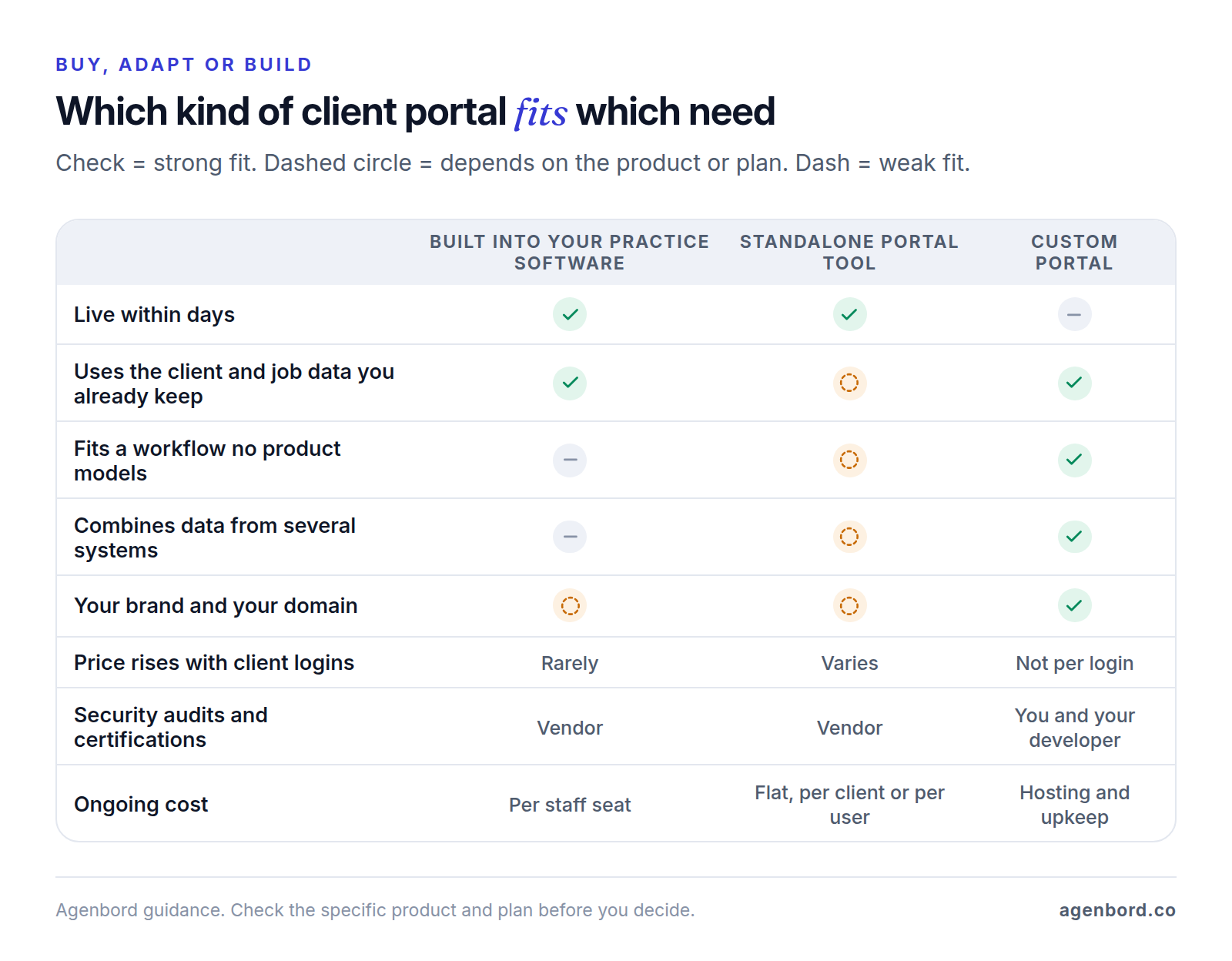
- Your workflow is the service. Clients move through steps no product models: say, a hypothetical engineering firm whose clients approve drawings at five gates, each with different reviewers and documents. Packaged portals give you status and tasks, not your process.
- The data lives in several systems. Status sits in your project tool, invoices in your accounting software and documents in a file share, and you want one client view. A custom portal reads from each through its API instead of asking staff to copy updates into one more tool. Sometimes a few automations that push updates into the portal you already have do the job for far less.
- The portal is part of what clients pay for. A client reporting portal, where clients see their campaign results, portfolio or project costs, is part of your product, and it should look and work like yours rather than a vendor's.
- Client logins make per-user pricing expensive. Softr's Business plan, for example, includes 100 client users and charges $2 a month for each extra one up to 500. At 500 client users that's $1,129 a month, about $13,500 a year, and beyond 500 you need Enterprise pricing. A custom portal's running costs don't grow with each login.
Two cautions. Plenty of tools don't price by client at all (SuiteDash, TaxDome, ShareFile and JobTread don't), so the fourth reason alone rarely justifies a build. And if your practice software's portal already covers what clients need, a custom one solves a problem you don't have. Our build-vs-buy framework walks through the decision step by step.
What building a client portal involves
If you're working out how to build a client portal, this is what sits underneath one, in plain English:
- Sign-in and access. An account for each client contact and staff member, MFA, password resets and session timeouts, plus roles that decide what each person can see and do.
- Permission checks on every request. Each time someone asks for a record or file, the server checks that it belongs to their client. This is where portals most often go wrong: broken access control tops the OWASP Top 10 for 2025, and OWASP found some form of it in 100% of the applications tested. The classic example is viewing someone else's account by changing an ID in a request.
- Data and files. A database where every record belongs to one client, and private, encrypted file storage that issues short-lived download links instead of permanent ones.
- Connections. Integrations with your accounting, practice or project software and CRM, plus an e-signature service and a payment processor. Use the processor's hosted payment fields so card numbers never touch your servers: Stripe's security guide notes that handling card data directly can mean meeting more than 300 PCI DSS security controls.
- Audit log and alerts. A record of logins, views, downloads and changes, and email or text alerts that say something is waiting without including the details.
- Running it. Backups you've test-restored, monitoring, updates and an independent security test before launch.
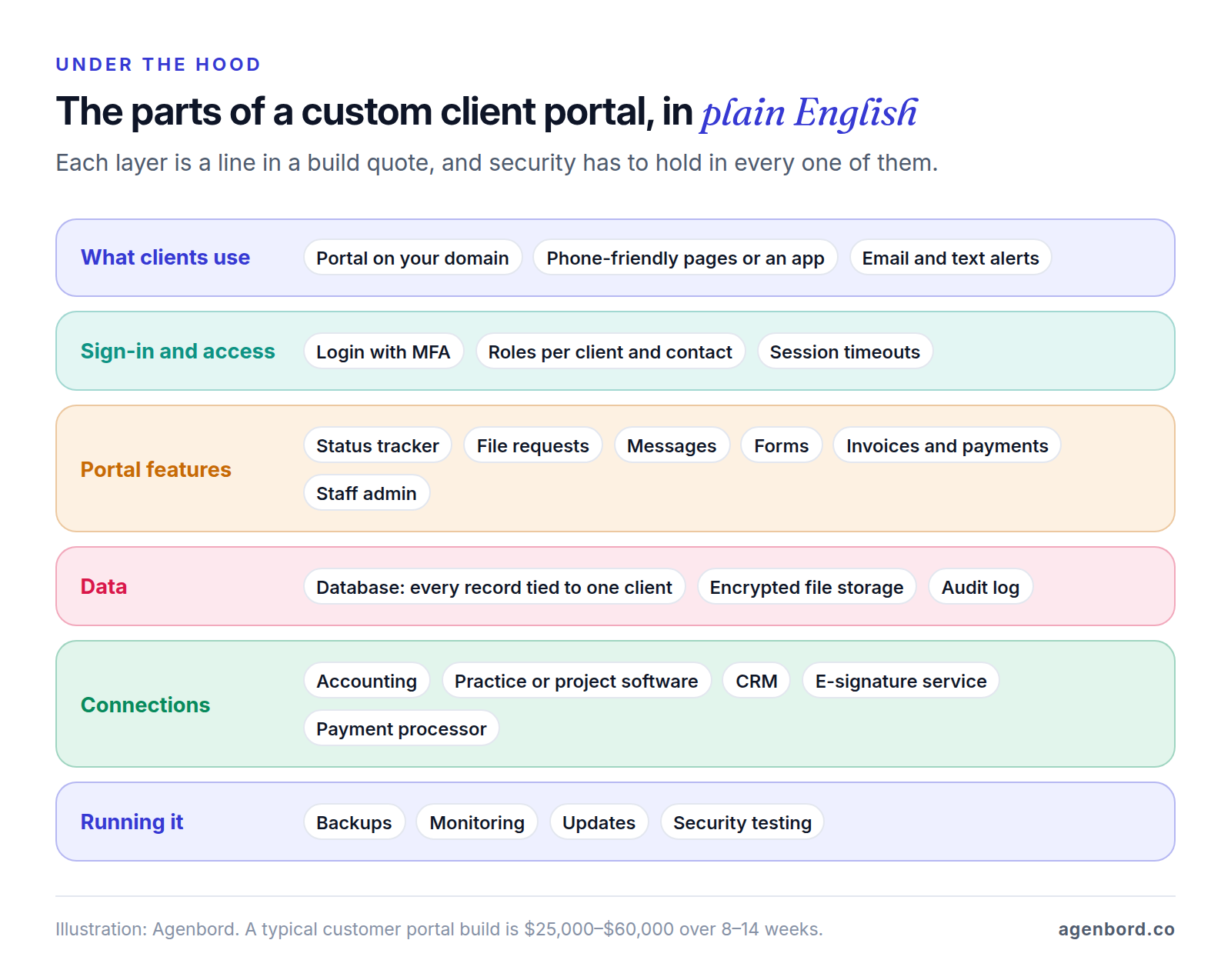
A custom web portal typically costs $25,000–$60,000 and takes 8–14 weeks to build. The low end is a portal for one core workflow: login with MFA, file requests, status, messages and one integration. The high end adds payments, e-signatures, intake forms with conditional logic, several integrations and staff reporting. An internal dashboard for your own team is a smaller project, from $12,000. Running costs are hosting, roughly $50–$500 a month for a small-business app, and maintenance of about 15–20% of the build cost per year. Our web app cost breakdown goes feature by feature, and our custom software cost guide explains what moves a quote up or down.
We price portals as fixed-price proposals with a written scope, show working software in weekly demos, deliver bigger systems in phases, and you own the code. The usual sequence: a short discovery that maps the client journey and the systems involved, design of the key screens, a phased build, security testing and a pilot with a few clients. If the client data you'd show is scattered because you don't have a proper CRM yet, a CRM with a client portal on top, typically $30,000–$75,000 with integrations, can be the better first project. We build customer-facing apps for our own products too: our WhatsApp-first billing and collections platform includes a customer app alongside its owner dashboard.
If none of the four situations applies, choose the portal in your practice software or one of the standalone tools above, and put the effort into getting every client to use it.
Sources
- Assembly - Copilot is now Assembly (accessed October 2026)
- Assembly - Pricing (accessed October 2026)
- SuiteDash - Pricing (accessed October 2026)
- Clinked - Pricing (accessed October 2026)
- Moxo - Pricing (accessed October 2026)
- Moxo - Security (accessed October 2026)
- Progress ShareFile - Pricing (accessed October 2026)
- HoneyBook - Pricing (accessed October 2026)
- Dubsado - Pricing (accessed October 2026)
- Softr Docs - Pricing and plans (accessed October 2026)
- TaxDome - Pricing (accessed October 2026)
- Karbon - Pricing (accessed October 2026)
- Canopy - Pricing (accessed October 2026)
- Clio - Pricing (accessed October 2026)
- Clio - Client portal, Clio for Clients (accessed October 2026)
- MyCase - Pricing (accessed October 2026)
- JobTread - Pricing (accessed October 2026)
- Buildertrend - Pricing (accessed October 2026)
- Basecamp - Pricing (accessed October 2026)
- Teamwork.com - Pricing (accessed October 2026)
- ClickUp - Pricing (accessed October 2026)
- WordPress.org - WP Customer Area plugin (accessed October 2026)
- WordPress.org - Client Portal, Private user pages and login plugin (accessed October 2026)
- Wix App Market - Wix Members Area (accessed October 2026)
- Federal Trade Commission - FTC Safeguards Rule: What Your Business Needs to Know (accessed October 2026)
- IRS - Publication 4557, Safeguarding Taxpayer Data (accessed October 2026)
- IRS - Publication 5708, Creating a Written Information Security Plan for your Tax & Accounting Practice (accessed October 2026)
- The Florida Bar - Ethics Opinion 12-3, cloud computing (accessed October 2026)
- HHS - Guidance on HIPAA & Cloud Computing (accessed October 2026)
- NAIC - Insurance Data Security Model Law, MO-668 (accessed October 2026)
- AICPA & CIMA - SOC 2 (accessed October 2026)
- OWASP - A01:2025 Broken Access Control (accessed October 2026)
- Stripe Docs - Integration security guide (accessed October 2026)
Prices, plans and regulations change. Figures were checked on October 2, 2026; follow the links for the latest. Nothing here is legal, tax or financial advice.
About the author
Founder, Agenbord
Muhammad Hamza is the founder of Agenbord, the Fort Lauderdale software company behind the construction ERP Smart Construction and a WhatsApp-first billing platform. He writes practical guides on buying, building and automating business software.