On this page
- What is construction ERP software?
- Construction ERP modules that matter, and how to test each one
- Construction ERP systems compared
- Construction ERP pricing: how vendors charge
- How to choose construction ERP software: a shortlisting scorecard
- Construction ERP implementation: steps, timeline and failure points
- How to connect field data to your ERP
- Buy, extend or build?
- Before you call vendors: a five-step checklist
Construction ERP software is the system a contractor runs the business on. One database carries each job from the winning estimate through subcontracts, purchase orders, field time, pay applications, payroll and the monthly work-in-progress (WIP) report, so the office, the project managers and the field work from the same numbers.
You usually feel the need before you can name it. Committed costs live in a spreadsheet, pay apps get rebuilt by hand every month, certified payroll is retyped from timesheets, and nobody knows a job's real margin until it closes. General accounting software wasn't built for that, and a construction ERP is the usual next step.
Our take, from building construction software and running a construction ERP of our own: if a package fits most of how you work, buy it and fix the edges with integrations. Build only the part that is genuinely yours.
What is construction ERP software?
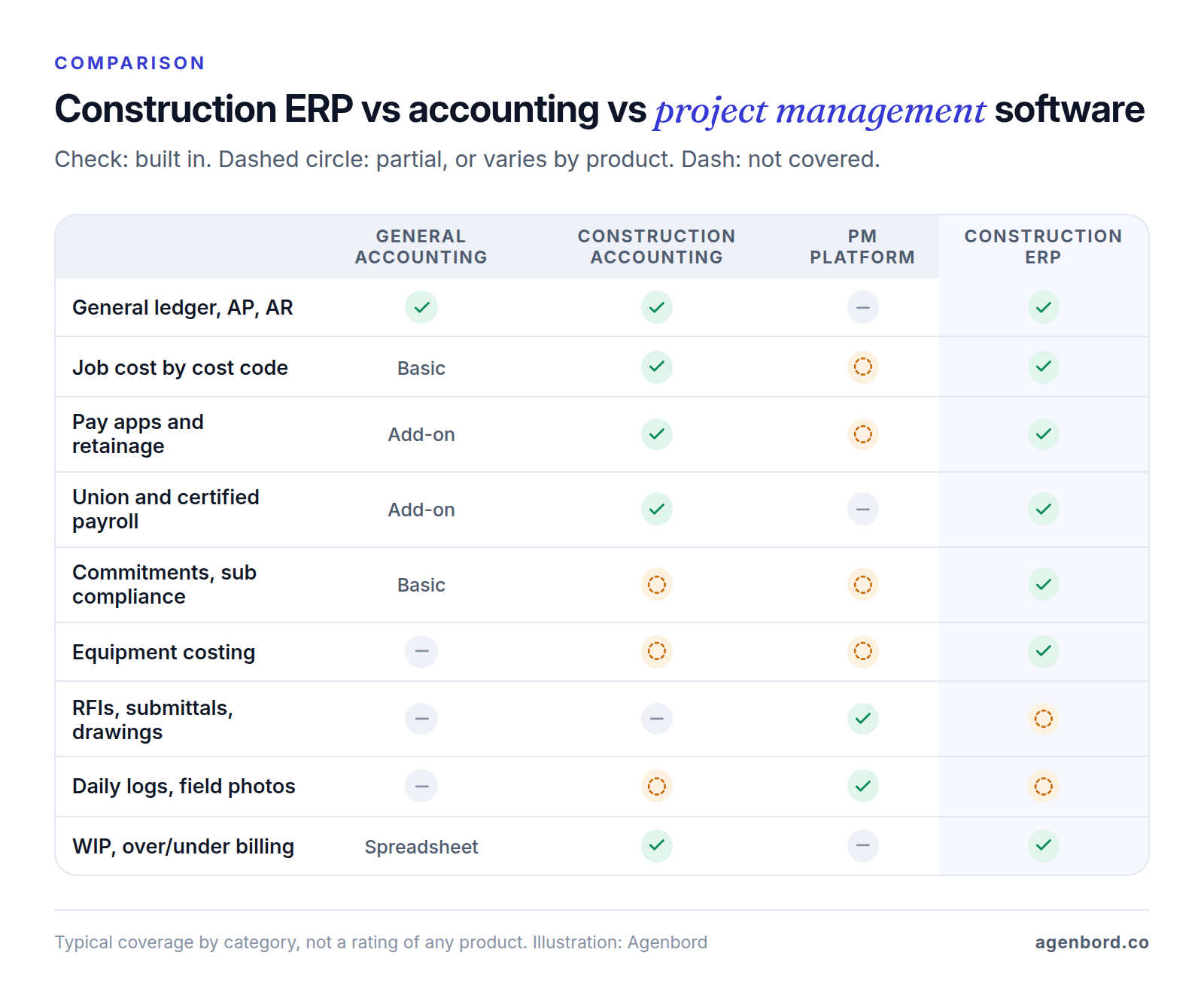
ERP stands for enterprise resource planning: one system and one database for a company's money and operations. A construction ERP organizes all of it around the job. Every cost, commitment, timesheet and invoice carries a job and a cost code, so at any point you can see what a job was budgeted at, what you've committed to subs and suppliers, what you've spent, what you've billed and what you're owed.
What makes it construction-specific is money logic that general systems don't handle out of the box: progress billing against a schedule of values, retainage (the share of each payment held back until the work is accepted), subcontract change orders, lien waivers, union and prevailing-wage payroll, equipment charged to jobs, and the WIP schedule that shows whether each job is over- or under-billed.
Construction ERP vs construction accounting software
The line is blurry, and vendors draw it differently. Foundation Software sells FOUNDATION as construction accounting software, yet it includes job costing, built-in certified payroll, purchase orders and AIA-style billing with retainage. CMiC calls its product a construction ERP and runs financials, payroll, project controls, procurement, construction documents, and quality and safety on a single database platform.
Roughly, "construction accounting" is the financial core (ledger, job cost, billing, payroll), and "construction ERP" adds the operations around it: procurement, equipment, service, HR, document control and multiple companies. Judge products on the modules you need, not the label; our construction accounting software guide covers the financial core in depth, and the estimating software guide covers the step before the budget.
Construction ERP vs project management software
Project management platforms run the project side: RFIs, submittals, drawings, daily logs and punch lists. Procore, for example, describes itself as construction project management software. It includes cost management tools, but the general ledger, payables and payroll stay in an accounting system or ERP that it syncs with. A common setup is exactly that pair: a PM platform for the project team, an ERP for the money. Our guide to construction project management software covers the project side for smaller contractors.
Construction ERP vs general ERP
General ERPs such as Oracle NetSuite serve many industries and get their construction depth from industry features and partners; NetSuite's construction page notes that some of the capabilities it describes require partner integrations. Acumatica sits in between, with a dedicated Construction Edition. A general ERP makes the most sense when construction is one of several businesses you run on the same books.
Construction ERP modules that matter, and how to test each one
Vendors demo with clean sample data. Your jobs have change orders, partial deliveries, a sub with an expired insurance certificate and a foreman who fills in timesheets on Friday. Ask each finalist to run these tests on your data.
| Module | What it does | Test it in the demo |
|---|---|---|
| Estimating hand-off | Turns the winning estimate into the job budget by cost code | Import a real estimate. Do cost codes and cost types land without re-keying? |
| Job costing | Tracks budget, committed, actual and projected cost per job and cost code | Approve a subcontract and watch committed cost update on the right code |
| Procurement and POs | Requisitions, purchase orders, receipts and invoice matching | Receive a partial delivery, then match the supplier's invoice |
| Subcontracts and compliance | Subcontracts, sub change orders and pay apps, insurance certificates, lien waivers | Try to pay a sub whose certificate has expired. The system should stop you; our subcontractor management guide covers the rest |
| Progress billing and retainage | Schedule of values, AIA-style pay apps, retainage held and released | Bill a pay app with an approved change order and a retainage change partway through the job |
| Payroll and certified payroll | Field time by job and cost code feeds payroll, union rates, fringes and certified reports | Produce a weekly certified payroll for a worker split across two jobs and two classifications |
| Equipment | Charges equipment to jobs at set rates, tracks hours and maintenance | Post equipment hours from a field entry and find them on the job |
| Document control | Keeps contracts, change orders, certificates, waivers and invoices attached to their records | Open a sub's current certificate from the payment screen |
| Field data | Mobile time, quantities, daily logs and photos | Have a foreman enter time on a phone with no signal, then sync |
| Reporting and WIP | Job cost reports, WIP with over/under billing, cash and aging | Run last month's WIP and drill into one job down to the source entries |
Job costing is the module most contractors buy an ERP for; our guide to construction job costing software follows one job from estimate to WIP. Three other modules carry legal or cash risk, so look harder at them.
Progress billing. AIA's G702 is both the contractor's application for payment and the architect's certification of it; the G703 continuation sheet breaks the contract sum into a schedule of values, line by line. Your ERP should produce both (or your owner's own format) from billing data, with change orders and retainage carried forward rather than retyped.
Subcontract compliance. The point is to tie payments to paperwork: a sub's payment should stop when an insurance certificate has expired or a required lien waiver hasn't come in. Waiver forms and rules vary by state, so set yours up with your attorney.
Certified payroll. On federally funded or assisted construction contracts over $2,000, the Davis-Bacon and Related Acts require contractors and subs to pay at least the locally prevailing wages and fringe benefits, and payrolls are submitted weekly. The Department of Labor's Form WH-347 is optional; the weekly payroll information is not. Many states have their own prevailing wage laws for public work, too. Your ERP should produce these reports from the same timesheets that drive payroll. This is general information, not legal advice; the DOL pages and your contract are the primary sources.
Construction ERP systems compared
There's no single best construction ERP software, only the best fit for your size, work type and team. These are the main systems you'll run into, described the way each vendor positions them as of October 2026.
| System | How the vendor positions it | Notable modules | Check before you buy |
|---|---|---|---|
| Sage Intacct Construction | Cloud-native accounting for contractors and real estate developers | Job costing with committed costs, change orders, AIA billing for fixed-price, T&M and cost-plus work, WIP with over/under-billing entries, multi-entity | Payroll runs through integrated providers (Sage HCM, or ADP Workforce Now for Construction); test time to payroll to job cost end to end |
| Sage 300 Construction and Real Estate | Sage's established system for contractors, developers and property managers, formerly Sage Timberline Office | Project management, property management, service operations and preventive maintenance agreements, field work orders | Sage pitches "mobile and cloud capabilities" to extend it; ask how yours would be hosted and updated, and compare it with Intacct Construction |
| Trimble Viewpoint Vista | "Highly customizable enterprise ERP" for large-scale contractors with complex multi-entity accounting and HR/payroll needs | Job cost and WIP, workforce and payroll, equipment and service management; part of Trimble Construction One | Deep configuration takes implementation time and an internal admin; plan for both |
| Trimble Viewpoint Spectrum | "Native, web-based cloud ERP" for mid-to-large contractors, pitched on fast onboarding and ease of use | Job cost, payroll with multiple unions, service and maintenance contracts, field app | Between mid-size and large? Demo it against Vista; Trimble positions the two differently |
| Foundation Software | Construction accounting software | Built-in certified payroll; AIA, T&M and progress billing with retainage; job costing; a FOUNDATION Hosted option that Foundation manages | Priced by module; mobile time tracking, equipment, service dispatch and project management are add-ons, so price the full set |
| CMiC | Construction ERP on a single database platform, for general contractors, subcontractors and heavy-highway firms | Financials, payroll and HCM, project controls, procurement, construction documents, quality and safety, equipment | A broad suite means a big implementation; phase it, and get deployment and support terms in writing |
| Acumatica Construction Edition | Cloud ERP with a dedicated construction edition | Job cost, AIA pay apps, subcontract commitments, lien waiver and insurance compliance, union and certified payroll, daily field reports, WIP | Priced on applications and resource use with unlimited users, so model your transaction volume |
| Oracle NetSuite | General cloud ERP with construction features | Job costing by project, cost code and phase; progress billing; retainage; percentage-of-completion revenue | Some construction capabilities need partner integrations; get the partner's scope and support terms in writing |
Procore isn't in the table because it isn't an ERP; it sits beside one. If you already run it, check that your finalist is on Procore's supported ERP integrations list, which includes Trimble Spectrum and Vista, Sage Intacct, Sage 300 CRE, CMiC, Acumatica, NetSuite and QuickBooks, and ask what the integration actually syncs.
Construction ERP pricing: how vendors charge
None of the vendors above lists prices; all are quote-based as of October 2026. What you can compare is how each one charges, because that decides who pays more as you grow, especially when many field staff need to log in.
- Platform, modules and users. NetSuite describes its pricing as an annual subscription made up of the core platform, optional modules and the number of users, plus a one-time implementation fee.
- Unlimited users, priced on usage. Acumatica says it doesn't charge for user seats. Price depends on the applications you implement, your transaction volume and resource levels, and your deployment option.
- Priced by module. Foundation customizes pricing by module: job costing, payroll, purchase orders and receivables are core, while mobile time tracking, service dispatch, equipment management and project management are add-ons.
- Quote-based subscriptions. Sage (Intacct Construction, and Sage 300 CRE, which offers subscription pricing), Trimble and CMiC all price through sales. CMiC advertises pricing with no hidden costs for implementation or support; whichever vendor you pick, get that promise in the contract.
- PM platforms on annual contracts. Procore sells annual contracts with unlimited users and offers renewal rate protection. Its pricing page doesn't list prices either.
Then budget the whole first year, not only the subscription:
- Implementation services: configuration, data conversion and report building, from the vendor or a partner
- Integrations with estimating, your PM platform, payroll provider and bank, and who maintains each one
- Field apps and add-on modules you'll need by year two
- Training, plus your own team's time: the controller and payroll lead will spend real hours on mapping and testing
- Hosting, if the vendor doesn't host it
- Renewal terms: annual increase caps, and the price of adding users, entities or modules mid-contract
- Exit: how you get your data out, and in what format, if you leave
Ask every finalist for a five-year cost on the same module list and user counts, in writing. That's the number to compare.
How to choose construction ERP software: a shortlisting scorecard
Start with three facts about your company. They narrow the field fast.
Size. Count open jobs, office users, field staff who'll enter data, and legal entities. Vendors position by size: Trimble aims Vista at large-scale contractors and Spectrum at mid-to-large ones, while others pitch a wide range. Ask for references at your size.
Work type. General contractors live in subcontracts: commitments, sub change orders, sub pay apps, insurance certificates and lien waivers. Specialty contractors self-perform, so labor is the big risk: union rates, field time by cost code, productivity, and often service work billed on time and materials. Public work adds certified payroll and prevailing-wage classifications. Bonded work makes the WIP schedule a document your surety reads closely.
Accounting setup. The number of companies, your cost code structure (phase, cost code, cost type), how you recognize revenue, and who closes the books: an in-house controller or an outside CPA. Bring your CPA into the final round.
Then score each finalist 1–5 per line, on your own data, and double the lines that match your profile.
| Criterion | What good looks like | Weigh it double if |
|---|---|---|
| Job cost and WIP | Committed cost updates on approval; WIP drills down to the cost code and source entry | You're bonded or bank-financed |
| Subcontracts and compliance | Sub change orders, sub pay apps, retainage payable, certificates and waivers that can block payment | You're a general contractor |
| Payroll | Union rates and fringes, multiple states, certified payroll from the same timesheets | You self-perform or do public work |
| Billing | Schedule of values, AIA-style pay apps, retainage release, T&M and service billing | You bill monthly pay apps or run service work |
| Field adoption | Foremen enter time, quantities and daily logs on a phone, offline | You have large self-perform crews |
| Integrations | Supported links to your estimating tool, PM platform, payroll provider and bank | You already run a PM platform |
| Fit for your size | Handles your entities, users and job count without workarounds | You run more than one company |
| Five-year cost | Same modules and user counts across vendors, implementation included | You expect headcount to grow |
| Implementation partner | A named team that has implemented contractors on this product | You're moving off spreadsheets |
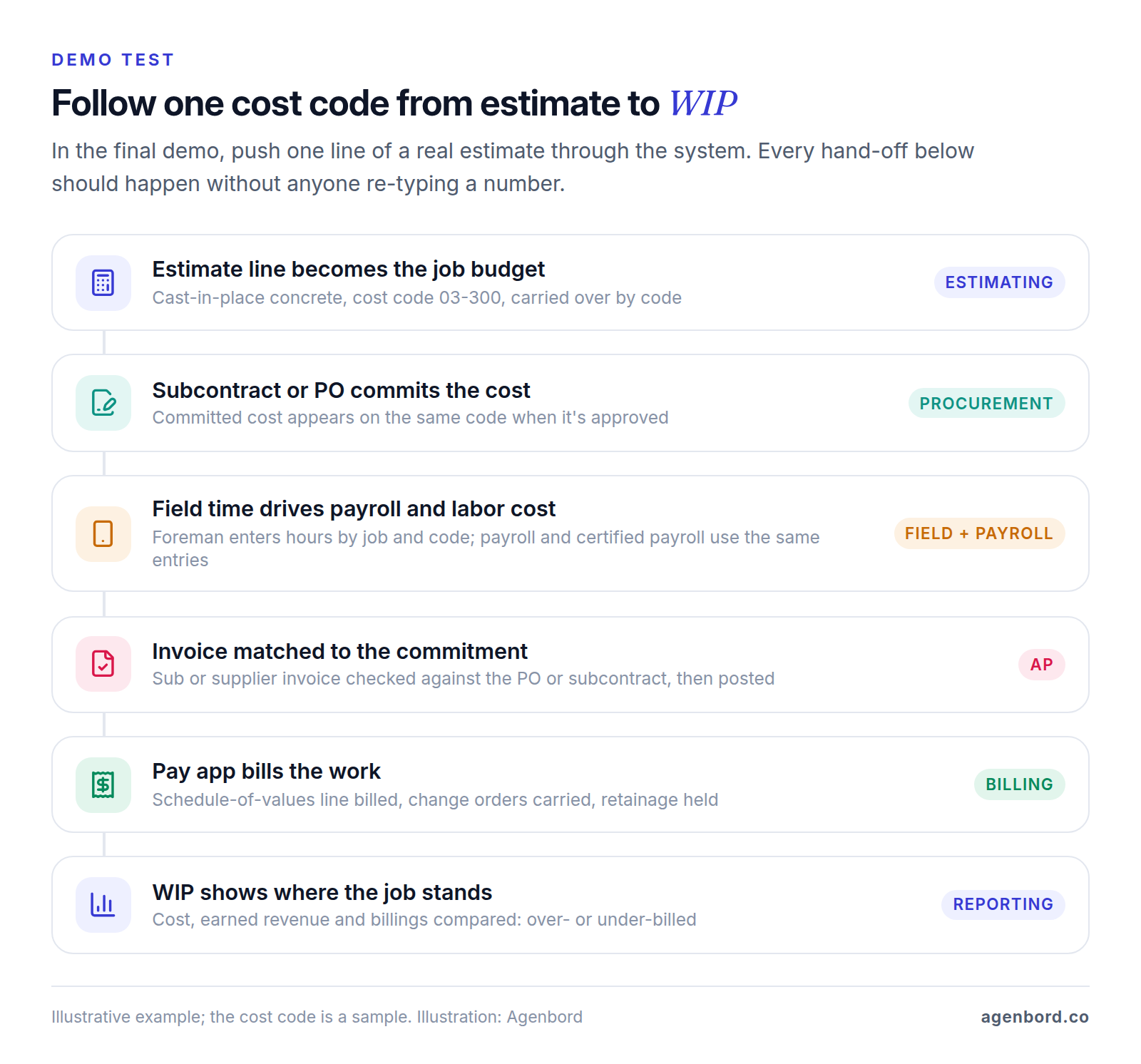
In the final demo, have each vendor follow one line of a real estimate through their system. Every place someone re-types a number, exports a file or waits for an overnight sync is a place your numbers will drift.
Construction ERP implementation: steps, timeline and failure points
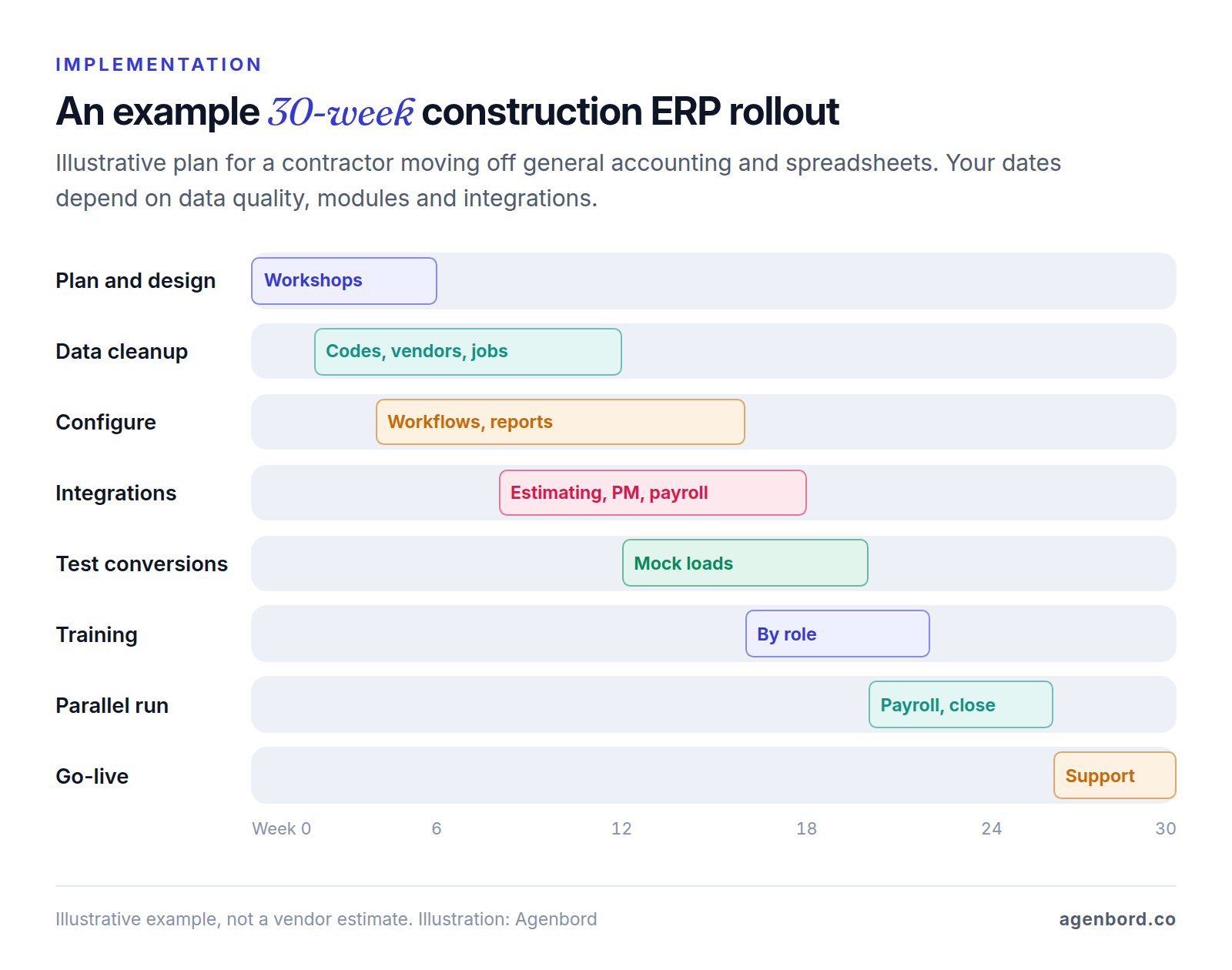
Plan in months, not weeks. A realistic sequence for a contractor moving off general accounting and spreadsheets:
- Name an owner and a go-live date. One person, usually the controller, owns the plan. Pick a clean cutover such as the start of a fiscal year or quarter; for payroll, a January 1 start means you don't load year-to-date wages for W-2s.
- Fix the cost code structure first. Decide the phase, cost code and cost type scheme you want to report on, then map old codes to it. Migrating a messy list unchanged moves the mess into a more expensive system.
- Decide what history to convert. Typically: open jobs with job-to-date totals by cost code (budget, committed, cost, billed, retainage), open payables and receivables, open subcontracts and POs with billed-to-date and retainage held, and the schedule of values for every open contract. Closed jobs stay in the old system as archived reports.
- Clean the master data. Vendors with tax IDs, insurance expiry dates and waiver requirements; customers; employees with pay rates, classifications, union locals and deductions; equipment with rates.
- Configure, then build the reports you run the business on. Approval limits and workflows first, then job cost, WIP, cash, AP aging and certified payroll, tested on converted data.
- Connect integrations. Estimating to budget, PM platform to ERP, time capture to payroll, bank feeds. Test with real transactions, not just a connection check.
- Train by role, on your own jobs. PMs, foremen, AP and payroll each get short sessions on the screens they use.
- Run in parallel. At least one payroll cycle and one month-end close in both systems, reconciling job cost, AP and WIP before you switch the old one off.
- Go live and stabilize. The first close in a new system takes longer than usual, so keep the implementer on call through it.
Where implementations go wrong
- Treating it as an IT project. The implementer configures what it's told; if accounting, payroll and operations leads aren't making the calls, nobody is.
- Cutting the parallel run to hold a date. Payroll or WIP differences then surface after the old system is gone.
- Customizing before learning. Heavy changes in phase one, before the team knows how the standard workflow behaves.
- Ignoring the field. If foremen keep paper timesheets, job cost runs a week behind and the ERP gets the blame.
- Leaving integrations to the end, when payroll and billing depend on them.
How to connect field data to your ERP
An ERP is only as current as its slowest input, which is usually a timesheet or a delivery ticket. There are three ways to connect the field:
- The ERP vendor's own field apps. Trimble offers field and service apps around Vista and Spectrum, Acumatica's Construction Edition includes a daily field report and mobile time entry, and Foundation sells mobile time tracking as an add-on. This route has the fewest moving parts; adoption depends on how simple the app is for crews.
- A PM platform synced to the ERP. Daily logs, RFIs and photos live in the PM platform, and financial records sync across. Ask which records sync (budgets, commitments, change orders, invoices, cost codes), in which direction, and who approves a cost before it posts.
- A custom field app or integration. Worth it when crews need a simpler screen, when you track something unusual (quantities by area, equipment hours by asset), or when one app has to feed several systems. Sage Intacct Construction and CMiC both advertise open APIs, which is what makes this practical. A custom field app for iOS and Android starts from $15k with us.
Whatever the route, capture time against job, cost code and, for certified payroll, the worker's classification at the source. Add one approval step, then let approved entries post without re-entry.
Smart Construction, the cloud construction ERP our team designed, built and operates as a subscription SaaS, shows the single-database version of this. Its web, desktop and mobile apps share one data model, so labor attendance taken on site is the record payroll runs from, and site diaries with photos and materials entries land on the same project records the office uses for procurement and billing. Progress billing calculates retention on every bill, payment approvals reach decision-makers on WhatsApp, and an AI copilot answers questions over the company's own project and financial data. It shows what the single-database approach looks like in practice.
Buy, extend or build?
For the accounting and payroll core, buy. Payroll tax, certified payroll and audit-ready financial reporting are solved problems in mature packages, and you don't want to own that code.
Buy off-the-shelf when your workflows match how construction ERPs already work, you need payroll and financials you can defend to auditors and sureties, and someone on your team can own the system.
Extend what you have when the core fits but a few workflows don't. Typical gaps: a field app crews will actually use, a subcontractor portal for insurance certificates and lien waivers, an estimating-to-budget hand-off from a niche estimating tool, or dashboards that combine ERP and PM data. Our custom ERP modules start from $25k for a single module (2–4 months), and integrations are quoted per integration. Smaller gaps, such as an alert when a sub's certificate is about to expire, are often a workflow automation from $1.5k rather than a software project.
Build custom when the workflow is your edge and every package forces workarounds, when per-user pricing for a large field workforce makes a package expensive (not every vendor charges per user, so check), or when one system has to span construction and non-construction businesses. Even then, keep the general ledger in a proven package and build the operations layer on top, connected both ways. A connected multi-module platform typically runs $60k–$150k over 4–9 months, delivered in phases. Budget hosting at roughly $50–$500 a month and maintenance at about 15–20% of the build cost per year. Our build vs buy framework walks through the decision, and the custom software cost guide explains what moves the price.
Whichever way you go, insist on a written scope and phased delivery: the module that hurts most goes live first, and each phase should work on its own if you stop there. That's how we run projects: fixed-price proposals with a written scope, weekly demos, phased delivery, and you own the code. If you're comparing partners, here's how to choose a software development company.
Before you call vendors: a five-step checklist
- Write a one-page profile: open jobs, entities, office and field users, GC or specialty, public or private, union or open shop.
- Pick one recent job with change orders and a retainage release as your demo data.
- Shortlist three systems whose positioning matches that profile and that connect to the PM and payroll tools you keep.
- Get a written five-year cost from each on the same module list and user counts.
- Name your internal owner and go-live date before you sign.
Sources
- Sage - Sage Intacct Construction (accessed October 2026)
- Sage - Sage 300 Construction and Real Estate (accessed October 2026)
- Sage - Sage 300 Construction and Real Estate, formerly Sage Timberline Office (accessed October 2026)
- Trimble - Viewpoint construction ERP: Vista and Spectrum (accessed October 2026)
- Trimble - Vista construction ERP software (accessed October 2026)
- Trimble - Spectrum ERP (accessed October 2026)
- Foundation Software - Construction Accounting Software (accessed October 2026)
- Foundation Software - Pricing (accessed October 2026)
- Foundation Software - FOUNDATION Hosted (accessed October 2026)
- CMiC - Construction ERP (accessed October 2026)
- CMiC - Construction ERP Software: open API and pricing terms (accessed October 2026)
- Acumatica - Construction Edition overview (accessed October 2026)
- Acumatica - Construction Edition data sheet, 2026 (accessed October 2026)
- Acumatica - Pricing (accessed October 2026)
- Oracle NetSuite - Construction ERP software (accessed October 2026)
- Procore - Construction project management software (accessed October 2026)
- Procore - Pricing (accessed October 2026)
- Procore Support - Which ERP integrations are supported by Procore? (accessed October 2026)
- U.S. Department of Labor, Wage and Hour Division - Davis-Bacon and Related Acts (accessed October 2026)
- U.S. Department of Labor, Wage and Hour Division - Form WH-347 (accessed October 2026)
- U.S. Department of Labor, Wage and Hour Division - State prevailing wage laws (accessed October 2026)
- AIA Contract Documents - Summary: G702-1992, Application and Certificate for Payment (accessed October 2026)
- AIA Contract Documents - Summary: G703-1992, Continuation Sheet (accessed October 2026)
Prices, plans and regulations change. Figures were checked on October 1, 2026; follow the links for the latest. Nothing here is legal, tax or financial advice.
About the author
Founder, Agenbord
Muhammad Hamza is the founder of Agenbord, the Fort Lauderdale software company behind the construction ERP Smart Construction and a WhatsApp-first billing platform. He writes practical guides on buying, building and automating business software.