On this page
- What construction accounting software does differently
- Three routes: QuickBooks, construction accounting or construction ERP
- What construction accounting software costs
- When a construction ERP or custom module pays off
- How to choose construction accounting software
- Switching from QuickBooks: a cutover checklist
If your books run on general accounting software, you can see what the company made last quarter. What's harder to see is what each job is making, what you've already committed to subs and suppliers, how much retainage you're owed and owe, and whether a job is billed ahead of the work or behind it. Construction accounting software is built around those questions. Every cost, commitment, timesheet and bill carries a job and a cost code, and the job records tie to the general ledger instead of to a spreadsheet someone rebuilds every month.
It also handles the money rules that generic tools leave to workarounds: progress billing against a schedule of values, retainage in both directions, change orders, a monthly work-in-progress (WIP) schedule with over/under billings, and certified, union and multi-state payroll.
You have three routes:
- QuickBooks plus construction add-ons. The cheapest start, and more capable than it was: Intuit says QuickBooks Online Advanced ($340 a month list as of October 2026) now includes budgets by phase, AIA-style progress billing, change orders and WIP reporting. Add-ons cover the rest.
- Construction-specific accounting such as Foundation, Sage 100 Contractor, Sage Intacct Construction or Premier: one ledger built around jobs, often with construction payroll built in.
- A construction ERP such as Trimble Viewpoint Spectrum or Vista, Acumatica Construction Edition or CMiC, which adds purchasing, equipment, service and HR around the accounting core.
We build software for contractors, including a construction ERP of our own. Below are the differences, the three routes with October 2026 prices, a demo script and a cutover checklist.
What construction accounting software does differently
General accounting organizes money by account and period. Construction accounting adds the job, because a contractor earns profit job by job, over months, under contracts with their own billing rules. Here's one subcontract cost moving through a construction ledger; the sections below explain each step.
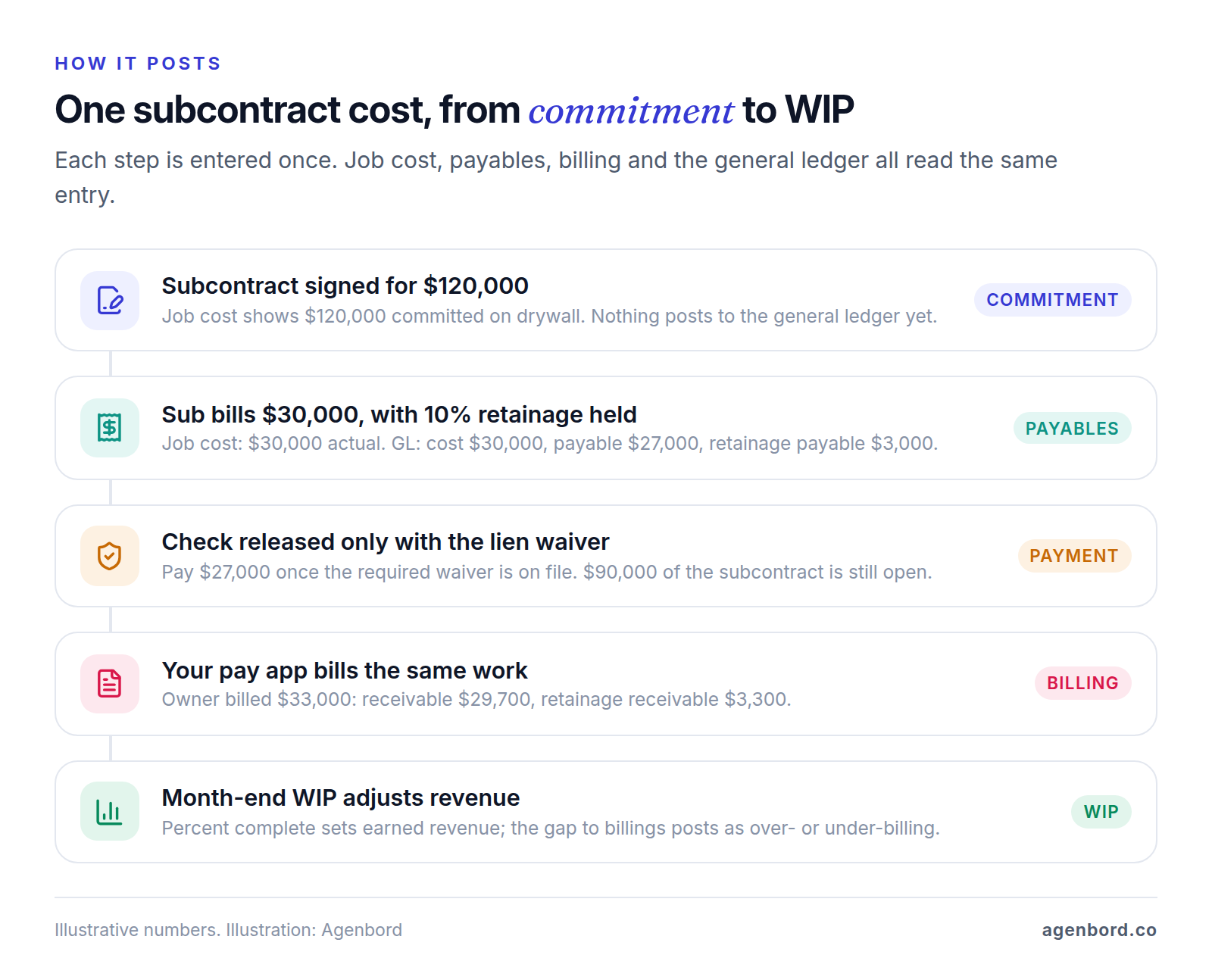
A job cost ledger tied to the general ledger
Each transaction carries a job, a cost code (what the money went to: site work, framing, electrical rough-in) and a cost type (labor, material, equipment, subcontract or other). One entry updates the job and the general ledger together, so the job cost report and the income statement agree at month end without a reconciliation spreadsheet.
Budgets live at the same level. Each job's budget by cost code comes from the estimate, which is what lets you compare budget, committed, actual and forecast cost while the job is still running.
Committed costs from POs and subcontracts
Generic accounting sees a cost when the bill arrives. Construction accounting records a commitment when a subcontract or purchase order (PO) is signed, so the job shows money you've agreed to spend before anyone invoices it. When the sub bills, the system matches the invoice to the subcontract, checks billed-to-date against the contract value, holds retainage at the subcontract rate and reduces the open commitment.
Progress billing, pay applications and change orders
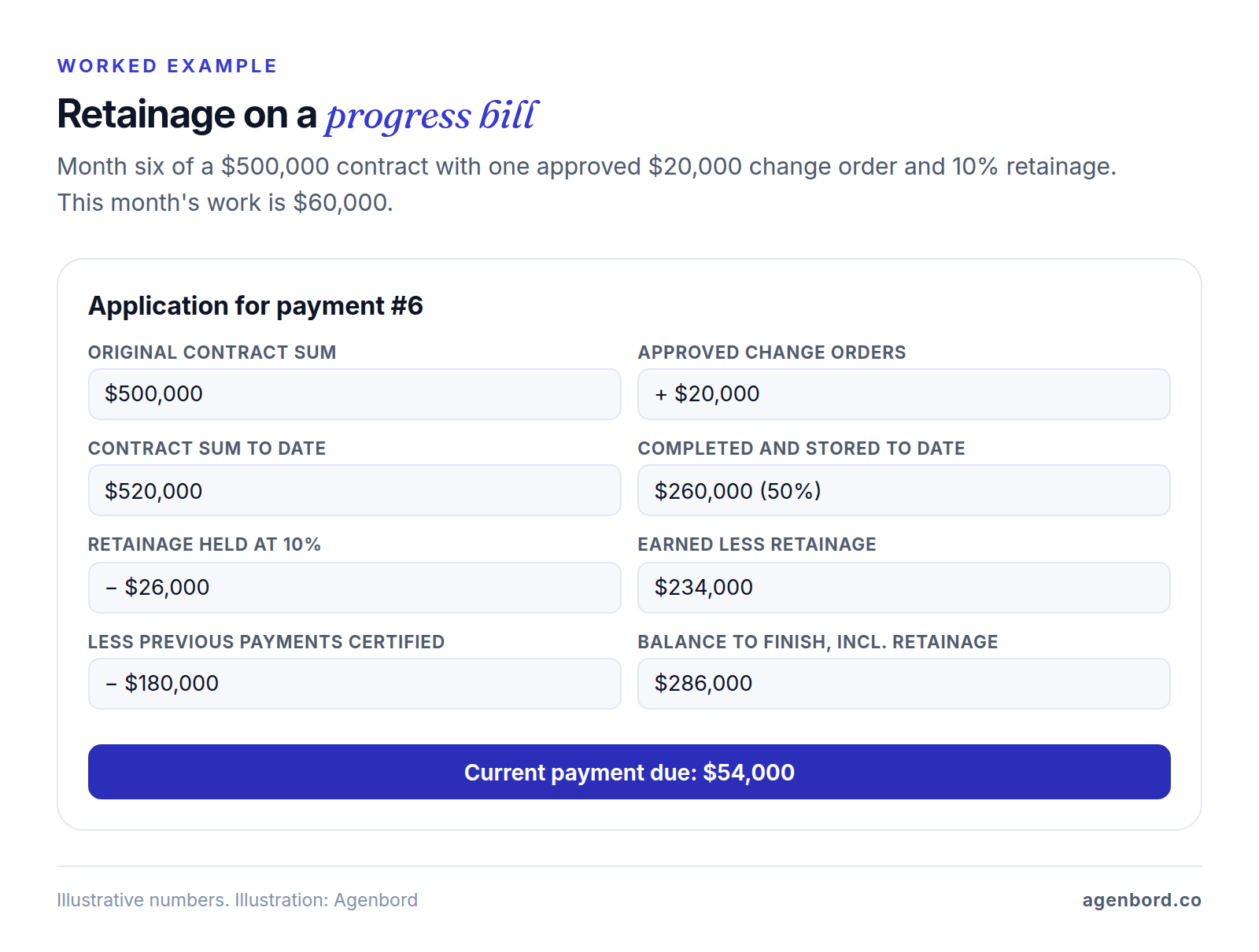
Commercial work is usually billed monthly against a schedule of values: the contract broken into line items, each billed by percent complete. Owners and architects often require AIA's G702 Application and Certificate for Payment with its G703 continuation sheet, or a format based on them. Together they show work completed and stored to date, retainage, previous payments, a summary of change orders and the amount now due.
Your software should build the pay app from the schedule of values, carry prior billings and approved change orders forward, and post the receivable and the retainage in the same step. Change orders touch everything: the owner contract, the schedule of values, the job budget and often a sub's commitment. Pending changes should show as cost you're carrying but stay off the bill until the owner approves them.
Retainage receivable and payable
Retainage is the share of each payment held back until the work is accepted, at a rate set by the contract. You carry it in both directions: retainage receivable from owners and retainage payable to subs. Each needs its own balance by job and by sub, an aging and a release step. Generic systems tend to collapse all of that into one balance-sheet account.
WIP, over/under billing and revenue over time
Contractors on long jobs generally recognize revenue as the work progresses, not when they bill or get paid. A common measure of progress is cost-to-cost: cost to date divided by estimated total cost, the basis of the percentage-of-completion approach. The monthly WIP schedule applies it to every open job. Percent complete times the current contract value gives earned revenue, and the gap to what you've billed is an overbilling (billed ahead, a liability) or an underbilling (billed behind, an asset).
Good software builds the WIP from job cost and your project managers' cost-to-complete estimates, then posts the over/under billing entries to the general ledger. For a WIP worked through on a sample job, see our guide to construction job costing software. Which revenue method your financial statements use, and which you use for taxes (they can differ), are decisions for your CPA. The software's job is to apply them the same way every month.
Construction payroll: certified, union and multi-state
Payroll is where generic tools fall shortest. One field worker can work three jobs in a week, under two classifications, in two states.
- Certified payroll. On federally funded or assisted construction contracts over $2,000, the Davis-Bacon and Related Acts require contractors and subs to pay at least the locally prevailing wages and fringe benefits. Covered contractors submit payroll information weekly, each payroll with a signed statement of compliance. The Department of Labor's Form WH-347 is optional; the weekly submission isn't. State and agency systems add their own formats, so check what a product exports: Foundation, for example, lists DIR, eMars and LCPtracker formats.
- Union payroll. Wage and fringe rates vary by local and classification, and contributions are reported and paid to each union's funds.
- Multi-state payroll. Crews that cross state lines need each state's withholding and unemployment rules applied.
- Labor in job cost. Hours should reach the job at the burdened rate (wages plus payroll taxes, insurance and fringes), not the bare wage.
Lien waivers, equipment and multiple entities
- Lien waivers. A lien waiver is a sub's or supplier's written release of lien rights for a payment. Payables should know which waiver each payment needs and hold the check until it's in. Forms and rules vary by state; our subcontractor management guide covers conditional and unconditional waivers and states that set the forms by statute.
- Equipment costing. Owned equipment is charged to jobs at hourly or daily rates, so each job carries the cost of the machines it used, and the equipment ledger shows whether those rates cover ownership and repairs.
- Multiple entities. Many contractors run more than one company, such as an operating company and an equipment company that rents to it. You need intercompany entries handled for you and consolidated statements that eliminate them.
This is general information, not accounting, tax or legal advice. Your CPA and attorney set the rules; the software should apply them consistently.
Three routes: QuickBooks, construction accounting or construction ERP
The best construction accounting software is the one that fits your size, contracts and payroll, so pick the route first and the product second. Here's how the main products compare, described the way each vendor positions them, with prices checked in October 2026.
| Product | Route | Positioning, per the vendor | Payroll | Price (October 2026) |
|---|---|---|---|---|
| QuickBooks Online Plus or Advanced | QuickBooks | Plus: up to 5 users. Advanced: up to 25 users, with construction financials | Add-on, or a construction payroll service | $140 or $340 a month, list |
| Foundation | Construction accounting | Construction accounting software | Built in: certified, union, multi-state | Quote, priced by module |
| Sage 100 Contractor | Construction accounting | Small to mid-sized contractors | Certified payroll included | Quote |
| Sage Intacct Construction | Construction accounting | Cloud-native, for medium-sized contractors and real estate developers | Through Sage HCM or ADP Workforce Now for Construction | Quote |
| Premier | Construction accounting | Construction cloud ERP for general contractors, owners and land developers | Add-on | Quote |
| Trimble Viewpoint Spectrum | Construction ERP | Web-based cloud ERP for mid-to-large contractors | Built in, multiple unions | Quote |
| Trimble Viewpoint Vista | Construction ERP | Customizable enterprise ERP for large-scale contractors | Built in, HR and payroll | Quote |
| Acumatica Construction Edition | Construction ERP | Cloud ERP edition; APEX package for small and midsize firms | Built in: unions, locals, certified wages | APEX from under $1,500 a month; otherwise quote |
| CMiC | Construction ERP | Single-database ERP for GCs, subcontractors, civil and heavy highway | Built in, with HCM | Quote |
QuickBooks plus construction add-ons
Construction accounting in QuickBooks has improved. QuickBooks Online Plus tracks project profitability and budgets. Advanced gained construction financials in Intuit's August 2026 release: structured budgets by phase, AIA-style progress billing, change order management and WIP over/under billing reporting, which Intuit says were previously a paid add-on. Intuit noted that not every feature would be available on August 1, so confirm what's live in your account. A 50%-off-for-three-months promotion was running on paid plans when we checked.
Two other Intuit products matter to contractors. QuickBooks Desktop Enterprise is still sold with job costing tools for contractors, and its contractor page lists no price. Intuit Enterprise Suite, for multi-entity businesses, adds construction tools such as AIA-style invoices, change order capture, budget-versus-actual with real-time WIP and consolidated financials, and connects to Procore, Buildertrend, ServiceTitan and JobTread. It's priced by quote, and Intuit says ProAdvisor accountants can offer up to 60% off list.
Add-ons fill the gaps:
- Billing and job management. Knowify, for example, produces AIA G702/G703 documents, tracks job cost by phase, change orders and POs, and syncs with QuickBooks Online (Simple Start through Advanced), QuickBooks Desktop and Intuit Enterprise Suite.
- Construction payroll. A service such as Payroll4Construction (powered by Foundation) handles certified payroll, prevailing wage, union fringes and multi-state payroll, and integrates with accounting software. Ask exactly how it posts payroll and job cost into QuickBooks.
- Project management and field apps for commitments, daily logs and crew time, synced to your books.
Strengths: the lowest cost, an accountant who already knows the system and a large ecosystem. Limits: every add-on is another sync where jobs, cost codes and vendors have to match, and the user caps (5 on Plus, 25 on Advanced) bite as you grow. Intuit's announcement doesn't mention retainage, committed costs or certified payroll, so test those three before you rely on QuickBooks for them. Fits: smaller contractors with one company, little certified or union payroll and a bookkeeper who'll keep the add-ons in sync.
Construction-specific accounting software
These systems put job cost, construction billing and, usually, construction payroll in one ledger.
- Foundation. Foundation's construction accounting software includes built-in payroll for certified, multi-state and union requirements; AIA, time-and-materials and progress billing with retainage; and change orders that update the over/under billing WIP schedule as soon as they're entered. Its pricing is by quote and module: job costing, payroll, POs and subcontracts, and receivables are core, while mobile time tracking, service dispatch, equipment management and project management are add-ons.
- Sage 100 Contractor. Sage's construction accounting software for small to mid-sized contractors, with job cost, certified payroll, AIA billings, lien waivers, subcontracts and POs.
- Sage Intacct Construction. Sage describes it as cloud-native and aims it at medium businesses: actual and committed costs across projects and entities, change orders, AIA billing for fixed-price, time-and-materials and cost-plus contracts, automated over/under billing entries and WIP, and multi-entity consolidation. Payroll runs through Sage HCM or ADP Workforce Now for Construction, and an open API connects tools such as Procore and Autodesk.
- Premier Construction Software. Calls itself a construction cloud ERP, with job costing, real-time budgets and forecasting, consolidated multi-entity financials, intercompany transactions and change order automation. Payroll is an add-on.
Strengths: one ledger built around jobs, with WIP and retainage built in rather than assembled from add-ons, and often payroll too. Limits: quote-based pricing makes comparison slower, implementation and data conversion take real effort, and the screens are built for accountants, so field time usually comes from a separate app. Fits: contractors with bonded work, monthly pay apps, in-house accounting staff, and payroll that QuickBooks add-ons handle awkwardly.
Construction ERP
A construction ERP runs the accounting core plus the operations around it. Our construction ERP buyer's guide compares these systems module by module, so briefly:
- Trimble Viewpoint Spectrum: in Trimble's words, "a native, web-based cloud ERP" for mid-to-large contractors that prioritize rapid onboarding and ease of use; its payroll handles multiple unions.
- Trimble Viewpoint Vista: a highly customizable enterprise ERP for large-scale contractors with deep configuration, complex multi-entity accounting and HR/payroll needs.
- Acumatica Construction Edition: payroll for multiple unions, locals and certified wages; lien waiver and insurance certificate tracking; AIA applications for payment; WIP automation; and multi-company, intercompany accounting. Its APEX for Construction package bundles software, implementation and support for smaller construction companies from under $1,500 a month, with unlimited users, as SaaS only.
- CMiC: a construction ERP on a single database platform for general contractors, subcontractors and civil and heavy-highway firms, covering construction accounting, project controls, payroll and HCM, and equipment.
Strengths: one system from purchasing to payroll, built for many entities and users. Limits: the biggest implementation of the three routes, and it needs an internal owner. Fits: larger or multi-company contractors, heavy self-perform or union workforces, equipment fleets and service divisions.
What construction accounting software costs
As of October 2026, only two products in the table publish a price. QuickBooks Online lists at $140 a month for Plus and $340 for Advanced, with payroll extra. Acumatica's APEX for Construction starts under $1,500 a month, including implementation and support, with unlimited users. Everything else in the table is quote-based, and so is Intuit Enterprise Suite. QuickBooks Desktop Enterprise is priced by the configuration you choose.
What moves a construction accounting software price differs by route:
- QuickBooks: the plan, plus a separate subscription for each add-on and for the payroll service.
- Construction accounting: the modules you license, user counts, hosting, and implementation and data conversion, which the vendor or a partner bills separately unless it's bundled, as APEX is.
- Construction ERP: the same items at larger scale, plus integration work and the internal time of your controller and payroll lead.
Ask each finalist for first-year and renewal costs in writing on the same scope, and for the price of adding a company or 20 field users mid-contract.
When a construction ERP or custom module pays off
Move up to a construction ERP when the accounting core works but the operations around it run on spreadsheets: several companies billing each other, an equipment fleet to cost and maintain, a service division, purchasing with approvals, or HR for a large field workforce.
Custom software is a narrower answer. Keep the general ledger and payroll in a proven package: tax tables, certified payroll and statements your CPA will sign off on are mature in packaged software, and owning that code is rarely worth it. Build only the part packages handle badly:
- a field app your crews will actually use, feeding time and quantities by job and cost code
- an owner-specific billing format, or unit-price contracts with hundreds of lines
- a subcontractor portal for pay apps, lien waivers and insurance certificates
- a dashboard that combines accounting, project management and field data
Our ERP and operations modules start from $25,000 for a single module (2–4 months). Connected multi-module platforms run $60,000–$150,000 over 4–9 months, delivered in phases, and integrations are quoted per integration. Smaller gaps, such as chasing missing lien waivers before a pay run, are often a workflow automation from $1,500. Budget hosting at roughly $50–$500 a month and maintenance at about 15–20% of the build cost per year. Our build vs buy framework walks through the decision.
We've built this kind of system for ourselves. In Smart Construction, the cloud construction ERP our team designed, built and operates as a subscription SaaS, retention is calculated on every progress bill. Its modules, from progress billing to procurement and subcontractor ledgers, labor attendance and payroll, and materials and inventory, sit in one data model shared by its web, desktop and mobile apps. Payment approvals reach decision-makers on WhatsApp, and an AI copilot answers questions over the company's own project and financial data. That single record per cost is the principle we'd bring to a module built around your accounting system.
How to choose construction accounting software
Start with a one-page profile. It narrows the field before the first sales call.
- Contracts: lump sum with monthly pay apps, cost-plus, time and materials, unit price, service work
- Subs or self-perform: a general contractor lives in commitments, sub pay apps and waivers; a specialty contractor lives in labor and payroll
- Payroll: union locals, prevailing-wage jobs, the states you work in and the number of field employees
- Companies: legal entities, intercompany billing and owned equipment
- Reporting: who reads your WIP (surety, bank, CPA) and how often
- Systems you'll keep: estimating, project management, a payroll service, bank feeds
- People: who will own the system, and whether your CPA already works in it
A demo script with four tests
Then give every finalist the same script and your own data: a recent job with a change order and a retainage release. Ask for the consultant who would implement you, not only the salesperson.
- Bill a pay app with retainage. Load the job's schedule of values and its prior pay apps. Bill this month by line, reduce retainage on a finished line if your contracts allow it, and print your owner's format. Pass: previous billings and change orders carry forward, the receivable and retainage receivable post to the job and the general ledger in one step, and retainage aging by job is one report away.
- Process a change order end to end. Log a pending owner change with its cost estimate, approve it, then issue the matching sub change order. Pass: the contract value, schedule of values, job budget and sub commitment all update without re-typing, and the pending cost showed in the forecast before approval but never on a bill.
- Pay a sub with a lien waiver hold. Enter a sub's pay app with retainage, leave its waiver missing and try to pay it. Pass: the system blocks the payment or demands a named override with a reason, and once the waiver arrives the check releases and the sub's ledger shows retainage payable.
- Produce a WIP report. Run last month's WIP on your converted data and drill into one job. Pass: percent complete uses your project manager's cost to complete, over/under billing shows by job, the adjusting entry is generated for you, and the totals tie to the general ledger.
If you do public or union work, add a fifth test: one worker on two jobs in one week under two classifications, producing the weekly certified payroll and the union report from the same timesheets.
Score each test pass or fail, and note every number someone re-types along the way. Those are the reconciliations you'll be doing every month.
Switching from QuickBooks: a cutover checklist
If you're coming from QuickBooks and spreadsheets, the conversion that works brings over open items, not just balances.
- Cut over at a period end. Month-end at minimum; a quarter-end or fiscal year-end is cleaner. Payroll is simplest to start on January 1, so you don't load year-to-date wages for W-2s.
- Convert open jobs by cost code: contract value with approved change orders, budget, cost to date, billed to date and the schedule of values with previous billings on every line, so the next pay app comes out right.
- Rebuild retainage by job and by sub. If retainage sits in one QuickBooks account, rebuild it from your pay apps (receivable by job, payable by sub, invoice by invoice) and tie each total to the general ledger.
- Load open commitments: every open subcontract and PO with its original value, change orders, invoiced to date, retainage held and remaining balance. Without them, job cost shows actuals only and forecasts start blind.
- Convert open receivables and payables by invoice, not as one balance per customer or vendor, so aging and retainage release work. If you switch mid-year, bring each vendor's year-to-date payments for 1099s.
- Reconcile before you switch: job cost totals to the cost accounts, retainage ledgers to their control accounts, agings to the general ledger and the opening WIP to the over/under billing accounts. Then run one month-end close in both systems.
- Keep the history readable. Closed jobs stay in QuickBooks or an export, for unit costs, audits and warranty claims.
Sources
- Intuit QuickBooks - QuickBooks Online plans and pricing (accessed October 2026)
- Intuit Firm of the Future - What's New in QuickBooks Online Advanced: August 2026 Updates (accessed October 2026)
- Intuit QuickBooks - Desktop Enterprise for contractors (accessed October 2026)
- Intuit - Intuit Enterprise Suite pricing (accessed October 2026)
- Intuit - Intuit Enterprise Suite for construction (accessed October 2026)
- Knowify - QuickBooks integration (accessed October 2026)
- Payroll4Construction - Construction payroll service (accessed October 2026)
- Foundation Software - Construction accounting software (accessed October 2026)
- Foundation Software - Pricing (accessed October 2026)
- Sage - Sage 100 Contractor (accessed October 2026)
- Sage - Sage Intacct Construction (accessed October 2026)
- Premier Construction Software - Construction cloud ERP (accessed October 2026)
- Trimble - Viewpoint construction ERP: Vista and Spectrum (accessed October 2026)
- Trimble - Spectrum ERP (accessed October 2026)
- Acumatica - Construction Edition overview (accessed October 2026)
- Acumatica - Construction Edition data sheet, 2026 (accessed October 2026)
- Acumatica - APEX for Construction (accessed October 2026)
- CMiC - Construction ERP (accessed October 2026)
- U.S. Department of Labor, Wage and Hour Division - Davis-Bacon and Related Acts (accessed October 2026)
- U.S. Department of Labor, Wage and Hour Division - Form WH-347 (accessed October 2026)
- AIA Contract Documents - Summary: G702-1992, Application and Certificate for Payment (accessed October 2026)
Prices, plans and regulations change. Figures were checked on October 2, 2026; follow the links for the latest. Nothing here is legal, tax or financial advice.
About the author
Founder, Agenbord
Muhammad Hamza is the founder of Agenbord, the Fort Lauderdale software company behind the construction ERP Smart Construction and a WhatsApp-first billing platform. He writes practical guides on buying, building and automating business software.