On this page
- What is job costing software?
- How job costing works: a worked example
- Job cost reports to review weekly and monthly
- How job costing software works: where the data comes from
- Signs you've outgrown spreadsheets or basic accounting
- Types of construction job costing software
- How to choose construction job costing software: a scorecard
- When a custom module or integration makes sense
- Implementation: cost codes and field adoption
If you find out what a job really made only after it's over, when the last invoices post and someone runs profit and loss by job, every overrun is already history. Construction job costing software moves that moment up: it ties every hour, purchase order, subcontract and invoice to a job and a cost code, and compares them with the budget while there's still time to act.
Which one you need depends on how complex your jobs are. A small contractor already on QuickBooks Online may be covered by the Plus or Advanced plan plus a field time app, especially now that Advanced has added AIA-style billing and work-in-progress (WIP) reporting. If you're bonded, run several project managers (PMs) and need commitments, WIP and construction payroll in one ledger, a construction accounting suite earns its cost. HVAC, plumbing and electrical service businesses should look first at field service platforms with job costing. When none of those fits how you work, a custom module beside your accounting system is the remaining option.
We build software for contractors, including our own cloud ERP, so what follows is the mechanics: a worked example, the reports to read, the tool types with pricing checked in October 2026, and a scorecard for choosing.
What is job costing software?
Job costing means tracking cost and revenue for each job separately, in enough detail to act on. Job costing software makes that continuous. Every timesheet, purchase order (PO), subcontract and invoice carries three tags: the job, a cost code and a cost type. That lets the system line up each part of the budget with what's committed, what's spent and what's left.
- Cost codes say what the money went to: a phase or scope of work, such as framing and drywall, underground plumbing or ductwork.
- Cost types say what kind of cost it is. Five cover most contractors:
| Cost type | What goes in it | General contractor example | Specialty trade example |
|---|---|---|---|
| Labor | Your own crews' wages plus burden | Carpenters framing walls | Electricians pulling wire, installers hanging duct |
| Materials | Anything installed or consumed | Studs, drywall, fasteners | Conduit, wire, fittings, a rooftop unit (some contractors give major equipment its own type) |
| Equipment | Owned or rented construction equipment | Scissor-lift rental | Lift, trencher or excavator time |
| Subcontract | Work bought out to another contractor | Plumbing, HVAC and electrical subs | Insulation or controls subs |
| Other | Everything else the job causes | Permits, dumpsters, temporary toilets | Permits, disposal fees, inspections |
Labor burden: cost labor at what it really costs
A worker's wage isn't what an hour of labor costs you. Burden adds employer payroll taxes (the employer share of Social Security and Medicare alone is 7.65% of wages), federal unemployment tax (0.6% of the first $7,000 per employee if you get the full state credit), state unemployment tax, workers' comp, liability insurance, benefits or union fringes, and paid time off.
In the example below, a framer earning $36 an hour costs $48 once $12 of burden is added. Workers' comp and unemployment rates vary by state and trade, so your number will differ. If job cost records labor at the bare wage, every self-performed cost code looks 25% cheaper than it is, and your next bid inherits the mistake.
How job costing works: a worked example
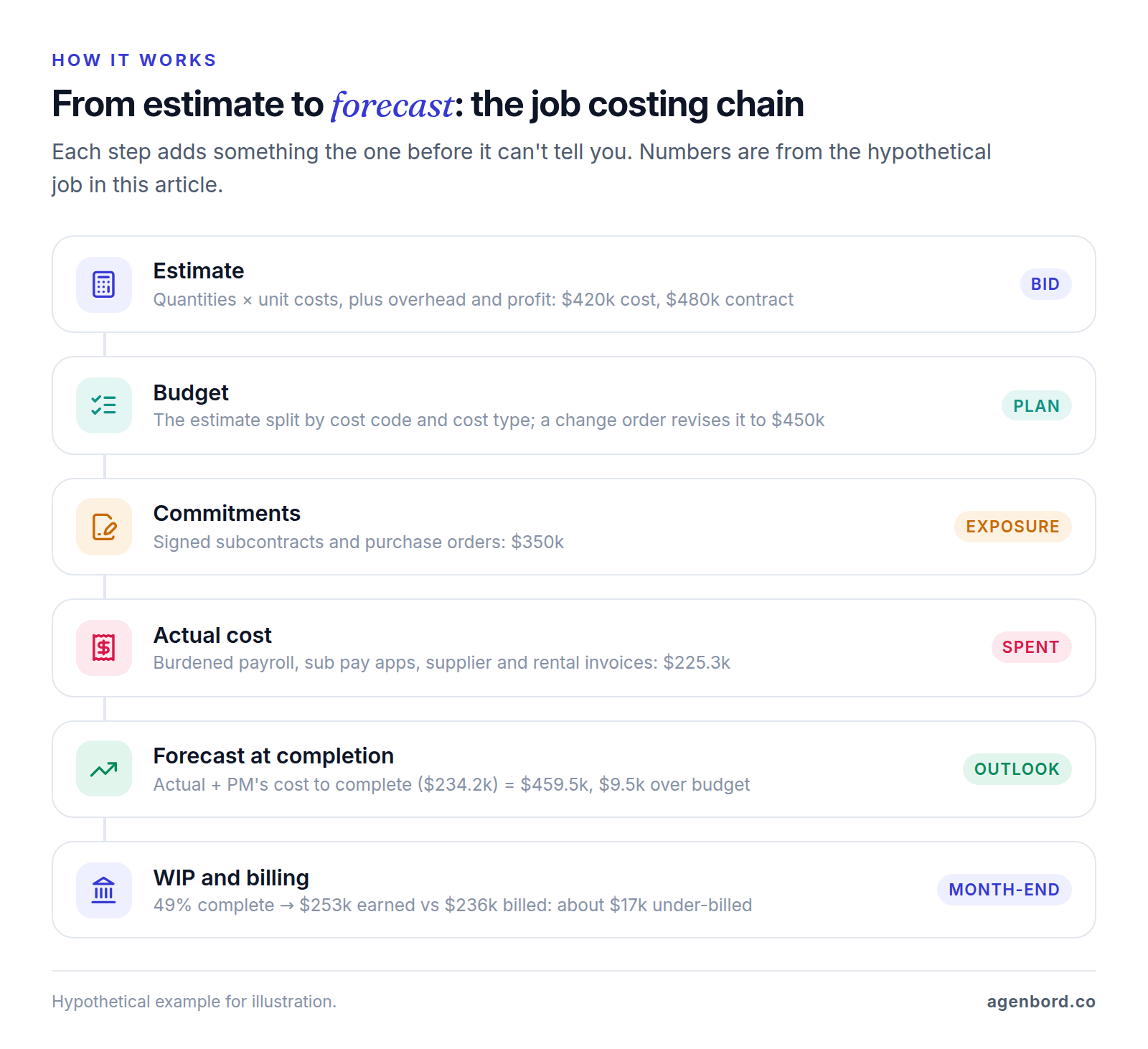
The chain is the same in every system: estimate, budget, commitments, actual cost, cost to complete, forecast. Here it is on one hypothetical job: a $480,000 medical office build-out by a general contractor that self-performs framing and drywall and subcontracts the trades. We'll stop at the end of month three of five. The numbers are illustrative, not from a real project.
Estimate to budget
The estimate comes to $420,000 of cost plus $60,000 for overhead and profit, a planned gross profit of 12.5%. When the job is won, the estimate becomes the budget, split into cost codes and cost types. Framing and drywall becomes 1,125 crew hours at $48 ($54,000 of labor) plus $42,000 of materials. Plumbing, HVAC, electrical, and finishes and doors become subcontract budgets.
Change orders
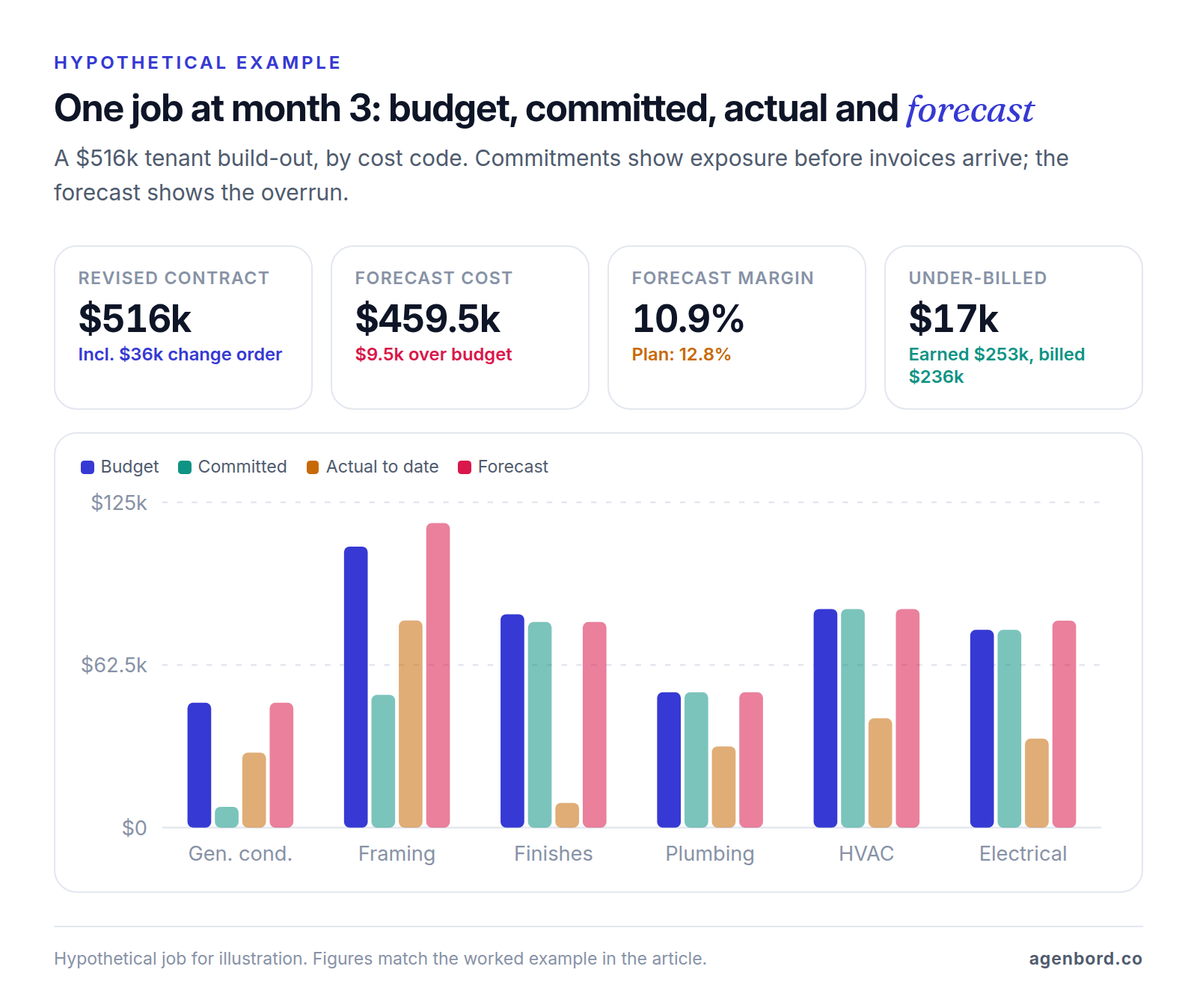
The owner adds two exam rooms. Approved change order #1 adds $36,000 to the contract and $30,000 to the budget: $12,000 to framing and drywall (125 more hours plus $6,000 of materials), $8,000 to electrical, $6,000 to HVAC and $4,000 to finishes and doors. The revised contract is $516,000, the revised budget $450,000, and the planned gross profit $66,000, or 12.8%.
Changes the owner hasn't approved go on a pending log. Their cost belongs in your forecast now; their price doesn't count until someone signs.
Commitments
Commitments are what you've agreed to spend: signed subcontracts and POs. On this job they total $350,000, about 78% of the budget, long before most of it is invoiced.
Two lines stand out. The finishes and doors subcontract, change order included, came in at $79,000, $3,000 under budget. The PO for studs and drywall came in at $51,000 against $48,000 because the supplier raised prices. Good software flags that $3,000 the day the PO is issued, not a month later when the invoice arrives. Labor isn't committed in advance, so for self-performed work you watch hours instead.
Actual cost, cost to complete and the forecast
By the end of month three, $225,300 of actual cost has posted: approved timesheets at the burdened rate, subcontractor pay applications, supplier and rental invoices, dumpster service and the superintendent's time. On its own that number tells you little. The one that matters is the forecast at completion: actual cost to date plus the project manager's estimate of the cost to complete, code by code.
Framing and drywall shows why. The crew has used 825 of 1,250 budgeted hours, but the foreman puts the work at 60% complete, which is only 750 hours' worth. At that pace the scope needs 1,375 hours, so labor finishes $6,000 over. Add the $3,000 material overrun and the code forecasts at $117,000 against $108,000. In electrical, the sub has submitted a $3,500 change request for outlets the owner asked for on site. It sits in the forecast as cost, and on the pending log until the owner approves a price.
| Cost code (cost types) | Revised budget | Committed | Actual to date | Cost to complete | Forecast | Variance |
|---|---|---|---|---|---|---|
| General conditions (labor, equipment, other) | $48,000 | $8,000 | $28,800 | $19,200 | $48,000 | On budget |
| Framing & drywall (labor, materials) | $108,000 | $51,000 | $79,600 | $37,400 | $117,000 | $9,000 over |
| Finishes & doors (subcontract) | $82,000 | $79,000 | $9,500 | $69,500 | $79,000 | $3,000 under |
| Plumbing (subcontract) | $52,000 | $52,000 | $31,200 | $20,800 | $52,000 | On budget |
| HVAC (subcontract) | $84,000 | $84,000 | $42,000 | $42,000 | $84,000 | On budget |
| Electrical (subcontract) | $76,000 | $76,000 | $34,200 | $45,300 | $79,500 | $3,500 over |
| Total | $450,000 | $350,000 | $225,300 | $234,200 | $459,500 | $9,500 over |
The job now forecasts $9,500 over budget. Gross profit drops from a planned $66,000 (12.8%) to $56,500 (10.9%), and you know it in month three, with half the work left to act: price the electrical change for the owner, fix the framing crew's pace and protect the finishes savings.
Percent complete, WIP and over/under billing
Once a month the forecasts feed the WIP schedule, which compares what each job has earned with what you've billed. The basics, using this job:
- Percent complete, measured by cost (often called the cost-to-cost method): $225,300 ÷ $459,500 = 49%.
- Earned revenue: $516,000 × 49% = about $253,000.
- Billed to date: the total of your pay applications before retainage, $236,000 here.
- Over/under billing: billed minus earned. This job is under-billed by about $17,000, meaning costs and earned profit exceed billings (an asset on the balance sheet). Billing ahead of earned revenue is over-billing, a liability.
Under-billing isn't automatically bad; the next pay application may catch up. But cost-to-cost treats overspending as progress, so overruns surface as under-billings, and sureties read persistent under-billing as a warning of profit fade, as an article in NASBP's surety newsletter explains.
The WIP is only as honest as the cost-to-complete numbers behind it. If the PM hadn't updated this forecast and it still said $450,000, the job would show 50.1% complete, $258,300 earned and $33,000 of profit to date instead of $27,700. That $5,300 difference is profit that doesn't exist.
How you recognize contract revenue on your financial statements, and how the WIP is prepared for your bank or surety, are decisions to set up with your CPA. The software's job is to apply those rules the same way every month.
Retainage
Retainage is the share of each payment held back until the work is finished. The percentage comes from your contract, and public work may limit it: on federal construction contracts, FAR 32.103 allows retainage only when progress is unsatisfactory and caps it at 10%.
Say this owner withholds 10%. Of the $236,000 billed, $23,600 sits in retainage receivable. You hold back 10% from your subs too, so $11,690 of their $116,900 in billings is retainage payable. Retainage changes cash, not cost or earned revenue: job cost records the full sub invoice and the WIP uses gross billings, but your cash forecast shouldn't count retainage until it's released.
Job cost reports to review weekly and monthly
Good software produces dozens of reports. These are the ones worth a standing slot on the calendar:
| Report | How often | What it tells you |
|---|---|---|
| Labor hours by cost code (budget vs actual, with percent complete) | Weekly | Whether self-performed work is on pace. It's the earliest warning you get. |
| Cost-to-complete review (budget, committed, actual and forecast by code) | Weekly | Which codes are trending over, and what the job makes if nothing changes. |
| Open commitments (POs and subcontracts, billed vs remaining) | Weekly | Exposure that hasn't hit actual cost yet, and buyout gains or losses. |
| Change order log (pending vs approved, cost and price) | Weekly | Scope you're carrying without a price, and the margin at risk. |
| WIP schedule with over/under billing | Monthly | Earned revenue, profit to date, and fade or gain by job. This is what your surety reads. |
| Receivables by job, including retainage | Monthly | Cash tied up in each job and retainage still to collect. |
| Payables and retainage owed to subs | Monthly | What you owe each sub and when it comes due. |
| Closed-job estimate vs actual (unit costs) | At closeout | Real productivity and costs to feed into the next bid. |
The weekly review matters more than any feature. Give it 30 minutes per job with the PM and whoever keeps the books: the PM updates cost to complete by code, and accounting confirms costs and commitments are coded to the right place. Month-end then rolls those forecasts into the WIP instead of guessing at them.
How job costing software works: where the data comes from
Job costing software doesn't create numbers. It collects them from documents you already produce and makes sure each one is tagged.
- Estimates become the budget, ideally imported by cost code rather than retyped; our construction estimating software guide covers that hand-off.
- POs and subcontracts become commitments, and change orders to them adjust the commitments.
- Vendor and subcontractor invoices become actual cost, matched to their PO or subcontract so the system knows what's left and how much retainage to hold.
- Timesheets and field apps supply hours by job and cost code, sometimes with equipment hours and quantities installed.
- Payroll turns hours into burdened labor cost. Better systems apply an estimated burden when time is approved, so labor shows up before payroll runs, then true it up.
- Owner billing, such as progress billing against a schedule of values on AIA G702/G703 pay applications, supplies billed to date and retainage receivable.
Timing is the catch. Labor can reach job cost the day time is approved, while materials may not hit actual cost until the invoice is entered weeks after delivery. That lag is why commitments and cost to complete tell you more than the actual-cost column.
The data can live in one system or several connected ones: a construction suite that does everything, or accounting plus a project management tool plus a time app. A connected stack works if jobs, cost codes and cost types sync both ways and nobody re-keys. If the only gap is one handoff, such as pushing approved, cost-coded timesheets into payroll, a workflow automation may close it without new software.
Signs you've outgrown spreadsheets or basic accounting
Basic accounting tells you what a job cost after the fact. You need more when:
- You learn a job's margin at closeout, or from the year-end financials.
- Field hours arrive on paper or by text, and the bookkeeper guesses the cost codes.
- POs and subcontracts live in email, so nobody can say what's committed.
- Change orders get approved verbally and billed late, or never.
- Your surety or bank asks for a WIP schedule and it takes days to build in Excel.
- Each PM keeps a private spreadsheet, and none of them agrees with accounting.
- Estimators can't pull actual unit costs from finished jobs to price the next one.
- Labor sits in job cost at the bare wage, without burden.
If three or more of these apply, the problem is no longer discipline. It's the tools.
Types of construction job costing software
There's no single best construction job costing software, only the best fit for your work. Job costing software for contractors falls into five categories, plus custom work, and you can combine them, for example a time app feeding your accounting system. Prices are list prices as of October 2026.
| Type | Examples | Best fit | Pricing |
|---|---|---|---|
| Accounting software with job costing | QuickBooks Online Plus and Advanced, QuickBooks Desktop Enterprise, Intuit Enterprise Suite | Smaller contractors whose books already live in QuickBooks | Online: $140/month (Plus), $340/month (Advanced); others by configuration or quote |
| Construction accounting and ERP suites | Foundation, Sage 100 Contractor, Sage Intacct Construction, Acumatica Construction Edition | Bonded contractors, several PMs, construction payroll, monthly WIP | Mostly by quote; Acumatica's APEX for Construction starts under $1,500/month |
| Project management tools with financials | Procore, Buildertrend, JobTread | General contractors, builders and remodelers who want PMs to own budgets and commitments | Procore and Buildertrend by quote; JobTread $199/month plus per-user fees |
| Field service software | ServiceTitan, Jobber | HVAC, plumbing and electrical service and replacement work | ServiceTitan by quote; Jobber publishes plans, with job costing from Grow up |
| Time tracking apps | QuickBooks Time, Workyard, ClockShark | Getting hours coded to the right job and cost code | Per user per month, some with a base fee |
Accounting software with job costing
QuickBooks Online includes projects on Plus (up to 5 users) and Advanced (up to 25 users); the cheaper plans don't. Plus tracks project profitability, labor costs and budgets. Advanced adds project cost estimates vs actuals and, with its August 2026 release, construction financials that Intuit says were previously a paid add-on: budgets by phase, AIA-style progress billing, change order management and WIP over/under billing reporting (Intuit's announcement). Intuit notes that release timing varies, so confirm what's live in your account.
The strength: if your bookkeeper and CPA already work in it, job costing lives in your system of record with no second ledger to reconcile. The watch-outs: field crews need QuickBooks Time or another time app, and you should test how open POs, subcontracts and retainage show up before you trust its forecasts.
On desktop, QuickBooks Desktop Enterprise's contractor features include a Job Costing Center, a committed-costs-by-job report and a work-in-progress report. Larger, multi-entity firms can look at Intuit Enterprise Suite, which has a construction edition and is priced by quote.
Construction accounting and ERP suites
These are accounting systems built around the job: cost codes crossed with cost types, commitments, progress billing and construction payroll in one ledger. Foundation Software sells construction accounting covering job costing, payroll, invoicing, vendor payments and financial reporting, with WIP and over/under billing reports. Sage sells Sage 100 Contractor for smaller firms and Sage Intacct Construction, a cloud product, for midsize ones. Acumatica tracks labor, material, equipment, subcontractor and other costs against budgets and commitments without per-user fees, and its packaged APEX for Construction offer starts under $1,500 a month, including implementation and support.
Our construction ERP buyer's guide compares these suites module by module. Their strength is depth, down to payroll details: if you do federal prevailing-wage (Davis-Bacon) work, you submit certified weekly payrolls (the Department of Labor's optional form is the WH-347), so check that each suite on your list produces them. The watch-outs: implementation takes real time, most pricing is by quote, and the screens are built for accountants first, so plan how field data gets in.
Project management tools with financial modules
Procore's project financials include a budget, commitments (subcontracts and POs), change events and change orders, and time-phased cost forecasts. Procore sells annual contracts by quote, without per-user fees except on its field productivity product, and connects to accounting systems through integrations rather than replacing them. Buildertrend includes a job costing budget, POs and bills, a time clock, and QuickBooks and Xero integrations, priced by custom quote with unlimited users. JobTread publishes its pricing and includes every feature in one plan, from budgets and change orders to job costing and a QuickBooks Online integration.
The strength: they're built for PMs, so budgets and commitments get updated where the work is managed. The catch: accounting still lives elsewhere, so the quality of the sync decides whether the two sets of numbers match. Our construction project management software guide compares these tools for small contractors.
Field service software for HVAC, plumbing and electrical
Service and replacement work runs on different math: many short jobs, flat-rate pricing, technician time and truck stock. ServiceTitan's job costing breaks each job into materials, equipment, POs, commissions and labor burden, pulling from sold estimates, POs, vendor invoices and payroll; it's priced by quote. Jobber includes job costing from its Grow plan and publishes its prices. If you also run construction projects, check how the platform handles multi-month jobs, commitments and retainage, or pair it with construction accounting. When the gap is between your field service platform and your books, that's integration work for home service companies, not a new system.
Time tracking apps
Time apps handle the hardest input: hours coded to the right job and cost code on the day they're worked. QuickBooks Time's Elite plan compares budgeted with actual hours by project. Workyard's Pro plan can require a project and cost code at clock-in and imports cost codes from your accounting system. ClockShark tracks time by job and task, with advanced job costing controls on its Pro plan. A time app captures labor, but subcontracts, POs and owner billing live elsewhere, so it feeds a job costing system rather than replacing one.
How to choose construction job costing software: a scorecard
Score each shortlisted tool from 1 to 5 on every line, multiply by the weight and add it up. Adjust the weights to your business; a service contractor might weight field capture higher and WIP lower.
| Criterion | Weight | What to test in the demo |
|---|---|---|
| Cost structure fit | 20% | Your cost codes crossed with cost types, phases and units. Does your estimate import into the budget by code? |
| Field capture | 20% | Can a foreman log crew time to the right job and cost code on a phone in under a minute? |
| Commitments and change orders | 15% | Subcontracts and POs with their change orders, pending vs approved owner changes, sub invoices matched to commitments, retainage payable. |
| Forecasting and WIP | 15% | Cost to complete by code, forecast at completion, and a WIP schedule with over/under billing your CPA accepts. |
| Billing | 10% | Progress billing on a schedule of values (AIA-style if your owners require it), time-and-materials billing, retainage receivable. |
| Payroll and accounting | 10% | Labor burden, certified payroll if you need it, and a sync where jobs and cost codes flow both ways without re-keying. |
| Total cost and rollout | 10% | Pricing model (per user, unlimited users or quote), implementation fees, training time and data migration. |
Make every vendor run one of your recent jobs, with your cost codes and real numbers, through the demo. If a tool can't import your estimate by cost code, expect re-keying forever. If foremen won't use its field app during a two-week trial, the forecast will never be better than the timesheets.
When a custom module or integration makes sense
Buy first. For most contractors, one of the tools above plus a clean cost-code structure is the right answer, and our build-vs-buy framework walks through the decision. Custom work makes sense when:
- Your accounting system is staying, and the gap is between it and the field: cost-coded time, quantities installed, or POs that never reach job cost.
- You run several tools and nobody trusts any one of them for the forecast, so you need one cost-to-complete view across them.
- Your contracts don't fit standard templates: cost-plus with fee tiers or shared savings, unit-price work with hundreds of line items, or owner-specific billing formats.
- Per-user fees for a large field crew cost more each year than a module you'd own.
For scale, our custom ERP and operations modules start around $25,000 for a single module such as job costing (2–4 months), and connected multi-module platforms run $60,000–$150,000 over 4–9 months, delivered in phases. Integrations with existing systems are quoted per integration. Hosting for a small-business app runs roughly $50–$500 a month, and maintenance about 15–20% of the build cost per year. If your job cost lives in a spreadsheet that already works, turning it into a multi-user web app starts around $12,000.
We've built this kind of software for ourselves. Smart Construction, the cloud construction ERP our team designed, built and operates as a subscription SaaS, keeps estimating and bills of quantities, procurement and subcontractor ledgers, labor attendance and payroll, materials and inventory, and progress billing with retention in one data model shared by its web, desktop and mobile apps. That's the principle we'd bring to a custom module: capture each cost once, where it happens, and have every report read the same record.
Implementation: cost codes and field adoption
Two things decide whether job costing works after go-live: the cost-code list, and whether the field actually uses the app. In order:
- Design cost codes before you migrate anything. One list, used everywhere: estimate, budget, timesheets, POs and invoices. Keep it short enough that a foreman can pick the right code on a phone, dozens rather than hundreds. General contractors can use CSI's MasterFormat divisions as the backbone and trim them to the work they do; trade contractors can code by phase instead (rough-in, trim, startup).
- Keep cost types separate from cost codes. Don't create "framing labor" and "framing material" codes. Use one code with five cost types, and reports by type come for free.
- Set burden rates up front by trade or class, and revisit them with your CPA when insurance or benefit costs change.
- Start with open jobs, not history. Load each open job's budget, open commitments and billed to date. Leave closed jobs in the old system for reference.
- Make field coding the default. Require a cost code at clock-in, review timesheets daily for the first few weeks, and show each crew its hours against budget, which gives foremen a reason to code accurately.
- Hold the weekly cost review from week one. The forecast is only as good as the PM's cost to complete.
- Close the loop at closeout. Compare estimated and actual unit costs on every finished job and update your estimating data, so the next bid starts from what the work really cost.
Sources
- Intuit QuickBooks - QuickBooks Online plans and pricing (accessed October 2026)
- Intuit QuickBooks - Project profitability with job costing software (accessed October 2026)
- Intuit QuickBooks Help - Set up and use projects in QuickBooks Online (accessed October 2026)
- Intuit QuickBooks Help - Compare project cost estimates vs actuals (accessed October 2026)
- Intuit Firm of the Future - What's New in QuickBooks Online Advanced: August 2026 Updates (accessed October 2026)
- Intuit QuickBooks - Desktop Enterprise job costing for contractors (accessed October 2026)
- Intuit - Intuit Enterprise Suite and pricing (accessed October 2026)
- Intuit QuickBooks - QuickBooks Time pricing (accessed October 2026)
- Foundation Software - Construction accounting software (accessed October 2026)
- Sage - Construction accounting and management software (accessed October 2026)
- Acumatica - Construction management software (accessed October 2026)
- Acumatica - APEX for Construction (accessed October 2026)
- Procore - Pricing (accessed October 2026)
- Procore - Project Financials (accessed October 2026)
- Buildertrend - Pricing (accessed October 2026)
- JobTread - Pricing (accessed October 2026)
- ServiceTitan - Job costing software (accessed October 2026)
- Jobber - Pricing (accessed October 2026)
- Workyard - Pricing (accessed October 2026)
- ClockShark - Pricing (accessed October 2026)
- IRS - Topic no. 751, Social Security and Medicare withholding rates (accessed October 2026)
- IRS - Topic no. 759, Form 940 Employer's Annual Federal Unemployment (FUTA) Tax Return (accessed October 2026)
- Acquisition.gov - FAR 32.103, Progress payments under construction contracts (accessed October 2026)
- NASBP - A surety's perspective of underbilling and its impact on contractor financials (accessed October 2026)
- AIA Contract Documents - Summary: G702-1992, Application and Certificate for Payment (accessed October 2026)
- U.S. Department of Labor - Payroll certification for Davis-Bacon contracts (WH-347) (accessed October 2026)
- Construction Specifications Institute - MasterFormat 2026 (accessed October 2026)
Prices, plans and regulations change. Figures were checked on October 1, 2026; follow the links for the latest. Nothing here is legal, tax or financial advice.
About the author
Founder, Agenbord
Muhammad Hamza is the founder of Agenbord, the Fort Lauderdale software company behind the construction ERP Smart Construction and a WhatsApp-first billing platform. He writes practical guides on buying, building and automating business software.