On this page
- What construction project management software does (and doesn't)
- Construction project management software features small contractors need
- Best construction project management software for small contractors, compared
- Free construction project management software: what you actually get
- Construction project management software that integrates with QuickBooks
- How to choose: match the tool to your work
- When a lightweight custom tool or integration beats an all-in-one suite
- Switching tools: a migration checklist
If you're shopping for construction project management software, you've probably had a week like this: a schedule change reached two subs but not the third, a change order agreed in a driveway never reached an invoice, and the photos that would settle a dispute are on a laborer's phone. The fix is one place per job for the schedule, the field record, changes and documents, open in the office and in the truck.
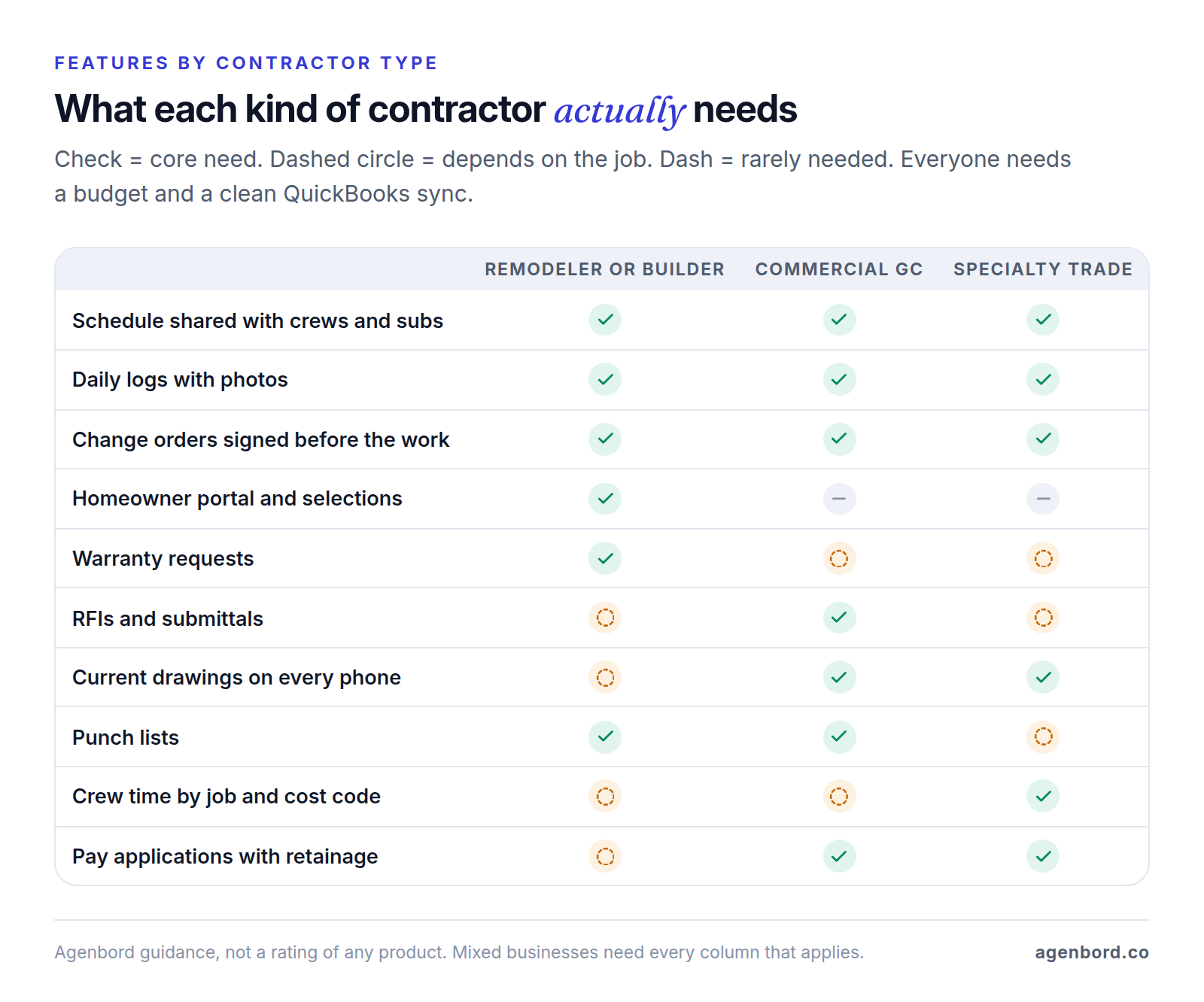
The short answer: a contractor with 2–50 people needs scheduling, daily logs with photos, change orders signed before the work, punch lists, document storage, a budget, a field app the crew will actually use and a clean sync with QuickBooks. Remodelers and builders add a client portal with selections. RFIs and submittals matter mainly on commercial work. Most of what enterprise platforms add on top, you can skip.
Then choose by the work you do. Remodelers and home builders should start with Buildertrend, JobTread or Houzz Pro, commercial general contractors with Procore or Fieldwire, and trade contractors with Knowify or Raken. Contractor Foreman covers a lot for little money across all three. As of October 2026, free plans exist but have tight limits, entry-level paid plans for one user list at $39–$199 a month, and three vendors only quote.
We build software for contractors, including our own construction ERP. This guide sticks to what decides the purchase: features, real prices, what "integrates with QuickBooks" means, and a trial that tests whether your crew will use it.
What construction project management software does (and doesn't)
Construction project management (PM) software runs the work side of a job: each job's schedule, site record, documents, changes and conversations in one place, on the web and on a phone. Nearly every current product is cloud-based construction project management software, so the data sits on the vendor's servers and the office and the field see the same version. Ask how the app behaves with no signal, because basements and rural lots often have none.
It isn't your accounting system. Construction ERP and accounting software runs the money: the general ledger, payables, payroll, job costing, progress billing with retainage (the share of each payment held back until the work is accepted) and the work-in-progress (WIP) report. Our construction ERP guide covers that side. The line blurs at small-contractor scale, because many PM tools now include estimates, budgets, purchase orders and invoices. Even then, QuickBooks usually stays the books and the PM tool feeds it.
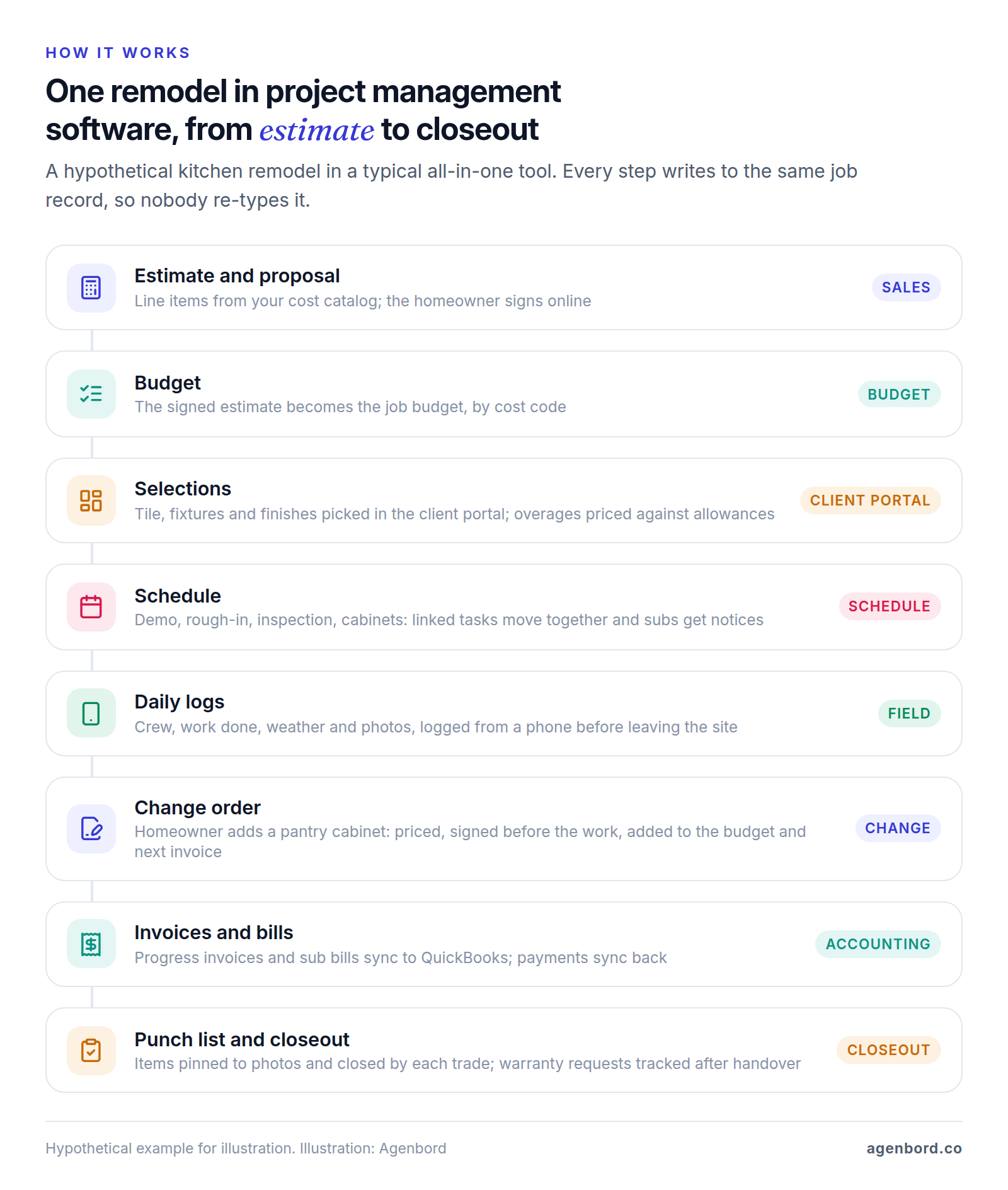
Here's how one remodel moves through a typical all-in-one tool.
Construction project management software features small contractors need
Ten features cover nearly everything a small contractor needs. A vendor demo on sample data won't expose the gaps, so run the right-hand column on one of your own jobs during a trial.
| Feature | What it does for you | Test it on your own job |
|---|---|---|
| Scheduling | Linked phases, so moving one date moves the rest; crews and subs get notices | Push the drywall start back three days. Do later tasks and the sub's notice update on their own? |
| Daily logs and photos | A dated record of crew, work done, weather, deliveries and inspections, with photos | Can your foreman file a log with five photos in under five minutes, on one bar of signal? |
| Change orders | Scope, price and schedule impact, signed by the client before the work starts | Does the signed change reach the budget and the next invoice without re-typing? |
| Client portal and selections | Homeowners see the schedule and photos, pick finishes and approve overages against allowances | Can a client pick a faucet and approve a $300 overage from a phone? |
| RFIs and submittals | RFIs (requests for information) put design questions to the architect in writing; submittals get product data and shop drawings approved before you order | Send an RFI with a marked-up sheet and get a dated answer back |
| Punch lists | Items pinned to a photo or drawing, assigned to a trade and closed with a photo | Assign ten items to two subs. Can they close them without a paid seat? |
| Document storage | Current drawings, contract, permits and insurance certificates, filed by job | Upload a revised sheet. Does the field see only the current revision? |
| Budget and estimate-to-budget | The signed estimate becomes the job budget by cost code, and costs post against it | Convert a real estimate. Do your cost codes come through intact? |
| Field mobile app | Everything above from a phone, for the people doing the work | Hand it to your least technical crew lead, with no training session |
| QuickBooks sync | Invoices, bills and payments reach your books once, on the right job | Push one bill and one invoice, then have your bookkeeper check them in QuickBooks |
At small scale, two of these carry most of the value. Daily logs are cheap insurance when a client disputes a delay or a sub disputes a backcharge. Change orders protect margin, because extra work done on a verbal go-ahead is the easiest to leave unbilled.
What you can skip at your size
Simple construction project management software is mostly a matter of what you leave out:
- 3D model (BIM) coordination, unless a commercial client requires it.
- Formal document control: transmittals, correspondence logs and meeting-minute workflows. A job folder and an RFI log cover most small jobs.
- Critical-path scheduling with resource leveling. A Gantt chart with dependencies handles a job with a few dozen tasks.
- Bid management portals, unless you're a general contractor who invites sub bids on most jobs.
- Payroll or a second ledger inside the PM tool. Send hours to your payroll provider or QuickBooks, and keep one set of books.
- Bundled marketing such as websites, email campaigns and ads. Fine if you'd buy them anyway; not a reason to pick a PM tool.
- AI features as the tiebreaker. Judge the daily workflows first.
Best construction project management software for small contractors, compared
There's no single best construction project management software, only the best fit for your work and team size. Here are the main options for small contractors, with list prices from each vendor's site as of October 2026.
| Tool | Built for (vendor's positioning) | Price as of October 2026 | Watch out for |
|---|---|---|---|
| Buildertrend | Home builders and remodelers, plus commercial and specialty contractors | Custom quote; unlimited users and projects | No list price to compare; its QuickBooks Desktop sync is in maintenance mode |
| JobTread | Builders, remodelers and specialty contractors | $199/month with 1 internal user, plus $20/month per user for users 2–10 (billed monthly; annual saves 20%) | QuickBooks Online only |
| Houzz Pro | Remodelers, builders and designers | Free plan; Design $99, Pro $199, Teams from $399 a month, on an annual subscription | Schedules, daily logs, change orders and QuickBooks start on Pro |
| Contractor Foreman | Small and mid-sized residential and commercial contractors | $49–$332/month billed annually, by user cap (1, 3, 8, 15 or unlimited) | Price steps up at each user cap |
| Knowify | Trade contractors | Core $99/month (1 user) or Advanced $329/month (10 users), billed yearly; $29/month per extra user | Job costing, daily logs and the client portal need Advanced |
| Procore | General contractors, specialty contractors and owners | Custom quote on an annual contract, based on construction volume; unlimited users | No list prices; the quote rises with your construction volume |
| Fieldwire | Field teams at GCs and specialty contractors | Free for 5 users and 3 projects; $39, $64 or $89 per user/month billed annually | RFIs, submittals, change orders and budgets only on the $89 plan |
| Raken | GCs, subcontractors and heavy civil firms | Quote; no list prices on its pricing page in our check | Field-first; pair it with your estimating and accounting tools |
Buildertrend
An all-in-one for residential builders and remodelers that also pitches commercial and specialty work. Project tools include scheduling, daily logs, change orders with e-signature, selections with running totals, a time clock, warranty claims and a client portal, alongside sales and financial tools. With unlimited users and projects, adding a superintendent or a sub doesn't raise the bill. Get the quote in writing for year one and for renewal.
JobTread
An all-in-one with a published price and every feature in one plan: estimating, selections and allowances, schedules, daily logs, change orders, AIA-style payment applications, job costing and customer portals. Per-user rates drop above 10 users. Vendors, subs and customers use the portals free, and so can field crew who only post photos, log daily notes and check their schedule. There are no contracts or setup fees, monthly plans carry a 30-day money-back guarantee, implementation and training are included, and it integrates with QuickBooks Online.
Houzz Pro
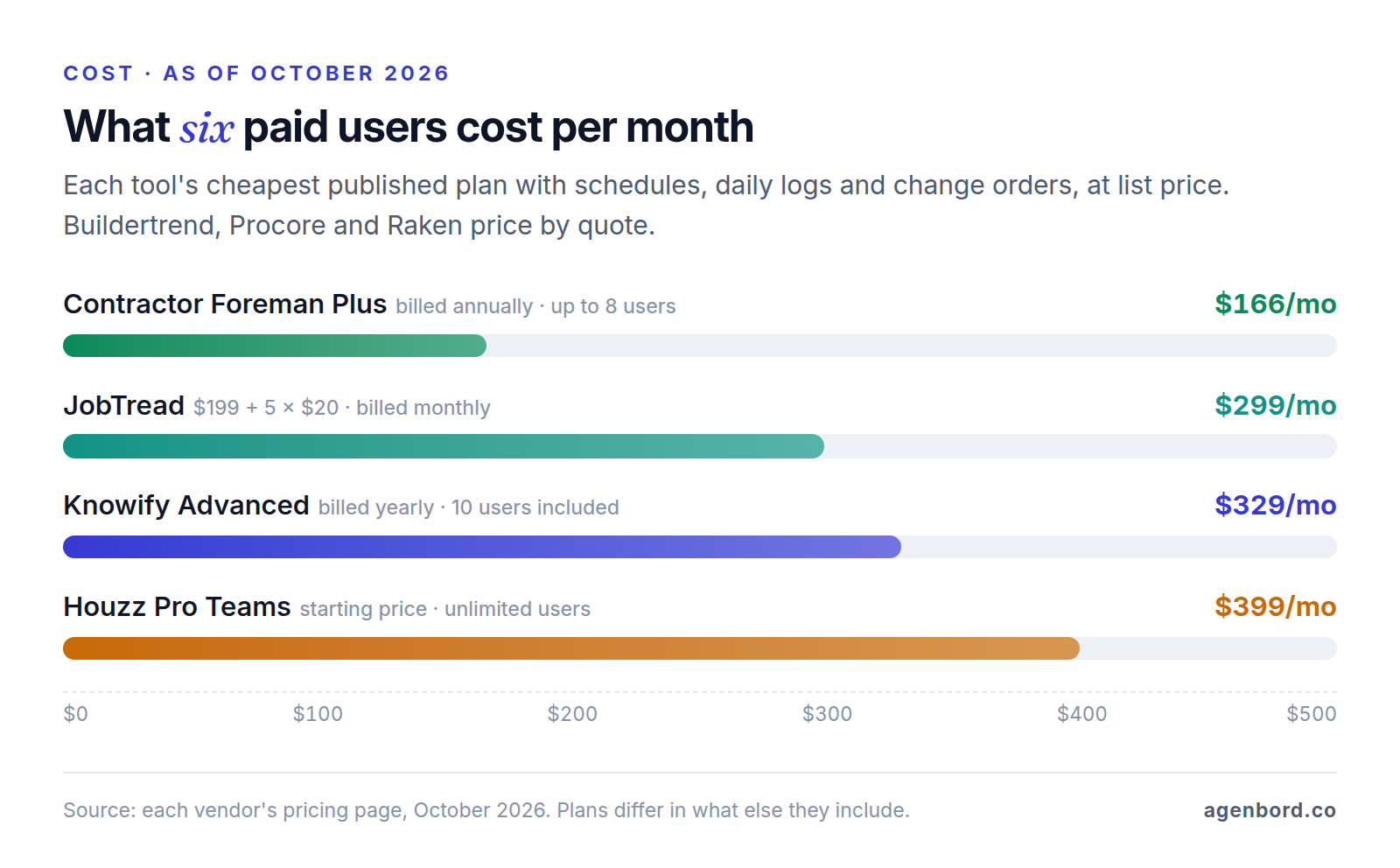
Houzz Pro adds design, estimating and marketing tools to project management: 3D floor plans, mood boards, takeoffs, a website and lead generation. The project core (schedule, daily logs, change orders, budgets, time tracking) and the QuickBooks Online integration start on Pro at $199 a month with one user. Extra users are $50 a month each on Design and Pro, so from six users up, Teams (from $399 a month with unlimited users and a subcontractor dashboard) costs less. Plans are annual subscriptions that start after a 30-day free trial.
Contractor Foreman
Sold as affordable all-in-one software for small and mid-sized residential and commercial contractors, with the same modules on every plan: schedules, daily logs, RFIs, submittals, punch lists, change orders, time cards, a client portal, job costing and two-way QuickBooks Online and Desktop sync. Billed annually, plans run from $49 a month for 1 user to $332 for unlimited users, with steps at 3, 8 and 15 users ($105, $166 and $221). There's a 30-day free trial and a 100-day money-back guarantee. With this many modules, roll out three or four first.
Knowify
Built for trade contractors (electrical, plumbing, HVAC, painting, concrete and more) and pitched on its QuickBooks integration. Core ($99 a month billed yearly or $149 monthly, one user) covers bids, scheduling, time tracking, change orders and AIA-style pay applications. Job costing, daily logs, a client portal, subcontractor management and WIP reporting need Advanced ($329 yearly or $399 monthly, 10 users). Extra users are $29 a month. RFIs, submittals and QuickBooks Desktop are on Enterprise, priced by quote.
Procore
Built for collaboration: owners, general contractors and specialty contractors work in one project record, which is why Procore doesn't charge per user. Its project management product covers RFIs, submittals, drawings, specifications, a daily log, punch lists, schedules and meetings. Annual contracts are priced on construction volume (its Field Productivity product is priced per full-time employee). For a small commercial GC whose clients or partners already use Procore, that shared record is the reason to buy. Remodelers who need homeowner selections will fit the residential tools better.
Fieldwire
Fieldwire (sold as Fieldwire by Hilti) is a jobsite tool: version-controlled drawings on every phone, tasks, punch lists, inspections and forms, with plan markups that work offline. RFIs, submittals, change orders and budgets come only with the $89-per-user Business Plus plan. Its plans don't include estimating, client selections or invoicing, so it sits beside your accounting rather than replacing anything.
Raken
Field-first software for general contractors, subcontractors and heavy civil firms, built around daily reports, time cards, production tracking, toolbox talks, checklists and photos, with tasks, RFIs and submittals alongside. Its integrations page lists QuickBooks Online and Desktop, Procore, Sage, Foundation and Viewpoint, so it can feed systems you already run. Its pricing page showed no list prices when we checked in October 2026; you book a demo or start a free trial.
What happened to CoConstruct?
Buildertrend acquired CoConstruct in February 2021. CoConstruct's site now says the transition to Buildertrend is in its final phase and sends new buyers to Buildertrend, so it isn't a separate option anymore. If you still run jobs in CoConstruct, plan the move between jobs rather than in the middle of one.
Free construction project management software: what you actually get
Free plans exist, but they're designed to be outgrown.
- Fieldwire Basic is free for up to 5 users, 3 projects and 100 sheets, with plan viewing, tasks, specifications, files, photos and checklists: enough for a small crew working from drawings, with no change orders or budgets.
- Houzz Pro's Free plan has a 3D floor planner, estimates and invoicing. It helps you sell remodels; schedules and daily logs start on the paid Pro plan.
- Generic boards such as Trello are free for up to 10 collaborators and 10 boards per Workspace. A card per task works for a few simple jobs, but you rebuild daily logs, change orders and the accounting link by hand.
- Free users on paid plans are often the better deal. JobTread doesn't charge for portal users or for field crew with limited roles, and Buildertrend and Procore don't charge per user.
Free trials and money-back periods, noted in the write-ups above, are the other way to pay nothing up front. Run them on a live job, and check what you can export if you walk away.
Construction project management software that integrates with QuickBooks
Nearly every tool here "integrates with QuickBooks," and the phrase covers very different things: QuickBooks Online or Desktop, which records move, and in which direction. Here's what each vendor's own documentation says.
| Tool | QuickBooks versions | What syncs, per the vendor |
|---|---|---|
| Buildertrend | Online; Desktop through the QuickBooks Web Connector | Jobs, customers, vendors, bills, invoices, deposits and time clock entries go to QuickBooks; estimates, payments and expenses (into the job costing budget) come back. Desktop is in maintenance: fixes continue, new features go to Online and Intuit Enterprise Suite |
| JobTread | Online (no Desktop integration listed) | Customers, jobs and cost codes (as products and services) go to QuickBooks; vendors, invoices, bills, payments, expenses, time and attachments sync both ways |
| Houzz Pro | Online, on Pro and Teams | Listed as a QuickBooks Online integration; ask for the list of records it moves |
| Contractor Foreman | Online and Desktop | Invoices, bills, payments and expenses, both ways |
| Knowify | Online (Simple Start through Advanced) on every plan; Desktop on Enterprise only | Clients, vendors, subs, items, expenses, bills, payments and projects both ways; invoices and time go to QuickBooks. Desktop is push-to-sync |
| Procore | Separate Online and Desktop connectors | Online needs Plus, Advanced or Intuit Enterprise Suite and moves vendors, cost codes, sub and owner invoices, bill payments and direct costs, but not budgets, commitments or timecards. Desktop syncs projects, vendors, cost codes, budgets, commitments, commitment change orders and sub invoices |
| Raken | Online and Desktop listed | Listed on its integrations page; confirm which records move |
Settle three things before the first sync:
- Let one system create each record. Customers and jobs usually start in the PM tool at the sale and get pushed to QuickBooks. Pick one side to create vendors; when both sides create them, you get duplicates.
- Map cost codes before the first sync. JobTread and Procore's QuickBooks Online connector, for example, turn cost codes into QuickBooks products and services, so agree on the list with your bookkeeper and keep it short.
- Choose one path for bills. Enter them in the PM tool and push them, or enter them in QuickBooks and pull them in as job cost. Doing both double-counts.
On QuickBooks Desktop, get Desktop support confirmed in writing before you sign. And watch QuickBooks itself. Intuit says the August 2026 release of QuickBooks Online Advanced added budgets by phase, AIA-style progress billing, change orders and WIP reporting at no extra cost, though Intuit notes release timing varies. If the money side can live in QuickBooks, a lighter field tool may be all you need; our job costing guide shows how far QuickBooks goes.
How to choose: match the tool to your work
Choosing construction project management software for a small business starts with your type of work: it decides which features are must-haves and which are noise.
Remodelers and home builders
Your client is a homeowner who wants to see progress and make decisions, so weight the client portal, selections with allowances, change orders with e-signature and warranty requests. Shortlist Buildertrend, JobTread and Houzz Pro (a natural fit for design-build), plus Contractor Foreman if price matters most. In each trial, run a real selection sheet and one change order from proposal to invoice.
Commercial general contractors
You answer to architects and owners and coordinate subs, so weight RFIs, submittals, current drawings in the field, daily logs and punch lists. Shortlist Procore, especially if your clients or partners use it, Fieldwire for a field-first team and Contractor Foreman for a lower-cost all-in-one. Test an RFI round trip with your architect and a drawing revision reaching the field.
Specialty trade contractors
You bill GCs on pay applications, track crew hours by job and cost code, and work to someone else's schedule. Weight time tracking, daily reports, production, change orders to the GC and AIA-style billing. Shortlist Knowify, Raken (beside your accounting) and Contractor Foreman. If most of your revenue comes from service calls rather than projects, a field service platform fits better; here's how we approach software for home service companies.
Score your shortlist
Score each finalist from 1 to 5 on every line, multiply by the weight and add it up. Adjust the weights to your business, but keep field adoption at the top.
| Criterion | Weight | How to score it |
|---|---|---|
| Field adoption | 25% | Share of trial days with a complete daily log, minutes per log, behavior on a weak signal |
| Fit for your work | 20% | Runs your real job: selections for remodels, RFIs for commercial work, crew time and pay apps for trades |
| Change orders and budget | 15% | A signed change reaches the budget and the invoice without re-typing |
| QuickBooks sync | 15% | Supports your QuickBooks version; right records, right direction, no duplicates after two weeks |
| Client and sub experience | 10% | Clients and subs use the portal or notices without training, at no extra seat cost |
| Three-year cost | 10% | Subscription at your expected user count in year three, plus onboarding and add-ons |
| Exit and support | 5% | You can export logs, photos, documents and lists; onboarding is included |
Run a two-week trial that tests field adoption
Spend two weeks of any trial on a live job, with the people who'll make or break the rollout.
- Pick one live job and a small team: your busiest foreman, a PM or office manager, one sub and, if you're a remodeler, a client who won't mind.
- Day 1: set up only what the job needs: the schedule, your cost code list, current drawings, the contract and the QuickBooks connection.
- Every working day, the foreman logs crew, work done and photos from a phone before leaving the site. Stop reminding after day three; adoption is what you're measuring.
- Days 3–5: move a date. Shift a phase and check that the sub got the notice and the client portal shows the new date.
- Week two: write a real change order. Send it for e-signature and follow it to the budget and the next invoice.
- Push one bill and one invoice to QuickBooks. Have your bookkeeper confirm the job, item and amount, and that payments come back.
- Day 14: score it. Count the days with a complete log, and ask the foreman one question: "Would you keep using this if I stopped asking?"
If the foreman logged fewer than eight of ten working days, find out what got in the way before you buy: too many required fields, slow photo uploads or screens designed for the office.
When a lightweight custom tool or integration beats an all-in-one suite
For most small contractors, buy. At list prices, six JobTread users on monthly billing cost $299 a month, about $3,600 a year, with implementation and support included. A focused custom tool starts around $12,000 to build, plus hosting (roughly $50–$500 a month) and maintenance (about 15–20% of the build cost a year). The math favors a suite unless a gap costs your team hours every week.
Custom work earns its place in a few cases:
- One workflow the suite handles badly, such as a GC's required daily report format, unit-price production tracking for your trade, or an inspection checklist that must produce a specific PDF. A small tool beside the suite closes that gap without replacing the rest; focused custom software like this starts from $12,000 (4–8 weeks).
- The integration you need doesn't exist. Procore's QuickBooks Online connector doesn't sync commitments, your tool may not support QuickBooks Desktop, or approved hours need to reach a payroll provider your PM tool doesn't connect to. A one-way hand-off is often a workflow automation from $1,500 (1–2 weeks); a custom integration service that keeps two systems in sync both ways typically starts around $15,000.
- A spreadsheet already runs part of the business. If a well-built spreadsheet is your estimating or scheduling system, turning it into a multi-user web app starts from $12,000, and you keep the logic your team trusts.
- Your crews need a simpler app than the suite's. A field app for iOS and Android starts from $15,000 (8–12 weeks) and, where your PM tool has an API, can feed it directly.
We built Smart Construction, our own cloud construction ERP, on the principle we'd bring to any of these: capture each record once, where the work happens. Its site diaries with photos, labor attendance and progress billing share one data model across web, desktop and mobile apps, so the office reads what the site recorded. It shows what capturing each record once looks like in practice; our build vs buy framework covers the decision itself.
Switching tools: a migration checklist
- Pick a cutover date. New jobs start in the new tool, short jobs finish where they are, and long jobs move with open items only.
- Decide which system creates customers, vendors and cost codes, and connect QuickBooks before anyone enters a bill or invoice.
- Clean your lists first. Merge duplicate customers and vendors, add subs' insurance expiry dates, and trim cost codes to a list a foreman can pick from on a phone.
- Load each open job: contract amount, approved change orders, budget by cost code, billed to date and the remaining schedule.
- Build templates from a finished job: schedule, estimate, selection sheet and daily log.
- Move current documents only: the latest drawing set, contract, permits and certificates. Leave old photos archived where they are, with a link.
- Use the onboarding you're paying for. JobTread includes implementation and training, Knowify includes 1, 3 or 5 onboarding sessions depending on the plan, and Contractor Foreman includes free setup on Pro and Unlimited.
- Confirm your exit before you sign: how you'd export daily logs, photos, documents and lists, and in what format.
Sources
- Buildertrend - Pricing (accessed October 2026)
- Buildertrend - Project management (accessed October 2026)
- Buildertrend Help - QuickBooks Online Integration Overview (accessed October 2026)
- Buildertrend Help - QuickBooks Desktop Integration Overview (accessed October 2026)
- Buildertrend - Buildertrend acquires CoConstruct, February 24, 2021 (accessed October 2026)
- CoConstruct - Transition to Buildertrend (accessed October 2026)
- JobTread - Pricing (accessed October 2026)
- JobTread - Construction management software features (accessed October 2026)
- JobTread - QuickBooks Online integration (accessed October 2026)
- Houzz - Houzz Pro pricing (accessed October 2026)
- Houzz - Houzz Pro software for builders, remodelers and designers (accessed October 2026)
- Contractor Foreman - Pricing (accessed October 2026)
- Contractor Foreman - Construction management software (accessed October 2026)
- Contractor Foreman - Integrations (accessed October 2026)
- Knowify - Pricing (accessed October 2026)
- Knowify - Construction management software for trade contractors (accessed October 2026)
- Knowify - QuickBooks integration (accessed October 2026)
- Procore - Pricing (accessed October 2026)
- Procore - Pricing based on construction volume (accessed October 2026)
- Procore - Project Management (accessed October 2026)
- Procore Support - QuickBooks Desktop integration (accessed October 2026)
- Procore Support - About the QuickBooks Online connector (accessed October 2026)
- Fieldwire by Hilti - Pricing (accessed October 2026)
- Fieldwire by Hilti - Jobsite management software (accessed October 2026)
- Raken - Construction management software (accessed October 2026)
- Raken - Integrations (accessed October 2026)
- Raken - Pricing (accessed October 2026)
- Trello - Pricing (accessed October 2026)
- Intuit Firm of the Future - What's New in QuickBooks Online Advanced: August 2026 Updates (accessed October 2026)
Prices, plans and regulations change. Figures were checked on October 2, 2026; follow the links for the latest. Nothing here is legal, tax or financial advice.
About the author
Founder, Agenbord
Muhammad Hamza is the founder of Agenbord, the Fort Lauderdale software company behind the construction ERP Smart Construction and a WhatsApp-first billing platform. He writes practical guides on buying, building and automating business software.