On this page
- The five kinds of construction schedules
- What small contractors need (and what Primavera P6 adds)
- A worked example: a six-week kitchen remodel and its critical path
- Construction scheduling software compared (October 2026 prices)
- Sharing the schedule with subs and clients
- Documenting delays: make the schedule your record
- When custom scheduling software makes sense
- How to choose and roll out construction scheduling software
If you're shopping for construction scheduling software, your schedule probably lives in three places right now: a whiteboard in the office, a spreadsheet someone emailed last Tuesday and the superintendent's head. That works until the drywall crew shows up before the rough-in inspection has passed, or a homeowner asks when the cabinets go in and gets three different answers.
The software's job is to keep one current version of the schedule where everyone can see it. The short answer on what to buy: most small contractors need a Gantt schedule with linked tasks (so moving one date moves everything after it), a baseline to measure delays against, a three-week look-ahead their subs confirm and a phone app the field will actually update. Full critical path tools such as Primavera P6 matter when a contract requires one or a long job is crowded with trades.
As of October 2026, Gantt and scheduling tools priced per user list at $9–$30 a month, TeamGantt prices by project from $59 a month, construction suites run from $49 a month to quote-only, and Oracle doesn't publish P6 prices. We build software for contractors, including our own construction ERP, and this guide sticks to what decides the purchase: which kind of schedule you need, what a critical path looks like on a real job, and what each tool costs.
The five kinds of construction schedules
"Construction scheduling software" covers five different tools, each answering a different question. You'll likely need two or three of them.
| Schedule type | The question it answers | Fits | Where you'll find it |
|---|---|---|---|
| Job calendar | Who is on which job, which day? | One to three jobs at a time, mostly your own crews | Google or Outlook calendars, the calendar view in construction suites |
| Gantt chart | When does each phase start and finish? | Remodels and new homes, once tasks are linked so one change moves the rest | Gantt tools, residential construction suites |
| Critical path (CPM) schedule | Which tasks drive the finish date, and how much slack does everything else have? | Commercial and public work, long jobs with many trades, contracts that require one | Microsoft Project, Primavera P6, ProjectLibre |
| Look-ahead or pull plan | What's ready to start in the next few weeks, and what's in the way? | Any job with several trades; the weekly meeting with subs | A whiteboard, a spreadsheet, lookahead tools in platforms like Procore |
| Crew dispatch board | Which crew goes where tomorrow? | Trade contractors running many short jobs | Field service management software |
Five terms come up again and again. A dependency links two tasks, usually finish-to-start: drywall can't start until the rough-in inspection passes. A lag is a wait built into that link, such as cure time or shop fabrication. Float is how many days a task can slip without delaying the finish. The critical path is the chain of tasks with no float, so any slip on it moves the finish date. A baseline is a saved copy of the original plan you compare progress against.
Plenty of tools draw Gantt bars. Check whether they link tasks, calculate float and keep a baseline, because those three features separate a picture of the plan from a schedule that tells you what a delay will cost.
What small contractors need (and what Primavera P6 adds)
For a small business (a remodeler, home builder or small GC), construction scheduling software has seven jobs:
- Link tasks, so pushing the drywall start moves paint, flooring and everything after it, with lags for cure time and shop work.
- Start from templates built from your own finished jobs, so a new bathroom remodel doesn't begin on a blank page.
- Know your working days: weekends, holidays and weather days.
- Save a baseline before work starts.
- Treat deliveries and inspections as tasks with dates and an owner, not as notes.
- Share without paid seats: view-only access or portals for subs and clients, and a notice when their dates move.
- Work on a phone in the hands of whoever runs the site, including on a weak signal.
Enterprise CPM tools such as Primavera P6 add what big jobs need: resource leveling (shifting tasks so a crew or a crane isn't booked twice), separate calendars per resource, date constraints, cost and resource loading, multi-project portfolios and formal schedule submittals.
Sometimes the contract makes the choice for you. The US Army Corps of Engineers' project schedule specification, for example, requires the Critical Path Method for all project schedules, states "The Government uses Primavera P6," and asks for P6's .xer export file when P6 is used. Long commercial jobs with many trades, or jobs where you expect to argue about time, also justify a true CPM tool. A six-week remodel doesn't.
A worked example: a six-week kitchen remodel and its critical path
Here's a hypothetical kitchen remodel, scheduled in working days (Monday to Friday), 30 days in all. The cabinets are ordered on day 1 from a supplier quoting 15 working days. The countertops are templated once the cabinets are set and fabricated off-site in five working days.
| # | Task | Days | Starts after | Working days | Float |
|---|---|---|---|---|---|
| 1 | Cabinet order to delivery (supplier) | 15 | Job start | 1–15 | 1 day |
| 2 | Demo and haul-off | 3 | Job start | 1–3 | 0 |
| 3 | Plumbing rough-in | 2 | 2 | 4–5 | 1 day |
| 4 | Electrical rough-in | 3 | 2 | 4–6 | 0 |
| 5 | Rough-in inspection | 1 | 3 and 4 | 7 | 0 |
| 6 | Insulation and drywall | 5 | 5 | 8–12 | 0 |
| 7 | Prime and paint | 2 | 6 | 13–14 | 0 |
| 8 | Flooring | 2 | 7 | 15–16 | 0 |
| 9 | Cabinet install | 3 | 1 and 8 | 17–19 | 0 |
| 10 | Countertop template | 1 | 9 | 20 | 0 |
| 11 | Countertop fabrication (off-site) | 5 | 10 | 21–25 | 0 |
| 12 | Countertop install | 1 | 11 | 26 | 0 |
| 13 | Plumbing and electrical trim-out, appliances | 1 | 12 | 27 | 0 |
| 14 | Backsplash tile | 1 | 12 | 27 | 1 day |
| 15 | Final inspection | 1 | 13 | 28 | 0 |
| 16 | Punch list and clean | 2 | 14 and 15 | 29–30 | 0 |
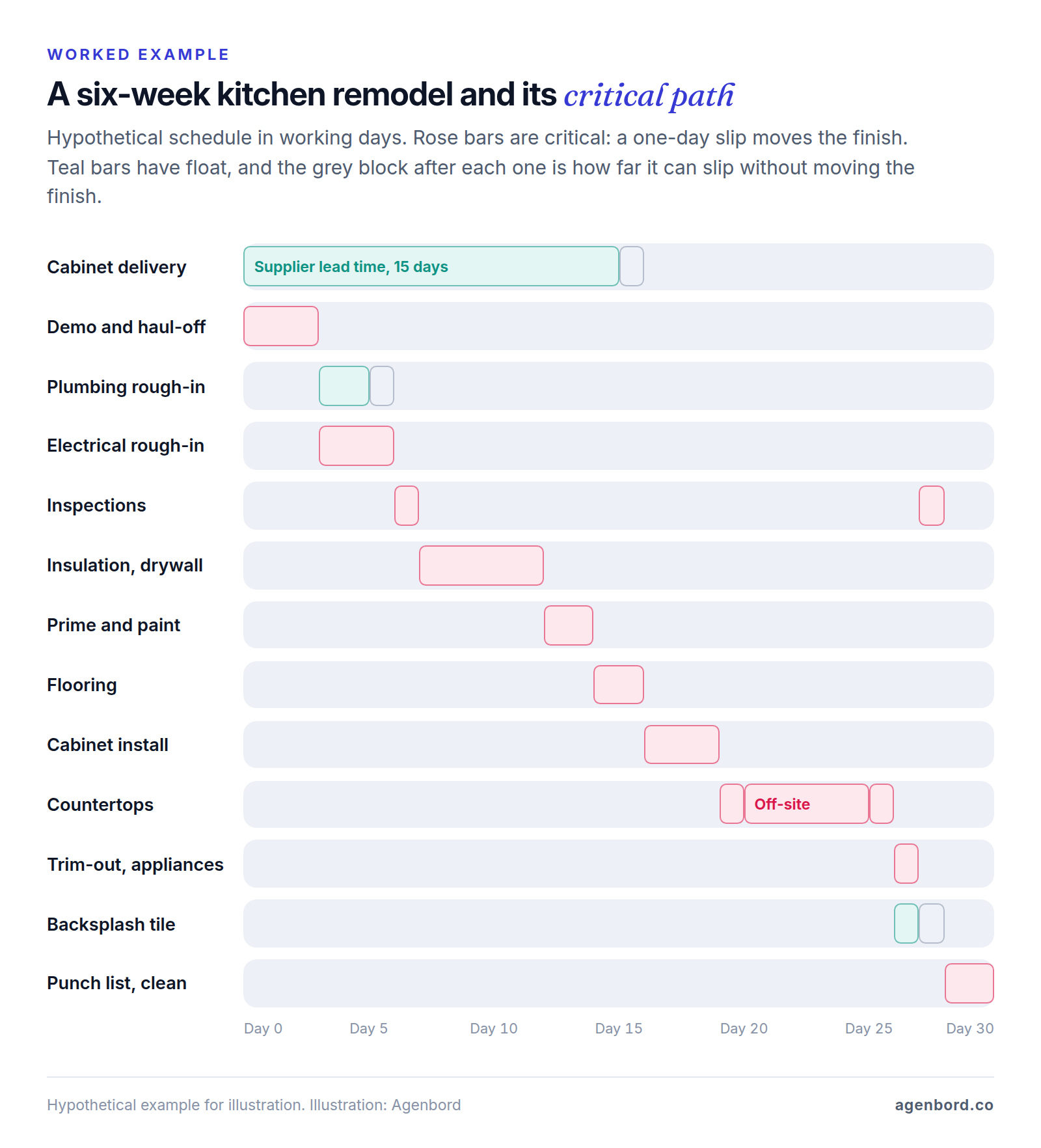
To find the critical path by hand, walk forward first: each task starts the day after the last of its predecessors finishes, which puts the finish on day 30. Then walk backward from day 30: each task must finish by the day before its earliest successor has to start. Where a task's earliest and latest dates match, it has zero float. Here that chain runs from demo through electrical rough-in, both inspections, drywall, paint, flooring, cabinets, the three countertop steps and trim-out to the punch list. Software does this arithmetic every time a date changes.
What the example shows:
- Not every delay moves the finish. If the plumber finishes a day late, nothing moves, because the inspection is waiting on the electrician anyway. If the electrician runs a day late, the job finishes on day 31.
- Inspections sit on the critical path. If the inspector can't come until day 9, everything after the inspection shifts two days. Book it when the rough-in starts, not when it ends.
- Off-site work can be critical. Nobody is on site during the five days of countertop fabrication, so a crew calendar shows a quiet week. The linked schedule shows those days driving the finish. You can enter shop time as its own task, as here, or as a five-day lag on the link between template and install.
- Deliveries need dates too. The cabinets have one day of float. If they arrive two days late, cabinet install starts on day 18 and the finish moves a day. Tracking the delivery as a task shows that before the installer shows up to nothing.
In a tool with dependencies, you change the inspection date once, the 11 tasks after it move with it, and the subs whose dates changed get a notice. On a whiteboard or a plain calendar, you move each one by hand and call each sub yourself.
Construction scheduling software compared (October 2026 prices)
There's no single best construction scheduling software. The right one depends on whether you need a whole job-management suite, just a schedule, or the CPM tool an owner requires. Here are ten options by type, with list prices from each vendor's site as of October 2026.
| Tool | Type | Scheduling highlights | Price as of October 2026 |
|---|---|---|---|
| Buildertrend | Residential suite | Linked Gantt schedule with baselines and critical path; portals; offline app | Custom quote; unlimited users and projects |
| JobTread | Residential and specialty suite | Calendar, Gantt and list views; free portal users | $199/month with 1 internal user, plus $20 per user for users 2–10 (monthly; annual saves 20%) |
| Contractor Foreman | Low-cost suite | Gantt scheduler on every plan | $49–$332/month billed annually, by user cap |
| Procore | Commercial platform | Shares and imports P6, Microsoft Project and Powerproject schedules; lookaheads | Custom quote, annual contract; unlimited users |
| TeamGantt | Gantt tool | Dependencies and critical path on paid plans | Free for 1 project; Base $59/month; Business from $120; Builder Edition from $199 |
| Smartsheet | Spreadsheet-style work management | Gantt and dependencies on Pro; baselines on Business | Pro $9, Business $19 per member/month billed yearly |
| monday.com | Work management | Gantt and timeline views from Standard | Basic $9, Standard $12, Pro $19 per seat/month billed annually |
| Microsoft Planner and Project | Scheduling | Gantt and dependencies on Plan 1; critical path from Plan 3 | $10 or $30 per user/month paid yearly; desktop from $679.99 one-time |
| Primavera P6 | Enterprise CPM | Multi-project CPM, resource optimization | Not listed on Oracle's P6 page; contact sales |
| ProjectLibre | Low-cost CPM | Critical path and float, resource leveling | Desktop app free; Cloud from $9.99 per user/month billed annually |
Most of these are online construction scheduling software in the plain sense: they run in a browser. ProjectLibre's free app and Microsoft's one-time Project 2024 licenses are desktop software, so you share the schedule by sending exports, and that's how old versions end up on site.
Construction suites: Buildertrend, JobTread, Contractor Foreman
Suites tie the schedule to the rest of the job: daily logs, change orders, selections, the client portal and invoicing. Our construction project management software comparison covers those modules; here's what matters for scheduling.
Buildertrend shifts linked tasks when a predecessor moves, overlays weather days and holidays, and sends assignees a text, email or push notice when dates change. Subs and clients see the schedule through portals, by item or phase. Its pricing page pitches builders running five or more projects a year. CoConstruct is now part of Buildertrend; CoConstruct's site says the transition is in its final phase.
JobTread lists calendar, Gantt and list views, task templates and sync to Google Calendar, Outlook or iCal. Its scheduling page doesn't mention dependencies or a critical path, so move a task during your trial and see what follows it. Field users who only post photos, log daily notes, view their schedule and check off tasks are free.
Contractor Foreman's plans step up at 1, 3, 8, 15 and unlimited users, with the Gantt scheduler on every plan. A 30-day free trial and a 100-day money-back guarantee (with conditions) make it cheap to test.
Commercial jobs: Procore with a CPM master schedule
Procore's Schedule tool creates and shares schedules and imports ones built in Primavera P6, Microsoft Project or Asta Powerproject, so the scheduler keeps working in a CPM tool while everyone else sees the current version on the web or a phone. It also builds lookahead schedules with subtasks and takes schedule change requests. Unlimited users suit jobs where the owner, the architect and every sub need access.
Gantt and work management tools: TeamGantt, Smartsheet, monday.com
These cost less when the schedule is your only gap and estimates, logs and billing live elsewhere.
- TeamGantt prices by project, not by person: Business includes unlimited managers and collaborators and adds projects at $24 a month each. Its Builder Edition ($199 a month with 10 projects, or $1,908 a year) is built for construction: subs confirm dates by email without a login, view-only links go to subs and clients, long-lead materials are tracked against install dates, and it syncs with Procore.
- Smartsheet looks like a spreadsheet and switches to a Gantt view. Pro caps you at 10 members ($12 each billed monthly) and Business needs at least 3 ($24 monthly). It isn't construction-specific, so you build your own template.
- monday.com's Gantt page lists dependencies, baselines and critical paths without saying which plan includes each, so confirm before you commit.
CPM tools: Microsoft Project, Primavera P6, ProjectLibre
Microsoft splits its lineup along the Gantt-versus-CPM line. Planner Plan 1 has a timeline (Gantt) view and task dependencies; critical path, baselines, lead and lag, and the Project desktop app start with Planner and Project Plan 3. The one-time licenses are Project Standard 2024 ($679.99) and Project Professional 2024 ($1,129.99).
Primavera P6 is Oracle's enterprise CPM product, pitched at planning and controlling "large-scale programs and individual projects." For a small contractor, the usual reason to own it is a contract that requires it.
ProjectLibre's free desktop app adds network diagrams and baselines to the critical path basics. It lists import of Microsoft Project (.mpp) and P6 (.xer) files, handy when an owner sends you their schedule; check which edition handles which format.
Free construction scheduling software
Free plans exist, with limits. TeamGantt's covers 1 user, 1 project and 40 tasks, enough to schedule one remodel. ProjectLibre's desktop app is real CPM if you can live with sharing PDFs. monday.com's free plan covers 2 seats but no Gantt view. The better deal is often free seats on a paid plan: JobTread's portal and limited field users, and Buildertrend's and Procore's unlimited users, keep subs and clients off the bill.
Sharing the schedule with subs and clients
A schedule only works if the people in it see their dates in time. For subs, that means three things: their own start and finish dates, whether the work before theirs is done, and early warning when either changes. Count a sub's date as real only once the sub confirms it, whether through an email confirmation like TeamGantt's or a call you note in the schedule. Insurance certificates, lien waivers and pay applications are a separate workflow, covered in our subcontractor management guide.
The weekly look-ahead is where the master schedule meets the field. The Lean Construction Institute's Last Planner System turns it into a method built around the "last planner," whom it defines as "the person closest to the work with authority to make decisions regarding the schedule." A small contractor's Monday version has four steps:
- Pull the next three weeks of tasks from the master schedule.
- For each one, check what it needs to start: the work before it finished, materials on site, an inspection booked, the client's selections made.
- Have each foreman and sub commit to dates they can keep, and put those dates in the tool.
- Look back at last week. Which commitments slipped, and why? Fix the cause, not just the date.
Clients need less detail. Share milestones and the decisions you need from them, with deadlines tied to lead times: in the worked example, cabinet choices have to be final before day 1 and the countertop slab before fabrication starts on day 21. When a homeowner can see that a late decision moves the move-in date, the deadline is easier to hold.
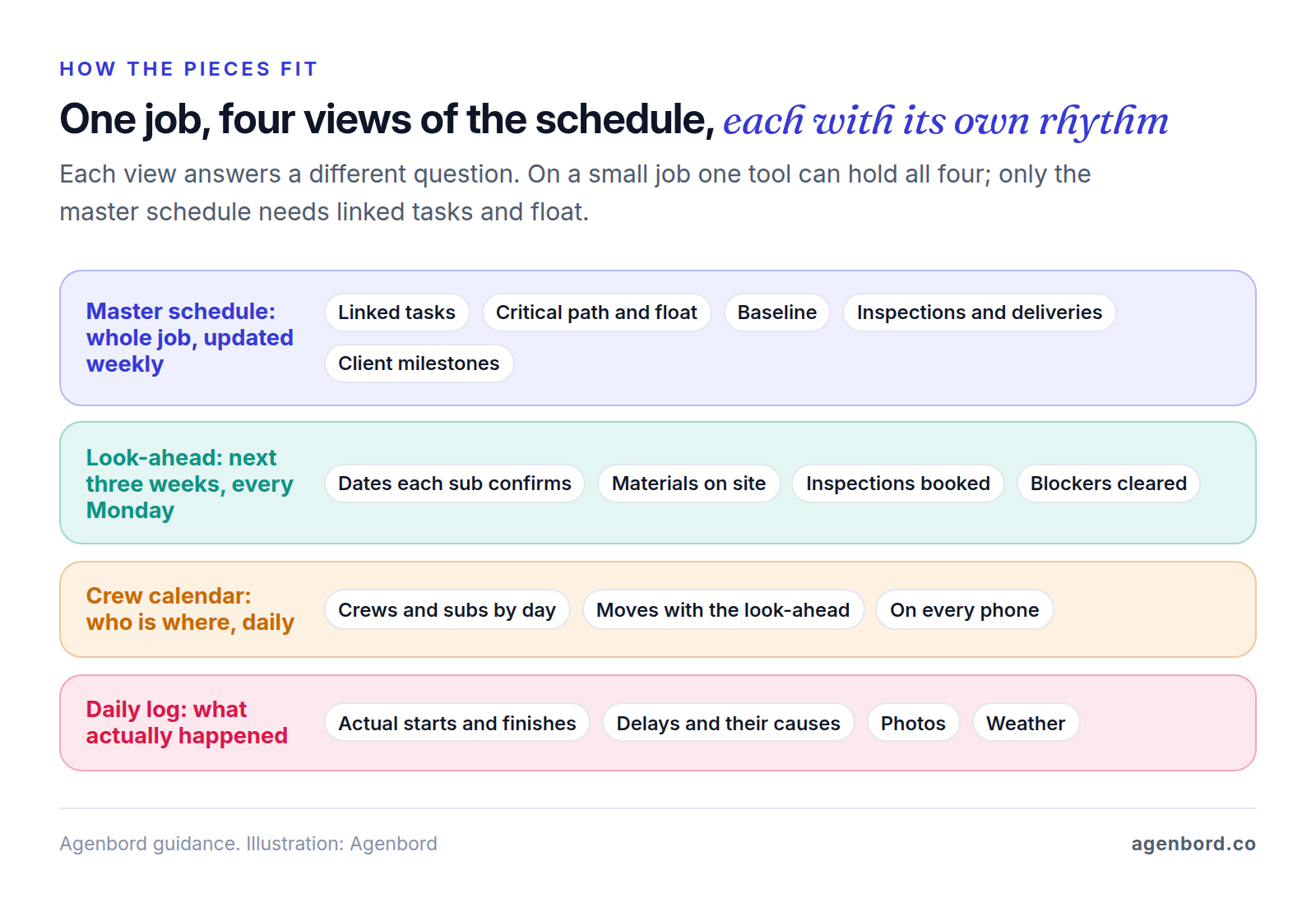
That's also the answer to what "construction site scheduling software" should do: on site, the look-ahead and the crew calendar matter more than the master schedule, so judge a tool by its phone app, not its desktop Gantt chart.
Documenting delays: make the schedule your record
When a job runs late, the question is whose delay it was and whether it moved the finish. The schedule and the daily logs answer it, if you kept them. This is general information, not legal advice: your contract sets the rules, so read its notice and time-extension clauses before the job starts.
- Save a baseline before work starts and never overwrite it. Every delay is measured against it.
- Record actual start and finish dates at least weekly, taken from the daily logs.
- Log each delay the day it happens: what happened, the cause, who was affected, photos, and which tasks it pushed. "Waiting on countertop selection, client notified March 3" beats "delayed" every time.
- Check the critical path. A delay to a task with float doesn't move the finish until the float runs out. A request for more time is much easier to support when you can show the delayed task was on the critical path.
- Give written notice within the contract's deadline. On federal fixed-price construction contracts, for example, FAR 52.249-10 requires the contractor to notify the contracting officer in writing of the causes of delay "within 10 days from the beginning of any delay." Private contracts set their own deadlines.
- Keep the as-built schedule: the final version with actual dates, next to the daily logs.
Back to the worked example: if the homeowner picks the countertop slab three days late, fabrication starts on day 24 instead of day 21 and the finish moves from day 30 to day 33. With the selection deadline in the schedule, the date of the decision in the log and the notice sent, that's a conversation about three days, not an argument.
When custom scheduling software makes sense
For most contractors, buy. The published plans above run from free to a few hundred dollars a month, and building your own scheduler would cost more than years of those subscriptions. Custom work earns its place around the schedule, where off-the-shelf tools don't connect:
- Estimates that should become schedules. If your estimating system already knows the tasks and crew-days, a small tool can turn each signed job into a draft schedule instead of someone retyping it. Focused custom software like this starts from $12,000 (4–8 weeks).
- Notices your tools don't send. Texting each sub their confirmed dates from the Monday look-ahead, or alerting the office when a delivery date slips into a task's float, is a workflow automation job, from $1,500 (1–2 weeks) for a single workflow.
- A schedule that has to reach other systems. Crew assignments that should flow to payroll, or an owner's P6 updates you keep re-keying into your project tool, need an integration. A custom integration service that keeps two systems in sync typically starts around $15,000.
Add hosting at roughly $50–$500 a month and maintenance at about 15–20% of the build cost a year. We built Smart Construction, our own cloud construction ERP, on a rule that applies here: capture each record once, where the work happens. Its site diaries with photos and labor attendance share one data model across web, desktop and mobile apps, so the office works from the record the site wrote. Our build vs buy framework walks through the decision.
How to choose and roll out construction scheduling software
Simple construction scheduling software is mostly a matter of buying only the layers you need. Start with your situation:
- One to three jobs at a time, mostly your own crews: a shared calendar, or the scheduler in the construction suite you already pay for. Move up when rescheduling subs eats your evenings.
- Remodelers and home builders using subs: a residential suite with linked schedules, portals and notices, or TeamGantt's Builder Edition if scheduling is the only gap.
- Commercial GCs: a CPM master schedule (Microsoft Project, or P6 when the contract says so) plus a shared platform for look-aheads and change requests.
- Trade contractors: a crew calendar or dispatch board for your own work, and the GC's look-ahead for theirs.
Then roll it out on one live job before you move the company:
- Build a template from your last finished job, with the real durations, not the ones you bid.
- Load one live job: working days and holidays, deliveries and inspections as tasks, links between tasks. Save the baseline.
- Invite subs and the client with view-only access first, and ask each sub to confirm their dates.
- Run the Monday look-ahead from the tool for three weeks straight.
- Test the hard parts: push a task three days and check what moves and who gets told; open the sub's view on a phone; print a three-week look-ahead; export the schedule and see what you could take with you.
- Decide after a month. If the superintendent updated it from the site and subs confirmed their dates, put every new job in it. If not, find out what got in the way before you blame the crew or buy a bigger tool.
Sources
- Buildertrend - Construction scheduling software (accessed October 2026)
- Buildertrend - Pricing (accessed October 2026)
- CoConstruct - Transition to Buildertrend (accessed October 2026)
- JobTread - Pricing (accessed October 2026)
- JobTread - Tasks and scheduling (accessed October 2026)
- Contractor Foreman - Pricing (accessed October 2026)
- Procore - Pricing (accessed October 2026)
- Procore Support - Schedule (project level) (accessed October 2026)
- TeamGantt - Pricing (accessed October 2026)
- TeamGantt - Construction scheduling, Builder Edition (accessed October 2026)
- Smartsheet - Pricing (accessed October 2026)
- monday.com - Pricing (accessed October 2026)
- monday.com - Gantt chart features (accessed October 2026)
- Microsoft - Planner plans and pricing (accessed October 2026)
- Microsoft - Compare Microsoft Project management software (accessed October 2026)
- Oracle - Primavera P6 (accessed October 2026)
- ProjectLibre - Project management software (accessed October 2026)
- Lean Construction Institute - Last Planner System (accessed October 2026)
- WBDG - UFGS 01 32 01.00 10 Project Schedule, US Army Corps of Engineers (accessed October 2026)
- Acquisition.gov - FAR 52.249-10 Default (Fixed-Price Construction) (accessed October 2026)
Prices, plans and regulations change. Figures were checked on October 2, 2026; follow the links for the latest. Nothing here is legal, tax or financial advice.
About the author
Founder, Agenbord
Muhammad Hamza is the founder of Agenbord, the Fort Lauderdale software company behind the construction ERP Smart Construction and a WhatsApp-first billing platform. He writes practical guides on buying, building and automating business software.