On this page
- What is field service management software?
- Benefits of field service management software, and what to measure
- Field service management software and QuickBooks
- How much does field service management software cost?
- Field service management software compared (October 2026)
- How to choose field service management software
- Pitfalls that raise the bill later
- Switching platforms: migration tips
- When custom software or integrations make sense
Field service management software is the system a service company runs on between the phone ringing and the money landing. It books the job, puts it on a technician's schedule, gives the tech what they need on their phone, prices the work, takes payment on site and passes the invoice to QuickBooks. For HVAC, plumbing, electrical, cleaning, pest control, landscaping and appliance repair companies, it replaces the whiteboard, the paper tickets and most of the retyping.
As of October 2026, published prices start at $0 (ServiceM8's free plan: 30 jobs a month, one user) and $29 a month (Jobber's one-user Core plan, billed annually), and pass $500 a month for larger teams. ServiceTitan, FieldEdge, Workiz, FieldPulse and ServiceTrade quote on request. How a vendor counts users, technicians or jobs will move your bill more than its starting price.
We build custom software and integrations, so we'll also say when custom work is worth paying for. For most service companies it isn't: buy a platform and put the effort into setup and training.
What is field service management software?
Field service management (FSM) software is one shared record of customers, service locations, equipment, jobs and money, with an office app for booking and dispatch and a mobile app for technicians. The address taken on the phone is the one the tech navigates to, the parts on the invoice come off the truck's stock, and the payment reaches QuickBooks without anyone typing it twice.
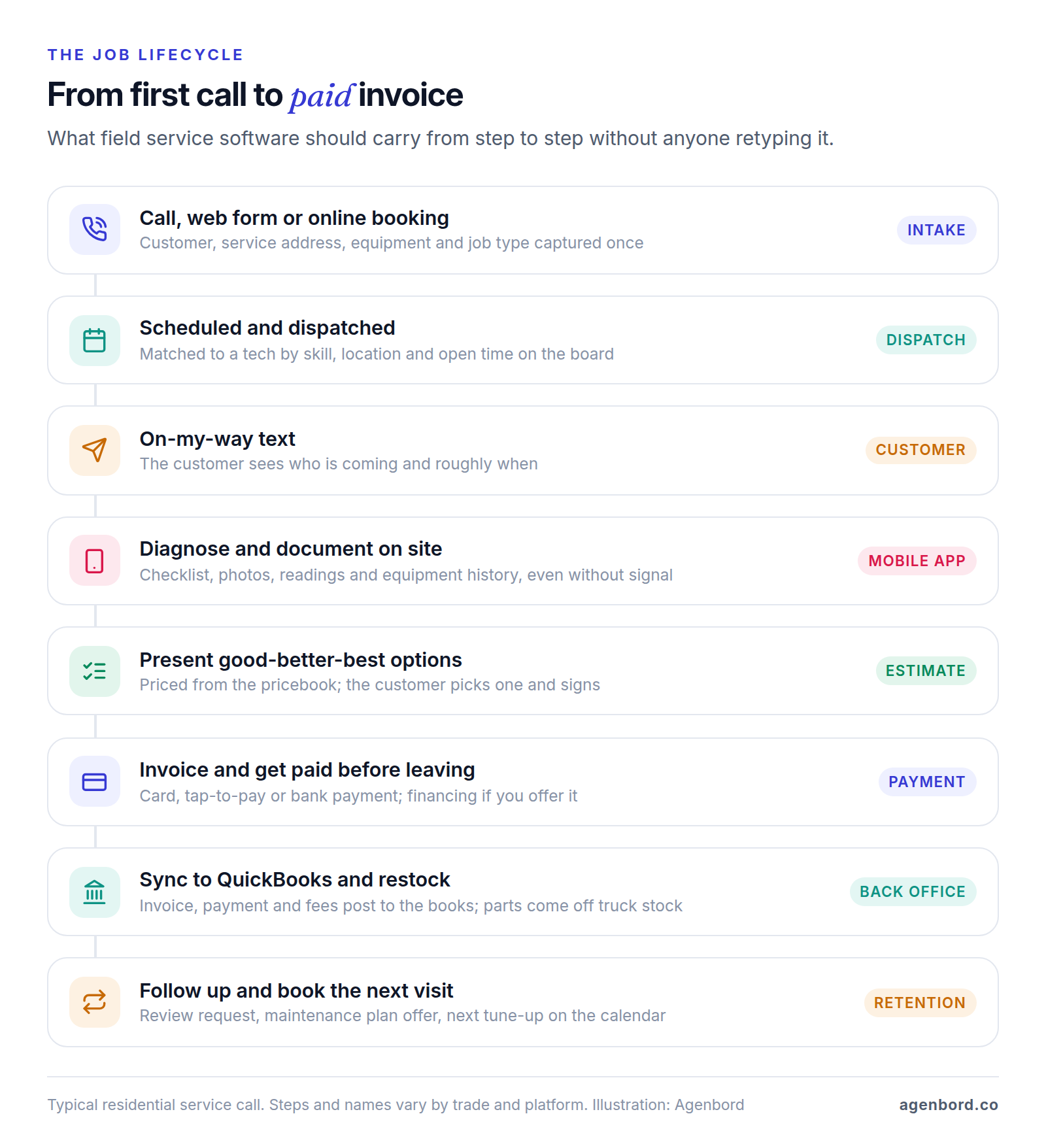
Here's what each part should do.
Booking and intake
Calls, web forms, online booking and AI receptionists should all create the same record: a customer, a service location and a job with a type and urgency. Check that the platform separates who pays from where the work happens, because a landlord pays for many rental addresses and a commercial customer has many sites. If after-hours calls go unanswered, our guide to AI receptionists covers what voice AI can handle on a call and what to hand to a person.
Scheduling and dispatch
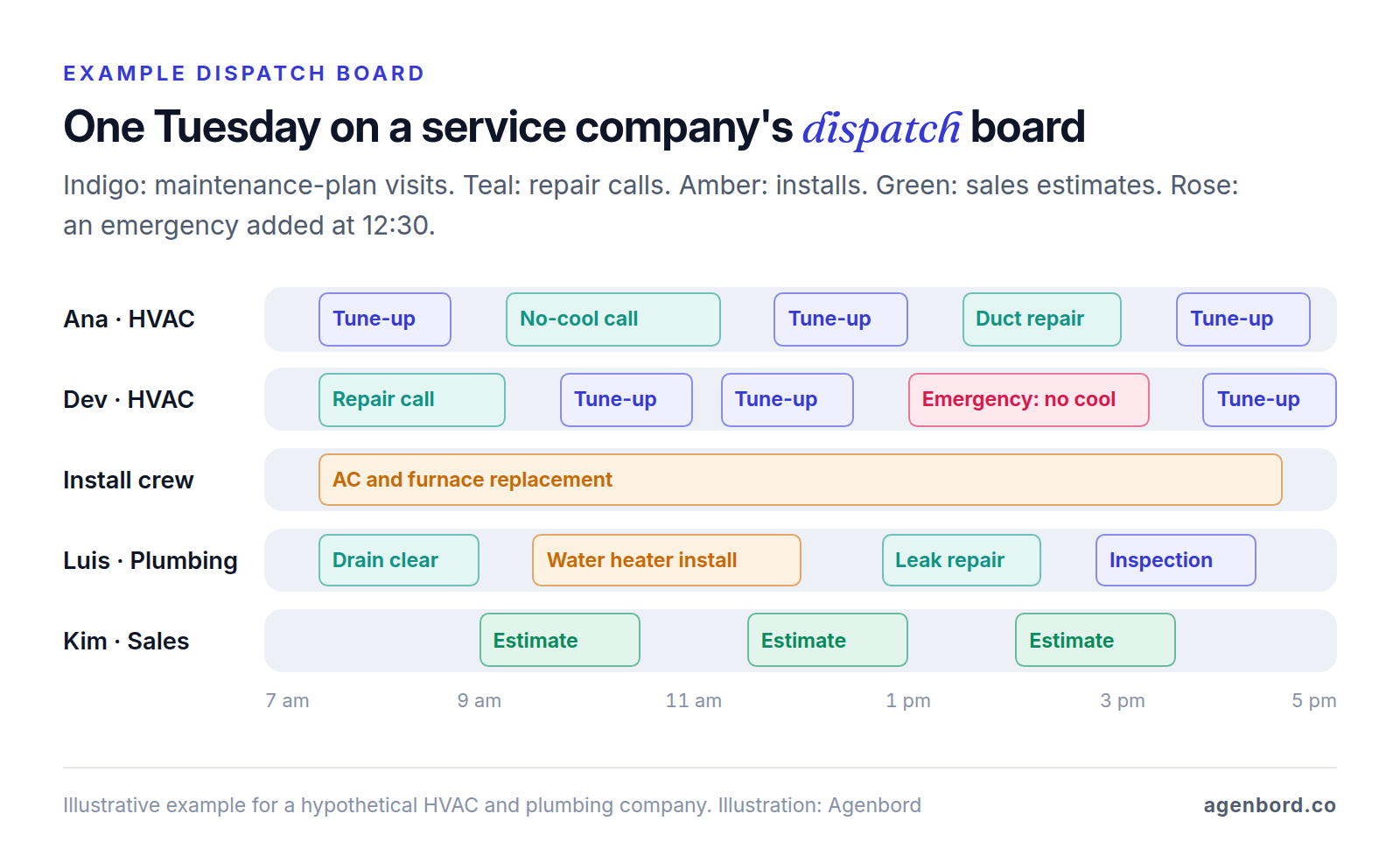
The dispatch board is where the office lives: technicians as rows, jobs as blocks on a timeline, a map beside it. A good board shows skills, job length and drive time, so when an emergency comes in the dispatcher can see who is close and qualified, drag the job over and text every customer whose time moved. Route optimization matters most for recurring route work like pest control, cleaning and lawn care.
The technician mobile app
For your techs, the mobile app is the software. It should show the job, customer notes, equipment history and past invoices, walk them through checklists, and capture photos, readings and signatures, including in basements and rural areas with no signal. Ask exactly which actions work offline (viewing jobs, checklists, signatures, payments) and test each one in airplane mode, on the iPhones and Android phones your techs actually carry.
Estimates and good-better-best options
Many residential service companies sell from a pricebook of flat-rate prices, so the price doesn't depend on how long the tech takes. Good-better-best estimates put three options side by side (say a repair, a repair plus a maintenance plan, or a replacement), and the customer picks one and signs on the tech's tablet. Look for optional line items, photos, financing offers and automatic follow-up on unapproved estimates. Jobber adds optional line items on Grow; Housecall Pro includes a sales proposal tool on Max.
Invoicing and payments in the field
The best time to get paid is before the truck leaves the driveway. The tech turns the approved estimate into an invoice and the customer pays by card, tap-to-pay on the tech's phone or bank transfer (ACH), while commercial customers get their PO number on the invoice and pay on terms. Look for deposits on installs, cards on file for agreements and automatic reminders on unpaid invoices.
Inventory and truck stock
Every truck is a small warehouse. Inventory features track stock on each truck and in the shop, deduct parts as techs add them to invoices and flag restocking, while purchase orders tie parts to the job they were bought for. A two-truck company can skip this at first; our inventory management software guide covers stock across locations in more depth. It often sits on a higher tier: Workiz puts inventory and purchase orders on Ultimate, and Service Fusion includes inventory from Plus.
Maintenance agreements and recurring service
Maintenance agreements (memberships or service plans) bring recurring revenue and keep you first in line when equipment fails. The software should sell the plan on site, bill it monthly or annually, apply member pricing, schedule the included visits and flag renewals; commercial agreements add schedules per site and asset. If customers prepay a year, ask your accountant how to book revenue you haven't earned yet.
Agreements are a common tier gate: Housecall Pro lists recurring service plans on Max, Workiz lists service plans on Ultimate and FieldEdge's advanced service agreements start on Premier. ServiceTitan lists customizable memberships on all three packages.
Customer communication
Booking confirmations, reminders, on-my-way texts with the tech's name, and a follow-up asking for a review are table stakes. Two-way texting from the company number keeps conversations on the customer record instead of on techs' personal phones. If you plan to send promotions, ask how the platform records consent and handles opt-outs before the first campaign goes out.
Reporting
The reports that run a service business are revenue per technician per day, average ticket, estimate close rate, callbacks (return visits to fix the same problem) by technician, active agreements and receivables, filtered by technician, job type and lead source. Job costing, comparing each job's revenue with its labor and parts, is the next step up; Jobber includes it from Grow. For multi-month construction projects, see our job costing guide.
Benefits of field service management software, and what to measure
The benefits come from removing hand-offs: fewer missed appointments, faster payment, bigger tickets, fewer callbacks and less retyping. Vendors' case studies show what's possible; your own numbers show what happened. Write down these baselines before you switch and compare them three months after go-live:
- No-shows and late arrivals, which reminders and on-my-way texts should cut.
- Days from job complete to paid, which invoicing and payment on site should shorten.
- Average ticket and option close rate, driven by the pricebook and good-better-best estimates.
- Callback rate by technician, which checklists, photos and equipment history should lower.
- Active agreements and renewal rate, from plans sold on site and renewed automatically.
- Office hours spent retyping, which one record from booking to QuickBooks should remove.
If none of these moves, look at setup and adoption before blaming the platform.
Field service management software and QuickBooks
The usual split: QuickBooks keeps the general ledger, bills, payroll and taxes, and the FSM platform handles customers, jobs, invoices and payments. Whether your bookkeeper trusts the numbers comes down to five things:
- Online or Desktop. Jobber (from its Connect plan), Housecall Pro (from Essentials), FieldPulse and ServiceM8 list QuickBooks Online. FieldEdge, Service Fusion and ServiceTitan list Online and Desktop, and Kickserv charges $50 a month for Desktop from its Run plan.
- What syncs, and in which direction. Customers, items, invoices and payments at a minimum. FieldPulse, for instance, describes a two-way sync of customers, estimates, invoices, payments and line items, so an invoice created in QuickBooks appears in FieldPulse too. With a one-way sync, agree which system wins when someone edits an invoice after it has synced.
- Payments and fees. Card payouts often arrive net of fees and batched. The sync should record the full payment, the fee and the deposit separately so your bank reconciliation matches.
- Tax, classes and locations. If you report by department (HVAC versus plumbing) or by branch, confirm those fields map across.
- Your bookkeeper's sign-off. Sync a week of real invoices, a partial payment and a refund into a test or trial QuickBooks company, and have your bookkeeper check them before go-live.
Larger companies on other accounting systems should look for a native connector first. ServiceTitan, for example, lists Sage Intacct, NetSuite, Acumatica, Xero, Viewpoint Vista and Spectrum, and Foundation alongside QuickBooks.
How much does field service management software cost?
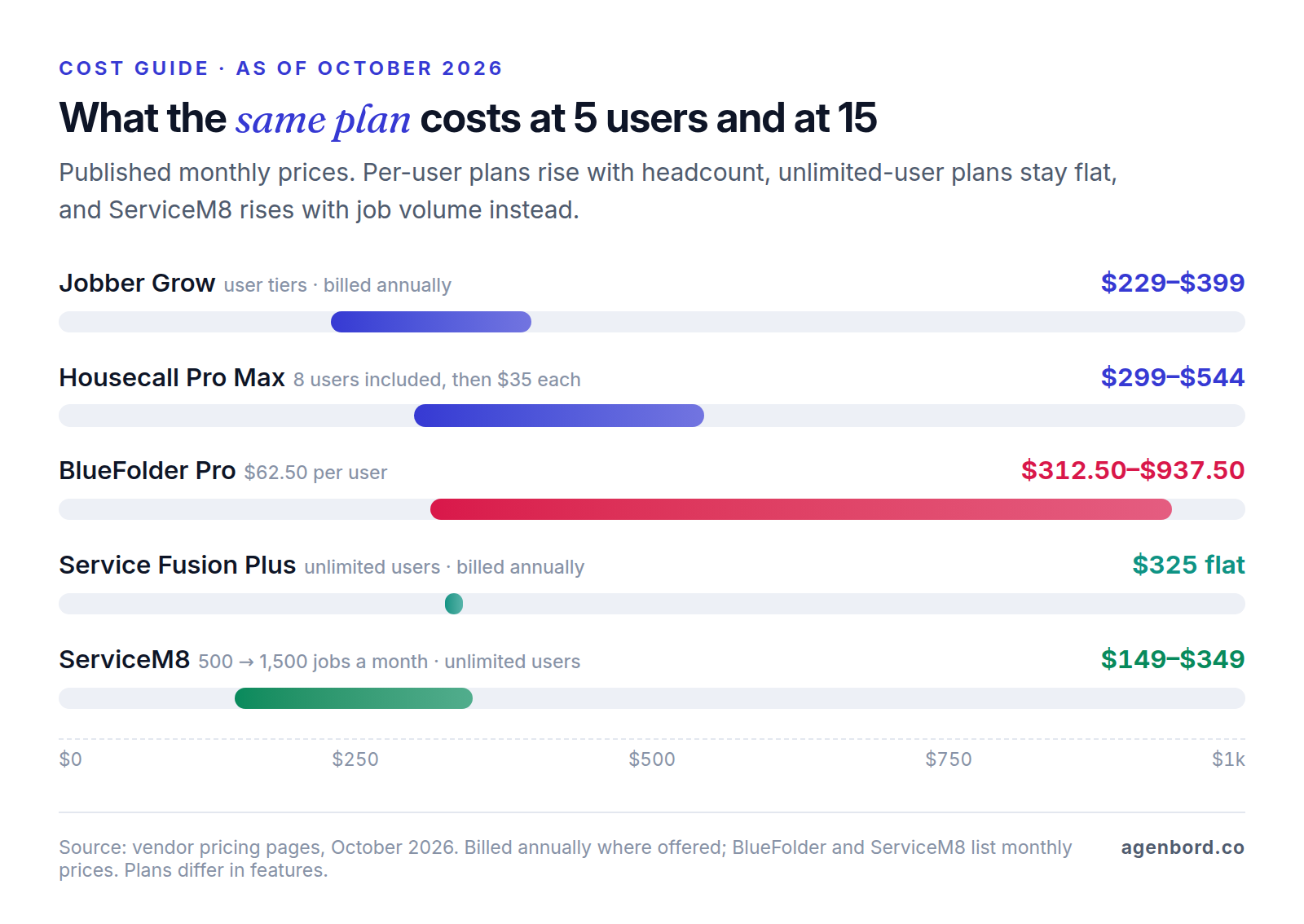
Published plans run from $0 to more than $500 a month, and five of the platforms below don't publish prices at all. The model behind the price decides what you'll pay as you grow:
- User tiers. Jobber's Grow plan costs $149 a month billed annually for one user, $229 for five, $299 for ten and $399 for fifteen, and extra users are $29 a month each. Kickserv bundles 5, 10 or 20 users into its three plans.
- Included users, then a fee. Housecall Pro's Max plan includes 8 users and charges $35 a month for each additional one.
- Per user. BlueFolder charges $62.50 to $110 per user per month, with two- to five-user minimums.
- Per technician or seat, by quote. ServiceTitan describes "per-technician pricing," ServiceTrade prices mainly by technician count with unlimited office users, FieldEdge prices by team size and add-ons, and FieldPulse sells seats you buy upfront for the contract term.
- Unlimited users. Service Fusion's three plans cost the same however many people log in.
- Job volume. ServiceM8's paid plans include unlimited users and are priced by jobs per month, from 50 jobs for $29 to 1,500 or more for $349.
The subscription is only part of the bill. Payment processing, add-ons and onboarding come on top; see the pitfalls below.
Field service management software compared (October 2026)
Prices are list prices from each vendor's pricing page as of October 2026. "Best fit" is our read of who each platform is built for.
| Platform | Best fit | Published price | QuickBooks | Watch for |
|---|---|---|---|---|
| Jobber | Owner-operators and small residential teams | Core $29/mo billed annually ($49 monthly), 1 user; Grow from $149/mo billed annually | Online, from Connect | Optional line items and job costing start on Grow |
| Housecall Pro | Residential companies, solo to mid-size | Basic $59/mo billed annually ($79 monthly), 1 user; Essentials $149 (5 users) and Max $299 (8 users), billed annually | Online, from Essentials | Service plans and route optimization on Max only |
| ServiceTitan | Growing HVAC, plumbing and electrical companies | Quote-based, per technician | Online and Desktop, plus Sage Intacct, NetSuite and more | "Pro" add-ons; get term and onboarding costs in writing |
| Workiz | Teams wanting phone, AI and automation tools | Quote-based; annual billing discounted | Listed from Standard | Service plans and inventory on Ultimate |
| FieldEdge | Contractors wanting guided onboarding | Quote-based | Online and Desktop | No free trial; advanced agreements from Premier |
| ServiceM8 | Small teams with modest job volume | Free (30 jobs/mo, 1 user); $29–$349/mo by job volume | Online (also Xero) | Cost follows job count, not headcount |
| Service Fusion | Teams with many office and field users | $208–$533/mo billed annually; $245–$627 monthly | Online and Desktop | Inventory and job costing from Plus; portal on Pro |
| FieldPulse | Contractors needing agreements, inventory and asset tracking | Quote-based, per seat | Online, two-way sync | Seats bought upfront for the term |
| Kickserv | Budget-conscious small teams | $60–$199/mo for 5–20 users, billed monthly; 20% off annual | Online; Desktop +$50/mo from Run | Dispatch mapping and GPS check-ins from Run |
| BlueFolder | Commercial and B2B service | $62.50–$110 per user/mo | On Enterprise (also Xero) | Portal and equipment tracking from Pro Plus |
| ServiceTrade | Commercial service contractors | Quote-based, mainly per technician | Listed from Select | Unlimited office users; portal from Premium |
So what's the best field service management software? The one your techs will use on every job, at a three-year cost you can live with. A three-person cleaning company and a 60-tech HVAC company with a call center should never be comparing the same shortlist.
How to choose field service management software
Start with your size and trade, then score a shortlist and trial the finalists.
By company size
- Field service management software for small business (1–3 techs): booking, scheduling, quotes, invoices, card payments and QuickBooks Online sync, priced so your first hire doesn't hurt. Jobber, Housecall Pro, ServiceM8 and Kickserv all publish prices for this stage.
- 4–20 techs with an office: the dispatch board, technician app, checklists, pricebook, agreements and reporting by tech now matter more than the sticker price, and so does how each pricing model scales.
- 20–100 techs: call booking with lead sources, memberships at volume, payroll and commissions, several trades or branches, and deeper reporting. Expect quotes, annual terms and formal onboarding.
By trade
- HVAC, plumbing and electrical: flat-rate pricebook, good-better-best options, equipment history by location, memberships and financing. Test an install with a deposit and a two-day schedule. Our HVAC software guide goes deeper on memberships, refrigerant records and install job costing.
- Cleaning, lawn care, pest control and pool service: recurring visits on fixed routes, route optimization, crew scheduling, autopay and service notes with the products used. Test moving a whole route after a rain day.
- Appliance and equipment repair: make, model and serial number, warranty status, parts ordering and the return visit once the part arrives. Test a job that pauses for a part.
- Commercial service: many sites under one customer, asset lists, preventive maintenance schedules, not-to-exceed amounts, PO numbers on invoices, contract pricing and a customer portal. BlueFolder and ServiceTrade focus on this work, and both put a customer portal on their middle tier.
A weighted scorecard
Run the same scripted demo with every finalist and score it, adjusting the weights to your business: route-based companies weight scheduling higher, commercial firms agreements and portals.
| Criterion | Weight (example) | What the vendor should show you |
|---|---|---|
| Scheduling and dispatch | 20% | Your busiest day rebuilt, with an emergency, a two-tech job and a sick call |
| Technician mobile app | 20% | A full job on a tech's own phone: checklist, photos, signature, payment, offline |
| Estimates, invoicing and payments | 15% | A good-better-best estimate, a deposit, a card payment and a refund |
| Agreements and recurring work | 10% | An agreement sold on site, billed, and its visits scheduled |
| QuickBooks sync | 10% | A week of invoices, payments and fees landing correctly in your books |
| Reporting | 10% | Revenue per tech, average ticket, close rate and callbacks, filtered your way |
| Three-year total cost | 15% | Subscription at year-three headcount, add-ons, payment fees and onboarding |
Score each criterion from 1 to 5, multiply by the weight and add it up. If two platforms land within a few points, pick the one your techs and dispatcher preferred during the trial.
The trial plan: run real jobs with two technicians
Demos show the happy path; a trial with real jobs shows what your techs will put up with. Trials are short (7 days at Workiz, 14 at Jobber, Housecall Pro and ServiceM8, 30 at Kickserv), so plan before you start the clock:
- Pick two technicians: one experienced, one newer, ideally on different phones.
- Load real data: their customers for the week, your 25–50 most-used pricebook items, two checklists and one agreement type.
- Run their real jobs in the new system for a week while everyone else stays on the old one.
- Script the hard cases: an emergency insert, a reschedule, a job with no signal, a three-option estimate, a deposit, a card payment, a refund and a return trip for a part.
- Sync to QuickBooks and have your bookkeeper check every invoice, payment and fee.
- Debrief: the techs score the app, the dispatcher scores the board and the bookkeeper scores the sync. Those scores go straight into the scorecard.
FieldEdge has no free trial and walks new customers through onboarding instead. With quote-based vendors, ask for a pilot or sandbox on your own data, and don't sign until your hard cases have run.
Pitfalls that raise the bill later
Per-user pricing as you add techs
Count users the way each vendor does: Jobber counts anyone in the office or the field who views or manages the schedule, ServiceTrade includes unlimited office users, and Service Fusion and ServiceM8 (on paid plans) don't limit users. Then price your headcount three years out. In the chart above, the most expensive plan at five users is the cheapest at fifteen. With per-technician quotes, ask for the year-three rate and whether it's locked at renewal.
Add-on creep
Entry prices rarely include everything you saw in the demo. On October 2026 pricing pages, Jobber includes Marketing Suite, Pipeline and its AI Receptionist on Plus and sells them as add-ons on other plans ($99, $49 and $29 a month). Kickserv charges $50 a month for QuickBooks Desktop, ServiceM8's phone service starts at $19 a month, Workiz sells its Genius phone, answering and marketing tools separately, and ServiceTitan sells "Pro" products such as Marketing Pro, Contact Center Pro and Fleet Pro. Ask which plan and add-ons power every screen you're shown, and get the full list priced in writing.
Payment processing rates and contracts
Card fees often cost more than the software. Jobber publishes 2.9% + 30¢ for cards, 2.7% + 30¢ for Tap to Pay, 1% for bank payments and 1% more for instant payouts; Housecall Pro lists card rates "as low as 2.59%" and 1% on bank payments. A hypothetical company taking $80,000 a month in card payments across 250 invoices pays about $2,395 a month at 2.9% + 30¢, so every quarter point of rate is worth $200 a month. Kickserv ties its subscription to processing, taking 5% off monthly fees when you process at least $1,000, $2,000 or $3,000 a month through it, depending on plan.
Billing terms vary as much. Jobber prices month to month, a one-year commitment and annual prepay differently; Housecall Pro, Service Fusion and BlueFolder say they don't require long-term contracts; FieldPulse sells seats for a contract term. Before you sign a term, get in writing the renewal price, whether you can reduce seats, and the exit terms for the software and the payment processing.
Data export
Your customer list, equipment history and agreements are the business. Before you sign, ask how you'd get all of it out: customers and service locations, equipment with serial numbers, job history with notes and photos, invoices, and agreements with their dates and visits remaining. Ask whether that's a self-serve export or a support ticket, and which tier includes API access. Housecall Pro lists open API access on Max, Workiz on Ultimate, Service Fusion on Pro and BlueFolder on Enterprise. Run a test export during the trial.
Switching platforms: migration tips
Migration is mostly data cleanup. Move what you need to run the business on day one, and keep a full export of everything else.
- Clean customers first. Merge duplicates and separate billing contacts from service locations, so a landlord with 12 rentals becomes one customer with 12 locations.
- Attach equipment to locations. Make, model, serial number, install date and warranty dates belong to the service location, not the customer.
- Rebuild agreements carefully. Plan type, start and renewal dates, price, billing schedule, and visits used and remaining. Spot-check a sample against your old records.
- Plan for stored cards. Saved payment methods may not transfer between processors. Ask both vendors, and plan how you'll collect new details for autopay agreements.
- Bring open work across. Scheduled jobs, open estimates and unpaid invoices as opening balances.
- Trim the pricebook. Import current items at current prices, not every part you've ever bought.
- Start phone and texting setup early. Porting numbers and registering business texting take time.
- Go live in a slower week, with techs trained on the app beforehand, and keep the old system read-only for lookups.
If you're coming from spreadsheets or paper, the cleanup is the project. Budget more time for it than for learning the software.
When custom software or integrations make sense
Most service companies should buy, not build. The platforms above cover the standard lifecycle well, and rebuilding dispatch, payments and an offline mobile app would cost more than years of subscriptions; our build-vs-buy framework covers the general decision. Custom work pays off in four situations, usually built on your platform's API rather than replacing it:
- A dispatch rule your platform can't express, such as contract response times for priority commercial accounts, licenses required by job type, or a capacity rule only you use. A small service scores the options and pushes assignments back to the board.
- A customer portal for commercial accounts, where multi-site customers see every location's work orders, maintenance schedules, inspection reports, quotes and invoices in one login, with approvals. That's a custom web portal reading from your platform.
- A commercial maintenance workflow: preventive maintenance by asset, inspection forms that produce compliance reports, not-to-exceed approvals and PO matching, where the agreements module stops short.
- Connecting FSM to an ERP or other systems, such as inventory and purchasing in an ERP, reporting across several brands, or a CRM for commercial sales. Use a native connector if one exists. Simpler links, like pushing web leads into the FSM or chasing unpaid invoices, are workflow automation, and our workflow automation examples include several for field service.
Check API access before scoping anything, since it often depends on your tier. Sometimes the upgrade is the cheapest custom option.
For budgeting, our typical ranges are a single automated workflow from $1,500 (1–2 weeks), a custom integration service from $15,000, an internal tool from $12,000 (4–8 weeks) and a customer portal at $25,000–$60,000 (8–14 weeks). A custom technician app is a mobile app project: an MVP from $15,000, a full business app $35,000–$90,000. Add hosting of roughly $50–$500 a month and maintenance of about 15–20% of the build cost per year. A full custom FSM platform is a phased project of $80,000 and up, and only makes sense when the way you dispatch or bill is the core of your business.
We've built the office-plus-field pattern for construction: Smart Construction, our construction ERP, runs web, desktop and mobile apps on one data model, with site diaries and photos captured on site. We price custom software as a fixed-price proposal with a written scope and weekly demos, and you own the code. Our home services page shows the integrations and automations we build around ServiceTitan, Housecall Pro and Jobber.
If none of those four situations applies, put the money into the right tier, a clean migration and training your techs instead.
Sources
- Jobber - Pricing (accessed October 2026)
- Housecall Pro - Pricing (accessed October 2026)
- ServiceTitan - Pricing (accessed October 2026)
- ServiceTitan - Accounting integrations (accessed October 2026)
- Workiz - Pricing (accessed October 2026)
- FieldEdge - Pricing (accessed October 2026)
- ServiceM8 - Pricing (accessed October 2026)
- ServiceM8 - Home page (accessed October 2026)
- Service Fusion - Pricing (accessed October 2026)
- FieldPulse - Pricing (accessed October 2026)
- FieldPulse - Home page and feature list (accessed October 2026)
- FieldPulse - QuickBooks integration (accessed October 2026)
- FieldPulse - Maintenance agreements (accessed October 2026)
- Kickserv - Pricing (accessed October 2026)
- BlueFolder - Pricing (accessed October 2026)
- ServiceTrade - Pricing (accessed October 2026)
Prices, plans and regulations change. Figures were checked on October 2, 2026; follow the links for the latest. Nothing here is legal, tax or financial advice.
About the author
Founder, Agenbord
Muhammad Hamza is the founder of Agenbord, the Fort Lauderdale software company behind the construction ERP Smart Construction and a WhatsApp-first billing platform. He writes practical guides on buying, building and automating business software.