On this page
CMMS software, short for computerized maintenance management system, is where a maintenance team keeps its list of equipment, turns breakdown requests and preventive maintenance schedules into work orders, sends them to technicians' phones and records what was done, how long it took and which parts went in. Over months, that history shows what each asset costs to keep running and what to fix before it fails.
If your work orders live on paper, a whiteboard, a spreadsheet and a stream of texts, the symptoms are familiar: preventive maintenance (PM) slips whenever the team gets busy, nobody can find the last repair when a machine fails again, the part you need is out of stock, and there's no good answer when someone asks what a line or a building costs to maintain.
Choosing one comes down less to the brand than to which plan includes what you need: preventive maintenance, meter triggers, parts and an app that works offline. We build custom software and integrations, so we'll also say when buying is the better call.
What is CMMS software?
A CMMS is a database of the assets you maintain with a work management system on top. Most products share six building blocks and differ in depth, in the mobile app and in which plan unlocks what.
The asset register
Every piece of equipment gets a record: a unique ID, its place in the asset hierarchy, make, model, serial number, install date, warranty, criticality, manuals, photos, meters and, over time, every work order, part and dollar spent on it. If assets are missing or duplicated here, every report built on top is wrong.
Work requests and work orders
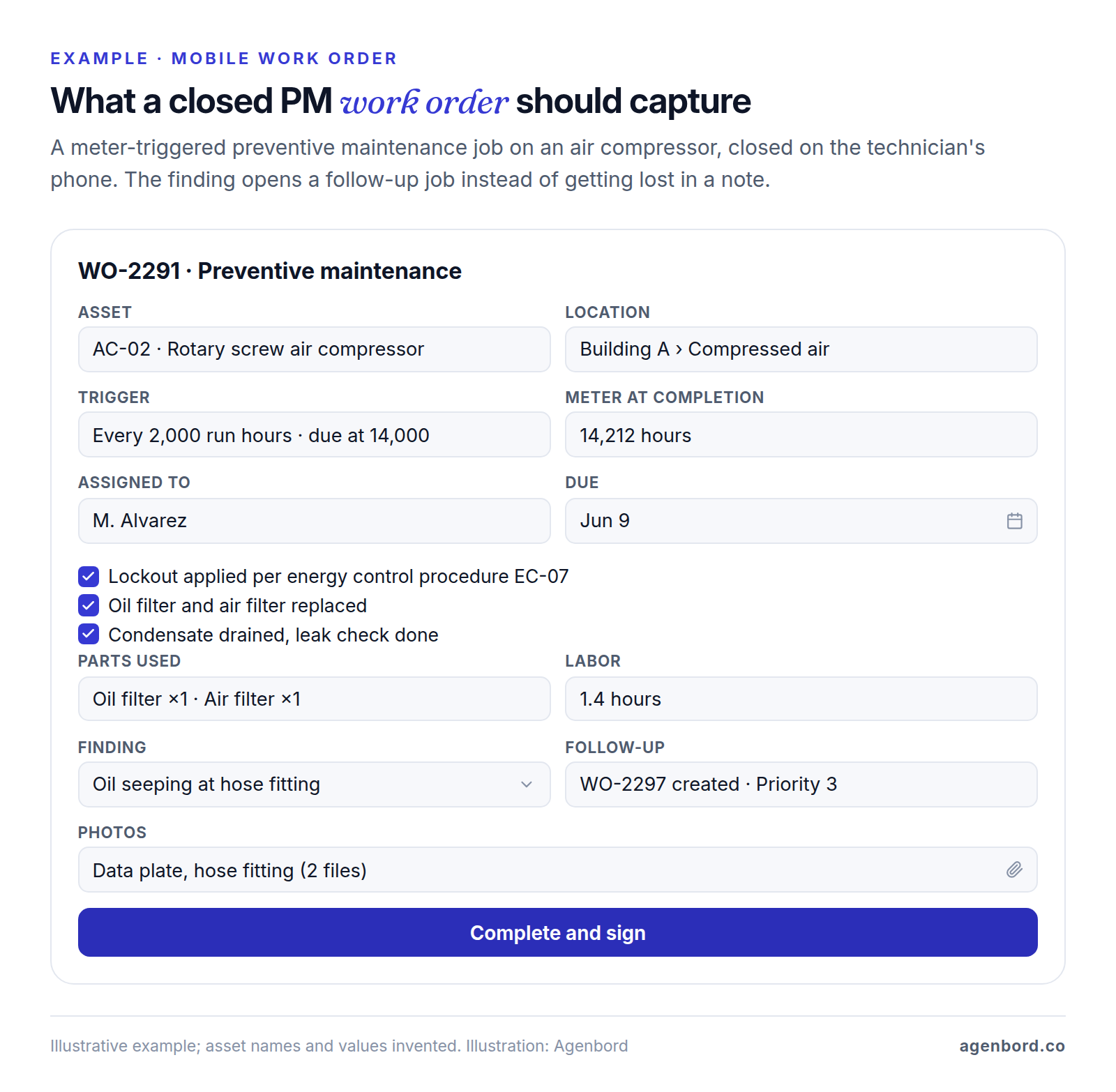
Anyone who spots a problem, such as a leaking valve or a dock door that won't close, submits a request through a portal, a QR code on the asset or the app. A supervisor approves it and turns it into a work order with the asset, priority, technician, due date, checklist, parts, safety steps and a time estimate. The technician closes it with notes, actual time, parts used and a failure code, so the history means something later.
Preventive maintenance schedules
PM schedules create work orders automatically from three kinds of trigger:
- Time. Every week, month or year. A fixed schedule keeps its calendar dates; a floating schedule counts from the last completion, so a late job pushes the next one back.
- Meter. Run hours, miles, cycles or units produced, entered by a technician or read from a sensor or the machine's controller. Many PMs combine the two: every 250 hours or 3 months, whichever comes first.
- Condition. A reading crosses a limit (vibration, temperature, pressure), which is where predictive maintenance starts.
Check the plan before you count on any of these: UpKeep's Essential plan doesn't include preventive maintenance at all, and meter-based scheduling often sits a tier or two up, as the comparison table below shows.
Spare parts and inventory
Maintenance parts need stock by storeroom and bin, minimum and maximum levels that trigger reorders, parts reserved for planned jobs, and every part issued to a work order so its cost lands on the asset. Purchasing often sits a tier above parts: Fiix's Basic plan, for example, includes parts inventory but not purchasing, which starts on Professional. For reorder points, cycle counts and costing methods, see our inventory management software guide.
The technician mobile app
Technicians should be able to see their work orders, the asset's history and manuals, follow a checklist, log time, scan a part, add photos and close the job on a phone. Test it where the signal is worst, such as a basement mechanical room or the far end of the plant, and check that offline mode is on the plan you're pricing: UpKeep lists it from its Professional tier and Limble from Premium+.
Reports that drive decisions
- PM compliance: the share of PMs completed on time. When it falls, the schedule is unrealistic or breakdowns are eating the week.
- Backlog: approved work not yet done, in labor hours. Divide it by the crew's weekly hours to get weeks of backlog.
- Downtime by asset, with MTTR (mean time to repair: total repair time divided by the number of repairs) and MTBF (mean time between failures: operating time divided by the number of failures).
- Cost per asset: labor, parts and contractors, the number that tells you when to replace instead of repair.
- Planned vs reactive hours: how much of the team's time goes to scheduled work compared with breakdowns.
CMMS vs EAM vs work order software vs field service software
Vendor marketing blurs these categories, but each was built for a different job:
| Type | Built for | What it covers | Examples |
|---|---|---|---|
| CMMS | Teams maintaining their own equipment and buildings | Asset register, work orders, PM by time and meter, parts, mobile app, maintenance reports | MaintainX, UpKeep, Fiix, Limble, eMaint |
| EAM (enterprise asset management) | Asset-heavy, multi-site organizations such as utilities, large plants and campuses | A CMMS plus the asset's whole life: investment planning, procurement, financials through the ERP, asset performance and risk | IBM Maximo Application Suite; MicroMain sells both CMMS and EAM |
| Work order or request software | Small facilities teams and property managers | Requests, work orders and a calendar, often without meter-based PM, parts or cost history | Entry plans of CMMS vendors; maintenance modules in property management software |
| Field service management (FSM) | Companies sending technicians to customers' sites | Booking, dispatch by location, quotes, invoicing and payment in the field, customer updates | Jobber, Housecall Pro, ServiceTitan |
A simple test: if you maintain your own equipment, start with a CMMS. If your technicians work at customers' sites and you invoice for it, you need field service management software. If your questions are about capital budgets, depreciation and risk across many sites, you're in EAM territory, where IBM, for example, sells Maximo as SaaS or client-managed software licensed through credits it calls AppPoints. And if you manage homes or apartments, the work order module in your property management software may be enough until the portfolio includes plant equipment such as boilers, chillers and elevators.
What to prepare before go-live
A CMMS is only as useful as the data in it, and most of that data has to come from you. Start with the asset hierarchy, the tree that places every asset so costs and history roll up from a component to a system, a building or the whole site:
Plant 1                                    site
└── Building A                             area
    ├── Compressed air                     system
    │   ├── AC-01 Rotary screw compressor  asset
    │   └── AC-02 Rotary screw compressor  asset
    └── Packaging line 2                   system
        └── CV-2 Conveyor                  asset
            └── CV-2-GB Drive gearbox      component
Keep it three to five levels deep; deeper trees are slow to navigate on a phone. Then collect the rest:
| Data | What to collect | Tip |
|---|---|---|
| Asset IDs | A short, unique ID per asset (AC-02, RTU-07) on a durable tag | Add QR codes if your CMMS scans them, so requests land on the right asset |
| Criticality | A rank (A, B, C) by what a failure does to safety, production or occupants | It decides which assets get PMs first, which spares you stock and how requests are prioritized |
| PM tasks | Steps, trigger, time, parts, tools and safety steps, from manuals, warranty terms, regulations and your technicians | Start with A-critical assets; don't try to load every manual in week one |
| Meters | Which assets have meters, current readings and how they'll be read | Decide now whether readings are manual or come from sensors or controllers |
| Spare parts | Part number, description, location, quantity, min/max, vendor and the assets each part fits | Count before you load; wrong quantities on day one cost the system its credibility |
| People | Requesters, approvers, technicians, planners, managers | Requester accounts are free on several platforms; license the people who do the work |
| Failure codes | Short lists of problem, cause and action codes | Short enough to pick on a phone in seconds |
| History | Open work orders and the last completion date of each PM | Archive older paper and spreadsheets as attachments instead of migrating them line by line |
A worked preventive maintenance schedule
Here's a starter PM program for a hypothetical small plant with two maintenance technicians. The intervals are illustrative: take yours from the manufacturers' manuals, your warranty terms and your own failure history.
| Assets | Task | Trigger | Time per job | Jobs a year | Hours a year |
|---|---|---|---|---|---|
| Air compressors AC-01, AC-02 | Check oil level, drain condensate, check for leaks | Every Monday (fixed) | 0.25 h | 104 | 26 |
| AC-01, AC-02 | Replace oil filter and air filter | Every 2,000 run hours (meter) | 1.5 h | 4 | 6 |
| Forklifts FL-01 to FL-06 | Examination by the operator before use | Daily | Operator's time | 1,500 checklists (250 days) | Not counted |
| FL-01 to FL-06 | Planned service: fluids, brakes, forks, chains, lubrication | 250 hours or 3 months, whichever comes first | 1.5 h | 24 | 36 |
| Rooftop units RTU-01 to RTU-08 | Replace filters, check belts | Every 3 months (fixed) | 0.75 h | 32 | 24 |
| RTU-01 to RTU-08 | Spring cooling and fall heating checks | April and October (seasonal) | 1.5 h | 16 | 24 |
| Conveyors CV-1, CV-2 | Lubricate bearings, check belt tracking and tension | Every month (floating) | 1 h | 24 | 24 |
| CV-1, CV-2 drive gearboxes | Change gearbox oil | Every 12 months | 3 h | 2 | 6 |
| Dock doors and levelers D-01 to D-10 | Inspect, adjust, lubricate | Every 3 months | 0.5 h | 40 | 20 |
| Lockout/tagout procedures for 12 machines | Periodic inspection of each procedure, with certification | At least every 12 months | 1 h | 12 | 12 |
| Total | 258 work orders | 178 hours |
How a CMMS handles each trigger is where tools differ, so test these:
- Fixed vs floating. The compressor check stays on Mondays even if one week's is done on Tuesday; the conveyor lube floats, so a job done 10 days late moves the next one back 10 days.
- Meter. The compressors log about 330 run hours a month, so each comes due roughly every six months, and a slow month pushes the date out on its own. That only works if someone, or a sensor, enters the readings.
- Whichever comes first. A busy forklift hits 250 hours before three months are up and gets serviced sooner; an idle one still gets its quarterly service.
- Seasonal. The rooftop checks belong to April and October, whenever the last one was done.
Two rows are compliance work (general information, not legal advice; read the standards for your situation). OSHA's powered industrial truck standard, 29 CFR 1910.178, requires trucks to be examined before being placed in service, at least daily (after each shift when they run around the clock), and a truck that needs repair or is unsafe must be taken out of service until it's restored. In a CMMS, that's a mobile checklist per truck where a failed item opens a work order and marks the truck down. The lockout/tagout standard, 29 CFR 1910.147, requires a periodic inspection of each energy control procedure at least annually, certified with the machine, the date, the employees included and the inspector: an annual PM per procedure, with those four fields required to close it.
Now look at the calendar. The program averages about 15 hours a month, but load every schedule with a January start and the quarterly and annual work lands together: 42 hours in January, 4 in February. Stagger the start dates (for example, two forklifts a month, the rooftop filters in two groups, one lockout/tagout inspection a month) and no month goes above 21.5 hours. The remaining peaks are the seasonal checks, which can't move.
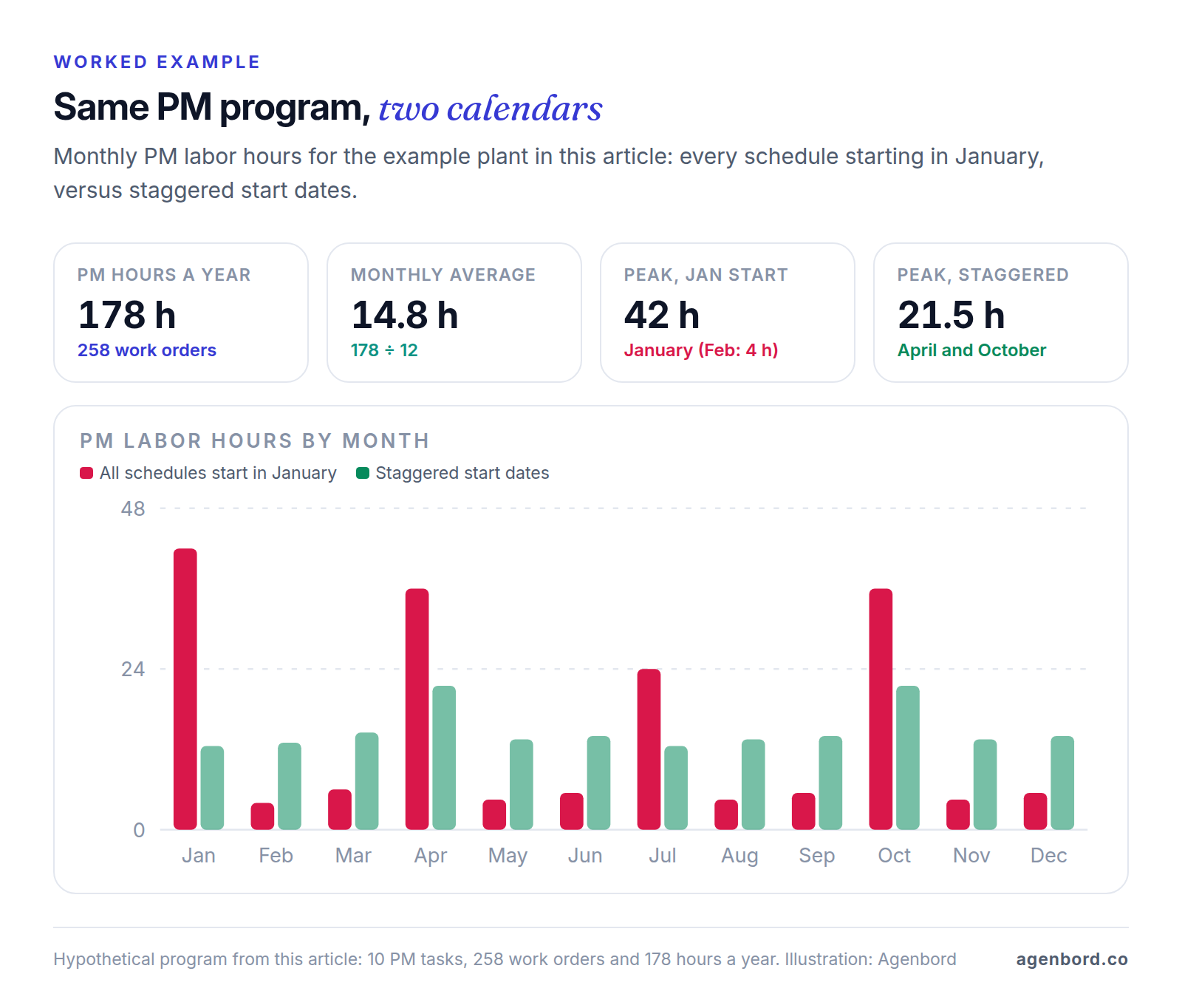
So set each schedule's first due date deliberately when you load it, and ask vendors to show upcoming PM hours by month. Also agree a grace window, such as 10% of the interval, so PM compliance measures work done on time rather than on the exact day.
CMMS software prices and plans compared (October 2026)
Here's how eight CMMS options compare, based on their official sites in October 2026. "Best fit" is our read; prices are list prices per user per month.
| Platform | Best fit | Free or entry option | What the tiers gate | Pricing |
|---|---|---|---|---|
| MaintainX | Starting free and growing on one platform | Basic: free, with unlimited work orders and requesters and 2 active repeating work orders | Unlimited repeating work orders from Essential; meter-based PMs, parts, purchase orders and REST API on Premium; IoT sensors, SSO and multi-site on Enterprise | Essential $20 billed annually ($25 monthly); Premium $65 ($75 monthly); Enterprise custom |
| UpKeep | Teams that want AI features (Nova AI) on every plan | No free plan; view-only, requester and vendor users are free | PM, parts and costing from Premium; meter readings, offline mode and request portal from Professional; purchase orders, API, multi-site and SSO on Enterprise | Essential $24, Premium $55 (billing term not stated); Professional and Enterprise by quote |
| Fiix | Parts inventory from the free plan up | Free: limited users, 25 active PMs, unlimited assets, work orders, requests and parts | Unlimited PMs from Basic; purchasing, RFQs and multi-site from Professional; custom API integrations and SSO on Enterprise, at extra cost | Basic $45, Professional $75 (billing term not stated); Enterprise custom |
| Limble | Unlimited PM and a request portal on the entry plan | None listed | Standard: PM, request portal, asset hierarchies. Premium+: meter and threshold PMs, parts, purchasing, REST API, IoT sensors, offline mobile, SSO as an add-on. Enterprise: multiple locations, SSO | Quote, via a price calculator |
| eMaint | Plants with condition monitoring, ERP and multi-site needs | None listed | Professional: PM, meters, condition-based triggers, parts, requisitions, offline mobile app. Enterprise: global multi-site, ERP, BI and SCADA integrations, pre-built connectors, unlimited request-only portal licenses, SSO | Quote-based; 3-user minimum on Professional, 5 on Enterprise; prepaid annual commitment |
| Eptura Asset (Hippo CMMS) | Facility teams; Eptura says Hippo CMMS is evolving into Eptura Asset | Demo | Work orders, PM, parts with barcode scanning, inspection logs, vendor management, compliance reporting | Quote-based |
| MicroMain | Growing from CMMS into EAM with one vendor | Free trial, no credit card | Sells CMMS and EAM software | Quote-based |
| Odoo Maintenance | Companies running, or choosing, Odoo as their ERP | One App Free: the Maintenance app alone, unlimited users | Spare parts stock and purchase orders live in Odoo's Inventory and Purchase apps, so they need a paid plan | Standard (all apps) $24.90 per user/month for the first year, $31.10 regular |
How much does CMMS software cost?
Per-user prices only compare once you match tiers. For six paid users, say five technicians and a manager, a year at list price comes to $3,240 on Fiix Basic, $3,960 on UpKeep Premium and $4,680 on MaintainX Premium billed annually. They don't buy the same things: of the three, only MaintainX Premium lists meter-based maintenance and purchase orders. Then ask about what the price list doesn't show, such as add-ons (SSO is an add-on on Limble Premium+), integration costs (extra on Fiix Enterprise) and user minimums (eMaint's start at three).
Free CMMS software, and what it leaves out
- MaintainX Basic is free with unlimited work orders, procedures and requester users, but only 2 active repeating work orders and no parts inventory, purchase orders or API. It's a work order system with a taste of PM.
- Fiix Free covers limited users (the page doesn't say how many), up to 25 active PMs, and unlimited assets, work orders, service requests and parts inventory, plus the mobile app. It's the only one of these three free options with parts inventory.
- Odoo's One App Free plan runs the Maintenance app with unlimited users on Odoo Online: equipment, requests, a maintenance calendar and preventive maintenance with MTBF and MTTR. Spare parts and purchasing mean more apps, which means a paid plan.
UpKeep, Limble and eMaint list no free plan; MicroMain offers a free trial. Use a free plan to prove the habit on one area, but price the tier you'll need once PMs, meters and parts are in before you design your process around it.
The best CMMS software for your situation
There's no single best CMMS, only a best shortlist for your team:
- A small facilities team leaving paper (1–5 technicians): pilot on MaintainX's or Fiix's free plan, trial UpKeep and Limble, and compare the tier each needs for PM and parts.
- Manufacturing with meters and machine data: shortlist plans with meter-based PMs and an API, such as MaintainX Premium, Limble Premium+ and eMaint, which lists condition-based triggers on Professional and SCADA among its Enterprise integrations. Ask exactly how readings get from the machine into the CMMS.
- Several sites: compare multi-site support (Enterprise at MaintainX, UpKeep, Limble and eMaint; Professional and up at Fiix) and look at EAM, such as Maximo or MicroMain, if capital planning is part of the job.
- On Odoo, or choosing an ERP: the Maintenance app sits in the same system as Odoo's inventory, purchasing and manufacturing apps, and Odoo notes that manufacturing can trigger maintenance requests from the work center control panel.
Whichever you shortlist, make each vendor run the worked example in the demo: the compressor PM on a 2,000-hour meter, the forklift PM on 250 hours or 3 months, a failed forklift checklist that opens a work order, the lockout/tagout inspection with its four certification fields required, a part issued to a work order, and the cost-per-asset report afterward.
How to implement and use a CMMS: a 90-day plan
A workable plan for one site:
- Days 1–30: data and setup for a pilot area. Pick an area with critical assets and a supervisor who wants it to work. Build its hierarchy, tag the assets, load PMs and spare parts for the A-critical assets, and set up users, the request flow, priorities and failure codes. Decide which fields are required to close a work order: time, parts and a failure code at least.
- Days 31–60: run the pilot. All work in that area goes through the CMMS: requests through the portal or QR codes, no verbal-only jobs, every job closed on the phone. Review open work orders and PM compliance weekly, and fix checklists and data as technicians flag problems.
- Days 61–90: expand and settle the routine. Roll out area by area and load the remaining PMs with staggered start dates. Build each week's schedule from due PMs plus the backlog, sized to the hours the crew actually has. Each month, review PM compliance, backlog and the ten assets with the most downtime and cost, and adjust PM intervals that prove too frequent or too sparse. Make the old spreadsheet read-only.
Everything depends on closing the loop: a job that's done but not closed in the system leaves the history, and every report built on it, wrong. Keep phone forms short, require only the fields that matter, and stop accepting requests that bypass the system.
When a custom CMMS or integration makes sense
Buy first. For standard work orders, PM and parts, the platforms above cost a small team a few thousand dollars a year at list price, and their vendors keep improving the mobile app you'd otherwise have to build and maintain. Custom work pays off at the edges:
- ERP or accounting integration. Parts purchasing, receiving and costs posted to the general ledger, when your plan has no connector or API access sits on a tier you don't otherwise need (UpKeep puts its API on Enterprise, and Fiix charges extra for Enterprise integrations). A custom integration service starts around $15,000; a simpler one-way sync through workflow automation starts from $1,500.
- Machine data. Run hours, cycle counts and alarms pulled from controllers or sensors into the CMMS's API, when the vendor's IoT integration doesn't cover your equipment.
- Unusual assets or workflows. A rental fleet that moves between customers and your shop, inspection regimes with their own forms and reports, or maintenance windows tied to production scheduling. A focused internal tool starts from $12,000 (4–8 weeks), and a larger business platform runs $30,000–$80,000 (2–4 months).
- A homegrown system you depend on. If maintenance runs on an Access database or a spreadsheet with rules you can't lose, moving it to a web app is a modernization project from $12,000.
- A technician app for a workflow no CMMS app handles: a mobile app MVP for iOS and Android starts from $15,000 (8–12 weeks).
Add hosting of roughly $50–$500 a month and maintenance of about 15–20% of the build cost per year. Our build-vs-buy framework covers the general decision, and we price custom software as a fixed-price proposal with a written scope and weekly demos, and you own the code.
The short version: choose the CMMS tier that includes the PM, meter and parts features you need, prove it on one area with your own assets, and build only what sits between it and your ERP, your machines or a workflow it can't handle.
Sources
- MaintainX - Pricing (accessed October 2026)
- UpKeep - Pricing (accessed October 2026)
- Fiix - Pricing (accessed October 2026)
- Limble - Pricing (accessed October 2026)
- eMaint - Pricing (accessed October 2026)
- Eptura - Hippo CMMS (accessed October 2026)
- MicroMain - CMMS and EAM software (accessed October 2026)
- Odoo - Pricing (accessed October 2026)
- Odoo - Maintenance app (accessed October 2026)
- IBM - Maximo Application Suite (accessed October 2026)
- OSHA - 29 CFR 1910.178, Powered industrial trucks (accessed October 2026)
- OSHA - 29 CFR 1910.147, The control of hazardous energy (lockout/tagout) (accessed October 2026)
Prices, plans and regulations change. Figures were checked on October 2, 2026; follow the links for the latest. Nothing here is legal, tax or financial advice.
About the author
Founder, Agenbord
Muhammad Hamza is the founder of Agenbord, the Fort Lauderdale software company behind the construction ERP Smart Construction and a WhatsApp-first billing platform. He writes practical guides on buying, building and automating business software.