On this page
- How inventory management software works
- The five types of inventory management software
- How much does inventory management software cost?
- How to choose inventory management software
- How to implement inventory software without losing count
- When a custom build or ERP module pays off
- How to make inventory management software
Inventory management software keeps a running record of everything you stock: what came in, where it sits, what's promised to customers and what needs reordering. Every receipt, transfer, sale and adjustment is recorded as it happens, so purchasing, sales and the books work from the same numbers instead of a spreadsheet someone last updated on Tuesday.
There are five main types. Accounting software with inventory (QuickBooks Online Plus or Advanced) fits one location and simple stock. Standalone inventory apps (inFlow, Sortly, Zoho Inventory, Katana) add locations, scanning and purchasing for product sellers, wholesalers and trades. E-commerce and omnichannel systems (Shopify, Cin7) keep stock right across online stores, marketplaces and shops. Warehouse management systems, or WMS (NetSuite WMS, Logiwa), direct the work in busy warehouses. ERP modules (Microsoft Dynamics 365 Business Central, NetSuite, Odoo) tie stock to manufacturing and the general ledger.
As of October 2026, published plans start free and run past $1,000 a month for omnichannel and e-commerce platforms, ERP is priced per user and most WMS vendors quote. We build custom software and ERP modules, so we'll also say when a custom system pays off, and when it doesn't.
How inventory management software works
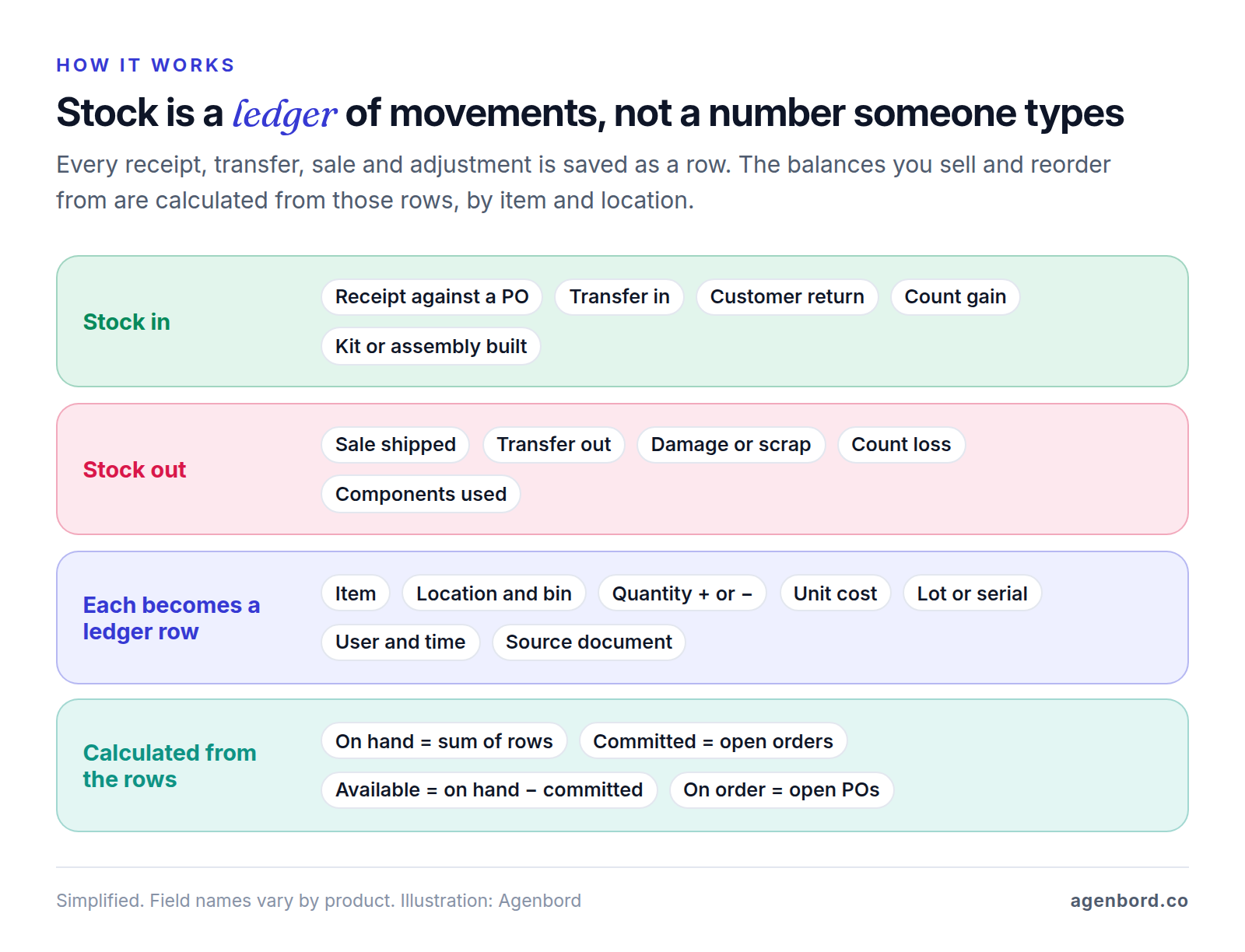
Good inventory software is a ledger at heart. Each receipt, transfer, sale and adjustment is saved as a movement: which item, which location, how many, at what cost, who did it and which document caused it. Stock levels are never typed in. They're calculated from the movements, so when the system says 37 you can click through to every document behind the number. A spreadsheet stores the current number and forgets how it got there.
The item master: SKUs, variants and units of measure
Everything starts with the item master, the list of things you stock. Each item gets a SKU (stock-keeping unit, your code for one distinct product) plus a barcode, cost, price, supplier and reorder settings. Each variant needs its own SKU because each has its own stock: a shirt in three colors and five sizes is 15 SKUs.
Units of measure are where quiet errors start. If you buy screws by the case of 2,000 and use them one at a time, the software needs a base unit (each) and a conversion, or receiving one case adds 1 instead of 2,000. Contractors hit the same trap with pipe bought by the length and used by the foot.
Locations and bins
A location is any place that holds stock you count separately: a warehouse, a store, a service van, even a job site. Bins are addresses inside a location, such as aisle 3, shelf B, bin 4 (A3-B-04). Once more than one or two people put stock away and pick it, bins let the system send anyone to the right shelf. A small shop can start without them; a warehouse can't.
Receipts, transfers, sales and adjustments
Every change in quantity should come from a document:
- Receipts against purchase orders. Order 300 and receive 250: the receipt adds 250, leaves 50 on backorder (or closes the PO short) and gives accounting the quantity to match against the supplier's bill. The rest of purchasing, from request to paid bill, is in our procure-to-pay walkthrough.
- Transfers. Two movements, out of one location and into another, with the stock held "in transit" in between so it's neither counted twice nor lost.
- Sales and returns. A shipment removes stock; a return adds it back, ideally into a returns bin until someone inspects it.
- Adjustments. Damage, theft, samples, expiry and count corrections, each with a reason code, so shrinkage (stock lost to damage, theft or error) shows up in a report instead of vanishing.
Here's one item's week at a hypothetical main warehouse (SKU MUG-12-WHT, a 12 oz white mug):
| Date | Movement | Document | Change | On hand |
|---|---|---|---|---|
| Oct 1 | Opening balance (full count) | CNT-001 | +120 | 120 |
| Oct 2 | Received against a PO | PO-1042 | +200 | 320 |
| Oct 3 | Transferred to Store 2 | TR-0087 | −48 | 272 |
| Oct 6 | Shipped to a customer | SO-5531 | −12 | 260 |
| Oct 6 | Damaged, written off | ADJ-0193 | −3 | 257 |
| Oct 7 | Cycle count: 255 in bin A-03 | CC-0412 | −2 | 255 |
Nobody typed 255. It's the sum of six movements, each pointing to the document that explains it.
On hand, committed and available
Three numbers are easy to mix up:
- On hand: physically in the location, from the ledger. 255 in the example.
- Committed (or allocated): reserved for orders, transfers or builds not yet shipped. Say two open orders need 40.
- Available: on hand minus committed, the most you can promise the next customer: 215.
Add on order (open purchase orders) for the full picture. If your online store shows on hand instead of available, you'll sell the same 40 mugs twice.
Reorder points and safety stock
A reorder point is the stock level that triggers a new purchase order, set so the delivery arrives before you run out:
Reorder point = average daily usage × lead time in days + safety stock
Safety stock is the buffer for busy stretches and late deliveries. A common rule of thumb:
Safety stock = (highest daily usage × longest lead time) − (average daily usage × average lead time)
Worked example (hypothetical). You sell 20 units a day on average and 24 on busy days. Your supplier usually delivers in 8 days, 10 at worst.
- Safety stock = (24 × 10) − (20 × 8) = 240 − 160 = 80 units
- Reorder point = (20 × 8) + 80 = 240 units
When available stock plus what's on order falls to 240, the software suggests a purchase order. In an average cycle the delivery lands as you reach 80; in a busy one, the 80 covers the gap.
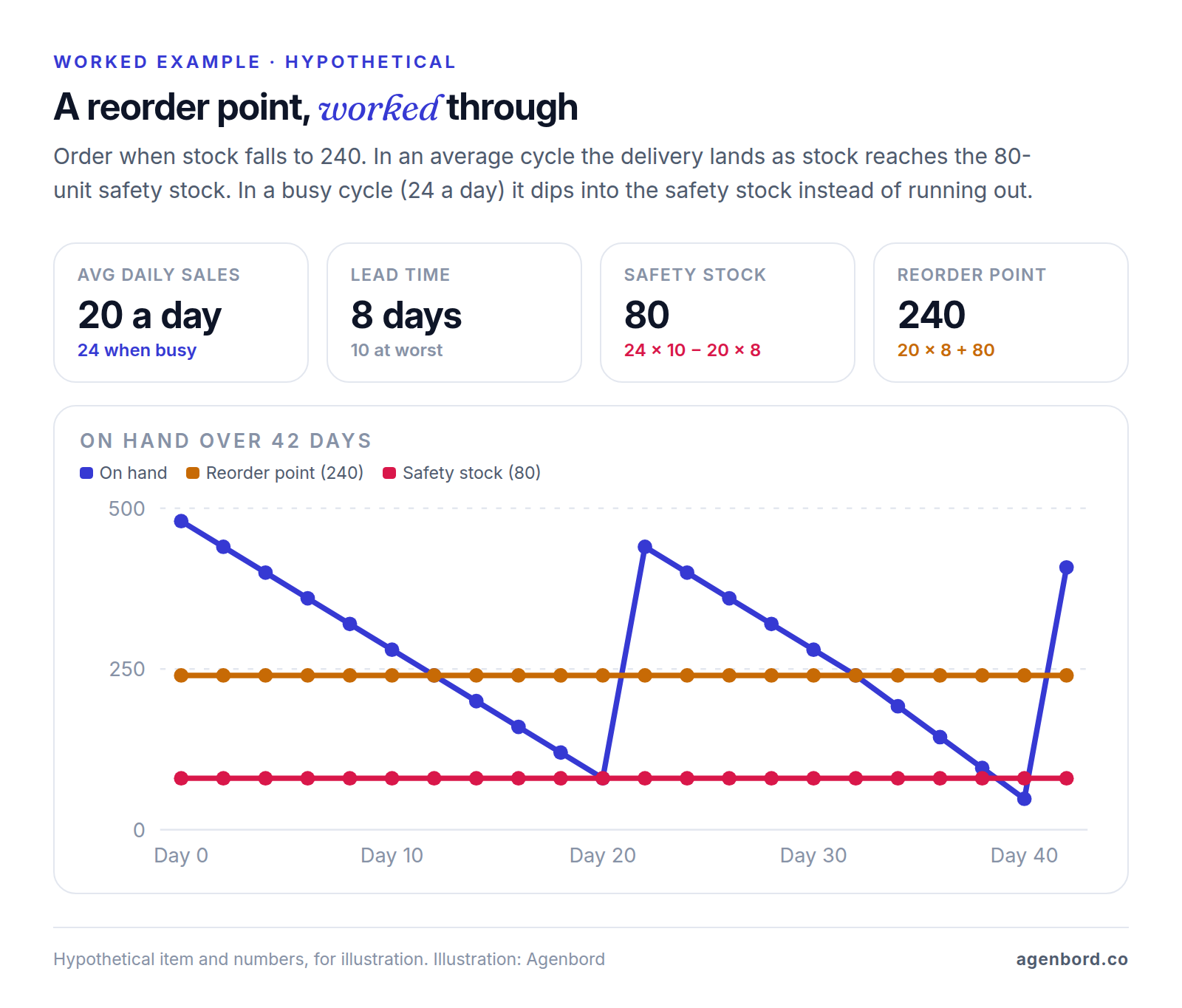
This rule of thumb is conservative: it assumes your busiest days and slowest delivery coincide. With a year of clean sales data, a statistical method based on how much demand and lead time actually vary sizes the buffer more precisely. Either way, review reorder points every season; points set once and forgotten cause stockouts and dead stock alike.
Cycle counts and barcode scanning
A cycle count means counting a few bins or items every day or week instead of shutting down for an annual count. With ABC counting, the items that make up most of your sales value get counted often (monthly, say) and slow, cheap items once or twice a year. The software should build the count list, hide the expected quantity (a blind count, so people count rather than confirm) and post differences as adjustments.
Barcodes make counting, receiving and picking fast and accurate: label every item and bin before go-live, and scan the bin and the item whenever stock moves.
Lot, serial and expiry tracking
Lot (batch) numbers group units made or received together; serial numbers identify single units. Track lots and expiry dates if you sell food, supplements, cosmetics, chemicals or anything that could be recalled: the software should pick the earliest expiry first (FEFO, first expired, first out) and show which customers received a given lot. Track serials for equipment with warranties or service histories. Both add a scan to every movement, so turn them on only for the items that need them.
Kits, assemblies and bills of materials
A kit (or bundle) sells as one SKU but ships as its parts: a gift set sells as one item and takes two MUG-12-WHT and one coaster out of stock. An assembly is built ahead of time: a build order consumes components and adds finished units. The bill of materials (BOM) is the recipe, and manufacturers add work orders, routings and labor costs. If you sell kits online, check that kit availability is calculated from component stock, or you'll sell kits you can't build.
Costing methods and the sync to accounting
Inventory software also values your stock. The common costing methods:
- FIFO (first in, first out): the oldest purchase costs go to cost of goods sold first.
- Weighted average: each receipt re-averages the unit cost.
- Specific identification: each serialized unit carries its actual cost.
- Standard cost: a set cost per item with variances posted separately, mostly in manufacturing.
Add landed costs (freight, duties) to the items they brought in, or your margins will look better than they are.
In the books, a receipt increases inventory, a shipment moves cost into cost of goods sold and an adjustment posts to a shrinkage account. Make one system the record for inventory value: usually the inventory system posts to QuickBooks, Xero or your ERP, item by item or as daily summaries, and nobody adjusts stock in the accounting software. Your costing method affects taxes and financial statements, so confirm it with your accountant before go-live; this is general information, not tax advice.
The five types of inventory management software
Most products fit one of five types. The edges blur as vendors add features from the type above, so use the types to shortlist, then test the specific plan.
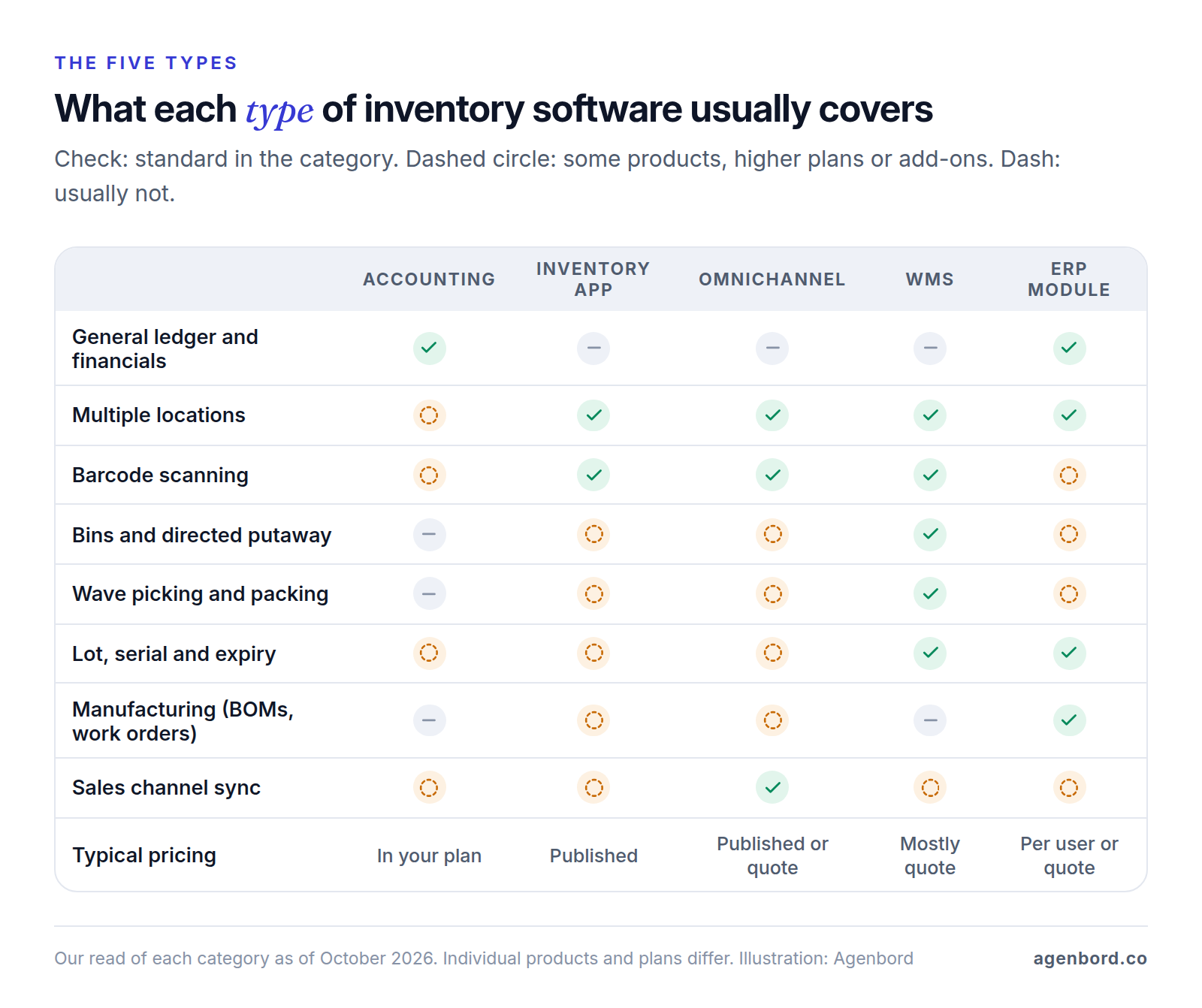
1. Inventory inside your accounting software
QuickBooks Online tracks inventory on its Plus and Advanced plans, with purchase orders that turn into bills when stock arrives and low-stock alerts. QuickBooks Desktop Enterprise includes Advanced Inventory on its Platinum and Diamond tiers.
One system with no sync is the strength. But it's built around the books, not the stockroom, so check your plan for locations, bins, lot and serial numbers, scanning and kits. It fits one location, a modest catalog and one or two people handling stock.
2. Standalone inventory apps for small businesses
Most inventory management software for small business sits here: inFlow, Sortly and Zoho Inventory, plus Katana, inFlow Manufacturing and Fishbowl for light manufacturers. They add locations, mobile scanning, purchase orders, counts and reorder points, and most connect to accounting software.
Plan limits drive upgrades, so read them. inFlow charges $39 a month each for serial and lot numbers below its Pro plan, Zoho Inventory adds bins and serial and batch tracking from Premium, and Sortly puts purchase orders on Ultra and its QuickBooks Online integration on Premium. Sortly also counts active jobs and offers check-in and check-out from Ultra, which suits contractors tracking tools and materials. Service companies with truck stock should check their field service platform first; several include it, as our field service software guide shows.
3. E-commerce and omnichannel inventory
When you sell through a website, marketplaces, wholesale and stores, the hard part is keeping available stock right everywhere at once. Shopify includes inventory management on every plan, with 10 inventory locations on Basic, Grow and Advanced and 200 on Plus, which may be all a retailer with a website and a shop or two needs. Retail inventory management software also has to cover the store floor: scanner counts, transfers between stores, and a point-of-sale (POS) system and website selling from the same available stock.
Omnichannel systems such as Cin7 sit between your channels, warehouse and accounting. Cin7 Core's entry plan includes unlimited locations, batch and expiry tracking, kits, bills of materials and barcode scanning, but caps sales orders (6,000 a year) and channel and app connections (two). These systems are built around orders and channels, so warehouse depth and manufacturing vary widely by plan; test them if you need them.
4. Warehouse management systems (WMS)
A WMS runs the work inside a warehouse: directed putaway (the system chooses the bin), pick paths, wave and batch picking, packing and shipping. NetSuite WMS, for example, lists mobile barcode scanning, putaway and picking strategies, wave release, bin management, cycle count plans, and lot and serial tracking. Logiwa focuses on high-volume brands and third-party logistics (3PL) warehouses, while Fishbowl Advanced Warehouse and the warehouse add-ons from Cin7, Katana and Zoho Inventory suit smaller operations.
Warehouse inventory management software earns its cost when several people pick all day and mistakes become returns or retailer chargebacks. Expect real setup work (bin layout, labels, devices, rules) and quote-based pricing from dedicated vendors.
5. ERP inventory modules
An ERP (enterprise resource planning) system keeps inventory in the same database as purchasing, sales, manufacturing, projects and the general ledger. Microsoft Dynamics 365 Business Central includes inventory and warehouse management in both plans and adds manufacturing on Premium. NetSuite sells an annual license (core platform, modules and users) plus a one-time implementation fee. Odoo sells all its apps on per-user plans, with a free plan for a single app.
You get one set of numbers from purchase to profit, but implementation is usually a partner-led project and the cost grows with every user. ERP fits manufacturers, multi-warehouse distributors and businesses whose stock is tied to jobs, as our construction ERP guide covers for contractors. Our ERP for small business guide covers choosing one, and when a packaged ERP fights your process, a custom ERP module is the other route.
How much does inventory management software cost?
List prices from each vendor's pricing page as of October 2026. Compare the plan that covers your hardest workflow, not the cheapest one.
| Product | Type | Published price (October 2026) | Limits and extras |
|---|---|---|---|
| QuickBooks Online Plus / Advanced | Accounting | $140 / $340 a month; 50% off the first 3 months | 5 / 25 users |
| Sortly | Inventory app | Free (100 items); $49–$299 a month list; 50% off the first year billed yearly | 500–5,000 items; QuickBooks Online on Premium |
| Zoho Inventory | Inventory app | Free (50 orders a month); $29–$249 a month billed annually | Orders, users and locations capped by plan |
| inFlow | Inventory app | $99–$699 a month billed yearly ($129–$879 monthly) | 2–20 users; serial and lot numbers from Pro |
| Katana | Inventory and manufacturing | Free (30 SKUs); Core from $299 a month, sales orders billed by usage | Manufacturing, traceability and warehouse add-ons, $149–$249 a month each |
| Fishbowl | Inventory, manufacturing, warehouse | $229–$729 a month billed annually; Advanced Warehouse from $595 | Advanced priced by users and deployment, by quote |
| Shopify | E-commerce | $29–$299 a month billed yearly ($39–$399 monthly); Plus from $2,300 | 10 inventory locations, 200 on Plus |
| Cin7 Core | Omnichannel | $349, $599 or $1,199 a month | 5–15 users; 6,000–120,000 sales orders a year |
| Logiwa | WMS | Quote, by fulfillment volume and complexity | Unlimited users |
| NetSuite | ERP and WMS | Quote: annual license plus implementation fee | WMS is an add-on module |
| Business Central | ERP | $80 or $110 per user a month, paid yearly | Bought through a partner; manufacturing on Premium |
| Odoo | ERP | Standard $24.90 per user a month for the first year, then $31.10, billed annually; one app free | All apps on paid plans |
The subscription is rarely the whole bill. Also price:
- Volume: order caps (Zoho Inventory, Cin7), item caps (Sortly) and per-order usage (Katana) raise the bill as you grow.
- People and places: inFlow adds team members at $29 a month each; Zoho Inventory charges $10 a month per extra location.
- Add-ons: inFlow's API access is $49 a month, and Cin7 sells advanced WMS, a B2B portal and POS as add-ons on its lower plans.
- Setup: onboarding packages (inFlow), implementation fees (NetSuite) or partner consulting (Business Central).
- Hardware: scanners, label printers and a label for every bin and item.
How to choose inventory management software
There's no single best inventory management software, only the one that handles your hardest workflow at a price that still works at three times today's volume. Shortlist two or three products of the right type, then test them on your data.
Score the shortlist
| Criterion | What to check |
|---|---|
| Your hardest workflow | Kits, lots and expiry, mixed units or job materials, shown working, not described |
| Locations and bins | Every place stock lives, vans and job sites included |
| Stock accuracy | Available vs on hand, reservations, blind counts, reason codes, permissions, movement history |
| Purchasing | Reorder suggestions, POs in supplier units, partial receipts, landed costs |
| Integrations | Accounting, sales channels and shipping, with one owner for each kind of data |
| Mobile and scanning | Receiving, picking and counting on your team's devices, including weak signal |
| Three-year cost | Your year-three users, orders and locations, plus add-ons, onboarding and hardware |
Run a demo script with your own data
Send each finalist 20–30 real SKUs, including a kit, a lot-tracked item and one you buy and sell in different units, and ask them to run these live:
- Receive a PO short: order 300, receive 250, and show the backorder, the new cost and what reached accounting.
- Split a transfer: send 48 to another location, receive 40, and show where the other 8 are.
- Count a bin: run a blind count, enter a difference, and show the adjustment, reason code and value change.
- Sell a kit: sell it online, show the components committed, then ship it and show what left stock.
- Take a return: receive it into a returns bin, inspect it and restock it.
- Trigger a reorder: show the suggested PO, rounded to the supplier's case size.
- Trace a lot to every customer who received it.
- Export everything: items, balances and the full movement history.
Then trial the winner with the people who'll use it. inFlow and Sortly offer 14-day trials, Business Central 30 days, and Katana a free plan for up to 30 SKUs.
How to implement inventory software without losing count
Most of the work is data and discipline:
- Clean the item master: one SKU per variant, no duplicates, units and conversions set, suppliers and reorder settings filled in. Archive dead items instead of importing them.
- Label locations and bins in walking order, and decide where returns and damaged stock go.
- Count opening balances at a cutoff. Stop movements at a quiet moment, count everything going live and import the counts with their costs. Agree the opening inventory value with your accountant.
- Go live one location at a time: the main warehouse or simplest store first, the rest once it settles, vans and job sites last.
- Connect integrations in order: accounting (which accounts, item-level or summary postings), then sales channels (push available, not on hand), then shipping (labels, with tracking flowing back to orders).
- Lock down adjustments: a few trusted people, a reason code every time, approval for large ones.
- Count again after 30 days, and fix the cause of every big difference, not just the number.
When a custom build or ERP module pays off
Buy first. The products above handle standard stock-keeping well, and rebuilding scanning, channel sync and costing would cost more than years of subscriptions; our build-vs-buy framework covers the general decision. Custom software, or an ERP module built around your process, pays off when:
- Stock is tied to jobs. Contractors buy materials for a job, keep some in the yard, send some to site and bring leftovers back, and the cost must land on the job as well as the count. Most inventory apps are built around orders, not jobs.
- Your units don't fit: cut-to-length stock, sheets and remnants, rolls, items sold by weight.
- Field stock works offline: vans, crews and remote sites scanning without signal.
- You're reconciling three apps that each hold part of the truth.
- The process is your edge: rental fleets, consignment or returns rules that set you apart.
In Smart Construction, our construction ERP, materials and inventory is one module alongside procurement, projects, progress billing and site diaries, and the web, desktop and mobile apps share one data model. That's the pattern we recommend wherever stock moves with jobs: one ledger, many screens.
For budgeting, we scope a focused internal tool from $12,000 (4–8 weeks), a single ERP module from $25,000 (2–4 months) and a multi-module system at $60,000–$150,000 (4–9 months, phased), with integrations quoted per integration. A mobile app MVP for iOS and Android, such as a scanning app, starts at $15,000 (8–12 weeks). Add hosting of roughly $50–$500 a month and maintenance of about 15–20% of the build cost a year; our custom software cost guide explains what moves those numbers.
How to make inventory management software
If you're building your own or briefing a developer, get these right:
- A movement ledger. Tables for items, units and conversions, locations and bins, and documents (POs, transfers, orders, counts). Every quantity change is an append-only row: item, location, bin, base-unit quantity, unit cost, lot or serial, document, user and timestamp. Never edit a movement; reverse it.
- Derived, cached balances. Update a balance table in the same database transaction as each movement, and run a nightly job that recomputes it from the ledger and flags any drift.
- Safe reservations. Reserve stock inside a transaction with row-level locks, so a web order and a picker can't both take the last unit, and decide whether negative stock is blocked or flagged.
- Cost layers. Store each receipt as a FIFO layer that shipments consume in order (or re-average on each receipt), and post the results to accounting as journal entries.
- Scanner-first screens. Big buttons, scan-to-confirm and an error sound, for people in gloves. Many hardware scanners type into the active field like a keyboard, so a web app can work with them.
- Offline sync. Queue scans on the device with unique IDs, sync when signal returns, and have the server re-check each movement against current stock, sending conflicts to a review list.
- Idempotent integrations. Pull orders, push available quantities, post journal entries and fetch tracking numbers through APIs and webhooks, built so a retried message can't ship an order twice.
- An audit trail. Who did what, when and on which device, with approval for large adjustments and closed periods locked.
A first version for one warehouse (items, receiving, transfers, counts, a scanning app and an accounting sync) is a focused build. Multi-location inventory with manufacturing is a phased project: start with the ledger and the workflow that hurts most.
Sources
- QuickBooks - Pricing (accessed October 2026)
- QuickBooks - Inventory management (accessed October 2026)
- QuickBooks Desktop Enterprise - Pricing (accessed October 2026)
- Sortly - Pricing (accessed October 2026)
- Zoho Inventory - US pricing (accessed October 2026)
- inFlow - Pricing (accessed October 2026)
- Katana - Pricing (accessed October 2026)
- Fishbowl - Pricing (accessed October 2026)
- Shopify - Pricing (accessed October 2026)
- Cin7 - Pricing (accessed October 2026)
- Logiwa - Pricing (accessed October 2026)
- Oracle NetSuite - Warehouse Management System (accessed October 2026)
- Microsoft - Dynamics 365 Business Central pricing (accessed October 2026)
- Odoo - Pricing (accessed October 2026)
Prices, plans and regulations change. Figures were checked on October 2, 2026; follow the links for the latest. Nothing here is legal, tax or financial advice.
About the author
Founder, Agenbord
Muhammad Hamza is the founder of Agenbord, the Fort Lauderdale software company behind the construction ERP Smart Construction and a WhatsApp-first billing platform. He writes practical guides on buying, building and automating business software.