On this page
- What is ERP for a small business?
- Signs you need an ERP, and when you don't
- ERP modules in plain English
- Best ERP for small business: the main options compared
- How much does ERP cost for a small business?
- How to choose an ERP for your small business
- Implementing ERP with a small team
- Free ERP for small business: what "free" really costs
- When custom ERP modules make sense
- Your next step: a one-week ERP readiness check
ERP for small business means one system and one database for your money and your operations: sales orders, purchasing, inventory, production or projects, and the books. You enter an order once, and the stock level, the purchasing plan, the invoice and the financial reports all update from that record. Nobody re-types it into accounting or patches the inventory spreadsheet afterward.
You need one when the gaps between your tools cost more than the tools: stock numbers nobody trusts, orders typed twice, a month-end close built from exports, and no clear margin by product or customer. You probably don't if you sell services, carry little inventory and your accounting software connects cleanly to two or three other apps. That setup is often enough for years.
As of October 2026, Microsoft lists Dynamics 365 Business Central Essentials at $80 per user/month (paid yearly), Odoo's all-apps Standard plan is $24.90 per user/month for the first year, and NetSuite, Acumatica, SAP Business One and Sage Intacct are priced by quote. Implementation, data migration, training and integrations come on top.
Our take, as a team that builds ERP and operations software: buy a proven package for the financial core, connect what already works, and build custom only for the workflow that sets you apart.
What is ERP for a small business?
ERP stands for enterprise resource planning, a name that sounds bigger than the idea. At small-business scale, an ERP is a set of modules (finance, purchasing, inventory, sales, production or projects, reporting) that share one database. Each customer, item and vendor exists once, and every module reads and updates the same records.
The usual alternative is a stack: accounting software such as QuickBooks or Xero, an order or e-commerce app, an inventory spreadsheet, a CRM, maybe a shipping tool. Each keeps its own copy of customers, items and orders. People or integrations carry data between them, and every hand-off is a place where numbers drift. Here is the same order handled both ways.
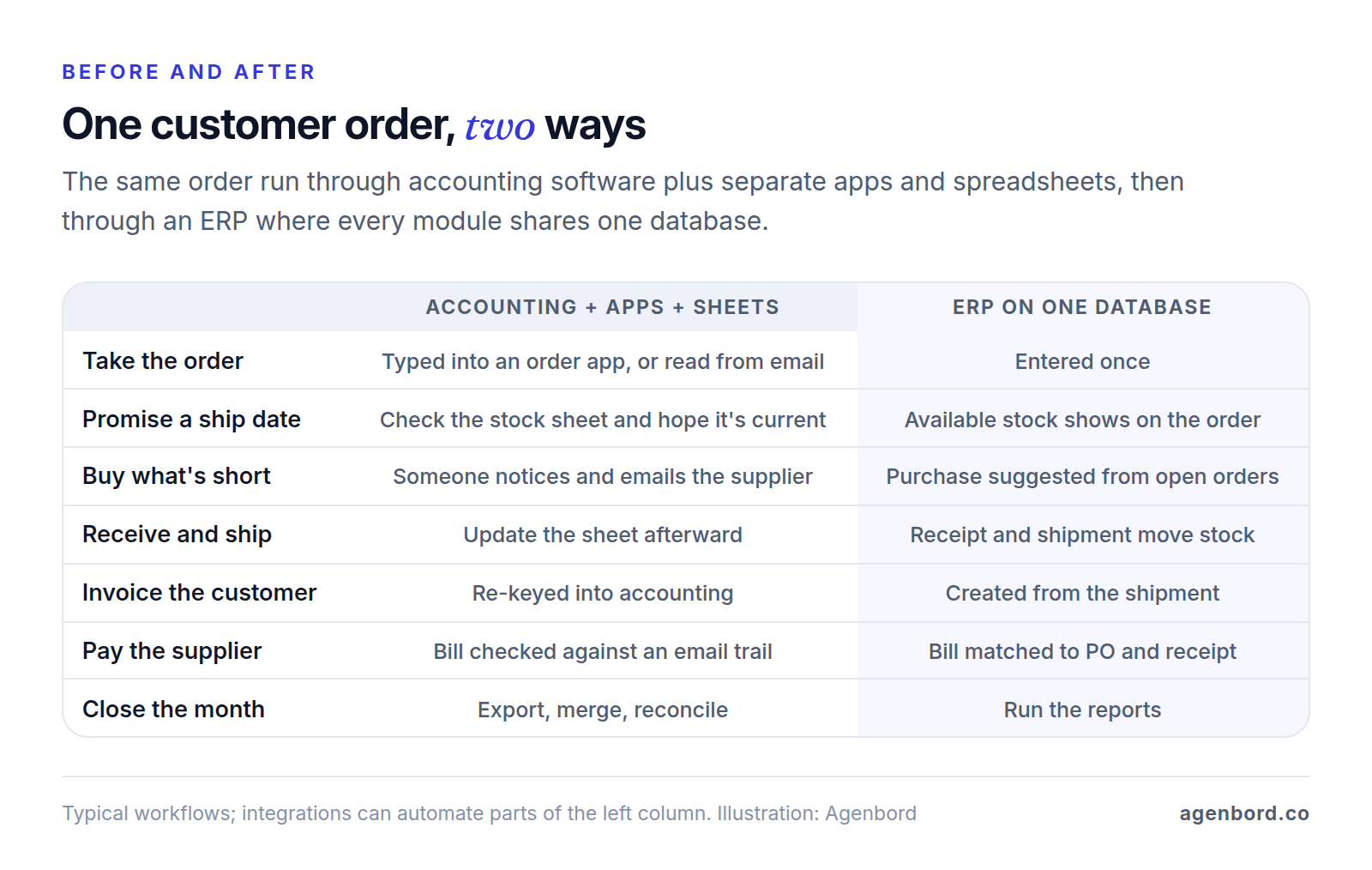
The payoff is less typing and fewer arguments about whose number is right. Sales promises from live stock, purchasing buys from real demand, and margin by product or customer is a report instead of a weekend in Excel.
Cloud ERP for small business
Most small businesses should buy cloud ERP: the vendor hosts it, applies updates and runs the infrastructure, and you pay a subscription. Some products also run in a private cloud or on your own servers. Acumatica prices cloud, private cloud and on-premises deployments, Odoo's Custom plan allows Odoo.sh or on-premises hosting, and ERPNext can be self-hosted. Pick those only for a specific reason, such as a hosting requirement or an IT team that wants control, because servers, backups and upgrades then become your job or your partner's.
Signs you need an ERP, and when you don't
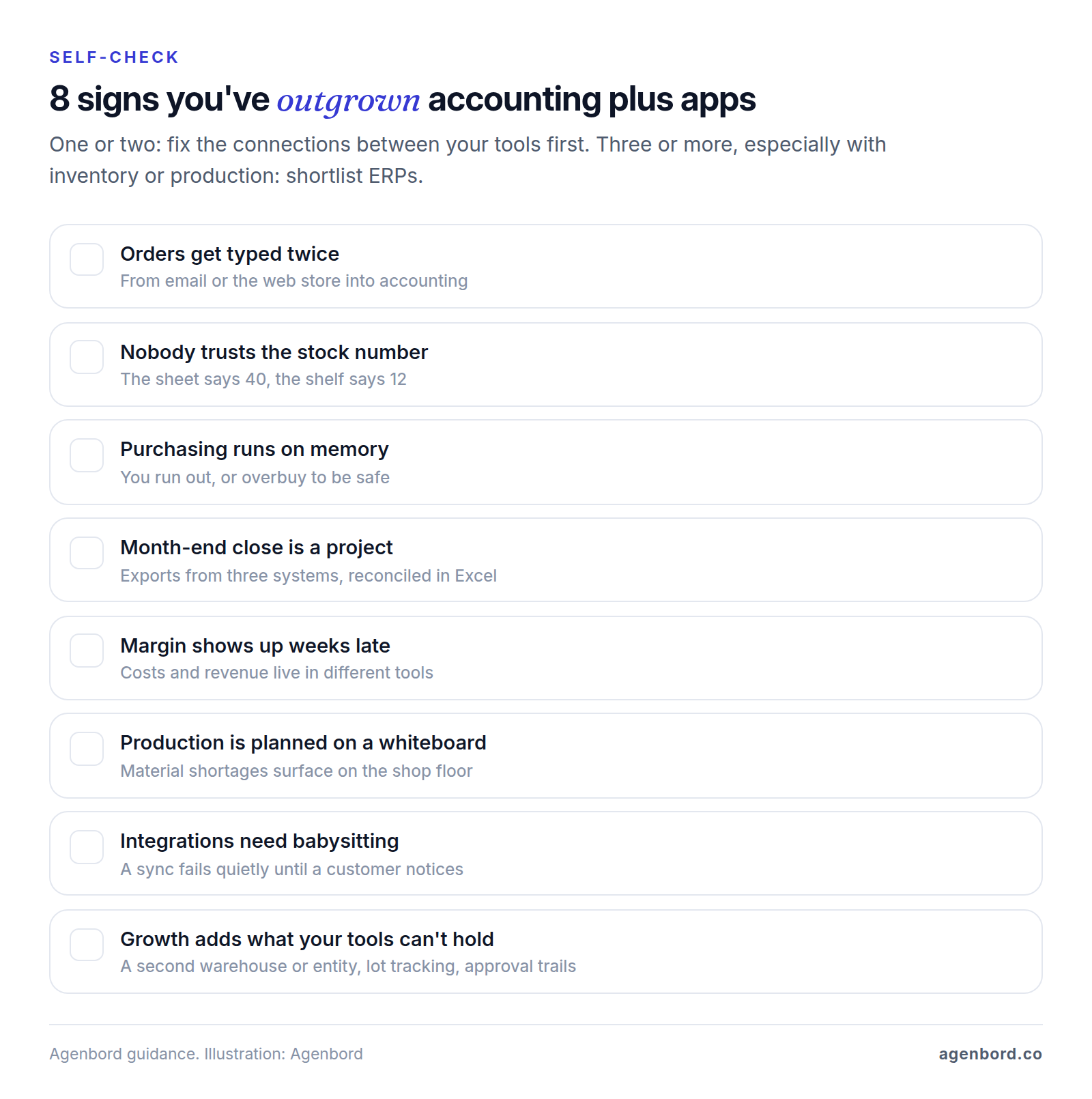
Is ERP good for a small business? It is when the cost of working between systems (re-typing, reconciling, guessing at stock) is higher than the cost and disruption of replacing them. These are the signs that usually tip it:
- Orders get typed twice. An order arrives by email or from the web store, someone keys it into accounting, and the two don't always match.
- Nobody trusts the stock number. The sheet says 40, the shelf says 12, and sales promises from the sheet.
- Purchasing runs on memory. Reorders happen when someone notices, so you either run out or overbuy to be safe.
- Month-end close is a project. Someone exports from three systems, reconciles them in Excel and still isn't sure the inventory value is right.
- Margin shows up weeks late, because costs and revenue live in different tools.
- Production is planned on a whiteboard, and material shortages surface on the shop floor instead of when the order is taken.
- Integrations need babysitting. A sync fails quietly and nobody notices until a customer, or the bank, does.
- Growth adds what your tools can't hold: a second warehouse or legal entity, lot tracking for a new customer, or an auditor asking who approved a purchase.
When you don't need an ERP. If you sell services or carry little inventory, accounting software plus two or three well-connected apps is often enough: a CRM for sales, a project or field service tool for delivery, and a payroll provider, each syncing to the books through a native integration. One or two of the signs above can usually be fixed by connecting what you have: a web order that creates the invoice, a purchase that routes for approval, an alert when a sync fails. That's workflow automation, and a single workflow starts from $1,500 with us. Our walkthrough of end-to-end processes such as quote-to-cash and procure-to-pay shows how much can be connected before you replace anything.
Three or more signs, especially with inventory or production in the mix, mean it's time to shortlist ERPs.
ERP modules in plain English
Vendors slice and bundle modules differently, so compare by job, not by label. These are the parts a small business typically uses:
| Module | What it does | What changes on one database |
|---|---|---|
| Financials | General ledger, payables, receivables, bank reconciliation, financial statements | Sub-ledgers post as work happens, so the close starts from current numbers |
| Purchasing | Requisitions, purchase orders, receipts, supplier bills | Bills are checked against the order and receipt before payment (a three-way match); approvals leave a trail |
| Inventory | Items, warehouses and bins, lots or serial numbers, counts, valuation (more on inventory software) | Stock moves with every receipt, shipment and production step |
| Sales and orders | Quotes, sales orders, pricing, fulfillment, invoicing, returns | Orders can reserve stock and become invoices without re-keying |
| Manufacturing (MRP) | Bills of materials, work orders, material requirements planning | Open orders drive what to make and buy, and when |
| Projects | Budgets, time and expenses, project billing | Labor and purchases land on the project as they're entered |
| HR and payroll links | Employees, time, payroll journals, often from a payroll provider | Payroll cost lands on the right department, job or project |
| Reporting | Dashboards, financial statements, margin by product, customer or job | One set of numbers, so reports don't need reconciling |
Two scope notes. ERP suites often include basic CRM, but a sales team that lives in a dedicated CRM can keep it and sync customers and orders both ways; our guide to connecting a CRM to your other systems covers which system should own which field. Payroll is the other common exception: many small businesses keep a payroll provider and post its journals into the ERP, while Sage Intacct, for one, lists HR and payroll alongside its financials. Check what each vendor runs itself.
ERP for small business manufacturing
If you make things, manufacturing depth is the first filter, because it varies widely between products. The basics are bills of materials (the parts and quantities that go into each product), work orders, and MRP, which works out what to make and buy, and when, from open orders and stock on hand. Depending on your work, you may also need routings and work centers, lot or serial traceability, scrap and yield, outside processing and product costing that rolls up material, labor and overhead.
Business Central puts manufacturing in its Premium plan ($110 per user/month, paid yearly, as of October 2026). Odoo and ERPNext both include manufacturing apps, and Acumatica offers a manufacturing-specific pricing calculator. Whichever you shortlist, test it on one of your real products: build its bill of materials with a substitute component and a scrap allowance, enter a sales order that's short on material, and see what the MRP run tells you to buy and when.
Best ERP for small business: the main options compared
There's no single best ERP for small business. The right one depends on your industry, how complex your inventory is, how many people need access and who will implement it. Here are seven common options, as each vendor describes and prices them in October 2026.
| System | How it's sold and deployed | Price (October 2026) | Often a fit for | Check before you buy |
|---|---|---|---|---|
| Oracle NetSuite | Cloud, annual subscription | Quote-based: core platform, optional modules and users, plus a one-time implementation fee | Fast-growing companies that want one broad cloud suite | Module-by-module pricing and renewal terms, in writing |
| Microsoft Dynamics 365 Business Central | Subscription, sold and supported only through Microsoft partners | Essentials $80, Premium $110, Team Members $8; per user/month, paid yearly | Distributors and small manufacturers already working in Outlook, Excel and Teams | Partner services are quoted separately; price every user type you need |
| Acumatica | Cloud, private cloud or on-premises, through partners | Quote-based; no per-user fees; priced on applications, usage and deployment | Companies with many occasional users, such as warehouse staff and approvers | Model transaction growth, since usage drives the price |
| SAP Business One | Through SAP partners; deployment options vary | No published price | Small and midsize companies built around inventory, purchasing and sales | The partner does the work; ask for references at your size |
| Sage Intacct | Cloud | Quote-based, "tailored to your organization's size and specific needs" | Finance-led companies with multiple entities or project accounting | Financials-first: test inventory and order handling, or plan integrations |
| Odoo | Odoo Online; Odoo.sh or on-premises on the Custom plan | One App Free: $0, one app, unlimited users. Standard $24.90, Custom $37.40 per user/month in year one | Small companies that want many apps, from CRM to manufacturing, in one suite | Year-one discount; Standard excludes Studio, multi-company and the external API |
| ERPNext | Frappe Cloud, a partner or self-hosted | Open source; Frappe Cloud hosting from $5/month per site, not priced per user | Teams with technical help, or a partner, that want open-source software | Someone has to own setup, upgrades and support |
Quote-based suites. NetSuite, Acumatica, SAP Business One and Sage Intacct can only be compared on written quotes for the same scope, and their models diverge as you grow: NetSuite adds users and modules to a platform fee, while Acumatica charges for applications and usage but not seats. Acumatica sells through partners and SAP points buyers to its partner finder, so you're choosing a partner as much as a product.
Published prices. Business Central's Team Members seat covers people who mainly read data, approve workflows or update select records. Microsoft sells and supports the product only through partners, so implementation is a separate quote. Odoo's listed prices carry a discount that "is valid for 12 months, for initial users ordered"; the regular prices shown are $31.10 (Standard) and $46.70 (Custom).
Simple starting points. If you want a simple ERP for a small business, start narrow: Odoo's free plan runs one app, and ERPNext, which its GitHub repository calls a "100% Open-Source ERP System," costs nothing to license. Both still need hosting and help, covered in the free ERP section below.
How much does ERP cost for a small business?
The cost of ERP for a small business has two parts: what you pay the vendor every year, and what it takes to configure the system, load your data and get people using it. At best, vendors publish the first part. The second has to be quoted.
The total cost checklist
Make sure every proposal covers these lines before you compare anything:
- Subscription: users by type, modules, entities, and any usage or storage tiers
- Implementation: process design, configuration and the partner's project management
- Data migration: customers, vendors, items, open orders, opening balances, and how much history comes over
- Integrations: e-commerce, CRM, payroll, banking, shipping, EDI; who builds each one and who maintains it
- Customization and reports: fields, workflows and reports beyond the standard ones
- Training: power users first, then everyone else
- Support and upgrades: the support plan after go-live, and who tests each update
- Hosting: only if you self-host or choose a private cloud
- Your team's time: the people who map processes, clean data and test will do less of their day job for months
A three-year cost table
Fill in one per finalist from written quotes. It shows where each cost lands over time:
| Cost line | Year 1 | Years 2–3 | Usually priced |
|---|---|---|---|
| Subscription | Full year, sometimes at a first-year discount | Renewal price, capped or not | Per user, per module or by usage |
| Implementation | One-off project | Change requests | Fixed fee or time and materials |
| Data migration | One-off | Only if you add entities or systems | Often inside implementation; ask |
| Integrations | Build and test | Upkeep when either side changes | Per integration |
| Customization | Build | Retesting at each upgrade | Fixed fee or hourly |
| Training | Initial rounds | New hires, new modules | Per session or bundled |
| Support | Ask what's included | Annual plan | Per year or per hour |
| Internal time | Heavy | Light | Your payroll |
The subscription is the one line you can calculate from public prices. Take a hypothetical 20-person distributor where 12 people process transactions every day and 8 mainly look things up or approve:
| Option (published prices, October 2026) | Year 1 | Years 2 and 3, each | 3-year license total |
|---|---|---|---|
| Business Central Essentials: 12 users at $80, 8 Team Members at $8 | $12,288 | $12,288 | $36,864 |
| Odoo Standard: 20 users at $24.90, then $31.10 | $5,976 | $7,464 | $20,904 |
| Odoo Custom, which adds the external API: 20 users at $37.40, then $46.70 | $8,976 | $11,208 | $31,392 |
These assume today's prices hold and that all 20 Odoo users need full accounts, and they exclude implementation, partner services and renewal increases. The two lessons: the plan you actually need matters more than the headline price, and first-year discounts end. Put NetSuite, Acumatica, SAP Business One and Sage Intacct in the same table once their quotes arrive, and ask each for a three-year figure on the same scope.
How to choose an ERP for your small business
- Write down your processes first. Pick the four or five that run the business, such as order to cash, purchase to pay, make to order and the month-end close, and write each as numbered steps with who does what. That becomes your demo script and your scope.
- Shortlist three. Filter on industry (distribution, manufacturing, projects, services), inventory complexity (lots, serials, several warehouses), legal entities and your user mix. If many people need only occasional access, a model without per-user fees or with a cheap light-user seat changes the math.
- Run scripted demos on your data. Send every vendor the same script and a sample of real items, customers and orders a week ahead. Make it specific: "Take an order for 40 units with 25 in stock, ship 25, back-order 15 and invoice only what shipped." Score each step from 1 to 5 and note every workaround, export and "that would be a customization."
- Call references at your size. Ask for two customers of similar headcount in your industry, implemented by the same partner. Ask what went live late, what they'd scope differently and how the first-year cost compared with the quote.
- Judge the partner as hard as the product. They configure, train and support you. Ask who will do the work, how many similar projects they've delivered on this product and what support costs after go-live.
- Read the contract before you commit. Look for the terms below.
- A cap on renewal price increases, and how long it lasts
- Minimum user counts or multi-year commitments, and the price of adding users or entities mid-term
- Your right to a full data export in a usable format, during the contract and at exit, and what it costs
- A sandbox (test copy) for trying updates and changes
- Support response times, and whether support comes from the vendor or the partner
- Who owns customizations and integration code
Implementing ERP with a small team
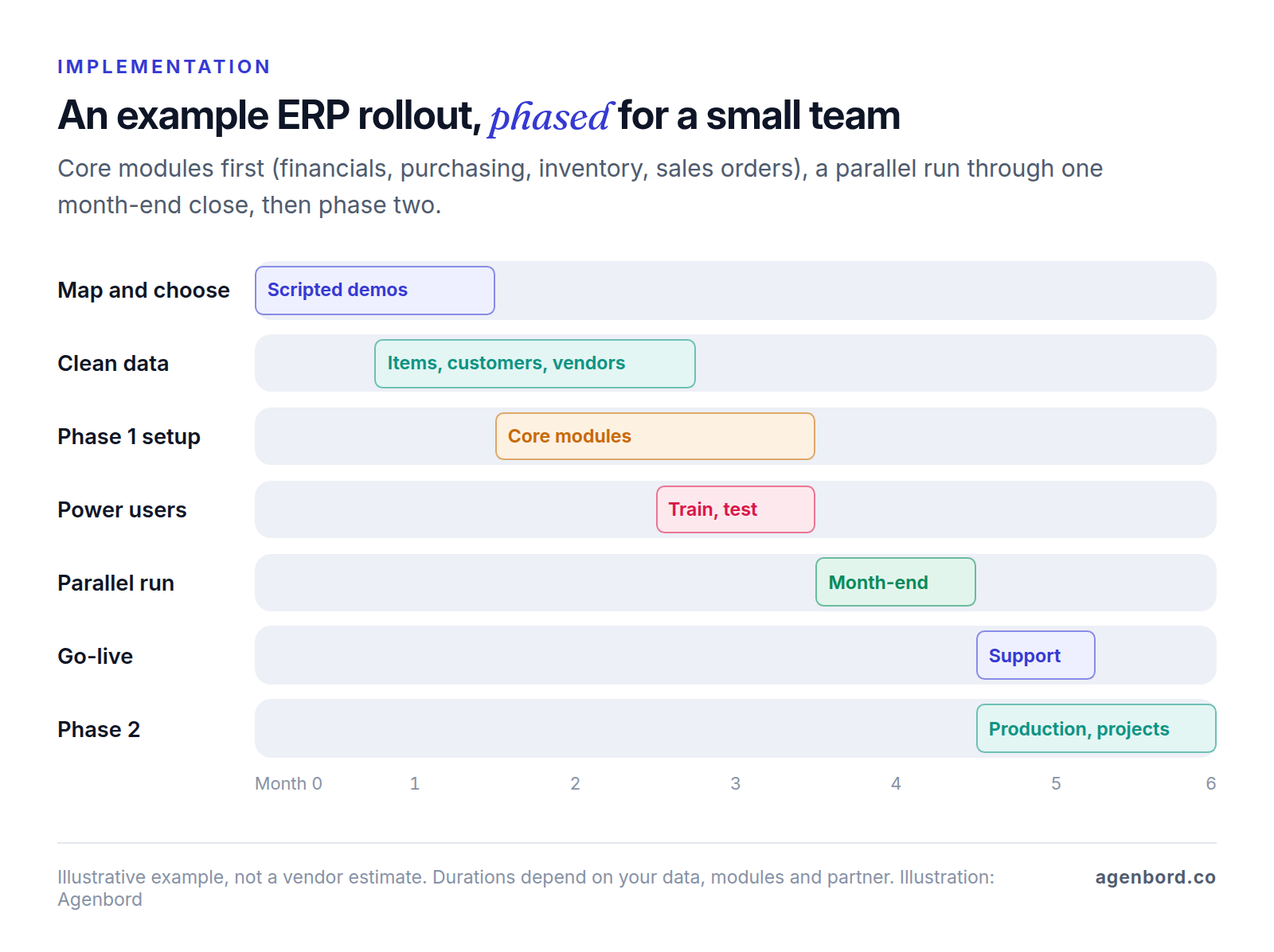
You don't have a project office, so keep the plan simple and the scope phased.
- Phase the modules. Go live first with the core everything else depends on, usually financials, purchasing, inventory and sales orders. Add manufacturing, projects, advanced warehousing or a customer portal once the core is stable.
- Name an owner and power users. One person owns decisions and the timeline. Each area (sales, purchasing, warehouse, finance) gets a power user who learns the system first, helps test it and trains colleagues.
- Clean the data before you move it. Merge duplicate customers and vendors, retire dead items, fix units of measure and agree on numbering. Bring over open transactions and opening balances, and leave most closed history in the old system as reports.
- Pick a clean cutover. The start of a month or quarter keeps opening balances and reporting simple.
- Run in parallel for a period. Process real transactions in both systems through at least one month-end close. Compare receivables and payables aging, inventory quantities and value, and the profit and loss statement before you switch the old system off.
- Save customization for phase two. Learn the standard workflow before changing it; many must-have changes turn out to be habits.
Free ERP for small business: what "free" really costs
"Free" covers three different things:
- Free tiers of commercial products. Odoo's One App Free plan covers one app with unlimited users. A second app means a paid plan.
- Open-source software. Odoo Community, the open-source core that Odoo Enterprise is built on, and ERPNext cost nothing to license. Some Odoo apps and features are Enterprise-only (Odoo's editions page compares the two), so check your must-haves before planning around Community.
- Free trials. Business Central offers 30 days and ERPNext on Frappe Cloud 14. Good for a look, too short to prove fit.
What you pay for instead:
- Hosting. Frappe Cloud starts at $5/month for an ERPNext site on shared servers and $20/month for a server. Self-hosting costs whatever your servers, backups and monitoring cost; Odoo notes that hosting isn't included for on-premises installs.
- Setup. Configuration, data migration and training take the same effort as with a paid product. Odoo sells implementation packages (Success Packs) to companies under 50 employees and recommends partners for mid-size ones; ERPNext's paid setup comes through its partner network.
- Upgrades and security. New versions, security patches and backups are your job unless you pay someone to do them.
- Support. Without a vendor support plan, answers come from community forums, a partner retainer or your own staff.
Free ERP works when you have a technical person in-house or a partner on retainer, fairly standard processes and the discipline to own the system. It fails when nobody owns it and the first broken upgrade lands in the middle of a month-end close.
When custom ERP modules make sense
For the general ledger, payables, receivables and payroll, buy. Those are solved problems with established packages your accountant already knows, and you don't want to own that code.
Custom work earns its place in three situations:
- One workflow is your edge and every package forces a workaround: configure-to-order quoting, a rental fleet, a compliance trail your customers audit, or a field team that needs a simpler app than the ERP's.
- Per-user pricing doesn't fit your workforce, such as drivers, technicians or warehouse staff who each touch one screen a day. Price Acumatica's no-per-user model and Business Central's Team Members license first, and build only if neither fits.
- One system has to span very different businesses with operations no single package covers.
The usual pattern is to keep the financial core in a package and build the operations layer on top, connected both ways. We price a single custom module from $25,000 (2–4 months) and a connected multi-module platform at $60,000–$150,000 (4–9 months, delivered in phases), with integrations quoted per integration. Budget hosting at roughly $50–$500 a month and maintenance at about 15–20% of the build cost per year. Our build vs buy framework walks through the decision, and the custom software cost guide explains what moves the price.
Industry ERPs are the other route, and construction is a clear example: progress billing, retainage and job costing are specific enough that contractors usually compare construction ERPs rather than general ones, as our construction ERP buyer's guide explains. Smart Construction, the construction ERP our team designed, built and runs as a subscription SaaS, applies the one-database idea to that industry: its web, desktop and mobile apps share one data model, from site diaries and labor attendance to procurement and progress billing.
Your next step: a one-week ERP readiness check
- Count users by type: daily transaction users, occasional users and approvers.
- Write your four or five core processes as numbered steps.
- Tick the signs above and mark which ones a connection or automation could fix.
- List the systems you'd keep and the ones an ERP would replace.
- Pick a cutover month and the person who'll own the project.
If the list points to connecting what you have, start there. If it points to ERP, send it to three vendors as your demo script.
Sources
- Microsoft - Dynamics 365 Business Central pricing (accessed October 2026)
- Microsoft - Dynamics 365 Business Central overview (accessed October 2026)
- Oracle NetSuite - NetSuite ERP, including how NetSuite is priced (accessed October 2026)
- Acumatica - Pricing (accessed October 2026)
- SAP - SAP Business One (accessed October 2026)
- SAP - SAP Business One features (accessed October 2026)
- Sage - Sage Intacct (accessed October 2026)
- Odoo - Pricing (accessed October 2026)
- Odoo - Community and Enterprise editions (accessed October 2026)
- Odoo - Source code repository on GitHub (accessed October 2026)
- Frappe - ERPNext pricing and Frappe Cloud hosting (accessed October 2026)
- Frappe - ERPNext repository on GitHub (accessed October 2026)
Prices, plans and regulations change. Figures were checked on October 2, 2026; follow the links for the latest. Nothing here is legal, tax or financial advice.
About the author
Founder, Agenbord
Muhammad Hamza is the founder of Agenbord, the Fort Lauderdale software company behind the construction ERP Smart Construction and a WhatsApp-first billing platform. He writes practical guides on buying, building and automating business software.