On this page
- Task vs. workflow vs. process
- 15 business process automation examples by department
- How to pick your first process to automate
- How to implement business process automation
- Benefits of business process automation you can measure
- Why business process automation fails
- When tools are enough, and when a custom build pays off
Business process automation examples are whole processes, not single tasks. Quote-to-cash runs from a customer asking for a price to their payment landing in your books; procure-to-pay runs from a purchase request to a paid, correctly coded supplier invoice. Each crosses teams and systems, with handoffs, approvals and exceptions where work stalls.
Automating a process means software runs the routine path (moving data, routing approvals, sending reminders, matching records) while people keep the decisions: approvals, judgment calls and anything that moves money or makes a promise to a customer. The 15 examples below, by department:
- Sales and customers: quote-to-cash, customer onboarding, contract renewals
- Finance: procure-to-pay, expense reports and card reconciliation, month-end close
- People and IT: hire-to-first-day, timesheets to payroll, joiner-mover-leaver access
- Operations and service: order-to-delivery with returns, ticket-to-resolution, field service request to invoice, construction change orders
- Vendors and compliance: vendor and subcontractor onboarding, document and policy approvals
Task vs. workflow vs. process
The difference between the three decides what you build and what you measure:
- A task is one action: copy a signed quote's line items into an invoice.
- A workflow is a trigger plus a short chain of tasks across a few apps, done in minutes: when a quote is signed, create the order and the deposit invoice and tell operations.
- A process is the outcome the business cares about, from trigger to end state: a price request turned into cash in the bank. It contains several workflows, crosses teams, can wait on people for days and includes decisions only a person should make.
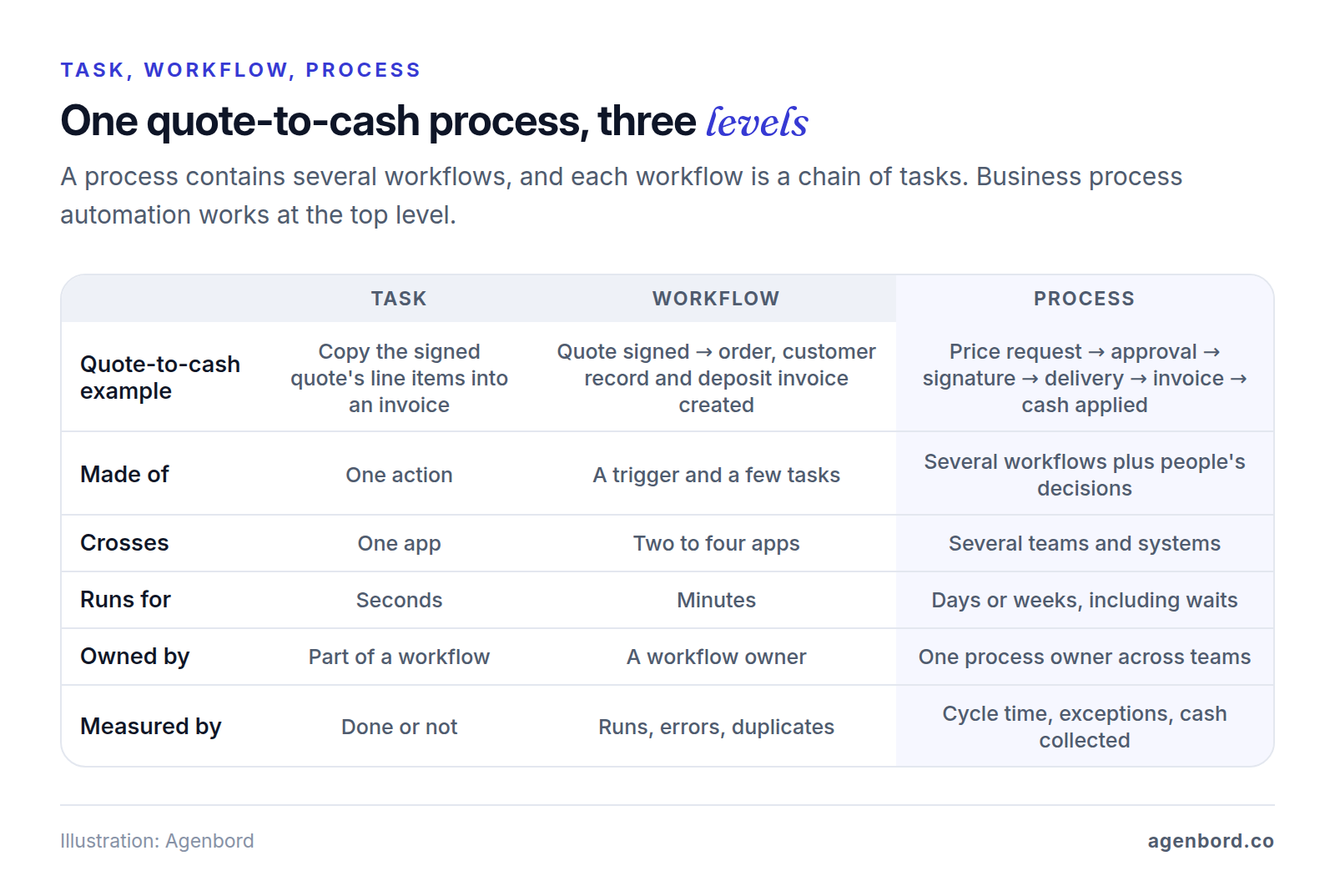
Business process automation works at that third level, so it needs what no single workflow has: a status for every item, approvals with deadlines and backups, an exception queue with an owner, and timestamps at each handoff to measure the whole. For recipes at the workflow level, see our 20 workflow automation examples.
15 business process automation examples by department
Each example names the teams and the start and end, then the steps: Auto runs on its own, Person stays with someone. Systems are listed by category, and thresholds stand in for your own policies. Legal and tax rules are general information, not advice; the links go to the official sources.
Sales and customers
1. Quote-to-cash
Sales, operations, finance and the customer · price request → payment applied
- Auto: the quote is built from the price book and customer record.
- Person: a sales manager approves discounts above the rep's limit (say, 10%); finance sets credit terms for new accounts.
- Auto: e-signature with reminders. Signing creates the job, the customer in accounting and a deposit invoice.
- Person: operations delivers and marks the work complete.
- Auto: the final invoice comes from the delivery record, with a payment link and reminders until paid; the payment is matched to it.
- Person: the account owner works disputes; finance approves write-offs.
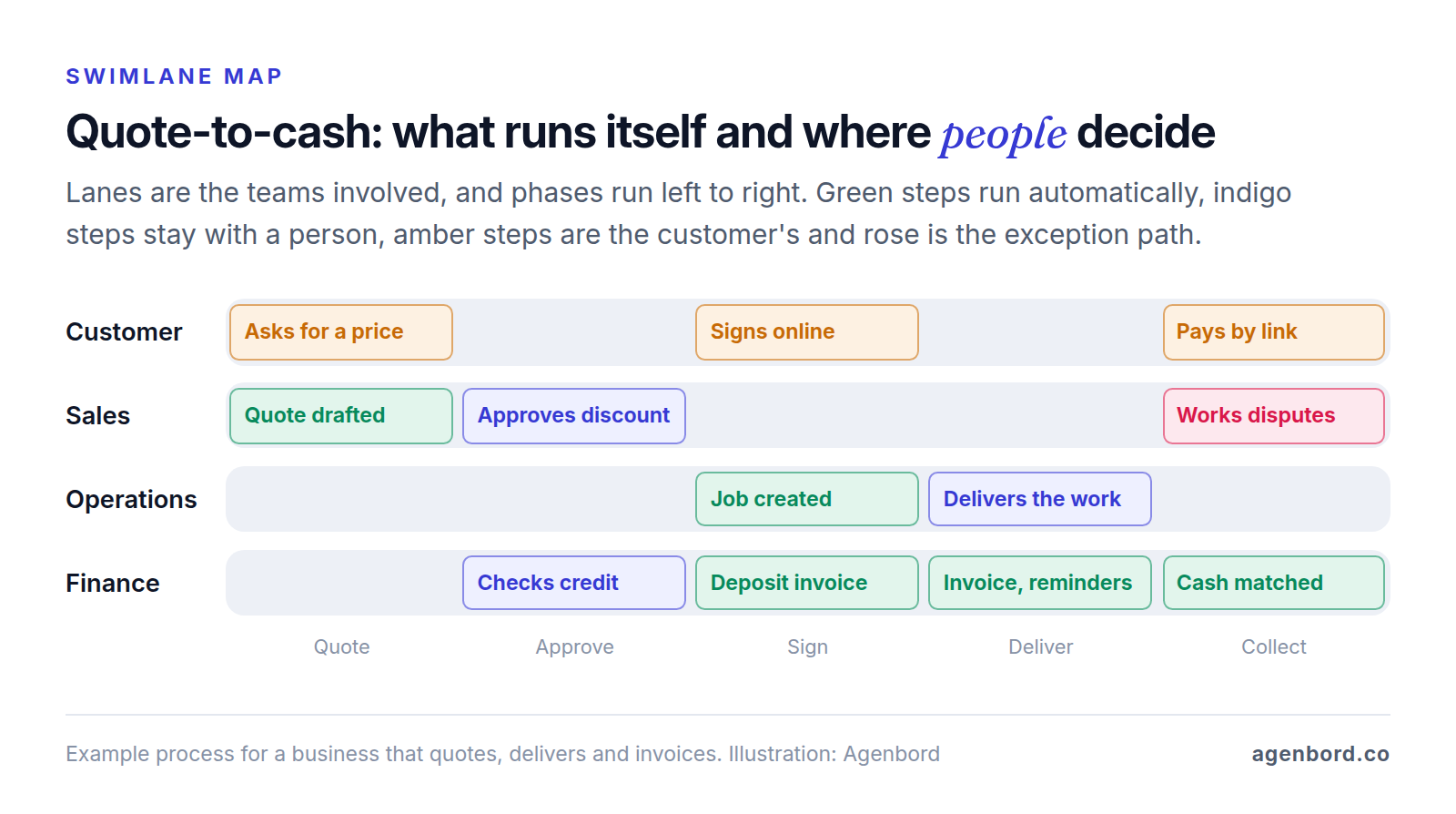
Systems: CRM with quoting, e-signature, accounting, payments. Exceptions: expired quotes are repriced before signature; payments that match no invoice land in a queue finance clears daily. Measure: quote turnaround, average discount, days from delivery to invoice, days sales outstanding (DSO), credit memos per 100 invoices.
2. Customer onboarding after the sale
Sales, the onboarding team, operations and the customer · deal won → customer live
Start with the handoff from sales, where details get lost. The CRM won't mark a deal won until the scope sold, promised dates and special terms are filled in (Auto). Winning it creates the onboarding project from a template, books the kickoff and requests the customer's logins, files and data, with reminders (Auto). At kickoff, the onboarding lead checks scope against what was sold (Person); any gap goes to the sales manager, because it's a promise to the customer. Go-live needs the lead's sign-off (Person), and a survey 30 days later routes unhappy answers to the account owner (Auto).
Systems: CRM, project tool, client portal. Exceptions: items missing after five business days go to the onboarding lead. Measure: days from won to live, deals with a complete handoff, customers lost in their first 90 days.
3. Contract renewals
Account management, sales, finance and the customer · 120 days before the end date → renewed and invoiced, or a deliberate exit
- 120 days out (Auto): a renewal record with the notice deadline and a health snapshot: usage, open tickets, overdue invoices.
- 90 days (Person): the account owner picks a plan: renew, expand, re-scope or rescue.
- 60 days (Auto): the renewal quote applies your standard price increase; anything less needs a manager's approval (Person).
- 30 days (Auto): e-signature with reminders; the owner's manager is alerted if it's still unsigned two weeks before the end date.
- On signature (Auto): new term dates in the CRM, invoice in accounting.
Systems: CRM, e-signature, accounting, usage data. Exceptions: at-risk accounts get a rescue plan owned by the account owner. Measure: renewals signed before the end date, gross revenue retention (revenue kept from existing customers, excluding expansion), average discount against policy.
Finance
4. Procure-to-pay
Requesters, approvers, purchasing, receiving and accounts payable · purchase need → supplier paid
- Auto: the request form checks budget and approved suppliers; reorder points raise requests on their own.
- Person: the approver for that amount and department decides, with a backup when they're out.
- Auto: the purchase order goes to the supplier.
- Person: receiving confirms quantities on a phone.
- Auto: the invoice is captured and matched to the PO and receipt (a three-way match).
- Person: AP resolves mismatches beyond tolerance; a second person releases each payment run.
- Auto: payment, sync to the books, invoice filed.
Systems: purchasing or ERP, accounting, bill pay, inventory. Exceptions: invoices without a PO go back to the requester; partial deliveries hold only the unmatched lines. Measure: spend with a PO, first-pass match rate, days to approve an invoice, late fees. Our invoice automation guide covers AP matching, approvals and fraud controls in depth.
5. Expense reports and card reconciliation
Employees, managers and finance · card swipe or out-of-pocket spend → receipted, approved and in the books
- Auto: card transactions import daily, and the cardholder is texted for a receipt photo and the business purpose.
- Auto: receipts are matched on amount, date and merchant; policy rules flag over-limit, duplicate or wrong-category items.
- Person: managers approve flagged items and reimbursement claims; finance reviews anything above a second threshold.
- Auto: suggested coding, sync to accounting, reimbursement with the next payroll or payment run.
Systems: expense or card platform, accounting, payroll. Exceptions: a missing receipt triggers reminders, then the manager, then a paused card. Controls: if you reimburse employees, an IRS accountable plan needs three rules: a business connection, plus an accounting and the return of any excess, both within a reasonable period. Automated deadlines enforce the last two. Measure: transactions receipted by month-end, days to reimburse, out-of-policy rate.
6. Month-end close
Accounting, AP, AR, payroll and department heads · last business day → period locked, statements reviewed
An example five-day close:
| When | Auto | Person |
|---|---|---|
| Before month-end | Checklist with owners and due dates; reminders for missing bills, timesheets and receipts | Department heads report known accruals |
| Days 1–2 | Bank and card feeds matched; AR, AP and payroll tied to the general ledger | Accountant clears unmatched items |
| Days 2–3 | Recurring entries posted from templates: depreciation, prepaids, accruals | Accountant reviews entries above a set amount |
| Days 3–4 | Variance report flags accounts that moved more than your threshold | Account owners explain each flag |
| Day 5 | Statements assembled; period locked after sign-off | Controller reviews and signs off |
Systems: accounting or ERP, bank feeds, a close checklist, payroll. Exceptions: a late vendor bill becomes an accrual instead of holding up the close; unexplained differences go to the controller. Measure: days to close, entries posted after close, reconciliations finished on time.
People and IT
7. Hire-to-first-day
Hiring manager, HR, payroll, IT and the new hire · offer signed → ready on day one
- Auto: the signed offer creates the employee record in the HR system, starting payroll setup, tax forms and an IT request.
- Person: the manager confirms the start date, equipment and any access beyond the role's standard set.
- Auto: accounts created by role (see example 9), equipment ordered, first-week schedule sent.
- Person: HR reviews identity and work authorization documents. USCIS requires the employee's Section 1 of Form I-9 by the first day of employment and the employer's Section 2 within three business days of the hire; automation tracks both dates.
- Auto: the hire is reported to your State Directory of New Hires, required within 20 days of hire and sooner in some states.
Systems: HR system, payroll, identity provider, IT ticketing. Exceptions: a moved start date reschedules every dependent task; late equipment triggers a loaner. Measure: hires fully ready on day one, I-9s completed on time, days to a first agreed milestone (time to productivity).
8. Timesheets to payroll
Employees, supervisors, payroll and accounting · pay period closes → everyone paid correctly, labor cost on the right jobs
- Auto: reminders go to anyone with a missing timesheet, then to their supervisor.
- Auto: rules flag missing punches, overtime, leave beyond the balance and time coded to closed jobs.
- Person: supervisors approve and resolve flags with a reason; payroll reviews any change to pay.
- Auto: approved hours sync to payroll.
- Person: the payroll administrator approves the run.
- Auto: labor cost posts to jobs or departments.
Systems: time tracking, payroll, job costing. Exceptions: timesheets unapproved at the cutoff go to the supervisor's manager; late corrections become logged off-cycle adjustments. Records: the Department of Labor's FLSA recordkeeping rules call for keeping payroll records at least three years and time cards two, so store edits and approvals with them. Measure: timesheets approved by the cutoff, corrections per pay run, hours edited after submission.
9. Joiner-mover-leaver access
HR, managers, IT and app owners · any hire, role change or departure → access that matches the role
The HR system is the source of truth, and nobody requests access by email.
| Event | Auto | Person |
|---|---|---|
| Joiner | Identity account created from the HR record; connected apps get accounts by role | Manager approves anything beyond the standard set |
| Mover | New role's access added; old role's removed on a set date | Previous manager confirms what must stay |
| Leaver | Sign-in disabled at the end of the last day, sessions ended, licenses reclaimed | Manager takes over files and inboxes; IT recovers devices |
Movers are where access quietly piles up, so removal is automatic. Identity providers such as Microsoft Entra ID can create, update and deactivate accounts in connected apps as roles and status change, using the SCIM standard where the app supports it; other apps get a task for their owner. Control: managers confirm each person's access every quarter. Measure: hours from departure to full removal, stale accounts found in reviews, share of apps provisioned automatically.
Operations and service
10. Order-to-delivery, with returns
Sales or e-commerce, the warehouse, customer service and finance · order placed → delivered and paid, or returned and refunded
Outbound, payment is authorized and orders that trip your fraud rules are held (Auto) for customer service to release or cancel (Person). Stock is allocated and backorders split with a notice to the customer (Auto). The warehouse picks, packs and scans (Person); tracking and carrier delivery exceptions flow to the customer and customer service (Auto).
Returns inside your policy get a return authorization (RMA) and a label (Auto). Customer service decides requests outside policy, and the warehouse inspects every return (Person). A passed inspection triggers the refund, credit or replacement, and the item is restocked or written off by condition (Auto).
Systems: order management, payments, inventory, shipping, help desk, accounting. Measure: order-to-ship time, on-time delivery, returns by reason code, days from return received to refund.
11. Ticket-to-resolution with SLAs
Support agents, team leads, specialists and the customer · request on any channel → fix confirmed, knowledge captured
- Auto: tickets from email, chat, forms and calls, merged with any open ticket on the same issue.
- Auto: rules or an AI classification step suggest category and priority; an agent confirms urgent ones (Person).
- Auto: routing by skill and workload starts the service-level agreement (SLA) clocks for first response and resolution, paused while you wait on the customer.
- Auto: at 75% of an SLA the team lead is alerted; at breach, the ticket moves up a tier.
- Person: agents resolve; specialists take escalations with the full history.
- Auto: solved tickets close after a quiet period, with a one-question survey.
- Person: recurring issues get one problem record and an owner who fixes the cause.
Systems: help desk, CRM, chat and phone, knowledge base. Exceptions: reopened tickets return to the same agent; a breach on a key account alerts its account owner. Measure: SLA attainment by priority, first-contact resolution, reopen rate, age of the oldest open ticket.
12. Field service: request to invoice
Dispatch, technicians, the service manager, billing and the customer · call or online booking → job done, invoiced and paid
This is the core process for home services companies. Intake pulls the equipment and service history and checks warranty or service-plan coverage (Auto). The system suggests a slot by skill, location and parts, and the dispatcher confirms it (Person). On site, the technician completes the checklist and photos and quotes any extra work, which the customer approves before it starts (Person). Completing the job creates the invoice from labor and parts, only once the required photos and signature are attached, and sends a payment link (Auto). Callbacks within your warranty window go to the service manager (Person).
Systems: field service software, accounting, payments, inventory. Exceptions: a missing part becomes a scheduled return visit with the part on order. Measure: first-time fix rate, days from request to completion, days from completion to invoice, callback rate.
13. Change orders on a construction job
Superintendent, project manager, estimator, the client, subcontractors and accounting · change found in the field → signed, budgeted and billed
For construction contractors, this process keeps extra work from going unbilled.
- Person: the superintendent logs the change with photos; urgent work goes on signed time-and-materials tickets.
- Person: the project manager and estimator price it with cost codes from the original estimate; changes below your margin floor or above a set value need internal approval.
- Auto: the change order is generated and sent for the client's signature, with reminders.
- Auto: signature updates the contract value, the budget and the schedule of values (the line items progress bills are made against), and drafts matching subcontract changes for the project manager to approve (Person).
- Auto: the change appears on the next progress bill.
Systems: project management, estimating, job costing or ERP, e-signature, accounting. Exceptions: unsigned changes stay on a weekly work-at-risk report to the project manager and the business owner, out of billing until signed. Measure: days from identified to signed, value of unsigned work in progress, margin on changes against the estimate.
Vendors and compliance
14. Vendor and subcontractor onboarding
The requester, purchasing, accounts payable and the vendor · new vendor requested → approved, payable and tracked
- Person: the requester says why this vendor and what it will be paid for.
- Auto: the vendor gets a portal link to upload a Form W-9, certificate of insurance, license and bank details, with reminders.
- Auto: insurance limits, dates and license status are checked against your requirements.
- Person: AP reviews the name and taxpayer identification number (TIN); eligible payers that file information returns can validate the pair before filing with the IRS's TIN Matching service.
- Person: bank details are confirmed by calling a number you already have, never one from the email.
- Person, then Auto: finance approves, and the vendor is created in accounting with expiry tracking on.
Systems: vendor portal or forms, accounting, document tracking. Exceptions: a TIN that won't validate goes back to the vendor, since without a correct TIN you may have to backup withhold 24% of reportable payments; a lapsed certificate holds payments. Measure: days to approve a vendor, vendors with complete and current documents, payments on compliance hold.
15. Document and policy approvals with an audit trail
Authors, reviewers in legal, finance, HR or safety, approvers and the people a policy covers · draft ready → approved, signed, acknowledged and filed
Routing rules pick reviewers by document type and value, such as finance and legal for contracts above a set amount (Auto); our document automation guide covers generating and signing the documents themselves. Reviewers comment in parallel, every version is kept, and the approver signs electronically (Person). The approved version is published, the old one archived and a review date set (Auto). Everyone a policy covers gets an acknowledgment request with reminders (Auto).
Systems: document management or e-signature, a policy library, the HR system. Exceptions: an approver away for two business days is replaced by a named delegate; urgent contracts take an expedited path that still records who approved. Control: the audit trail: who approved which version, when, and who acknowledged it. Measure: approval cycle time, documents approved without rework, acknowledgment completion, documents past their review date.
How to pick your first process to automate
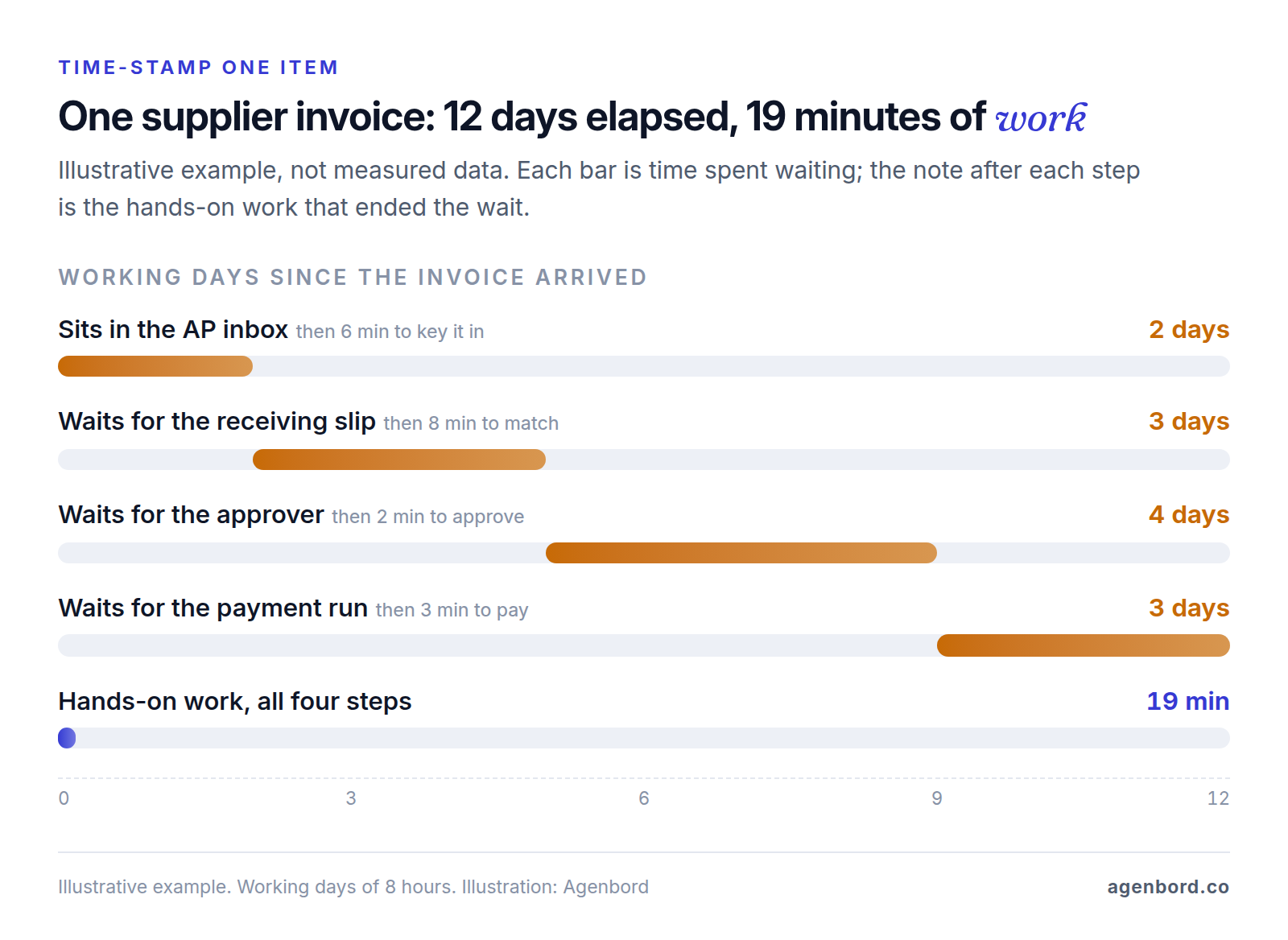
Pick a process you can measure, own and fix, not the one that annoys you most. Start by time-stamping it: for five to ten recent items, such as invoices, quotes or new hires, note when each step received the item, when someone started and when they finished. Touch time is the sum of the working stretches, cycle time runs from first arrival to final finish, and wait time is the difference.
Then check five things:
- One accountable owner for the outcome end to end, with authority over every team it touches. If sales and finance each own half, settle that first.
- The happy path and top exceptions on paper: the normal path, plus the three to five exceptions that came up most often last month and who resolves each.
- Systems you can connect. Each needs an API (an interface other software can use) or a maintained integration with the actions you need. Steps on paper, in personal inboxes or in portals without APIs cost more to automate.
- A repeatable baseline: volume, cycle time, touch time and exception rate, measured the way you'll measure them afterward.
- A small blast radius. Start where mistakes are visible and reversible, usually an internal process. Leave processes that pay people or commit you to customers until your monitoring has earned trust.
How to implement business process automation
- Map it as it runs: one row per step with owner, system, handoff, exceptions and volume. Our guide to business process automation software covers mapping, tool types and governance.
- Simplify before you automate. Cut steps that exist only because of an old constraint, standardize inputs (one intake form, required PO numbers) and set approval limits so routine items skip approval.
- Name exception owners. Each exception type gets a queue, an owner and a deadline; each approval, a backup approver and an escalation path.
- Build in slices. Add a status field and timestamps first, then automate one workflow at a time, starting with the longest wait.
- Run it alongside the manual process for one full cycle, such as a month-end or pay period, comparing counts and outcomes before you switch the manual path off.
- Measure against the baseline with the same method after a few cycles, and let the numbers pick the next slice.
Benefits of business process automation you can measure
The benefits show up as numbers you can track before and after, not as a percentage someone promised:
| Benefit | Metric | How to measure it |
|---|---|---|
| Faster outcomes | Cycle time | Timestamps at the start and end of each item |
| Less manual work | Touch time per item | Time-stamped samples, or time logged per step |
| Fewer errors | First-pass rate | Share of items finished with no rework, correction or credit memo |
| Fewer stalls | Exception rate and age | Share of items needing a person; age of the oldest open exception |
| Faster cash | Days sales outstanding | Receivables ÷ credit sales × days in the period |
| Kept promises | SLA attainment | Share of tickets or jobs finished inside target times |
| Faster ramp-up | Time to productivity | Days from start date to a defined first milestone |
| Audit readiness | Approval completeness | Share of sampled items with approvals and documents on record |
| Lower cost | Cost per item | Staff time plus software and fees, divided by items processed |
Compare medians rather than averages, since one stuck item skews an average, and give each change a few cycles before judging it.
Why business process automation fails
- Automating a broken process. Rework done by hand becomes rework done faster. Simplify first.
- Exceptions with no owner. Odd cases age in a queue nobody watches while the averages look fine. Give each exception type an owner and a deadline, and review the oldest one weekly.
- Rubber-stamp approvals. When everything needs approval, approvers stop reading. Route only what needs judgment, such as amounts over a limit, and sample approved items monthly.
- Two systems owning one field. If the CRM and accounting both edit billing addresses or payment terms, syncs overwrite each other and nobody trusts either. Give each field one owning system and sync it one way.
- Nobody watching end to end. Every workflow reports success while the process slows down. The process owner should review cycle time, exception age and volume weekly, not just error alerts.
When tools are enough, and when a custom build pays off
Built-in automation plus a connector tool is enough when the process lives mostly in one or two systems that handle approvals and reminders, every system has a maintained integration, volumes are modest and the process is still changing. Our Zapier vs. Make vs. n8n comparison prices the main connector tools at volume. Custom software pays off when:
- the process spans systems with no shared ID or status, so nobody can say where a given order or invoice is;
- the rules are complex: pricing by customer, approvals tied to job budgets, matching across several systems;
- volume makes per-task or per-seat fees a real line item;
- the process is part of what you sell.
Some steps belong inside the system of record. In Smart Construction, the construction ERP our team built and runs, payment approvals are part of the ERP itself and reach decision-makers on WhatsApp.
Typical ranges for our business process automation work: from $1.5k for a single workflow (1–2 weeks), $6k–$20k for a program of 5–15 workflows (3–8 weeks) and $15k+ for a custom integration service (1–3 months), plus tool subscriptions billed to you directly. If the process needs its own app, a focused internal tool starts from $12k (4–8 weeks) and an ERP module from $25k (2–4 months). We quote fixed prices with a written scope and weekly demos, and you own the code; our build vs. buy framework helps with the bigger decision.
Sources
- USCIS - Completing Section 1, Employee Information and Attestation (accessed October 2026)
- HHS Administration for Children and Families - New Hire Reporting (accessed October 2026)
- U.S. Department of Labor - Fact Sheet #21: Recordkeeping Requirements under the FLSA (accessed October 2026)
- IRS - Publication 463 (2025), Travel, Gift, and Car Expenses (accessed October 2026)
- IRS - About Form W-9 (accessed October 2026)
- IRS - Taxpayer Identification Number (TIN) Matching (accessed October 2026)
- IRS - Backup withholding (accessed October 2026)
- IETF - RFC 7644, System for Cross-domain Identity Management: Protocol (accessed October 2026)
- Microsoft Learn - What is app provisioning in Microsoft Entra ID? (accessed October 2026)
Prices, plans and regulations change. Figures were checked on October 2, 2026; follow the links for the latest. Nothing here is legal, tax or financial advice.
About the author
Founder, Agenbord
Muhammad Hamza is the founder of Agenbord, the Fort Lauderdale software company behind the construction ERP Smart Construction and a WhatsApp-first billing platform. He writes practical guides on buying, building and automating business software.