On this page
- What is invoice automation?
- Accounts receivable: automating the invoices you send
- Accounts payable: automating the bills you receive
- Controls that stop duplicate, fake and redirected payments
- Benefits of invoice automation: a worked example
- Invoice automation software: what it costs (October 2026)
- When custom invoice automation pays off
- Risks and cons of invoice automation
- How to roll out invoice automation and what to measure
If someone in your office spends part of every week typing invoices, chasing late payers and keying supplier bills into QuickBooks, invoice automation is the fix. It covers both directions of money: the invoices you send customers (accounts receivable, or AR) and the bills you receive from vendors (accounts payable, or AP). Software creates, sends, reminds, captures and matches; people handle the exceptions.
For most small businesses the first step costs little: QuickBooks Online already includes recurring invoices, reminders, pay links and bill capture, and Xero and similar tools cover much of the same ground. As of October 2026, what you pay depends mostly on how customers pay you (card fees add up fast) and how many people approve bills, which decides your plan tier.
The risk grows with the automation. Business email compromise, where a criminal impersonates a vendor or colleague to redirect a payment, drew just over $3 billion in reported losses in the FBI's 2025 figures. So this guide covers controls as well as tools, with a worked example and a view on when custom software pays off.
What is invoice automation?
Invoice automation is software running the routine steps of invoicing by rules you set: creating and delivering invoices, reminding customers, applying payments, capturing vendor bills, matching them to orders, routing approvals and scheduling payments. The goal isn't zero human touches. It's people spending their time on exceptions: a disputed charge, a price that doesn't match the purchase order, a vendor asking to be paid into a new bank account.
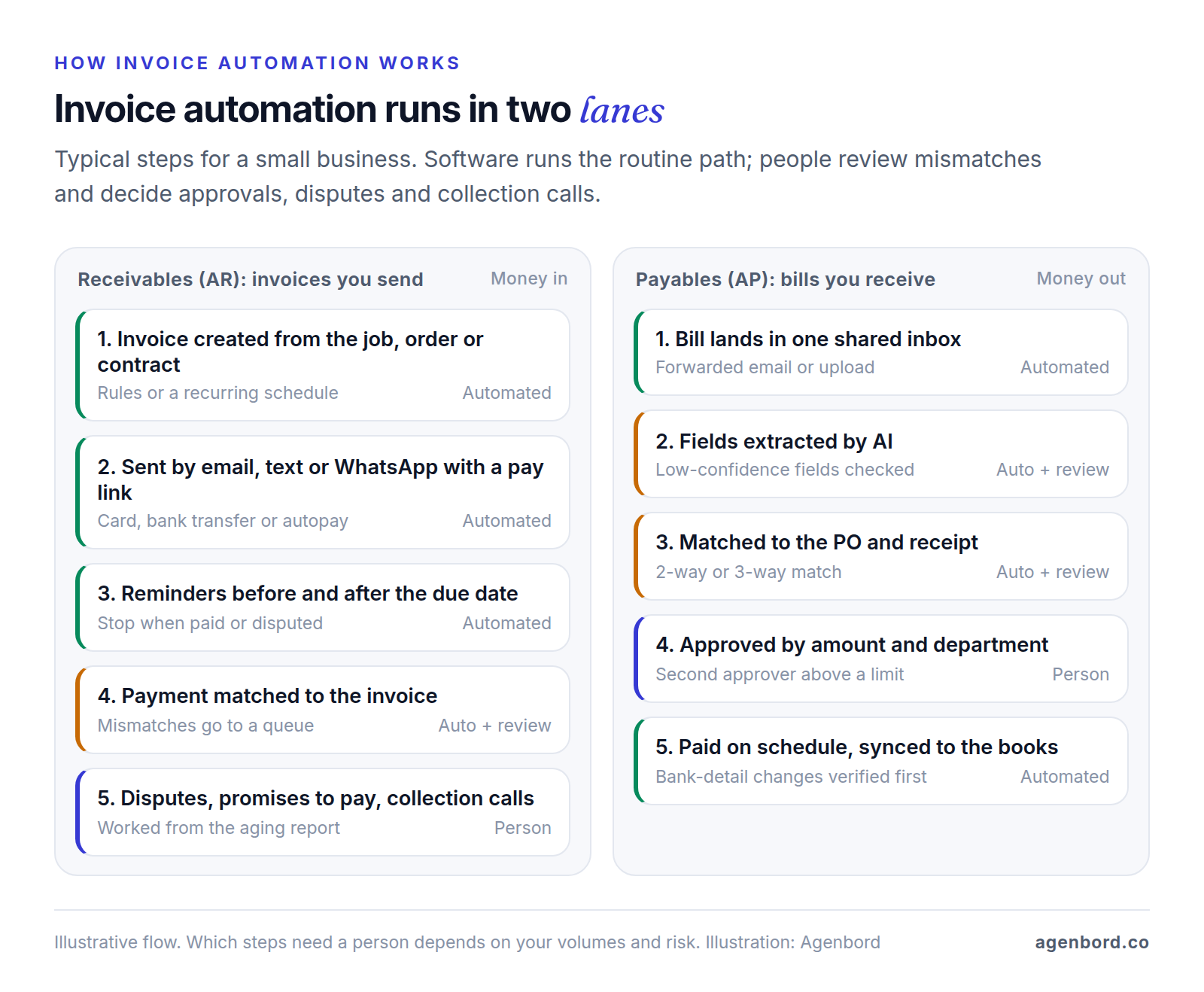
AR automation gets you paid sooner with less chasing. AP automation pays the right amount, to the right vendor, on time, with an approval on record.
Accounts receivable: automating the invoices you send
Create invoices where the work is recorded
The biggest AR saving comes before the invoice exists. If jobs live in a field service app, orders in an online store and hours in a timesheet, generate the invoice from that record instead of retyping it; retyping is where wrong quantities, missed items and late invoices come from. Use your systems' native integration first and a connector or small custom workflow for the gaps. Our workflow automation examples show a job-completion-to-invoice workflow step by step.
Recurring invoice automation
Contracts, retainers, rent, maintenance plans and memberships should bill themselves. Set the schedule once (customer, items, terms, frequency, start and end dates) and choose whether each run sends automatically or waits as a draft: auto-send for fixed amounts, drafts for amounts that change. QuickBooks Online can auto-send recurring invoices daily, weekly, monthly or yearly, and Square includes them on its free plan. Tie each schedule's end date to the contract, and when prices change, update every schedule in one pass. If recurring revenue rides on saved cards, failed-payment recovery matters most; our guide to membership management software covers retries and dunning.
Delivery: email, text or WhatsApp
Every invoicing tool in this guide sends invoices by email. Square also sends them by text or a shareable link, and Stripe gives you an invoice link you can text. WhatsApp suits customers who already message you there; it runs on the WhatsApp Business API, with approved message templates and per-message charges from Meta that our WhatsApp Business API pricing guide explains. Get consent first: Meta requires an opt-in that names your business before you message people on WhatsApp, and you should have permission before texting customers too.
Pay links and autopay
A pay button in the invoice and autopay (a saved payment method, with the customer's authorization on file) move cash fastest, but the method sets the cost. As of October 2026, card payments run 2.9–3.5% on the tools below, some with a per-payment fee, while bank transfers (ACH) cost 1% or less. On a $5,000 invoice, a card payment at QuickBooks' 2.99% online rate costs $149.50; ACH costs $50 at QuickBooks' 1%, $10 on Square's paid plans and $5 under Stripe's ACH Direct Debit cap. Offer ACH on every invoice, invite recurring customers to autopay, and decide whether large invoices should take cards at all.
Reminders that stop when the invoice is paid
QuickBooks Online sends up to three automatic reminders, up to 90 days before or after the due date, for invoices you've emailed. Xero and Square remind customers before and after the due date on a schedule you set. A sensible starting sequence:
| When | Channel | Message |
|---|---|---|
| 3 days before due | Friendly heads-up with the pay link | |
| Due date | Email or text | "Due today," with the pay link |
| 7 days late | Email and text | Second reminder; invite questions |
| 14 days late | Email, plus a task for staff | Last automated reminder; someone calls |
| 30 days late | Phone | A person agrees a payment date and decides on pausing new work |
Stop the sequence the moment a payment or dispute is logged, and keep your biggest accounts out of it. QuickBooks can also add late fees automatically, with an optional grace period, but Intuit warns there may be limits on the fees you can charge, so confirm the rules where you operate first.
Cash application and reconciliation
Cash application means matching each payment to the invoice it pays. When customers use the invoice's pay link, the software does it; QuickBooks, for example, records and matches payments made through QuickBooks. The hard cases are checks, transfers with no reference, partial payments, one payment for several invoices and amounts short by a bank fee. For transfers, Stripe Invoicing generates virtual bank account numbers for ACH credit payments and reconciles them with open invoices. For the rest, match on the invoice number in the reference, then the exact amount from the same customer, then the oldest open invoice, and send leftovers to a queue someone clears daily. Book each processor payout as what it is: a batch of payments minus fees.
Aging and collections
The AR aging report sorts what customers owe by how late it is: current, 1–30, 31–60, 61–90 and over 90 days. Let automation run the early buckets and hand the later ones to a person, with the invoice, reminder history and any promise to pay in one place.
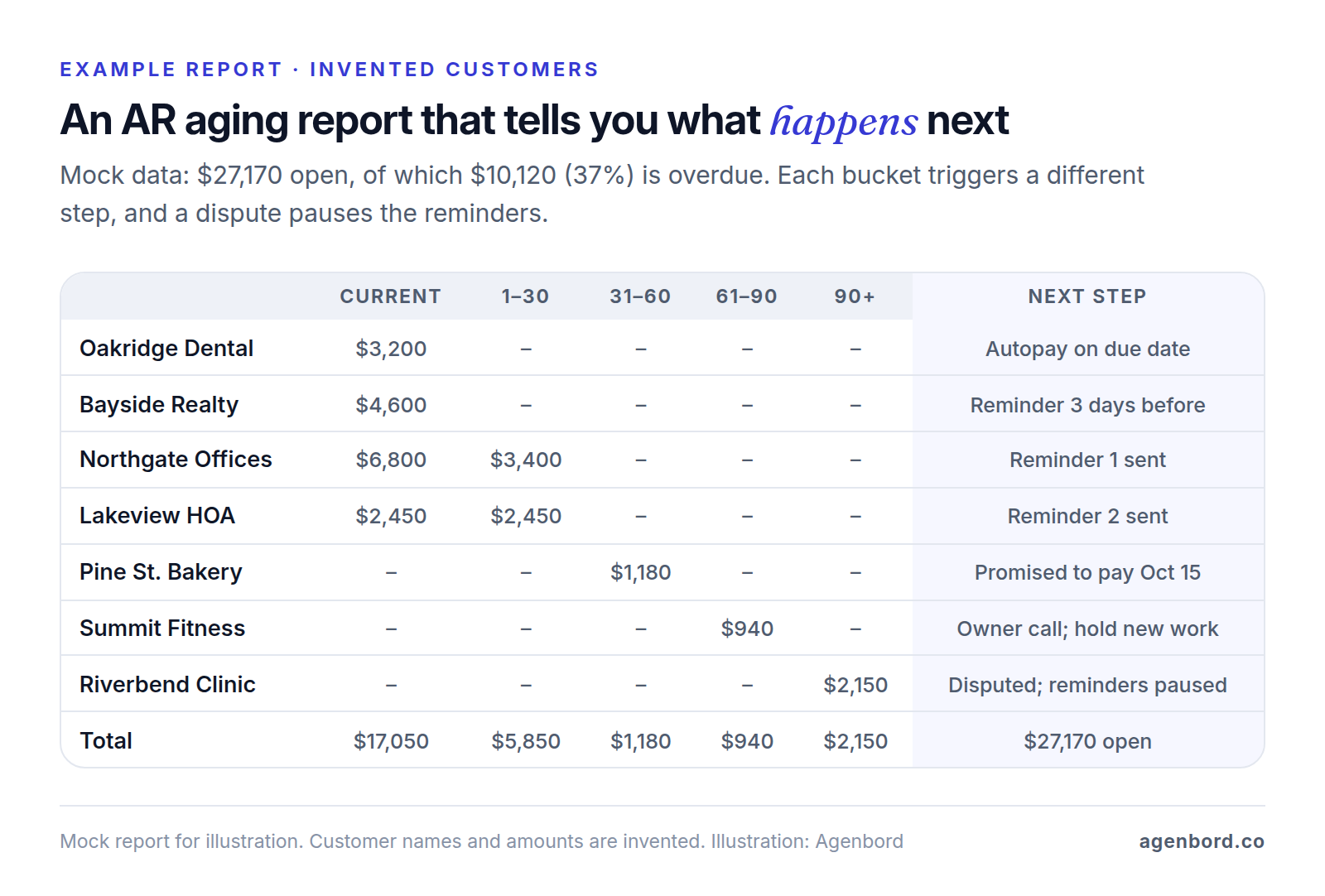
Track days sales outstanding (DSO): receivables at the end of a period, divided by credit sales for the period, times the days in it. With $48,000 outstanding and $120,000 of credit sales over 90 days, DSO is 36 days. Watch your own trend, not someone else's average.
Accounts payable: automating the bills you receive
Capture: one inbox for every bill
Accounts payable invoice automation starts with one front door. Give vendors a single address for bills and route it to your AP tool: QuickBooks Bill Pay, Xero, Melio and Ramp all turn emailed or uploaded invoices into draft bills, reading the fields with AI or optical character recognition (OCR). Scan paper bills into the same place, so every bill gets the same checks.
Vendor master data
The vendor master holds each approved vendor's legal name, remit-to address, contact, payment method, bank details, terms, default expense account and tax details. Collect a Form W-9 at onboarding so you have the vendor's taxpayer identification number for 1099s; BILL offers a W-9 agent that collects and verifies them. Bank-detail fraud works by changing this table, so limit who can edit it and log every change.
2-way and 3-way matching
A 2-way match compares the bill with the purchase order (PO): same items and prices, quantities no higher than ordered. A 3-way match adds the receiving record, so you pay only for goods that arrived. Set a tolerance for small differences, such as up to $25 for freight or rounding, and send bigger gaps to whoever placed the order. Service bills without a PO need the contract rate and someone confirming the work. If you don't issue POs today, start with your largest suppliers. As of October 2026, BILL includes 2-way PO matching on its Corporate plan (or as an add-on), and Ramp offers 3-way matching on Plus.
Approval routing by amount and department
Write the approval matrix before you configure anything: who approves which department's bills, up to what amount, and who covers absences. A common shape is managers approving their department's bills up to a limit, the owner or controller above it, and two people for any bank-detail change. Keep approving a bill separate from releasing the payment: QuickBooks Bill Pay Premium ($15 a month) adds payment release approval, and Elite ($45, included with QuickBooks Online Advanced) adds custom bill approval workflows. To catch purchases split to stay under a limit, review same-vendor bills just below it each month.
Payment scheduling and sync to the ledger
Pay on the due date unless an early-payment discount is worth taking: 2/10 net 30 (2% off within 10 days, otherwise due in 30) works out to about 37% a year for paying 20 days early. Batch payments into one or two approved runs a week, using the cheapest method each vendor accepts. Standard ACH is free or under a dollar on the tools below, while checks cost $1.50–$1.99 and arrive more slowly. Then check what syncs back to your books: BILL's Essentials plan exchanges data with accounting software only by CSV import and export, and automatic two-way sync with QuickBooks Online and Xero starts on Team.
AI invoice automation: what extraction gets right and wrong
AI extraction reads a bill and returns the vendor, invoice number, dates, totals, tax and line items. Current models can read layouts they haven't seen before, which template-based OCR couldn't, and AP tools use your history to suggest coding.
It errs on blurry scans and phone photos, handwriting, multi-page tables, credit memos read as invoices, subtotals taken as totals, dates like 03/04 read the wrong way round, and remit-to addresses that differ from the vendor's. The wrong answers look as confident as the right ones.
That's why confidence scores matter. Microsoft's documentation describes a field confidence of 0.95 as likely correct 19 times out of 20, and recommends scores close to 100% for sensitive cases such as financial records. One wrong digit in an amount costs real money, so auto-accept only high-confidence fields, review the rest and every new vendor's bills, and never let extraction change bank details. Before you trust a tool, run 50–100 of your past bills through it and count the corrections.
AI-drafted invoices need the same care. QuickBooks' Intuit Intelligence drafts invoices from PDFs and photos for you to review, and Intuit notes it flags duplicate files in Google Drive but not invoices already in QuickBooks. Our guide to AI workflow automation shows how to validate extracted fields before anything posts, and if your documents are unusual, an AI automation pilot from $4,000 can test extraction on your own files first.
Controls that stop duplicate, fake and redirected payments
Automation pays bills faster, including the wrong ones. Three kinds of bad invoice need controls:
- Duplicates. The same bill arrives twice, or comes back as INV-1043 after 1043. Block exact vendor-and-number matches and flag the same vendor and amount within a few weeks; Xero, for one, flags duplicate bills automatically.
- Fake invoices. The FTC warns of phony invoices made to look like you ordered something, and of bills for listings in fake business directories. Pay only vendors in your vendor master, and match bills for goods to a PO and a receipt.
- Redirected payments. A vendor's email is hacked or imitated, and a message asks you to pay a new account. This is business email compromise (BEC). In the FBI's 2025 IC3 annual report, BEC drew 24,768 complaints and $3,046,598,558 in reported losses: second only to investment fraud, and about $123,000 per complaint on average.
The defense is a process, not software. The FBI's guidance is to verify any change in account number or payment procedures with the person making the request, using a phone number you look up yourself. Build that call-back into the vendor-change step, hold payments to new bank details until it's logged, and require a second approver. Separate duties so no one person can add a vendor, approve its bill and release the payment, and keep the audit trail.
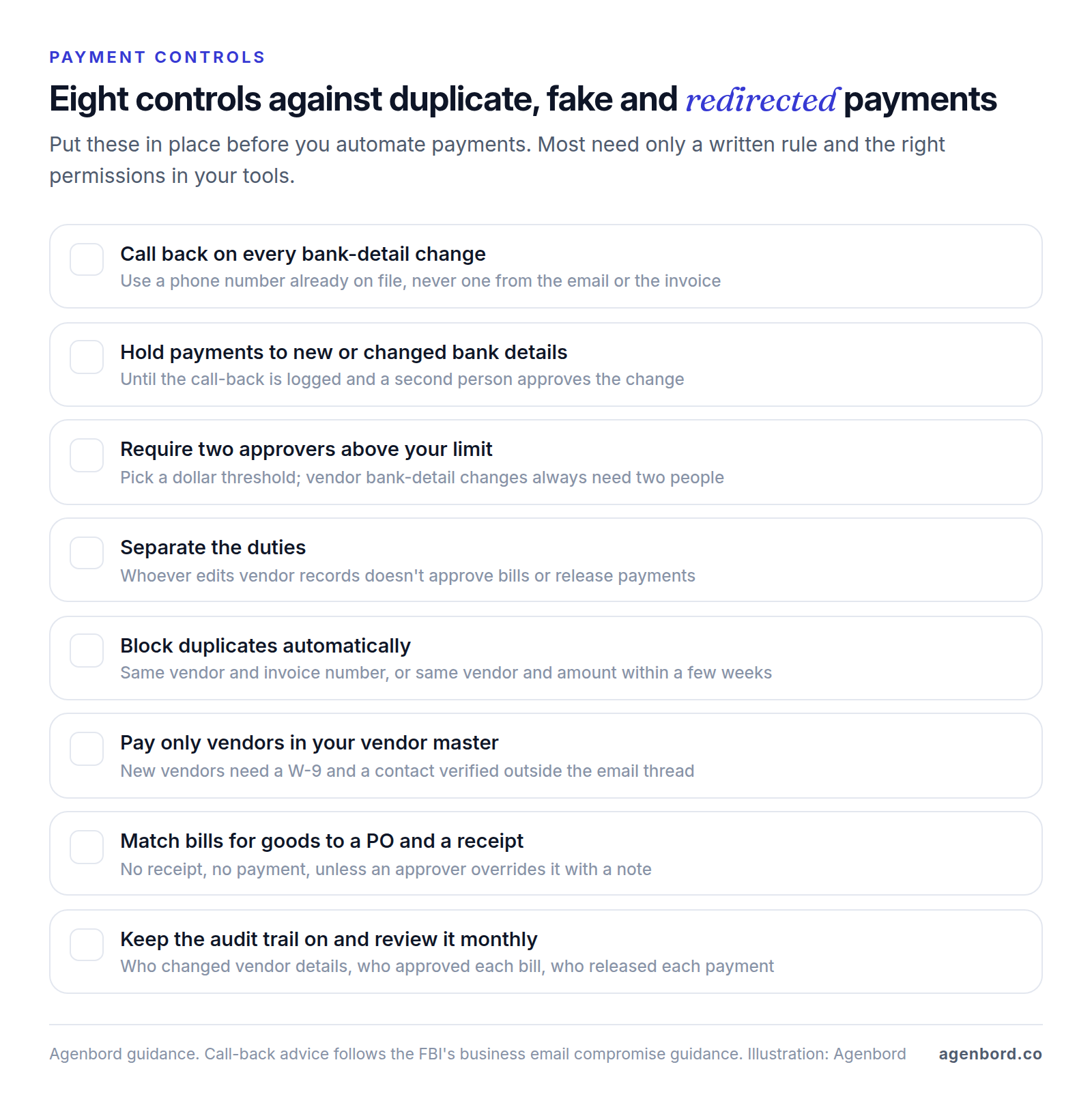
Tool checks are a useful second net, not a replacement: Ramp, for example, says its fraud agent flags unexpected changes to vendor bank details before payment.
If your business originates ACH payments, these controls are now a network rule too. Since June 2026, Nacha's rules have required every non-consumer originator, whatever its volume, to have risk-based procedures to identify payments made under false pretenses such as BEC and vendor impersonation, and to review them yearly. Nacha's examples include change controls on payment instructions for vendors and payroll. Ask your bank or payments provider what it expects from you; this is general information, not legal advice. And if money does reach a fraudster, the IC3 report's advice is to contact your financial institution immediately and request a recall of the funds, then report it at ic3.gov.
Benefits of invoice automation: a worked example
The benefits of invoice automation are fewer hours of typing and chasing, faster payment, fewer errors and an approval record for every bill. Hours are the easiest to estimate, so here is a hypothetical example with every assumption visible.
A hypothetical 20-person commercial cleaning company bills 120 contract customers each month, invoices 25 one-off jobs, applies about 145 customer payments and pays 90 supplier bills. It adopts recurring invoices, pay links, automatic reminders, AI bill capture and in-app approvals. The minutes are our assumptions; use your own team's timings.
| Task | Monthly assumptions | By hand | Automated |
|---|---|---|---|
| Recurring contract invoices | 120 invoices; 4 min each by hand, 30 seconds each to spot-check | 8.0 h | 1.0 h |
| One-off job invoices | 25 invoices; 8 min by hand, 2 min to review a draft | 3.3 h | 0.8 h |
| Chasing overdue invoices | 35 overdue at 10 min each; automated reminders, then 10-min calls to the 8 unpaid at 30 days | 5.8 h | 1.3 h |
| Applying customer payments | 145 payments at 3 min; 35% still need a person | 7.3 h | 2.5 h |
| Entering supplier bills | 90 bills; 5 min to key, 1.5 min to check extracted fields | 7.5 h | 2.3 h |
| Approvals and payment runs | 2 min per bill plus four 45-min runs, against 30 seconds per bill and four 15-min runs | 6.0 h | 1.8 h |
| New work | Clearing the exception queue, checking that automations ran | – | 4.0 h |
| Total | 37.9 h | 13.7 h |
What the example shows:
- Real but modest savings: about 24 hours a month, roughly three working days. That's time for collection calls and a faster month-end close, not a job eliminated.
- Exceptions remain. Almost 14 hours are still needed, and 4 of them are new work: someone has to own the exception queue and notice when an automation stops.
- Fees can cancel the hours. With invoices averaging $600, the company bills $87,000 a month. If 40% of that moves to cards at QuickBooks' 2.99% online rate, fees come to about $1,041 a month; the same payments by ACH at 1% cost $348. At an assumed $30 an hour, the hours saved are worth about $726. Push bank payments and autopay before you put a card button on every invoice.
Invoice automation software: what it costs (October 2026)
Invoice automation software falls into three groups, and most small businesses need one or two: the features in your accounting software, a bill-pay platform when approvals or volume outgrow them, and an invoicing-and-payments tool when you bill online. Prices are list prices from each vendor's pricing page as of October 2026, before introductory discounts.
| Tool | Category | Published price | Payment fees |
|---|---|---|---|
| QuickBooks Online | Accounting | Free (2 invoices a month unless QuickBooks Payments is on); Simple Start $38, Essentials $85, Plus $140, Advanced $340 a month | Cards 2.99% online; ACH 1% ($1 minimum). Bill Pay: standard ACH free up to an allotment, then $0.50; checks $1.50 |
| Xero | Accounting | Early $27 (20 invoices and 5 bills a month), Growing $59, Established $97 a month | Standard ACH bill payments included, other methods extra; invoice payments through processors such as Stripe |
| BILL | AP and AR | Essentials $49, Team $65, Corporate $89 per user a month | ACH $0.59; checks $1.99; paying a vendor by card 2.9% |
| Melio | Bill pay | Free (5 ACH payments a month); paid plans $25–$80 a month, or $20–$64 billed annually | Extra ACH $0.50; checks $1.50; paying by card 2.9% |
| Ramp | Spend management | Free plan includes Bill Pay; Plus $15 per user a month plus a platform fee | ACH $0.59; checks $1.99; eligible fees waived when paying from a Ramp checking account |
| Stripe Invoicing | Invoicing and payments | 0.4% (Starter) or 0.5% (Plus) per paid invoice | Cards 2.9% + 30¢; ACH Direct Debit 0.8%, capped at $5 |
| Square Invoices | Invoicing and payments | Free; Plus $49 and Premium $149 a month per location | Online cards 3.3% + 30¢ (Free) or 2.9% + 30¢; card on file 3.5% + 15¢; ACH 1% ($1 minimum; $10 cap on paid plans) |
Accounting software
QuickBooks Online covers the AR loop (recurring invoices, reminders, late fees, payments matched automatically) and creates bills from a dedicated inbox. Approvals are where it costs more: payment release approval needs Bill Pay Premium, and bill approval workflows need Elite. Xero captures bills by upload or email, flags duplicates, schedules payments and includes standard ACH bill payments on every plan, but Early's limit of 20 invoices and 5 bills a month pushes most invoicing businesses to Growing.
Bill-pay platforms
Melio is the low-cost entry for paying vendors; approval workflows and full QuickBooks and Xero sync start on Core. BILL suits teams with several approvers and handles receivables too; its AI codes multi-line bills on Team and up, and per-user pricing grows with every login. Ramp bundles bill pay with company cards, expense management and banking; 3-way matching, payment release approvals and NetSuite or Sage Intacct sync need Plus.
Invoicing and payments tools
Stripe Invoicing suits businesses that bill online or from their own software: hosted invoice pages, automatic charging of saved payment methods, reminders and automatic reconciliation of bank transfers, with the invoicing fee on top of processing. Square Invoices suits service businesses that also take payments in person: recurring invoices, reminders and deposit requests, with milestone payment schedules on Plus and Premium. On invoices over $75, its card-on-file autopay (3.5% + 15¢) costs more than an online card payment.
The best choice is the cheapest setup that covers your volume and approvals: built-in features while one or two people handle everything, a bill-pay add-on once a second approver is involved, and a dedicated platform once several people approve or per-payment fees become a real line item.
When custom invoice automation pays off
Packaged tools win for most small businesses. Custom work, usually built around your accounting system rather than replacing it, pays off in four situations:
- Volume. Thousands of invoices or bills a month, where per-user, per-invoice and per-payment fees pile up and a few minutes saved per item adds up to a staff position.
- Billing rules the tools can't model. Usage-based charges, contract prices per customer, progress billing with retention, or one payer across several businesses.
- WhatsApp-first collections. If customers answer WhatsApp faster than email, invoices, reminders and receipts belong there, with replies landing in a shared team inbox. The billing and collections platform our team built works this way: automated monthly invoices on WhatsApp, digital payments reconciled into customer ledgers that update themselves, and a shared WhatsApp inbox with an AI assistant. It's built for businesses that bill monthly, such as gyms, schools and rental properties; see our page on software for membership businesses. If you only need WhatsApp reminders on top of QuickBooks, a WhatsApp automation setup plus one reminder workflow is a much smaller project; our WhatsApp automation guide shows how payment reminders work there.
- Tight links to operations. Invoices built from your job or project system with your own rules, approvals that need project data, or one dashboard across receivables, payables and operations.
Our build vs. buy framework covers the decision, and our guide to business process automation software shows how to map a process before automating it. Typical ranges with us: a single workflow automation from $1,500 (1–2 weeks), a program of 5–15 workflows at $6,000–$20,000, a custom integration service from $15,000, a WhatsApp setup with a shared inbox from $2,500 (1–3 weeks), and a customer billing portal at $25,000–$60,000 (8–14 weeks). Add hosting of roughly $50–$500 a month and maintenance of about 15–20% of the build cost a year. We quote fixed prices with a written scope and weekly demos, and you own the code.
Risks and cons of invoice automation
Automation removes typing, not responsibility. The main risks, and how to manage them:
- Errors at scale. A wrong price in a recurring template or a bad matching rule repeats until someone notices. Preview new schedules, check the first run line by line, and cap automatic credits and refunds.
- Reminders that annoy good customers. Too many messages, or reminders after payment or during a dispute, cost goodwill. Cap the sequence, stop it on payment or dispute, and handle top accounts personally.
- Rubber-stamp approvals. One-click approvals get clicked. Route only what needs judgment, and sample approved bills each month.
- Vendor lock-in. History, rules and customers' saved payment methods live in the tool. Test exports of invoices, bills, payments and attachments during the trial, and ask in writing how saved payment details move if you leave.
- Data quality. Duplicate customers, stale billing emails and messy vendor records get automated along with everything else. Clean them first.
How to roll out invoice automation and what to measure
- Clean the data. Merge duplicate customers and vendors, confirm billing emails, terms and tax details, collect missing W-9s, and confirm vendor bank details by call-back.
- Start with one flow. Pick the one with the most volume and least risk, usually recurring invoices with reminders, or bill capture. Leave payment release manual at first.
- Run in parallel. For one cycle, keep the old process going and compare every invoice, amount and match until the two agree.
- Switch, then add the next flow. Retire the old process, write down the new one (who owns exceptions, who approves what) and move on.
Measure before and after, from your own numbers:
- DSO: receivables divided by credit sales, times the days in the period.
- Approval cycle time: days from a bill's arrival to its approval.
- Exception rate: the share of invoices, payments or bills that needed a person.
- Cost per invoice: staff time plus software and payment fees, divided by the invoices or bills processed.
Give each change two or three months before you judge it. If a flow still can't be automated with the tools you have, that's the one worth pricing as custom work.
Sources
- FBI Internet Crime Complaint Center - 2025 IC3 Annual Report (accessed October 2026)
- FBI - Business Email Compromise (accessed October 2026)
- FTC - Scams and Your Small Business: A Guide for Business (accessed October 2026)
- Nacha - Risk Management Topics: Fraud Monitoring Phase 1 (accessed October 2026)
- Nacha - Risk Management Topics: Fraud Monitoring Phase 2 (accessed October 2026)
- Microsoft Learn - Document Intelligence accuracy and confidence scores (accessed October 2026)
- IRS - About Form W-9 (accessed October 2026)
- Meta for Developers - Get opt-in for WhatsApp (accessed October 2026)
- Intuit QuickBooks - Pricing (accessed October 2026)
- Intuit QuickBooks - Payment rates (accessed October 2026)
- Intuit QuickBooks - Bill Pay (accessed October 2026)
- Intuit QuickBooks - Invoicing (accessed October 2026)
- QuickBooks Help - Send invoice reminders automatically or manually in QuickBooks Online (accessed October 2026)
- QuickBooks Help - Turn on automatic late fees (accessed October 2026)
- QuickBooks Help - Automate invoices with Intuit Intelligence (accessed October 2026)
- Xero - Pricing plans, US (accessed October 2026)
- Xero - Pay bills (accessed October 2026)
- Xero - Send invoices (accessed October 2026)
- BILL - Pricing (accessed October 2026)
- Melio - Pricing (accessed October 2026)
- Ramp - Pricing (accessed October 2026)
- Ramp - Bill Pay (accessed October 2026)
- Ramp - Home page (accessed October 2026)
- Stripe - Invoicing pricing (accessed October 2026)
- Stripe - Pricing (accessed October 2026)
- Stripe - Invoicing (accessed October 2026)
- Stripe Docs - Invoicing (accessed October 2026)
- Square - Pricing (accessed October 2026)
- Square - Invoices pricing (accessed October 2026)
- Square - Invoices (accessed October 2026)
Prices, plans and regulations change. Figures were checked on October 2, 2026; follow the links for the latest. Nothing here is legal, tax or financial advice.
About the author
Founder, Agenbord
Muhammad Hamza is the founder of Agenbord, the Fort Lauderdale software company behind the construction ERP Smart Construction and a WhatsApp-first billing platform. He writes practical guides on buying, building and automating business software.