On this page
- How WhatsApp automation works
- What the free WhatsApp Business app can automate
- What the WhatsApp Business API adds
- The WhatsApp automations worth building first
- WhatsApp marketing automation and the US pause
- WhatsApp automation tools: which kind fits
- How it works end to end: an appointment reminder
- What WhatsApp automation costs
- How to set up WhatsApp business automation: a 30-day plan
If your customers already message you on WhatsApp, someone on your team types the same things every day: tomorrow's appointment reminder, the "your order shipped" note, the nudge about an unpaid invoice, the "thanks, we'll get back to you" at 9 PM. WhatsApp automation sends those messages and handles the replies on its own, triggered by the booking, the shipment or the due date.
There are two official ways to do it. The free WhatsApp Business app automates a greeting, an away message and little else. Anything your own systems should trigger, such as a reminder the day before a booking, runs on the WhatsApp Business Platform (Meta's Cloud API), using message templates Meta approves in advance.
Start with service and utility automations: reminders, confirmations, status and payment updates, and routing new chats to the right person. All of them reach US numbers. Promotions don't, for now: as of October 2026, WhatsApp doesn't deliver marketing templates to US phone numbers.
How WhatsApp automation works
Every automation, from an away message to a payment reminder, has four parts:
- A trigger. A customer sends a message, an appointment is 24 hours away, an order ships, an invoice comes due, someone taps an ad.
- Rules. Who gets which message and when, plus the checks that keep you out of trouble: did this person opt in, did they opt out, is it 11 PM where they live, did we already send this?
- A message WhatsApp allows at that moment. When a customer messages or calls you, a 24-hour customer service window opens, and inside it you can send any type of message. Outside it you can only send an approved template. Meta bills templates per delivery by category (utility, marketing or authentication) and the customer's country, and since October 1, 2026 it bills your replies inside the window too, at the utility rate.
- An action in your systems. The booking is marked confirmed, the conversation lands on the contact in your CRM, a person gets assigned.
Getting approved, template categories and the opt-in rules are covered in our WhatsApp Business API guide. This guide is about what to automate once you're there.
What the free WhatsApp Business app can automate
The WhatsApp Business app is built for an owner or a small team answering from a phone. Its automation covers first replies:
- Greeting message: sent automatically when a new customer starts a conversation.
- Away message: an automatic reply outside your business hours.
- Quick replies: saved shortcuts for answers you send often. A person still picks and sends them.
- Labels: tags for sorting and filtering chats, applied by hand.
- Catalog and cart: products or services customers browse and order inside the chat.
- Entry points: QR codes, short links and Click-to-WhatsApp ads on Facebook and Instagram.
Two newer features are worth checking for in your app, but don't plan around them yet. Business Broadcasts, scheduled one-to-one messages to many people with buttons such as Book or Order, are offered "to eligible users in select countries." Meta Business Agent is an AI that answers from your Facebook Page, website and past chats, recommends products and books appointments. Meta announced it in June 2026, and WhatsApp's Help Center says it's available to select businesses in a limited set of countries, in English and Spanish.
Where the app stops
- Your other systems can't trigger anything. A booking in your scheduler can't send a reminder, and a paid invoice can't send a receipt.
- No routing rules. Nothing assigns chats by topic or escalates the ones nobody has answered.
- Nothing reaches your CRM unless someone copies it there.
- No forms and no ad data. A Click-to-WhatsApp ad opens a chat, but the ad's ID never reaches your CRM.
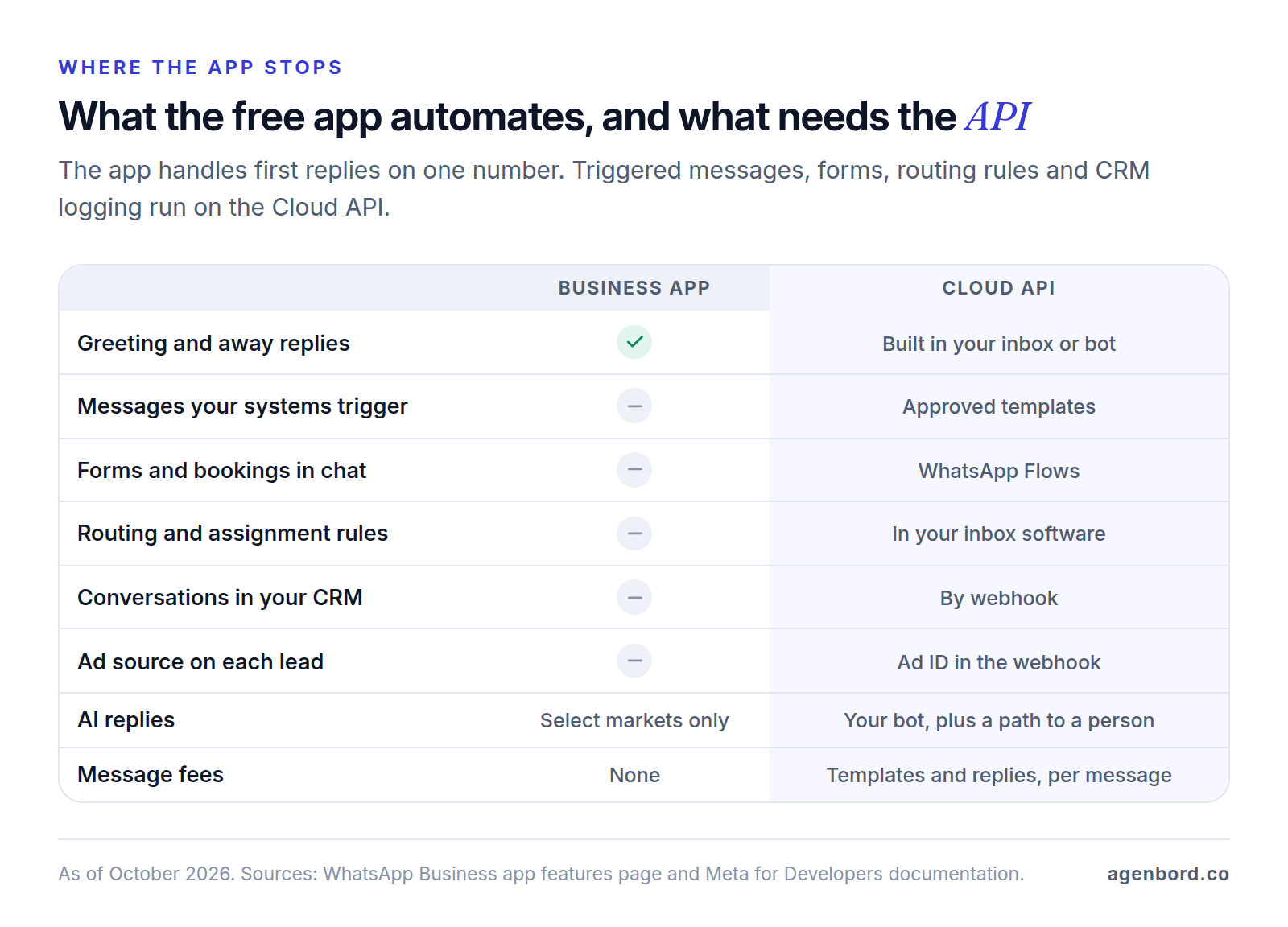
Outgrowing the app doesn't mean giving it up. Through coexistence, Meta's onboarding for app users, the same number connects to the Cloud API: your greeting and away messages keep working in the app, and messages your staff send from the app are copied to your system by webhook.
Skip the unofficial tools that drive WhatsApp Web or a phone to send in bulk. WhatsApp's terms of service list "bulk messaging, auto-messaging, auto-dialing" as impermissible, and your number is what you'd lose.
What the WhatsApp Business API adds
The API has no screen of its own. Your systems call it to send messages, Meta pushes replies and delivery statuses back by webhook, and your team works in an inbox built on top. That opens five kinds of automation the app can't do.
Messages your systems trigger
Your booking, order, dispatch or billing system calls the API when something happens, and the customer gets an approved template filled in with their details. Most of these are utility templates, Meta's category for non-promotional messages tied to a transaction or account. A utility template can carry up to 10 buttons: quick replies such as Confirm and Reschedule, a link to track an order or pay an invoice, or a phone number. A quick-reply tap comes back to you as a message, so it opens the 24-hour window for whatever comes next.
Forms and bookings with WhatsApp Flows
WhatsApp Flows are multi-screen forms that open inside the chat: a quote request, an intake form, an appointment booking. A Flow can be static, or it can call your server to show live data, such as open appointment slots, and check answers as they're entered. You can send one in a conversation the customer started, or attach it to a template button to start one; the completed answers arrive at your system by webhook as clean fields, not ten messages of free text.
Routing, tags and a shared inbox
Routing automation lives in the shared inbox, whether that's an inbox platform, your CRM's or a custom WhatsApp inbox. New chats get a short menu or keyword check, a tag (sales, service, billing), an owner, and an escalation if nobody answers within your target time. After hours, an auto-reply sets expectations and creates a callback task.
A chatbot adds menu or AI answers for routine questions; our WhatsApp chatbot guide compares builders and costs. Whatever answers, WhatsApp's Business Messaging Policy requires automated chats to offer a prompt, clear path to a person, such as an in-chat handoff, a phone number, email or a support form.
Lead capture from Click-to-WhatsApp ads
When someone messages you from a Click-to-WhatsApp ad or a Facebook Page button and you reply within 24 hours, Meta opens a 72-hour free entry point window in which every message you send is free. The first message carries the ad's details, including its ID, so your system can create the lead in your CRM with its source. A welcome message sequence on the ad can greet people and offer tap-to-ask questions ("Get a quote," "Check availability") that start your qualification flow.
Conversations synced to your CRM
Your integration logs each message on the matching contact, creates the contact if it's new and writes back what matters, such as "appointment confirmed" or "lead qualified." Our CRM integration guide covers the sync design. Two WhatsApp details trip people up:
- Don't match on phone number alone. Since early April 2026, Meta's webhooks include a business-scoped user ID, and WhatsApp usernames are rolling out through 2026. For a customer who adopts a username, a webhook can leave out the phone number unless you've messaged or called each other in the last 30 days or they're in your contact book. Store the ID on the contact.
- Sync opt-outs. Customers can turn off your marketing messages inside WhatsApp. Meta reports the change through a
user_preferenceswebhook, and later sends fail with error 131050. Record it in the CRM so no other tool keeps trying.
The WhatsApp automations worth building first
Ranked for a small business with US customers by three tests: how often your team sends the message by hand today, what it protects (a booked slot, a payment, a lead) and whether it reaches US numbers.
| # | Automation | Trigger | Message type | What to measure |
|---|---|---|---|---|
| 1 | Appointment reminder with Confirm and Reschedule buttons | A set time before the visit, from your scheduler | Utility template | Confirmation rate, no-shows, reschedules handled without staff |
| 2 | Booking or order confirmation | Booking created or order paid | Utility template | Delivery rate, "did you get my booking?" messages |
| 3 | Status updates: on the way, shipped, ready for pickup | Status change in your dispatch, order or job system | Utility template | Read rate, "where is it?" questions |
| 4 | Payment reminders and receipts | Invoice due or overdue, card declined, payment received | Utility template, with no offers | Share paid by the due date, days to pay |
| 5 | Inbound triage: after-hours reply, menu, tags, assignment | Customer sends a message | Service messages, billed at the utility rate | First response time, unassigned chats |
| 6 | Lead capture from Click-to-WhatsApp ads | Customer messages from an ad | Any message, free for 72 hours if you reply within 24 | Cost per qualified lead, time to first reply, leads booked |
| 7 | Quote or intake form (WhatsApp Flow) | Customer taps "Get a quote" | Flow in an open window, or a template with a Flow button | Completion rate, time to quote |
| 8 | Feedback request after a job or delivery | Job closed or order delivered | Utility template tied to that job or order | Response rate, rating, review link clicks |
| 9 | Promotions, abandoned carts, win-backs | Campaign date, abandoned cart, inactivity | Marketing template; not delivered to US numbers | Conversions, blocks and opt-outs, template quality |
A few notes on the list:
- Keep offers out of utility messages. Meta's categorization rules treat any template with promotional content as marketing, and its own examples put abandoned-cart reminders and discounted renewals in marketing. A feedback request counts as utility only when it's tied to a specific order or visit.
- Payment reminders belong on WhatsApp when customers already answer you there. That's how the billing platform our team built works: automated monthly invoices on WhatsApp, with payments reconciled into customer ledgers that update themselves. Our invoice automation guide covers the rest of the receivables process.
WhatsApp marketing automation and the US pause
WhatsApp marketing automation means sending marketing templates, such as offers, launches, cart reminders and win-backs, to people who opted in, on a schedule or a trigger. It's allowed, with two limits that shape every campaign.
Per-user limits. WhatsApp caps how many marketing templates a person receives from all businesses over a period, based on how that person engages; Meta publishes no number. A blocked send fails with error 131049, and Meta says to wait at least 24 hours before retrying. Marketing messages sent inside an open customer service window don't count toward the limit.
US numbers. Since April 1, 2025, WhatsApp hasn't delivered marketing templates to US numbers. As of October 2026, Meta's documentation says WhatsApp "does not currently deliver marketing template messages" to users with a +1 dialing code and a US area code, and gives no end date. Utility, authentication and service messages are unaffected.
The rule follows the customer's number, not your location. So:
- Customers with non-US numbers, common if you serve Latin America or international clients, can still receive your marketing templates if they opted in, within the per-user limits and at their country's rates.
- For US customers, automate the conversations they start. Click-to-WhatsApp ads, QR codes and a WhatsApp button on your site or in your emails bring them into an open window, where your replies are ordinary messages: a customer who asks about this month's offer gets the details in your answer.
- Keep US promotions on email and SMS for now, with consent. US consent laws such as the TCPA can apply to promotional messages; that's a question for your lawyer, and this is general information, not legal advice.
Opt-in and opt-out work the same everywhere. Meta's opt-in rules say the opt-in must name your business and make clear the person will receive messages from you. One opt-in can cover every kind of message, but Meta notes that separate opt-ins for updates and offers make customers less likely to block you. Every tool that sends messages should check one opt-out flag, set by the in-app marketing opt-out, a typed "stop" in any wording or a request made by phone or email.
WhatsApp automation tools: which kind fits
There's no single best WhatsApp automation tool. There are four kinds, and the right one depends on where your trigger data lives and where your team answers.
| Type | Examples (October 2026) | Good for | Watch for |
|---|---|---|---|
| Inbox and chatbot platforms | respond.io Workflows (up to 150 per workspace on Growth and higher plans); ManyChat (WhatsApp from the Pro plan) | Visual flows, a shared inbox, bots and broadcasts, a fast start | Pricing by contacts or seats; some bill messages on their own rate card; your flows live in their tool |
| CRMs with WhatsApp | HubSpot (Marketing or Service Hub Professional and up, with a "Send WhatsApp message" workflow action); Pipedrive (Growth plan and up; automations can send WhatsApp messages) | Messages triggered by deal, ticket and contact changes; history on the record | Plan requirements; HubSpot caps template messages at 1,000 a month; limited bot logic |
| Connector tools | Zapier, Make, n8n | Linking a booking, store or accounting app to templates without code | No inbox; multi-step conversations get awkward; per-task costs at volume |
| Custom on the Cloud API | Your own code, or a custom CRM with WhatsApp built in | Rules across several systems, high volume, WhatsApp inside your product | Build and maintenance cost |
What the connectors' WhatsApp integrations actually do, as of October 2026:
- Zapier's WhatsApp Business app triggers on a new incoming message or a status change (sent, delivered, read or failed) and can send a template, a freeform message inside the 24-hour window or media. It's a premium app, so it needs a paid Zapier plan.
- Make's WhatsApp Business Cloud app, built and maintained by Make, watches events, sends messages and templates, and handles media.
- n8n's WhatsApp Business Cloud node sends messages and templates and can send and wait for a response (an approval, free text or a form). Its WhatsApp Trigger handles incoming messages and template updates, but WhatsApp allows one webhook per app, so test and production workflows can't listen at the same time.
All three still need a WhatsApp Business Account with approved templates, and none gives your team an inbox. They're good glue for a reminder or a receipt; plan pricing is in our Zapier vs. Make vs. n8n comparison.
Our rule of thumb: start where your team already works, and go custom only when the rules span your scheduler, CRM and accounting, or when per-contact pricing gets expensive at your volume. If you're choosing who connects you to the API, our WhatsApp provider comparison prices the options.
How it works end to end: an appointment reminder
Take a hypothetical home services company with 30 visits a day. Here's what runs behind the reminder its customers see.
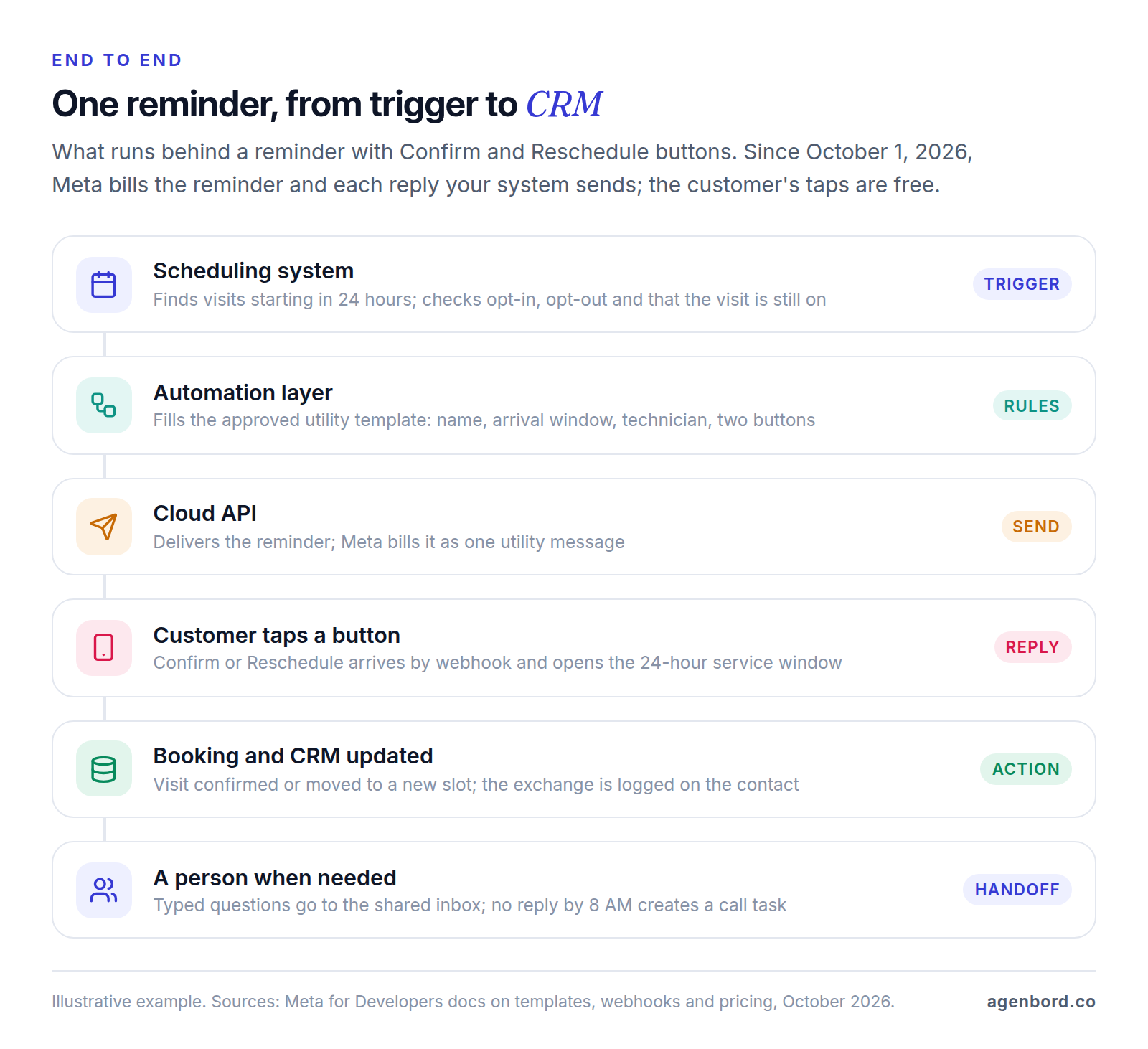
- Trigger. Every 15 minutes, a scheduled job asks the scheduling system for visits starting in 24 hours.
- Checks. The customer opted in and hasn't opted out, the visit is still on, no reminder has gone out yet, and it's a reasonable hour where the customer is.
- Send. The automation fills the approved utility template (name, arrival window, technician) with Confirm and Reschedule buttons and calls the Cloud API. Meta bills it as one utility message.
- Statuses. Webhooks report sent, delivered and read. If delivery fails, the system falls back to another channel the customer agreed to, or a call task.
- Confirm. The tap arrives by webhook. The visit is marked confirmed in the scheduler, the exchange is logged on the contact, and a short "See you tomorrow" goes back.
- Reschedule. The system replies with up to three open slots as reply buttons, or a Flow showing live availability, then books the new slot and confirms it.
- Anything typed. "Can you come after 3?" goes to the shared inbox, tagged and assigned to dispatch.
- No reply. If nothing comes back by 8 AM, the front desk gets a call task.
Two engineering details decide whether it runs cleanly. Meta retries a webhook for up to 7 days when your server doesn't acknowledge it, and can deliver the same one twice, so every step checks the message ID before acting. And time zones belong to the customer, not your server.
Since October 1, 2026, every reply your system sends in steps 5 and 6 is billed at the utility rate, like the reminder; the customer's taps cost nothing. So design replies to do more per message: offer the open slots in one message with buttons rather than a back-and-forth.
What WhatsApp automation costs
You pay in three places.
Meta's message fees. Meta bills per delivered message, by category and the customer's country. Since October 1, 2026, that includes replies inside the 24-hour window, whether a person, a bot or an automation sends them, at the utility rate with no volume discounts, and utility templates sent inside an open window, which used to be free. Meta's main pricing page still described replies as free on October 1; the dated page is the one to follow. Messages customers send you stay free, and so does everything in the 72-hour window after an answered ad click. For US numbers, utility messages cost from $0.0034 each, per Twilio's pricing page. In the reminder example, that's the reminder plus each reply your system sends. Our WhatsApp Business API pricing guide explains the categories and provider fees.
Tools. List prices as of October 2026:
| Tool | Price |
|---|---|
| HubSpot Service Hub Professional | $90 per seat a month billed annually, plus a $1,500 onboarding fee; WhatsApp included, capped at 1,000 template messages a month |
| Pipedrive Growth, its first plan with WhatsApp | $39 per seat a month billed annually |
| ManyChat Pro, its first plan with WhatsApp | $29 a month billed annually, for 2,500 active contacts |
| Twilio as your WhatsApp provider | $0.005 per message, inbound or outbound, on top of Meta's fees |
| Zapier, Make or n8n | Plan fees by task, credit or execution |
Building it. Typical ranges for how we price this work: a single workflow automation from $1,500 (1–2 weeks), a program of 5–15 workflows $6,000–$20,000, a WhatsApp setup with a shared inbox from $2,500 (1–3 weeks) and a chatbot with CRM integration $8,000–$25,000 (4–8 weeks). A custom build adds hosting of roughly $50–$500 a month and maintenance of about 15–20% of the build cost a year. We quote a fixed price with a written scope and weekly demos, and you own the code.
How to set up WhatsApp business automation: a 30-day plan
Here's an illustrative plan for two utility automations plus inbound routing. Business verification runs in the background: until it's done, you can start conversations with up to 250 different customers a day, and a business sending 30 reminders a day is far below that.
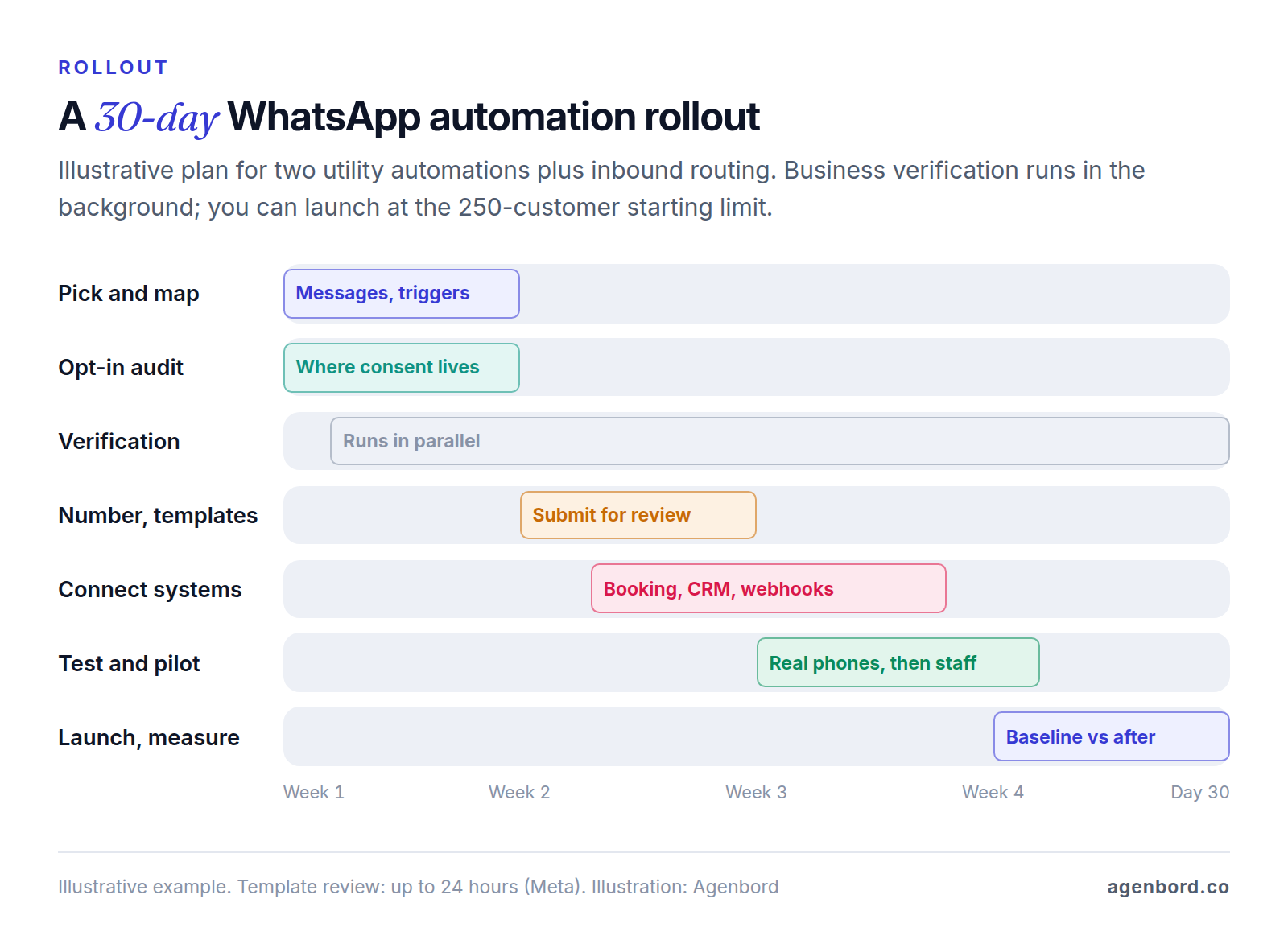
Week 1: pick and map. Choose two automations from the list, usually reminders plus confirmations or payment reminders. Write each message, its buttons and what happens after each tap. Note the trigger, the system it comes from and the fields it needs. Find where consent lives today and what it says. Record a baseline (this month's no-shows, "where's my order" messages, days to pay), or you won't know whether the automation worked. Start business verification, and decide whether to connect your current app number through coexistence or use a new one.
Week 2: set up and connect. Create the WhatsApp Business Account in your own business portfolio, register the number and complete the profile. Submit the templates; Meta decides on each within 24 hours. Connect the trigger systems and webhooks, and set up routing rules and tags in the inbox.
Week 3: test and pilot. Test on real phones, including the awkward cases: a customer who taps Reschedule twice, types "stop" or asks something the flow doesn't expect, a failed delivery, a duplicate webhook, a message after hours. Train staff on the inbox, then run a pilot with your own team before a small group of customers.
Week 4: launch and measure. Turn it on for every opted-in customer. Check template quality and your messaging limit in WhatsApp Manager each week, compare results with the baseline, rewrite anything that confuses people and pick the next automation from the list.
Sources
- WhatsApp Business - Business app features (accessed October 2026)
- WhatsApp Business - Meta Business Agent (accessed October 2026)
- WhatsApp Business blog - Conversations 2026: Introducing Meta Business Agent, June 3, 2026 (accessed October 2026)
- WhatsApp Help Center - About using business AI to chat with customers (accessed October 2026)
- Meta for Developers - Onboard WhatsApp Business app users (coexistence) (accessed October 2026)
- WhatsApp - Terms of Service (accessed October 2026)
- WhatsApp - Business Messaging Policy, updated September 23, 2026 (accessed October 2026)
- Meta for Developers - Send messages and the customer service window (accessed October 2026)
- Meta for Developers - Utility templates (accessed October 2026)
- Meta for Developers - Template categorization (accessed October 2026)
- Meta for Developers - Template review (accessed October 2026)
- Meta for Developers - Interactive reply buttons messages (accessed October 2026)
- WhatsApp Business - WhatsApp Flows (accessed October 2026)
- Meta for Developers - Implementing your Flow endpoint (accessed October 2026)
- Meta for Developers - Sending a Flow (accessed October 2026)
- Meta for Developers - Receiving Flow responses (accessed October 2026)
- Meta for Developers - Click-to-WhatsApp welcome message sequences (accessed October 2026)
- Meta for Developers - WhatsApp Business Platform pricing (accessed October 2026)
- Meta for Developers - Pricing for non-template messages: replies and in-window utility templates billed from October 1, 2026 (accessed October 2026)
- Meta for Developers - Webhooks overview (accessed October 2026)
- Meta for Developers - Business-scoped user IDs and usernames (accessed October 2026)
- Meta for Developers - WhatsApp error codes (accessed October 2026)
- Meta for Developers - Per-user marketing template limits and US phone numbers (accessed October 2026)
- Braze - Meta WhatsApp resources: US marketing message pause start date (accessed October 2026)
- Meta for Developers - Get opt-in for WhatsApp (accessed October 2026)
- Meta for Developers - Messaging limits (accessed October 2026)
- respond.io Help Center - Workflows overview (accessed October 2026)
- ManyChat - Pricing (accessed October 2026)
- HubSpot Knowledge Base - Connect WhatsApp to the conversations inbox (accessed October 2026)
- HubSpot Knowledge Base - Customize and manage WhatsApp message templates (accessed October 2026)
- HubSpot - Service Hub pricing (accessed October 2026)
- Pipedrive Support - WhatsApp integration (accessed October 2026)
- Pipedrive - Pricing (accessed October 2026)
- Zapier - WhatsApp Business integrations (accessed October 2026)
- Zapier - Pricing: premium apps on paid plans (accessed October 2026)
- Make - WhatsApp Business Cloud integration (accessed October 2026)
- n8n Docs - WhatsApp Business Cloud node (accessed October 2026)
- n8n Docs - WhatsApp Trigger node (accessed October 2026)
- Twilio - WhatsApp pricing: $0.005 platform fee, US utility messages from $0.0034 (accessed October 2026)
Prices, plans and regulations change. Figures were checked on October 2, 2026; follow the links for the latest. Nothing here is legal, tax or financial advice.
About the author
Founder, Agenbord
Muhammad Hamza is the founder of Agenbord, the Fort Lauderdale software company behind the construction ERP Smart Construction and a WhatsApp-first billing platform. He writes practical guides on buying, building and automating business software.