On this page
- WhatsApp Business app vs. the WhatsApp Business API
- How the WhatsApp Business API works
- Going direct with Meta or through a BSP
- What you need to get approved
- How to set up the WhatsApp Business API, step by step
- The rules: opt-in, quality and messaging limits
- What's allowed in 2026: US marketing, AI chatbots and groups
- What the WhatsApp Business API costs
- Why numbers get restricted, and a pre-launch checklist
The WhatsApp Business API lets your software, not a phone, send and receive WhatsApp messages on your business number. Meta calls it the WhatsApp Business Platform, and every new setup runs on the Cloud API, which Meta hosts. You need it when several people answer one number, when conversations belong in your CRM, or when your systems should send reminders and updates on their own.
There's no single application to pass. "Getting approved" means clearing a chain of checks: a Meta business portfolio, a phone number you control, a display name Meta accepts and templates it approves. Business verification can wait, but it lifts the starting cap of 250 customers a day for conversations you start.
One catch for US businesses: as of October 2026, WhatsApp doesn't deliver marketing templates to US phone numbers. Here, the API is a channel for service and notifications, not promotions.
WhatsApp Business app vs. the WhatsApp Business API
Meta offers two official products. The WhatsApp Business app is "for small businesses who personally manage conversations with customers." The Business Platform is "for medium to large businesses communicating with customers at scale through programmatic access." Plenty of small companies use the platform; how you work matters more than your headcount.
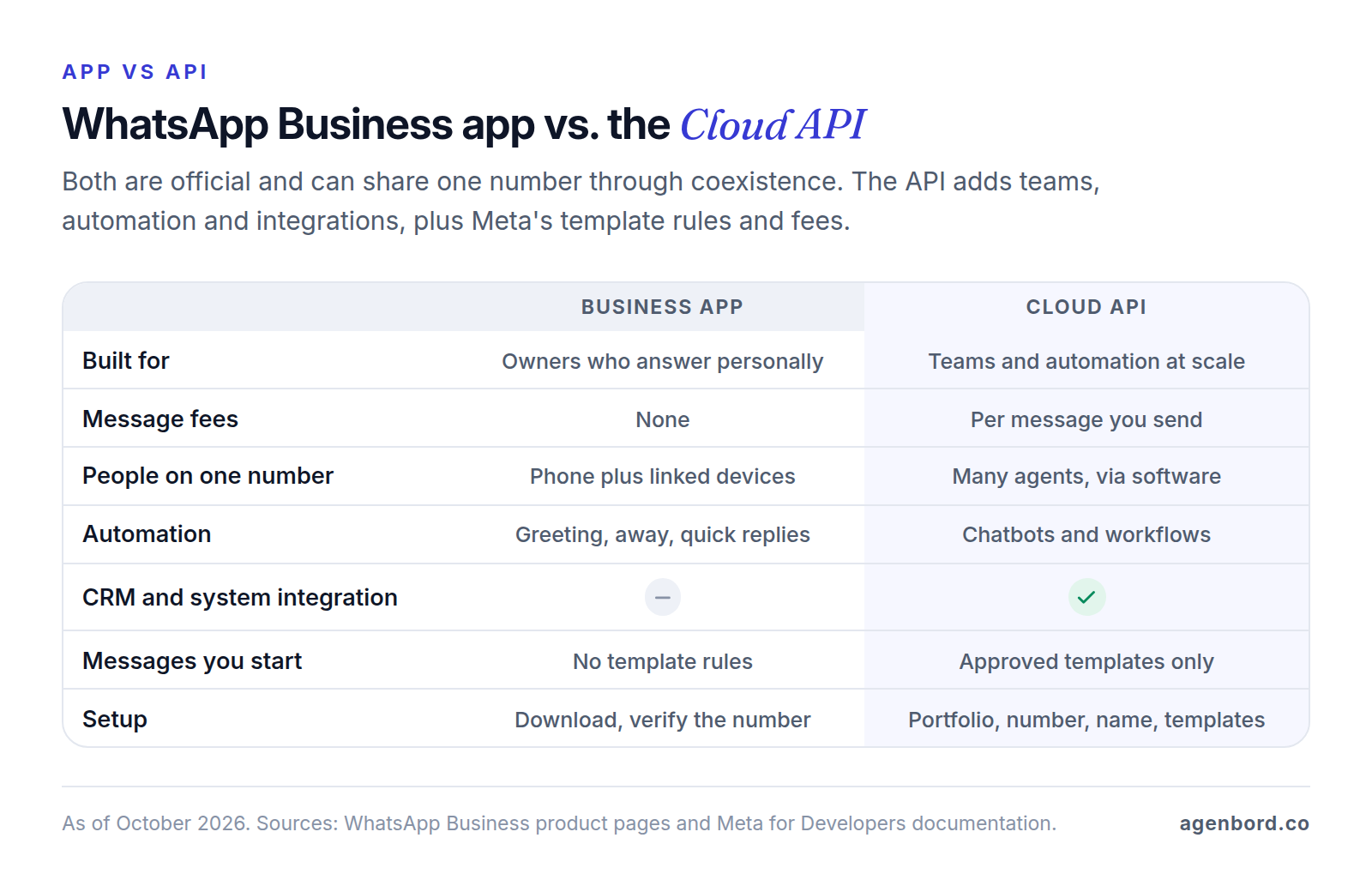
Two things older guides get wrong. The self-hosted On-Premises API is gone: its final version expired on October 23, 2025, and messages to or from numbers still registered on it aren't delivered. And one number no longer has to pick a side: Meta's coexistence onboarding connects a number you use in the app to the Cloud API (details below).
Who actually needs the API
Move to the API when any of these is true:
- Several people answer one number and you need assignment, notes and a record of who said what.
- Conversations belong in your systems, logged on the customer in your CRM or helpdesk automatically; our CRM integration guide shows how that sync works.
- Your software should message customers on its own when something happens (a booking, a shipment, a failed payment), the trigger-and-action pattern behind most workflow automation; our WhatsApp automation guide ranks the ones worth building first.
- You want a chatbot to answer routine questions and hand the rest to a person.
- Volume: ads that open WhatsApp chats, or more conversations than one phone can handle.
If you answer personally at modest volume, the free app is enough. If the plan is promotional blasts to US customers, the API won't help either.
How the WhatsApp Business API works
Meta hosts the Cloud API. Your software sends messages through API calls, and Meta pushes incoming messages and status updates (sent, delivered, read) to your server through webhooks. The API has no screen of its own: your team works in a shared inbox, CRM or chatbot platform on top of it, built by you or bought from a provider.
Everything else follows from the customer service window:
- When a customer messages or calls you, a 24-hour window opens, and each new message from them resets it. Inside it you can send any message type (text, photos, documents, buttons, lists) without a template. Since October 1, 2026, Meta charges for these service messages too, at the same rate as utility messages in the customer's market.
- Outside the window, you can only send a template: a message Meta approved in advance, with fields such as a name or order number filled in for each customer.
Templates come in three categories, and the category sets both the price and the rules:
| Category | What it's for | Examples | Worth knowing |
|---|---|---|---|
| Utility | Something specific to a transaction or account the customer has with you, or that they asked for; no promotional content | Appointment reminders, order and delivery updates, receipts, account alerts | Billed even inside an open window since October 1, 2026 |
| Authentication | One-time passcodes | Login and sign-up codes | The most restricted category: passcodes only |
| Marketing | Anything promotional, including a utility message with an offer added (a coupon on a shipping update makes it marketing) | Sales, product launches, re-engagement | Not delivered to US numbers as of October 2026 |
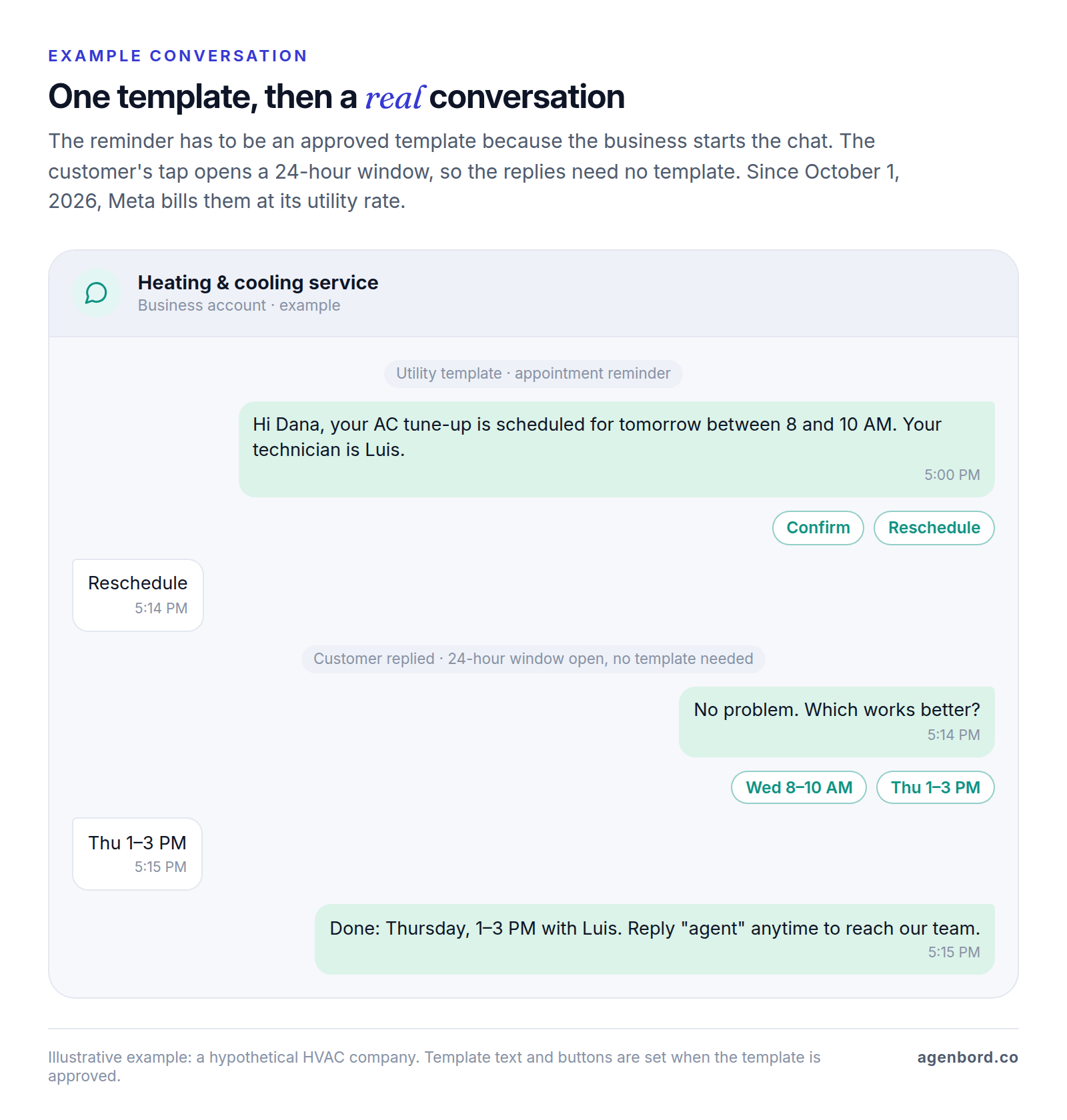
The WhatsApp-first billing platform our team built uses the same pattern: automated monthly invoices delivered on WhatsApp, payments reconciled into customer ledgers that update themselves, and replies handled in a shared team inbox with an AI assistant.
Going direct with Meta or through a BSP
You can connect to the Cloud API yourself or through a Business Solution Provider (BSP), a company approved by Meta to onboard and serve other businesses. Solution Partners can extend a line of credit and invoice you for messaging; Tech Providers onboard you while Meta bills your own payment method.
| Direct with Meta | Through a provider | |
|---|---|---|
| Setup | A developer creates a Meta app, connects your WhatsApp Business Account and sets up tokens and webhooks | The provider's signup flow |
| Inbox and tools | You build or buy them | Usually included or sold as add-ons |
| Billing | Meta bills your payment method | Meta (Tech Providers) or the provider's invoice (Solution Partners) |
| Extra fees | None beyond Meta's rates | Per message, per number or per seat |
| Keeping your app number (coexistence) | Through a provider only | If the provider supports it |
| Support | Meta's developer support | The provider, which has direct support from Meta |
The rulebook doesn't change: every provider works under the same messaging policy, template review, quality ratings, messaging limits and US marketing pause. No provider can pre-approve a template or exempt a number.
Fees do change. As of October 2026, Twilio adds $0.005 to every WhatsApp message, inbound and outbound, on top of Meta's fees; 360dialog charges from €49 per number a month plus Meta's fees; inbox platforms add subscriptions by seats or contacts. Either way, create the WhatsApp Business Account inside your own business portfolio so the number and templates stay yours. Meta supports migrating a number to another account if you switch providers. Our comparison of WhatsApp Business API providers goes provider by provider.
What you need to get approved
Start by checking that your business can use WhatsApp at all. The Business Messaging Policy bans selling or promoting, among other things, firearms, alcohol and tobacco, drugs, real-money gambling, adult products, dating services, payday loans, debt collection and bail bonds, whatever licenses you hold. A few regulated categories, such as over-the-counter drugs and alcohol, have narrow exceptions.
A business portfolio and a WhatsApp Business Account
Your business portfolio (formerly Business Manager) is your company's container in Meta's systems. The WhatsApp Business Account (WABA) inside it holds your numbers, templates and analytics. Use your legal business name and the same address and website you'll use for verification.
A phone number you control
The number must be yours, include a country and area code (no short codes) and be able to receive a verification code by SMS or voice call. Landlines and toll-free numbers work as long as the code reaches a person; toll-free numbers must also accept international calls. You'll set a two-step verification PIN. New portfolios can register two numbers, rising to 20 once you're verified or reach the 2,000 messaging limit.
A number active on WhatsApp can't be registered on the API until its WhatsApp account is deleted. Coexistence, Meta's onboarding for Business app users, avoids that:
- You keep the Business app on the number while your software uses the Cloud API.
- It needs Business app version 2.24.17 or later and runs through a Solution Partner's or Tech Provider's signup flow.
- Up to six months of chats and your WhatsApp contacts sync; group chats don't.
- Messages sent from the app stay free; messages sent through the API are billed as usual.
- Some app features switch off: disappearing messages, view-once and live location, broadcast lists (now read-only) and the Windows and Wear OS companion apps. Throughput is fixed at 20 messages per second, and the Groups API isn't available.
Otherwise, delete the account in the app and register the number on the API, or use a new number.
A display name Meta accepts
The display name is the business name customers see. Meta's display name guidelines require a clear link to your business that outside sources, such as your website, back up. No generic terms, generic places or people's full names; no all caps unless that's how your brand is styled; no added punctuation or emoji, URL formats or names under three characters. Names are checked again after every change (up to 10 in 30 days) and when you reach a higher messaging limit. Until approval, the name shows on your profile but not at the top of the chat.
Business verification
Business verification is Meta's check that you're a real business entity. You start it from your business portfolio's settings, enter your legal details and provide the documents Meta asks for; its Business Help Center lists what it accepts.
You can go live without it, but verification unlocks:
- A daily limit of 2,000 customers instead of 250. Sending 2,000 high-quality templates to different customers within 30 days also gets you there.
- Up to 20 numbers instead of two, and up to 6,000 templates per account instead of 250 once your display name is approved.
- The blue checkmark. An Official Business Account also needs 30 days on the platform, two-step verification and an approved display name, and Meta reviews each request.
How to set up the WhatsApp Business API, step by step
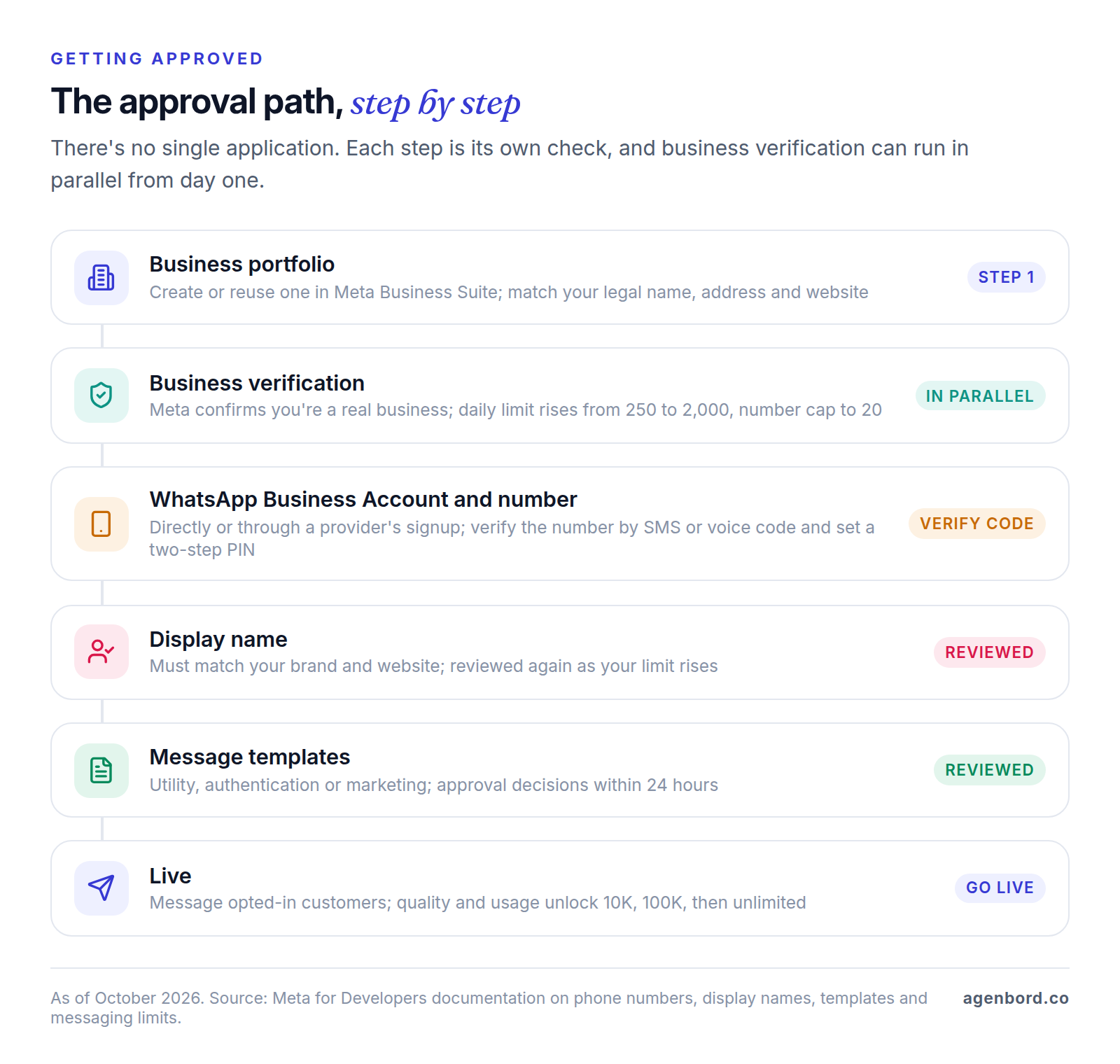
- List your use cases and messages, and sort each message you'll start into utility, authentication or marketing. For US customers, plan without marketing templates.
- Prepare your business portfolio in Meta Business Suite and start business verification, which runs in parallel.
- Choose direct or a provider, and create the WhatsApp Business Account in your own portfolio.
- Register the number with the SMS or voice code and set the two-step PIN, or connect your Business app number through coexistence.
- Set the display name and profile: description, address, hours and website.
- Add a payment method in Meta Business Suite billing, or use your Solution Partner's credit line.
- Submit templates for every message you'll start outside the window. Decisions take up to 24 hours.
- Connect your inbox and systems (webhooks, CRM sync, routing, opt-out handling) and test on real phones, including a customer who asks you to stop.
- Go live with opted-in customers, then watch template quality and your messaging limit in WhatsApp Manager.
Our fixed-price setups, shared inbox included, are scoped at 1–3 weeks; business verification is the one step with no published timeline.
Why templates get rejected
Meta's documentation lists the common reasons:
- Badly formatted variables: missing or mismatched curly braces, characters such as #, $ or % inside a variable, variables out of sequence, or a template that starts or ends with one.
- Too many variables for the length of the message.
- Requests for sensitive identifiers such as full card, financial account or national ID numbers.
- Abusive or threatening content, or a sale WhatsApp's commerce rules don't allow.
- Duplicates of an existing template.
A utility template with promotional wording gets moved to marketing, with a day's notice, or none if you've been warned for misuse before; you can request a review within 60 days. To appeal a rejection, edit the template in WhatsApp Manager, add sample values and resubmit. Meta decides within 24 hours.
The rules: opt-in, quality and messaging limits
Opt-in and opt-out
The Business Messaging Policy lets you message people only after they've given you their number and opted in to hear from you. You choose the method, but it must comply with the laws that apply to your messages. Meta recommends separate opt-ins for different message types (order updates versus promotions) and clear opt-out instructions.
Honor every request to stop, on WhatsApp or anywhere else. Customers can also turn off your marketing messages inside WhatsApp; deliveries then fail with error 131050, and you shouldn't retry. If you automate replies, offer a prompt, clear path to a person: an in-chat handoff, phone, email, a support form or a store visit.
US texting consent rules such as the TCPA may also bear on promotional messages; how they apply to WhatsApp is a question for your lawyer. Our real estate CRM guide explains the consent basics. This is general information, not legal advice.
Quality rating
Meta rates each template high, medium or low based on usage, customer feedback and engagement. A template that drops to low is paused for three hours, then six hours the second time, and disabled the third time. Low quality also stops your limit from rising, and excessive negative feedback can restrict the whole account. The fix happens before you hit send: message people who asked to hear from you, about what they asked for.
Messaging limits
Your messaging limit caps how many different customers you can reach with messages you start (templates outside the window) in any rolling 24 hours; replies inside an open window don't count. Since October 8, 2025, the limit belongs to your whole business portfolio and is shared by all its numbers.
| Daily limit (unique customers) | How you get there |
|---|---|
| 250 | Where every new business portfolio starts |
| 2,000 | Business verification (yours or through a partner), or 2,000 delivered templates to different customers within 30 days, using high-quality templates |
| 10,000, then 100,000, then unlimited | Automatic, one level at a time, when your messages are high quality and you used at least half your current limit in the last 7 days; each increase lands within 6 hours |
What's allowed in 2026: US marketing, AI chatbots and groups
Marketing templates to US numbers
Since April 1, 2025, WhatsApp hasn't delivered marketing templates to US numbers. As of October 2026, Meta's documentation says WhatsApp "does not currently deliver marketing template messages to WhatsApp users with United States phone numbers," meaning a +1 dialing code with a US area code, and gives no end date.
Replies inside the 24-hour window, utility templates and authentication codes all still work. Relabeling promotions as utility doesn't: Meta moves mixed templates to marketing, and misuse counts toward enforcement.
AI chatbots
A bot that serves your own customers is allowed. WhatsApp's Business Solution Terms bar "AI Providers" (makers of large language models, generative AI platforms and general-purpose assistants) when the AI is the primary thing on offer rather than "incidental or ancillary." Meta dates the restriction to January 15, 2026, and the terms exempt users with European Economic Area or Brazilian numbers.
So a bot that answers questions about your services, books appointments or checks order status is fine; selling a general-purpose assistant on WhatsApp is not. Every bot also needs a path to a person. And the terms prohibit using WhatsApp data to create, train or improve AI models, except to fine-tune a model only your business uses, so check your AI vendor's data terms. Bot replies are service messages, so since October 1, 2026 each one is billed like a person's reply; replies from Meta Business Agent, Meta's own AI agent, are billed per token instead ($2.00 per million tokens since August 1, 2026). Our WhatsApp chatbot guide compares builders and costs, our customer service chatbot guide covers handoff design and testing, and our AI chatbot development pilots start from $4,000.
Groups
Yes, with limits. Meta added a Groups API in October 2025. As of October 2026:
- Only numbers with Official Business Account status qualify, and not numbers onboarded through coexistence.
- Your business creates each group through the API, and people join through an invite link; you can't add them directly.
- Groups hold up to 8 participants, and one number can create up to 10,000 groups.
- Text, media and templates work; interactive messages, calls, disappearing messages and edits or deletions don't.
- Group messages fall under Meta's per-message pricing.
That suits small working groups, such as a contractor, a homeowner and their designer on one remodel, not broadcasts.
What the WhatsApp Business API costs
Meta doesn't charge to use the Cloud API. It charges per message, priced by the customer's country: templates by category since July 1, 2025 and, since October 1, 2026, your replies inside the 24-hour window too, at the same rate as utility messages and with no volume discounts. Utility templates sent inside an open window, free until then, are now billed as well, per Meta's non-template pricing page (its general pricing page still called replies free on October 1). Messages customers send you cost nothing, and messages sent inside the 72-hour window that opens when a customer writes from a Click-to-WhatsApp ad or Facebook call-to-action button stay free. Our WhatsApp Business API pricing guide covers rates in more detail.
| Cost | How it's billed | Typical amount (October 2026) |
|---|---|---|
| Meta message fees | Per message: templates by category, replies at the utility rate, both by the customer's country | Utility messages from $0.0034 each, per Twilio's pricing page |
| Provider fees | Per message, per number or both | Twilio $0.005 per message, inbound and outbound; 360dialog from €49 per number a month |
| Inbox, chatbot or CRM software | Monthly subscription, usually by seats or contacts | Varies; ask whether messages are billed at Meta's rates or the vendor's own rate card |
| Setup and integration (ours) | One-time, fixed price | Setup with a shared inbox from $2,500 (1–3 weeks); chatbot and CRM integration $8,000–$25,000; custom WhatsApp products $25,000+ |
| Running a custom build | Monthly | Hosting about $50–$500; maintenance about 15–20% of the build per year; AI usage billed by the provider |
For example, at $0.0034 each, 3,000 replies a month add about $10 in Meta fees, before any provider fees. The bigger budget items are the inbox, the integrations and the time it takes to keep templates and opt-ins clean. We scope WhatsApp automation as a fixed-price project with a written scope, and you own the code.
Why numbers get restricted, and a pre-launch checklist
Meta enforces the policy in steps: warnings first, then a 1- or 3-day block on sending templates and adding numbers, a 5-, 7- or 30-day block on sending any messages, an account lock that only an appeal removes, and finally permanent removal. Severe violations such as scams go straight to offboarding.
The usual causes are spam, messaging people who didn't opt in, miscategorized templates, prohibited products and excessive negative feedback. Appeal from Business Support Home by selecting the violation and requesting a review; Meta says reviews typically take 24 to 48 hours, and not every spam violation can be appealed.
Before you send your first template:
- Every contact has an opt-in on record (source, wording and date), and one opt-out stops every automation
- Each template sits in the right category, with no offers inside utility messages
- Variables are formatted correctly and have sample values
- No message asks for full card, bank account or ID numbers
- Every automated flow reaches a person when the customer asks, in any wording
- Someone checks template quality and the messaging limit in WhatsApp Manager every week
- Business verification is done before you need to reach more than 250 customers a day
- The WhatsApp Business Account and number sit in your own business portfolio
Sources
- Meta for Developers - WhatsApp Business Platform overview (accessed October 2026)
- Meta for Developers - About the WhatsApp Business Platform (accessed October 2026)
- Meta for Developers - On-Premises API sunset (accessed October 2026)
- WhatsApp Business - Home: Business app vs. Business Platform (accessed October 2026)
- WhatsApp Business - Business app features (accessed October 2026)
- Meta for Developers - Cloud API: Get started (accessed October 2026)
- Meta for Developers - Send messages and the customer service window (accessed October 2026)
- Meta for Developers - Solution Providers overview (accessed October 2026)
- WhatsApp Business - Partners (accessed October 2026)
- Meta for Developers - Embedded Signup overview (accessed October 2026)
- Meta for Developers - WhatsApp Business Accounts (accessed October 2026)
- Meta for Developers - Business phone numbers (accessed October 2026)
- Meta for Developers - Onboard WhatsApp Business app users (coexistence) (accessed October 2026)
- Meta for Developers - Display names (accessed October 2026)
- Meta for Developers - Display name guidelines (accessed October 2026)
- Meta for Developers - Business verification (accessed October 2026)
- Meta for Developers - Official Business Accounts (accessed October 2026)
- Meta for Developers - Templates overview (accessed October 2026)
- Meta for Developers - Template categorization (accessed October 2026)
- Meta for Developers - Template review and rejection reasons (accessed October 2026)
- Meta for Developers - Template quality rating (accessed October 2026)
- Meta for Developers - Template pausing (accessed October 2026)
- Meta for Developers - Messaging limits (accessed October 2026)
- Meta for Developers - WhatsApp Business Platform changelog (accessed October 2026)
- Meta for Developers - Per-user marketing template limits and US phone numbers (accessed October 2026)
- Braze - Meta WhatsApp resources: US marketing message pause start date (accessed October 2026)
- Meta for Developers - WhatsApp error codes (accessed October 2026)
- WhatsApp - Business Messaging Policy, updated September 23, 2026 (accessed October 2026)
- WhatsApp - Business Solution Terms, last modified March 6, 2026 (accessed October 2026)
- Meta for Developers - Pricing policy for AI Providers (accessed October 2026)
- Meta for Developers - Groups API (accessed October 2026)
- Meta for Developers - Policy enforcement (accessed October 2026)
- Meta for Developers - Pricing for non-template messages: service and in-window utility charges from October 1, 2026 (accessed October 2026)
- Meta for Developers - WhatsApp Business Platform pricing (accessed October 2026)
- WhatsApp Business - Platform pricing (accessed October 2026)
- Twilio - WhatsApp pricing (accessed October 2026)
- 360dialog - Pricing (accessed October 2026)
Prices, plans and regulations change. Figures were checked on October 2, 2026; follow the links for the latest. Nothing here is legal, tax or financial advice.
About the author
Founder, Agenbord
Muhammad Hamza is the founder of Agenbord, the Fort Lauderdale software company behind the construction ERP Smart Construction and a WhatsApp-first billing platform. He writes practical guides on buying, building and automating business software.