On this page
- What a customer service chatbot can and can't do
- Customer service chatbot use cases, ranked
- Design the handoff before you build the bot
- Prepare your knowledge base
- Disclosure, tone and privacy basics
- Channels: website, SMS, WhatsApp, Messenger, Instagram and email
- Customer service chatbot platforms and pricing (October 2026)
- Metrics to track and how to test before launch
- How to set up a customer service chatbot
A customer service chatbot answers the messages your team gets over and over (where's my order, what's your return policy, can I move my appointment) on your website, by text or in messaging apps, and passes everything else to a person. Today's AI bots don't follow a script. They read your help articles and policies and, if you connect them, your order or booking system, then reply in plain language. Phone calls need a different design, which our AI receptionist guide covers.
That makes them good at the repetitive half of support and bad at judgment calls, upset customers and exceptions to policy. It also makes them sound confident when they're wrong, and your business answers for what the bot says. The bots that work are narrow, open about being bots and quick to hand off.
What a customer service chatbot can and can't do
Older chatbots were decision trees that matched keywords or button taps to scripted answers. They're predictable, and they fall apart when a customer phrases something nobody scripted. The AI agents helpdesk vendors sell now run on large language models (LLMs) with retrieval: the bot searches your approved content, then writes its answer from what it found, ideally with a link to the source.
| Rules-based bot | AI (LLM-based) bot | |
|---|---|---|
| Understands | Keywords and button taps | Free-form questions, typos, follow-ups |
| Answers from | A script for each path | Your articles, policies and connected systems |
| Fails when | The customer goes off-script | Your content is missing, outdated or contradictory |
| Best for | Exact steps: pick a slot, enter an order number | Questions people phrase many different ways |
Good bots combine the two: AI to understand and answer, buttons and hard rules wherever the outcome must be exact.
An AI customer service chatbot is good at answering policy and product questions in the customer's own words at 2 a.m., looking things up once it's connected to your systems (order status, open slots, a return label), collecting what your team needs before a person picks up, and summarizing the conversation for them. What it can't do, or shouldn't be trusted to do alone:
- Know what you haven't given it. Missing content gets "I don't know" at best and a confident guess at worst.
- Enforce policy by instruction. Refund limits, eligibility rules and account changes belong in code and permissions, not the prompt.
- Make judgment calls on exceptions, goodwill credits, or angry and vulnerable customers.
- Know who it's talking to without your login or verification step.
- Be right every time.
That last point has consequences. In Moffatt v. Air Canada (2024), a British Columbia tribunal held the airline liable for refund information its website chatbot got wrong, and rejected the argument that the chatbot was responsible for its own words. It's a Canadian small-claims decision, not US law, but the lesson travels: your bot's answer is your company's answer.
Customer service chatbot use cases, ranked
Rank requests by how often they come in and how much damage a wrong answer would do. Start with the frequent, low-risk ones you can answer from data you already have.
| Request | Fit | What the bot needs | Hand to a person when |
|---|---|---|---|
| Order status and tracking | High | Read access to orders and a light check (order number plus email or ZIP) | It shows delivered but nothing arrived |
| FAQs and policies | High | Current articles on hours, pricing, shipping, warranty, service area | The customer disputes the policy or wants an exception |
| Booking and rescheduling | High | Your scheduling system, real availability, a confirmation message | No slot fits, special requests, a complaint about a visit |
| Lead capture | High | Qualifying questions, CRM integration, a calendar link | The job is large or needs a custom quote |
| Returns and exchanges | Medium | Return rules, order data, a way to issue labels | Outside the window, damaged or high-value items, refunds above your limit |
| Account questions | Medium | Identity verification, read-only access to start | Payment, email or password changes; billing disputes |
| Troubleshooting | Medium | Step-by-step guides that actually work | Two failed steps, any safety risk, anything needing a technician |
Always send these to a person, whatever the bot could technically handle:
- Safety issues and emergencies. For a home services business, a burst pipe or a no-heat call in winter should get your emergency number in the bot's first reply.
- Legal threats, regulator complaints and media inquiries.
- Billing disputes, chargebacks and requests for exceptions or goodwill credits.
- Anything that amounts to medical, legal or financial advice.
- Harassment, signs of distress and anyone who asks for a human.
A simple rule: the bot can say yes to anything your written policy already says yes to. Anything that needs someone to decide goes to a person.
Design the handoff before you build the bot
The fastest way to make customers hate a chatbot is a bad handoff: the bot loops, hides the "talk to a person" option, or passes the chat on and the customer has to start over. Decide the escalation rules first.
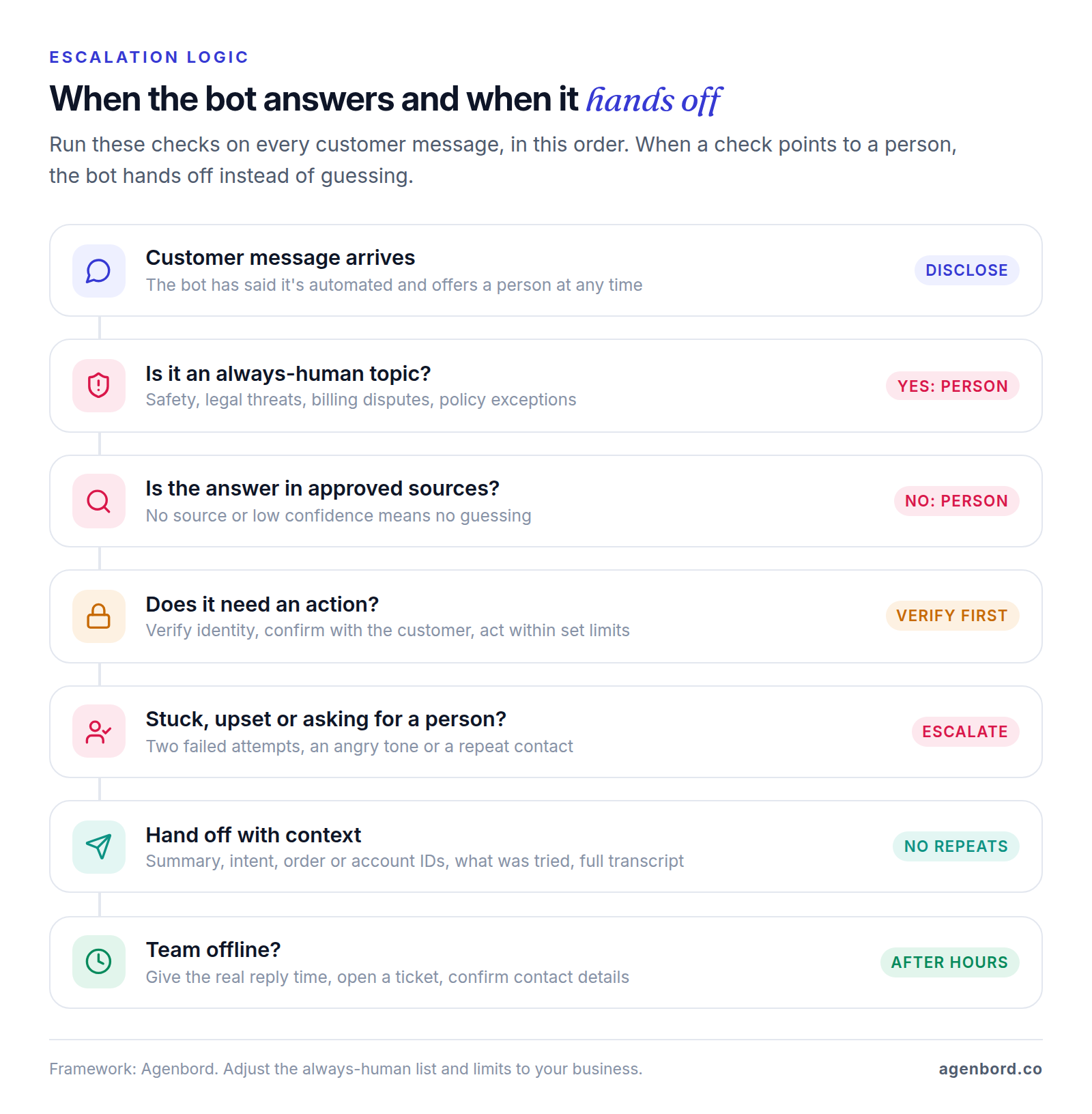
When to hand off
- The customer asks for a person, in any wording ("agent", "human", "call me").
- The topic is on your always-human list.
- The answer isn't in approved sources, or the bot's confidence is low.
- Two failed attempts, or frustration: angry language, all caps, a second contact about the same problem.
- The action is outside the bot's limits, such as a refund over your threshold.
What to pass along
The person who picks up should never ask a question the bot already asked. Send a short summary (what the customer wants, what's been tried, what's left), the intent and urgency for routing, who the customer is and whether they're verified, order or account numbers and attachments, what the bot told them with its sources, and the full transcript.
Bot and staff should share one inbox, so a person can watch the bot's conversations and step in. The WhatsApp-first billing platform our team built works this way: a shared team inbox with an AI assistant inside it.
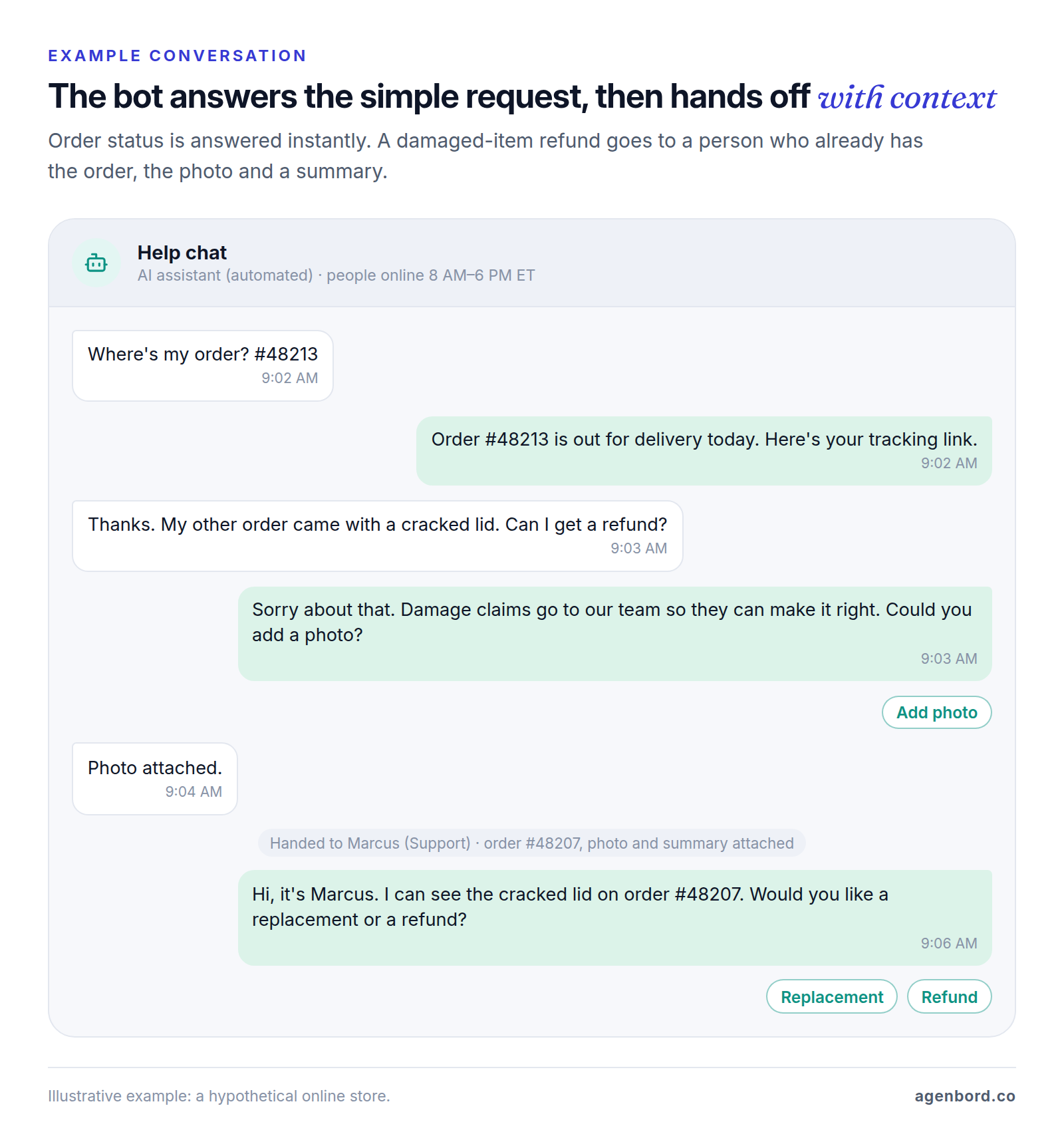
After hours
Tell the truth about availability ("Our team is back at 8 AM Eastern. I've opened a ticket and we'll reply by text.") and never imply someone is about to join. Give urgent problems a real path, such as an on-call number, collect the contact details you'll need, and queue whatever the bot can't resolve with the summary already written.
Prepare your knowledge base
An AI bot is only as accurate as the content it reads. Before choosing a tool:
- Pull your real questions. Export 60–90 days of tickets, chats and emails, tag each by reason and rank by volume.
- Give each top reason one current answer: the policy, steps, exceptions and the date it took effect.
- Remove contradictions such as old PDFs and expired promotions. If two documents disagree, the bot may quote either.
- Write down what you don't do (areas you don't serve, products you don't carry) so the bot can say no correctly.
- Keep internal notes out. Assume anything the bot can read, it can repeat to a customer.
- Give each article an owner and a review date, and update the bot the day a policy changes.
- Keep the questions. They become your test set.
Disclosure, tone and privacy basics
Say it's a bot
Label the assistant as automated, say so in the first message and answer honestly whenever someone asks. The FTC's business guidance puts it plainly: "people should know if they're communicating with a real person or a machine." Some rules make it concrete:
- California: Business and Professions Code §17941 makes it unlawful to use a bot with someone in California while intentionally misleading them about its artificial identity to drive a sale. A clear, conspicuous disclosure that it's a bot avoids liability under that section.
- Utah: businesses using generative AI with consumers must disclose it when a consumer clearly asks, and regulated occupations must disclose it up front in high-risk interactions (S.B. 226, 2025).
- Messenger and Instagram: Meta's policy says that where the law requires it, automated chats must disclose automation at the start of a conversation, after a long gap and when a chat moves from a person to automation.
This is general information, not legal advice; check the rules for your industry and states with counsel.
Tone
Lead with the short answer, ask one question at a time and use buttons for structured choices. Skip fake human touches like a human name or fake typing. "I don't know, let me get someone who does" beats a guess, and the bot shouldn't say a refund or booking is done until your system confirms it.
Privacy and security
- Collect the minimum and verify identity before sharing order or account details. Never take card numbers in chat; send a secure payment link.
- Mask sensitive data in transcripts, set a retention period, and ask vendors in writing whether your data trains their models and where it's stored.
- If the bot handles protected health information, HHS treats the vendor as a business associate, so you need a signed business associate agreement. Intercom, for one, lists HIPAA support on its Expert plan.
- If California's CCPA applies to you, transcripts tied to a customer are personal information they can ask to see or delete.
- Treat every message as untrusted input. Prompt injection, a customer typing instructions meant to override the bot's rules, is first on OWASP's Top 10 for LLM applications. Give the bot only the access it needs, and require confirmation or a person's approval for anything that moves money or changes an account.
Channels: website, SMS, WhatsApp, Messenger, Instagram and email
| Channel | Good for | Watch for |
|---|---|---|
| Website widget | Pre-sale questions, order help, logged-in customers | Only reaches site visitors; must work with a keyboard and screen reader |
| SMS | Reminders, order and job updates, quick replies | Plain text; business texting must be registered |
| Customers who already message you there | 24-hour reply window; no marketing messages to US numbers | |
| Messenger and Instagram DMs | Questions from posts and ads | 24-hour reply window; Meta's disclosure rule |
| Detailed issues, attachments, overnight backlog (most helpdesk AI agents answer email) | Answers must be complete; back-and-forth is slow |
Start with the channel that carries the most repetitive volume and add others once accuracy holds. The US specifics:
SMS. Carriers require businesses texting from standard 10-digit numbers to register their brand and use case with The Campaign Registry (10DLC registration). Under the FCC's consent rules, a reply of "stop," "quit," "end," "revoke," "opt out," "cancel" or "unsubscribe" is a valid opt-out you must honor within 10 business days. So a customer who texts "cancel" may be opting out, not canceling an appointment: use other wording for changes ("reply R to reschedule") and have counsel review your flows.
WhatsApp. About a third of US adults use it, including more than half of Hispanic adults, per Pew Research Center's 2025 survey, so add it when your customers already message you there. Since October 1, 2026, Meta bills your replies within 24 hours of the customer's last message per message, at its utility rate; messages you start need approved templates, also billed per message, and WhatsApp currently doesn't deliver marketing templates to US numbers. Since January 15, 2026, its business terms restrict general-purpose AI assistants; a bot serving your own customers isn't the target. Fees are covered in our WhatsApp Business API pricing guide, and approval, templates and opt-in rules in our WhatsApp Business API guide.
Messenger and Instagram. Meta gives businesses 24 hours to reply. A human-agent tag extends that (to seven days on Messenger), but only for replies a person writes, so plan after-hours handoffs around the window.
Customer service chatbot platforms and pricing (October 2026)
If you already use a helpdesk, price its built-in AI agent first: it inherits your tickets, routing and reports. List prices as of October 2026; seats are per agent per month, billed annually unless noted.
| Option | How the AI is billed | Plan you need | Worth knowing |
|---|---|---|---|
| Intercom Fin | $0.99 per outcome, such as a resolution or a completed handoff procedure; lead qualifications $9.99 | Intercom seats: Essential $29, Advanced $85, Expert $132 | Also runs on Zendesk, Salesforce, HubSpot and others: $0.99 per outcome, 50-outcome monthly minimum |
| Zendesk AI agents | 5 (Team) or 10 (Professional) resolutions per agent a month included; then $1.50 committed or $2.00 pay-as-you-go | Suite Team $55, Suite Professional $115 | Only LLM-verified resolutions count |
| HubSpot Customer Agent | $0.50 per resolution (50 HubSpot Credits) | Service Hub Professional $90 or Enterprise $150 | Professional includes 3,000 credits a month, shared with other HubSpot AI features |
| Freshdesk Freddy AI Agent | $49 per 100 sessions after 500 included once | Growth $19, Pro $55, Enterprise $89 | A session is every message within 24 hours, resolved or not |
| Tidio Lyro | From $39/month for 50 AI conversations, billed monthly ($32.50 annually) | Optional help desk from $29/month, billed monthly | Counts any conversation the AI replies to; also plugs into Zendesk or Salesforce |
| Custom build | Model usage, billed per use by the AI provider | One-time build; pilots from $4,000 | You own the code and the upkeep |
The billing unit matters as much as the price
Say your bot handles 1,000 conversations a month and fully resolves 600 (a hypothetical). AI fees alone, before seats, at list prices:
| Billing unit | Example | AI fees for the month |
|---|---|---|
| Per resolution | HubSpot at $0.50 | About $300, less included credits |
| Per outcome | Intercom Fin at $0.99 | About $594 |
| Per 24-hour session | Freshdesk at $49 per 100 | About $490, since all 1,000 count |
| Per automated resolution | Zendesk at $1.50–$2.00 | About $900–$1,200, less the included allowance |
Outcome and resolution pricing mostly charges when the bot does its job, but the definitions differ: Intercom counts a resolution when no further help is requested after Fin's last answer (and also bills completed handoff procedures), HubSpot when the conversation isn't handed to a person for 72 hours, Zendesk when an LLM verifies it. Per-session and per-conversation pricing (Freshdesk, Tidio's standard plans) charges for every conversation the bot touches. And seats can outweigh AI fees: HubSpot's low rate requires Professional or Enterprise seats.
Platform or custom build?
A platform AI agent is the right call when your answers live in help articles, you already run that helpdesk and volume is modest. It can be answering customers within days. A custom build is worth pricing when:
- The bot has to take actions inside your own systems (a custom CRM, scheduling or job-management tool), not just answer.
- WhatsApp or SMS is your main channel and the flows must follow your rules.
- You need tight control over what the bot says and does, where data goes and which model runs.
- Per-resolution fees at your volume add up to more than owning the bot.
Once a bot takes actions, it's effectively an AI agent, and the same rules apply: narrow permissions, limits in code and a measured pilot. Our guide to AI agents for business covers those controls.
Our AI chatbot development work starts with a pilot from $4,000 (2–4 weeks: one channel, one knowledge base, human handoff, an accuracy report). Production assistants with helpdesk or CRM integrations typically run $12,000–$35,000; assistants that take actions like bookings or refunds, with approvals and audit logs, start around $35,000. Running costs: model usage billed by the provider, hosting (roughly $50–$500 a month for a small-business app) and maintenance at about 15–20% of the build a year. The AI chatbot cost guide works through the subscription-versus-custom math, and the build-vs-buy framework covers the wider decision. For the build itself, step by step, see how to create an AI chatbot for your business.
Metrics to track and how to test before launch
Test before customers see it
- Build a test set of 50–200 real questions with correct answers, plus the awkward ones: policy edge cases, out-of-scope requests, angry messages, "are you a bot?", "let me talk to a person" and attempts to talk the bot into a discount.
- Score every answer as correct, partly correct, wrong or should-have-handed-off, against a pass bar you set beforehand.
- Fix failures at the source (the article, the integration, the escalation rule) and rerun the whole set after every change to content, instructions or model.
- Test handoffs end to end, in and after business hours, on every channel and on a phone.
What to measure after launch
| Metric | What it measures | Watch out for |
|---|---|---|
| Resolution rate | Conversations resolved with no person involved and no repeat contact | Vendor definitions differ; add your own repeat-contact check |
| Containment rate | Conversations that never reached a person | A customer who gives up counts as contained |
| Escalation rate | Conversations handed to a person | Separate planned handoffs from bot failures |
| CSAT | Post-chat satisfaction score | Compare bot-only, handed-off and human-only chats |
| First response time | Time to the first reply | The bot is instant; track time to a person after handoff |
| Wrong-answer rate | Reviewed answers that were wrong | Needs a weekly human review of sample transcripts |
When escalations cluster around one topic, that's your next content fix or your next automation.
How to set up a customer service chatbot
- Rank your real questions from 60–90 days of tickets, chats and emails.
- Pick 3–5 use cases for version one, and write the always-human list.
- Fix the content those use cases depend on.
- Choose a platform or a custom build based on your channels, systems and volume.
- Connect systems read-only first. Add refunds and changes later, with limits, confirmations and logs.
- Write the bot's instructions: scope, tone, the disclosure line, what it must never do and when to hand off.
- Build the handoff: routing, the context package, business hours and the after-hours message.
- Run your test set and fix failures at the source.
- Soft-launch on one channel or a slice of traffic, such as after-hours chats. Review transcripts daily for two weeks, then weekly.
Launch checklist
- The first message says it's automated and how to reach a person
- Asking for a person works at any point, in any wording
- Always-human topics go straight to the right queue
- Handoffs carry the summary, IDs, attachments and transcript
- After hours, the bot gives a real reply time and opens a ticket
- Identity is verified before order or account details are shared
- The bot never asks for card numbers or passwords
- Every action has limits, a confirmation step and an audit log
- The test set passes your accuracy bar; known gaps are documented
- SMS opt-out words are handled; WhatsApp templates are approved
- The widget works on a phone, with a keyboard and with a screen reader
- Someone owns content updates and the weekly transcript review
Sources
- Intercom - Pricing (accessed October 2026)
- Intercom - Intercom pricing explained: annual vs monthly seat prices (accessed October 2026)
- Fin - Pricing and outcome definitions (accessed October 2026)
- Fin - What is Fin for Zendesk? (accessed October 2026)
- Zendesk - Pricing (accessed October 2026)
- Zendesk - About automated resolution tiers (accessed October 2026)
- HubSpot - Service Hub pricing (accessed October 2026)
- HubSpot - Customer Agent (accessed October 2026)
- HubSpot - Product and Services Catalog: HubSpot Credits (accessed October 2026)
- Freshworks - Freshdesk pricing (accessed October 2026)
- Freshworks - Freddy AI Agent sessions FAQs (accessed October 2026)
- Tidio - Pricing (accessed October 2026)
- California Legislative Information - Business and Professions Code sections 17940-17943, Bots (accessed October 2026)
- Utah Legislature - S.B. 226 (2025), Artificial Intelligence Consumer Protection Amendments, enrolled (accessed October 2026)
- Federal Trade Commission - The Luring Test: AI and the engineering of consumer trust (May 2023)
- Civil Resolution Tribunal (British Columbia) - Moffatt v. Air Canada, 2024 BCCRT 149
- Meta for Developers - Messenger Platform and IG Messaging API policy (accessed October 2026)
- Meta for Developers - Messenger Platform: Send a message (accessed October 2026)
- Meta for Developers - Instagram Messaging overview (accessed October 2026)
- Meta for Developers - WhatsApp Business Platform pricing (accessed October 2026)
- Meta for Developers - WhatsApp per-user marketing template limits (US delivery note) (accessed October 2026)
- Meta for Developers - WhatsApp pricing policy for AI Providers (accessed October 2026)
- TechCrunch - WhatsApp changes its terms to bar general-purpose chatbots from its platform (October 2025)
- Pew Research Center - Social Media Fact Sheet, 2025 survey (accessed October 2026)
- The Campaign Registry - Introduction to 10DLC (accessed October 2026)
- eCFR - 47 CFR 64.1200, revocation of consent (accessed October 2026)
- HHS - Guidance on HIPAA and cloud computing (accessed October 2026)
- State of California Department of Justice - California Consumer Privacy Act (accessed October 2026)
- OWASP - LLM01:2025 Prompt Injection (accessed October 2026)
Prices, plans and regulations change. Figures were checked on October 1, 2026; follow the links for the latest. Nothing here is legal, tax or financial advice.
About the author
Founder, Agenbord
Muhammad Hamza is the founder of Agenbord, the Fort Lauderdale software company behind the construction ERP Smart Construction and a WhatsApp-first billing platform. He writes practical guides on buying, building and automating business software.