On this page
- Can you integrate a chatbot with WhatsApp?
- What a WhatsApp chatbot for business can do
- How a WhatsApp chatbot works
- WhatsApp chatbot for ecommerce: orders, products and carts
- WhatsApp chatbot builders compared (October 2026)
- Builder platform or custom WhatsApp chatbot?
- WhatsApp chatbot pricing: what you'll pay
- How to create a WhatsApp AI chatbot, step by step
A WhatsApp chatbot for business replies to the messages customers send your WhatsApp number. It can offer menus and buttons, collect details in a form, answer free-form questions from your own content with AI, look up an order or an open appointment slot, and pass the conversation to a person when it should. Most run on Meta's WhatsApp Business Platform (the Cloud API), through a builder platform or software you own.
So yes, you can integrate a chatbot with WhatsApp. The real choice is how. A builder such as WATI, respond.io or ManyChat gets you live in days for a monthly fee. A custom bot costs more up front, but it follows your rules, reaches your systems and keeps the data in your hands.
One constraint shapes every US design. A bot does nearly all its work replying inside the 24-hour window that opens when a customer writes, and as of October 2026 WhatsApp doesn't deliver marketing templates to US phone numbers. Answering questions, booking and order updates are what a WhatsApp bot does well here; promotional pushes such as cart reminders aren't.
Can you integrate a chatbot with WhatsApp?
Yes, though not inside the free WhatsApp Business app on its own. The app's built-in automation is a greeting message for new customers, an away message outside business hours and quick replies your staff send by shortcut. Anything that decides what to say runs on one of three routes:
- Meta Business Agent. Meta announced it in June 2026: an AI agent you set up in the WhatsApp Business app that answers questions about your business, recommends products from your catalog, books appointments and qualifies leads, and lets you decide when a person steps in. It's available to eligible businesses in select markets, so check whether your account has it. Since August 1, 2026, Meta has charged for its messages at $2.00 per million tokens, which Meta puts at about 4–5 cents for a typical message.
- A chatbot builder. WATI, respond.io, ManyChat, Landbot and similar platforms connect your number to the Cloud API through their own signup flow, then give you a visual flow editor, an AI agent and a team inbox in one subscription.
- A custom bot on the Cloud API. Your own code receives messages from Meta, decides what to send and calls your systems directly. You choose the AI model, own the logic and either build the inbox or connect one you already use.
Already using the Business app on your number? Meta's coexistence onboarding lets a provider connect that same number to the Cloud API, so the app and a bot can share it. The last six months of chats sync, some app features such as broadcast lists switch off, and throughput is fixed at 20 messages per second. Builders and custom bots both need the usual API setup: a Meta business portfolio, a registered number, an approved display name and approved templates. Our WhatsApp Business API guide walks through each approval.
What a WhatsApp chatbot for business can do
WhatsApp gives a bot four building blocks, and the best bots mix them.
Menu bots: buttons and lists
Reply buttons offer up to three choices of 20 characters each. List messages open a menu of up to 10 rows, each with a 24-character title and a 72-character description. A tap arrives as an exact value, so nothing gets misread. Menus suit routing ("Track an order", "Book a visit", "Talk to a person"), picking a time slot and confirming. They break down when customers type instead of tapping, or ask something that isn't on the menu.
WhatsApp Flows: forms inside the chat
Flows are multi-screen forms that open inside WhatsApp: choose a service and a date, enter an address, answer intake questions. Simple ones can be built from a template in WhatsApp Manager. Developers build richer ones in Flow Builder or through the API, with an optional endpoint that serves live data, such as open appointment slots, as the customer moves between screens. A Flow can open a conversation as part of a template or be sent during one. Use Flows when you need several fields at once and clean data at the end.
AI answers from your approved content
An AI bot reads a free-form question, searches content you've approved (FAQs, policies, product data) and writes its answer from what it found, a pattern called retrieval-augmented generation. It handles typos, follow-up questions and the long tail of questions no menu anticipates. It fails when the content is missing or out of date, and it shouldn't be trusted with anything that must be exact, like an order total or a refund amount.
Using AI to serve your own customers is allowed. What WhatsApp restricts, since January 15, 2026, is AI providers (makers of large language models, generative AI platforms and general-purpose assistants) offering general-purpose assistants on the platform, except where Meta is legally required to permit it.
Hybrids
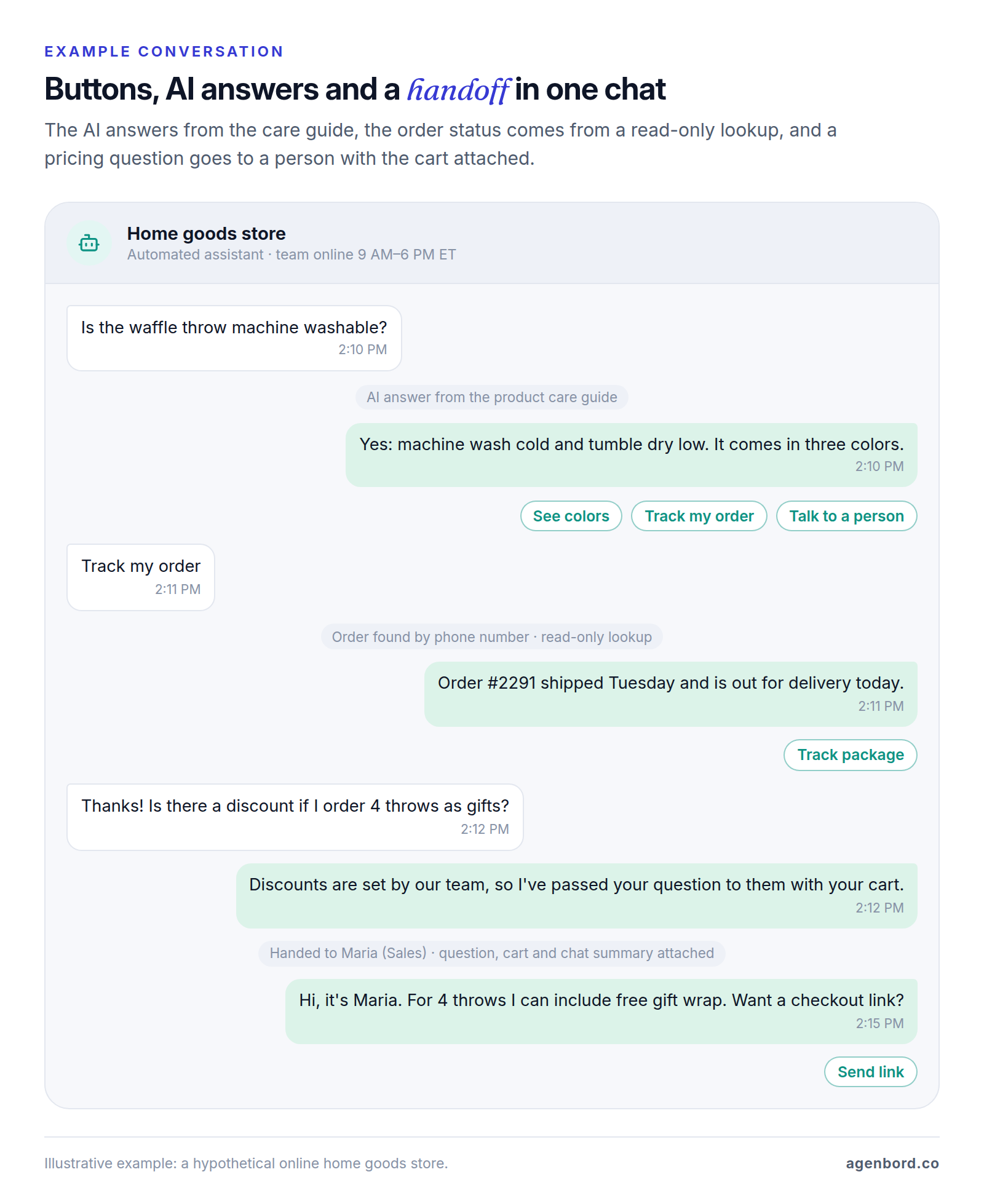
A hybrid uses AI to understand what the customer wants, buttons for choices, a Flow to collect details and code for anything that reads or changes a record. It's what most businesses should build, because each part covers another's weak spot, and "Talk to a person" can sit on every menu.
| Type | Best for | Watch out for | Effort |
|---|---|---|---|
| Menu bot | Routing, time slots, confirmations | Customers who type; anything off the menu | Low: any builder |
| WhatsApp Flows | Bookings, quotes, intake, sign-ups | Long forms; live data needs an endpoint | Low to medium |
| AI answers | Free-form product and policy questions | Thin or outdated content; AI usage fees | Medium: content and testing |
| Hybrid | Most businesses | More paths to test | Medium to high |
Whatever you build, WhatsApp's Business Messaging Policy lets you automate replies inside the 24-hour window, but you "must also have available prompt, clear, and direct escalation paths." Plan the handoff before the bot. Our customer service chatbot guide covers when to hand off and what to pass to the person who picks up.
How a WhatsApp chatbot works
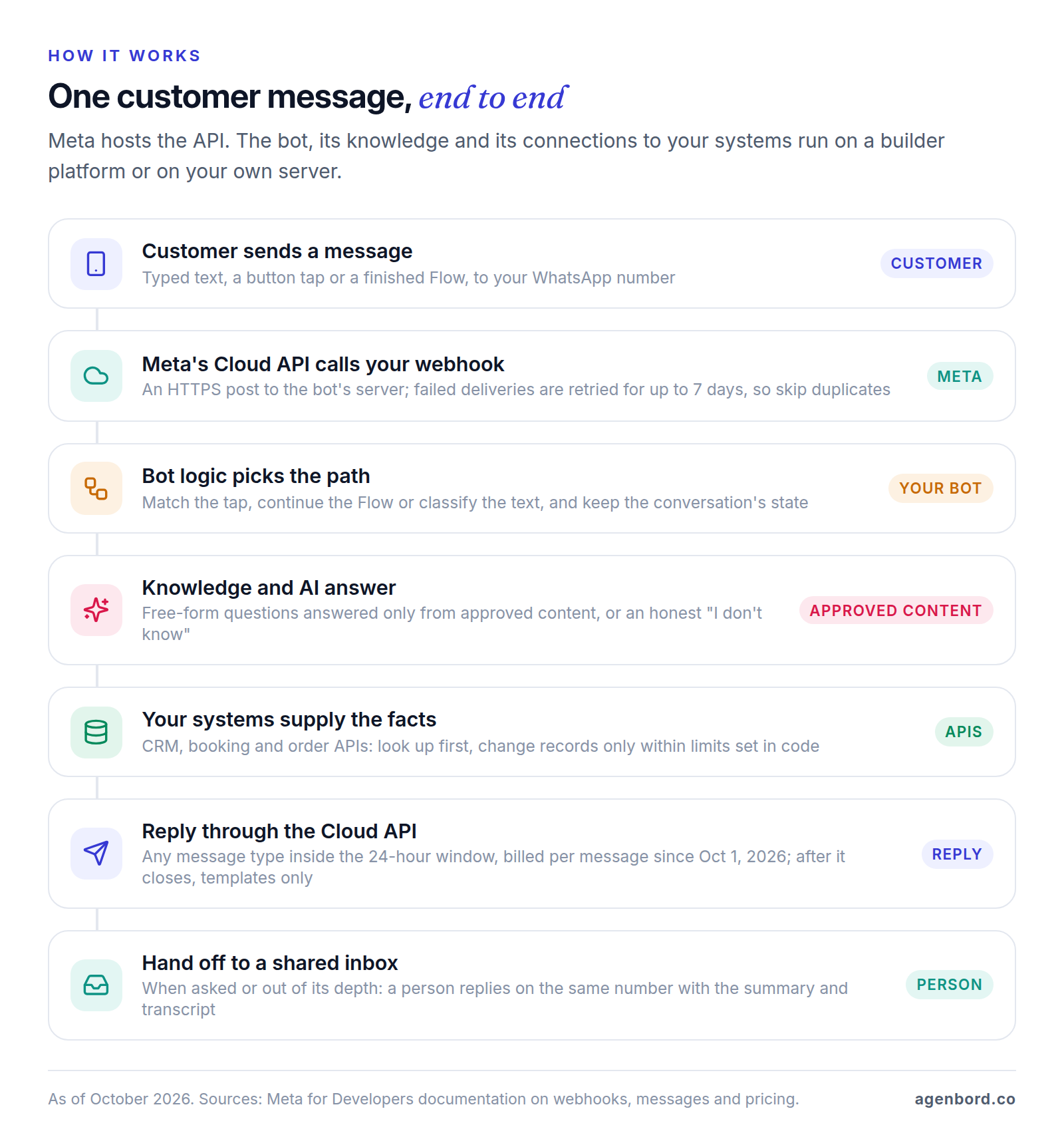
Meta hosts the Cloud API, which posts each incoming message, and the status of each message you send, to an HTTPS endpoint that you or your builder runs. Everything after that is the bot's job, and four details separate bots that hold up from bots that break:
- Duplicates. If the endpoint doesn't confirm receipt, Meta retries for up to seven days, so the bot has to skip message IDs it has already handled.
- State. The bot must remember where each customer is (halfway through a Flow, waiting on a lookup, with a person) so a typed reply doesn't restart the menu.
- Limits in code. The bot finds the customer by phone number in your CRM and reads orders or open slots through APIs. Anything that changes a record runs through rules and limits in code, never the model's judgment.
- A clean handoff. The conversation moves to a shared inbox with a summary and the transcript, and the bot stays quiet until the person hands it back.
Where the 24-hour window and templates come in
A bot sends two kinds of messages, under different rules:
- Replies. When a customer messages you, a 24-hour customer service window opens, and each new message from them resets it. Inside it, the bot can send any message type. Since October 1, 2026, Meta charges for each of these replies, whether a person or a third-party bot sends it, at the same rate as utility messages in the customer's market and with no volume discounts. They still don't count toward your messaging limit.
- Messages the bot starts. Outside the window, only approved templates go through, and Meta bills each one delivered, by category and the customer's country. Order confirmations and shipping updates are utility templates; anything promotional is marketing. A template can carry up to 10 buttons, so a reminder can restart the conversation with one tap.
Two things stay free: messages customers send you, and everything in the 72-hour window that opens after a Click-to-WhatsApp ad (more on that below). Meta's non-template pricing page dates the reply charges to October 1, 2026, though its main pricing page still called replies free that day.
Design the bot to finish its job while the window is open, and decide early which follow-ups deserve a template, including one your team can use to reopen a handoff they couldn't answer within 24 hours. Meta's rates and a budget example are in our WhatsApp Business API pricing guide, and the template-driven side (reminders, confirmations, payment updates) is in our WhatsApp automation guide.
WhatsApp chatbot for ecommerce: orders, products and carts
For an online store, a bot does three jobs. Two work well with US customers; the third mostly doesn't.
Order status. "Where's my order?" is the question to automate first. The bot matches the customer's phone number to an order, or asks for the order number plus an email or ZIP code, reads the status from your store or shipping system and replies with a tracking link. Updates you send unprompted (confirmed, shipped, out for delivery) are utility templates, billed per delivery. Since October 1, 2026, that includes utility templates sent in reply inside an open window, which used to be free.
Product questions. An AI bot answers sizing, care and compatibility questions from your product data, then shows the item. With a catalog connected to your WhatsApp Business Account, it can send one product or up to 30 in a single message, and shoppers can fill a cart in the chat and send it to you. Your system takes it from there, for example by replying with a checkout link.
Cart recovery. Meta's categorization guide files cart reminders under retargeting, which is marketing "even if requested by users." As of October 2026, WhatsApp doesn't deliver marketing templates to US numbers. A bot can still follow up with an ordinary message while the shopper's window is open, say, an hour after they asked about an item and went quiet. After that, recover US carts by email or SMS, with the consent those channels require. Customers with non-US numbers can receive marketing templates, within Meta's per-user limits.
One exception keeps a bot's replies free. When a shopper messages you from a Click-to-WhatsApp ad or a Facebook Page call-to-action button and you reply within 24 hours, Meta opens a 72-hour window in which every message is free, though once the 24-hour service window closes you can send only templates.
WhatsApp chatbot builders compared (October 2026)
A WhatsApp chatbot builder bundles the API connection, a visual flow editor, an AI agent and a team inbox into one subscription. The differences that matter are how each one bills and what it connects to. List prices are as of October 2026; Meta's per-message fees come on top everywhere.
| Platform | How it bills | List price | AI | Good fit |
|---|---|---|---|---|
| WATI | Plans with users included; messages on WATI's own rate card | Shown by region; extra users $24 (Pro) or $69 (Business) a month | Astra AI agents add-on; WhatsApp from $99/month | WhatsApp-centered teams: inbox, bots and broadcasts in one tool |
| respond.io | Plans, priced by the contacts you talk to | Starter $79, Growth $159, Advanced $279 a month | AI Agents on a monthly credit allowance | Teams on several channels that want AI to update the CRM |
| ManyChat | Active contacts per month | Pro $29/month billed annually for 2,500 contacts | Manychat AI from Pro | Instagram-first brands adding WhatsApp |
| Landbot | Chats per month, in euros | Professional WA €160/month billed annually: 2,500 chats, 1 number | 500 AI chats included, then €0.10 each | No-code lead capture into HubSpot, Salesforce, Pipedrive or Zoho |
| Botpress | Conversations, with AI usage included | Plus $150/month billed annually: 250 conversations, $25 of AI usage | AI-first agent builder | Custom AI logic without building an app |
| Twilio | Per message, inbound and outbound | $0.005 per message, plus Meta's fees | Bring your own model | Developers who want messaging APIs, SMS and voice in one place |
| Intercom Fin | Per outcome | $0.99 per outcome | Fin AI agent | Support teams already running a helpdesk |
- WATI includes a team inbox, a no-code chatbot builder, broadcasts and catalog messages on every plan; integrations rise by tier, from two on Growth to five including HubSpot on Pro and unlimited including Salesforce on Business. Watch for: Growth is capped at three users, plans include 1,000–5,000 free automation triggers a month, messages are billed on WATI's own rate card (compare it with Meta's), and Astra AI agents are a separate subscription that spends credits: one per simple text reply, three per rich reply. Plan prices display by region, so confirm the US price before signing up.
- respond.io is a team inbox for WhatsApp, TikTok, Instagram and Facebook. Its AI Agents answer from your knowledge sources, update CRM fields, assign or close chats, trigger workflows and escalate to a person, who can take over at any point, and it says it adds no markup to WhatsApp fees. Watch for: plans start at $79 a month, and AI usage beyond the monthly credit allowance is billed automatically in blocks.
- ManyChat is a low-cost way to run WhatsApp next to Instagram and Messenger DMs in one builder; Business is $69 a month billed annually for 7,500 contacts. Watch for: WhatsApp starts at Pro, features like comment replies and broadcasts lean toward marketing that US WhatsApp rules largely rule out, and its WhatsApp page still describes Meta's retired per-conversation pricing, so ask how messages are billed today.
- Landbot is a visual, no-code builder with three seats (extra seats €25 a month), integrations with HubSpot, Salesforce, Pipedrive, Zoho and Google Sheets, and webhooks and an API. Watch for: template messages cost Meta's fee plus €0.05 each, service messages above 10,000 carry a €0.003 Landbot fee, and extra numbers are €100 a month.
- Botpress suits teams that want custom AI logic, with code where needed, without building a whole app. Its WhatsApp integration uses your own WhatsApp Business Account, so you pay Meta directly. Watch for: extra conversations come in packs of 100 for $65, any exchange with at least two customer messages in a month counts as one, and Team is $750 a month billed annually for 1,500. Decide early where handed-off chats will land.
- Twilio is the developer's route: messaging APIs plus Studio, a low-code visual builder for messaging and voice flows, priced separately. Watch for: you build the bot logic, the AI and usually the inbox, and the $0.005 fee applies to every message on top of Meta's, including the customer's own messages, which Meta doesn't charge for, plus $0.001 for each message that fails.
- Intercom Fin and other helpdesk AI agents fit when WhatsApp is one support channel among several. Fin lists WhatsApp among its channels and has a 50-outcome monthly minimum on other companies' helpdesks. Watch for: per-outcome fees on top of helpdesk seats add up at high volume.
Compare at your own volume, not the sticker price, because the units differ. A 10-message conversation costs $0.05 in Twilio fees. On Landbot it's one of 2,500 included chats; on Botpress Plus it's one of 250 included conversations, with extras at $0.65 each; on ManyChat it counts once toward your monthly contacts, however many messages it takes. If you only need API access, our comparison of WhatsApp API providers covers going direct and the developer platforms.
Builder platform or custom WhatsApp chatbot?
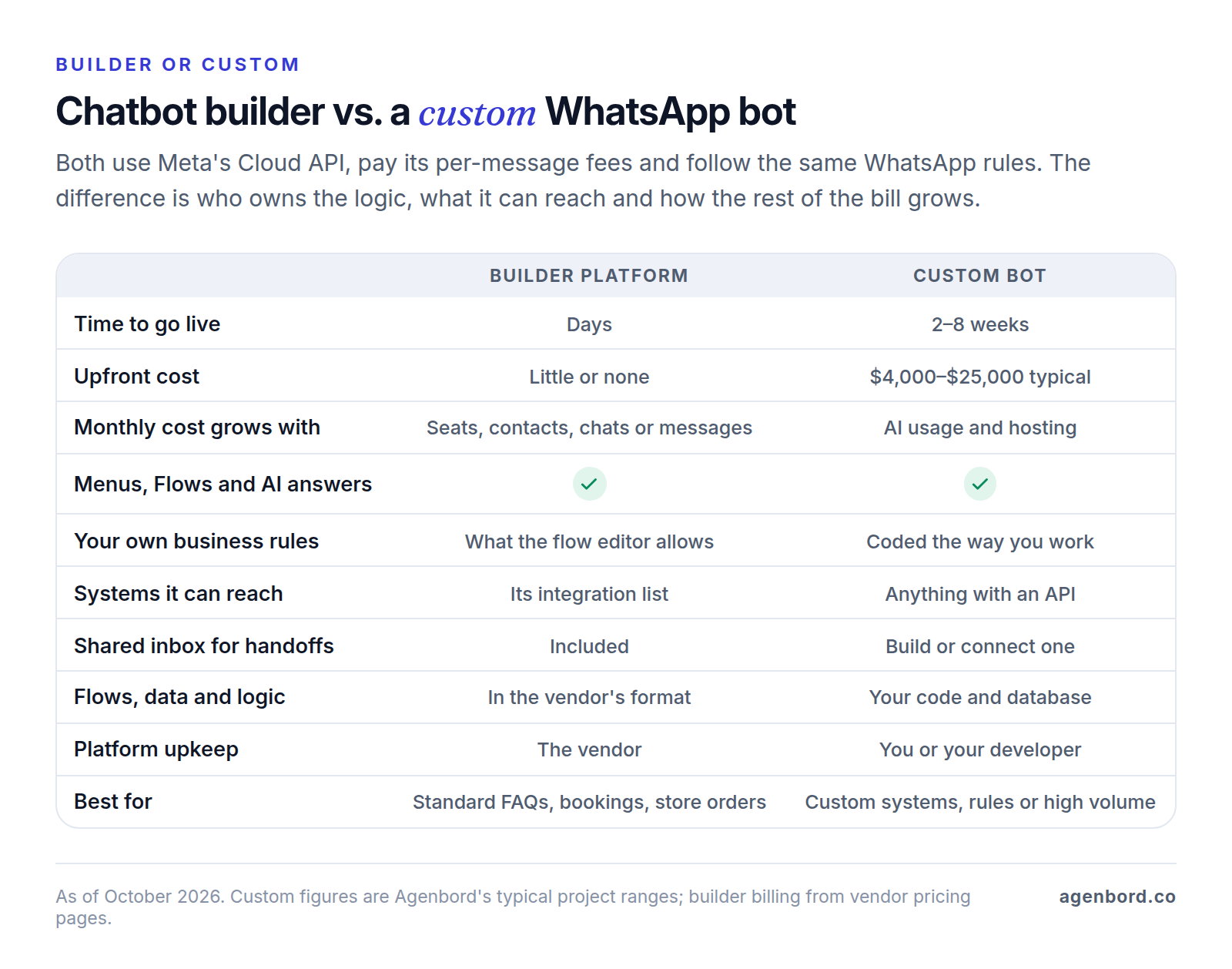
A builder is the better choice when your flows are standard (FAQs, menus, bookings through a calendar it supports, order status from a store it integrates with), your team is happy working in the vendor's inbox and volume is modest. You can be live in days and switch later. Keep the WhatsApp Business Account in your own Meta business portfolio, so the number and templates stay yours if you move.
A custom bot is worth pricing when:
- The bot must apply your rules: quotes from your own pricing logic, eligibility checks, approval limits or service areas that a flow editor can't express cleanly.
- It needs systems builders don't reach: a custom CRM, a scheduling or job-management tool, an ERP or your own database. Our CRM integration guide shows how WhatsApp messages land on contact records.
- You want to own the data and the logic: transcripts in your database, your choice of AI model and retention period, and no lock-in to one vendor's flow format.
- Volume makes metered pricing expensive: a builder's fees per contact, chat, conversation or message, on top of Meta's, that grow past the cost of owning the bot.
The WhatsApp-first billing and collections platform our team built sits at the custom end. It delivers automated monthly invoices on WhatsApp, reconciles digital payments into customer ledgers that update themselves and gives staff a shared WhatsApp inbox with an AI assistant: billing logic and ledgers that a flow builder isn't designed to hold. Our build-vs-buy framework covers the wider decision.
WhatsApp chatbot pricing: what you'll pay
A WhatsApp chatbot has three cost layers: the software (a builder subscription, or hosting for a custom bot), message fees and the work to set it up.
| Cost | How it's billed | Typical amount (October 2026) |
|---|---|---|
| Builder subscription | Monthly, by seats, contacts, chats or conversations | About $29–$279 a month for most plans above (Landbot's is €160), rising with seats, contacts and volume |
| AI usage | Credits or per-reply fees on builders; per use from the model provider on custom builds | Allowances, then metered, such as €0.10 per extra Landbot AI chat or $0.99 per Fin outcome |
| Meta message fees | Per delivered message, by category and the customer's country: templates and, since October 1, 2026, replies inside the 24-hour window | US utility and service messages from $0.0034 each, per Twilio's pricing page; free inside the 72-hour window after a Click-to-WhatsApp ad |
| Meta Business Agent, if you use Meta's own AI | Per token, since August 1, 2026 | $2.00 per million tokens, about 4–5 cents a typical message by Meta's estimate |
| Platform message fees | Some platforms add a fee per message | Twilio $0.005 per message; Landbot €0.05 per template; respond.io says none |
| Setup and build with us | One-time, fixed price | WhatsApp setup with a shared inbox from $2,500 (1–3 weeks); AI chatbot pilot from $4,000 (2–4 weeks); chatbot with CRM integration $8,000–$25,000 (4–8 weeks); custom WhatsApp product $25,000+ |
| Running a custom bot | Monthly | Hosting about $50–$500; maintenance about 15–20% of the build a year; AI usage billed by the provider |
What replies now cost, as a worked example: assume 1,000 customer-started conversations a month (none from ads), five bot or staff replies in each and $0.0034 per reply. Meta's fees come to 5,000 × $0.0034 = $17 a month, before any templates. The same 5,000 replies from Meta Business Agent at 4–5 cents each would be $200–$250, though that price includes the AI, which a builder or custom bot pays for separately. Every message now counts, so one answer with buttons attached beats three short bubbles.
At that volume, the bigger numbers are still the subscription, AI usage and the time it takes to keep flows and answers current. Our AI chatbot cost guide runs the subscription-versus-custom math.
We scope WhatsApp automation and AI chatbot development as fixed-price projects with a written scope and weekly demos, and you own the code.
How to create a WhatsApp AI chatbot, step by step
- Pick the jobs. Read a month or two of your WhatsApp chats and rank why people write. Choose three to five intents for version one, such as order status, booking and product questions, and list the topics that always go to a person.
- Match each intent to a building block: buttons or a list for choices, a Flow for forms, AI for free-form questions, an API call for anything that reads or changes a record.
- Write the approved answers. One current answer per question, with the policy, price or exception and the date it took effect, plus the product data the bot may quote and what you don't do. The AI answers only from this.
- Design the handoff. Put "Talk to a person" on every menu, catch "agent" or "human" in any message, route by topic, give the person a summary and be honest about reply times after hours. A reply that comes after the 24-hour window closes needs a template.
- Connect systems read-only first. Identify customers by phone number and read orders, availability and account status. Add bookings and changes once answers are reliable, with limits, a confirmation step and a log.
- Prepare the number. Verify the business, get the display name approved, record opt-in where customers give you their number, and submit templates for every message the bot will start.
- Test on real phones. Run 50–200 real questions, tap every button, type instead of tapping, ask for a person halfway through a Flow, let a conversation pass 24 hours and send "stop."
- Launch to a slice of traffic, such as after-hours chats or one ad campaign, and read transcripts daily for the first two weeks.
What to measure
| Metric | What it tells you |
|---|---|
| Resolution rate | Share of conversations finished without a person and without a repeat contact a few days later |
| Handoff rate and time to a person | Whether the bot escalates the right things, and whether your team answers before the window closes |
| Wrong answers | Errors found in a weekly review of sample transcripts; fix them in the content, not the prompt |
| Typed vs. tapped | Customers typing past your buttons means the menu doesn't match what they want |
| Flow completion | Where customers abandon a form, screen by screen |
| Business messages per conversation | Each one is billed since October 1, 2026; merge short replies and attach buttons to answers |
| Template quality and opt-outs | Rising opt-outs mean a message isn't wanted; Meta pauses templates that drop to low quality, and repeated low quality can affect your number |
| Cost per resolved conversation | Subscription, AI usage and Meta fees divided by conversations resolved |
Review these weekly for the first month. When the bot resolves the intents you picked and handoffs reach a person inside the window, add the next intent. When it doesn't, fix the answers or the menu before adding anything new.
Sources
- WhatsApp Business - Business app features (accessed October 2026)
- WhatsApp Business - Meta Business Agent (accessed October 2026)
- WhatsApp Business blog - Introducing Meta Business Agent, June 3, 2026 (accessed October 2026)
- Meta for Developers - Onboard WhatsApp Business app users (coexistence) (accessed October 2026)
- Meta for Developers - Interactive reply buttons messages (accessed October 2026)
- Meta for Developers - Interactive list messages (accessed October 2026)
- WhatsApp Business - WhatsApp Flows (accessed October 2026)
- Meta for Developers - WhatsApp Flows overview (accessed October 2026)
- Meta for Developers - Sending a Flow (accessed October 2026)
- Meta for Developers - Implementing your Flow endpoint (accessed October 2026)
- Meta for Developers - Pricing policy for AI Providers (accessed October 2026)
- WhatsApp - Business Messaging Policy, updated September 23, 2026 (accessed October 2026)
- Meta for Developers - Webhooks overview (accessed October 2026)
- Meta for Developers - Send messages and the customer service window (accessed October 2026)
- Meta for Developers - Messaging limits (accessed October 2026)
- Meta for Developers - Pricing for non-template messages: service, utility and Meta Business Agent charges (accessed October 2026)
- Meta for Developers - WhatsApp Business Platform pricing (accessed October 2026)
- Meta for Developers - Template categorization (accessed October 2026)
- Meta for Developers - Template components and buttons (accessed October 2026)
- Meta for Developers - Template pausing (accessed October 2026)
- Meta for Developers - Per-user marketing template limits and US phone numbers (accessed October 2026)
- Meta for Developers - Sell products and services with catalogs (accessed October 2026)
- WATI - Pricing (accessed October 2026)
- WATI - Astra AI agent pricing (accessed October 2026)
- respond.io - Pricing (accessed October 2026)
- respond.io - WhatsApp API: fees and features (accessed October 2026)
- respond.io - AI Agents (accessed October 2026)
- Manychat - Pricing (accessed October 2026)
- Manychat - WhatsApp automation (accessed October 2026)
- Landbot - Pricing (accessed October 2026)
- Botpress - Pricing (accessed October 2026)
- Botpress - WhatsApp integration (accessed October 2026)
- Twilio - WhatsApp pricing (accessed October 2026)
- Twilio Docs - Studio (accessed October 2026)
- Fin - Pricing (accessed October 2026)
Prices, plans and regulations change. Figures were checked on October 2, 2026; follow the links for the latest. Nothing here is legal, tax or financial advice.
About the author
Founder, Agenbord
Muhammad Hamza is the founder of Agenbord, the Fort Lauderdale software company behind the construction ERP Smart Construction and a WhatsApp-first billing platform. He writes practical guides on buying, building and automating business software.