On this page
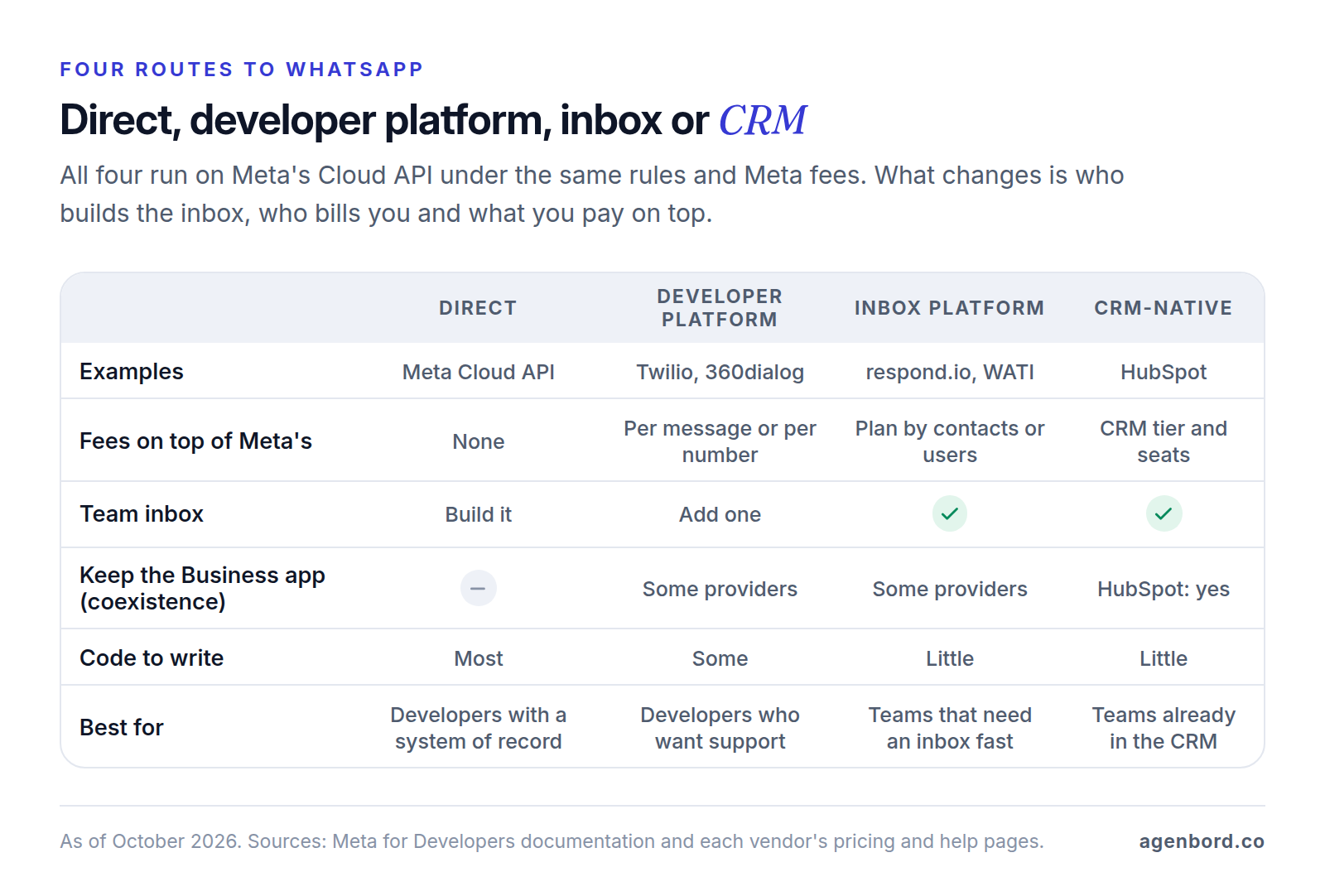
There's no single best WhatsApp Business API provider, because providers sell different layers. Developer platforms such as Twilio and 360dialog sell API access. Inbox platforms such as respond.io and WATI sell a shared inbox with automation. HubSpot sells WhatsApp inside its CRM. Every one of them runs on Meta's Cloud API, under Meta's rules and Meta's message fees, and you can skip them all and connect to Meta directly.
So the useful question is which layer you're missing. If you have developers and a system where conversations belong, going direct costs only Meta's fees. If your team needs an inbox next week, buy one. If you want API access with onboarding and support, a developer platform charges per message or per number for it.
One change affects every option: since October 1, 2026, Meta charges for replies inside the 24-hour customer service window, not just for templates. To a US number, a reply now costs $0.0034, the same as a utility template. We checked Meta's documentation and every vendor's site in October 2026.
Going direct vs. using a BSP: what changes and what doesn't
A Business Solution Provider (BSP) is a company Meta has approved to onboard other businesses onto the WhatsApp Business Platform and serve them. Our WhatsApp Business API guide covers what the API is and how approval works; this section is about what changes when a provider sits between you and Meta.
What stays the same with every provider
- Meta's message fees. Meta bills per delivered message by category and the customer's country, from the same rate cards whichever provider you use. From October 1, 2026, that includes service replies, priced the same as utility and authentication messages in each market and with no volume discount. Meta's main pricing page still described the old free-reply rule on October 1.
- The rules. The same messaging policy, template review and quality ratings apply. No provider can pre-approve a template.
- Messaging limits. Meta sets them per business portfolio and shares them across all your numbers, whichever provider you use.
- The US marketing pause. WhatsApp doesn't deliver marketing templates to US numbers, and Meta gives no end date.
What a provider adds
- Onboarding: a guided signup flow (Meta's Embedded Signup) instead of building a Meta app, tokens and webhooks yourself.
- Coexistence: keeping the WhatsApp Business app on a number while software uses the API. Meta offers it only through Solution Partners and Tech Providers.
- Support: Meta's Direct Support tickets, with a first response within 24 hours on business days, are for partners and other enterprise developers, and a Solution Partner's clients go to the partner. Going direct, you use Meta's developer support and community forum.
- Software: an inbox, a bot builder, analytics or SMS fallback, depending on the provider.
- Billing: one invoice and, from a Solution Partner, a line of credit.
Solution Partner vs. Tech Provider: who bills you
Meta's two main partner types show up differently on your invoices:
| Direct with Meta | Solution Partner | Tech Provider | |
|---|---|---|---|
| Who bills Meta's message fees | Meta, to your payment method | The partner, on its own invoice and credit line | Meta, to the payment method you add after onboarding |
| The provider's own fees | None | On the same invoice | Billed separately by the provider |
| Meta Business Partner status | Not applicable | Required | Not required |
Meta also lets a Tech Provider team up with a Solution Partner (a multi-partner solution), so you can use one company's software and another's credit line. Because a Solution Partner invoices Meta's fees, ask whether it passes them through at cost or bills its own rate card.
How to choose a WhatsApp Business API provider
Eight criteria, roughly in the order they decide the choice.
1. Pricing model and markup
Providers charge in four ways, and the cheapest depends on your traffic:
- Per message: Twilio adds $0.005 to every message, inbound and outbound. Vonage's platform fee starts at $0.00016 and varies by volume and region.
- Per number: 360dialog charges $59 (€49) a month per number on its Regular plan and passes Meta's fees through.
- Per contact, user or conversation: inbox platforms price by the contacts you talk to (respond.io), plan and user (WATI) or users plus conversations (Trengo).
- Per CRM tier and seat: HubSpot includes WhatsApp in its Professional and Enterprise tiers.
Then read the fine print: charges on inbound or failed messages (Twilio bills $0.001 for a message that fails), whether Meta's fees are passed through at cost or resold at the provider's own rates, monthly minimums or annual commitments, and caps such as HubSpot's 1,000 template messages a month.
2. Inbox and automation
Developer platforms are mostly APIs: your team still needs an inbox, built or bought. Inbox platforms include assignment, saved replies, bot builders and broadcasts, and CRM-native options put each conversation on the contact record. Our WhatsApp automation guide covers which automations to build first. If you plan a chatbot, make sure it hands off to a person in any wording, and budget for its replies: from October 2026, Meta bills a bot's reply like any other service message. Our WhatsApp chatbot guide compares bot builders, and our customer service chatbot guide covers handoff design and testing.
3. API quality and docs
If developers will touch it, read the API docs before the sales deck. Twilio sends WhatsApp through the same Programmable Messaging API it uses for SMS (addresses get a whatsapp: prefix), which helps if you already text customers through Twilio. Vonage offers a Messages API sandbox and SMS failover. Ask whether a provider passes Meta's Cloud API format through or wraps it in its own: that decides how much code changes if you switch, including to going direct. Check delivery status callbacks, webhook retries, template management through the API and a test environment.
4. Coexistence with the WhatsApp Business app
Coexistence lets you keep answering in the WhatsApp Business app on the same number while software sends through the API, with up to 180 days of chat history synced. 360dialog, respond.io (with some country limits), WATI (enabled through its support team) and HubSpot document it. Twilio's self sign-up guide has you delete the number's existing WhatsApp account first, so confirm support before choosing it if you want to keep the app. The trade-offs: throughput is fixed at 20 messages a second, disappearing messages, view once and live location switch off, and broadcast lists become read-only.
5. Number migration
Meta lets you move a number between WhatsApp Business Accounts without interrupting messages, keeping its display name, quality rating, messaging limit and approved templates. What decides whether you can do that easily is set up on day one; the lock-in section below covers it.
6. Support and SLAs
Get support hours, channels and first-response times in writing, by severity. 360dialog publishes its targets: 24/7 human support with a first response under 4 hours on Regular and under 30 minutes on Premium, plus an escalation path to Meta. If an outage would stop your business, ask for an uptime commitment in the contract, not just a status page.
7. Security and compliance
Ask for evidence, not badges: a SOC 2 Type II report under NDA or an ISO 27001 certificate. HubSpot offers a confidential SOC 2 Type 2 report and a public SOC 3 report, and respond.io says it's ISO 27001 certified. For health data, read the product list behind any Business Associate Agreement (BAA). Twilio signs BAAs with Security and Enterprise Edition customers, but its HIPAA-eligible services list, dated June 30, 2026, names Programmable SMS and MMS but not WhatsApp. This is general information, not legal advice: if messages could carry protected health information, get written confirmation from every vendor in the chain.
8. Data retention and export
Your conversation history lives in whichever software received the messages, so ask how long messages and media are kept, whether you can shorten that, and how you export conversations, contacts, opt-in records and templates. HubSpot's standard WhatsApp connection doesn't import past conversations, while its coexistence connection brings in the last 180 days.
WhatsApp Business API providers compared (October 2026)
List prices from each vendor's site in October 2026, before Meta's message fees unless noted. The grouping is ours; several providers sell more than one layer.
| Provider | Type | How it charges | Good fit for |
|---|---|---|---|
| Meta Cloud API | Direct | No provider fee; Meta bills you | Teams with developers and a system of record |
| Twilio | Developer platform | $0.005 per message in or out | Teams already sending SMS through Twilio |
| Vonage | Developer platform | Platform fee from $0.00016 per message | Multichannel apps with SMS failover |
| Infobip | Developer platform | Quote-based | Multichannel programs that want one vendor |
| Sinch | Developer platform | Quote-based | WhatsApp with SMS fallback at scale |
| 360dialog | Developer platform | $59 (€49) per number a month | Flat, predictable API access |
| respond.io | Inbox platform | From $79 a month; no markup on Meta's fees | An inbox with AI agents and routing |
| WATI | Inbox platform | Plan plus messages at WATI's rates | Small teams wanting a simple inbox and bots |
| Trengo | Inbox platform | From €299 a month, billed annually | Email, chat and WhatsApp in one inbox |
| HubSpot | CRM-native | Marketing Hub or Service Hub Professional | Teams already on HubSpot Professional |
Developer platforms
Twilio
- Price: $0.005 per WhatsApp message, inbound or outbound, plus Meta's fees passed through, and $0.001 for a message that ends in a failed status. Twilio's fee applies even when Meta's is zero.
- Strengths: one API for SMS and WhatsApp; self sign-up creates the WhatsApp Business Account in a Meta business portfolio you choose; documented migration from other providers that keeps your display name, limits and templates.
- Watch: fees on inbound messages add up in busy inboxes, there's no inbox included, and WhatsApp isn't on its HIPAA-eligible list.
Vonage
- Price: a platform fee from €0.0001 ($0.00016) per message that drops with volume to each region, plus Meta's fees. The platform fee applies to messages Meta doesn't charge for. Exact rates come from sales.
- Strengths: the Messages API covers WhatsApp, SMS and other channels, with SMS failover and a sandbox.
- Watch: you need a quote to know your real rate.
Infobip
- Price: quote-based; its pricing page has a calculator and offers custom plans through sales.
- Strengths: describes itself as a Premier Meta Partner, with WhatsApp Flows, calling, payments and product catalogs alongside its other channels.
- Watch: that pricing page still mentions 1,000 free service conversations a month, a rule from Meta's old pricing model, so get current terms in writing.
Sinch
- Price: quote-based. Sinch prices per message by who starts the conversation, the template category and the market.
- Strengths: describes itself as a Meta Premier Partner, with WhatsApp and SMS fallback in one platform.
- Watch: no published WhatsApp rates.
360dialog
- Price: Regular is $59 (€49) per number a month and Premium $119 (€99), with Meta's fees billed at Meta's rate cards.
- Strengths: a flat fee whatever your volume, published support targets, coexistence onboarding, and documented migration both in and out.
- Watch: Regular has no inbox of its own; Premium lists inbox and automation add-ons, or you connect a third-party inbox. The fee is per number, so five numbers cost five times as much.
Inbox and automation platforms
respond.io
- Price: Starter $79 a month, Growth $159 and Advanced $279, with Enterprise quote-based, priced on the contacts you talk to. It says it adds no markup to Meta's fees. 7-day trial.
- Strengths: a team inbox across WhatsApp, Instagram, Facebook, TikTok, email and calls, with AI agents, routing and broadcasts; coexistence with some country limits; ISO 27001 certified; badged Meta Business Partner.
- Watch: check how many monthly contacts each plan covers before you compare prices.
WATI
- Price: Growth, Pro and Business plans. Pro and Business include 5 users, with extra users at $24 and $69 a month. Messages are paid from a prepaid wallet at WATI's own rate cards, one for Growth and Pro and another for Business. Plan prices load by region on its site, so confirm the US figure there. 7-day trial, no setup fee.
- Strengths: team inbox, no-code chatbots and campaigns on every plan; coexistence, switched on by its support team; describes itself as an official Meta Business Partner.
- Watch: compare its message rates with Meta's. Broadcast features matter less in the US, where marketing templates aren't delivered.
Trengo
- Price: Boost is €299 a month billed annually (€349 monthly) with 10 users and 500 conversations a month; Pro is €499 (€599 monthly) with 20 users and 1,500. A conversation is any exchange within a 7-day window. Prices are listed in euros.
- Strengths: one inbox for email, WhatsApp, Instagram and Facebook, with an AI agent.
- Watch: its pricing page lists WhatsApp service conversations as free, so ask how Meta's per-reply charge from October 2026 is billed.
CRM-native: HubSpot
HubSpot
- Price: WhatsApp needs Marketing Hub or Service Hub Professional or Enterprise. Service Hub Professional is $90 per seat a month billed annually ($100 monthly) plus a $1,500 onboarding fee; Marketing Hub Professional starts at $800 a month with 3 seats and a $3,000 onboarding fee.
- Strengths: conversations land on the contact record next to deals and tickets, and coexistence is supported, importing 180 days of history.
- Watch: a cap of 1,000 template messages a month, shared by all connected WhatsApp accounts. Reminders and notifications at volume need another route.
If your CRM or help desk offers its own WhatsApp channel, ask it the same questions about template caps, Meta's fees and who owns the account.
What one month costs: a worked example
Unit prices only mean something against real traffic, so here's a hypothetical month for a US home-services company with one WhatsApp number:
- 2,000 appointment reminders, sent as utility templates outside any open window
- 8,000 messages from customers
- 8,000 replies from the team, inside open service windows
- No ad-driven conversations, no failed messages, Meta's US list rates as of October 2026
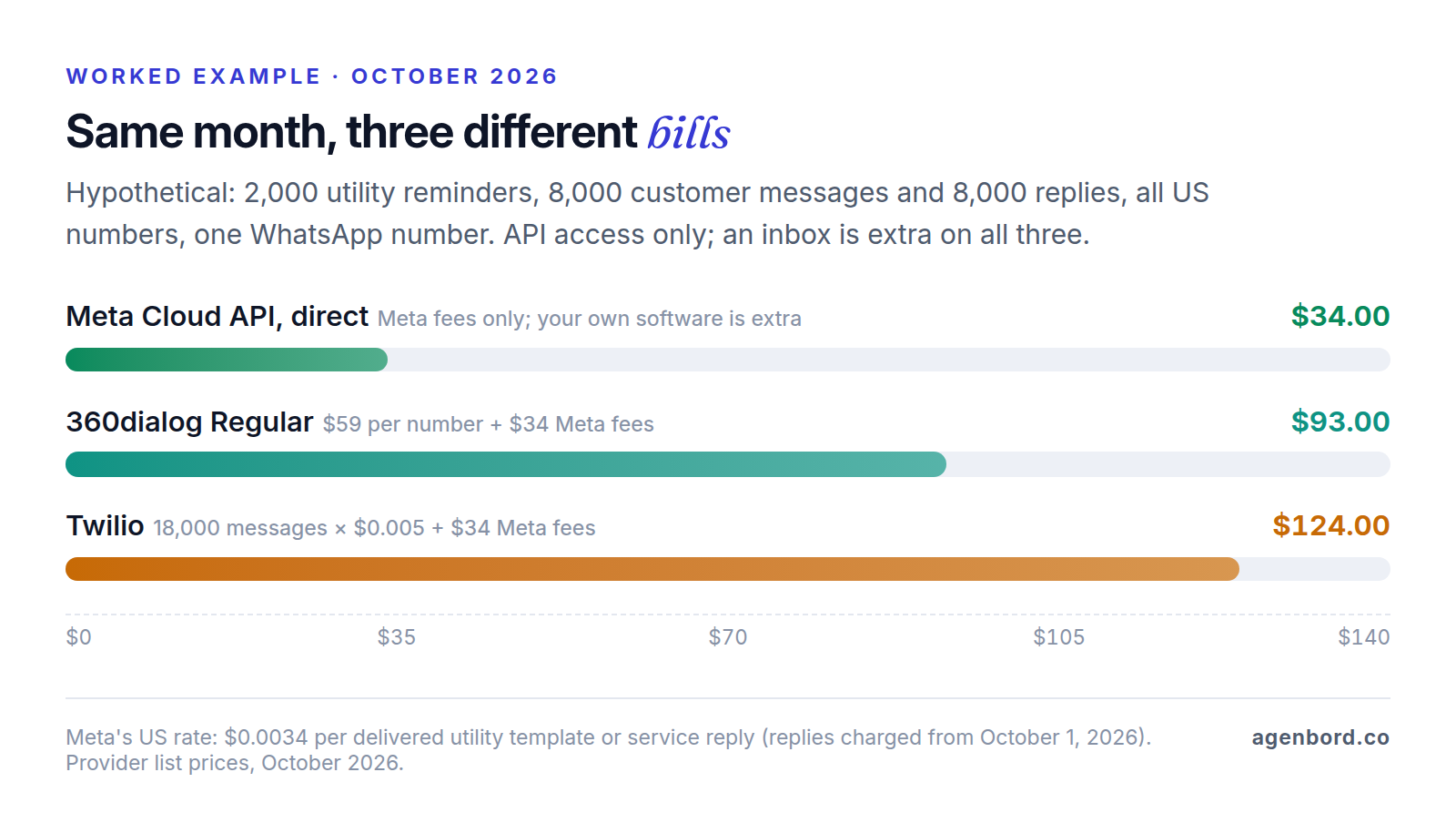
Meta's fees are the same on every route: 2,000 reminders × $0.0034 = $6.80, plus 8,000 replies × $0.0034 = $27.20, for $34.00. Messages from customers cost nothing from Meta. The $0.0034 is Meta's US utility rate since its January 1, 2026 update, as shown on Twilio's pricing page, which passes Meta's fees through; replies take the same rate from October 1.
| Option | Provider fees | Meta fees | Monthly total | Still needed |
|---|---|---|---|---|
| Meta Cloud API, direct | $0 | $34.00 | $34.00 | Your own inbox or integration, and its hosting |
| 360dialog Regular | $59 for one number | $34.00 | $93.00 | An inbox: Premium add-on or third-party |
| Twilio | 18,000 messages × $0.005 = $90.00 | $34.00 | $124.00 | An inbox |
| HubSpot Service Hub Professional | $90 per seat | n/a | Doesn't fit | 2,000 reminders exceed the 1,000-template monthly cap |
What the example shows:
- Replies now drive Meta's bill. Under the rules before October 1, 2026, Meta's share of this month would have been $6.80. Replies are now 80% of it.
- Per message vs. per number. Twilio's fee costs less than 360dialog's $59 below 11,800 messages a month, counting both directions, and more above it. 360dialog's fee multiplies with each number, while Twilio's per-message fee doesn't depend on how many numbers you run.
- The inbox is usually the bigger cost. The first three rows buy API access only. An inbox platform adds its subscription (respond.io from $79 a month, depending on contacts), and building your own adds hosting, typically $50–$500 a month for a small-business app.
- Ads change the math. Conversations that start from a Click-to-WhatsApp ad or a Facebook Page button get 72 hours of free messages from Meta, though per-message provider fees still apply.
Our WhatsApp Business API pricing guide explains Meta's categories and volume tiers for budgeting.
When a custom Cloud API integration makes sense
Going direct means your own software talks to Meta's Cloud API: no provider fee, and messages stored where you decide. It's worth the build when two or more of these are true:
- Conversations belong in a system you already run, such as your CRM, scheduling or billing software, and a separate inbox would mean copying data between them. Our CRM integration guide shows how that sync works.
- Volume is high, across several numbers or a large team, so per-message, per-number or per-seat fees add up every month.
- You need control of the data: where messages are stored, for how long, and who can see them.
- WhatsApp is part of the product, not a side channel.
The trade-offs: no coexistence without a partner, Meta's developer support instead of a provider's, and someone on your side owns templates, webhooks and monitoring.
The WhatsApp-first billing platform our team built is the last case: it sends monthly invoices on WhatsApp, reconciles payments into customer ledgers that update themselves, and runs a shared team inbox with an AI assistant.
Typical ranges for our WhatsApp automation work: a setup with a shared inbox from $2,500 (1–3 weeks), a chatbot with CRM integration for $8,000–$25,000, and custom WhatsApp products from $25,000. AI chatbot pilots start from $4,000. Add hosting of about $50–$500 a month and maintenance of about 15–20% of the build cost a year. We price each as a fixed-price project with a written scope, and you own the code. If a provider's inbox already does the job, it's usually the cheaper choice; our build-vs-buy framework helps you decide.
How to avoid lock-in
WhatsApp lock-in comes from who controls the account, not from the phone number. Set these up on day one:
- Own the WhatsApp Business Account. Create it in your own business portfolio during signup. Meta says businesses onboarded through Embedded Signup own all their WhatsApp assets and keep full access to WhatsApp Manager, which the partner can't restrict.
- Keep control of two-step verification. A number can't move while its two-step verification PIN is on. If you own the account, you turn it off in WhatsApp Manager; otherwise you have to ask your Solution Partner.
- Know what migration keeps. Meta's number migration keeps the display name, quality rating, messaging limit, Official Business Account status and approved high-quality templates, with no break in messaging. Copied templates show an unknown quality rating for their first 24 hours. Your business must be verified, and the account approved with a payment method.
- Export before you leave. Conversation history isn't on Meta's list of what moves; it stays in the old provider's software. Export conversations, contacts and opt-in records first.
- Read the exit steps. 360dialog publishes its own: settle open invoices, turn off two-step verification, start the move with the new provider, cancel the number's subscription, then request a refund of unused funds.
- Keep business logic in your own systems where you can, so switching providers means changing one integration, not rebuilding every workflow.
Questions to ask before you sign
Put these ten to every provider on your shortlist, and get the answers in writing:
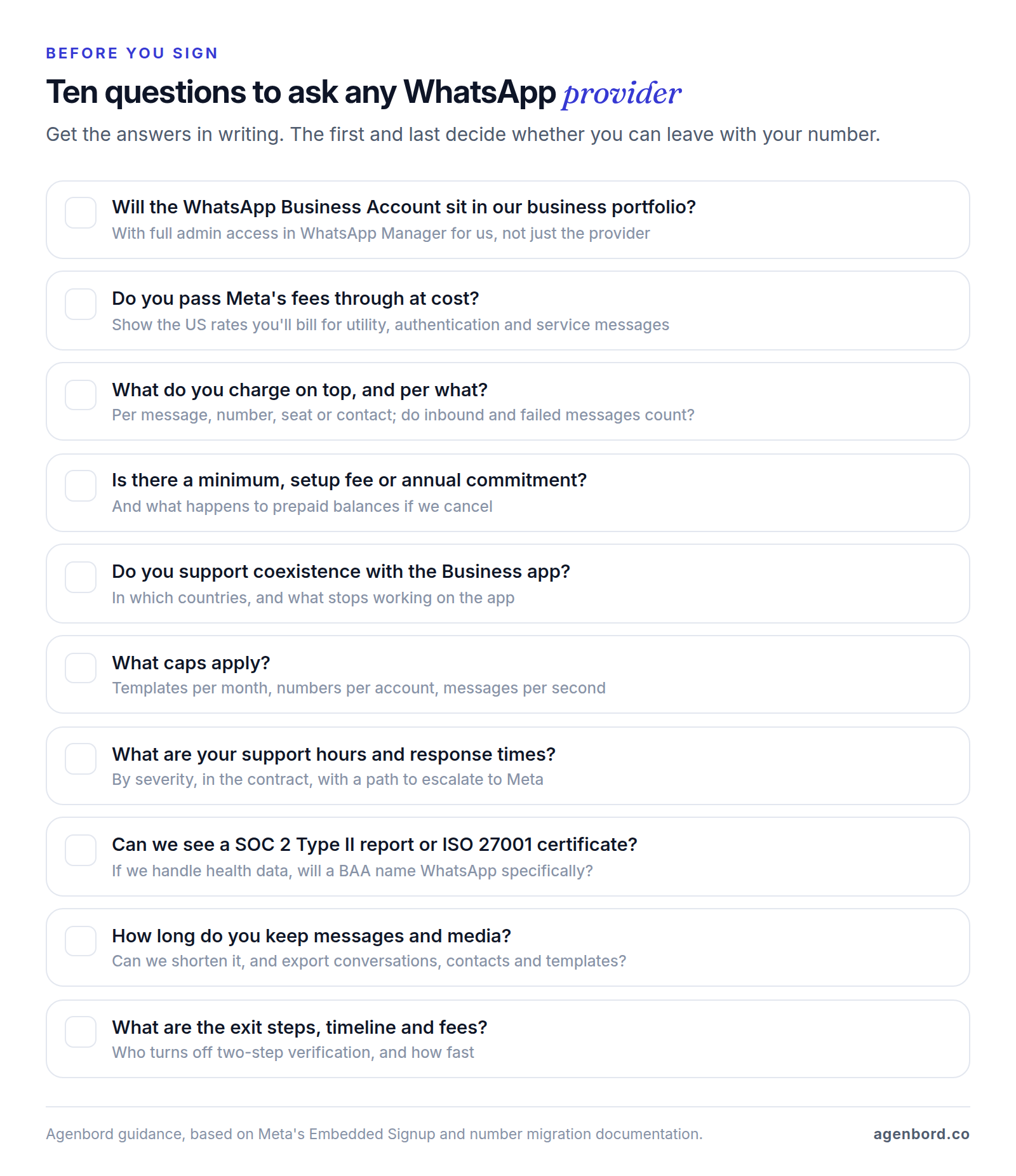
Three answers should end the conversation: the WhatsApp Business Account would sit in the provider's business portfolio instead of yours, the provider won't put its US per-message rates from October 2026 in writing, or leaving depends on the provider releasing your number with no stated timeline. Everything else is a trade-off between price, features and support that the comparison above helps you weigh.
Sources
- Meta for Developers - Solution Providers overview: Solution Partners, Tech Providers and billing (accessed October 2026)
- Meta for Developers - Pricing for non-template messages: service and in-window utility charges from October 1, 2026 (accessed October 2026)
- Meta for Developers - WhatsApp Business Platform pricing: rate cards, volume tiers, North America rate update (accessed October 2026)
- WhatsApp Business - Platform pricing (accessed October 2026)
- Meta for Developers - Embedded Signup overview: asset ownership and payment (accessed October 2026)
- Meta for Developers - Onboard WhatsApp Business app users (coexistence) (accessed October 2026)
- Meta for Developers - Migrating business phone numbers between WhatsApp Business Accounts (accessed October 2026)
- Meta for Developers - WhatsApp Business Platform support channels (accessed October 2026)
- Meta for Developers - Messaging limits (accessed October 2026)
- Meta for Developers - Per-user marketing template limits and US phone numbers (accessed October 2026)
- Meta for Developers - Throughput (accessed October 2026)
- WhatsApp Business - Partners (accessed October 2026)
- Twilio - WhatsApp pricing, including Meta's US fees passed through (pricing current as of September 2026; accessed October 2026)
- Twilio Docs - WhatsApp overview (accessed October 2026)
- Twilio Docs - WhatsApp Self Sign-up (accessed October 2026)
- Twilio Docs - Migrate phone numbers and WhatsApp senders (accessed October 2026)
- Twilio Docs - WhatsApp API with Programmable Messaging (accessed October 2026)
- Twilio - HIPAA and Business Associate Addendum (accessed October 2026)
- Twilio - HIPAA Eligible Products and Services, June 30, 2026 (accessed October 2026)
- Vonage - WhatsApp pricing (accessed October 2026)
- Vonage - WhatsApp Business API features (accessed October 2026)
- Infobip - WhatsApp Business Platform (accessed October 2026)
- Infobip - WhatsApp pricing (accessed October 2026)
- Sinch - WhatsApp Business API (accessed October 2026)
- 360dialog - Pricing (accessed October 2026)
- 360dialog Docs - Pricing, EUR and USD license fees (accessed October 2026)
- 360dialog - Home page, Official Meta Solution Partner (accessed October 2026)
- 360dialog Docs - Coexistence onboarding (accessed October 2026)
- 360dialog Docs - Migrate a number to an alternate BSP (accessed October 2026)
- respond.io - Pricing (accessed October 2026)
- respond.io - WhatsApp pricing calculator, no markup on Meta's fees (accessed October 2026)
- respond.io - WhatsApp API: Meta Business Partner status and coexistence (accessed October 2026)
- respond.io - Security (accessed October 2026)
- WATI - Pricing (accessed October 2026)
- WATI - Home page: product and partner status (accessed October 2026)
- WATI Help Center - Introducing WhatsApp Coexistence (accessed October 2026)
- Trengo - Pricing (accessed October 2026)
- HubSpot Knowledge Base - Connect WhatsApp to the conversations inbox (accessed October 2026)
- HubSpot Knowledge Base - Connect a WhatsApp number using coexistence (accessed October 2026)
- HubSpot - Service Hub pricing (accessed October 2026)
- HubSpot - Marketing Hub pricing (accessed October 2026)
- HubSpot - Security: SOC 2 Type 2 and SOC 3 reports (accessed October 2026)
Prices, plans and regulations change. Figures were checked on October 2, 2026; follow the links for the latest. Nothing here is legal, tax or financial advice.
About the author
Founder, Agenbord
Muhammad Hamza is the founder of Agenbord, the Fort Lauderdale software company behind the construction ERP Smart Construction and a WhatsApp-first billing platform. He writes practical guides on buying, building and automating business software.