On this page
- What CRM integration means in practice
- What to integrate first
- Three ways to integrate a CRM
- Design decisions to make before you connect anything
- API limits to check before you design
- Security: scopes, tokens, audit logs and personal data
- CRM integration examples: QuickBooks, WhatsApp, phone and ERP
- Testing and monitoring checklist
- What CRM integration costs
Most CRMs start with a name, a deal stage and a few notes. The rest of the customer's story lives elsewhere: the quote in an email thread, the call on a rep's cell phone, the invoice and payment in QuickBooks, the latest question on WhatsApp. CRM integration connects those systems to the CRM, so records stay in sync, an event in one system starts work in another, and anyone who opens a contact sees the whole history.
The short answer: connect email and calendar, website forms and your phone system first, then accounting and messaging. Use your CRM's own integrations where they exist, a connector tool such as Zapier, Make or n8n for steps that span several apps, and custom API code where volume, money or complex rules justify it. And before connecting anything, decide which system owns each field and how records get matched. Those two decisions prevent most duplicates and overwritten data.
We build custom CRMs and CRM integrations, so this guide comes from the build side, with API limits and vendor details checked on official docs in October 2026.
What CRM integration means in practice
An integration does up to three jobs, and it pays to name the ones you need before talking about tools:
- Data sync. The same record kept consistent in two systems. A customer created in QuickBooks appears as a contact in the CRM, and a corrected email address reaches both. Sync runs one way or both ways, instantly or on a schedule.
- Triggered actions. An event in one system starts work in another. A deal marked won creates the customer and a draft invoice in accounting; a missed call creates a callback task.
- Context in the CRM. Information shown on the record without anyone retyping it: the open invoice balance, recent support tickets, a call recording, the WhatsApp thread.
The third job is the one buyers forget to ask for and salespeople notice most. A rep who sees two overdue invoices before a renewal call has a different conversation.
All three serve one goal: a single source of truth, where your team looks up a customer and trusts what it finds. Nobody asks accounting whether the deposit cleared, nobody retypes a web lead, and pipeline reports agree with the money that came in.
What to integrate first
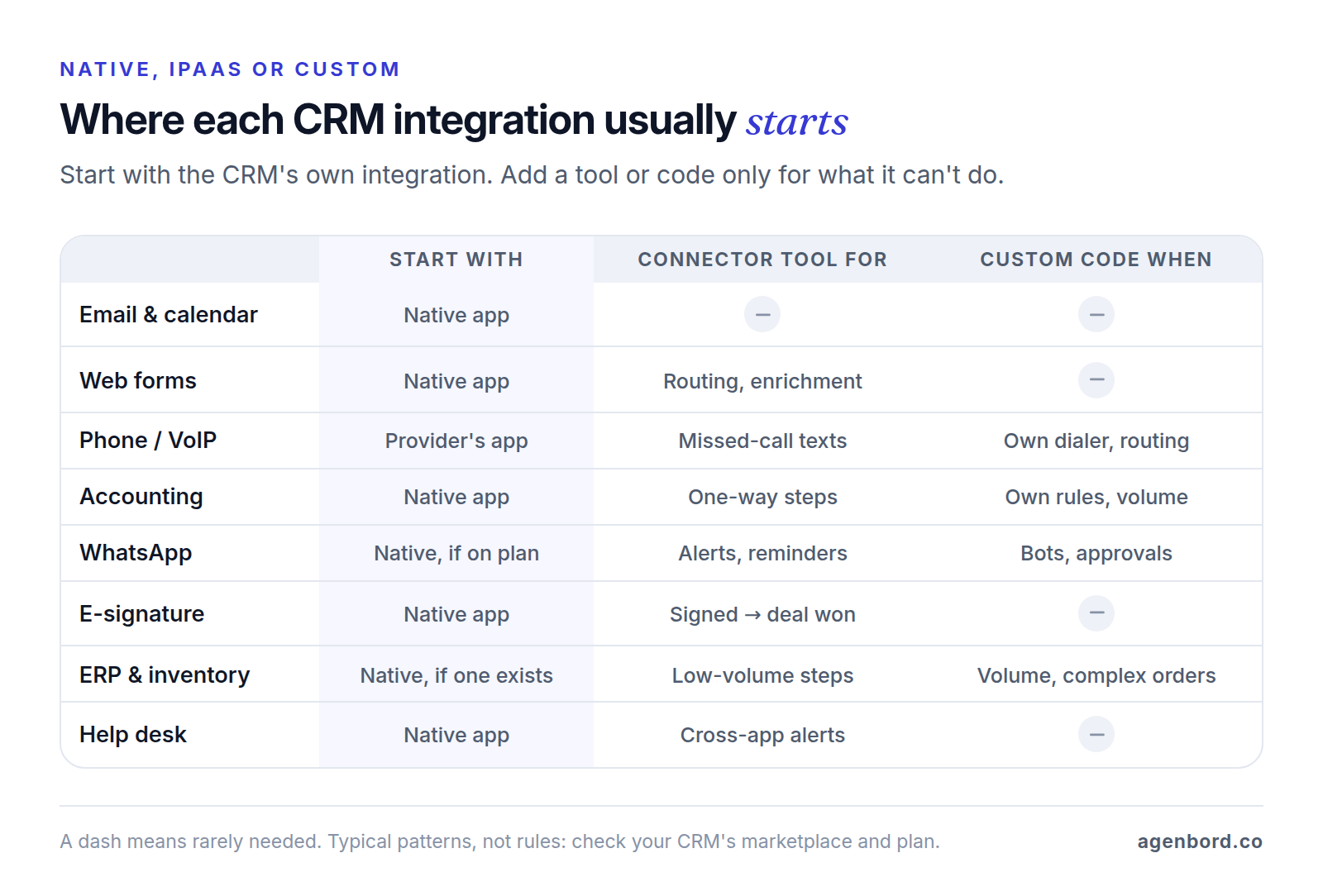
Rank candidates by three questions: how much customer activity the system holds, how often someone retypes its data today, and how much damage a bad sync could do. For most businesses, that gives this order:
- Email and calendar. Emails and meetings logged to the right contact and deal. It's where much of the customer conversation happens, most CRMs connect natively to Gmail and Outlook (Salesforce includes it even in Starter Suite), and mistakes are easy to undo. Exclude internal and personal addresses.
- Website forms. Leads arrive with their source page, campaign and consent, checked against existing contacts instead of retyped.
- Phone and VoIP. Click-to-call, automatic call logs and missed-call tasks. Calls are often the biggest gap in a CRM's history.
- Accounting. Customers, products, invoices and payment status. Sales needs to see what's billed and paid, and this is the first integration where an error costs money, so it gets a written field map first.
- Messaging and WhatsApp. Conversations logged to the contact, plus approved templates for messages you start. Move it up if most customers message rather than call or email.
- E-signature. The signed PDF and status back on the deal, moving it to won. A short, high-value handoff.
- ERP and inventory. Orders, stock, fulfillment and invoice status. The most valuable link for distributors and manufacturers, and the most complex.
- Help desk. Tickets on the contact, so a rep knows about an open complaint before calling. Move it up if support is your busiest channel.
Two rules sit on top of the order. Connect the systems your process actually runs on, not every app with a connector. And show rather than copy: the CRM needs a customer's open balance, not the general ledger.
Three ways to integrate a CRM
Native integrations and marketplace apps
Built by the CRM vendor or the other app's vendor, these switch on from settings or the CRM's app marketplace (Salesforce's is AppExchange). Setup takes minutes to hours, and the vendor keeps them working when APIs change.
The trade-off is control: you get the vendor's field mappings, sync schedule and conflict rules, and plan requirements apply. HubSpot's QuickBooks Online integration, for example, works on every HubSpot plan, but adding your own field mappings takes a Data Hub Starter, Professional or Enterprise subscription.
iPaaS: Zapier, Make, n8n and similar tools
An iPaaS (integration platform as a service) runs workflows between apps: a trigger in one, then conditions and actions in others, usually without code. It suits the cross-app steps native integrations don't cover, like routing a web lead to the right rep and texting the lead a booking link.
The downsides: a subscription that grows with volume, and logic that sprawls across undocumented workflows. Error handling and duplicate checks exist only if someone builds them. Our Zapier alternatives roundup compares what the same workload costs on each tool, and Zapier vs. Make vs. n8n runs the numbers at higher volumes.
Custom API integration
This is code you own, running in your cloud account and calling each system's API (the interface a system exposes to other software). You control matching, conflict rules, retries, logging and timing, with no per-task fees, and you own the upkeep: token renewals, API version changes and monitoring.
| Native app | iPaaS | Custom API | |
|---|---|---|---|
| Upfront cost | Setup time | Build time, or from $1.5k a workflow if outsourced | From $15k for a custom integration service |
| Running cost | Often included in your plan | Subscription that rises with tasks, credits or runs | Hosting, typically $50–$500 a month, plus maintenance |
| Control | Vendor's fields, schedule and rules | Your logic, within the tool's building blocks | Everything |
| Limits | Objects and fields the vendor chose | Plan limits plus each API's rate limits | Each API's rate limits |
| Maintenance | Vendor | Whoever built the workflows | Your developer or partner |
| Who owns it | The vendor | You own the workflows; the vendor runs the platform | You own the code |
| Best for | Email, calendar, phone, e-signature | Cross-app steps at low to moderate volume | Money, high volume, complex rules |
Most businesses end up with all three: native apps for email and phones, a connector tool for a few cross-app workflows, and custom code for the one integration that moves money or runs operations.
Design decisions to make before you connect anything
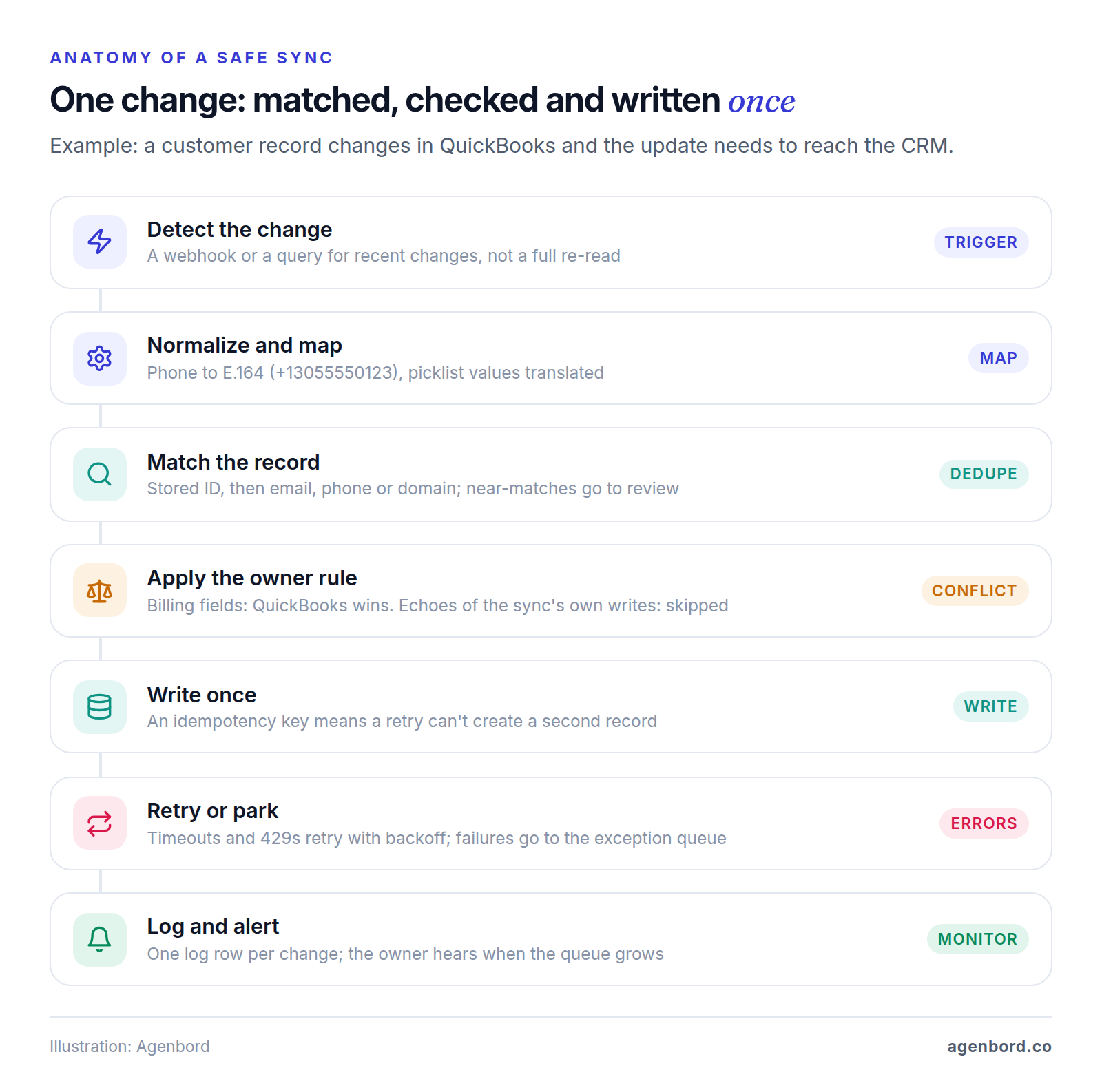
Native apps and connector tools make each of these decisions by default if you don't make them yourself. Here's what a well-designed sync does with every change; the sections below explain the decisions behind it.
Pick a system of record for every field
For each field, one system owns it and the others read it. A typical split for a CRM connected to accounting:
| Field | Owned by | Flows to |
|---|---|---|
| Contact name, email, phone | CRM | Accounting, when the customer is created |
| Billing address, payment terms, tax status | Accounting | CRM, read-only |
| Invoice number, amount, due date, balance | Accounting | CRM, read-only |
| Lead source, owner, deal stage, notes | CRM | Nowhere |
| Products and prices | Accounting or ERP | CRM, for quotes |
Write this table before choosing a tool. It settles most later arguments, including what happens when two people edit the same customer.
Store IDs and map every field
Names make poor keys: "Smith Plumbing LLC" and "Smith Plumbing" are the same customer. Store the other system's record ID on each record, such as the QuickBooks customer ID on the CRM company, and match on it first. Salesforce builds this in: mark a field as an External ID, and an upsert creates a record when nothing matches, updates it when one record does, and writes nothing when several do. HubSpot's API can upsert contacts on a custom property that requires unique values.
Then map every field: name, type, format, owner and direction. Quiet mismatches cause most failures: one "Full name" field against first and last, time zones, and picklists (dropdown values). If the CRM says "Commercial" and accounting says "Business," keep a translation table, and send any value without a translation to an exception queue instead of writing a blank.
One-way or two-way sync, and conflict rules
Default to one-way sync, field by field. Two-way sync is worth it only for fields both teams legitimately edit, and each of those needs a conflict rule:
- Owner wins. The system of record overwrites the other side. Right for most fields.
- Latest change wins. Compare timestamps. Risky when one side syncs on a delay: HubSpot's QuickBooks Online integration picks up HubSpot changes within a few minutes but checks QuickBooks every 30 minutes, so a field can change on both sides inside one window.
- A person decides. Conflicts go to a review queue. Right for anything financial.
Also stop echoes: a write to one system shows up there as a change that could sync straight back. Write through a dedicated integration user and ignore its own changes, or skip writes that change nothing.
Deduplication keys
Set the match order before the first record moves:
- The stored ID from the other system.
- Email address, lowercased and trimmed. HubSpot deduplicates contacts by email automatically.
- Phone number, normalized to E.164, the international format (+13055550123), so "(305) 555-0123" and "305.555.0123" match.
- Company domain, from the website or a work email (never gmail.com). HubSpot deduplicates companies by domain, except companies created through the API or by third-party sync apps, so your integration must check before it creates one.
Never merge automatically on a name alone. Send near-matches to a person.
Error handling: retries, an exception queue, alerts and idempotency
Temporary errors, such as timeouts, server errors and rate limits, should retry on their own. Intuit's developer guidance is a good default for any API: don't retry 4xx errors except 429 (too many requests), honor the Retry-After header, back off exponentially (1, 2, then 4 seconds) with some randomness, and cap retries at 3 to 5.
Permanent errors, like a missing required field, won't fix themselves. Send them to an exception queue (developers say dead-letter queue): failed records with the error and the original data, which a named person reviews and replays. Alert that person when the queue grows.
Retries carry their own risk: a request that timed out may have succeeded, and retrying it creates a second invoice. Make every write idempotent, meaning safe to repeat. QuickBooks Online accepts a RequestId and, if the same ID arrives again, returns the original response instead of running the operation twice. Incoming events repeat too, and Meta's webhook docs tell you to handle duplicates yourself, so store each event's ID and skip ones you've processed.
Backfills
A backfill loads existing records before live sync starts. Merge duplicates first, in the source system. Load in batches: HubSpot's batch endpoints take 100 records per call, and Salesforce calls any job over 2,000 records a good candidate for Bulk API 2.0. Pause automations that fire on new records, or 3,000 imported contacts get 3,000 welcome emails. Record the cutoff time so live sync starts where the backfill stopped, then reconcile counts and totals on both sides.
API limits to check before you design
Every API caps how many requests you can send. Two examples from the vendors' developer docs, as of October 2026:
- HubSpot: private apps get 100 requests per 10 seconds on Free and Starter, with 250,000 a day per account; Professional allows 190 per 10 seconds and 625,000 a day, and Enterprise 190 and 1,000,000. An add-on raises the burst to 250 and adds 1,000,000 a day, and CRM search has stricter limits of its own. Go over and you get a 429 error.
- Salesforce: Enterprise Edition allows 100,000 API requests per 24 hours plus 1,000 per Salesforce user license (5,000 on Unlimited and Performance), plus purchased add-ons, so a 20-user Enterprise org gets 120,000. Paid orgs can go over occasionally, up to a hard cap. Check access itself, too: Salesforce's small-business pricing lists no API access on Starter Suite and an add-on for Pro Suite.
If you're still choosing a CRM (our CRM for small business guide covers how), confirm API access and the integrations you need on the plan you'd buy; our HubSpot alternatives comparison lists October 2026 prices for ten CRMs, and what a CRM really costs adds the fees beyond seats.
Limits look generous until an integration polls. Checking ten record types for changes once a minute is 14,400 requests a day before any real work. Webhooks (the other system calls you when something changes), batch endpoints and caching avoid that, which is what HubSpot's guidelines recommend.
Security: scopes, tokens, audit logs and personal data
An integration holds the keys to two systems, so treat it like a user with broad access:
- Least privilege. The IETF's OAuth security best practice (RFC 9700) says a token's privileges should be restricted to the minimum the application needs. An integration that reads invoices shouldn't be able to delete contacts.
- A dedicated integration user. Connect through a company-owned account, not an employee's login, so access survives staff changes and the audit trail shows what the integration changed.
- Token storage and rotation. Keep tokens in an encrypted secrets store, never in a spreadsheet, code repository or workflow note. HubSpot private app tokens don't expire, but HubSpot recommends rotating them every six months. QuickBooks Online access tokens last an hour; refresh tokens run on a rolling 100-day window with a hard five-year limit, after which someone must reconnect.
- Audit logs. Log every write: record, fields, old and new values, source event and time. It answers "who changed this?" and makes a bad sync reversible.
- Personal data. Sync only the fields the other system needs, and keep a map of where each field goes so a deletion request reaches every copy. California's CCPA, for example, lets consumers ask a covered business to delete their personal information and to tell its service providers to do the same. This is general information, not legal advice.
CRM integration examples: QuickBooks, WhatsApp, phone and ERP
QuickBooks Online and your CRM
Four things typically sync: customers (created once, usually from the CRM when a deal is won, with the QuickBooks ID stored on the CRM record), products and services (QuickBooks to CRM, so quotes use real prices), invoices (number, amount, due date and balance on the deal) and payments (QuickBooks to CRM, updating the balance and starting the next step, such as scheduling the job).
A native app may cover it. HubSpot's QuickBooks Online integration syncs contacts with customers, products, invoices and credit memos, in the sync direction you choose. Its help page lists the gaps: a payment applied to several invoices in QuickBooks doesn't sync to HubSpot, and invoices created in HubSpot can't have line items added or removed, prices updated or tax added in QuickBooks. HubSpot also recommends syncing all QuickBooks customers into HubSpot first and invoicing from those linked contacts: the stored-ID rule in practice.
If you build your own integration, it connects as an app on Intuit's developer platform, so read Intuit's App Partner Program guide (version 1.2, March 2026). Most calls that create or update data, such as invoices and customers, are unmetered and free. Most reads, such as accounts, company information and reports, are metered: the free Builder tier allows 500,000 a month and blocks anything above that, and Silver costs $300 a month with 1 million included, then $3.50 per 1,000. A sync that reacts to changes usually stays well inside Builder; one that polls ten record types every minute uses about 432,000 reads a month before doing anything useful.
WhatsApp and your CRM
CRM integrations use Meta's WhatsApp Business Platform through its Cloud API, which Meta hosts:
- Inbound. Meta sends a webhook to your HTTPS endpoint when a customer messages you or a template's status changes. Your endpoint checks Meta's signature (the X-Hub-Signature-256 header), matches the sender's number to a contact and logs the message on its timeline, or creates a lead when nothing matches.
- Replies. Within 24 hours of the customer's last message (the customer service window), your team can reply with any message type. Since October 1, 2026, Meta charges for these replies per message, at the utility rate for the customer's country.
- Outbound. Outside that window you can send only templates, which Meta reviews in advance and sorts into marketing, utility and authentication categories. Since July 1, 2025, Meta has charged per template message by category, and since October 1, 2026, utility templates sent inside an open window are charged too. Our WhatsApp Business API pricing guide covers US rates.
Some CRMs include this. HubSpot connects WhatsApp to its inbox on Marketing Hub or Service Hub Professional and Enterprise. It attaches a message to a contact automatically only when the number matches the contact's Phone number or Mobile phone number property, and its help page lists a limit of 1,000 template messages a month shared across connected accounts. Getting a number approved and templates through review comes first; our WhatsApp Business API guide walks through it. Go custom for chatbot flows, approvals or payment links, or when neither your CRM nor its marketplace covers what you need: that's our WhatsApp automation work, and how our recurring billing platform delivers invoices on WhatsApp and reconciles payments into customer ledgers.
Phone and VoIP
Reps should get click-to-call from any record, every call logged (direction, duration, outcome, notes) on the right contact with its recording, and missed calls turned into tasks. This usually comes as your phone provider's app, built on the CRM's calling framework: HubSpot's Calling Extensions SDK lets providers add click-to-dial and log calls to the timeline, and Salesforce's Open CTI lets them embed a softphone. Normalize caller ID to E.164 before matching, and decide what happens when one office number belongs to several contacts. Federal law allows recording with one party's consent, but some states, including Florida, require everyone's, so announce recording at the start of each call.
ERP and CRM: the quote-to-cash handoff
Quote-to-cash runs from an accepted quote to money in the bank. The CRM owns the opportunity and the quote; the ERP owns the order, stock, fulfillment, invoice and payment. The integration needs one clean handoff and a status feed back:
- Customers, products and price lists come from the ERP, so quotes use valid items and prices.
- An accepted quote creates the ERP sales order once, with an idempotency key, and the order number is stored on the deal.
- Order status (confirmed, shipped, invoiced, paid) flows back to the CRM as read-only fields.
- Changes after the handoff happen in the ERP, not in the CRM quote.
Microsoft builds the same split into its own products. In Dynamics 365's prospect-to-cash integration, quotes and orders can start in either Sales or Supply Chain Management, but invoices are created only in Supply Chain Management and synced to Sales, where they can't be edited. Return orders aren't supported: the kind of exception to find before go-live. If the ERP side needs building too, see ERP development; integrations there are quoted one by one.
Testing and monitoring checklist
Before go-live:
- Field map signed off: owner, direction, format and picklist translations for every field.
- Tests run in a sandbox or test account with messy data: blank fields, shared email addresses, international numbers, long names.
- Failure paths tested: an expired token, a 429 rate limit, the other system offline, a record deleted or merged on one side.
- Idempotency proven: the same event sent twice creates one record.
- A backfill sample reconciles by count and total before the full load.
- Old process and integration run side by side for a week with matching counts.
After go-live:
- Every failure lands in the exception queue and alerts a named owner.
- A daily check compares counts or totals, such as this week's invoices in QuickBooks against invoices on CRM deals.
- API usage and token expiry are tracked against the limits above.
- Mappings are retested whenever either system adds fields, changes plans or retires an API version.
- A one-page runbook explains how to pause the sync, replay the queue and reconnect an account.
Our workflow automation guide applies the same habits to single workflows.
What CRM integration costs
Native apps cost little beyond the plan tier they need, as the HubSpot examples above show, and connector tools add a subscription that grows with usage. Building is the bigger variable. Typical ranges for our business process automation and CRM work:
| Scope | Typical price | Timeline |
|---|---|---|
| Single workflow, in a connector tool or code | From $1.5k | 1–2 weeks |
| Program of 5–15 workflows | $6k–$20k | 3–8 weeks |
| WhatsApp chatbot plus CRM integration | $8k–$25k | 4–8 weeks |
| Custom integration service | $15k+ | 1–3 months |
| Custom CRM with a portal and integrations | $30k–$75k | 3–5 months |
Custom work adds hosting, typically $50–$500 a month for a small-business app, and maintenance of about 15–20% of the build cost a year. Tool subscriptions and third-party fees, such as Intuit's metered reads or Meta's template messages, bill you directly. That cost pays off when money moves through the integration, volume is high, matching rules are complex, or the integration is part of what you sell. If you're weighing a custom CRM against integrating a SaaS one, our custom CRM cost guide works through the three-year math.
Start on paper: decide who owns each field and how records match. Then connect email, forms and phones with native apps, add accounting with a written field map, and write custom code only where money, volume or complex rules call for it.
Sources
- HubSpot Developers - API usage guidelines and limits (accessed October 2026)
- HubSpot Developers - CRM API: Contacts, batch limits and upsert (accessed October 2026)
- HubSpot Developers - Legacy private apps, scopes and token rotation (accessed October 2026)
- HubSpot Developers - Calling extensions SDK (accessed October 2026)
- HubSpot Knowledge Base - Connect HubSpot and QuickBooks Online (accessed October 2026)
- HubSpot Knowledge Base - Deduplication of records (accessed October 2026)
- HubSpot Knowledge Base - Connect WhatsApp to the conversations inbox (accessed October 2026)
- Salesforce Developers - API request limits and allocations (accessed October 2026)
- Salesforce - Small business pricing, API access by edition (accessed October 2026)
- Salesforce Developers - Upsert a record using an external ID (accessed October 2026)
- Salesforce Developers - Bulk API 2.0 (accessed October 2026)
- Salesforce Developers - Open CTI developer guide (accessed October 2026)
- Intuit - App Partner Program guide, version 1.2, March 2026 (accessed October 2026)
- Intuit Developer - Retrying the right way: 4XX vs 5XX (accessed October 2026)
- Intuit Developer - Track your refresh token's hard expiry (accessed October 2026)
- Meta for Developers - WhatsApp Business Platform pricing (accessed October 2026)
- Meta for Developers - WhatsApp message templates (accessed October 2026)
- Meta for Developers - WhatsApp webhooks (accessed October 2026)
- Meta for Developers - Webhooks: signatures, retries and deduplication (accessed October 2026)
- Microsoft Learn - Prospect-to-cash in dual-write (accessed October 2026)
- Zapier - App directory (accessed October 2026)
- Make - Home page, app count (accessed October 2026)
- n8n - Pricing and executions (accessed October 2026)
- IETF - RFC 9700: Best Current Practice for OAuth 2.0 Security (accessed October 2026)
- ITU - Recommendation E.164, the international public telecommunication numbering plan (accessed October 2026)
- Cornell Law School LII - 18 U.S. Code § 2511 (accessed October 2026)
- Florida Legislature - Section 934.03, Florida Statutes (accessed October 2026)
- State of California Department of Justice - California Consumer Privacy Act (accessed October 2026)
Prices, plans and regulations change. Figures were checked on October 2, 2026; follow the links for the latest. Nothing here is legal, tax or financial advice.
About the author
Founder, Agenbord
Muhammad Hamza is the founder of Agenbord, the Fort Lauderdale software company behind the construction ERP Smart Construction and a WhatsApp-first billing platform. He writes practical guides on buying, building and automating business software.