On this page
If your leads live in an inbox, your customers in a spreadsheet and your follow-ups in someone's head, you've probably wondered whether a CRM is worth paying for. A CRM for small business (customer relationship management software) puts every lead and customer in one shared place: who they are, every email and call, what they might buy next, and the next step with a date on it.
The short answer: you need one when the warning signs stack up, most often follow-ups that slip, more than one person dealing with customers, and a pipeline nobody can see without asking around. Start with an off-the-shelf CRM that matches how you sell, settle your process before you import anything, and judge the result by whether your team still uses it after 30 days.
We build custom CRMs, and we'll say below when that's worth it. For most small businesses, it isn't, at least not yet.
What is a CRM for small business?
A CRM is a shared database of the people and companies you sell to, plus a record of everything that happens between you. Six parts do most of the work:
- Contacts and companies. Names, phone numbers, emails and how each person found you, with people linked to their company.
- Deals and a pipeline. Each potential sale is a deal with a value and a stage, such as inquiry, quote sent, won or lost. The pipeline shows every open deal by stage.
- Activities and tasks. Calls, meetings and to-dos tied to a contact or deal, each with an owner and a due date.
- Email and call logging. Emails sync from Gmail or Outlook onto the right contact, and calls are logged by a phone integration or by hand, so the history sits on one timeline.
- Automation. Rules for routine steps: assign a new web lead, create a follow-up task when a quote goes out, send a renewal reminder.
- Reporting. Pipeline value by stage, won revenue by lead source, activity by person and overdue follow-ups.
How a CRM differs from a spreadsheet, an inbox and accounting software
Before a CRM, customer information usually lives in three tools, none of them built for follow-up:
| Tool | Good at | Where it falls short for sales and follow-up |
|---|---|---|
| Spreadsheet | Lists, quick math, total flexibility | No reminders, no call or email history behind each row, and copies multiply |
| Email inbox | Conversations, one person at a time | Each person's history sits in their own mailbox, and an unanswered quote looks like any other email |
| Accounting software | Invoices, payments and who owes you money | Built around transactions, so most of what happens before the first invoice isn't there |
| CRM | Leads, deals, follow-ups and the history behind them | Only works with a defined process and people who keep it current |
Accounting software is starting to reach into sales. As of October 2026, QuickBooks Online's pricing page lists website lead forms on its Essentials plan and "Customer AI" that sources leads and follows up on Plus. If you sell simply and already live in QuickBooks, try those first. A CRM earns its place when several people work deals through stages and need the same notes and reminders.
Why a CRM is important for a small business
A CRM doesn't make anyone a better salesperson. It makes the basics happen every time:
- Follow-up that doesn't depend on memory. Every open lead and quote has an owner and a next-step date, and the CRM puts it on someone's list when it's due. The quote you sent three weeks ago comes back as a task instead of quietly expiring.
- Shared history when someone is out. When a customer calls and their usual contact is on vacation, whoever answers sees the last emails, the quote and the site-visit notes. When someone leaves, the relationship stays with the business.
- Pipeline visibility. You can see what's open, at which stage and worth how much without calling a meeting. That informs real decisions: whether to hire, when cash will come in, which salesperson needs help.
- Repeat business. Past jobs and purchases stay on the record, so the CRM can remind you when a service is due, a contract is up for renewal or a good customer hasn't heard from you in a year.
Do you need a CRM? 10 signs you've outgrown spreadsheets
Each sign comes with the symptom that usually gives it away:
- Follow-ups depend on memory. A customer asks about "that quote," and nobody can find it or remember sending it.
- New leads wait, or get called twice. Tuesday's web inquiry got calls from two people; Friday's got none, and nobody noticed until the customer hired someone else.
- Nobody can see the pipeline without asking around. The monthly forecast is everyone's guesses, added up in a meeting.
- Customer history leaves with the person. A salesperson is out sick, their customer calls about a quote, and the thread is in a mailbox nobody else can open.
- There are several versions of the list. "Leads FINAL v3 (Dana's copy)" sits next to the real file, and each has changes the other doesn't.
- Quotes go out and nobody chases them. Proposals sit with no yes, no no and no recorded reason, because nobody followed up after the first week.
- You can't tell which lead sources pay off. You spend on ads, directories and trade shows but can't say which of them brought the work you won.
- Past customers stop hearing from you. A customer from two years ago hires someone else for the next project, because nobody called when it was due.
- The same details are typed three times. A won deal goes from email into the spreadsheet, then into accounting, then onto the calendar, picking up typos at each step.
- The owner is the CRM. Every question about a customer waits for you, and a week off means follow-ups stop.
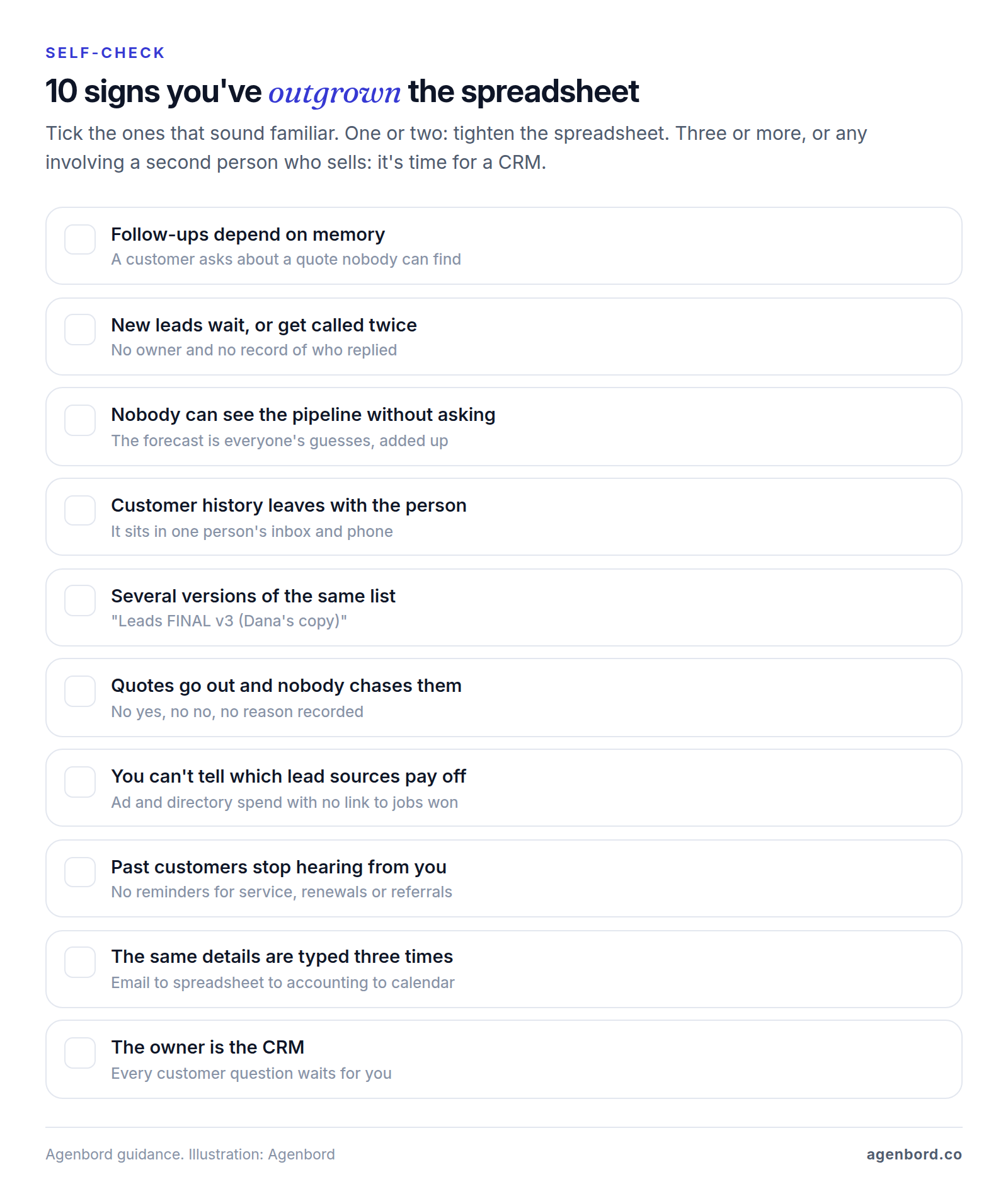
One or two of these can be fixed with a tidier spreadsheet: one shared file with columns for owner, lead source, stage and next-step date, sorted by date every morning. Three or more, or any that involve a second person who sells, mean it's time for a CRM. If the spreadsheet discipline doesn't hold, though, software won't create it.
What a CRM won't fix
A CRM changes where information lives, not how your team works. Four problems survive the purchase:
- No defined process. If your team can't agree on the steps from inquiry to paid job, the CRM just records the confusion. Write your stages down, with what has to be true for a deal to move on.
- No follow-up habit. Reminders that everyone dismisses are noise. Someone has to review overdue tasks every week, and the owner has to ask about them.
- Bad data. Importing thousands of duplicates, dead contacts and blank fields gives you an expensive copy of the old spreadsheet. Clean first and leave stale records behind.
- Too few leads. A CRM helps you win and keep the demand you have; it doesn't create demand on its own.
How to avoid a CRM nobody uses
A CRM only works if the people who talk to customers keep it current. Four habits make that likely:
- Name an owner. One person, often the office manager or sales lead, owns fields, stages, users and "how do I…?" questions, which takes a few hours a week at the start.
- Ask for as little as possible. Require only what you'll use: name, phone or email, lead source, owner and next step. Every extra required field is a reason to skip the CRM.
- Make it the only place, starting at the top. Run the weekly pipeline meeting from the CRM screen, and ask "what does the CRM say?" instead of "where are we with…?" If a deal isn't in the CRM, it isn't in the forecast.
- Put it where people already work. Turn on email logging and the mobile app, and connect your phone system, so logging happens as a side effect of working.
Types of CRM for small businesses
"CRM" covers several kinds of product. Pick the type first and the shortlist shrinks from dozens of vendors to a handful:
| Type | Examples | Fits | Watch for |
|---|---|---|---|
| Sales CRM | Pipedrive, Zoho CRM, Freshsales, Less Annoying CRM | Teams that sell through quotes and a deal pipeline | Features growing teams want often start on the second tier; email marketing may need a separate tool |
| Marketing all-in-one | HubSpot with Marketing Hub, Keap, HighLevel | Businesses whose leads come from email, forms, ads and texting | Prices that rise with contacts or usage, and more to set up |
| Industry CRM | Follow Up Boss (real estate), JobNimbus (roofing and exteriors) | Trades and agents with industry-specific sales steps | A business with several lines of work may need two tools |
| CRM inside your operations software | Jobber (field service), Clio Grow (law firms), TaxDome (accounting firms) | Businesses whose customer records already live where the work and billing happen | Pipelines, follow-up automation and reports vary; compare them with a sales CRM's |
| Custom CRM | Built for your business | A process no product fits, many light users, or a CRM that has to run operations | Upfront cost, a smaller first version and the need for an owner on your side |
Industry CRMs handle the sales steps a general CRM leaves to you. Follow Up Boss, for example, connects to more than 250 lead sources and website providers and distributes leads across a real estate team, and JobNimbus orders aerial roof measurements from EagleView or Hover and sends material orders to suppliers such as ABC Supply. Contractors can compare options by trade in our guide to CRMs for contractors, and agents and brokers should start with our real estate CRM guide.
The CRM inside your operations software is often the right first CRM, because the customer record already exists there. Jobber's client records hold job and communication history and let you tag leads. Clio Grow handles a law firm's intake and syncs new clients to Clio Manage; our client intake software guide compares it with the alternatives. TaxDome combines a CRM, client portal, billing and documents for accounting firms. If your work already runs on a platform like these, use its CRM features first and add a sales CRM only when your pipeline outgrows them.
From spreadsheet to custom: a simple maturity path
Few businesses jump from a spreadsheet straight to a custom system, and many never need one. The usual path has four stages:
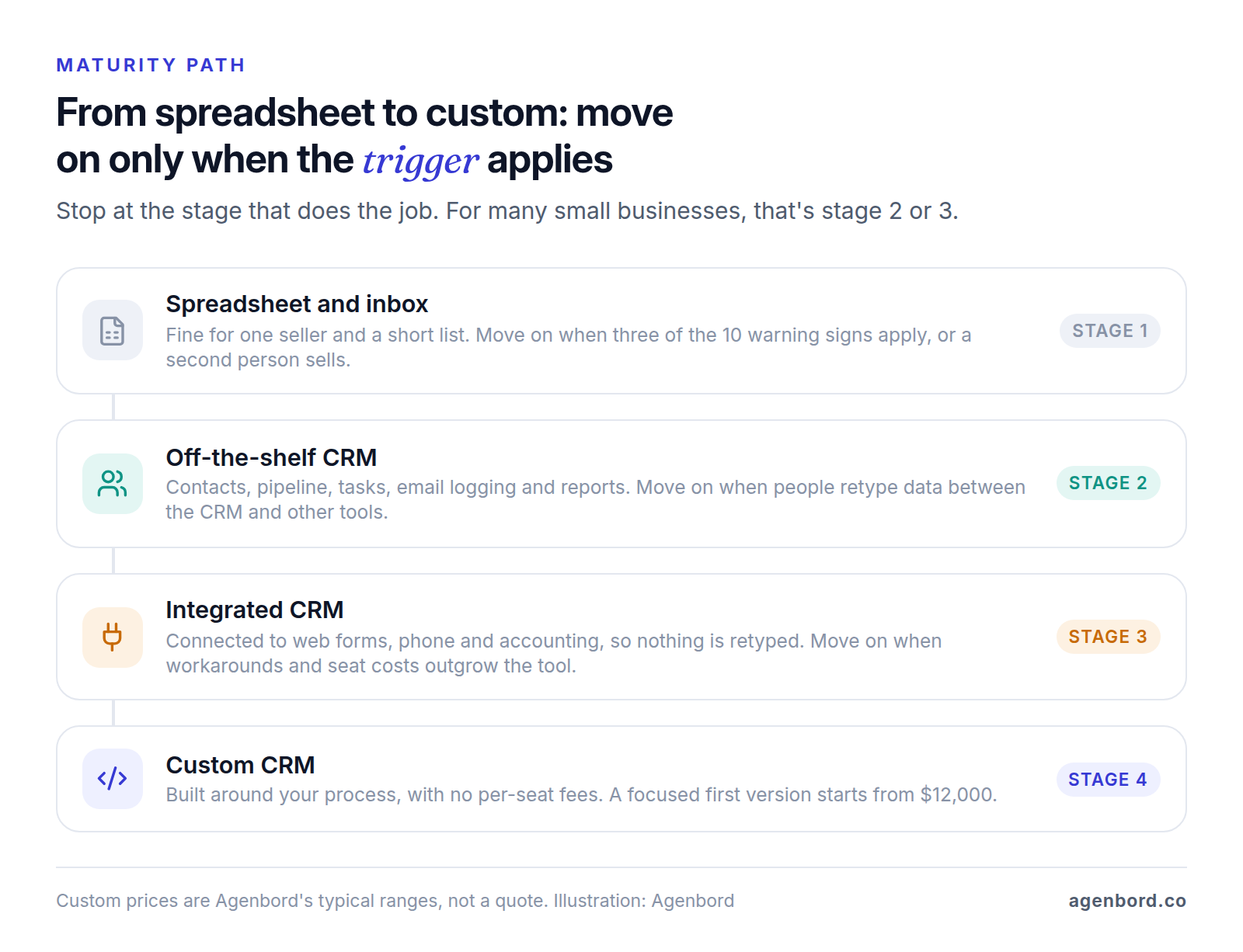
Stage 2 can serve a small team for years. Stage 3 connects the CRM to your website forms, phone system and accounting so nobody retypes a won deal: native integrations first, then an automation tool or a custom workflow automation for the gaps, from $1,500 for a single workflow with us. Stage 4, a custom build, makes sense only when the conditions below apply; our build-vs-buy framework helps with that call.
When a custom CRM makes sense
A custom CRM starts to pay off when two or more of these are true:
- Your process isn't a standard pipeline: quotes built from job specs, service contracts with renewals, or deals that hand off to operations and billing.
- Many people need a little access, such as field staff who update a record now and then, and per-user pricing makes each one a paid seat.
- The CRM has to run operations: a signed quote should create the job, and the job the invoice, without retyping.
We build these on a fixed price with a written scope. A focused first version (contacts and companies, one or two pipelines, tasks, email logging, reports and data import) typically starts at $12,000 and takes 6–10 weeks. A CRM with a client portal, quoting and integrations usually runs $30,000–$75,000 over 3–5 months, and multi-team systems $75,000 and up. Running costs are hosting, typically $50–$300 a month for a small team, and maintenance of about 15–20% of the build cost a year, with no per-seat fees. Our custom CRM cost guide explains what moves the price, our guide to building a CRM walks through the steps, and custom CRM vs. HubSpot covers keeping a SaaS CRM and building around it.
How to choose a CRM for your small business
Start from how you sell, not from feature lists. Six steps take most of the guesswork out of choosing a CRM for a small business.
1. Map your process on one page
Write down the stages a customer goes through, from first contact to paid and back again, who handles each and where the information comes from. For a hypothetical eight-person commercial cleaning company, that might be inquiry, walkthrough booked, proposal sent, negotiating, won, onboarding, and renewal 60 days before each contract ends. Give every stage an exit rule: "proposal sent" means the PDF went out with a price.
2. List your must-haves
Write five to eight things the CRM must do on day one, as tasks rather than feature names: "log my Gmail automatically," "create a lead from our website form with its source," "let field staff update a deal on a phone," "keep renewals in a second pipeline," "send won customers to QuickBooks." Everything else is a nice-to-have and shouldn't decide anything.
3. Check integrations on the plan you'd buy
List the tools the CRM has to talk to, usually email and calendar, website forms, phone, accounting and e-signature, and confirm each works on the plan you'd buy, not just the top one. API access, which any custom connection needs, varies by plan too: Salesforce's small-business pricing doesn't include its Web Services API on Starter Suite and lists it as an add-on for Pro Suite. Our CRM integration guide covers what to connect first and how to keep the data clean.
4. Price the tier you'll actually need
Entry plans look alike; the gap opens one tier up. As of October 2026, with annual billing, Pipedrive's email sync and automations start on Growth at $39 per seat per month, not Lite at $14, and Zoho CRM's assignment rules, which route new leads to the right person, start on Professional at $23 per user, not Standard at $14. Find the cheapest tier with every must-have and price it at next year's headcount. Our breakdown of what a CRM costs compares tiers across vendors and lists the fees pricing pages leave out.
5. Trial with real data and the people who'll use it
Pick two finalists and import 100–200 real records into each, messy ones included. Then have the two or three people who'll use it daily work in it for a week, on their phones as well as at a desk. Free plans and trials make this cheap: Pipedrive offers a 14-day trial and Less Annoying CRM a 30-day one.
Before you decide, export a contact with its notes and emails to see what you'd take with you if you left. HubSpot's standard record export, for example, leaves out activities such as calls and notes; HubSpot points to activity reports or its API for those.
6. Score the finalists
Must-haves are pass or fail: a CRM that can't log your email on the plan you'd buy is out, however well it scores elsewhere. Score the rest from 1 to 5 against weights that suit your business. An example for two hypothetical CRMs:
| Criterion | Weight | How to test it in the trial | CRM A | CRM B |
|---|---|---|---|---|
| Fits your process | 25% | Your stages, fields and a second pipeline set up in an afternoon | 4 | 3 |
| Daily use | 25% | Each tester logs a call, moves a deal and sets a follow-up on a phone | 4 | 5 |
| Integrations on your tier | 20% | Your tools connect natively on that plan, without an extra automation tool | 5 | 2 |
| 12-month cost | 15% | Cheapest tier with every must-have, at next year's headcount, plus fees | 3 | 4 |
| Data in and out | 10% | A clean sample import, and a record that exports with its history | 4 | 3 |
| Support | 5% | A real question answered during the trial | 4 | 4 |
| Weighted score | 100% | 4.05 | 3.50 |
CRM A wins on fit and integrations, even though the team liked using CRM B more. If totals land within about 0.2 of each other, let the people who'll use it every day decide.
Your first 30 days with a CRM
A CRM is live the day you import your contacts, and working only when the team relies on it. A 30-day rollout for a small team:
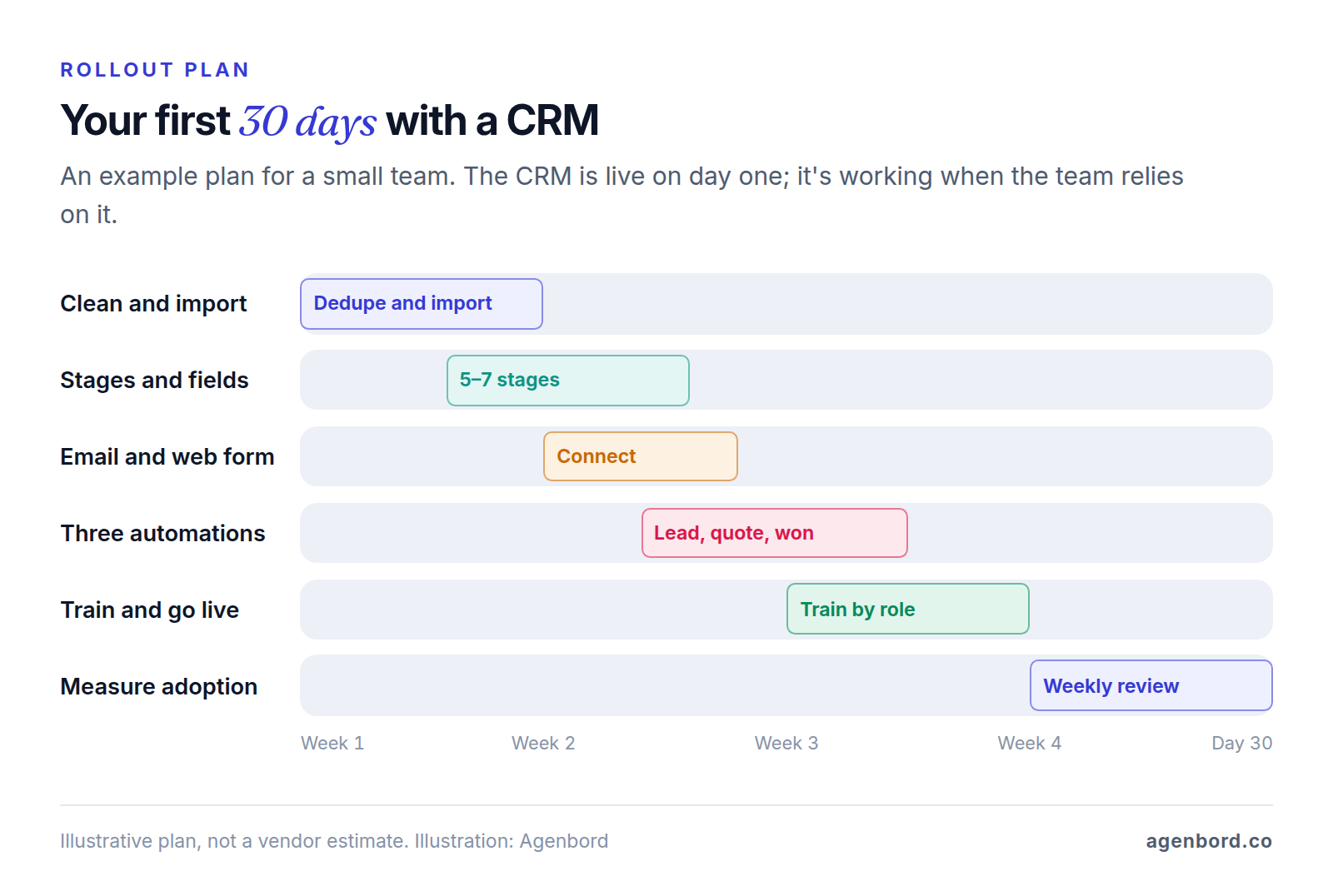
Week 1: clean and import. Pull everything into one file: spreadsheets, email contacts and your accounting software's customer list. Merge duplicates by email and phone, standardize names, phone formats and lead sources, and leave out contacts nobody has spoken to in years. Import 50–100 records first, check that people, companies and deals link up, then import the rest.
Weeks 1–2: set stages and fields. Build the pipeline from your process map: five to seven stages with exit rules. Keep required fields to the short list above and add custom fields only for things you'll report on. Set permissions, connect email and calendar, and point your website form at the CRM.
Weeks 2–3: add three automations. Start with the ones that protect revenue: a new web lead gets an owner and a same-day call task; a deal moved to "quote sent" creates a follow-up task three days later; a won deal creates a handoff task for whoever delivers the work. Automated texts go only to customers who agreed to receive them.
Week 3: train and go live. Give each role a short session on the five things it does every day, using your own data, plus a one-page cheat sheet. Then switch over: new leads go into the CRM only, and the old spreadsheet becomes read-only.
Week 4: measure adoption. Review these numbers weekly, by person, in the pipeline meeting:
| Metric | What it tells you |
|---|---|
| New leads entered within one business day | Whether leads go into the CRM or still sit in inboxes |
| Open deals with a next-step date | Whether follow-up is planned rather than remembered |
| Overdue tasks per person | Who needs help, or a shorter list |
| Deals untouched for 14 days or more | Stalled deals and records nobody owns |
| Calls and emails logged per person each week | Whether logging happens at all; watch the trend, not a target |
Set your own targets, with one exception: every open deal needs a next step. If the numbers slide in week four, fix the cause, such as too many required fields, a missing integration or a meeting that still runs from memory, before you add features.
Sources
- HubSpot - CRM pricing, free plan and Starter offer (accessed October 2026)
- HubSpot - Marketing Hub pricing (accessed October 2026)
- HubSpot Knowledge Base - Export records (accessed October 2026)
- Zoho CRM - Edition comparison (accessed October 2026)
- Pipedrive - Pricing (accessed October 2026)
- Freshworks - Freshsales pricing (accessed October 2026)
- Less Annoying CRM - Pricing (accessed October 2026)
- Salesforce - Small business pricing (accessed October 2026)
- Keap - Pricing (accessed October 2026)
- HighLevel - Pricing (accessed October 2026)
- Follow Up Boss - Home page (accessed October 2026)
- JobNimbus - Home page, trades served (accessed October 2026)
- JobNimbus - Integrations (accessed October 2026)
- Jobber - Field service CRM (accessed October 2026)
- Clio - Clio Grow client intake and CRM (accessed October 2026)
- TaxDome - Accounting practice management software (accessed October 2026)
- Intuit - QuickBooks Online plans and pricing (accessed October 2026)
Prices, plans and regulations change. Figures were checked on October 2, 2026; follow the links for the latest. Nothing here is legal, tax or financial advice.
About the author
Founder, Agenbord
Muhammad Hamza is the founder of Agenbord, the Fort Lauderdale software company behind the construction ERP Smart Construction and a WhatsApp-first billing platform. He writes practical guides on buying, building and automating business software.