On this page
- What is a CRM in real estate?
- How does real estate CRM software work? One lead, start to finish
- Real estate CRM features that matter
- Texting and calling leads: TCPA consent and 10DLC basics
- Best real estate CRM software: popular options compared
- Is there a free real estate CRM?
- How to choose a real estate CRM for your role
- When a custom real estate CRM makes sense
- Questions to ask in every real estate CRM demo
A real estate CRM decides whether the buyer who asks about a listing at 9:40 p.m. hears back in a minute or the next morning. It pulls in leads from portals and your website, assigns each one to an agent, keeps follow-up going until the person is ready to move, and tracks every deal from first inquiry to closing and beyond.
Most agents, teams and brokerages should buy one, not build one: published prices run from free to a few hundred dollars a month, and the popular tools are good. The hard part is matching the tool to where your leads come from and how your team shares them.
What is a CRM in real estate?
CRM stands for customer relationship management. In real estate, the CRM is the database and daily to-do list for everyone you might do business with: new leads, active buyers and sellers, past clients, your sphere (the friends, family and acquaintances who send referrals), and the lenders, inspectors and closing contacts around each deal.
A generic CRM like HubSpot, Salesforce or Zoho can hold the same records. The difference is what a real estate CRM knows out of the box:
| Generic CRM | Real estate CRM | |
|---|---|---|
| Where leads come from | Web forms, email, outbound sales | Portals such as Zillow and Realtor.com, your IDX website, sign calls, open houses |
| What a deal is | A company buying a product or contract | A buyer or seller, a property, a price and a closing date |
| Sales cycle | Weeks to months, then renewals | Months of nurture, one transaction, then years of staying in touch |
| Property data | None by default | Saved searches, listing alerts, homes a lead viewed on your site |
| Team rules | Territories and account owners | Routing by listing, ZIP code or price; showing agents; inside sales agents |
| After the sale | Renewals and upsells | Home anniversaries, market updates, referral requests |
IDX (Internet Data Exchange) is the MLS policy that lets brokers display each other's listings on their own websites and apps; an IDX website is a home search on your domain that captures leads. Inside sales agents (ISAs) qualify leads by phone before passing them to an agent.
You can build all of this in a generic CRM, but you configure the pipelines, lead-source connections and automations yourself. That's why most agents should start with a real estate CRM, and why a general CRM only wins when someone on your team will set it up.
How does real estate CRM software work? One lead, start to finish
The clearest way to understand a real estate CRM workflow is to follow one buyer inquiry through a well-configured system. The timings are targets you set, not industry averages.
- New portal lead (minute 0). A buyer asks about a 3-bedroom listing at 9:40 p.m. The CRM receives it by direct integration or by reading the portal's notification email, checks for duplicates, and records the source, the listing and the consent wording on the form.
- Instant text (under a minute). A text and email go out in the agent's name: "Hi Dana, this is Sam. Got your question about the 3-bed on Palm Ave. Want to see it Thursday or Saturday?" Only text leads who agreed to texts (more on consent below).
- Agent assignment (minutes 0–5). A routing rule picks the agent: the listing agent, whoever covers that ZIP code or price band, the next agent in a round robin, or the first to claim a push alert. Unclaimed leads go to a fallback agent; Follow Up Boss's First to Claim lets you set that window up to 30 minutes.
- First call. The agent calls and logs timeline, pre-approval, must-haves and whether the buyer already has an agent. Ready buyers get a showing; "just looking" buyers go to nurture.
- Nurture. An action plan sends texts, emails and listing alerts on a schedule and reminds the agent to call. A reply pauses it and alerts the agent.
- Showing. Booked on the agent's calendar with a reminder text; feedback goes on the contact.
- Offer and contract. Inspection, appraisal, financing and closing dates become tasks, and documents run through your transaction management or e-signature tool.
- Closing. The deal is marked closed with price and commission, which feeds reporting by lead source.
- Post-close follow-up. A past-client plan takes over: a check-in after the move, a home-anniversary note, an annual market update, a referral ask. It's the step that slips first when follow-up lives in your head.
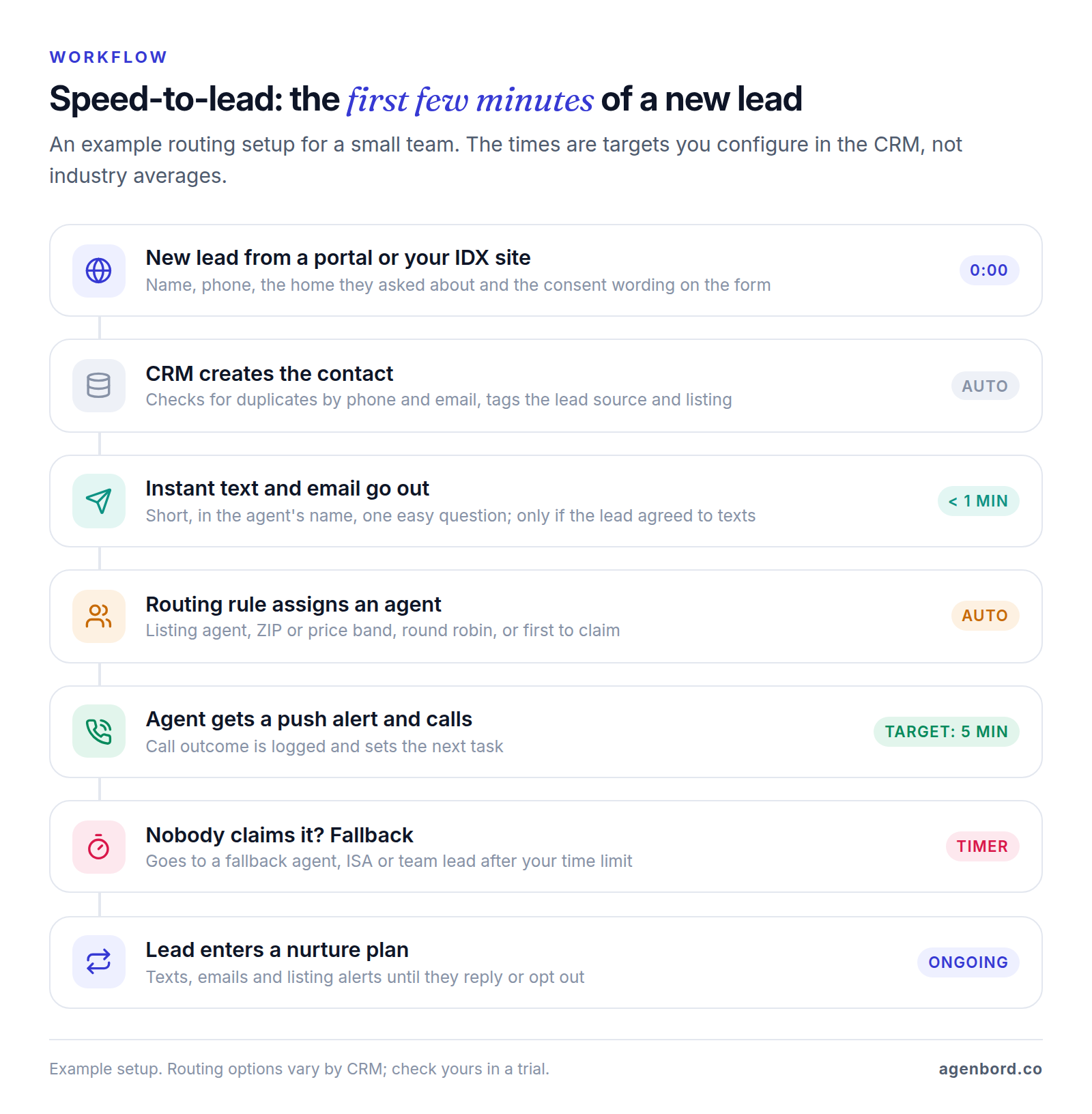
Speed matters because someone who just asked about a home is holding their phone right now, and may have asked other agents too. A fast, useful reply is your best chance of being the agent they talk to.
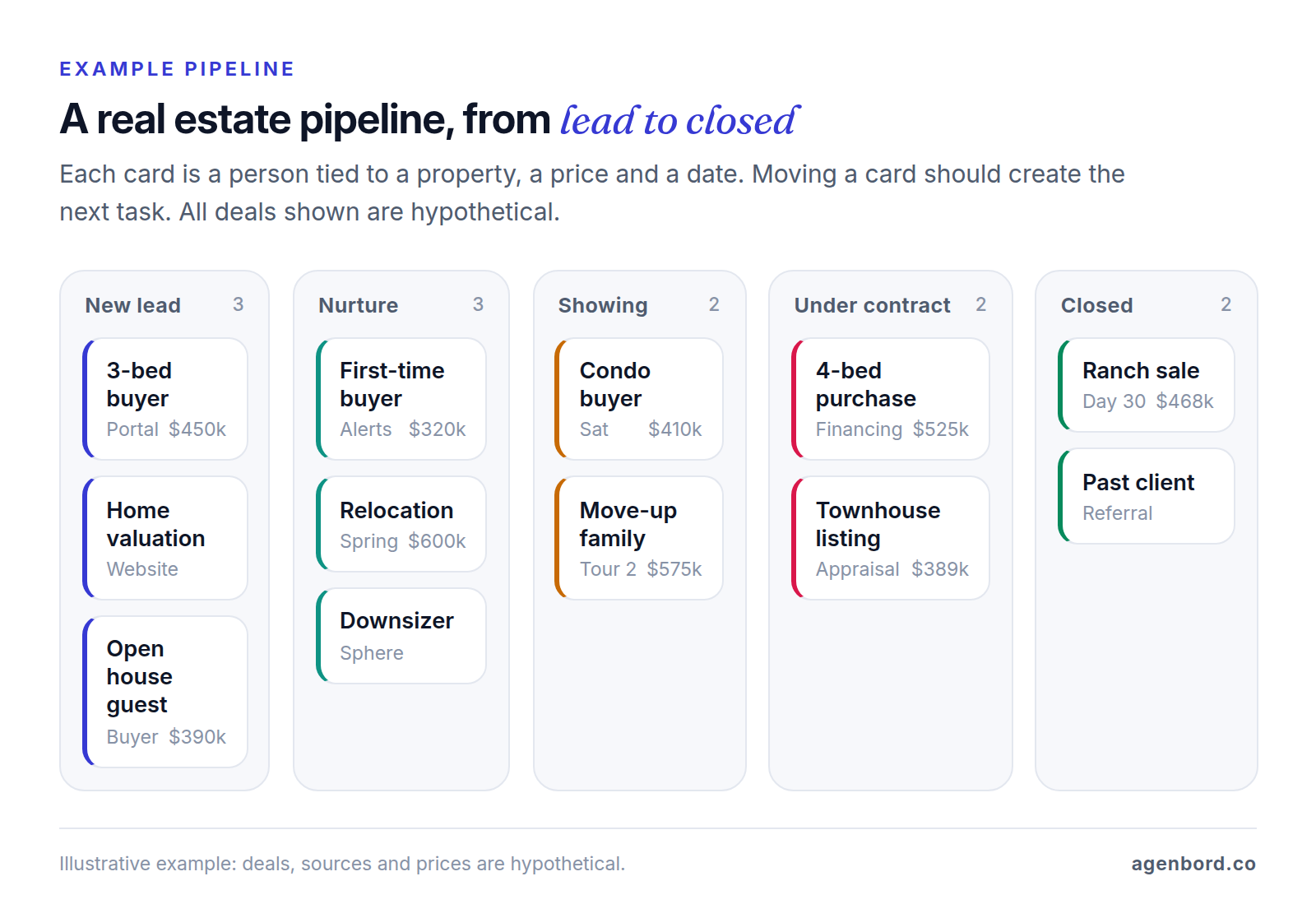
Day to day, the routine is short: new leads first, then today's tasks, then a few sphere touches, with a next step on every active contact.
Real estate CRM features that matter
Skip the long vendor feature lists. These are the features that decide whether a CRM helps you close more deals.
Lead capture from portals and your IDX website
Leads should land in the CRM automatically, with the source and property attached, from every channel: portals, your IDX website, landing pages, ads, open-house sign-ins and calls. If your website is a real lead source, its forms should post straight into the CRM, which is worth specifying when you plan a new website.
Lead routing and speed-to-lead
Look for routing by listing, ZIP code and price band, round robin, first-to-claim with a fallback, and a shared "pond" for leads nobody is working. Follow Up Boss's lead distribution covers all of these, and Sierra Interactive lists advanced lead routing in its Essential package.
Text and email nurture
Action plans (also called drips, smart plans or campaigns) send a sequence of texts and emails and create call tasks. Good ones stop when the lead replies, so nobody gets a canned "just checking in" after saying they bought elsewhere. Replies should land in an inbox the whole team can see.
Sphere and past-client follow-up
Repeat and referral business comes from staying in touch for years. You want sphere tags, touch frequencies (for example, a call every 90 days for your top 50 contacts) and automated value: anniversary notes, listing alerts, market reports. Top Producer's Market Snapshot, for instance, sends branded reports built from MLS data.
A pipeline from lead to closed transaction
Stages should match how deals move (new, nurture, showing, offer, under contract, closed), with buyers and sellers tracked separately if you work both and contract dates stored on the deal. Moving a deal forward should create the next tasks.
Tasks, reminders and a mobile app
The CRM should open to one list: new leads, tasks due, overdue follow-ups. The mobile app matters as much as the desktop: between showings, an agent should be able to claim a lead from a push alert, call or text from a business number and log the result in under a minute.
Integrations
| Integration | Why it matters | What to check |
|---|---|---|
| MLS / IDX | Listing alerts, saved searches, property details on the contact | Which MLS feeds are included and what extra feeds cost |
| Portal lead sources | Leads arrive with source and listing attached | Direct integration or email parsing; source kept for reporting |
| Transaction management, e-signature | Contract dates and documents tie to the deal | Works with what your brokerage requires, such as dotloop, SkySlope or DocuSign |
| Calendar and email | Showings and emails logged without retyping | Two-way sync with Google Workspace or Microsoft 365 |
| Dialer and texting | Calls and texts logged automatically | Included or a paid add-on; who handles texting registration |
MLS feeds increasingly use the RESO Web API standard, which is replacing the older RETS, but access to the data always comes from your MLS, under its rules. For the sync rules behind any of these connections, see our CRM integration guide.
Reporting by lead source
This is the report that pays for the CRM: closings and commission by lead source, next to what each source costs. It shows which portal, ad campaign or sphere effort actually produces deals, and it only works if every lead keeps its original source and every closing is recorded.
Texting and calling leads: TCPA consent and 10DLC basics
This section is general information, not legal advice. The rules have nuances, so have a lawyer review your consent wording and scripts.
Consent for automated marketing. Under the Telephone Consumer Protection Act (TCPA), FCC rules require prior express written consent for telemarketing calls and texts made with an autodialer or an artificial or prerecorded voice. That means a signed written agreement (an electronic signature counts if it's valid under federal or state law) stating that the person agrees to those messages and doesn't have to agree in order to buy anything.
Opt-outs. People can revoke consent by any reasonable means, not just by replying STOP, and you must honor it within a reasonable time of no more than 10 business days. CTIA's messaging guidelines say the same in practice: act on STOP and on plain-language requests like "unsubscribe" or "please opt me out," and send one confirmation. Your CRM should stop every automation for that contact, not just the current campaign.
Do-not-call and calling hours. Telephone solicitations, including texts to cell phones, are limited to 8 a.m. to 9 p.m. in the recipient's local time, and numbers on the National Do Not Call Registry are off-limits unless an exception applies. One exception is an established business relationship: a transaction with you in the last 18 months or an inquiry in the last three months. That covers recent inquiries and recent clients for do-not-call purposes; it doesn't replace consent for automated marketing texts.
Consent doesn't transfer. Under CTIA's guidelines, an opt-in applies only to the sender and campaign it was collected for. Before adding a portal lead to a text campaign, check what the form said and who it named.
A2P 10DLC registration. Business texts sent from ordinary 10-digit numbers (application-to-person messaging over a 10-digit long code, or A2P 10DLC) must be registered: your business as a brand and each use as a campaign, through The Campaign Registry, which carriers require. Unregistered traffic can be blocked outright; Twilio has blocked all unregistered 10DLC messages to US numbers since September 1, 2023. Ask your CRM vendor whether it handles registration, what it charges (Wise Agent lists a one-time $80 registration fee on its texting add-on) and what happens to your texts while approval is pending.
Email. Marketing email falls under CAN-SPAM: honest subject lines, a valid postal address, a clear opt-out, and opt-outs honored within 10 business days.
In practice, your CRM should store consent (form wording, source and timestamp) on each contact, stop all automation on an opt-out, enforce quiet hours on automated texts, flag do-not-call numbers before dialing, and keep a log you can export.
Best real estate CRM software: popular options compared
There's no single best real estate CRM. The right one depends on where your leads come from, whether you also need a website, and how many agents share leads. List prices below come from each vendor's own pricing page, as of October 2026.
| CRM | Best fit | Published price (October 2026) | Worth knowing |
|---|---|---|---|
| Follow Up Boss | Teams that buy leads and need routing | Grow $69/user/mo ($58 billed annually); Pro $499/mo incl. 10 users; Platform $1,000/mo incl. 30 users | Calling on Grow is a $39/user add-on; Pro and Platform include unlimited calling and texting |
| Lofty | Agents and teams wanting site, CRM and lead gen together | Request pricing (Agent, Team, Broker, Enterprise) | IDX website, texting, basic dialer and mobile app in every tier |
| BoldTrail (formerly kvCORE) | Brokerages and large teams | Not published; varies by team size and modules | IDX sites, CRM, marketing automation; BackOffice adds commissions and agent billing |
| Wise Agent | Solo agents and small teams on a budget | $49/mo, or $499/yr billed annually | Up to 5 team members on a shared login; transaction management included |
| Real Geeks | Agents wanting an IDX site plus optional paid leads | $399/mo plus $500 setup, 2 users | Lead packages from $299/mo; IDX feeds $10 per MLS board per month |
| Sierra Interactive | Teams buying site and CRM together | $299.95–$599.95/mo billed annually (1–5 users) | Monthly billing is $359.95–$724.95 plus $500 setup, 12-month agreement |
| Top Producer | Agents who farm or work their sphere | Pro $179/user/mo; Pro Teams 5 $399/mo | Market Snapshot reports; MLS integration with 320+ boards |
| HubSpot (general) | Do-it-yourself agents who want free | Free for 2 users and 1,000 contacts | No IDX or real estate pipelines out of the box |
| GoHighLevel (general) | Marketing-driven teams | Starter $97/mo | Phone numbers, texts and emails billed on usage |
| Buildout (commercial) | Commercial brokerages | From $125/user/mo | CRM with properties and comps, marketing, transaction management |
Follow Up Boss has the routing options described above and imports leads from 200+ sources, but its plans list CRM, calling and texting rather than a website, so you'll pair it with a separate IDX site.
Lofty puts the website, CRM, texting and marketing automation with one vendor, with lead generation and a power dialer as add-ons. The trade-offs: your site and CRM move together if you switch, and you need a sales call to get a price.
BoldTrail is Inside Real Estate's platform, which unified kvCORE, BoomTown and Brokermint under one brand in mid-2024. It's sold to brokerages as well as teams and agents, so check whether yours already licenses it.
Wise Agent gives real depth for the price, but team members on the base plan share one login (extra logins are $20 a month each), and texting is a paid add-on.
Real Geeks and Sierra Interactive both bundle an IDX website, so compare the extras: Real Geeks sells optional lead packages, while Sierra includes one MLS feed ($25 a month per extra feed) and offers AI follow-up, Lead Engage, for $199 a month on its Essential and Growth packages.
Top Producer costs more per user than the other agent CRMs here, and its website is a $35-per-user add-on. It's strongest for agents who farm a neighborhood, with Market Snapshot reports and an optional farming plan.
General CRMs (HubSpot, Zoho, GoHighLevel) can be cheap or free, but you build the real estate parts yourself: buyer and seller pipelines, lead-source connections and action plans. Our HubSpot alternatives roundup compares the general options and their prices. GoHighLevel bundles funnels, texting and email around agency-style sub-accounts; we compare it with a custom build in GoHighLevel vs. a custom CRM.
Is there a free real estate CRM?
Yes, but the free options are general CRMs, and you pay in setup time and missing real estate features.
- HubSpot's free CRM covers up to two users and 1,000 contacts, with no expiration date.
- Zoho CRM's free edition covers up to three users, with contact management, follow-up reminders, workflow automation and mobile apps.
- Your brokerage may already pay for one. Lofty and BoldTrail both sell plans to brokerages. Ask before you buy your own, and ask in writing whether you can export your contacts and notes if you leave.
- Free trials let you test before paying: Wise Agent and GoHighLevel list 14-day trials, and Follow Up Boss offers a free trial with no contract.
On free tiers you give up portal integrations and IDX (leads arrive by email unless you connect them yourself), hit caps as you grow (HubSpot's free tier stops at 1,000 contacts), and build your own action plans. A new agent working a small sphere can start free. Once you pay for leads, buy a real estate CRM: its monthly fee is small next to a paid lead that goes cold because nobody replied.
How to choose a real estate CRM for your role
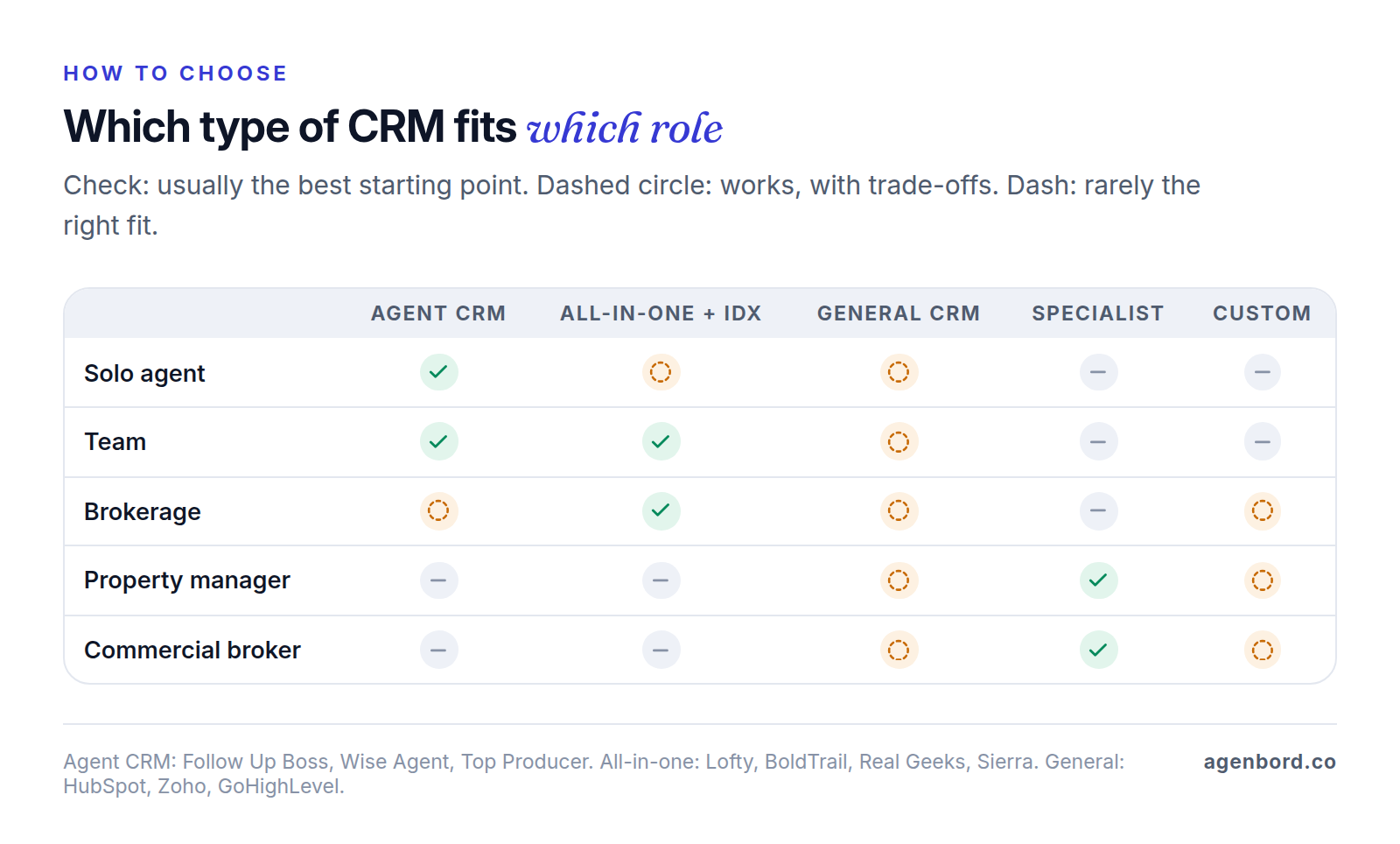
Solo agent
Prioritize sphere follow-up, a mobile app you'll actually open, and price. Wise Agent and Follow Up Boss's Grow plan are simple starting points; Top Producer fits if you farm a neighborhood. If you buy portal leads or run ads, instant response to your phone is non-negotiable. An all-in-one platform makes sense when your own website is a real lead source.
Team
Routing and accountability matter most: who got which lead, how fast they called, and what happens to leads nobody works. Follow Up Boss Pro includes 10 users for $499 a month; Sierra Interactive, Lofty and Real Geeks add an IDX website, and Lofty and Real Geeks sell lead generation. In the trial, check the reports your team lead will use weekly: response time by agent and closings by source.
Brokerage
Brokerages buy for adoption across many independent agents, plus things teams don't need: recruiting, company-wide reporting, commission tracking and clear rules on who keeps a contact when an agent leaves. BoldTrail with BackOffice and Lofty's Broker and Enterprise tiers (Enterprise adds single sign-on and a customizable org structure) target this buyer, and Follow Up Boss Platform includes 30 users.
Property manager
You run two pipelines: rental prospects, and property owners you want to sign to management agreements. Your property management software may cover the first: Buildium lists a prospect pipeline, tour scheduling, online leasing and owner and resident portals among its plan features, and AppFolio offers a Leasing CRM on its Max plan. For owner acquisition, a general CRM is often enough. If you also run a brokerage, decide early where each person's single record lives: owners you manage for are natural listing leads when they decide to sell.
Commercial broker
Commercial deals run long and involve many parties, and the records that matter are properties, owners, tenants, comps and lease dates as much as contacts. Residential CRMs aren't built for that. A commercial real estate CRM such as Buildout (from $125 per user per month, and owner of the Apto CRM since 2022) combines contacts, properties and comps with marketing materials and transaction tracking. Some firms customize Salesforce or HubSpot instead.
Investors and wholesalers have their own category: investor CRMs such as REsimpli center on finding motivated sellers (list stacking, skip tracing, direct mail) rather than on showings and portal leads.
When a custom real estate CRM makes sense
We build custom CRMs, and we still tell most agents and teams to buy one. A custom build earns its cost when the business itself doesn't fit the products:
- Routing no product can express. For example, routing by language, by new-development project and by ISA availability, with different rules for each lead source.
- Owner and investor portals. Owners who want statements, documents, showing feedback and offers in one login; investors who want deal updates without emailing your team. That's a client portal build connected to your CRM; our client portal software guide covers buying one first.
- Property management and brokerage data in one place. The same person can be a tenant, an owner you manage for, a seller and a buyer. When the two systems don't share records, nobody sees the whole relationship.
- Channels your clients prefer. If many of your buyers would rather message on WhatsApp, those conversations should be logged on the contact like any other, through the official WhatsApp Business Platform; our WhatsApp Business API guide explains approval and the US rules.
Price alone rarely justifies custom. A hypothetical 60-agent brokerage on Follow Up Boss Platform would pay $1,600 a month on monthly billing ($1,000 for 30 users plus 30 more at $20), or about $19,200 a year. Our custom CRM builds start around $12k for a focused v1 (6–10 weeks); a CRM with portals and integrations typically runs $30k–$75k, and multi-team platforms $75k+, delivered in phases. Add hosting (typically $50–$300 a month for a small team) and maintenance of roughly 15–20% of the build cost a year. Custom wins on fit and data ownership, and sometimes on multi-year cost at a large headcount; it rarely wins in year one. The custom CRM cost guide and our build-vs-buy framework walk through the math.
Often the best answer is hybrid: keep the real estate CRM your agents like and build only the piece it can't do, such as an owner portal, a routing service or a sync with your property management system. We work to a fixed price with a written scope and weekly demos, and you own the code. See what we build for brokerages and property managers on our real estate software page.
Questions to ask in every real estate CRM demo
- If we send a test lead from our own portal account and website, how long until the text goes out and an agent is alerted?
- Can routing do what we do today (by listing, ZIP code, price, language or shift), and what happens to unclaimed leads?
- Where is texting consent stored, and does one opt-out stop every automation and every agent?
- Who handles 10DLC registration, and what do texting and calling cost per user or per message?
- Which MLS feeds are included, and what do extra feeds cost?
- What is our total first-year cost at our headcount: users, setup, add-ons, dialer, texting and IDX feeds?
- Can an agent claim, call, text and log a lead from the mobile app in under a minute?
- Which report shows closings and commission by lead source?
- Can we export every contact, note and activity in a usable format if we leave?
Sources
- Follow Up Boss - Pricing (accessed October 2026)
- Follow Up Boss - Lead distribution features (accessed October 2026)
- Follow Up Boss Help Center - First to Claim (accessed October 2026)
- Lofty - Pricing (accessed October 2026)
- BoldTrail - kvCORE vs BoldTrail (accessed October 2026)
- BoldTrail - Platform overview (accessed October 2026)
- Wise Agent - Pricing (accessed October 2026)
- Real Geeks - Pricing (accessed October 2026)
- Sierra Interactive - Pricing (accessed October 2026)
- Top Producer - Pricing (accessed October 2026)
- HubSpot - Free CRM (accessed October 2026)
- Zoho - Zoho CRM pricing (accessed October 2026)
- HighLevel - Pricing (accessed October 2026)
- Buildout - Pricing (accessed October 2026)
- Buildout - Buildout announces acquisition of Apto (accessed October 2026)
- Buildium - Pricing (accessed October 2026)
- AppFolio - Pricing (accessed October 2026)
- REsimpli - Pricing (accessed October 2026)
- eCFR - 47 CFR 64.1200, Delivery restrictions (accessed October 2026)
- CTIA - Messaging Principles and Best Practices, May 2023 (accessed October 2026)
- The Campaign Registry - FAQ (accessed October 2026)
- Twilio Support - Shutdown of unregistered 10DLC messaging (accessed October 2026)
- FTC - CAN-SPAM Act: A Compliance Guide for Business (accessed October 2026)
- National Association of REALTORS - Internet Data Exchange (IDX) policy (accessed October 2026)
- RESO - RESO Web API (accessed October 2026)
- dotloop - Real estate transaction management (accessed October 2026)
- SkySlope - Home (accessed October 2026)
Prices, plans and regulations change. Figures were checked on October 1, 2026; follow the links for the latest. Nothing here is legal, tax or financial advice.
About the author
Founder, Agenbord
Muhammad Hamza is the founder of Agenbord, the Fort Lauderdale software company behind the construction ERP Smart Construction and a WhatsApp-first billing platform. He writes practical guides on buying, building and automating business software.