On this page
- What is real estate transaction management?
- The transaction lifecycle, from listing to closed file
- What should transaction management software do for a brokerage?
- How long brokers must keep transaction records
- Real estate transaction management software compared (October 2026)
- How to choose by brokerage size and role
- Switching platforms without losing files
- When custom software makes sense
- Questions to ask in every demo
Real estate transaction management software gives every deal one digital file: the contract and every addendum, the disclosures each type of transaction requires, e-signatures, the contract's deadlines as dated tasks, and a broker's review before anyone is paid. When a deal closes, falls apart or gets audited years later, the file is complete and findable.
If your deals live in email threads, a shared drive and a spreadsheet of dates, you know where that breaks: a missing initial found the week of closing, an inspection deadline nobody owned, a commission paid on a file that was never finished.
Most brokerages should buy this software, not build it. As of October 2026, published prices run from free (dotloop, up to 10 transactions) to several hundred dollars a month, and the established platforms cover the core well. The choice depends on who does the work (agents, coordinators or a compliance desk), your state's forms and record rules, and whether commissions belong in the same system. We build custom software, so we'll also say where the products stop.
What is real estate transaction management?
Real estate transaction management is the work of moving a deal from a signed agreement to a closed, complete file: collecting and signing documents, tracking contract dates, keeping the lender, title or escrow company, inspector and other agent on schedule, getting the broker's approval, and archiving the record. On a typical deal, four roles touch it: the agent, often a transaction coordinator (TC, an in-house or freelance specialist who runs paperwork and dates), a broker or compliance reviewer, and whoever handles commissions.
Software for the job comes in overlapping types, and many products cover several rows:
| Tool type | What it handles | Examples |
|---|---|---|
| Forms and e-signature | State or association contract forms, signing, audit trail | DocuSign, Lone Wolf's Authentisign, SkySlope DigiSign |
| Transaction management | One file per deal, checklists, broker review, deadlines, storage | SkySlope, dotloop, Lone Wolf Transact, Paperless Pipeline |
| Coordinator workspace | Task automation, email templates, client and agent updates | Open to Close, Folio |
| Back office | Commission plans, CDAs, agent payouts and billing, accounting | BoldTrail BackOffice, SkySlope Books, Paperless Pipeline's commission module |
| CRM | Leads, follow-up and past clients | Follow Up Boss and others in our real estate CRM guide |
The CRM owns the relationship before and after the deal; transaction management owns the deal itself. The handoffs, a new contract and a closing, are where integrations matter.
The transaction lifecycle, from listing to closed file
Every residential deal moves through the same stages, whatever your state calls its forms:
| Stage | What happens | What the software should do |
|---|---|---|
| Representation | Listing agreement signed, or a written buyer agreement before the first showing | Open the file with parties, property, side and type; generate the checklist |
| Marketing and offers | Listing goes live; offers and counteroffers go back and forth | Keep every offer, including rejected ones; share disclosures with buyers' agents |
| Under contract | Final acceptance sets the effective date | Store the executed contract; compute every deadline; send it to title or escrow and the lender |
| Contingency period | Earnest money, inspection, repairs, appraisal, financing, title and HOA review | Give each deadline an owner; recalculate when an amendment changes a date |
| Clear to close | Walk-through, closing statement, commission paperwork | Final broker review; generate the commission disbursement authorization (CDA) |
| Closed or terminated | Funds disbursed, or the deal is released | Lock the file, start the retention clock, hand the client back to the CRM |
The buyer agreement row is newer than many brokerage checklists. Since August 17, 2024, under NAR's practice changes, many agents must have a written agreement with a buyer before touring a home with them, in person or virtually, and offers of compensation can no longer be published on the MLS. If your buyer-side checklist still starts at the contract, update it.
Deadlines: compute them, don't type them
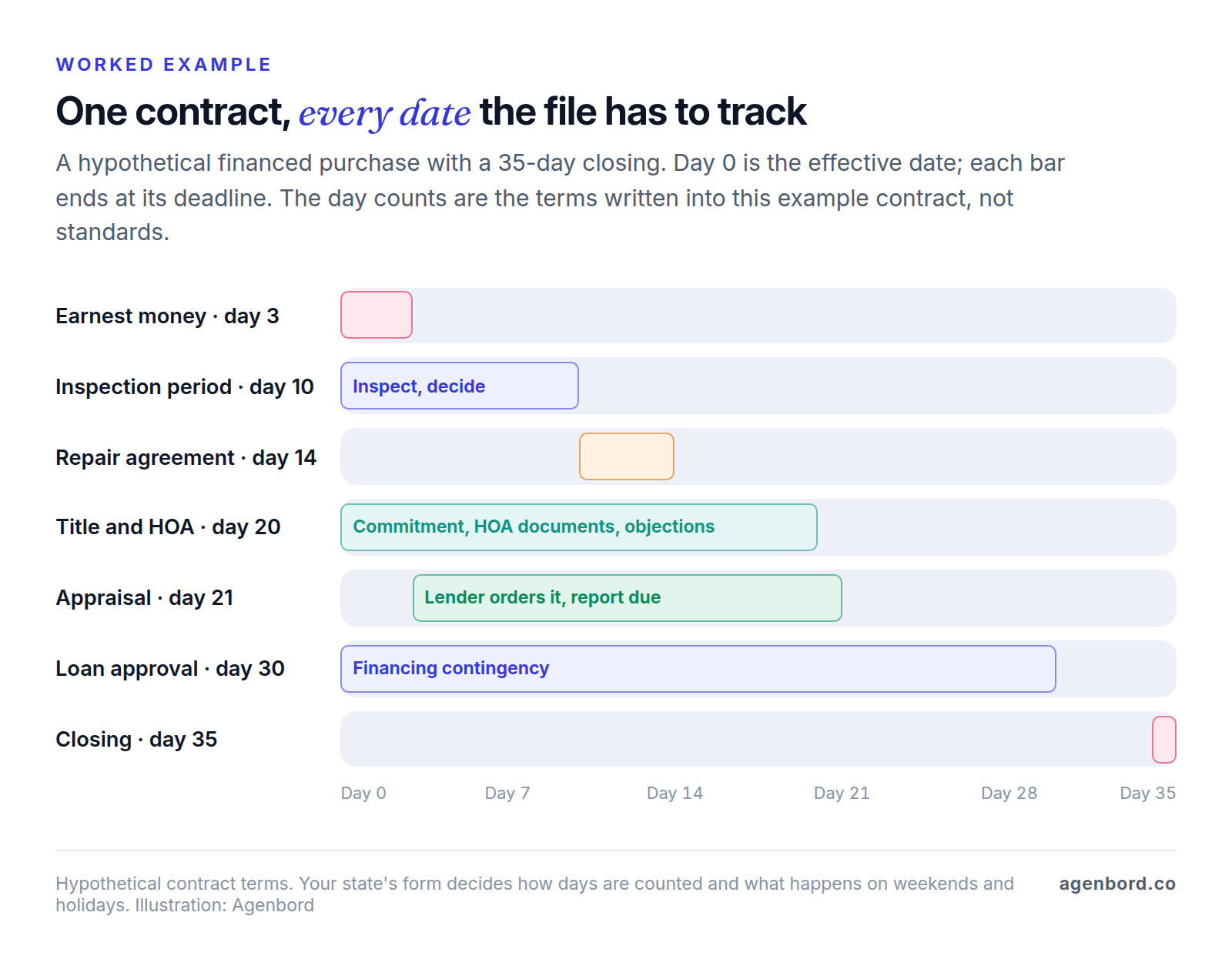
Most missed deadlines start as arithmetic. A contract's dates hang off its effective date, and your state's form decides how to count. Texas's current resale contract, TREC form 20-19, shows the details software has to get right:
- The effective date is the date of final acceptance, which the broker fills in.
- Earnest money and the option fee are due within 3 days after the effective date. If the last day falls on a Saturday, Sunday or legal holiday, it moves to the end of the next day that isn't one: on a contract that becomes effective on a Thursday, the deposit is due Monday, not Sunday.
- A buyer's notice to end the contract during the option period must be given by 5:00 p.m., local time where the property is located.
Other states' forms count differently, and many periods are negotiated deal by deal. So test a vendor's deadline engine with your own paperwork: enter an executed contract signed on the Thursday before a holiday weekend and check every date against what your best coordinator calculates by hand.
What should transaction management software do for a brokerage?
Beyond storing documents, six jobs separate a real transaction system from a shared drive.
Build checklists from the deal's data
A checklist is the list of documents a file needs before it's complete. Good platforms build it from the deal's own fields (side, transaction type, year built, HOA, financing, location) instead of one master list. Paperless Pipeline, for example, branches checklists by deal type, side, location or stage, and anchors due dates to the listing, acceptance, option, contingency or closing date.
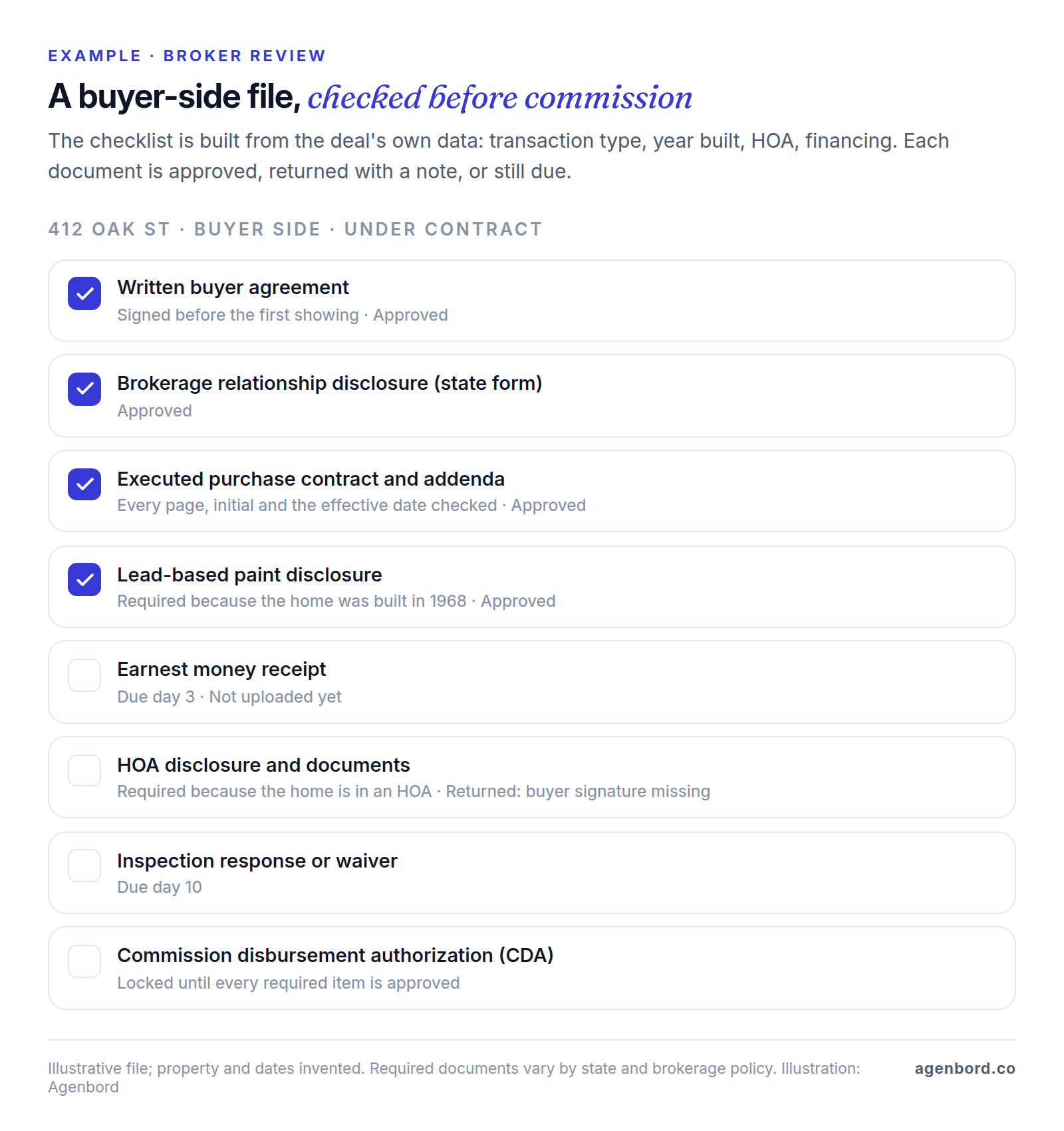
Conditional items are where this pays off. For housing built before 1978, the federal lead-based paint rule requires sellers and landlords to give buyers and renters EPA's pamphlet plus any known information and records, gives buyers a 10-day period for a lead paint inspection or risk assessment (the parties can change it in writing), and requires a signed copy of the disclosure to be kept for three years after the sale or the start of the lease. A file for a 1968 home should demand that disclosure automatically; a file for a 2015 home shouldn't ask.
| Transaction type | Example checklist items (your state and policy decide the real list) |
|---|---|
| Listing (seller side) | Listing agreement, brokerage relationship disclosure, seller's property disclosure, lead paint disclosure if built before 1978, then the executed contract |
| Purchase (buyer side) | Written buyer agreement, relationship disclosure, executed contract and addenda, earnest money receipt, inspection response or waiver |
| Lease | Lease, deposit receipt, lead paint disclosure if built before 1978, move-in condition report |
| Referral only | Referral agreement, closing statement showing the fee |
| Terminated or expired | Termination or release, earnest money release, a note on what happened |
Review every file before commission
Broker review is the job email can't do. Agents or the TC upload documents into checklist slots; a reviewer checks signatures, initials, dates and page counts, confirms that names, address and price match across documents, then approves each item or returns it with a note. A good review queue shows files by status and age, flags missing required items before sign-off, and records who approved what and when.
The control that matters most is simple: no CDA until the file is complete. If the commission request can't be generated while a required item is open, agents finish their files without being chased.
Handle forms and e-signature
Platforms either include e-signature (dotloop Premium does), sell it as an add-on (SkySlope DigiSign; Lone Wolf's Authentisign costs extra) or connect to one (Open to Close integrates DocuSign; Paperless Pipeline works with DocuSign and Dropbox Sign). Under the federal ESIGN Act, a contract can't be denied legal effect solely because an electronic signature or record was used to form it; state law and the exceptions are covered in our document automation guide.
Forms are a separate question. Purchase contracts and disclosures are usually your state association's or real estate commission's forms, often licensed through an MLS or association: dotloop lists more than 190 MLS and association forms partnerships, and Lone Wolf Transact includes a forms library by region. Ask whether your forms are included and who updates them when they change.
Pass the closing to the back office
When a file closes, money moves: the commission arrives from the closing agent, and each agent's share depends on their plan (splits, caps, transaction fees, referral fees). Paperless Pipeline's commission module covers splits, caps, fees and agent net statements and generates the CDA. BoldTrail BackOffice handles unlimited commission plans with sliding scales, next-day ACH payouts to agents, ledgers per agent and transaction, and a QuickBooks integration. SkySlope sells Books, its accounting and commission disbursement product, as an add-on. If commissions live in a spreadsheet today, decide whether they move into the same system; that choice narrows the shortlist fast.
Connect to the CRM, MLS and accounting
Pulling listing details from the MLS saves retyping; sending contract and closing dates back to the CRM keeps past-client follow-up on schedule; posting commissions and fees to accounting saves a second entry. Native connectors vary widely: dotloop lists 75+ integrations, Open to Close lists Follow Up Boss, Stripe, DocuSign, dotloop, SkySlope and Brokermint, and Paperless Pipeline reaches 1,500+ apps through Zapier. Where no connector exists, workflow automation usually fills the gap without custom code.
Keep deal communication in the file
Folio files deal emails and attachments into folders inside Gmail or Outlook and builds closing timelines you can share; Open to Close adds agent and client portals. Whatever you use, keep wiring instructions out of it: they should come from the title or escrow company through its own secure channel, and clients should hear from you at the start of every deal that you will never email a change to them.
How long brokers must keep transaction records
This is general information, not legal advice; your state's real estate commission rules and your attorney have the final word. Two states show how much the rules differ:
| Florida | Texas | |
|---|---|---|
| Minimum period | 5 years | 4 years |
| Clock starts | When money is entrusted to the broker or, if none, when any party signs the listing, offer, lease or other agreement engaging the broker | At closing, termination of the contract or the end of the transaction |
| What's covered | All books, accounts and records of the brokerage business, plus brokerage relationship disclosures in deals that reach a written sales contract | Disclosures, commission agreements, substantive communications with the parties, offers and contracts with addenda, compensation receipts and disbursements, property management contracts, appraisals, BPOs and CMAs, sponsorship agreements |
| Format | At least one legible copy | A format readily available to the commission |
| Source | Fla. Stat. § 475.5015 | 22 Tex. Admin. Code § 535.2 |
Florida also extends the period for records that were part of litigation: at least 2 years after the case and any appeal end, and never less than 5 years in total. What these rules mean for your software:
- Keep dead deals. Florida's clock can start when an offer is signed, and Texas lists offers among the records to keep. Rejected offers, expired listings and terminated contracts belong in the system with the same care as closings.
- Communications count. Texas includes substantive communications with the parties. If agents negotiate repairs by personal text, the record sits on their phones, not in the file. Route deal messages through channels that land in the file, or have agents export them to it.
- Retention outlives your subscription. You may switch platforms inside a 4- or 5-year window. Before signing, get in writing how you export complete files (documents, signature certificates, activity history) and how long you can reach your data after canceling.
- Files belong to the brokerage. When an agent leaves, their closed and open files must stay in the brokerage's account.
Real estate transaction management software compared (October 2026)
There's no single best real estate transaction management software; the right one depends on who does the work and what you already pay for. Prices are list prices from each vendor's official site in October 2026. "Best fit" is our read.
| Platform | Best fit | Published price | Pricing basis | Worth knowing |
|---|---|---|---|---|
| dotloop | Agents who want forms, signing and files in one place | Free up to 10 transactions; Premium $34.99/month or $344/year; Teams and Business+ quote | Per agent; team and broker plans custom | Automated compliance workflows start on Teams; multi-office compliance and broker dashboard on Business+ |
| SkySlope | Brokerages wanting a broker dashboard and quick audits | Suite from $340/month | Not stated; no long-term contract | Forms, checklists and audit review included; DigiSign and Books are add-ons |
| Lone Wolf Transact | Brokers, MLSs and associations in the Lone Wolf ecosystem | Quote (demo) | Not published | Compliance checklists, forms library by region; Authentisign e-signature costs extra |
| BoldTrail BackOffice | Brokerages that want transactions and commissions together | Quote; three packages | Not published | Billed as the next generation of Brokermint; commission plans, next-day ACH payouts, QuickBooks |
| Paperless Pipeline | Compliance-focused brokerages | $69–$715/month; $127–$900 with commission module | New transactions a month; unlimited users | Month-to-month, free setup, 14-day trial |
| Open to Close | Transaction coordinators and teams | Grow $99, Pro $199, Scale $399 a month | 1 user included; $69 per extra user | Unlimited transactions; free agent and client portals; 30-day trial |
| Folio | Agents and TCs who work from their inbox | Free for 2 transactions at a time; Pro $29/month billed annually ($45 monthly) | Per account; team plans | Organizes deal email in Gmail and Outlook; not a compliance system |
| Buildout | Commercial brokerages | From $125 per user/month | Per user plus platform maintenance | Marketing, CRM and transaction management in one platform |
What the table doesn't show:
- dotloop is the easiest start for an individual agent; Premium adds unlimited transactions, task templates and a clause manager.
- SkySlope doesn't say what headcount or volume its starting price covers, so get a quote at your size with e-signature included.
- Lone Wolf Transact organizes deals around the client rather than the property, and its Deal Tracker links leads, transactions and back-office data with Lone Wolf Relationships. Check whether your MLS or association already provides it.
- Open to Close charges for automation depth: Pro and Scale add advanced and triggered automations, commission templates and more reports.
How much does transaction management software cost?
Prices only compare once you apply your own numbers, because the bases differ. Take a hypothetical brokerage with 20 agents, two office staff who run the files and about 18 new transactions a month:
- Paperless Pipeline: the "up to 25" tier is $190 a month, or $254 with the commission module, with every agent and staffer included.
- Open to Close: Grow with two staff users is $168 a month ($99 plus $69), with agents on the free agent portal; Pro is $268.
- dotloop: if every agent bought Premium, the office would spend $699.80 a month, or $6,880 a year on annual plans.
- SkySlope: from $340 a month, at whatever volume that covers.
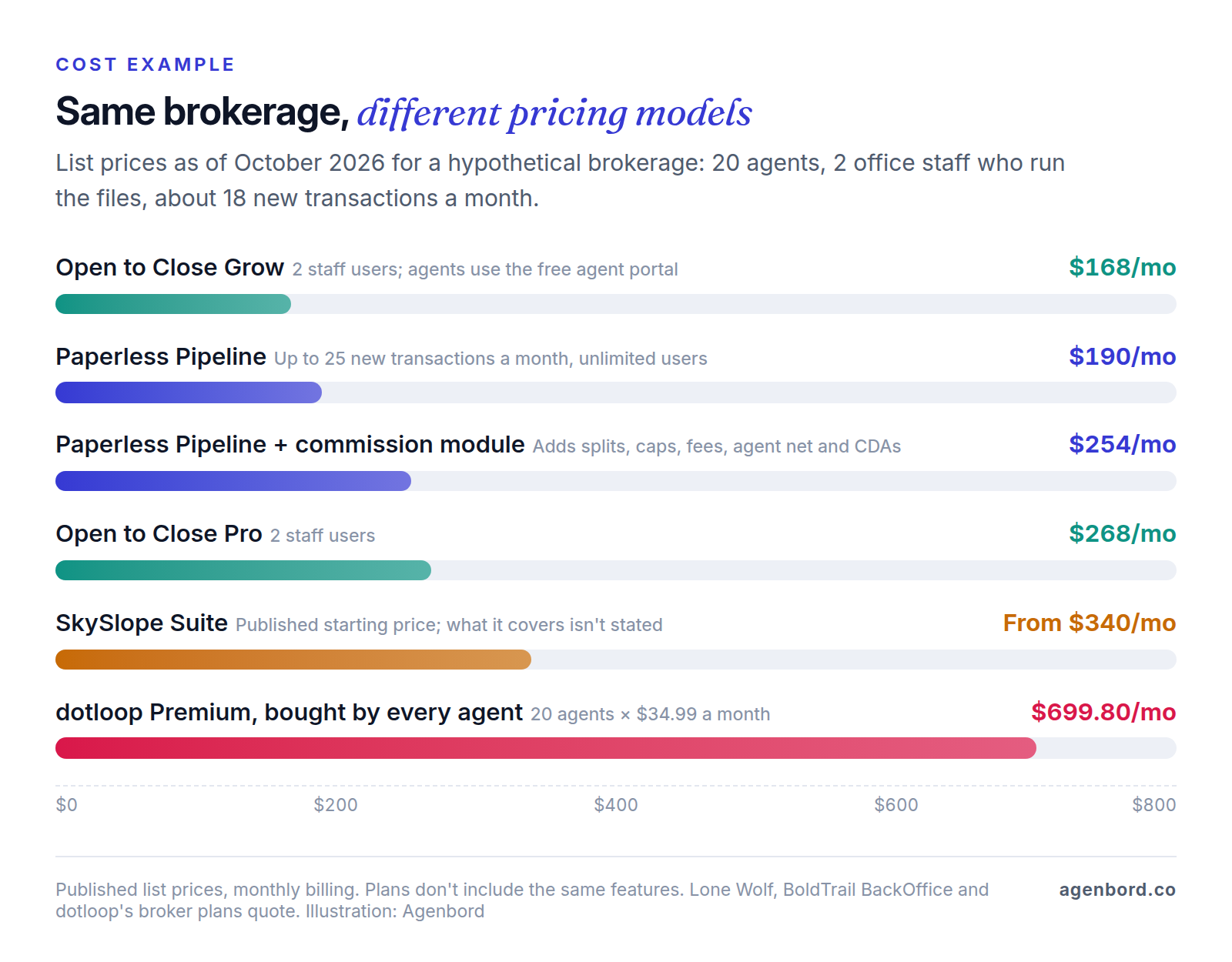
These plans don't buy the same things: Paperless Pipeline and SkySlope center on broker review, Open to Close on tasks and automation, dotloop Premium on the agent's own forms and signatures. Then add what price lists leave out: e-signature add-ons, extra users as staff grows, and the hours to build checklists and templates.
Commercial real estate transaction management software
Commercial deals stretch the same model: a letter of intent before the contract, longer due diligence, more parties, and leases where commission may be paid in installments, which turns one closed deal into receivables to track. A residential platform with configurable checklists can hold simple commercial files, but a commercial brokerage usually gets more from keeping transactions next to its property, comp and marketing records. Buildout is built that way: marketing, CRM and transaction management with deal tracking, commission automation and invoice management, from $125 per user per month plus platform maintenance.
How to choose by brokerage size and role
| You are | Shortlist | What decides it |
|---|---|---|
| Solo agent | Your brokerage's required platform; otherwise dotloop or Folio, free to start | Whether you need forms and e-signature in the same place |
| Transaction coordinator | Open to Close; Folio for a lighter setup | Templates per transaction type and state; access to each brokerage's platform |
| Team | dotloop for Teams, Open to Close, or the brokerage's platform | One checklist standard and visibility for the team lead |
| Small brokerage | SkySlope, Paperless Pipeline, dotloop Business+; BoldTrail BackOffice if commissions are manual | Review queue, cost at your volume, commission handling |
| Multi-office brokerage | dotloop Business+, SkySlope, Lone Wolf Transact, BoldTrail BackOffice | Multi-office compliance, cross-office reports, permissions, export |
| Commercial brokerage | Buildout; a configurable residential platform for simple files | Leases, installment commissions, property and comp data |
Two patterns help. Volume-based pricing suits offices with many part-time agents and few deals each; per-agent pricing suits fewer, busier agents. And when you read real estate transaction management software reviews, check the reviewer's role and date: an agent's complaint about clunky forms may really be about the association's forms library, and an older review may describe a product that has since been renamed or rebuilt, such as Brokermint, which is now sold as BoldTrail BackOffice.
Switching platforms without losing files
- Inventory. List open files, closed files still inside your retention window, checklists, templates and commission plans.
- Archive closed files. Export complete PDFs with signature certificates and activity history into storage you control, indexed by address and closing date. They need to be findable, not editable, so importing them into the new platform is optional.
- Rebuild checklists before go-live. This takes longest, and it's your chance to clean up: one checklist per transaction type and side, with conditional items.
- Pick a cutover date. New deals start in the new system from that day; open deals finish in the old one, so budget for overlap until your longest open deal closes.
- Connect and test. Hook up the CRM and accounting and run a few real files end to end, including a termination.
- Train by role: agents on upload and signing, reviewers on the queue, the office on commissions.
- Keep the old records reachable until the retention period on the last file runs out.
When custom software makes sense
Buy the platform. The products above are mature, and their vendors keep forms, e-signature and mobile apps current, work you'd otherwise pay for. Custom work earns its cost at the edges:
- Back-office or accounting sync your platform doesn't offer, such as closed-file and CDA data posting to your books. A single automated workflow starts from $1,500; a custom integration service from $15,000.
- Brokerage plus property management or new-development sales in one system, when the same person is a buyer, an owner and a tenant, or when reservations and deposits need tracking alongside contracts. A business platform typically runs $30,000–$80,000 over 2–4 months.
- A portal for clients or agents showing the closing timeline, tasks and documents in one login. A customer portal typically runs $25,000–$60,000 (8–14 weeks); our client portal software guide covers buying one first.
- Reporting across systems: pipeline, compliance status and commissions from the transaction platform, CRM and accounting in one dashboard, as an internal tool from $12,000.
Add hosting of roughly $50–$500 a month and maintenance of about 15–20% of the build cost per year. Our build-vs-buy framework walks through the decision, and our real estate software page shows what we build for brokerages and property managers. We price custom software as a fixed-price proposal with a written scope and weekly demos, and you own the code.
Questions to ask in every demo
- Will you build our checklists from our actual transaction types, with conditional items such as year built, HOA and financing?
- If we enter one of our executed contracts, does every deadline match our coordinator's calculation, including weekend and holiday rules?
- How does a reviewer approve or return a document, and how do we see files by status and age?
- Can the CDA or commission request be blocked until every required item is approved?
- Are our state and association forms included, and who updates them?
- Is e-signature included, an add-on or an integration?
- What's our total monthly cost at our headcount and volume, with every add-on we'd need?
- How do we export a complete file, and how long can we access our data after canceling?
- Which CRM and accounting integrations are native, and is there an API?
Sources
- dotloop - Pricing (accessed October 2026)
- SkySlope - Pricing (accessed October 2026)
- Lone Wolf - Transact (accessed October 2026)
- BoldTrail - BackOffice (accessed October 2026)
- BoldTrail - Compare BackOffice packages (accessed October 2026)
- Paperless Pipeline - Pricing (accessed October 2026)
- Paperless Pipeline - Features (accessed October 2026)
- Open to Close - Pricing (accessed October 2026)
- Open to Close - Home (accessed October 2026)
- Amitree - Folio plans (accessed October 2026)
- Amitree - Folio (accessed October 2026)
- Buildout - Pricing (accessed October 2026)
- Florida Legislature - Section 475.5015, Brokerage business records (accessed October 2026)
- Cornell LII - 22 Tex. Admin. Code § 535.2, Broker Responsibility (accessed October 2026)
- Texas Real Estate Commission - One to Four Family Residential Contract (Resale), form 20-19 (accessed October 2026)
- Texas Real Estate Commission - Form 20-19 PDF (accessed October 2026)
- EPA - Real Estate Disclosures about Potential Lead Hazards (accessed October 2026)
- National Association of REALTORS - Consumer guide: Written buyer agreements (accessed October 2026)
- National Association of REALTORS - NAR settlement FAQs (accessed October 2026)
- Cornell LII - 15 U.S.C. § 7001, ESIGN Act general rule of validity (accessed October 2026)
Prices, plans and regulations change. Figures were checked on October 2, 2026; follow the links for the latest. Nothing here is legal, tax or financial advice.
About the author
Founder, Agenbord
Muhammad Hamza is the founder of Agenbord, the Fort Lauderdale software company behind the construction ERP Smart Construction and a WhatsApp-first billing platform. He writes practical guides on buying, building and automating business software.