
On this page
- What is document automation?
- Document generation: templates, data and clause libraries
- Intelligent document processing: getting data out of incoming documents
- Document workflow automation: approvals, signatures, filing and retention
- Are e-signatures legally binding? ESIGN, UETA and the exceptions
- Document automation software: tools and prices (October 2026)
- Where document automation pays off
- How to design and govern templates
- When a custom integration pays off
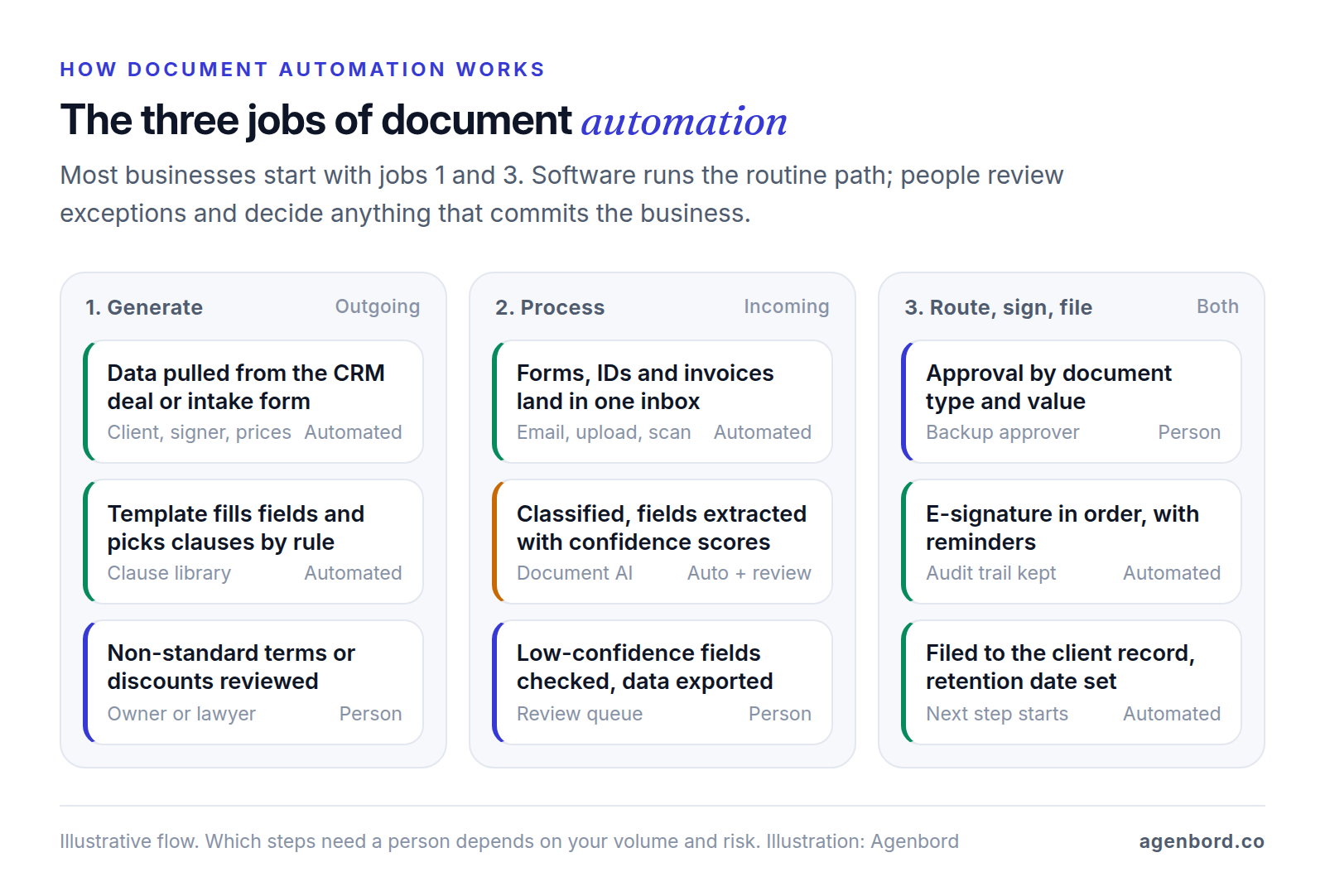
If your team builds every proposal by copying the last one, retypes client details into contracts and keys data off forms that arrive by email, document automation is the fix. It means software doing three related jobs:
- Generation: templates plus your data (CRM fields, form answers) produce proposals, contracts, engagement letters and HR letters.
- Processing: software reads documents that arrive, such as forms, IDs and invoices, and extracts their data for a person to check.
- Workflow: documents move through approval, e-signature, filing and retention by rules, not reminders.
Which do you need first? If the pain is producing documents, start with generation plus e-signature: the tools are mature and priced per seat, from $19 to $49 a month for PandaDoc's paid plans as of October 2026, billed annually. If the pain is typing data off paperwork that arrives, start with processing, and let your page volume decide between a packaged tool and a custom pipeline. Workflow comes with either.
What is document automation?
Document automation is software that creates, reads and moves business documents by rules you set, with people reviewing the exceptions. In practice the three jobs link up: a proposal is generated from a CRM deal and signed, the new client's onboarding forms are processed into your systems, and every final document is filed with a retention date.
Two terms you'll see in vendor material:
- Document workflow automation is the third job on its own: routing a document to the right reviewers, collecting approvals and signatures in order, filing the final version and setting how long it's kept. It's the answer when your documents already exist and the delay is getting them approved and signed.
- Intelligent document automation usually means adding AI, either to read unstructured documents (the processing job, also called intelligent document processing, or IDP) or to draft text with a language model. Both need a review step, covered below.
Document generation: templates, data and clause libraries
Generation, also called document assembly, replaces copy-the-last-one drafting. A template holds the fixed wording and placeholders, your data fills the placeholders, and rules decide which sections appear. Four building blocks do most of the work:
- Merge fields: client legal name, address, signer, prices and dates, pulled from a CRM record, an intake form or a spreadsheet row.
- Conditional logic: sections that appear only when a condition is true, such as a deposit clause for projects over $25,000 or travel terms when the client buys on-site support.
- Repeating sections: one row per service, line item or property, however many there are.
- A clause library: approved versions of standard clauses (payment terms, limitation of liability, confidentiality) that templates pull in by reference, so one approved change reaches every template that uses the clause.
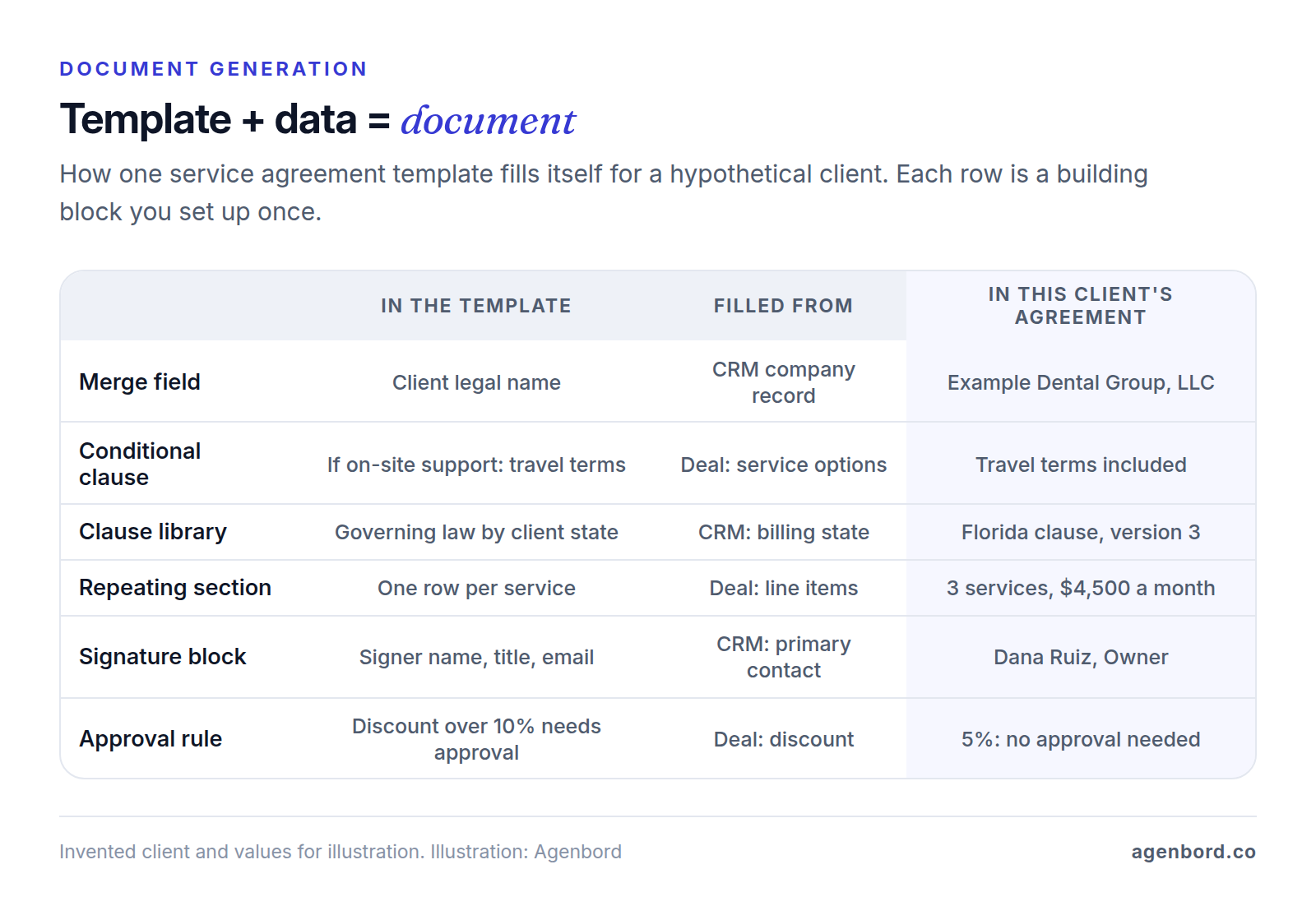
The output is a Word file or PDF, usually sent straight for signature. When generated documents go wrong, the cause is usually the data rather than the template: a CRM that holds the client's trading name instead of its legal name, or a deal with no signer email. If your CRM can't hold the fields your documents need, fix that first; it's often the real project.
Law firms use the same building blocks for legal document automation: an intake questionnaire decides which clauses and forms go into engagement letters, pleadings or estate planning documents, and a lawyer reviews the draft before it goes out.
Intelligent document processing: getting data out of incoming documents
Processing runs the other way. A document arrives (a W-9, a certificate of insurance, a driver's license, an application, a supplier invoice) and its data has to get into your systems. Intelligent document processing handles it in five steps:
- Capture: one inbox or upload page for every document, with paper scanned into the same place.
- Classify: work out what each document is, so it reaches the right extraction model.
- Extract: read fields such as names, dates, amounts and ID numbers. Optical character recognition (OCR) only turns an image into text; IDP models return labeled fields, each with a confidence score.
- Validate and review: auto-accept fields that clear your confidence threshold and your own checks (totals add up, dates are valid, the name matches the customer record), and send the rest to a person.
- Export: write the approved data to your CRM, accounting or project system, and file the original with it.
Set thresholds by what a wrong field costs. Microsoft's guidance for Azure Document Intelligence is to target a confidence score of 80% or higher, close to 100% for sensitive cases such as financial or medical records, and to add a human review stage to critical workflows. For your own forms you train a custom model on labeled samples, and Microsoft suggests at least five samples of each variation, such as digital and scanned versions of the same form. Before you rely on any model, run 50–100 of your past documents through it and count the corrections.
List prices per 1,000 pages from the three big cloud providers, as of October 2026:
| Service | Plain text (OCR) | Prebuilt models | Forms and custom fields |
|---|---|---|---|
| Azure Document Intelligence, US East | $1.50 | $10 (invoices, receipts, IDs, W-2s and more) | $30 (custom extraction) |
| Google Cloud Document AI | $1.50 (Enterprise Document OCR) | $0.10 per document of up to 10 pages (invoice, expense and ID parsers) | $30 (Form Parser, Custom Extractor) |
| Amazon Textract, US West (Oregon) | $1.50 | $10 (invoices and receipts); $25 (IDs) | $50 (forms) |
Several of these rates drop above a million pages a month. Azure's free tier covers 500 pages a month, and Textract has a three-month free tier for new AWS customers. Watch Google's unit: its specialized parsers bill per document, so 2,000 one-page invoices cost $200 there against $20 on Azure's prebuilt model.
The page fees are small next to everything else. These are developer services, not apps: someone has to build the intake, validation rules, review screen and export, and someone on your team works the review queue. If your incoming documents are mostly supplier bills, accounts payable tools already include capture; our invoice automation guide covers them. If you run on Microsoft 365, AI Builder's document processing model can be trained on as few as five sample documents and used in Power Automate flows. For anything else, an AI automation pilot from $4,000 can test extraction on your own documents before you commit to a build.
Document workflow automation: approvals, signatures, filing and retention
Workflow automation moves each document through its life by rules:
- Route: reviewers picked by document type and value. A contract over $50,000 goes to the business owner; any edit to a locked clause goes to whoever owns that clause.
- Approve: approvals with deadlines and a named backup, recorded against the exact version approved.
- Sign: signing order, reminders, an expiry date, and identity checks where the risk justifies them. Every party gets the signed copy.
- File: the signed PDF and the platform's audit trail saved to the client, matter or project record under a consistent name, not left in an inbox.
- Retain: a retention period by document type, with deletion when it ends unless a legal hold applies.
- Start the next step: a signed proposal creates the project and the deposit invoice.
Most proposal and e-signature tools cover signing and simple routing. Filing, retention and the next step usually need a connection to wherever your records live. For document approvals mapped as a full process, with owners, exceptions and metrics, see example 15 in our business process automation examples.
Are e-signatures legally binding? ESIGN, UETA and the exceptions
For most business documents, yes. This is general information, not legal advice; ask a lawyer about anything unusual.
- The federal rule. Under the ESIGN Act, a signature, contract or other record can't be denied legal effect solely because it's electronic, and a contract can't be denied effect solely because an electronic signature or record was used to make it. It doesn't require anyone, apart from some government agencies, to agree to use or accept electronic records or signatures.
- Consumer notices. If a law requires you to give a consumer information in writing, you can deliver it electronically only after the consumer affirmatively consents. First they must get a clear and conspicuous statement of their right to paper copies, how to withdraw consent and the hardware and software needed, and they must consent electronically in a way that shows they can open the records.
- Retention. An electronic record meets a legal retention requirement if it accurately reflects the information and stays accessible to everyone entitled to it for the required period.
- State law. A state that enacts the Uniform Electronic Transactions Act (UETA), a model law approved in 1999 by the National Conference of Commissioners on Uniform State Laws, can modify or limit ESIGN's general rule (15 U.S.C. § 7002). Florida's version, section 668.50, applies only where the parties have agreed to do business electronically, which can be judged from context and conduct, and says an electronic signature satisfies a law that requires a signature. New York has its own Electronic Signatures and Records Act, which gives e-signatures the same force and effect as handwritten ones.
- Exceptions. ESIGN doesn't apply to wills, codicils and testamentary trusts; adoption, divorce and other family-law matters; most of the Uniform Commercial Code; court orders and official court documents; notices of utility shutoffs, of default, foreclosure or eviction involving a primary residence, of health or life insurance cancellations, and of product recalls that risk health or safety; or documents that must travel with hazardous materials.
In practice: e-sign proposals, contracts, engagement letters, HR letters and most business forms; keep each signed PDF with its audit trail; capture consent before sending consumers legally required notices electronically; and check anything on the exceptions list, or with its own formalities such as notarization or witnesses, before you automate it. A property manager, for example, can generally e-sign lease renewals but should check before sending eviction notices electronically.
Document automation software: tools and prices (October 2026)
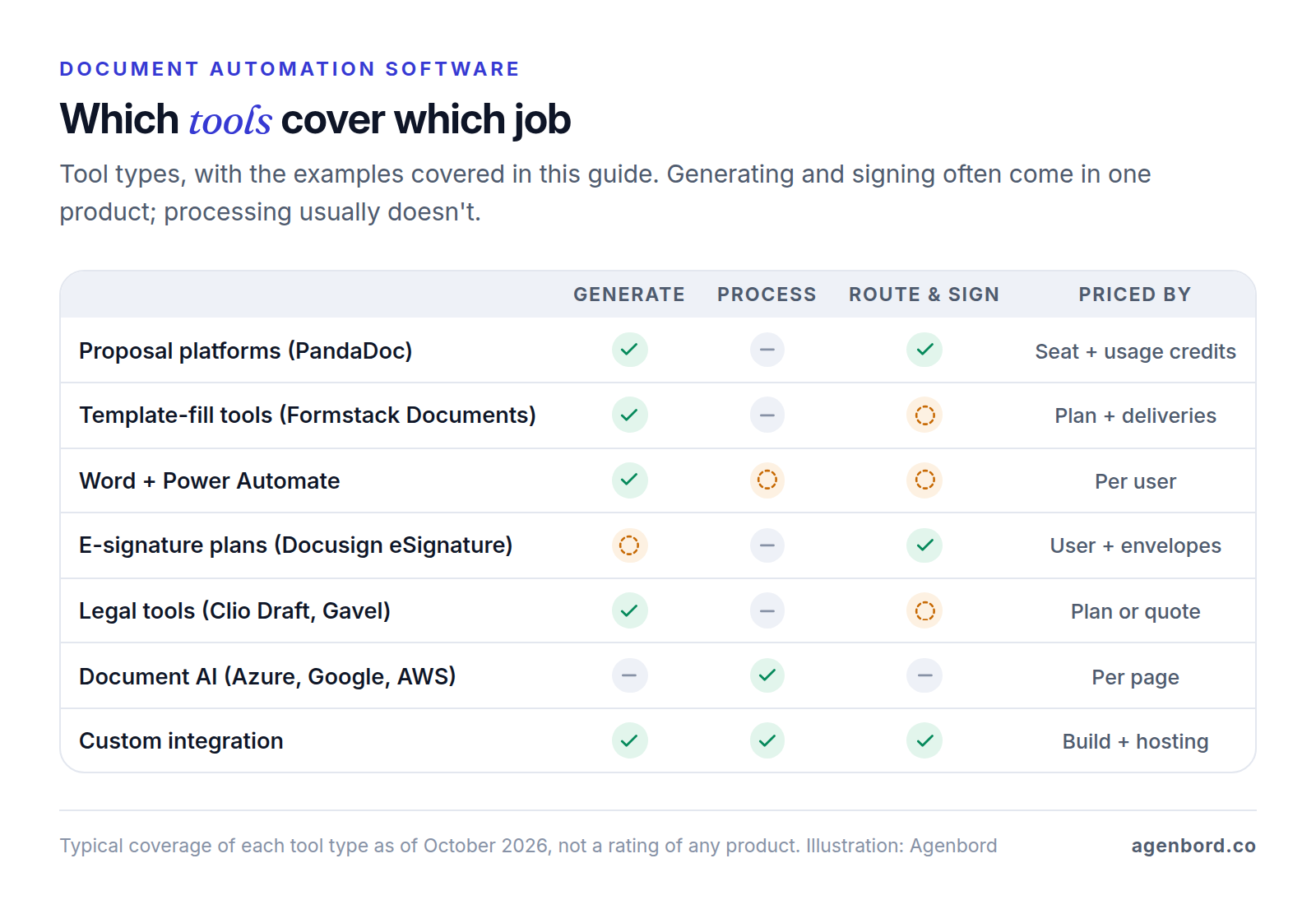
There's no single best document automation tool, because the three jobs need different software. Pick by job and by where your data already lives. Prices are list prices from each vendor's pricing page as of October 2026.
| Tool | Main job | Published price | Watch for |
|---|---|---|---|
| PandaDoc | Proposals, quotes and contracts from CRM deals, with e-signature | Free plan (5 documents a month, shared); Starter $19 and Business $49 per seat a month, billed annually; Enterprise quote-based | CRM integrations, content library and approval workflows need Business; documents created through the API, Zapier, Make, forms or bulk send use paid usage credits |
| Formstack Documents | Filling your own DOCX, PPTX, PDF or CSV templates from forms, CRMs or an API | Suite (Forms, Documents and Sign) from $250 a month paid annually, $299 monthly: 250 document deliveries a month, 3 builder users | Not sold on its own; Salesforce and Enterprise plans are quote-based |
| Word + Power Automate | Word templates filled from SharePoint lists, forms or other apps | Power Automate Premium $15 per user a month, paid yearly (the Word connector is premium) | Templates must live in OneDrive for Business or SharePoint; 10 MB file limit |
| Docusign eSignature | Signing, templates, web forms, bulk send | Personal $11 a month (5 envelopes a month); Standard $30 and Business Pro $45 per user a month on annual plans; Enhanced quote-based | 100 envelopes per user a year on Standard and Business Pro; web forms, payments and bulk send need Business Pro |
| Clio Draft | Legal document automation and court forms for firms on Clio | Quote-based | Clio's practice management plans include basic document templates from Core up |
| Gavel | Client questionnaires that produce Word and PDF documents, for law firms | From $83 a month (Lite: 1 builder, 10 workflows, Clio integration) | Plans cap workflows and monthly sessions; Docusign integration and Stripe payments start on Pro |
PandaDoc suits teams that sell from a CRM, with pricing tables, a content library and payment collection inside the proposal. Formstack Documents fits when you already have Word or PDF templates to fill from several sources, and its Salesforce plans generate documents from Salesforce data. Word plus Power Automate costs least for Microsoft 365 companies with simple templates, but the Word action supports only plain text, drop-down, combo box, image and repeating-section content controls, so complex clause logic gets awkward.
Docusign is built around signing: its standard plans send documents for signature, while generating documents from your data (Docusign calls it Agreement Preparation) belongs to its quote-based Intelligent Agreement Management platform. Law firms should start with the automation in their practice management system, such as Clio Draft for firms on Clio, and look at questionnaire tools like Gavel for client-facing intake that produces documents. Our page for law and accounting firms covers the portals and intake around them.
Where document automation pays off
Document automation pays off where three factors multiply:
- Volume: how many of a document you produce or receive each month, times the minutes each one takes.
- Variation: how much each copy differs. With none, a fillable PDF or a static template is enough. With moderate variation (services, prices, states, terms), templates with rules save the most. When every document is negotiated from scratch, automation only helps with the boilerplate.
- Error cost: what a mistake costs you: a re-sent proposal, a lost deal, a clause you can't enforce. A high error cost can justify automation at low volume, because the template locks the approved wording.
A worked example
Here's how a hypothetical 20-person IT services firm might score its documents:
| Document | Per month | Variation | Cost of an error | Verdict |
|---|---|---|---|---|
| Proposals | 30 | Medium: services, tiers, pricing | Medium: wrong price or scope | Automate first |
| Service agreements | 12 | Medium: state, term, liability cap | High: legal and payment terms | Automate, with locked clauses |
| Offer letters | 2 | Low | Medium | A Word template is enough |
| Vendor W-9s and insurance certificates | 25 | Low | Medium | Keep entering by hand |
Hours for the two it automates, plus follow-up and filing (the minutes are our assumptions; use your own):
| Task | Monthly assumptions | By hand | Automated |
|---|---|---|---|
| Proposals | 30 a month; 45 min copying and editing the last one, 15 min reviewing a generated draft | 22.5 h | 7.5 h |
| Service agreements | 12 a month; 40 min to assemble by hand, 10 min to review | 8.0 h | 2.0 h |
| Follow-up and filing | 42 documents; 10 min each chasing, filing and updating the CRM, 2 min each once reminders and filing run themselves | 7.0 h | 1.4 h |
| Template upkeep | Changes to templates and the clause library | – | 2.0 h |
| Total | 37.5 h | 12.9 h |
That's 24.6 hours a month back, worth $1,230 at an assumed loaded cost of $50 an hour. Four people who create documents on PandaDoc's Business plan cost $196 a month billed annually (documents created through its API or bulk send would also use paid usage credits), leaving $1,034 a month. Setting up the templates, clause library and CRM field mapping takes an assumed 30 hours ($1,500 at the same rate), paid back in under two months.
The service agreements save only six hours a month, but they carry the highest error cost, so locking the liability and payment clauses is the bigger win. Two offer letters a month take about 40 minutes, so a Word template with a few fields is enough. And at an assumed 4 minutes each by hand against 1.5 minutes to review extracted fields, processing 25 vendor forms would save about an hour a month, nowhere near the cost of building extraction and a review screen. Score again when volumes change.
Picking your first document
- List every document type you send or receive for a month, with counts, minutes each and the last mistake each caused.
- Score them on volume, variation and error cost, and pick one family, such as proposals.
- Fix the data it depends on before you build anything.
- Build one master template, then run it alongside the old way for two weeks, comparing every output.
- Add signing, filing and retention, then measure minutes per document, corrections and days from sent to signed.
How to design and govern templates
A template turns one person's mistake into every document's mistake, so treat templates like code: owned, versioned and tested.
- Validate data before generating. Make the fields a document depends on required in the CRM or form (legal entity name, state, signer name and email, prices), use drop-down lists instead of free text, and block generation when a value is missing or out of range, such as a discount above your limit.
- Keep one master template per document family. One proposal template with conditions beats 14 copies drifting apart, and consistent field names let one CRM mapping serve every template.
- Give every clause an owner. Salespeople choose among approved options but can't edit locked clauses; changes to liability, payment or confidentiality wording go to the owner or your lawyer, and a document with non-standard wording routes for approval.
- Version templates and clauses with numbers, effective dates and a short change log. Keep old versions: a dispute over last year's contract turns on the wording it used.
- Test every branch. Before publishing a change, generate a sample for each combination that matters (each state, fee type, with and without a deposit) and check it against the expected output.
- Keep the audit trail of who generated, edited, approved, sent and signed each document, stored with the signed PDF.
- Set retention by document type, with someone responsible for deletions. Tax rules are one input: the IRS says to keep records for 3 years in most cases, 7 years if you claim a loss from worthless securities or a bad debt deduction, and employment tax records for at least 4 years, and notes that insurers or creditors may require longer. Ask your lawyer how long to keep contracts.
AI drafting needs a reviewer
Language models can draft a scope of work, summarize a long contract or suggest a clause, and tools such as PandaDoc and Formstack now include AI features. They can also invent a term, drop a condition or restate a number wrongly, in fluent prose. Keep AI away from locked clauses, flag AI-written sections, and have a named person approve the document before it's sent; our guide to AI workflow automation covers validation and review patterns.
Law firms have a specific standard. ABA Formal Opinion 512 (July 2024) says lawyers using generative AI must consider their duties of competence, confidentiality, client communication and reasonable fees, which can mean getting a client's informed consent before entering their information into an AI tool.
When a custom integration pays off
Packaged tools are the right answer for most small businesses. A custom document automation solution, usually built around the tools you keep, pays off when:
- The data lives in several systems. A proposal needs contacts from the CRM, prices from an estimating spreadsheet and terms from the ERP, and no connector covers all three.
- The rules outgrow template logic: pricing calculations, clause sets by entity and state, or documents assembled from dozens of conditional parts.
- Incoming documents are your own and arrive in volume, such as application forms or field reports that need validation rules and a review screen.
- Documents are part of your product or operations. Clients complete a questionnaire in a portal and receive their documents, or documents come out of the system that runs the work.
- Seat pricing stops making sense, with dozens of occasional users each needing a seat to produce a document a month.
The fourth pattern is how Smart Construction, the construction ERP our team built, handles billing: progress billing with retention is a module of the ERP itself, alongside estimating and procurement, rather than a separate document tool.
Typical ranges for our business process automation work are from $1,500 for a single workflow (1–2 weeks), such as generating and sending one document type from your CRM, $6,000–$20,000 for a program of 5–15 workflows (3–8 weeks) and from $15,000 for a custom integration service (1–3 months). Processing your own documents can start with an AI pilot from $4,000 (2–4 weeks), and a production AI feature runs $15,000–$50,000. A client portal that collects answers and returns documents typically costs $25,000–$60,000 (8–14 weeks). Add hosting of roughly $50–$500 a month, maintenance of about 15–20% of the build cost a year, and AI usage billed per page or per token by the provider. We quote fixed prices with a written scope and weekly demos, and you own the code; our build vs. buy framework helps with the larger decision.
Sources
- PandaDoc - Pricing (accessed October 2026)
- Docusign - eSignature plans and pricing (accessed October 2026)
- Docusign - Agreement Preparation (accessed October 2026)
- Formstack - Pricing (accessed October 2026)
- Formstack - Documents (accessed October 2026)
- Microsoft Learn - Word Online (Business) connector reference (accessed October 2026)
- Microsoft - Power Automate pricing (accessed October 2026)
- Microsoft Support - Use mail merge for bulk email, letters, labels and envelopes (accessed October 2026)
- Microsoft Learn - AI Builder document processing overview (accessed October 2026)
- Clio - Pricing (accessed October 2026)
- Gavel - Pricing (accessed October 2026)
- Microsoft Azure - Azure Document Intelligence pricing (accessed October 2026)
- Microsoft Learn - Document Intelligence accuracy and confidence scores (accessed October 2026)
- Google Cloud - Document AI pricing (accessed October 2026)
- AWS - Amazon Textract pricing (accessed October 2026)
- Cornell Law School LII - 15 U.S. Code § 7001, General rule of validity (accessed October 2026)
- Cornell Law School LII - 15 U.S. Code § 7002, Exemption to preemption (accessed October 2026)
- Cornell Law School LII - 15 U.S. Code § 7003, Specific exceptions (accessed October 2026)
- Florida Legislature - Section 668.50, Uniform Electronic Transaction Act (accessed October 2026)
- New York State ITS - Electronic Signatures and Records Act (accessed October 2026)
- IRS - How long should I keep records? (accessed October 2026)
- American Bar Association - ABA issues first ethics guidance on a lawyer's use of AI tools (accessed October 2026)
Prices, plans and regulations change. Figures were checked on October 2, 2026; follow the links for the latest. Nothing here is legal, tax or financial advice.
About the author
Founder, Agenbord
Muhammad Hamza is the founder of Agenbord, the Fort Lauderdale software company behind the construction ERP Smart Construction and a WhatsApp-first billing platform. He writes practical guides on buying, building and automating business software.