
On this page
- Why small businesses look for HubSpot alternatives
- When staying on HubSpot is the right call
- HubSpot alternatives compared: prices, free plans and fit
- The 10 HubSpot alternatives, one by one
- Free and open-source HubSpot alternatives
- How to choose a HubSpot alternative
- When a custom CRM is the better long-term option
- Migrating off HubSpot: a checklist
HubSpot alternatives usually come up at one of two moments. Either the free plan runs out (it's capped at 2 users and 1,000 contacts), or the feature you need lives in Professional, where Sales Hub costs $90 per seat per month on annual billing plus a required $1,500 onboarding fee.
The short answer: for a sales-led team, Pipedrive, Zoho CRM and Freshsales do the core CRM job for $9–$39 per user per month billed annually. Close suits phone-heavy teams, Copper suits Google Workspace companies, Less Annoying CRM is the simplest, Attio suits startups, and Keap is the closest swap if HubSpot runs your marketing automation. Salesforce Starter makes sense if you expect to grow into Salesforce.
We checked every price below on the vendor's own site in October 2026. We build custom CRMs and will say when that's the better route, but for most small teams one of these ten does the job. And if HubSpot's marketing tools are what bring in your leads, staying put may be the cheapest move of all.
Why small businesses look for HubSpot alternatives
HubSpot publishes its prices, so none of this is hidden. The friction is in how the bill grows. These are list prices as of October 2026 from HubSpot's pricing pages and product catalog:
- You pay per seat. Paid features are priced per seat, so the bill grows with every user who needs them. View-only seats are free, which helps for owners and managers who only read reports.
- Professional is a big step up. Starter's catalog list price is $20 per seat per month, and in October 2026 HubSpot was advertising Starter from $7 for new customers as a limited-time offer. Sales Hub Professional is $90 per seat per month billed annually ($100 on monthly billing), plus a required one-time $1,500 onboarding fee. Enterprise is $150 per seat, with $3,500 onboarding.
- Marketing Hub is priced on contacts. Marketing Hub Professional starts at $800 a month with an annual commitment ($890 month to month). That includes 3 core seats and 2,000 marketing contacts, and onboarding is required at $3,000. Each extra block of 5,000 marketing contacts starts at $250 a month, and HubSpot's catalog says your contact tier can't be downgraded until your contract renews.
- The free plan has firm caps: 2 users and 1,000 contacts.
A hypothetical example shows how fast that moves. A six-person sales team on Starter at the $20 list price pays $1,440 a year. Move all six to Sales Hub Professional on annual billing and it's $6,480 a year plus the $1,500 onboarding fee: $7,980 in year one, before any Marketing Hub spend. If the team only needed Professional for one or two features, that's usually when the search for an alternative starts. For the costs beyond seats and a three-year comparison, see how much a CRM costs.
When staying on HubSpot is the right call
Switching has its own cost: exporting, cleaning and mapping data, rebuilding automations and retraining people. Stay on HubSpot if one of these describes you:
- HubSpot runs your marketing. If forms, email nurture, landing pages and attribution all live there, moving the CRM means buying a separate marketing tool and connecting the two. That often costs more than it saves.
- You're on Free or Starter and it works. The alternatives below won't save much at that level, and you'd still pay the switching cost.
- Most of your users only need to look. Keep paid seats for the people who edit and give everyone else free view-only seats.
- Your database is big but your mailing list isn't. Contacts you don't market to don't count toward Marketing Hub pricing (up to 15 million contacts in total), so reclassifying the ones you never email can cut the bill.
- You're mid-contract. You'll pay for the term either way. Plan now and time the move to your renewal date.
If only one thing hurts, such as a missing integration or a manual handoff to billing, fixing that gap with workflow automation is usually cheaper than a migration.
HubSpot alternatives compared: prices, free plans and fit
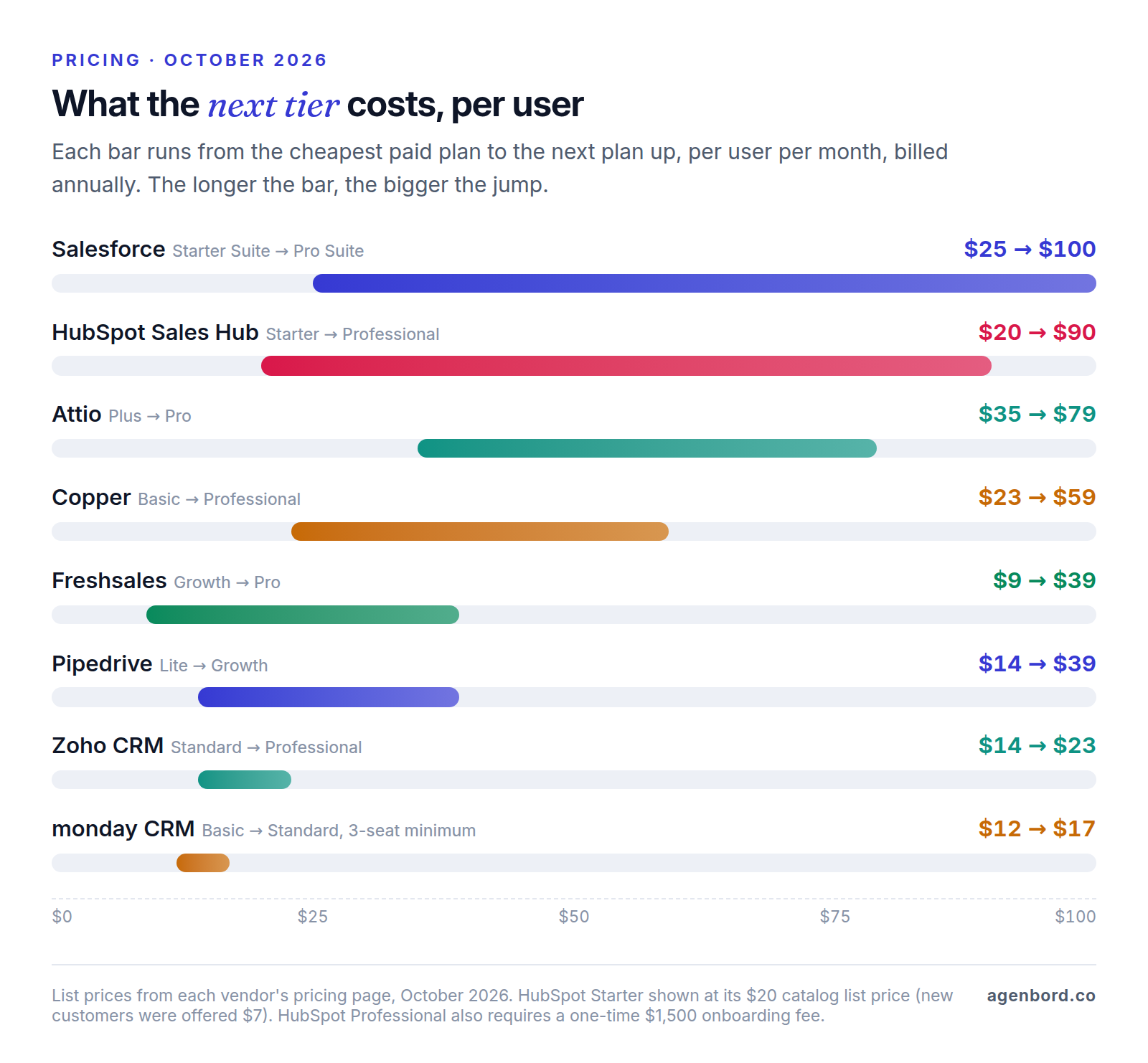
List prices per user per month as of October 2026, billed annually unless noted. Monthly billing costs more with most of these vendors.
| Alternative | Starting paid price | Free plan | Best for | Watch for |
|---|---|---|---|---|
| Pipedrive | $14 (Lite) | No, 14-day trial | Pipeline-driven sales | Email sync and automations start on Growth ($39) |
| Zoho CRM | $14 (Standard) | Yes, 3 users | Value with room to grow | Assignment rules start on Professional ($23) |
| Salesforce Starter Suite | $25, monthly or annual | No, free trial | Teams that may grow into Salesforce | Pro Suite is $100 on an annual contract |
| Freshsales | $9 (Growth) | No, 21-day trial | Lowest paid entry price | Sales sequences start on Pro ($39) |
| monday CRM | $12 (Basic) | No, 14-day trial | Teams already on monday.com | 3-seat minimum; Basic caps active contacts and deals at 1,000 |
| Copper | $23 (Basic) | No, free trial | Google Workspace teams | Basic caps contacts at 2,500 |
| Close | $35 (Essentials); Solo $9 for one user | No, 14-day trial | Phone-heavy inside sales | Calls and texts billed by usage |
| Less Annoying CRM | $15, billed monthly | No, 30-day trial | Simple follow-up, no tiers | No built-in email marketing or automation |
| Attio | $35 (Plus) | Yes, 3 seats | Startups that want a flexible data model | Plus is capped at 10 seats |
| Keap | $299 a month for 2 users, or $2,988 a year | No, free trial | Email and SMS marketing automation | Implementation required; price rises with contacts |
| HubSpot (for reference) | $20 Starter list price ($7 new-customer offer) | Yes, 2 users | Marketing-led teams | Professional adds required onboarding |
Entry plans are cheap almost everywhere, so the entry price is rarely the number that matters. Price the tier your team will need a year from now.
The 10 HubSpot alternatives, one by one
1. Pipedrive: best for pipeline-driven sales teams
- Price: Lite is $14 per seat per month billed annually. Growth, at $39, adds full email sync with tracking and automations. Pipedrive says annual billing saves up to 42%. No free plan; 14-day free trial with no card.
- Strengths: a clear visual deal pipeline that reps pick up quickly, 500+ integrations, and marketing tools (Campaigns, LeadBooster, Web Visitors) sold as add-ons, so you pay only for what you use.
- Limitations: most teams will need Growth for email sync and automations. The add-ons don't replace HubSpot's Marketing Hub.
- Moving from HubSpot: Pipedrive publishes a HubSpot migration guide: create custom fields first, then import organizations, people, deals, leads, activities and notes, in that order. Its setup team offers guided migration help.
2. Zoho CRM: best for value with room to grow
- Price: free for up to 3 users. Standard is $14 per user per month billed annually ($20 monthly); Professional is $23 ($35 monthly).
- Strengths: low prices at every tier, workflow rules even on the free edition, and sales forecasting from Standard.
- Limitations: assignment rules, which route new records to the right rep automatically, start on Professional. Expect more settings to work through than in the simpler tools here.
- Moving from HubSpot: Zoho has a built-in HubSpot migration that connects with a HubSpot private-app token and brings over contacts, companies, deals, tasks, meetings, calls, notes, products and quotes. It doesn't support custom modules, and you can undo or rerun it only three times, so test with a sample first.
3. Salesforce Starter Suite: best for teams that may grow into Salesforce
- Price: $25 per user per month, billed monthly or annually, with no user maximum and a free trial. Pro Suite is $100 per user per month, billed annually with a contract.
- Strengths: sales, service, email marketing and commerce tools in one starter product, on the same platform as Salesforce's larger editions. If you grow, you upgrade instead of migrating again.
- Limitations: the step to Pro Suite quadruples the per-user price and adds a contract. Heavily customized Salesforce setups usually need an admin, a cost we break down in custom CRM vs. Salesforce.
- Moving from HubSpot: Salesforce's Data Import Wizard handles common objects such as accounts, contacts and leads, up to 50,000 records at a time. Larger loads go through Data Loader.
4. Freshsales: best for the lowest paid entry price
- Price: Growth is $9 per user per month billed annually; Pro is $39 and Enterprise $59. Annual billing saves 20%. No free plan is listed on its pricing page; there's a 21-day trial.
- Strengths: Growth already includes chat, email and phone in the CRM, plus basic workflows and custom fields.
- Limitations: sales sequences, contact scoring and territory management start on Pro. The Freddy AI agent is billed separately, at $49 per 100 sessions.
- Moving from HubSpot: Freshsales has a HubSpot migration option for contacts, accounts and deals. Its help article warns that HubSpot's retirement of API keys affects importing engagement data such as tasks, notes and call logs, so confirm how your activity history will move before you commit.
5. monday CRM: best for teams already running work in monday.com
- Price: Basic is $12 per seat per month billed annually ($18 monthly); Standard is $17 ($25 monthly). Plans start at 3 seats. No free CRM plan; 14-day trial.
- Strengths: your pipeline sits next to the project boards your team already uses. Standard adds a shared timeline of emails, calls, meetings and notes.
- Limitations: the 3-seat minimum means a two-person team pays for three. Basic caps active contacts and deals at 1,000 and has no custom automations; Standard raises that to 10,000 and 250 automations a month.
- Moving from HubSpot: Excel or CSV import, plus a HubSpot integration that brings leads, contacts and companies into a leads board.
6. Copper: best for Google Workspace teams
- Price: Basic is $23 per seat per month billed annually ($29 monthly); Professional is $59 ($69 monthly). Free trial, no free plan.
- Strengths: it's built as a Google Workspace CRM, with Gmail, Google Calendar, Google Contacts and Google Drive sync on every plan, so reps work from their inbox.
- Limitations: Basic caps you at 2,500 contacts and Professional at 15,000. It's a weaker fit for companies on Microsoft 365.
- Moving from HubSpot: CSV-based. Copper's guide has you export from HubSpot and create custom fields in Copper for any HubSpot columns it doesn't have before you import.
7. Close: best for phone-heavy inside sales
- Price: Essentials is $35 per user per month billed annually ($49 monthly). Solo is $9 billed annually ($19 monthly) but limited to one user. 14-day trial, no free plan.
- Strengths: calling and SMS are built in, with usage passed through at cost. Close says most outbound calls cost around $0.02 a minute and numbers start at about $1 a month.
- Limitations: usage is billed on top of seats. Close requires every contact and opportunity to belong to a lead record, so HubSpot's contacts, companies and deals need re-mapping.
- Moving from HubSpot: a built-in importer, powered by Import2, connects to HubSpot. Close says there's usually no cost if you start it from inside Close. Run its sample import before the full one.
8. Less Annoying CRM: best for simple follow-up with no tiers
- Price: $15 per user per month, one plan, no contracts. 30-day free trial; no free plan.
- Strengths: everything is included: unlimited contacts, companies and pipelines, email logging and mobile access. Phone and email support is free, even during the trial.
- Limitations: its feature list doesn't include email marketing or workflow automation. It's for tracking relationships and follow-ups, not running complex sales processes.
- Moving from HubSpot: its team will run up to three imports for you at no charge, up to 30 minutes each. You prepare and clean the files.
9. Attio: best for startups that want a flexible data model
- Price: free for up to 3 seats, 50,000 records and 3 objects. Plus is $35 per seat per month billed annually ($44 monthly) for up to 10 seats; Pro is $79 ($99 monthly). There's a 14-day trial of Pro.
- Strengths: you shape the objects and records around your business instead of a fixed contact-company-deal model, and the free plan covers a founding team of three.
- Limitations: Plus stops at 10 seats, so a growing team moves to Pro at more than twice the price.
- Moving from HubSpot: free migration through Import2 from the Migrate button on any paid plan, covering companies, people, deals, custom objects, notes, tasks and files (not call recordings).
10. Keap: best for replacing HubSpot's marketing automation, not just the CRM
- Price: from $299 a month billed monthly, or $2,988 a year billed annually, including 2 users. Extra users are $39 a month each, and the price rises with your contact count. Implementation services are required and priced separately. Annual contracts carry a $299 early-termination fee.
- Strengths: CRM, email and text marketing, landing pages, funnels, appointments, invoices and payments, and automation in one product. The first texting tier includes 500 messages, 100 voice minutes and a toll-free number.
- Limitations: a much higher entry price than the sales CRMs above, plus required implementation.
- Moving from HubSpot: plan to rebuild campaigns and automations by hand, and ask whether data migration is part of the implementation package you're quoted.
Free and open-source HubSpot alternatives
Free plans
| Free plan | Users | Main limits |
|---|---|---|
| HubSpot Free | 2 | 1,000 contacts |
| Zoho CRM Free | 3 | Workflow rules included; no assignment rules |
| Attio Free | 3 seats | 50,000 records, 3 objects |
| Capsule Free | 2 | 250 contacts, 1 pipeline |
Pipedrive, Freshsales, monday CRM, Copper, Close, Less Annoying CRM, Keap and Salesforce offer trials, not free plans. A free plan is a fine place to start, but check what the first paid tier costs, because that's where you'll land.
Open-source and self-hosted options
Three are worth a look. All are licensed under AGPLv3 (Twenty keeps some enterprise features under a commercial license), so the software itself costs nothing:
- SuiteCRM: a PHP CRM maintained by SuiteCRM Ltd, which recommends running it on a Linux server with a LAMP stack. SuiteCRM Ltd sells managed hosting from £50 a month per instance (not per user), support at £1,200 for 10 hours, and a SuiteASSURED care package from £3,350 a year.
- EspoCRM: a PHP CRM that runs on PHP 8.3–8.5 with MySQL, MariaDB or PostgreSQL. Its own cloud plans start at $15 per user per month (3-user minimum, billed for 6 or 12 months) and include the Advanced Pack for reports, workflows and business process management. If you self-host, check which official extensions you'll need and their terms.
- Twenty: a newer open-source CRM you self-host with Docker Compose. The core is free; SSO and row-level permissions need its paid Organization plan. Its hosted Pro plan starts at $9 per user per month.
Free to license isn't free to run. With a self-hosted CRM, you take on:
- Hosting and backups: a server, a database, off-site backups and someone who checks that they restore.
- Updates: security patches and version upgrades, tested before they touch live data.
- Support: community forums, or a paid plan like SuiteCRM Ltd's.
- Integrations: fewer ready-made connectors, so email, calendar and accounting links often run through the API or an automation tool (our Zapier vs. Make vs. n8n comparison covers the self-hostable option).
Self-hosting makes sense when you have technical help in-house or a partner, many users who need light access, or data that must stay on servers you control. Otherwise a paid plan is usually cheaper once you count people's time.
How to choose a HubSpot alternative
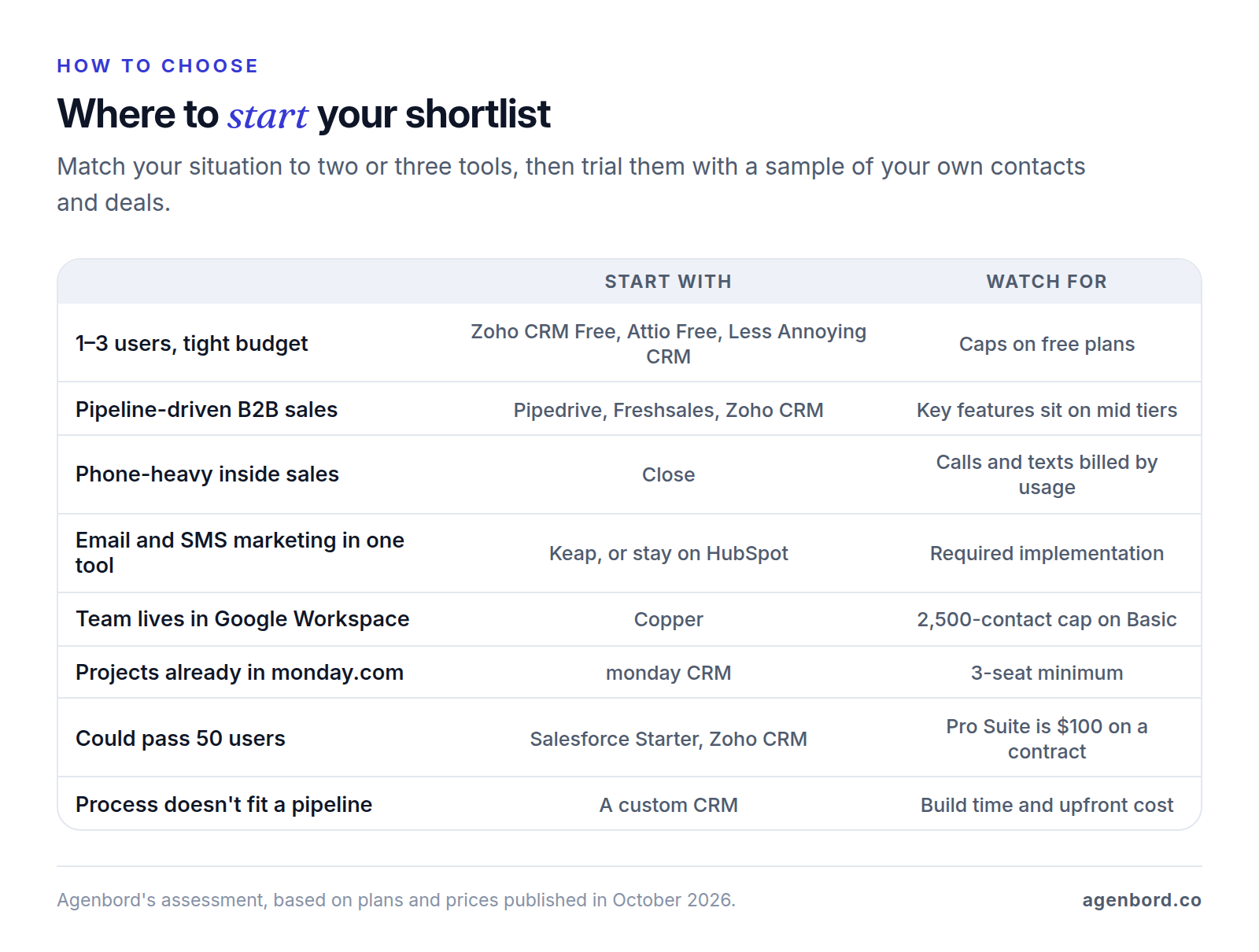
Start from how your team sells, not from feature lists. Four questions narrow the field fast.
Team size. With 1–3 people, start with a free plan (Zoho CRM, Attio) or Less Annoying CRM at $15 a user; monday CRM's 3-seat minimum makes it poor value at that size. With 4–20 people, look at Pipedrive Growth, Zoho CRM Standard or Professional, Freshsales, or Copper for Google Workspace teams, and price the tier you'll need, not the entry tier. Past 20 people or growing fast, Salesforce Starter and Zoho CRM have the longest upgrade paths, and a custom CRM is worth pricing if seat costs are the main problem.
Sales motion. A deal pipeline with stages fits Pipedrive, Freshsales or Zoho CRM. High-volume calling and texting fits Close. Relationship and account management from the inbox fits Copper (Gmail) or Less Annoying CRM. Unusual records, such as investors, partners or listings, fit Attio's custom objects. Real estate agents and teams usually do better with a CRM built for portal leads and listings; see our real estate CRM guide.
Marketing needs. If you use HubSpot mainly for email marketing and automation, a sales CRM won't replace it on its own. Your options are an all-in-one like Keap, Salesforce Starter's email campaigns, a sales CRM plus a separate email tool, or staying on HubSpot. Agencies and lead-gen-heavy local businesses often consider GoHighLevel too; we compare it with a custom build in GoHighLevel vs. a custom CRM and with nine other tools in our GoHighLevel alternatives guide.
Integrations. List the tools the CRM must talk to (email and calendar, phone, accounting, web forms, e-signature) and confirm each one in the vendor's integration directory, including which plan it needs. If you plan to connect your own systems, check which plans include API access; our CRM integration guide covers what to connect first and the sync rules that keep data clean.
When a custom CRM is the better long-term option
Every tool above asks your process to fit its model, and for most small teams that's fine. A custom CRM starts to make sense when two or more of these are true:
- Your process isn't a standard pipeline: quotes built from job specs, service contracts with renewals, or deals that hand off to operations and billing.
- Many people need a little access: field staff, operations and part-timers who update a record now and then, and would each need a paid seat on a per-user plan.
- The CRM has to drive operations: a signed quote should create a job, the job an invoice, and payments should update the account without re-typing.
- Customers talk to you on WhatsApp or SMS, and you want those conversations on the record with WhatsApp automation built around them.
We build custom CRMs on a fixed price with a written scope. A focused first version (contacts, companies, one or two pipelines, tasks, email logging, reporting and data import) typically starts at $12,000 and takes 6–10 weeks. A CRM with a client portal, quoting and integrations usually runs $30,000–$75,000, and multi-team systems $75,000+. There are no per-seat fees. Running costs are hosting, typically $50–$300 a month for a small team, and maintenance of about 15–20% of the build cost per year.
We won't repeat the full comparison here. Custom CRM vs. HubSpot covers fit and the hybrid route of keeping HubSpot and building around it, our custom CRM cost guide walks through the three-year math, and the build-vs-buy framework helps with the wider decision.
Migrating off HubSpot: a checklist
The usual trouble spots are activity history, field mapping, duplicates and automations nobody wrote down. Work through this list before you cancel anything.
- Inventory what you use. Objects, custom properties, pipelines and stages, users, workflows, forms, sequences, templates and integrations. Anything not on the list won't get moved.
- Export records with all properties and associations. HubSpot exports contacts, companies, deals, tickets and custom objects as CSV or Excel files. Pick the option that includes all properties and associations, and download promptly: export links expire after 30 days.
- Plan for activity history separately. A standard record export holds current property values, not emails, notes or calls, and not property history. If your email history matters, choose a vendor whose importer pulls activities or budget for an API-based migration.
- Map fields before importing. Create custom fields in the new CRM first, match picklist values and stage names, and map HubSpot owners to new users.
- Deduplicate first. Merge duplicate contacts and companies before the import, not after. Every duplicate you remove is one less record to fix by hand.
- Import a sample. Run a few hundred records, then check that contacts, companies and deals are still linked correctly.
- Rebuild automations on purpose. HubSpot exports workflows only as a spreadsheet and images, without their history, so each one gets rebuilt by hand. Drop the ones nobody needs, and repoint website forms and tracking at the new system.
- Run both systems in parallel. Work in the new CRM while HubSpot stays available for reference, and compare record counts and pipeline totals until they match.
- Time the cutover to your renewal. Contract terms and marketing contact tiers run to your renewal date, so plan the switch to land just before it.
Sources
- HubSpot - Sales Hub pricing (accessed October 2026)
- HubSpot - Marketing Hub pricing (accessed October 2026)
- HubSpot - CRM pricing, free plan and Starter offer (accessed October 2026)
- HubSpot - Product & Services Catalog (accessed October 2026)
- HubSpot Knowledge Base - Export records (accessed October 2026)
- HubSpot Knowledge Base - Export your content and data (accessed October 2026)
- Pipedrive - Pricing (accessed October 2026)
- Pipedrive Knowledge Base - HubSpot to Pipedrive migration (accessed October 2026)
- Zoho CRM - Edition comparison (accessed October 2026)
- Zoho CRM Help - Migrate data from HubSpot (accessed October 2026)
- Salesforce - Small business pricing (accessed October 2026)
- Salesforce Trailhead - Import data (accessed October 2026)
- Freshworks - Freshsales pricing (accessed October 2026)
- Freshworks Support - How to migrate from HubSpot (accessed October 2026)
- monday.com - monday CRM pricing (accessed October 2026)
- monday.com Support - How to import your leads (accessed October 2026)
- Copper - Pricing (accessed October 2026)
- Copper Support - How to migrate from HubSpot to Copper (accessed October 2026)
- Close - Pricing (accessed October 2026)
- Close Help - Migration from another CRM (accessed October 2026)
- Less Annoying CRM - Pricing (accessed October 2026)
- Less Annoying CRM - What's included when LACRM runs an import (accessed October 2026)
- Attio - Pricing (accessed October 2026)
- Attio Help - Migrate data from another CRM (accessed October 2026)
- Keap - Pricing (accessed October 2026)
- Capsule CRM - Pricing (accessed October 2026)
- SuiteCRM - Pricing (accessed October 2026)
- SuiteCRM-Core on GitHub - license and requirements (accessed October 2026)
- EspoCRM - Pricing (accessed October 2026)
- EspoCRM on GitHub - license and requirements (accessed October 2026)
- Twenty - Pricing (accessed October 2026)
- Twenty on GitHub - LICENSE (accessed October 2026)
Prices, plans and regulations change. Figures were checked on October 1, 2026; follow the links for the latest. Nothing here is legal, tax or financial advice.
About the author
Founder, Agenbord
Muhammad Hamza is the founder of Agenbord, the Fort Lauderdale software company behind the construction ERP Smart Construction and a WhatsApp-first billing platform. He writes practical guides on buying, building and automating business software.