On this page
- Why teams look for Salesforce alternatives
- When staying on Salesforce is the better call
- Salesforce alternatives compared
- The best Salesforce alternatives, one by one
- Free and open-source Salesforce alternatives
- What 15 users cost over three years
- Industry CRMs and custom builds
- Migrating off Salesforce: a checklist
Salesforce alternatives usually come up when the renewal quote lands. Salesforce's sales pricing page lists five editions, from Starter Suite at $25 per user per month to Max at $550, and everything above Starter is billed annually. On Core and Advanced, AI is an add-on, and the admin and partner time that keeps a customized org running never shows up on a pricing page.
The short answer: HubSpot Sales Hub is the closest all-round replacement, especially if marketing fills your pipeline. Zoho CRM gives you the most Salesforce-like depth for the money. Pipedrive and Freshsales are simpler and cheaper for small sales teams, Dynamics 365 Sales suits companies that run on Microsoft 365, SugarAI (formerly SugarCRM) targets mid-market teams, and SuiteCRM and Odoo are the open-source routes.
We checked every price below on the vendor's own site in October 2026 and priced the same hypothetical 15-person team across the main options. We build custom CRMs, so that option is in the comparison too, along with a plain list of who should stay on Salesforce.
Why teams look for Salesforce alternatives
The prices are public. The trouble is how they stack. Here's the sales lineup as of October 2026, per user per month:
| Edition | List price | Billing | What stands out |
|---|---|---|---|
| Starter Suite | $25 | Monthly or annually | Sales, service and email campaigns in one; no web services API |
| Pro Suite | $100 | Annually, contract required | Adds quoting and forecasting; the API is an add-on |
| Core | $195 | Annually | Includes Premier Success, Slack Business+ and Tableau Next |
| Advanced | $395 | Annually | Adds Backup & Recover, Archive, Data Detect and Security Center |
| Max | $550 | Annually | Adds Agentforce for Sales, Sales Planning and Salesforce Maps |
If your contract is on Enterprise or Unlimited, editions Salesforce's pricing pages mention without a price, your renewal quote is the baseline to compare against.
Four things push teams to look elsewhere:
- Steep steps between editions. Pro Suite costs four times Starter Suite and needs an annual contract. If you need the API to connect your own systems, Starter doesn't include it and Pro Suite sells it as an add-on.
- Extras on top of seats. Salesforce says AI can be added to Core and above, priced through a sales rep; its Agentforce pricing page lists sales add-ons at $125 per user per month, with usage billed in Flex Credits at $500 per 100,000. Premier Success, the plan with 24/7 support, costs 30% of net license fees on Starter and Pro Suite.
- Contracts that only move one way. Salesforce's Main Services Agreement says quantities can't be decreased during a subscription term, and subscriptions renew automatically for one-year terms unless either side gives written notice at least 30 days before the term ends. A renewal with fewer seats is re-priced without regard to your old per-unit price.
- The people around it. An org built up with flows, custom objects and AppExchange apps needs an admin, a consultant or a partner to keep it running. Before you compare tools, put a number on that: your admin's hours per week plus last year's partner invoices.
None of this makes Salesforce a bad product. It's a platform priced for teams that use a lot of it. If your team uses a fraction, you're paying for the rest.
When staying on Salesforce is the better call
Leaving has a price of its own: every field mapped, every automation and report rebuilt, every integration reconnected and every user retrained. Stay if one of these describes you:
- You run more than sales on it. If service, marketing or a customer portal share the same records, leaving means replacing or reconnecting all of them.
- Your process lives in code. Apex triggers, custom components and AppExchange packages don't move to another CRM. Each one becomes a feature, an app or new code somewhere else.
- You rely on its security and data tools. Backup, archiving and data detection are bundled from the Advanced edition up. Price the equivalents before you assume an alternative is cheaper.
- You're mid-contract. You'll pay for the term regardless, so aim the switch at your renewal date.
If price is the only problem, there are cheaper ways to stay:
- Drop an edition at renewal. Moving from Core to Pro Suite saves $95 per user per month at list price. Check which features you'd lose, and price the API add-on and Premier Success if you need them.
- Trim seats carefully. Remove inactive users at renewal, but get the new per-user price in writing first, since a smaller renewal can be re-priced.
- Fix the one gap that hurts. A manual handoff to billing or a missing integration is usually cheaper to solve with workflow automation than with a migration.
- Keep Salesforce for sales and build around it. Our custom CRM vs. Salesforce comparison covers this hybrid route, where a custom operations system or portal syncs with Salesforce instead of replacing it.
Salesforce alternatives compared
List prices per user per month, billed annually, as of October 2026. Monthly billing costs more with most of these vendors.
| Alternative | Price range | Free plan or trial | Best for | Watch for |
|---|---|---|---|---|
| HubSpot Sales Hub | $20 (Starter list) to $150 | Free CRM, 2 users | Marketing-led teams | Custom objects and sandboxes only on Enterprise |
| Zoho CRM | $14–$52 | Free, 3 users | Salesforce-style depth for less | Approvals and sandbox start on Enterprise ($40) |
| Pipedrive | $14–$79 | 14-day trial | Simple, pipeline-driven selling | Sandbox only on Ultimate ($79) |
| Freshsales | $9–$59 | 21-day trial | Lowest entry price | Custom modules and sandbox only on Enterprise ($59) |
| Dynamics 365 Sales | $65–$150 | Free trial | Microsoft 365 companies | Professional has limited customization |
| SugarAI (formerly SugarCRM) | $59–$135 | — | Mid-market sales teams | 15-user minimum |
| SuiteCRM | Free license | Free to self-host | No per-user fees | Hosting, updates and support are on you |
| Odoo | Free (one app) to $61 | One App Free | CRM and ERP in one system | External API only on the Custom plan |
| Salesforce (reference) | $25–$550 | 30-day trial | Large, customized orgs | Annual billing above Starter |
Entry prices rarely decide anything. A team that has customized Salesforce should compare the plan that matches what it uses, often a vendor's top tier.
The best Salesforce alternatives, one by one
For smaller teams, our HubSpot alternatives guide also reviews Copper, Close, Less Annoying CRM, Attio and others.
1. HubSpot Sales Hub: best all-round replacement
Price. HubSpot's free CRM covers 2 users and 1,000 contacts. Starter lists at $20 per seat per month, and in October 2026 HubSpot was offering it from $7 to new customers for a limited time. Professional is $90 per seat billed annually ($100 monthly) plus a required $1,500 onboarding fee. Enterprise is $150 per seat plus $3,500 onboarding.
Why teams pick it. Sales, marketing and service tools share one CRM, so leads from forms and campaigns arrive with their history. Professional adds forecasting, sequences and custom reports.
What you give up. Custom objects, sandboxes and field-level permissions are Enterprise-only. A Salesforce org built on custom objects lands on HubSpot's most expensive tier and its onboarding fee.
2. Zoho CRM: most Salesforce-like depth for the money
Price. Free for up to 3 users. Standard is $14 per user per month billed annually ($20 monthly), Professional $23 ($35), Enterprise $40 ($50) and Ultimate $52 ($65).
Why teams pick it. Enterprise covers much of what Salesforce teams customize: multi-team management, approval processes, custom buttons and functions, a developer sandbox and field-level encryption. Blueprint, Zoho's tool for guided multi-step processes, starts on Professional.
What you give up. Depth means settings, so budget admin time as you would for Salesforce, and find Zoho equivalents for any AppExchange apps you rely on.
Moving over. Zoho has a built-in Salesforce migration that takes the zipped CSV files from Salesforce's data export. It covers 18 standard modules, from users, leads and accounts to activities, notes, attachments and cases, plus custom objects, and you can undo a run from the import history. The Ultimate edition includes migration assistance and consulting.
3. Pipedrive: best for teams that want a simple pipeline
Price. Lite is $14 per seat per month billed annually, Growth $39, Premium $59 and Ultimate $79. Pipedrive says annual billing saves up to 42%, and its 14-day trial needs no card.
Why teams pick it. The deal pipeline is the center of the product. Growth adds full email sync, automations and forecast reports; Premium adds lead routing, scoring, contracts with e-signatures, formula fields and flexible permissions.
Watch for. A sandbox comes only with Ultimate, and email marketing (Campaigns) and website visitor tracking are paid add-ons. Pipedrive imports from spreadsheets or another CRM, but automations and reports get rebuilt by hand.
4. Freshsales: lowest entry price
Price. Growth is $9 per user per month billed annually, Pro $39 and Enterprise $59. Freshworks says annual billing saves 20%, and there's a 21-day trial.
Why teams pick it. Chat, email and phone are built into every plan. Pro adds sales sequences and territory management.
Watch for. Custom modules, a sandbox, audit logs and forecasting insights start on Enterprise, so compare a customized Salesforce org at $59, not $9. The Freddy AI agent is billed separately at $49 per 100 sessions.
5. Microsoft Dynamics 365 Sales: best for Microsoft 365 companies
Price. Sales Professional is $65 per user per month paid yearly, Sales Enterprise $105 and Sales Premium $150. Microsoft Relationship Sales, which pairs Sales Enterprise with LinkedIn Sales Navigator, has variable pricing and a 10-seat minimum. There's a free trial.
Why teams pick it. It works with Outlook and Teams. Enterprise adds custom apps, conversation intelligence, sales engagement, Copilot and prebuilt AI agents; Premium adds 1,000 Copilot Credits per user per month and Sales Insights.
What you give up. Not much depth, but not much simplicity either: it's a platform on Salesforce's scale, so plan for an admin or partner. Microsoft describes Professional's customization as limited, so compare a heavily customized org with Enterprise.
6. SugarAI (formerly SugarCRM): for mid-market sales teams
Price. Sugar Sell Standard is $59 per user per month, Advanced $85 and Premier $135, billed annually with a 15-user minimum. SugarAI says it will put together a package based on your requirements.
Why teams pick it. The 15-user minimum points it at established sales teams rather than startups, and its pricing page lists Sugar Intelligence, Sugar Predict and Smart Guides among its features.
Watch for. That minimum means Standard costs at least $10,620 a year. Ask which features sit on which tier before you compare.
Free and open-source Salesforce alternatives
| Free option | Users | Main limits |
|---|---|---|
| HubSpot free CRM | 2 | 1,000 contacts |
| Zoho CRM Free | 3 | Workflow automation and APIs included; no assignment rules or Blueprint |
| Odoo One App Free | Unlimited | One app only, hosted on Odoo Online |
Pipedrive, Freshsales, Dynamics 365 Sales and Salesforce offer free trials instead. For a team leaving Salesforce, a free plan is mostly a low-risk way to test a vendor with real data. Price the paid tier you'd actually need.
7. SuiteCRM: open source, no per-user fees
SuiteCRM describes itself as a full-featured open-source CRM: the software costs nothing, and there are no per-user licensing fees. You pay only for what you choose. Its managed hosting starts at £50 a month per instance, a Quick Start implementation at £2,520, standard support at £1,200 a year for 10 hours (£960 when bundled with hosting), and the SuiteASSURED care package at £3,350 a year. It suits companies with many users and someone technical to own it.
8. Odoo: a CRM inside a business suite
Odoo's CRM is one app in a suite that also covers sales, invoicing, inventory and more. One App Free gives unlimited users a single app on Odoo Online. Standard, with all apps, is $24.90 per user per month billed annually for the first year (then $31.10), but it excludes Odoo Studio and the external API. Custom adds both, plus multi-company and on-premise or Odoo.sh hosting, at $49 for the first year (then $61); Odoo.sh hosting is billed separately. A free Community edition is available to download and host yourself.
The catch: if your Salesforce org talks to other systems through the API, Odoo means the Custom plan. And if you also want purchasing, inventory and accounting in the same system, you're choosing an ERP, not just a CRM.
Self-hosting either one moves the bill from licenses to labor: a server, tested backups, security updates, upgrades and support. It pays off when many people need light access and you have technical help in-house or on call.
What 15 users cost over three years
Entry prices make every CRM look cheap. Here's a hypothetical: a 15-person sales team that has customized Salesforce with custom objects and tests changes in a sandbox before they go live, priced over three years at October 2026 list prices.
The assumptions:
- 15 full users for 36 months, billed annually, with no discounts or price increases.
- At HubSpot, Zoho and Freshsales, the cheapest plan that lists both custom objects (or modules) and a sandbox: Enterprise in each case. For Dynamics 365 Sales, Enterprise, the plan Microsoft lists with custom apps.
- Salesforce at Core, as the team's current edition, and at Pro Suite, as the downgrade.
- A custom CRM built for $30,000 or $75,000, the two ends of our price band for a CRM with integrations and a portal, plus maintenance at 15–20% of the build per year and hosting at $150 a month, both counted from year one.
- Not included: migration and retraining time, admin time, AI add-ons and taxes.
| Option | Plan | Per user per month | 3-year total |
|---|---|---|---|
| Salesforce | Core (includes Premier Success) | $195 | $105,300 |
| HubSpot Sales Hub | Enterprise, plus $3,500 onboarding | $150 | $84,500 |
| Dynamics 365 Sales | Enterprise | $105 | $56,700 |
| Salesforce | Pro Suite (API add-on extra) | $100 | $54,000 |
| Freshsales | Enterprise | $59 | $31,860 |
| Zoho CRM | Enterprise | $40 | $21,600 |
| Custom CRM | $30,000 build | No seat fees | $48,900–$53,400 |
| Custom CRM | $75,000 build | No seat fees | $114,150–$125,400 |
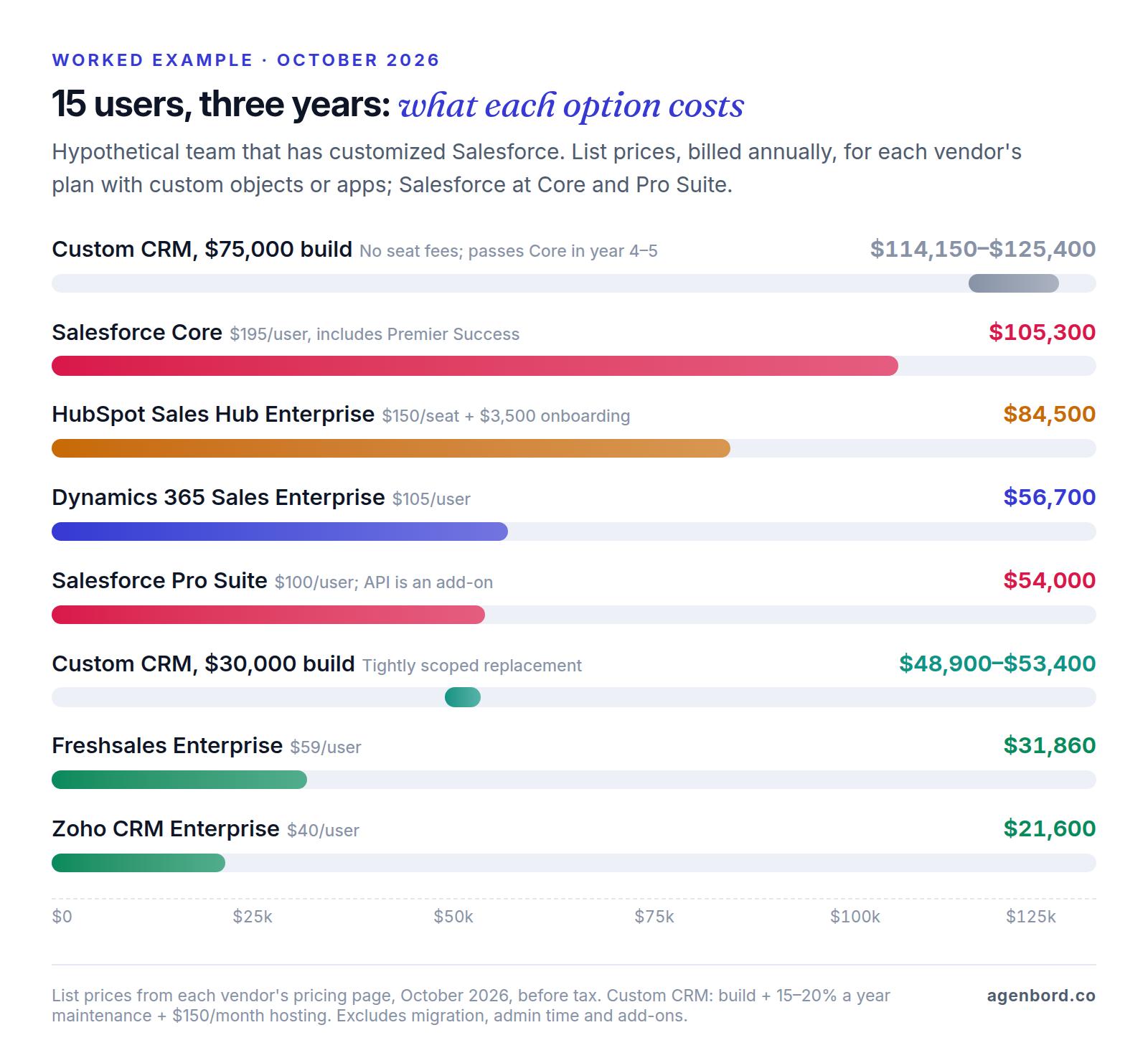
What the numbers show:
- Zoho CRM Enterprise is the cheapest way to keep custom modules and a sandbox: $21,600, about a fifth of Salesforce Core.
- Downgrading inside Salesforce nearly halves the bill, to $54,000 on Pro Suite. But Core's price includes Premier Success, which costs 30% of net license fees on Pro Suite ($16,200 here), and the API is an extra.
- HubSpot Enterprise saves about 20% on Core. If standard objects are enough, HubSpot Professional for the same team is $50,100 including onboarding.
- A custom CRM competes only when the scope is tight. At $30,000 it lands just under Dynamics 365 Sales Enterprise and Salesforce Pro Suite. At $75,000 it costs more than Salesforce Core over three years and pulls ahead only in year four or five, once the missing seat fees add up.
- If you need less customization, the bill drops again. For this team over three years, Dynamics 365 Sales Professional comes to $35,100, Pipedrive Growth $21,060 and Zoho CRM Professional $12,420.
The table counts licenses and published fees only. For the costs it leaves out, such as data cleanup, texting and admin time, see our breakdown of what a CRM really costs.
Industry CRMs and custom builds
When an industry CRM fits better
A general CRM is built around contacts, companies and deals. If most of your Salesforce customization exists to model something else, a CRM built for your industry may already have those records, along with the rules and integrations that come with them:
- Real estate: portal lead routing, listing and transaction stages, and texting consent rules.
- Contractors and home services: estimates that become jobs, scheduling and dispatch, and accounting sync.
- Law firms: intake, conflict checks and matter records.
- Nonprofits: donations, campaigns and donor receipts.
Shortlist one or two vertical tools alongside the general CRMs above, and trial all of them with the same sample data.
When a custom CRM is worth pricing
Off-the-shelf CRMs stay affordable by fitting every customer to the same model. Price a custom build when two or more of these are true:
- Your Salesforce org is mostly custom objects, flows and Apex written around one process, so you'd be rebuilding that process in any new CRM anyway.
- You pay full seats for people who only update a status or log a visit, such as field staff, operations or partners.
- Sales data has to become operational work: a closed-won opportunity should open a job, an order or an invoice without anyone retyping it.
- You plan to run the system for five years or more, long enough for the absence of seat fees to compound.
We build custom CRMs on a fixed price with a written scope and weekly demos, and you own the code. A focused first version typically starts at $12,000 and takes 6–10 weeks. A CRM with a client portal and integrations usually runs $30,000–$75,000, and multi-team systems start around $75,000. Running costs are hosting, roughly $50–$500 a month, and maintenance of about 15–20% of the build per year.
Weigh the trade-offs too: you need an owner on your side who knows the process and tests each release, and you give up the features a SaaS vendor adds to your plan over time. Our custom CRM cost guide walks through the multi-year math, and the build-vs-buy framework helps with the wider decision.
Migrating off Salesforce: a checklist
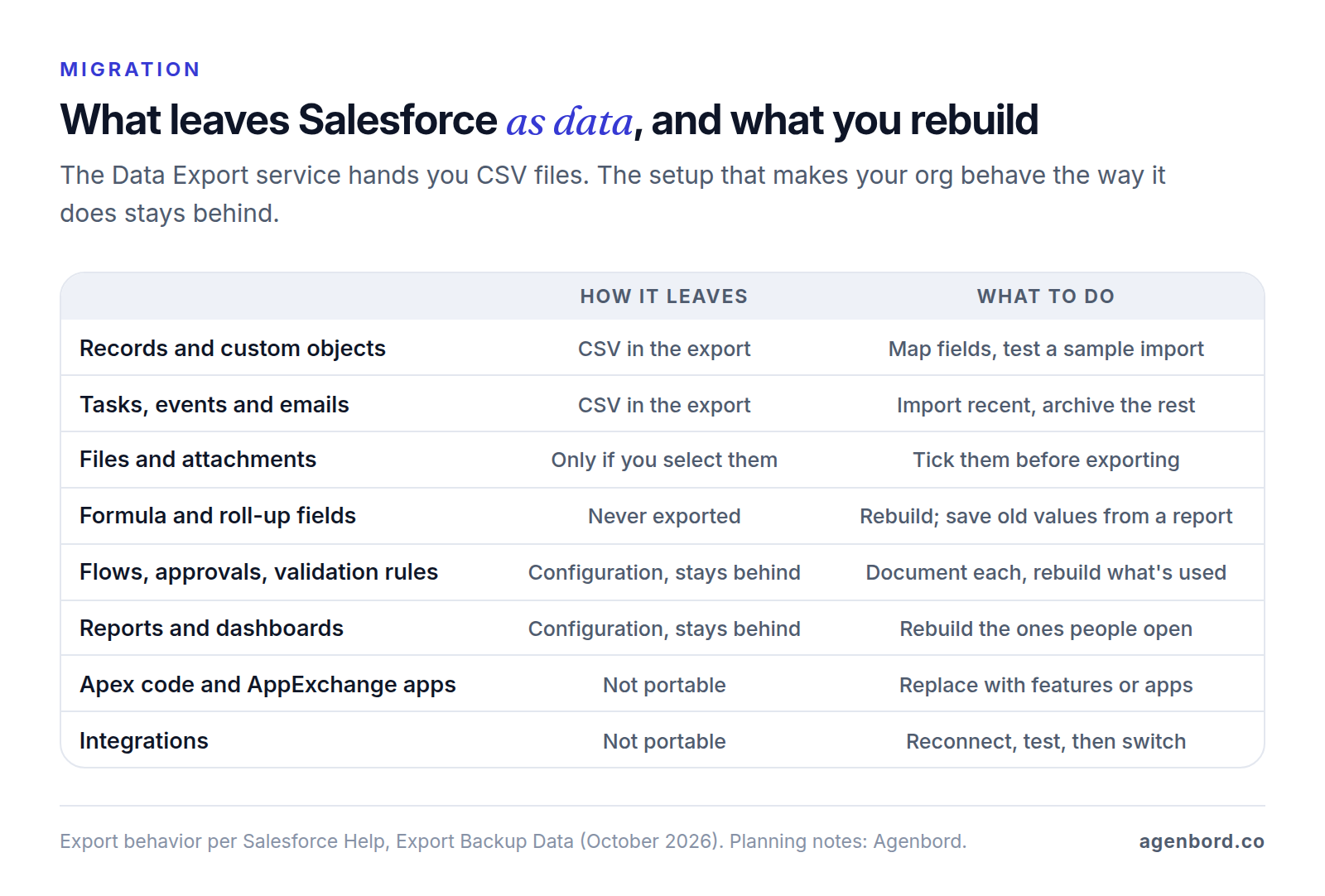
Records come out of Salesforce easily. The setup around them doesn't: automations, reports, permissions and integrations are configuration, and each has to be rebuilt in the new system. Work backward from your renewal date.
- Mark the notice date. Subscriptions renew for a year unless you give written notice, and email counts, at least 30 days before the term ends. Put that date at the top of the plan with a few weeks of buffer.
- Inventory the org. List objects and custom fields, record types, picklists, users and roles, flows, approval processes, validation rules, reports, dashboards, installed packages and connected apps. Mark what's actually used.
- Export early, then again at cutover. The Data Export service produces CSV files in .zip archives of up to about 512 MB each, weekly on Enterprise, Performance and Unlimited editions and monthly on the others. Select images, documents, attachments and Salesforce Files, and download promptly: the zip files are deleted 48 hours after Salesforce's email, not counting weekends.
- Capture formula and roll-up values. They're always left out of exports. Rebuild the logic in the new CRM, and if you need the historical values, export them from a report.
- Map the data model. Match each object and field, create custom fields first, align picklist values and stages, and map record owners to new users. Check lookups, such as the account on a contact, because that's where imports break.
- Rebuild only the automations you need. Write down what triggers each flow and rule and what it changes, then retire the ones nobody would miss.
- Rebuild reports from usage. Start with the pipeline, forecast and activity views managers actually open, not the full list.
- Reconnect integrations one at a time. List every system that reads or writes Salesforce data, such as email sync, marketing, billing and accounting, and switch them in order. Our CRM integration guide covers field ownership and duplicate rules.
- Decide how much history to move. Import open deals and recent activity, and keep older tasks, emails and closed deals in a searchable archive.
- Test, then run in parallel. Import a few hundred records, check relationships and counts, then work in the new CRM while Salesforce stays available for reference until pipeline totals match.
Sources
- Salesforce - Sales pricing (accessed October 2026)
- Salesforce - Small business pricing (accessed October 2026)
- Salesforce - CRM pricing and Success Plans (accessed October 2026)
- Salesforce - Agentforce pricing (accessed October 2026)
- Salesforce Help - Export backup data from Salesforce (accessed October 2026)
- Salesforce - Main Services Agreement (accessed October 2026)
- HubSpot - CRM pricing, free plan and Starter offer (accessed October 2026)
- HubSpot - Sales Hub pricing and plan features (accessed October 2026)
- Zoho CRM - Edition comparison (accessed October 2026)
- Zoho CRM - Pricing and edition features (accessed October 2026)
- Zoho CRM Help - Migrating from Salesforce (accessed October 2026)
- Pipedrive - Pricing (accessed October 2026)
- Freshworks - Freshsales pricing (accessed October 2026)
- Microsoft - Dynamics 365 Sales pricing (accessed October 2026)
- SugarAI - Pricing (accessed October 2026)
- SuiteCRM - Pricing (accessed October 2026)
- Odoo - Pricing (accessed October 2026)
Prices, plans and regulations change. Figures were checked on October 2, 2026; follow the links for the latest. Nothing here is legal, tax or financial advice.
About the author
Founder, Agenbord
Muhammad Hamza is the founder of Agenbord, the Fort Lauderdale software company behind the construction ERP Smart Construction and a WhatsApp-first billing platform. He writes practical guides on buying, building and automating business software.