On this page
How much is a CRM for a small business? As of October 2026, most small teams pay $9–$40 per user per month, billed annually, for a CRM that covers contacts, deals, tasks and some automation. For five people, that's $540–$2,400 a year. Free plans cover two or three users. One step above their entry plans, HubSpot and Salesforce charge $90–$100 per user, and HubSpot adds a required onboarding fee.
The subscription is rarely the whole bill. Onboarding, data cleanup, integrations, calls and texts, AI credits and the hours someone spends running the system land on top, and some vendors can raise your price at renewal.
Below are list prices we checked on seven vendors' own pricing pages in October 2026, the costs those pages leave out, and a three-year comparison for two hypothetical teams. We build custom CRMs, so the comparison includes a custom build. For most small teams an off-the-shelf CRM is cheaper, and the example shows where that changes. If you're still deciding whether you need a CRM at all, start with our guide to CRM for small business.
CRM pricing by tier (October 2026)
Every vendor sells a ladder of plans priced per user per month. Grouped by price, the rungs look like this:
- Free: $0 for 2–3 users, with caps. HubSpot's free CRM covers 2 users and 1,000 contacts; Zoho CRM's free edition covers 3 users.
- Entry: $9–$25. Contacts, companies, a deal pipeline, tasks and basic reports.
- Mid-tier: $17–$40. Where email sync, workflow automation, assignment rules and sales sequences usually start.
- Advanced and suite tiers: $52–$150+. The budget vendors' top plans, plus HubSpot's and Salesforce's professional tiers, where HubSpot adds a required onboarding fee.
| CRM | Free plan | Entry | Mid-tier | Advanced |
|---|---|---|---|---|
| Freshsales | No, 21-day trial | Growth $9 | Pro $39 | Enterprise $59 |
| monday CRM | No, 14-day trial | Basic $12 | Standard $17, Pro $28 | Top plan: custom price |
| Zoho CRM | Yes, 3 users | Standard $14 | Professional $23, Enterprise $40 | Ultimate $52 |
| Pipedrive | No, 14-day trial | Lite $14 | Growth $39 | Premium $59, Ultimate $79 |
| Less Annoying CRM | No, 30-day trial | $15, one plan | No other plans | No other plans |
| HubSpot Sales Hub | Yes, 2 users | Starter $20 list ($7 new-customer offer) | No middle plan | Professional $90 + $1,500 onboarding; Enterprise from $150 + $3,500 |
| Salesforce | No, free trial | Starter Suite $25 | No middle plan | Pro Suite $100, annual contract |
Prices are per user (or seat) per month, billed annually, as of October 2026. Less Annoying CRM is billed month to month with no contract, and Salesforce Starter Suite costs the same billed monthly or annually.
Two things stand out. HubSpot and Salesforce have no middle rung: their entry plans sit at $20–$25 and the next step is $90–$100 per user, while Zoho CRM, Pipedrive, Freshsales and monday CRM spread the climb over three or four tiers. And because entry prices are close everywhere, what separates vendors is the tier you'll need in a year. For each vendor's strengths and weak spots, our guide to HubSpot alternatives reviews ten CRMs at these prices.
Here's what those bands mean in subscriptions alone, per year, billed annually:
| Team | Entry ($9–$25) | Mid-tier ($17–$40) | Advanced ($52–$150) |
|---|---|---|---|
| 3 users | $324–$900 | $612–$1,440 | $1,872–$5,400 |
| 5 users | $540–$1,500 | $1,020–$2,400 | $3,120–$9,000 |
| 10 users | $1,080–$3,000 | $2,040–$4,800 | $6,240–$18,000 |
| 15 users | $1,620–$4,500 | $3,060–$7,200 | $9,360–$27,000 |
How CRM pricing works
Five pricing mechanics decide what you'll actually pay.
Per-seat pricing, minimums and free seats
Almost every CRM charges per user, so the bill grows with every hire who needs to edit records. Three details change the math:
- Seat minimums. monday CRM plans start at 3 seats, so a two-person team pays for three. HubSpot's Marketing Hub Professional comes with 3 core seats bundled in.
- Free view-only seats. HubSpot gives view-only seats at no extra cost, which suits owners and managers who only read reports.
- Flat-fee pricing. HighLevel charges a flat monthly fee instead: its Starter plan is $97 a month with unlimited users and contacts, and phone numbers, texts, emails and premium AI are billed by usage. We compare it with a custom build in GoHighLevel vs. a custom CRM, and with cheaper and white-label tools in GoHighLevel alternatives.
Features are gated by tier
Vendors put the features growing teams want one or two tiers up. As of October 2026:
- Pipedrive: email sync and automations start on Growth ($39), not Lite ($14).
- Zoho CRM: workflow rules are on every edition, even Free, but assignment rules and Blueprint process management start on Professional ($23), and Zia AI on Enterprise ($40).
- Freshsales: sales sequences, contact scoring and territory management start on Pro ($39); forecasting insights on Enterprise ($59).
- HubSpot Sales Hub: Starter has limited workflows. Forecasting, custom reports and fully customizable workflows start on Professional ($90 plus the $1,500 onboarding fee).
Forecasting shows how far apart vendors are: it comes with Zoho CRM Standard at $14 per user, Pipedrive Growth at $39, Freshsales Enterprise at $59, HubSpot Sales Hub Professional at $90 and Salesforce Pro Suite at $100. The depth differs, but if one feature is your reason to upgrade, price it at every vendor before you pay for a suite. Your real price is the cheapest tier that has all of your must-have features.
Marketing tools are priced by contacts
Marketing tools usually charge by the size of your list, not your team. HubSpot's Marketing Hub Professional starts at $800 a month with an annual commitment ($890 month to month), including 3 core seats and 2,000 marketing contacts, plus a required $3,000 onboarding fee. Each extra 5,000 marketing contacts adds $250 a month up to 22,000 contacts, so growing to 12,000 contacts takes the plan to $1,300 a month.
HubSpot's catalog also says your contact tier can't be downgraded until your contract renews. Contacts marked as non-marketing don't count, so keep the people you never email out of the tier.
Annual vs. monthly billing
Paying a year up front is cheaper almost everywhere. Zoho CRM Standard is $14 per user billed annually or $20 monthly, monday CRM Basic $12 or $18, and HubSpot Sales Hub Professional $90 or $100. Pipedrive says annual billing saves up to 42% and Freshsales says 20%. Less Annoying CRM is month to month at $15, and Salesforce Starter Suite is $25 either way.
The catch is the commitment. HubSpot's terms don't let you downgrade during your current term, and Salesforce's agreement says quantities can't be decreased mid-term. Both renew automatically: HubSpot for the shorter of your previous term or one year, Salesforce for one-year terms unless either side gives notice at least 30 days before the end.
AI credits and paid add-ons
AI is increasingly metered on top of seats:
- HubSpot includes HubSpot Credits each month for AI agents and automation: 500 on Sales Hub Starter, 3,000 on Professional and 5,000 on Enterprise. Unused credits don't roll over, and extra credits cost $0.01 each.
- Freshsales sells its Freddy AI Agent at $49 per 100 sessions.
- Zoho CRM puts its Zia AI features on Enterprise and up.
Pipedrive also sells marketing, lead capture and document tools as separate add-ons. None of this is hidden, but none of it is in the headline per-user price either.
Hidden CRM costs to budget for
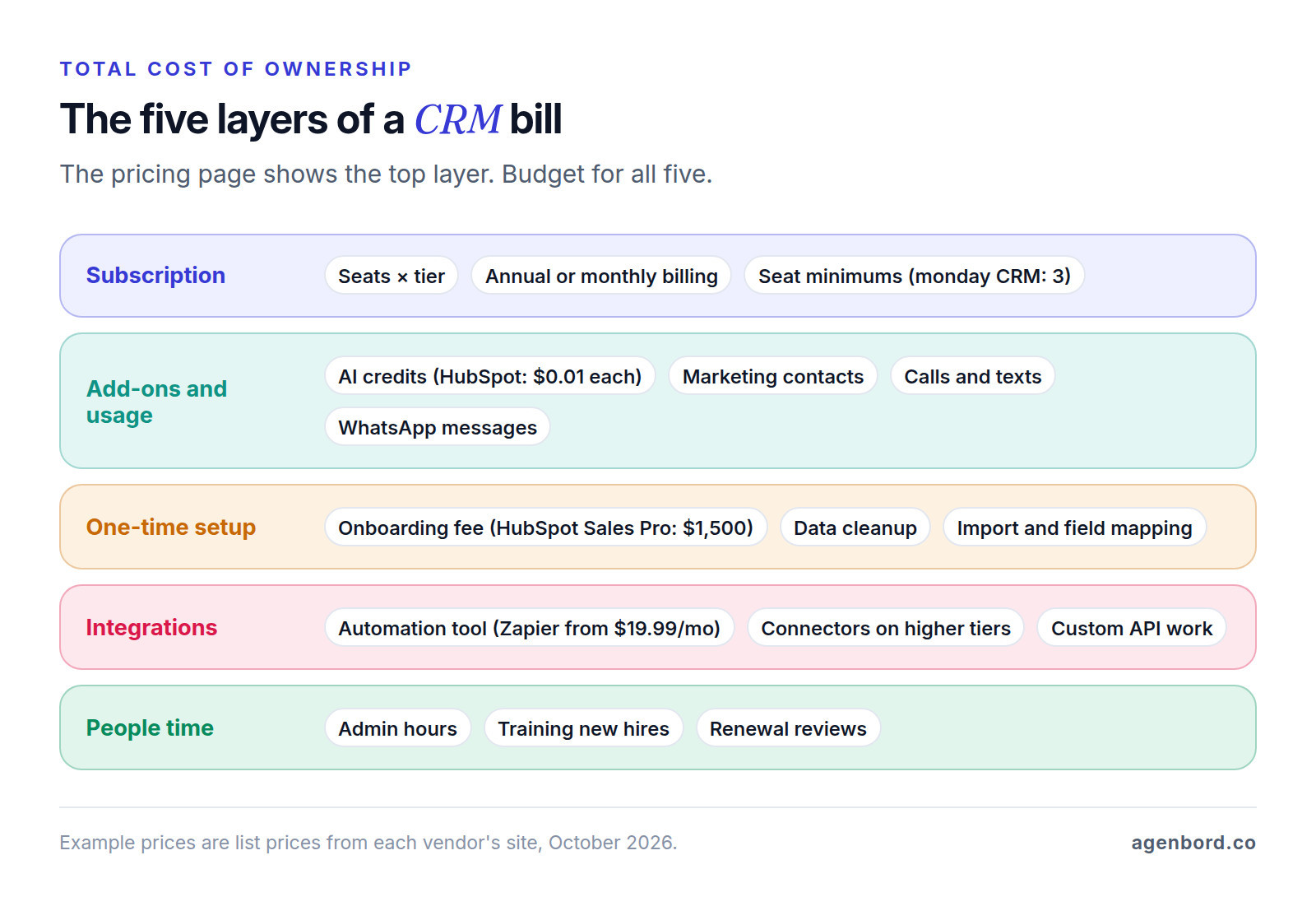
The pricing page shows the top layer of the bill. These are the layers underneath, roughly in the order they show up.
Onboarding and implementation fees
HubSpot requires one-time onboarding: $1,500 for Sales Hub Professional, $3,500 for Enterprise and $3,000 for Marketing Hub Professional. Other vendors fold help into the subscription. Pipedrive says implementation is free on plans over $400 a year, Less Annoying CRM's team will run up to three imports for you at no charge (30 minutes each, with you preparing the files), and Copper offers personal onboarding to eligible annual Professional and Business accounts. Ask whether onboarding is required, optional or included before you compare totals.
Data migration and cleanup
Importing is the easy part. Before it, someone exports from spreadsheets or the old system, merges duplicates, standardizes fields and decides what to leave behind. After it, someone checks that contacts, companies and deals still link up. Activity history (emails, notes, call logs) is the usual gap when you switch CRMs, so ask each vendor exactly what its importer brings over. Budget this in people's hours, and clean before you import.
Integrations and automation tools
Native integrations cover common tools such as email, calendar and often accounting. Everything else runs through an automation tool or custom API work; our CRM integration guide covers what to connect first and how. Zapier's Professional plan starts at $19.99 a month for 750 tasks and climbs with volume; our Zapier vs. Make vs. n8n comparison shows how the tools compare as volume grows. If a few handoffs (web lead to CRM, won deal to invoice) drive most of that usage, a purpose-built integration can cost less over time; our workflow automation projects start at $1,500 for a single workflow.
Calls, texts and WhatsApp
Built-in calling and texting are billed by usage, on top of seats. Close passes calls and texts through at cost and says most outbound calls cost around $0.02 a minute, with numbers from about $1 a month. If your CRM texts through Twilio, US list prices are $0.0083 per message segment plus carrier fees, $1.15 a month per local number, and registration fees for business texting (A2P 10DLC). Volume is the variable: 2,000 one-segment texts a month is about $16.60 before carrier fees.
Business texting also comes with consent rules; our real estate CRM guide covers TCPA and 10DLC basics. WhatsApp messages are billed by Meta per delivered template message, by category, which we break down in our WhatsApp Business API pricing guide.
Contact, record and storage caps
Free and entry plans cap your data. HubSpot's free CRM stops at 1,000 contacts. monday CRM Basic allows 1,000 active contacts and deals (Standard 10,000, Pro 100,000). Copper Basic allows 2,500 contacts and Professional 15,000. Outgrowing a cap usually means a higher tier, priced per seat, so check each cap against your database size today and a year from now. Less Annoying CRM, by contrast, includes unlimited contacts and 25 GB of file storage per user.
Admin time and training
Someone has to add fields, fix duplicates, build reports, set up new hires and answer "how do I…" questions. Put a number on it: if that's 2 hours a week at a loaded cost of $40 an hour, it's $4,160 a year, about three times what five Zoho CRM Professional seats cost ($1,380). The bigger the platform, the more there is to run, and heavily customized Salesforce setups usually need an admin, a cost we break down in custom CRM vs. Salesforce.
Training material is mostly free: Salesforce includes Trailhead in its Standard Success Plan, and Less Annoying CRM offers free phone and email support to everyone. Premium support isn't. Salesforce's Premier Success Plan costs 30% of net license fees, so on 15 Pro Suite seats ($18,000 a year) it adds $5,400 a year.
Renewal price increases
Year-one pricing isn't a promise for year three. HubSpot's terms let it raise your fees at renewal up to its then-current list price, with at least 30 days' notice, which matters if you started on a new-customer offer such as Starter at $7 against a $20 list price. Salesforce's agreement says promotional or one-time prices renew at the list price in effect at renewal, and that renewing with fewer seats or a shorter term is re-priced without regard to your previous per-unit price. Ask for renewal pricing in writing and put the cancellation deadline in your calendar.
How much is a CRM for a small business over three years?
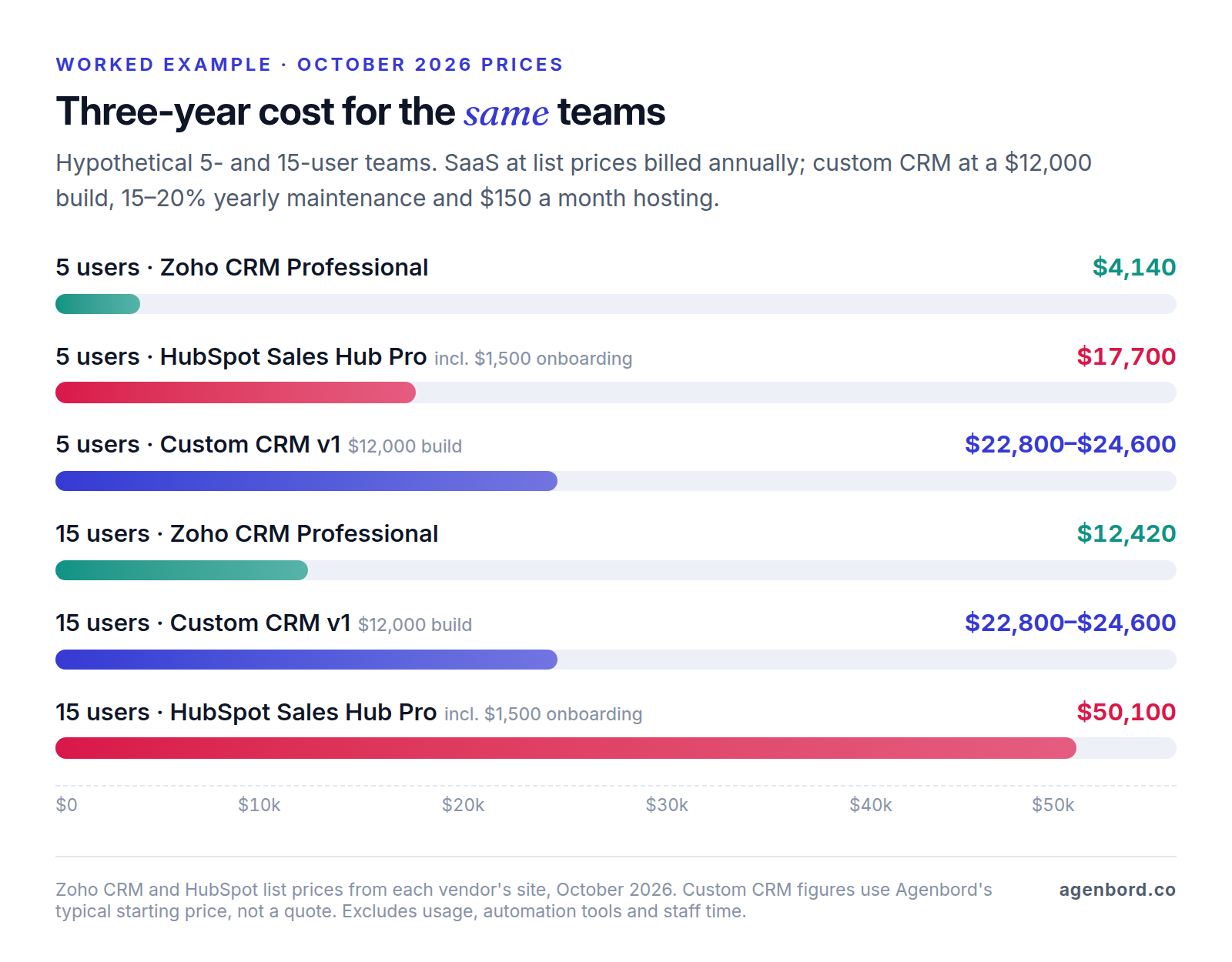
Here's a worked example for two hypothetical teams, one with 5 users and one with 15, comparing a low-cost CRM, a mid-tier suite and a custom CRM.
The assumptions:
- Low-cost CRM: Zoho CRM Professional at $23 per user per month, billed annually. We used Professional rather than Standard because it's where assignment rules start, which route new leads to the right person automatically.
- Mid-tier suite: HubSpot Sales Hub Professional at $90 per seat per month, billed annually, plus the required $1,500 onboarding fee.
- Custom CRM: a focused first version at $12,000, our typical starting price, covering contacts and companies, one or two pipelines, tasks, email logging, reports and data import (our guide on how to build a CRM walks through that scope). Maintenance at 15–20% of the build per year ($1,800–$2,400) and hosting at $150 a month ($1,800 a year), both counted from year one.
- For all three: every user needs a full seat, and list prices stay flat for three years, with no discounts and no increases.
- Left out: calls and texts, automation tools, AI credits, and your team's admin and training time. They depend more on how you work than on which option you pick, so budget them separately.
| Low-cost CRM (Zoho CRM Professional) | Mid-tier suite (HubSpot Sales Hub Professional) | Custom CRM (focused v1) | |
|---|---|---|---|
| One-time cost | $0 | $1,500 onboarding | $12,000 build |
| Per year, 5 users | 5 × $23 × 12 = $1,380 | 5 × $90 × 12 = $5,400 | $1,800–$2,400 maintenance + $1,800 hosting = $3,600–$4,200 |
| 3-year total, 5 users | $4,140 | $17,700 | $22,800–$24,600 |
| Per year, 15 users | 15 × $23 × 12 = $4,140 | 15 × $90 × 12 = $16,200 | $3,600–$4,200 (no per-seat fees) |
| 3-year total, 15 users | $12,420 | $50,100 | $22,800–$24,600 |
What the example shows:
- At 5 users, buy. The low-cost CRM costs $4,140 over three years, about a quarter of the suite and less than a fifth of the custom build.
- At 15 users, the low-cost CRM is still cheapest, but the custom CRM costs less than half as much as the suite: $22,800–$24,600 against $50,100.
- The break-even points are far apart. On these assumptions, the custom CRM costs less over three years than HubSpot Sales Hub Professional from 7–8 users, but less than Zoho CRM Professional only from about 28–30 users.
- Scope moves the line. A 15-person team often needs more than a focused v1: more roles, more reports, an integration or two. At $30,000, where our CRMs with a portal and integrations start, the three-year total is $48,900–$53,400, about the same as the suite.
The three options aren't feature-for-feature equivalents. HubSpot Professional comes with sequences, forecasting, an app marketplace and a product its vendor keeps improving. A custom v1 does fewer things, but only the things your team uses, built around your process. Our custom CRM cost guide explains what pushes a build above the starting price.
When a custom CRM costs less
Against a low-cost CRM, price alone rarely justifies a build. A custom CRM becomes the better financial decision when two or more of these are true:
- You'd otherwise pay suite prices for a growing team. Per-seat fees rise with every hire, while a custom CRM's running costs barely move. Field staff and part-timers who update a record now and then still need paid seats on most plans.
- Your workflow doesn't fit a standard pipeline. Quotes built from job specs, service contracts with renewals and deals that hand off to operations tend to end up as top-tier upgrades, admin hours and side spreadsheets.
- Contact-based pricing is the pain. If your database grows faster than your revenue, a system you own has no per-contact fees. You still pay an email-delivery service to send campaigns, at its own rates.
- The CRM has to run operations. When a signed quote should create a job, the job an invoice, and payments should update the account, you either pay for automation tasks and someone to fix them, or build the connection once. If customers also need to log in for documents or status, our client portal guide covers when to build that too.
- You want to own the data model. A custom CRM has exactly your objects and fields, and you own the code and the data.
There are honest counterweights. A focused v1 takes 6–10 weeks. Someone on your side has to own the process, join weekly demos and test. Maintenance is a cost whether or not you add features, and a SaaS vendor ships improvements you never pay to build. If only one of the points above applies, fix it with an integration or a different tier. Custom CRM vs. HubSpot covers the hybrid route of keeping HubSpot and building around it, and our build-vs-buy framework helps with the wider decision.
How to cut CRM costs without crippling the team
- Buy the tier your must-haves need, not the top tier "to be safe". Upgrading later is easy; downgrading mid-contract usually isn't allowed.
- Settle the seat count before you commit. Where a vendor offers monthly billing, use it while headcount and tier are still moving, then switch to annual for the discount.
- Give free seats to people who only look. HubSpot's view-only seats cost nothing. Elsewhere, share dashboards or scheduled reports instead of buying a seat for someone who never edits.
- Clean the database. Delete dead contacts and, on HubSpot, mark the ones you never email as non-marketing. A smaller database keeps you under caps and contact-based tiers.
- Use native integrations first, and pay for an automation tool only to fill the gaps.
- Put limits on usage. Prepaid packs make AI spend predictable (HubSpot sells credits in packs or pay-as-you-go), and a monthly look at texting and calling usage catches surprises early.
- Review seats 60–90 days before renewal. Remove people who left or never log in, get the renewal price in writing and note the cancellation deadline.
Don't cut the features your team uses every day. A CRM that saves $10 a seat but sends reps back to spreadsheets is the expensive option.
Before you buy: a CRM pricing checklist
- List your must-have features and find the cheapest tier with all of them at each vendor.
- Price that tier at next year's headcount, billed annually and monthly.
- Ask about one-time fees: required onboarding, implementation and migration help.
- Check the caps: contacts, records, storage, automations and AI credits.
- Map your integrations to the plan each one needs, plus any automation-tool subscription.
- Estimate usage: calls, texts, WhatsApp messages and email sends.
- Read the renewal terms: the price at renewal, whether you can reduce seats, and the notice deadline.
- Trial with real data and two or three of the people who'll use it daily.
- Confirm you can export everything, including notes, emails and call history.
Sources
- HubSpot - Sales Hub pricing (accessed October 2026)
- HubSpot - CRM pricing, free plan and Starter offer (accessed October 2026)
- HubSpot - Marketing Hub pricing (accessed October 2026)
- HubSpot - Product & Services Catalog (accessed October 2026)
- HubSpot - Customer Terms of Service (accessed October 2026)
- Salesforce - Small business pricing (accessed October 2026)
- Salesforce - CRM pricing and Success Plans (accessed October 2026)
- Salesforce - Main Services Agreement (accessed October 2026)
- Zoho CRM - Edition comparison (accessed October 2026)
- Pipedrive - Pricing (accessed October 2026)
- Freshworks - Freshsales pricing (accessed October 2026)
- monday.com - monday CRM pricing (accessed October 2026)
- Less Annoying CRM - Pricing (accessed October 2026)
- Less Annoying CRM - Import requests (accessed October 2026)
- Copper - Pricing (accessed October 2026)
- Close - Pricing (accessed October 2026)
- HighLevel - Pricing (accessed October 2026)
- Zapier - Plans and pricing (accessed October 2026)
- Twilio - SMS pricing for the United States (accessed October 2026)
Prices, plans and regulations change. Figures were checked on October 2, 2026; follow the links for the latest. Nothing here is legal, tax or financial advice.
About the author
Founder, Agenbord
Muhammad Hamza is the founder of Agenbord, the Fort Lauderdale software company behind the construction ERP Smart Construction and a WhatsApp-first billing platform. He writes practical guides on buying, building and automating business software.