On this page
- Step 0: Should you build a CRM at all?
- How to build a CRM in Excel or Google Sheets
- Step 1: Map how a lead becomes revenue
- Step 2: Design the CRM database
- Step 3: Set pipeline stages and required fields
- Step 4: Decide who sees what, and enforce it on the server
- Steps 5–7: Integrations, automation and reports
- Steps 8–10: Migrate, test and roll out
- How much does it cost to build a CRM?
When a spreadsheet stops keeping up and the CRMs you've tried don't fit how you sell, building your own starts to look attractive. Here's how to build a CRM your team will actually use, whichever route you take.
The steps: map how a lead becomes revenue, design the data model, set pipeline stages and required fields, decide who sees which records, connect email, phone, forms and accounting, add automations and reports, then migrate clean data, test with real users and roll out. You can do it in a spreadsheet (one or two people), a no-code builder (a small team with a simple process) or a custom web app (when your process, seat count or integrations justify it).
Often the honest answer is to build nothing. If you sell through a standard pipeline with a small team, buy: as of October 2026, HubSpot's free CRM covers 2 users and 1,000 contacts, and its Starter plan lists at $20 per seat a month. We build custom CRMs, so we'll say below when that's worth it.
Step 0: Should you build a CRM at all?
Compare the four routes before you design anything:
| Spreadsheet | No-code builder | Off-the-shelf CRM | Custom web app | |
|---|---|---|---|---|
| Fits | One or two people, one simple pipeline | A small team with a simple process and a willing builder | Most small and mid-size teams with a standard sales process | A process no product fits, many light users, or a CRM that runs operations |
| First version | An afternoon | Days to a few weeks | Days | 6–10 weeks for a focused v1 |
| Upfront cost | $0 | Your time | Setup time; some plans add onboarding fees | From $12k with us |
| Running cost | Software you already have | Per editing user, such as Airtable at $20–$45 a month, billed annually | Per user per month, rising by tier | Hosting, typically $50–$300 a month, plus 15–20% of the build a year |
| Who sees which records | Everyone with access sees everything | Depends on the tool and plan | Roles and teams, often on higher tiers | Your rules, enforced per record |
| Main risk | Copies, no reminders, no history | Plan limits; logic only its builder understands | Paying for seats and workarounds | Scope creep, or no owner on your side |
Buy when your process looks like most companies' (inquiry, qualify, quote, win), your team is small and you want to start this week. Building starts to pay off when two or more of these apply: your process isn't a standard pipeline, many people need light access that per-seat pricing makes expensive, the CRM has to run operations (a signed quote becomes a job, then an invoice), or your data has shapes generic CRMs handle badly, such as one customer with many sites, assets and contracts.
A middle route is to keep your CRM and build the missing piece around it, such as a client portal or an operations module. We weigh the options vendor by vendor in custom CRM vs. HubSpot, custom CRM vs. Salesforce and GoHighLevel vs. a custom CRM.
No-code builders sit in between. On Airtable, for example, you'd link tables for companies, contacts and deals, then add forms, views and automations. As of October 2026, its plans cost $20 a month per editor or commenter on Team, or $45 per editor on Business, billed annually, so 15 editors on Business cost $8,100 a year; read-only users are free. Check the caps against your volume: 50,000 records per base on Team and 125,000 on Business, and every logged call or email is a record. Ten reps logging 20 activities a day add about 50,000 a year. And check that the tool can limit people to their own records, not just hide the rest in a view.
How to build a CRM in Excel or Google Sheets
A spreadsheet CRM is a sensible start for one or two people, and it teaches you the data model you'll need later. Use linked tabs, not one wide sheet:
| Tab | Columns |
|---|---|
| Companies | Company ID, name, website, industry, owner |
| Contacts | Contact ID, company ID, name, role, email, phone, lead source, status |
| Deals | Deal ID, company ID, contact ID, deal name, stage, value, expected close, owner, next step, next-step date, lost reason |
| Activities | Date, contact ID, deal ID, type (call, email, meeting), summary, logged by |
| Lists | Allowed values for stage, source, owner and lost reason |
Four habits make it work:
- Link tabs by ID, never by retyping a company name; a lookup formula can show the name beside the ID.
- Use drop-downs (data validation) fed from the Lists tab for stage, source and owner, so reports group cleanly.
- Flag overdue next-step dates with conditional formatting and sort by them every morning, the nearest a spreadsheet gets to a reminder.
- Report the pipeline with a pivot table: deal value by stage and owner.
Size isn't what breaks it: an Excel worksheet holds 1,048,576 rows. What breaks is what a database and an app do for you:
- Nobody gets reminded. The overdue column works only for whoever opens the file.
- Anyone who can edit can change or delete any row. Protection works on sheets and ranges, not on "the deals I own."
- History isn't captured. Emails and calls stay in inboxes and phones unless someone types them in.
- Links break quietly. Delete a company and its deals point at an ID that no longer exists; sort only some columns and rows scramble.
- Copies multiply and drift from the shared file.
Move on when a second person sells, leads come from several places or follow-ups slip. Keep the tabs: they're the first draft of your data model and your import files.
Step 1: Map how a lead becomes revenue
Start on paper. Walk the path from first contact to paid invoice, and on to renewal or repeat work, with the people who do the work. Write down:
- Stages and handoffs: each step, its owner and what must be true to move on, including the handoffs to delivery and billing.
- Where records come from: web forms, calls, referrals, ads, events.
- What people check: what a rep looks at before calling a customer, and what a manager reviews each week.
- Today's workarounds: the side spreadsheet, the sticky note, the report someone rebuilds every week. Each is a requirement in disguise.
- The owner's questions: which lead sources produce revenue, how many quotes are open, what closes this month.
The output is a one-page process map, a list of records and fields, and your must-have reports. Turn them into a requirements document before anyone quotes; our software requirements document template includes a worked CRM example with roles, user stories and acceptance criteria.
Step 2: Design the CRM database
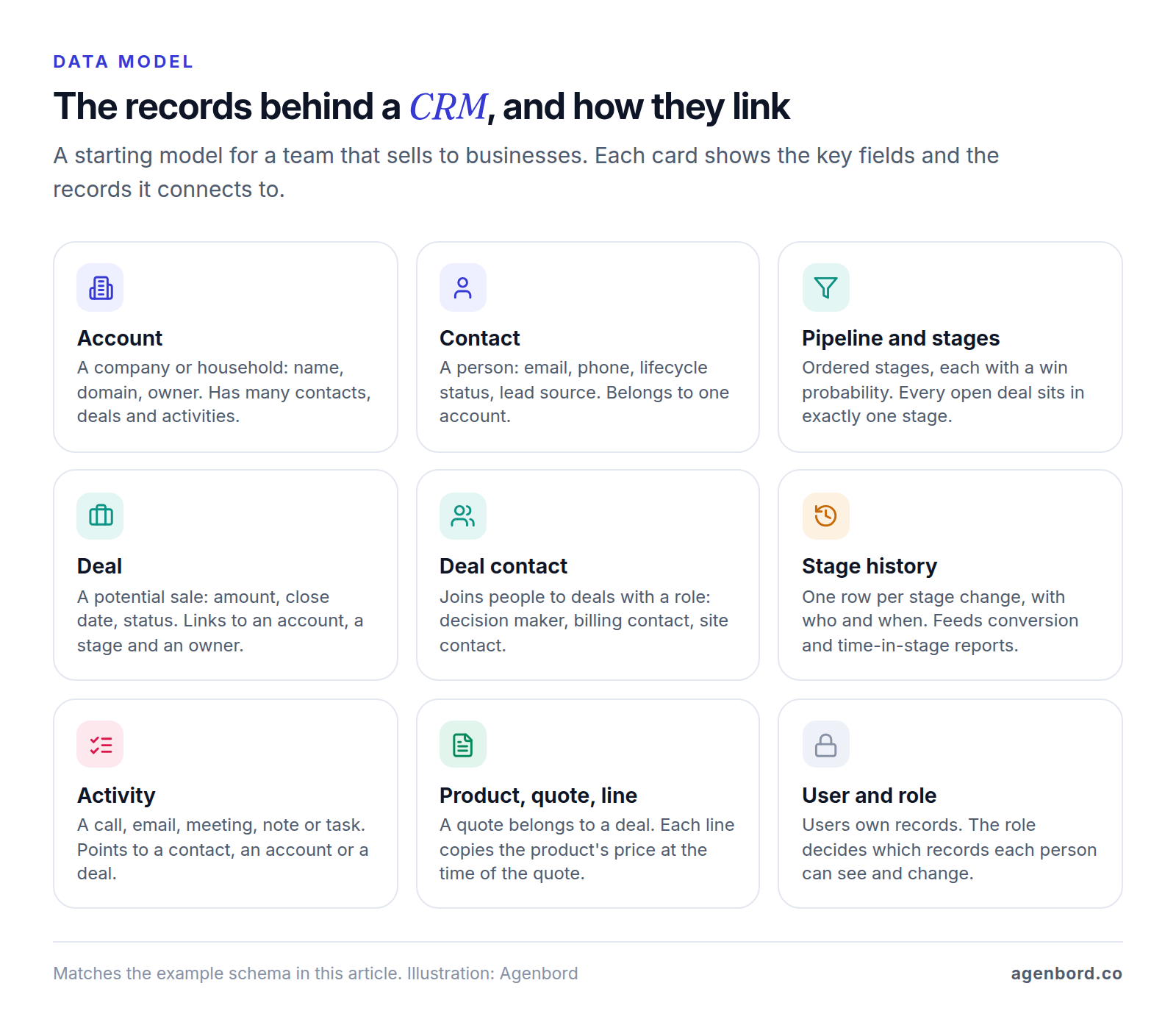
The data model is the most expensive part of a CRM to change: a screen can be redesigned in a week, but a missing relationship means migrating data. Most CRMs rest on the same records:
- Accounts: the companies you sell to, or households if you sell to consumers.
- Contacts: people, each linked to an account.
- Deals: potential sales with an amount, close date, owner and stage. An account can have many deals, and a deal can involve several contacts, each in a role.
- Pipelines and stages: the ordered steps a deal moves through. Use separate pipelines for different motions, such as new sales and renewals.
- Activities: calls, emails, meetings, notes and tasks, each linked to a contact, account or deal.
- Products and quotes: your price list, and quotes with line items on a deal.
- Custom objects: what your business tracks that generic CRMs don't, such as sites, vehicles or service contracts, each one another table linked to accounts.
Leads vs. contacts: pick one model
The first real design decision is where an unqualified inquiry lives:
- A separate leads table. Salesforce works this way: converting a qualified lead makes it a contact on a new or existing account, optionally with an opportunity, and can't be reversed. Raw inquiries stay out of your customer list, at the cost of matching and conversion logic.
- One contact record with a status. HubSpot tracks the journey with a lifecycle stage on contact and company records, from Subscriber and Lead through Opportunity and Customer. Every email and call stays on one record from the first touch.
For most small and mid-size businesses, we recommend the second, with a deal created only when there's a real opportunity. Use a separate leads table when raw leads arrive in bulk, such as purchased lists or busy ad forms, or when a separate team qualifies them.
A starter CRM schema you can copy
Here's that model as PostgreSQL tables, trimmed to the essentials. The same structure maps to linked tables in a no-code builder.
-- Starter CRM schema for PostgreSQL. Rename and extend to fit your process.
create table users (
  id          bigint generated always as identity primary key,
  email       text not null unique,
  full_name   text not null,
  role        text not null check (role in ('admin','manager','rep','ops','viewer'))
);

create table accounts (                  -- companies, or households for B2C
  id             bigint generated always as identity primary key,
  name           text not null,
  domain         text,                   -- acme.com, used to catch duplicates
  owner_id       bigint not null references users(id),
  accounting_id  text unique,            -- the customer ID in your accounting system
  created_at     timestamptz not null default now()
);

create table contacts (
  id          bigint generated always as identity primary key,
  account_id  bigint references accounts(id),
  first_name  text not null,
  last_name   text,
  email       text,
  phone       text,                      -- stored in E.164: +13055550123
  status      text not null default 'lead'
              check (status in ('lead','qualified','customer','inactive')),
  source      text,                      -- web form, referral, ad, event
  owner_id    bigint not null references users(id),
  created_at  timestamptz not null default now()
);
create unique index contacts_email_key on contacts (lower(email));

create table pipelines (
  id    bigint generated always as identity primary key,
  name  text not null                    -- e.g. New sales, Renewals
);

create table stages (
  id           bigint generated always as identity primary key,
  pipeline_id  bigint not null references pipelines(id),
  name         text not null,
  position     int not null,
  probability  int not null check (probability between 0 and 100),
  unique (pipeline_id, position)
);

create table deals (
  id            bigint generated always as identity primary key,
  account_id    bigint not null references accounts(id),
  stage_id      bigint not null references stages(id),
  owner_id      bigint not null references users(id),
  name          text not null,
  amount        numeric(12,2),
  close_date    date,
  next_step_on  date,
  status        text not null default 'open' check (status in ('open','won','lost')),
  lost_reason   text,
  created_at    timestamptz not null default now()
);

create table deal_contacts (              -- who is involved in a deal, and how
  deal_id     bigint not null references deals(id),
  contact_id  bigint not null references contacts(id),
  role        text,                       -- decision maker, billing, site contact
  primary key (deal_id, contact_id)
);

create table deal_stage_history (         -- one row per stage change
  id          bigint generated always as identity primary key,
  deal_id     bigint not null references deals(id),
  from_stage  bigint references stages(id),
  to_stage    bigint not null references stages(id),
  changed_by  bigint not null references users(id),
  changed_at  timestamptz not null default now()
);

create table activities (                 -- calls, emails, meetings, notes, tasks
  id          bigint generated always as identity primary key,
  type        text not null check (type in ('call','email','meeting','note','task')),
  subject     text not null,
  body        text,
  due_at      timestamptz,                -- for tasks
  done_at     timestamptz,
  owner_id    bigint not null references users(id),
  contact_id  bigint references contacts(id),
  account_id  bigint references accounts(id),
  deal_id     bigint references deals(id),
  check (num_nonnulls(contact_id, account_id, deal_id) > 0)
);
Quoting adds three tables: products (name, unit price, active), quotes (deal, version, status) and quote lines (quote, product, quantity and the unit price at the time of the quote).
Design rules that save a rebuild
- Key on internal IDs, never names or emails. Store other systems' IDs, such as your accounting customer ID, in their own unique columns, so syncs and re-imports match exactly.
- Normalize what you match on: compare emails case-insensitively and store phones in the international E.164 format.
- Keep history, not just the current state. A deal's current stage can't tell you conversion rates or how long deals sit in proposal; the stage history can. Add an audit log of who changed key fields.
- Give fields you filter or report on real columns, put rare extras in a JSON column, and don't let every user create fields, or you'll get three versions of "Phone 2."
- Copy prices onto quote lines, or next year's price change rewrites last year's quotes.
- Archive by default, but be able to remove everything about one person, across every table, if they ask.
Building a CRM system from scratch? Choose widely used tools over clever ones. We build CRMs with React and TypeScript in the browser and Node.js and PostgreSQL behind them; a relational database fits because nearly everything in a CRM is a relationship.
Step 3: Set pipeline stages and required fields
Stages should describe what has happened with the customer, not what the rep did, and each needs a definition everyone applies the same way. Five to seven stages suit most pipelines. For a hypothetical company selling commercial service contracts:
| Stage | What has happened | Required to enter |
|---|---|---|
| New | An inquiry arrived and has an owner | Contact, source, owner |
| Qualified | Need, budget range and timing confirmed | Estimated value, expected close date |
| Site visit | Visit done and scope agreed | Visit date, scope notes |
| Proposal sent | Customer has the price in writing | Quote attached, amount matches the quote |
| Negotiation | Customer asked for changes or approvals | Decision maker named, next-step date |
| Won or lost | Signed, or a definite no | Signed date, or a lost reason from a list |
Three rules keep stages honest:
- Check required fields on the server when the stage changes, not only on the form, so imports, integrations and the mobile app follow the same rules.
- Give every open deal a next-step date. Reminders, stalled-deal reports and the weekly pipeline meeting all run on it.
- Make the lost reason a pick list. Free text can't be counted, and lost reasons show where your pricing or fit is off.
Give each stage a default win probability, say 10% at Qualified and 50% at Negotiation, for a weighted forecast, then adjust once a year of stage history shows what really happens.
Step 4: Decide who sees what, and enforce it on the server
Write permissions down as roles and actions before anything is built. Most CRMs need four layers:
- Roles: admin, manager, rep, operations or billing, read-only.
- Record access: reps see their own and unassigned records, managers their team's, the owner everything.
- Field access: costs, margins and commission rates often stay hidden from reps.
- Risky actions: export, bulk edit, delete and reassign, limited to a few roles and logged.
The server must enforce these rules on every request; hiding a button isn't a permission. Broken access control is number one in the OWASP Top 10 for 2025, and its examples read like a CRM bug list: viewing or editing someone else's account by supplying its unique identifier, and bypassing access checks by modifying the URL. OWASP's advice is to deny by default, enforce access in trusted server-side code and enforce record ownership. A rep who changes /deals/1042 to /deals/1043 should get an error, not a colleague's deal.
For a second lock, PostgreSQL's row security policies restrict, per user, which rows queries can return or change, and a table with row security on but no policy shows nothing. Superusers and, by default, table owners bypass them, so connect the app as its own limited role.
Also require two-step verification or company single sign-on, and when someone leaves, reassign their records rather than deleting them.
Steps 5–7: Integrations, automation and reports
Step 5: Connect the systems customers already touch
Connect systems in order of how much customer activity they hold and how often someone retypes their data. For most businesses:
- Email and calendar, logged to the right contact and deal. If you build Gmail sync yourself, the scopes that read mail, such as gmail.readonly and gmail.metadata, are restricted. Apps that reach restricted data through their own server need a security assessment by a Google-empanelled assessor, repeated at least every 12 months, but an internal app used only by people in your own Google Workspace organization is exempt from verification.
- Web forms. Inquiries arrive with their source page, campaign and consent, matched against existing contacts.
- Phone and texting. Click-to-call, logged calls, missed calls turned into tasks. Per Twilio's docs, anyone texting US numbers from a 10-digit number through an application must register for A2P 10DLC, the carriers' standard, with a brand and a campaign; unregistered traffic pays extra carrier fees. Record when and how each person agreed to receive texts.
- WhatsApp, if customers prefer it. Free-form replies work inside the 24-hour window each customer message opens; messages you start are Meta-approved templates. Meta charges per message, replies included since October 1, 2026, and as of October 2026 WhatsApp doesn't deliver marketing templates to US numbers. Our WhatsApp Business API pricing guide covers the rates.
- Accounting. Typically, a won deal creates the customer in QuickBooks Online or Xero, and invoice status and balances come back as read-only fields.
Before anyone writes code, decide which system owns each field and how records match; our CRM integration guide covers both, plus retries and API limits.
Step 6: Automate the routine steps
Start with a few automations that protect revenue, and add more when people ask:
- Assignment: new inquiries get an owner by round robin, territory or product line, plus a same-day follow-up task.
- Reminders: a daily digest of overdue tasks and deals past their next-step date, and an alert when a deal sits too long in one stage.
- Handoffs: a won deal creates the onboarding task, the accounting customer or the job.
- Sequences: timed follow-up emails or texts that stop as soon as the person replies, books or opts out.
Sequences are where rules bite. The FTC's CAN-SPAM compliance guide says the law makes no exception for business-to-business email: commercial messages need honest headers and subject lines, identification as an ad, your physical postal address and a working opt-out honored within 10 business days, and each violating email can cost up to $53,088. Gmail's sender guidelines require SPF or DKIM from every sender, plus DMARC and one-click unsubscribe on marketing messages from anyone sending more than 5,000 messages a day to Gmail accounts. So keep an opt-out list the CRM checks before every send, and send from an authenticated domain through an email delivery service. This is general information, not legal advice.
Step 7: Build the reports you'll actually read
Choose reports before the build, because each depends on fields captured from day one:
| Report | Question it answers | Needs |
|---|---|---|
| Pipeline by stage and owner | What's open, and with whom? | Stage, amount, owner |
| Weighted forecast | What will probably close this month or quarter? | Close dates, stage probabilities |
| Stage conversion and time in stage | Where do deals stall or die? | Stage history |
| Revenue by lead source | Which marketing pays off? | Source on every contact and deal |
| Activity and overdue follow-ups | Who needs help this week? | Activities with owners and due dates |
Define each metric in writing, such as which date counts a deal as won, so the CRM's numbers match finance's.
Steps 8–10: Migrate, test and roll out
Step 8: Migrate and deduplicate your data
Old data is messier than anyone admits, so give migration its own plan:
- Inventory every source: spreadsheets, the old CRM, accounting's customer list, shared inboxes. Check whether each export includes notes, emails and call logs.
- Clean before importing: standardize emails, phones, company names and pick-list values, and leave behind records nobody has touched in years.
- Deduplicate with fixed rules: a stored ID first, then email, phone and company domain. Send near-matches to a person instead of merging on a name.
- Import in dependency order (users, accounts, contacts, deals, activities), keeping each record's old ID in a legacy column so rows can be traced and the load re-run.
- Rehearse on a copy: 100–200 records first, then everything, reconciling counts and totals with the source.
Switch off automations during the load, so old contacts don't trigger new-lead tasks and emails.
Step 9: Test with real users and real data
Test against your requirements, not a demo script:
- Workflows: every must-have story passes its acceptance criteria on a staging copy loaded with migrated data.
- Permissions: sign in as each role and try what it shouldn't do, such as opening another rep's deal by ID or exporting contacts. Automate these checks so they run on every release.
- Integrations: an expired token, a duplicate event, the other system offline. Nothing should create duplicates or fail silently.
- Volume and devices: lists and search stay fast with two or three years of projected data, and rep screens work on a phone.
Step 10: Roll out for adoption
Adoption is decided during the build more than at launch:
- Reps shape the screens. A few of them click through a prototype before the build and join the weekly demos. A field they argue against is one they won't fill in.
- Logging is a side effect: emails sync, calls log themselves and the next step is one tap.
- One owner on your side decides fields and stages and collects requests after launch.
- The launch has a fallback: a pilot group first, the old system read-only for a few weeks, and time for fixes while habits form. We include 30 days of support after cut-over.
Then judge it by adoption, not features; our guide to CRM for small business has a 30-day rollout plan and the weekly numbers to watch.
How much does it cost to build a CRM?
We price custom CRMs as a fixed scope after discovery. Typical ranges:
| Scope | Typical price | Timeline | What it covers |
|---|---|---|---|
| Focused CRM v1 | From $12k | 6–10 weeks | Contacts and companies, one or two pipelines, tasks, email logging, reports and data import |
| CRM + portal + integrations | $30k–$75k | 3–5 months | Adds quoting, e-signature, accounting sync, WhatsApp or SMS, a client portal and role-based access |
| Multi-team or multi-location | $75k+ | 5+ months, phased | Business units, territories, complex permissions and heavier integrations |
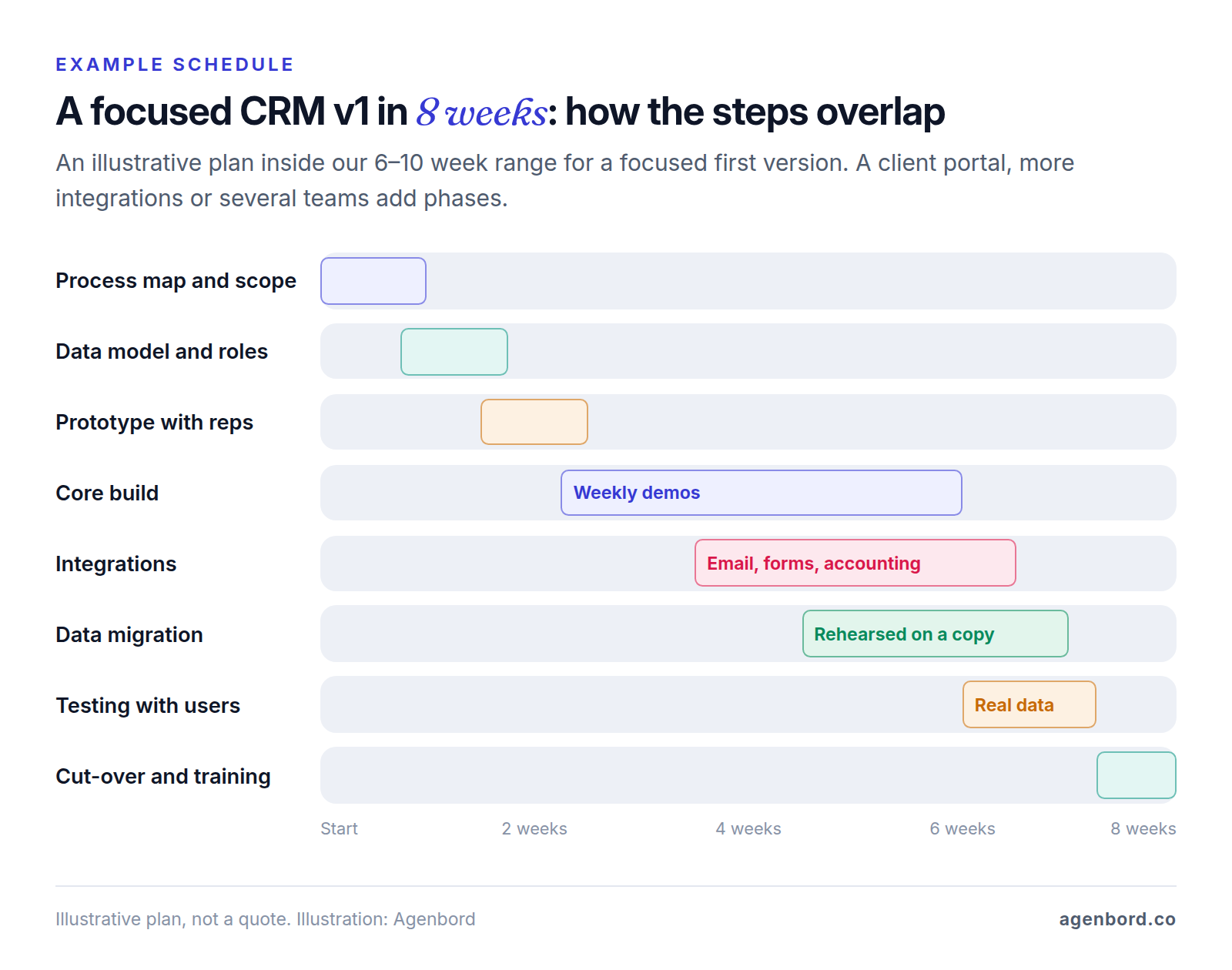
Five things move a CRM between those bands:
- Objects and pipelines. Each extra record type, such as service contracts or jobs, brings screens, permissions and reports.
- Roles and permissions. Field-level rules, territories and approval chains take design and testing.
- Integrations. Each one adds build time and upkeep when the other system's API changes; two or three well-chosen ones deliver most of the value.
- Data migration. Duplicated history from several sources takes longer than one clean export.
- Customer logins. A client portal is a second application with its own security and design work.
After launch, budget for hosting, typically $50–$300 a month for a small team, maintenance of about 15–20% of the build cost a year, and texting, WhatsApp and email services at their own rates. There are no per-seat fees. Our custom CRM cost guide runs the three-year math against per-seat CRMs.
Whichever route you choose, start with the two documents that don't depend on software: the process map from step 1 and the data model from step 2. If they fit a standard CRM, buy one and configure it. If they don't, you already have the start of a scope any developer can price.
Sources
- HubSpot - CRM pricing, free CRM and Starter plan (accessed October 2026)
- Airtable - Pricing (accessed October 2026)
- Airtable Support - Airtable plans: records per base and billable collaborators (accessed October 2026)
- Microsoft Support - Excel specifications and limits (accessed October 2026)
- Salesforce Help - Convert leads (accessed October 2026)
- HubSpot Knowledge Base - Use lifecycle stages (accessed October 2026)
- ITU - Recommendation E.164, the international public telecommunication numbering plan (accessed October 2026)
- OWASP - A01:2025 Broken Access Control (accessed October 2026)
- PostgreSQL 18 Documentation - Row security policies (accessed October 2026)
- Google for Developers - Choose Gmail API scopes (accessed October 2026)
- Google for Developers - Restricted scope verification (accessed October 2026)
- Twilio Docs - A2P 10DLC (accessed October 2026)
- Meta for Developers - WhatsApp pricing for non-template messages (accessed October 2026)
- Meta for Developers - WhatsApp marketing templates: per-user limits (accessed October 2026)
- Federal Trade Commission - CAN-SPAM Act: A Compliance Guide for Business (accessed October 2026)
- Google - Gmail email sender guidelines (accessed October 2026)
Prices, plans and regulations change. Figures were checked on October 2, 2026; follow the links for the latest. Nothing here is legal, tax or financial advice.
About the author
Founder, Agenbord
Muhammad Hamza is the founder of Agenbord, the Fort Lauderdale software company behind the construction ERP Smart Construction and a WhatsApp-first billing platform. He writes practical guides on buying, building and automating business software.