On this page
- What is a software requirements document?
- Software requirements document template
- Worked example: a CRM software requirements document
- How to write requirements a developer can quote and test
- What developers need to quote accurately
- Keep the document alive with change control
- Before you send it for quotes
Before you ask anyone to build software, write down what it has to do. A software requirements document (SRD) describes who will use the software, what each person needs to get done, the records it keeps, the systems it connects to and how well it has to work, in plain language but precisely enough that every developer prices the same thing.
This guide gives you a free software requirements document template to copy, a worked example for a small company's CRM, the rules for writing requirements a developer can quote and test, and a pre-quote checklist. You don't need to be an engineer, just someone who knows the process.
Skip the document and each developer fills the gaps with their own assumptions. That's how three quotes for "a simple CRM" end up pricing three different products.
What is a software requirements document?
A software requirements document is the written agreement, before anyone builds anything, on what the software must do. It covers the business side (goals, users, workflows, data, reports and rules) and the quality targets (security, speed, accessibility, uptime), and leaves the technical design to the developer. Developers quote against it, the contract points to it, and at the end you test the software against it instead of against everyone's memory of the meetings.
Who writes it
You do, with help. The first draft should come from the person who runs the process today, often an operations lead rather than the owner, with input from the people who'll use the software daily. A developer or business analyst then questions it, finds missing cases, adds technical constraints and estimates the work, and one named person on your side signs it off. If a vendor writes or refines it in a paid discovery phase, make sure the result is yours to share with other vendors.
When you need one
- Before you ask for quotes on custom software, and always before you sign a fixed price.
- When the software replaces a spreadsheet or process that several people depend on.
- When you switch vendors, or more than one company will work on the system.
- When you're buying, not building. A short version (roles, workflows, data, integrations, must-haves) becomes your script for vendor demos. Our build-vs-buy framework helps you pick the route.
You don't need a long, formal specification unless the project is regulated, safety-critical or split across several vendors.
SRD vs SRS vs PRD vs BRD
Four names cover overlapping documents. People use them loosely, but this is the usual split:
| Document | What it answers | Usually written by | Detail |
|---|---|---|---|
| BRD (business requirements document) | Why the business needs a change: problem, goals, benefits | A business sponsor or analyst | Low: no screens or fields |
| PRD (product requirements document) | What a product should do for its market, and how success is measured | A product manager | Medium; changes with the product |
| SRD (software requirements document) | What this software must do for your business, and how you'll test it | The business, with a developer's help | Enough to quote, build and accept |
| SRS (software requirements specification) | The same ground, formally: numbered requirements, interfaces, constraints | A business analyst or engineer | Highest; common on regulated and large projects |
If you're commissioning software for your own business, the SRD is the one you need, and a short BRD can be its first section. Some vendors call any requirements document an SRS, so ask what they mean.
The formal SRS has an international standard behind it: ISO/IEC/IEEE 29148:2018, Systems and software engineering — Life cycle processes — Requirements engineering, which defines what makes a good requirement and what requirements documents contain. Its 2011 first edition replaced IEEE 830-1998, the IEEE's recommended practice for software requirements specifications, so templates built on IEEE 830 follow a superseded standard. ISO confirmed the 2018 edition in 2024, and a third edition entered its draft ballot in September 2026. A business system doesn't need that formality, just the sections below, filled in honestly.
Software requirements document template
Copy the template below. It's plain Markdown: ## marks a heading, | builds a table, and lines starting with > explain each section, so delete them as you go. If a section doesn't apply, write "None" so the developer knows you considered it.
**Software requirements document: [project name]**

| Version | Date | Author | Approver | Status |
| --- | --- | --- | --- | --- |
| 0.1 | [date] | [name, role] | [name, role] | Draft / Out for quotes / Signed |

## 1. Purpose and goals
> Why this software, why now, and how you'll know it worked. Use numbers.
- Problem today: [what goes wrong and what it costs: hours, errors, lost sales]
- Goals: [e.g., every web lead gets a call from a rep within 1 business hour]
- Budget range and deadline: [if you have them, and what drives the date]

## 2. Users and roles
> Everyone who signs in, how many of them, and what each role can and can't do.
| Role | Users | Can see | Can do | Can't do |
| --- | --- | --- | --- | --- |
| [Sales rep] | [3] | [own deals] | [create and send quotes] | [export, delete] |

## 3. Current process
> How the work happens today, step by step, including the workarounds.
1. [Step: who does it, in which tool or file]
- Volumes: [records per month, busiest periods, people working at once]
- Pain points: [where work is retyped, lost or delayed]

## 4. Scope
> What version 1 includes and, just as important, what it doesn't.
- In scope: [workflows, roles, integrations, platforms]
- Out of scope: [anything someone might assume is included]
- Later phases: [ideas you are parking on purpose]

## 5. Workflows and user stories
> One story per task a user needs to do, each with an ID, a priority and tests.
**[ID] ([Must / Should / Could / Won't])** As a [role], I want [to do something],
so that [outcome].
- Given [the starting situation]
- When [the user or the system does something]
- Then [a result anyone can see: a screen, an email, a report]
- Statuses: [e.g., New, Contacted, Quote sent, Won, Lost]
- Unhappy paths: [duplicates, rejections, failures, missing permissions]

## 6. Screens
> A list, or a rough sketch per screen. Not a design.
| Screen | Used by | Main actions | Notes |
| --- | --- | --- | --- |

## 7. Data and records
> What the system stores, which fields are required, and what you'll import.
| Record | Key fields | Required | How many now / per year | Created by |
| --- | --- | --- | --- | --- |
- Import: [source file or system, number of rows, how clean, who cleans it]

## 8. Integrations
> Each connected system: direction, trigger, data, owner and failure handling.
| System | Direction | Trigger | Data | Owner of the data | If it fails |
| --- | --- | --- | --- | --- | --- |
- Accounts: [whose login or API key each integration uses]

## 9. Reports and notifications
> Reports: who reads them, filters, totals, exports. Alerts: trigger, who, how.
- [Report]: [reader, filters, columns, totals, export format, schedule]
- [Notification]: [trigger], sent to [who] by [email / text / in-app]

## 10. Non-functional requirements
> How well it must work. Each line needs a number or a named standard.
- Security: [sign-in method, two-step verification, audit log of key actions]
- Performance: [e.g., search returns in under 2 seconds with 50,000 records]
- Accessibility: WCAG 2.2 Level AA for every screen
- Availability: [uptime target, maintenance window, backups, recovery time]
- Data retention: [how long each record type is kept, then deleted or archived]
- Devices and browsers: [desktop, phone, tablet; which browsers]

## 11. Assumptions and constraints
> What you're taking as true, and the limits the developer must work within.
- Assumptions: [e.g., every user has a company Google account]
- Constraints: [systems you must keep, rules you must follow, fixed dates]
- Ownership: [code repository and cloud accounts in your company's name]

## 12. Open questions
> Undecided items, each with an owner and a date, so none blocks the quote.
| # | Question | Owner | Decide by |
| --- | --- | --- | --- |

## 13. Acceptance and sign-off
> How version 1 will be tested and who signs it off.
- Testing: [who tests, on a staging copy, for how long, with which data]
- Done means: [every Must story passes; no critical defects open]
- Signed off by: [name, role, date]

## Change log
| Version | Date | Change | Requirement IDs | Approved by |
| --- | --- | --- | --- | --- |
Five habits make it faster to fill in:
- Start with sections 1, 3 and 5, the parts only you can write.
- Write the out-of-scope list early. It heads off more disputes than any other line.
- List screens; don't design them. A photo of a whiteboard sketch is plenty.
- Attach samples, such as today's spreadsheet, a sent quote or the report someone rebuilds every Monday, with customer details removed.
- Leave technology choices to the developer unless they're real constraints.
Worked example: a CRM software requirements document
Here's the template filled in, abridged, for a hypothetical 20-person commercial cleaning company that sells recurring office-cleaning contracts. The company, numbers and rules are invented. A real document would have more stories and a screen list; these sections show the detail that makes a custom CRM quotable.
Goals, current process and scope
Today: about 120 quote requests a month arrive by web form and phone. Three reps track them in a shared spreadsheet and build quotes in Word, and the office manager retypes every new customer into QuickBooks Online. Follow-ups slip, and the owner has to ask around to see the pipeline.
Goals:
- Every website quote request gets a call from a rep within 1 business hour.
- No customer is typed twice.
- The owner can see the pipeline by stage and rep without asking anyone.
Out of scope for version 1: syncing reps' email inboxes, text messaging, marketing emails, crew scheduling and invoicing (both stay in their current tools), and a native mobile app. Reps will use the web app on their phones.
Roles and permissions
Six people will use it: the owner, a sales manager, three sales reps and an office manager who handles billing.
| Action | Owner | Sales manager | Sales rep | Office manager |
|---|---|---|---|---|
| See leads and deals | All | All | Own, plus unassigned | All, read-only |
| Create and edit leads and deals | Yes | Yes | Own only | No |
| Reassign leads | Yes | Yes | No | No |
| Approve discounts over 10% | Yes | Yes | No | No |
| Edit billing details | Yes | Yes | Own customers | Yes |
| Edit services and prices | Yes | No | No | Yes |
| See QuickBooks balances | Yes | Yes | Own customers | Yes |
| Export contacts | Yes | No | No | No |
| Delete records | Yes, logged | No | No | No |
| Manage users | Yes | No | No | No |
Fill in the "No" cells too. "Only the owner can export contacts" has to be built and tested like any feature, and it's the line you'll care about when a rep leaves.
User stories with acceptance criteria
Each story has an ID, a priority and acceptance criteria in Given/When/Then form, which the next section explains.
CRM-01 (Must). As a sales manager, I want website quote requests to become leads assigned to a rep, so that none sits in an inbox.
- Given a visitor submits the quote form with a name, company, email or phone and the address to be cleaned, when it arrives, then the lead appears in the CRM within 1 minute, assigned to the next rep in rotation, who gets an email linking to it.
- Given the email or phone matches an existing contact, when the form arrives, then no new contact is created; the request joins that contact's history, flagged for the sales manager.
CRM-02 (Must). As a sales rep, I want to build quotes from the price list and send them as PDFs, so that every quote is consistent and tracked.
- Given a deal with square footage and cleaning frequency filled in, when the rep adds services from the price list and clicks Send, then the contact gets an email with the quote PDF, the deal moves to Quote sent and the quote is saved on the deal as version 1.
- Given the total discount is over 10%, when the rep clicks Send, then nothing is sent: the quote shows Waiting for approval and the sales manager gets an email to approve or reject it.
CRM-03 (Must). As the office manager, I want a won deal to create the customer in QuickBooks Online, so that I stop retyping customers.
- Given a deal is marked Won and its company has no QuickBooks customer ID, when the deal is saved, then within 5 minutes QuickBooks Online has a customer with the company name, billing contact and email, billing address and payment terms, and the company's CRM record shows its new QuickBooks customer ID.
- Given QuickBooks rejects the record, when the sync runs, then the deal shows Sync failed with the reason and the office manager gets an email.
CRM-04 (Should). As the owner, I want a pipeline report by stage and rep, so that I can see where next quarter's revenue will come from.
- Given deals with monthly contract values, when I open the Pipeline report for a date range, then I see the count and total monthly value of deals in each stage for each rep, matching the deal list with the same filters, and can download it as a CSV file.
CRM-05 (Won't, this version). Two-way sync with reps' Gmail inboxes, listed so nobody assumes it's included.
Data and records
| Record | Key fields | Rules |
|---|---|---|
| Company | Name, service and billing addresses, owner rep, QuickBooks customer ID | One record per billing entity |
| Contact | Name, company, role, email, phone | Email or phone required; phones stored in one format |
| Deal | Company, contact, stage, monthly value, source, start date | Stages: New, Contacted, Site visit, Quote sent, Won, Lost; lost reason required |
| Quote | Deal, services, quantities, frequency, discount, total, version, status | Re-sending creates a new version; old versions are read-only |
| Service | Name, unit (per visit or per square foot), price, active | Maintained by the office manager |
| Activity | Type (call, email, visit, note), date, user, notes, photos | Up to 10 photos per visit, from a phone |
Import on day one: 1,850 companies and 2,400 contacts from the spreadsheet, deduplicated by the office manager beforehand, with an import report that shows counts for every record type.
Integrations
| Detail | Website quote form | QuickBooks Online |
|---|---|---|
| Direction | Form to CRM, one way | CRM to QuickBooks for new customers; QuickBooks to CRM for open balances |
| Trigger | Every submission | A deal marked Won; balances refresh hourly |
| Data | Name, company, email, phone, address, square footage, message | Company name, billing contact and email, billing address, terms; open balance |
| Who owns the data | The CRM owns leads | QuickBooks owns billing terms, invoices and balances |
| If it fails | The form still emails the request to the sales inbox, and the CRM retries | Sync failed on the deal, an email to the office manager, and retries that never create a duplicate customer |
| Connected through | The company's website account | A company-owned QuickBooks admin login, not an employee's |
Deciding which system owns each field is the step most integration specs skip; our CRM integration guide walks through it field by field.
Non-functional requirements
- Security: sign-in with company Google Workspace accounts, with two-step verification required. The server enforces the role table, not just hidden buttons. Exports, deletions and permission changes go into an audit log the owner can read.
- Performance: lists, search and the pipeline report load in under 2 seconds with 5,000 companies and 50,000 activities.
- Accessibility: every screen meets WCAG 2.2 Level AA, the W3C standard published in October 2023.
- Availability: 99.9% uptime a month (about 43 minutes of downtime) with maintenance outside 7 a.m.–8 p.m. Eastern; daily backups kept 30 days; after a failure, at most 24 hours of data lost and service back within one business day; a restore tested before launch.
- Data retention: customer, quote and activity records kept 7 years after the last contract ends, on the accountant's advice; leads idle for 24 months deleted after the sales manager reviews a monthly list.
- Devices: current Chrome, Edge and Safari on desktop; every rep screen usable on a phone.
Retention periods usually come from your accountant or attorney, not the developer; the IRS's guidance on tax records runs from 3 years to 7 or longer, depending on the situation. Treat these targets as general information, not legal advice.
Acceptance and sign-off
The sales manager, one rep and the office manager test for five business days on a staging copy, a private copy of the CRM loaded with the imported data. Version 1 is accepted when every Must story passes its criteria, import counts reconcile with the spreadsheet and no critical defect is open. The owner signs it off.
How to write requirements a developer can quote and test
Every line should pass two tests: two developers would read it the same way, and someone outside your company could check that it was done.
One requirement per line, with an ID
Give each requirement a short ID, such as CRM-07, so the quote, the tests and later change requests all point at the same line. NASA's guide to writing a good requirement asks for "only one thought per requirement statement." "Reps create quotes and managers approve discounts" is two requirements, with two prices.
Use "must" for every requirement and let the priority label say what's negotiable. NASA's handbook reserves "should" for goals, and a developer may price "the system should send a reminder" as optional.
Numbers, not adjectives
The same NASA guide lists terms that can't be verified, among them easy, sufficient, adequate, user-friendly, fast, flexible and quickly, and flags ambiguous phrases like "etc.," "and/or" and "but not limited to." Each hides a decision you haven't made yet:
| Vague | Testable |
|---|---|
| The CRM should be fast | Search returns results in under 2 seconds with 20,000 contacts |
| Integrate with QuickBooks | A won deal creates the QuickBooks Online customer within 5 minutes and stores its ID; nothing else syncs in version 1 |
| Easy to use | A new rep can log a lead and send a quote unaided after a 30-minute walkthrough |
| Secure | Two-step verification for all users; only the owner can export contacts; every export is logged |
| Users can upload files | Reps can attach up to 10 photos (JPG or PNG, 10 MB each) to a visit from a phone |
If you don't know a number yet, NASA suggests a best estimate marked to be resolved. Where a number doesn't fit, name a standard: WCAG 2.2 Level AA for accessibility, or OWASP's Application Security Verification Standard (version 5.0.0), a public list of testable security requirements.
Say what, not how
NASA's rule is to "state the problem not the solution." "Build it in React with microservices" says how without saying what; "reps must be able to log a site visit, with photos, from a phone" leaves the developer free to find the best way. Name a technology only when it's a real constraint, such as books kept in QuickBooks Online.
Prioritize with MoSCoW
MoSCoW sorts requirements into Must have, Should have, Could have and Won't have this time. In the Agile Business Consortium's DSDM framework, the Musts are the "Minimum Usable SubseT" a project guarantees to deliver, and the test is what happens if a requirement isn't met: if there's no point launching without it, it's a Must. DSDM advises keeping Musts to no more than 60% of the effort, with about 20% in Could haves as contingency.
Your developer estimates the effort; you set the priorities. The Won't list matters as much as the Musts: it records what everyone agreed to leave out.
Write acceptance criteria as Given/When/Then
The format comes from Gherkin, the language behind testing tools such as Cucumber. Given sets the starting situation, When is the event or action, and Then is the expected result. Cucumber's reference adds two rules worth keeping: the outcome should be observable, like a screen, an email or a report, rather than a record buried in a database, and each example should run 3–5 steps.
Write the unhappy paths too: duplicates, rejections, failed syncs, someone without permission trying anyway. They take real effort to build, and disputes start where nobody wrote them down.
Common mistakes
- A feature list instead of workflows. "Contacts, pipeline, reports" names screens without saying what people do with them.
- A product name as the spec. "Like Salesforce, but simpler" means something different to every reader. Describe the screen or behavior you like.
- No volumes. Six users and 2,400 contacts is a different build from 60 users and 2 million records.
- Boilerplate. A formal template padded to fill every heading buries the lines that matter.
What developers need to quote accurately
A developer prices risk as well as features. Every line they have to guess at gets either the cheapest reading, which returns later as a change request, or a padded one. The sections that move a quote most are roles and permissions (outside users such as customers turn a tool into a portal), workflows and their branches, integrations, data migration, demanding quality targets such as single sign-on or regulated data, and platforms: web only, or iOS and Android apps too.
For scale, our fixed-price custom software projects start around $12,000 for a focused internal tool (4–8 weeks), run $30,000–$80,000 for a business platform with a portal, roles and integrations (2–4 months), and go above $80,000 for complex or multi-tenant systems delivered in phases. A focused CRM version 1 starts around $12,000 (6–10 weeks); one with a client portal and integrations typically runs $30,000–$75,000. The custom software cost guide explains the drivers, and our web app and mobile app cost guides go feature by feature.
How detail changes the quote
Take a typical line: "Customers can pay their invoices online." Three vendors can read it three ways, and each prices what it read:
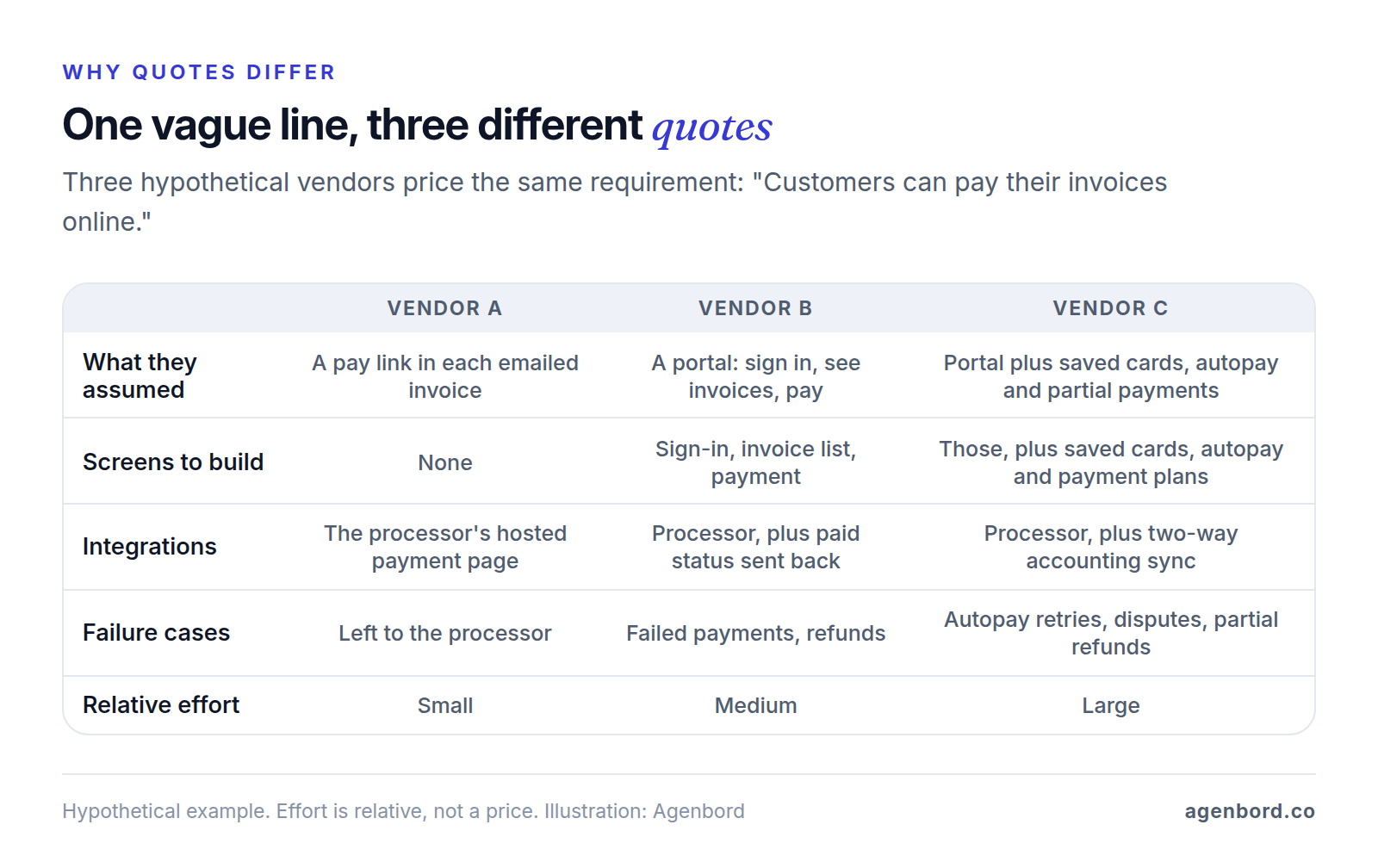
Here's that requirement rewritten so all three vendors would price the same thing: "Customers sign in to the portal, see their open invoices and pay one in full by card or bank transfer on the payment processor's hosted page. The invoice shows Paid within 5 minutes. Saved cards, autopay and partial payments are out of scope for version 1."
Send the same version to every vendor and ask each to list assumptions and exclusions against your requirement IDs. Our guide to choosing a software development company covers the rest of the comparison.
Red flags when quotes come back
- A fixed price with no questions about your document: either nobody read it closely or the risk is priced in.
- No list of assumptions and exclusions, so you can't tell what's included.
- Musts quietly moved to "phase 2," or features you didn't ask for priced in without explanation.
Keep the document alive with change control
A requirements document does its most important work after you sign:
- Freeze a baseline. The version you sign, say 1.0, is attached to or referenced by the contract. Anything after that is a change.
- Change it through written requests that name the requirement IDs affected and show the price and schedule impact, approved by a named person before work starts. That's how we keep fixed prices fixed: change requests are written up, priced and opt-in. Swapping a Could for a new item of similar size can leave the price and date unchanged.
- Separate clarifications from changes. Answering an ambiguous line isn't a change; adding a workflow is. The clearer the line, the shorter that conversation.
- Record decisions in the document. Weekly demos of working software are where gaps surface; when one settles a question, update the document and its change log, not just the meeting notes.
- Update it to "as built" at launch, as the reference for support, the next phase and anyone who takes over the code.
If the Must list keeps growing, cut version 1 down to an MVP built around the one workflow that matters most, and move the rest to phase two. If you're building a product to sell rather than a tool for your own team, our guide to building a SaaS product starts with validation.
Before you send it for quotes
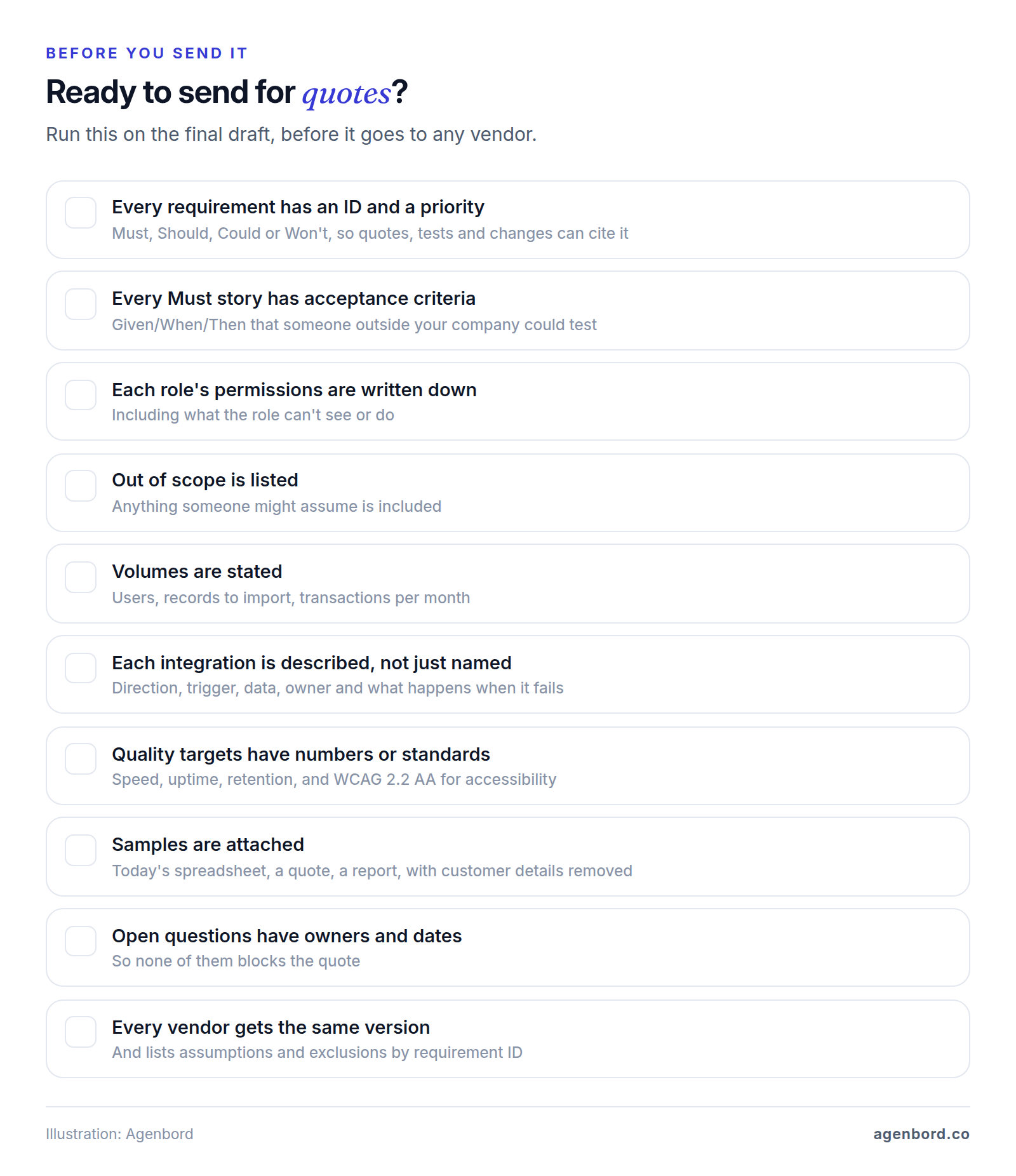
Run this check on the final draft:
- Every requirement has an ID and a priority.
- Every Must story has acceptance criteria someone outside your company could test.
- Each role's permissions are written down, including what it can't see or do.
- The out-of-scope list covers anything someone might assume is included.
- Volumes are stated: users, records to import, transactions per month.
- Each integration has its direction, trigger, data, owner and failure handling.
- Quality targets have numbers or named standards.
- Samples are attached, with customer details removed.
- Every open question has an owner and a date.
- One person is named to answer questions and sign off.
- Every vendor gets the same version and lists assumptions and exclusions by requirement ID.
Sources
- ISO - ISO/IEC/IEEE 29148:2018, Systems and software engineering - Life cycle processes - Requirements engineering (accessed October 2026)
- ISO - ISO/IEC/IEEE DIS 29148, third edition under development (accessed October 2026)
- IEEE SA - IEEE/ISO/IEC 29148-2018 (accessed October 2026)
- IEEE SA - IEEE 830-1998, Recommended Practice for Software Requirements Specifications (superseded) (accessed October 2026)
- NASA - Systems Engineering Handbook, Appendix C: How to Write a Good Requirement (accessed October 2026)
- Agile Business Consortium - MoSCoW Prioritisation, DSDM Project Framework (accessed October 2026)
- Cucumber - Gherkin Reference (accessed October 2026)
- Agile Alliance - Glossary: User Stories (accessed October 2026)
- W3C - Web Content Accessibility Guidelines (WCAG) 2.2 (accessed October 2026)
- W3C WAI - What's New in WCAG 2.2 (accessed October 2026)
- OWASP - Application Security Verification Standard project (accessed October 2026)
- IRS - How long should I keep records? (accessed October 2026)
Prices, plans and regulations change. Figures were checked on October 2, 2026; follow the links for the latest. Nothing here is legal, tax or financial advice.
About the author
Founder, Agenbord
Muhammad Hamza is the founder of Agenbord, the Fort Lauderdale software company behind the construction ERP Smart Construction and a WhatsApp-first billing platform. He writes practical guides on buying, building and automating business software.