On this page
- How much does a mobile app cost?
- Native vs cross-platform vs PWA: which costs less?
- What affects mobile app development cost
- Worked examples: what two hypothetical apps would cost
- App Store and Google Play costs and rules (October 2026)
- Ongoing costs after launch
- How to reduce app development cost without cutting corners
- How to get an accurate app development estimate
- Red flags in a mobile app quote
If you're budgeting for an iOS and Android app, here's the short answer on mobile app development cost. We price an app MVP for both platforms from $15,000 (8–12 weeks), a business app with several user roles, payments and integrations at $35,000–$90,000 (3–5 months), and complex apps with offline sync, real-time features or marketplaces from $90,000, delivered in phases.
Scope moves an app between those bands: who uses it, how many screens they need, what happens on the server and what the app must do without signal. Whether it runs on iPhone or Android matters far less.
The build is also only the first bill. Store fees, commissions on digital sales, hosting, maps and texting, and the updates Apple and Google require every year all come after launch, and this guide prices those too. We build iOS and Android apps at fixed prices, so the bands are ours; store and service prices come from each provider's own pages, checked in October 2026.
How much does a mobile app cost?
| App type | What's included | Typical price | Timeline |
|---|---|---|---|
| App MVP (iOS + Android) | One core flow, user accounts, backend API, admin panel, store submission for both platforms | From $15,000 | 8–12 weeks |
| Business app | Several user roles, payments, notifications, integrations with your CRM or operations systems | $35,000–$90,000 | 3–5 months |
| Complex app | Real-time features, offline sync, device hardware, marketplaces or heavy integrations | $90,000+ | 5+ months, in phases |
Each band covers the whole product, built from one React Native codebase: the app, the server behind it, the admin panel your team uses and the launch on both stores. They're typical ranges, not quotes; you get a fixed price once the scope is written down. For web portals and internal tools, our custom software cost guide has the equivalent bands.
Native vs cross-platform vs PWA: which costs less?
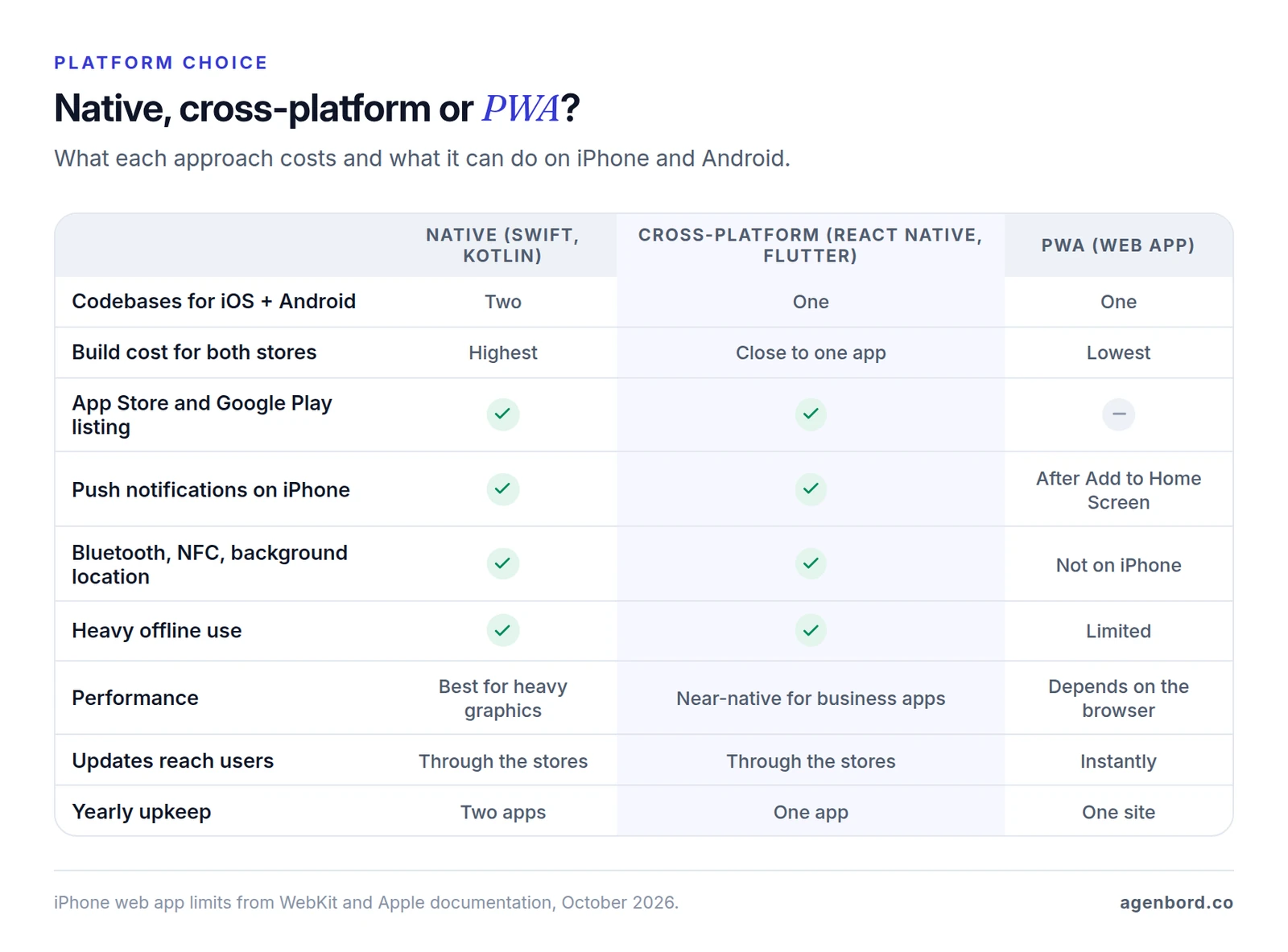
Native apps are written twice: Swift for iPhone, Kotlin for Android. You get every device feature as soon as Apple or Google ships it, and two codebases to build, test and keep updated.
Cross-platform apps share one codebase across both stores. React Native, maintained by Meta, renders each platform's own native UI components, and Flutter, supported by Google, builds both apps from a single Dart codebase. Either way, both store apps come from one build for close to the price of one, and a feature the framework doesn't cover can drop into a native Swift or Kotlin module. We build with React Native for that reason. It's also why Android doesn't cost a second build: with one codebase, it mainly adds testing, because Android phones come from many manufacturers in many screen sizes.
Progressive web apps (PWAs) are websites that install to the home screen: no store review, no store fees and one codebase that works on desktop too. The limits show up on iPhone. In the US, Apple requires every iOS browser to use its WebKit engine (other engines are allowed only in the EU and Japan), so a PWA can only do what WebKit supports:
- Push takes two steps from the user. Since iOS 16.4, a web app can send push notifications only after the user adds it to the Home Screen and then taps to allow them.
- It isn't in the App Store. Since iOS 26, any site added to the Home Screen opens as a web app by default, but people have to know to add it.
- Some hardware is off-limits. WebKit has decided not to implement Web Bluetooth, Web NFC or background geolocation, so an iPhone PWA can't pair with Bluetooth devices, read NFC tags or track location in the background.
- Offline data is less certain. WebKit can evict a site's stored data, least recently used sites first, unless it grants persistent storage, which it decides by heuristics such as whether the site runs from the Home Screen.
Which one should you choose?
- Cross-platform for most customer and staff apps: one budget, both stores, full device access.
- Native when the app lives on heavy graphics, advanced Bluetooth or platform-specific hardware. That's where a second codebase pays for itself.
- A web app or PWA when people will use it rarely or mostly on a computer, and it doesn't need the iPhone features a PWA lacks. A web app costs less and has no install step; our web app cost guide breaks that price down. If customers only log in to check status, sign documents or pay invoices, a client portal in the browser usually does the job.
What affects mobile app development cost
Every feature has a cheap version and an expensive one. The table shows why each driver adds cost, how much effort it usually adds and which of our bands it tends to put an app in. Treat it as our scoping guidance, not a price list.
| Cost driver | Why it costs more | Relative effort | Usually lands in |
|---|---|---|---|
| User roles and screens | Each role needs its own screens, permissions and tests; each screen needs loading, empty and error states | Grows with every role | 1–2 roles: MVP. 3 or more: business |
| Backend, API and admin panel | Data, business rules and your staff's tools live on the server, invisible in mockups | High | Every band. Reusing an existing API cuts it |
| Authentication | Email or phone login is routine. Google or Facebook login usually means also offering a private option such as Sign in with Apple; company single sign-on adds more | Low to medium | MVP. Single sign-on: business |
| Offline sync | Showing cached data is simple. Editing offline means queued changes, rules for when two people edit one record, and testing every failure | High | Offline capture, one editor per record: business. Shared records edited offline: complex |
| Real-time features | Chat, live tracking and live status need open connections, presence and delivery checks | High | Basic chat: business. Live tracking: complex |
| Payments | Card checkout through a processor is routine. Subscriptions, tips, split payments and payouts to providers add flows and edge cases, and store rules decide which method is allowed | Low to high | Simple checkout: MVP. Subscriptions or tips: business. Payouts to providers: complex |
| Maps and location | Showing a map is cheap. Geofences, routing and background location add battery work, permission text and store review steps | Low to high | Map: MVP. Background tracking: business or complex |
| Push notifications | Sending a push is simple. Targeting, scheduling and links that open the right screen take design and testing | Low to medium | Basic: MVP. Campaigns: business |
| Integrations | Each system (CRM, accounting, ERP) has its own API, limits and data rules, and needs error handling for the life of the app | Medium per system | One: MVP or business. Several two-way: complex |
| Files, photos and media | Uploads on weak signal need compression, retries and storage rules; video adds processing and streaming | Medium | Photos: business. Video: complex |
| Compliance | HIPAA and similar rules add access controls, audit logs, encryption, vendor agreements and documentation | High | Business at least; often complex |
| Design depth | Standard components are efficient. Custom animation, illustration and a bespoke design system multiply design and build time | Low to high | Any band |
| QA across devices and OS versions | Every flow is tested on small and large phones, older and newer OS versions and both platforms | Grows with screens | Every band |
Three things are easy to miss in a feature list:
- Drivers multiply. A new role doesn't add one screen. It adds its own version of every screen it touches, with permissions and tests for each.
- Store rules are scope. If users can create an account, both stores require a way to delete it inside the app, and Google also wants a web link for deletion requests. Both require privacy disclosures that cover every third-party SDK in the app, and Google Play approves background location only with a declaration, an in-app disclosure and a video of the feature.
- Health data changes the hosting. If your app handles protected health information for a healthcare provider or health plan, HIPAA reaches your vendors too: HHS says a cloud provider storing that data is a business associate that must sign a business associate agreement, even if it holds only encrypted data. HHS's guidance for health app developers and the FTC's Mobile Health Apps Interactive Tool help you check which rules apply. This is general information, not legal advice.
Worked examples: what two hypothetical apps would cost
Both businesses below are hypothetical. They show how we map a feature list to our bands; your own scope sets your price.
A booking app for a pet grooming business
Assumptions:
- Three locations. Customers use the app; the owner and staff share a web admin panel.
- Customers sign up, add their pets, pick a service, location and time, and pay a deposit by card, Apple Pay or Google Pay through Stripe.
- Booking reminders and "ready for pickup" alerts go out as push notifications.
- The admin panel manages services, prices, staff calendars, bookings and refunds.
- No other integrations, no offline mode, a clean design from standard components, and one React Native codebase for both stores.
Where it lands: our App MVP band, from $15,000 and 8–12 weeks. One core flow (book and pay), two kinds of users and one payment provider fit an MVP. Because the deposit pays for a service delivered in person, it isn't an in-app purchase, and neither store takes a commission on it.
What would move it up: memberships or prepaid packages, a loyalty program, a sync with an existing booking or point-of-sale system, or a staff app with schedules and check-in. Two or three of those put it in the business band.
A field app for an HVAC company with 25 technicians
Check the off-the-shelf options first: field service platforms already include technician apps, and our field service software guide compares them. Assume this company's inspection process doesn't fit them.
Assumptions:
- Technicians use the app; dispatchers and managers use a web admin panel.
- Jobs come in from the company's scheduling system through its API, and finished inspection reports go back as PDFs.
- Technicians can open the day's jobs, fill in checklists, take photos and capture signatures without signal, and everything syncs when signal returns. Only the assigned technician edits a job, so there are no conflicting edits to merge.
- Photos are compressed and uploaded in the background.
- A GPS check-in records arrival; there's no background tracking.
- Push alerts for new or changed jobs, on company and personal iPhones and Android phones.
Where it lands: our business app band, $35,000–$90,000 and 3–5 months. Offline capture, background photo uploads, three roles and an integration take it past an MVP. One editor per job and a check-in instead of live tracking keep it out of the complex band. Live route tracking, office and field editing the same records, or connections to more systems would push it past $90,000.
The first year for both
To show the full budget, assume a $15,000 build for the booking app and $50,000 for the field app. These are illustrative points inside our bands, not quotes.
| First-year cost | Booking app | Field app |
|---|---|---|
| Build (illustrative) | $15,000 | $50,000 |
| Apple Developer Program | $99 | $99 |
| Google Play registration (one time) | $25 | $25 |
| Hosting (assumed) | $1,200 ($100 a month) | $3,000 ($250 a month) |
| Maintenance, 15–20% of the build | $2,250–$3,000 | $7,500–$10,000 |
| Push notifications (Firebase Cloud Messaging) | $0 | $0 |
| In-app maps (Google Maps SDK) | Not used | $0 |
| Card processing (Stripe) | 2.9% + 30¢ per deposit ($1.46 on $40) | Not used |
| Build plus first 12 months live | $18,574–$19,324 plus card fees | $60,624–$63,124 |
In both, maintenance is the biggest fixed running cost, larger than hosting and store fees combined. Card fees scale with sales, so model them per transaction.
App Store and Google Play costs and rules (October 2026)
Developer accounts
- Apple Developer Program: $99 a year. Nonprofits, accredited schools and government entities that don't sell digital goods can apply for a fee waiver.
- Google Play Console: $25, one time.
- Company accounts need a D-U-N-S number on both stores. It's free from Dun & Bradstreet, but Google says it can take up to 30 days, so request it when the project starts.
- Use your company's accounts, not your developer's. A new personal Google Play account also has to run a closed test with at least 12 testers for 14 days in a row before it can publish; organization accounts skip that step.
Commissions apply only to digital sales
Store commissions apply to digital goods and services sold inside the app: subscriptions, premium features, content and credits. Apps that sell physical goods or services used outside the app, such as bookings, repairs, deliveries or event tickets, must use other payment methods on iOS (Apple names Apple Pay and card entry) and fall outside Google Play's billing requirement. Neither store takes a cut of those sales; your payment processor does.
For digital sales to US users, as of October 2026:
| Apple App Store | Google Play | |
|---|---|---|
| Standard rate | 30% | 20% + 5% billing fee |
| Small developers (up to $1M a year, after enrolling) | 15% | 10% + 5% billing fee |
| Subscriptions | 30% in a subscriber's first paid year, then 15% (15% throughout for small developers) | 10% + 5% billing fee |
| Paying on your website through a link | Allowed in US storefront apps | Allowed through Google's external content links program; service fee applies, billing fee doesn't |
- Google's US fees changed on June 30, 2026. The 20% rate applies to users who first installed the app on or after that date, which for a new app is everyone; earlier installs pay 25% + 5%. The 5% billing fee applies only when a purchase goes through Google Play Billing, but the service fee applies whether you use Google Play Billing, an alternative billing system or a link to your website, counting purchases made within 24 hours of the link.
- Apple lets US apps point to the web. Its guidelines allow apps on the US storefront to include buttons, external links and other calls to action that send customers to other ways to pay, without the entitlement Apple requires in other countries.
- Small businesses pay 15% on both stores. Once enrolled in each store's small-developer program, you pay 15% on in-app digital sales on both stores (on Google Play, 10% plus the 5% billing fee).
Store payment rules change often, so check both stores' current terms before you set prices.
Review times
Apple says 90% of submissions are reviewed in under 24 hours, and that more than 40% of unresolved issues fall under its App Completeness guideline, which covers problems like crashes, placeholder content and missing demo logins. Google says reviews for some accounts can take up to seven days, or longer in exceptional cases. Leave room in the launch plan for one resubmission.
Ongoing costs after launch
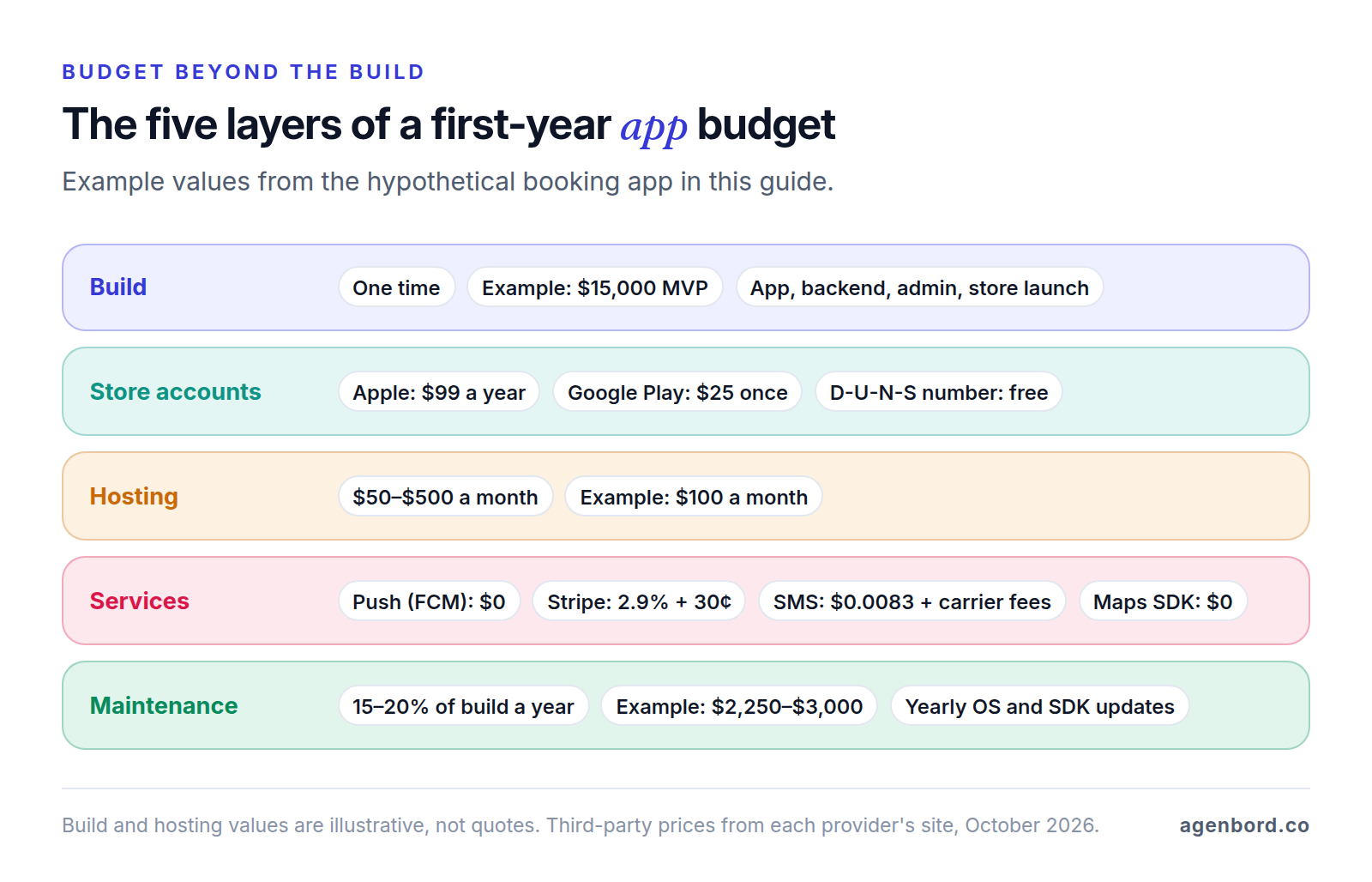
Four lines recur every year.
Hosting: roughly $50–$500 a month for a small-business app, covering servers, the database, file storage and backups.
Maintenance: about 15–20% of the build cost per year. It isn't optional, because both stores raise the floor every year:
- Since April 28, 2026, Apple accepts uploads only if they're built with the iOS 26 SDK, and from April 2027 it will require the iOS 27 SDK.
- From August 31, 2026, Google Play requires new apps and updates to target Android 16 (API level 36), with extensions to November 1. Existing apps must target at least Android 15 to stay available to new users on newer devices.
- Policies change in between. Since September 2026, Apple requires answers to new age-rating questions about social media features before you can submit an update.
- Libraries inside the app need security patches and upgrades, and small fixes keep coming.
Third-party services, billed at their published rates (as of October 2026):
| Service | Example | Price |
|---|---|---|
| Push notifications | Firebase Cloud Messaging | No cost |
| Crash reports and analytics | Firebase Crashlytics and Analytics | No cost |
| In-app maps | Google Maps SDK for Android and iOS | Free, unlimited |
| Address lookups | Google Geocoding API | 10,000 a month free, then $5 per 1,000 |
| Text messages | Twilio, US | $0.0083 per segment plus carrier fees; $1.15 a month per local number |
| Card payments | Stripe, US cards | 2.9% + 30¢ per payment |
| Builds and app updates | Expo (EAS) | Free tier; Starter $19 a month, Production $199 a month, plus usage |
Store and release work: every update is tested on current phones, submitted with release notes, privacy answers and new screenshots when the screens change, then reviewed. Budget it inside maintenance.
How to reduce app development cost without cutting corners
- Cut to the flow that proves the app. One user, one job, done well. That's how we scope MVPs: the riskiest question first, everything else in version two.
- Use one codebase for both stores unless a feature truly needs native.
- Reuse the backend you have. If your web app or SaaS already has an API, the mobile app can share its data, rules and permissions instead of rebuilding them. In Smart Construction, our construction ERP, the web, desktop and mobile apps share one data model.
- Phase features. Launch the core, then add extra payment options, integrations or offline mode in priced phases once real usage shows they're needed.
- Buy the commodity parts. Sign-in, payments, push, maps and crash reporting are services; spend the budget on what makes the app yours.
- Check that you need a custom app at all. If an off-the-shelf product covers the job, buy it; our build-vs-buy framework walks through the decision.
Don't cut device testing, security, crash reporting or the admin panel your team needs to run the app. Those cuts come back as bad reviews, store rejections and support hours.
How to get an accurate app development estimate
Every quote rests on the same arithmetic: the hours to design, build, test and launch each flow, plus the backend and admin, times the team's rates, plus a margin for what's still unknown. Quotes for the "same" app differ because each vendor fills the gaps in your brief with its own assumptions. Close the gaps before you ask (our requirements document template covers each one in more depth):
- Users and roles: who uses the app, who uses the admin panel, and what each can see and do.
- Three to five core flows, step by step, such as "sign up, book, pay a deposit, get a reminder".
- Screens or sketches, even photos of paper, plus apps you like and why.
- Integrations: each system, what data moves and in which direction.
- Device needs: camera, location (while the app is open or in the background), Bluetooth, offline use.
- What users pay for, and whether it's a real-world service or digital content.
- Data rules: health, financial or children's data, and who has to sign off.
- Constraints: launch date, budget range and who owns the developer accounts.
Here's how we turn that into a price: a 30-minute discovery call, then a written scope covering screens, roles, backend, integrations and store requirements, with one fixed price, in 3–7 days. Design and a clickable prototype take 2–3 weeks, and during the build you get a new test build on your phone every week through TestFlight and Google Play's testing tracks.
Red flags in a mobile app quote
- A price without a written scope. You can't compare it, and every gap becomes a change request later.
- No backend or admin panel in the line items. The app needs a server, a database and a way for your team to manage users and content.
- Your website in a wrapper, sold as an app. Apple's guidelines require apps to offer more than a repackaged website.
- Developer accounts or code in the vendor's name. Both should belong to your company from day one; our outsourcing guide has a contract checklist for accounts and code ownership.
- No testing plan. Ask which phones and OS versions they test on, and how often you'll get a build to try.
- Store requirements left out. Account deletion, privacy disclosures, permission prompts and a demo login for reviewers belong in the scope, not in a rejection email.
- Payment flows that ignore store rules. The quote should say whether your sales count as digital or real-world and how each store treats them.
- Silence on running costs. Hosting, third-party services and yearly maintenance should be in writing before you sign.
For the wider vetting process, see our guide to choosing a software development company.
Sources
- Apple - Apple Developer Program enrollment and fees (accessed October 2026)
- Apple - Developer Program fee waivers (accessed October 2026)
- Apple - D-U-N-S Number for enrollment (accessed October 2026)
- Apple - App Store Small Business Program (accessed October 2026)
- Apple - Auto-renewable subscriptions (accessed October 2026)
- Apple Newsroom - Apple announces App Store Small Business Program, standard 30% rate (accessed October 2026)
- Apple - App Review Guidelines, sections 2.1, 2.5.6, 3.1, 4.2, 4.8 and 5.1.1 (accessed October 2026)
- Apple - App Review: review times and common issues (accessed October 2026)
- Apple - App privacy details on the App Store (accessed October 2026)
- Apple - Upcoming SDK minimum requirements, February 3, 2026 (accessed October 2026)
- Apple - App Store submissions now open for the latest OS releases, September 9, 2026 (accessed October 2026)
- Apple - Age rating questionnaire now includes social media questions, July 9, 2026 (accessed October 2026)
- Google Play Console Help - Registration fee (accessed October 2026)
- Google Play Console Help - Information required to create a developer account (accessed October 2026)
- Google Play Console Help - Testing requirements for new personal developer accounts (accessed October 2026)
- Google Play Console Help - Service fees (accessed October 2026)
- Google Play Console Help - Updated service fees, announced March 4, 2026 (accessed October 2026)
- Google Play Console Help - External content links program for users in the US (accessed October 2026)
- Google Play Console Help - Reduced service fee tier enrollment (accessed October 2026)
- Google Play Policy Center - Payments policy (accessed October 2026)
- Google Play Console Help - Account deletion requirements (accessed October 2026)
- Google Play Console Help - Data safety section (accessed October 2026)
- Google Play Console Help - Location access in the background (accessed October 2026)
- Google Play Console Help - Review times (accessed October 2026)
- Android Developers - Target API level requirements for Google Play apps (accessed October 2026)
- WebKit - Web Push for Web Apps on iOS and iPadOS (accessed October 2026)
- WebKit - WebKit features in Safari 26.0 (accessed October 2026)
- WebKit - Tracking prevention: APIs WebKit does not implement (accessed October 2026)
- WebKit - Updates to storage policy (accessed October 2026)
- React Native - Official site (accessed October 2026)
- Flutter - Official site (accessed October 2026)
- Google Maps Platform - Pricing list (accessed October 2026)
- Firebase - Pricing (accessed October 2026)
- Twilio - SMS pricing for the United States (accessed October 2026)
- Stripe - Pricing (accessed October 2026)
- Expo - EAS pricing (accessed October 2026)
- HHS - Guidance on HIPAA and cloud computing (accessed October 2026)
- HHS - Resources for mobile health apps developers (accessed October 2026)
- FTC - Mobile Health Apps Interactive Tool (accessed October 2026)
Prices, plans and regulations change. Figures were checked on October 2, 2026; follow the links for the latest. Nothing here is legal, tax or financial advice.
About the author
Founder, Agenbord
Muhammad Hamza is the founder of Agenbord, the Fort Lauderdale software company behind the construction ERP Smart Construction and a WhatsApp-first billing platform. He writes practical guides on buying, building and automating business software.