On this page
- Web app vs. website: where the money goes
- How much does custom web app development cost in 2026?
- Web app development cost breakdown by feature
- What a web app costs to run (October 2026 prices)
- Progressive web app development cost
- Worked example: a client portal for a 30-person firm
- How to lower web app development cost without cutting corners
- How to get an accurate web app development cost estimate
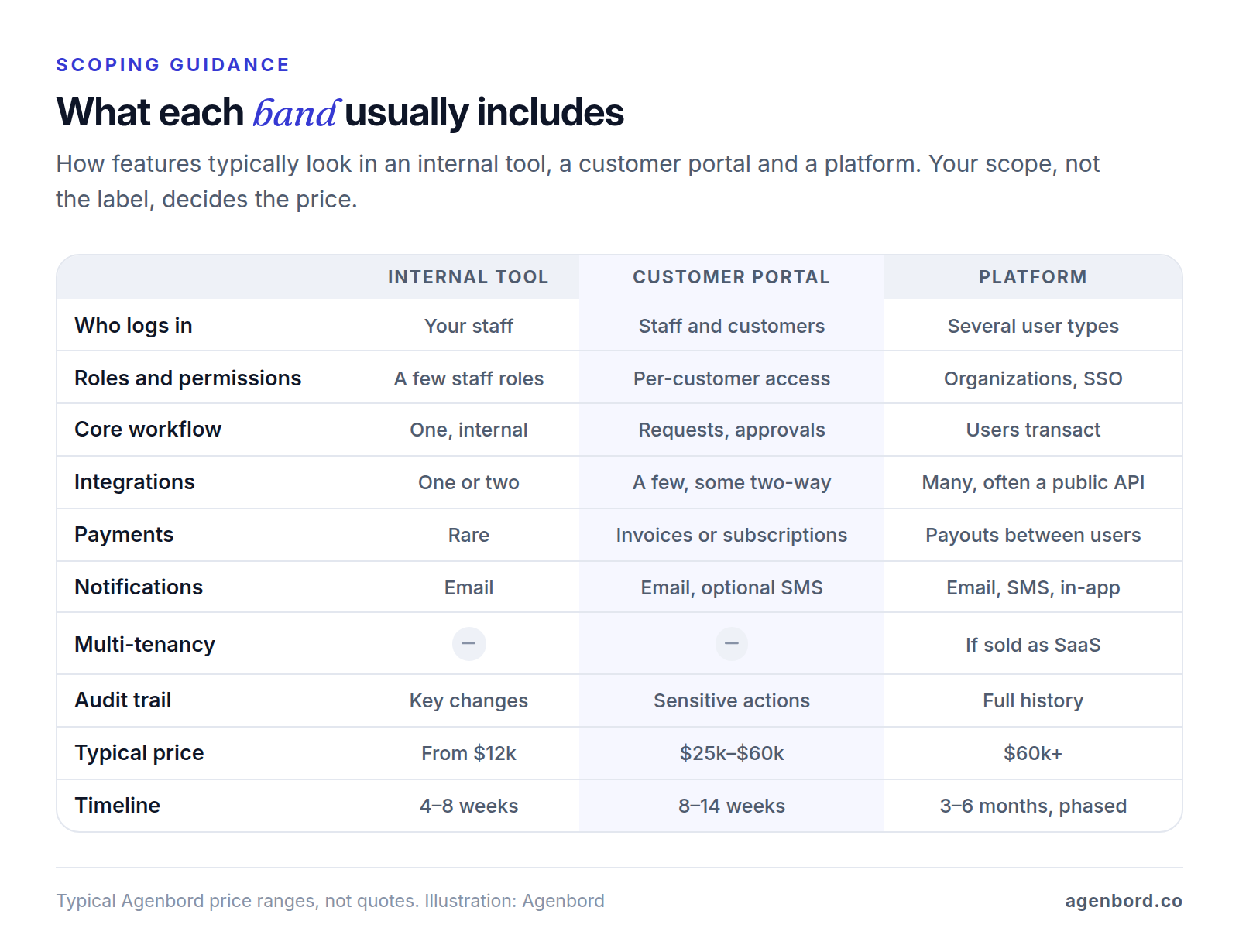
Web app development cost comes down to who logs in, what each of them can do and how many other systems the app talks to. In our pricing, an internal tool or dashboard starts around $12,000 and takes 4–8 weeks. A customer portal typically runs $25,000–$60,000 over 8–14 weeks. A platform or marketplace, where several kinds of users transact with each other, starts around $60,000 and is delivered in phases over 3–6 months.
The build isn't the whole bill. Hosting for most small-business web apps runs roughly $50–$300 a month, services such as payments, email and texting charge their own published rates, and maintenance costs about 15–20% of the build each year.
Below, we go feature by feature, then cover running costs as of October 2026, what a progressive web app adds, a worked portal example and how to get a quote you can trust. For market-wide figures and pricing models, see our custom software cost guide.
Web app vs. website: where the money goes
A website is mostly pages people read: services, about, a blog, a contact form. A web app is software people sign in to and use to get something done, such as approving a quote, uploading a document, checking an order or running a report. Each person sees only their own data, and the app enforces who can do what.
That difference is where the cost sits. A website's content lives in a content management system your team edits. A web app needs a data model (the records it stores and how they relate), business rules (what happens when a quote is approved), a permission check on every request, and tests for all of it. That's why our website projects start from $3,500 and web apps from $12,000; our small business website cost guide covers the website side.
Many businesses end up with both: the marketing site at yourcompany.com and the app at a subdomain such as app.yourcompany.com, usually scoped and priced as separate projects.
How much does custom web app development cost in 2026?
These are our typical bands for custom web app development. Each includes the admin side for your team, screens that work on phones and desktops, deployment to cloud accounts in your name and 30 days of support after launch.
| Type | What it usually includes | Typical price | Timeline |
|---|---|---|---|
| Internal tool or dashboard | One core workflow, a few staff roles, one or two integrations, reporting | From $12,000 | 4–8 weeks |
| Customer portal | Secure logins for your customers, roles and permissions, documents or payments, notifications, an admin back office | $25,000–$60,000 | 8–14 weeks |
| Platform or marketplace | Several user types transacting with each other, complex permissions, heavier integrations | $60,000+ | 3–6 months, in phases |
Two related cases have bands of their own:
- Replacing a spreadsheet or Access database. Rebuilding it as a multi-user web app with your data migrated is usually internal-tool sized and starts from $12,000; see cloud application development.
- A SaaS product you'll sell to other businesses. Tenant workspaces and subscription billing change the foundation. Our SaaS development MVPs start from $20,000 (8–14 weeks), and a launch-ready v1 runs $45,000–$120,000. The SaaS MVP cost guide covers what belongs in the first version, and our guide to building a SaaS product starts with validation.
Where a project lands inside a band depends on its features, and you get a fixed price for your scope after discovery rather than an hourly meter.
Web app development cost breakdown by feature
Price lists that put a dollar figure on "login" or "payments" treat features like blocks you can add up. In a real app they multiply. Add a second kind of customer user, say an approver alongside the person who submits requests, and you get new screens, a permission check on every request, different notifications, filtered reports and more tests.
So we scope by roles, screens and integrations, and the table below is our scoping guidance, not a price list. Effort is relative: small is a contained addition, medium touches several screens or one outside system, and large changes the data model or most of the app.
| Feature | Simple version | What makes it complex | Effort | Usually pushes you into |
|---|---|---|---|---|
| User accounts and roles | Staff sign-in, two or three roles | Customer or vendor logins, several contacts per account with different rights, enforced MFA, single sign-on for enterprise customers | Small to large | Outside users make it a portal; single sign-on and org hierarchies point to a platform |
| Dashboards and reports | Fixed reports and KPI tiles on the app's own data, CSV export | Data from several systems, saved custom reports, scheduled emails, totals that must match your accounting | Small to large | Internal tool, until reports have to combine systems |
| Forms, workflows and approvals | One form, a few statuses, one approver | Conditional multi-step forms, save and resume, approval chains by amount or department, deadlines and escalations | Medium to large | The core of an internal tool; branching rules push toward the top of any band |
| Files and documents | Private uploads on a record, expiring download links | Document requests with reminders, versions, generated PDFs, e-signature, retention rules | Small to medium | Customer portal; e-signature and generated documents push toward its upper half |
| Payments | Paying an invoice on the processor's hosted checkout page | Saved payment methods, subscriptions, partial payments and refunds, reconciliation to accounting, payouts to other users | Small to large | Customer portal; moving money between users is platform work |
| Notifications | Transactional emails: invites, password resets, status changes | User preferences, digests, SMS with opt-in and opt-out, an in-app inbox, push | Small to medium | Any band; rarely moves the band on its own |
| Integrations | A one-way push to one system with a good API | Two-way sync, conflicting edits, rate limits, weak or missing APIs, retries and monitoring | Medium to large, each | One or two fit an internal tool; each extra two-way sync moves you up |
| Search | Filters plus the database's built-in full-text search, which matches word variants and ranks results | Typo tolerance, ranking across many record types, searching inside documents, results filtered by permission | Small to medium | Any band, unless search is the product, as in a marketplace |
| Multi-tenancy | None: one company and its users | Many customer organizations in one app, each with isolated data, settings, users and billing | Large | SaaS: our MVPs start from $20,000 with tenancy built in; adding it to a single-company app later is expensive |
| Audit logs | Who created, changed or approved key records, and when | Field-level history, logs of views and downloads, tamper resistance, retention and exports for auditors | Small to medium | Logging sensitive actions is standard in our portals; full history leans toward a platform |
| Admin panel | Managing users, resetting access, editing core records | Settings your team changes without a developer (prices, templates, workflow rules), safe impersonation for support, bulk imports | Small to medium | Every band; the more your team can configure, the higher |
| Accessibility (WCAG 2.2 AA) | Accessible components, keyboard and screen reader tests of key flows | Drag-and-drop boards, dense data grids, charts and custom widgets | Small to medium built in; large to retrofit | No band change when it's in the scope from day one |
| Security and compliance | Encryption, hashed passwords, server-side permission checks, backups, updates | Health, card or financial data, security questionnaires, SOC 2 reports, penetration tests | Small to large | Baseline in every band; regulated data can push a portal toward platform pricing |
Accessibility: what WCAG 2.2 AA means inside an app
WCAG 2.2, a W3C Recommendation since October 2023, is the standard to name in your scope, at Level AA. Several of its newer success criteria land squarely on app features:
- Sign-in (3.3.8, Accessible Authentication): login can't depend on a cognitive test, such as remembering a password or solving a puzzle, unless there's an alternative or a helper. W3C counts password managers as a helper, so let them fill in fields and don't block paste.
- Drag and drop (2.5.7, Dragging Movements): kanban boards and sortable lists need a click or tap alternative.
- Buttons and icons (2.5.8, Target Size): at least 24 by 24 CSS pixels, or enough spacing around smaller targets. Check dense tables and icon toolbars first.
- Multi-step forms (3.3.7, Redundant Entry): don't ask people to retype what they entered earlier in the same process.
- Sticky headers and chat widgets (2.4.11, Focus Not Obscured): whatever has keyboard focus can't be completely hidden behind them.
Built in from the first screen, this is a small-to-medium cost; retrofitting a finished app costs far more, because fixes land in every component. Our ADA website compliance guide covers the legal side.
Security and compliance: the baseline and what raises it
The baseline in the table belongs in every app, and the permission checks deserve the most testing: broken access control is number one in the OWASP Top 10 for 2025, and OWASP found some form of it in 100% of the applications it tested.
Three things raise the cost:
- Card data. Take payments on the processor's hosted page or fields so card numbers never reach your servers. Stripe's security guide warns that handling card data directly can mean meeting more than 300 PCI DSS security controls.
- Health data. Under HIPAA, a cloud service that stores protected health information for you is a business associate and must sign a business associate agreement, HHS says, even if it can't read the encrypted data. That can mean higher plans: Supabase offers HIPAA only as a paid add-on on its $599-a-month Team plan and above, against $25 for Pro.
- Enterprise customers. Larger buyers send security questionnaires and may ask for a SOC 2 report, a CPA's examination of your controls over areas such as security, availability and confidentiality. The audit is a separate engagement, and preparing for it shapes logging, access reviews and change control from the start.
The accessibility and compliance points above are general information, not legal advice.
What a web app costs to run (October 2026 prices)
Third-party services bill you directly at their published rates. These are typical building blocks, with list prices checked on each vendor's site in October 2026; your app may use different ones.
| Service | What it's for | List price (October 2026) |
|---|---|---|
| Vercel Pro | Hosting the app's front end | $20 a month with one developer seat and $20 of usage credit; usage beyond that is billed |
| Supabase Pro | Managed Postgres database, sign-in and file storage | $25 a month with 8 GB of database disk, sign-in for 100,000 monthly active users and 100 GB of files |
| Stripe | Card and bank payments | 2.9% + 30¢ per domestic card payment; ACH Direct Debit 0.8%, capped at $5 |
| Postmark | Transactional email | $15 a month for 10,000 emails on Basic, then $1.80 per 1,000 |
| Amazon SES | Transactional email | $0.10 per 1,000 emails on à la carte pricing |
| Twilio | SMS | $0.0083 per message segment plus carrier fees; $1.15 a month per local number |
Four details change the math:
- Payment fees grow with revenue, not traffic. Stripe adds 1.5% for international cards and 1% when currency conversion is needed, and subscriptions on Stripe Billing add 0.7% of billing volume. On a $2,400 invoice, a card payment costs $69.90 in Stripe fees and ACH Direct Debit costs $5.
- Texting has carrier fees and registration. Twilio passes through carrier fees of $0.0035–$0.005 per outbound text on the major networks, and business texting from local numbers carries A2P 10DLC registration fees.
- Integrations can meter you. Intuit doesn't charge for most API calls that create or update QuickBooks Online records, but it meters most reads. Its free Builder tier includes 500,000 a month and blocks reads beyond that; the Silver tier is $300 a month. A sync that reads only what changed uses far fewer.
- Maintenance is a budget line, not a surprise. Plan on 15–20% of the build per year, or $1,500–$2,000 for every $10,000 of build, for security updates, dependency upgrades, integration changes and small improvements.
Taken together, hosting for most small-business web apps lands at roughly $50–$300 a month, and heavier ones run up to about $500.
Progressive web app development cost
A progressive web app (PWA) isn't a separate kind of app with its own price. It's your web app plus two pieces: a web app manifest, a small file with the app's name, icons, start page and display mode that lets people install it, and a service worker, a script that runs in the background to cache files for offline use and receive push notifications.
What each capability adds, in our scoping guidance:
- Installable, opens like an app: the manifest and icons. Small.
- Loads fast and reads offline: caching the app and recently viewed records. Small to medium.
- Push notifications: a push service, a permission flow and per-user preferences. Medium.
- Data entry offline that syncs later: an on-device database, a sync queue and rules for conflicting edits. Large, and the point to compare against a native app.
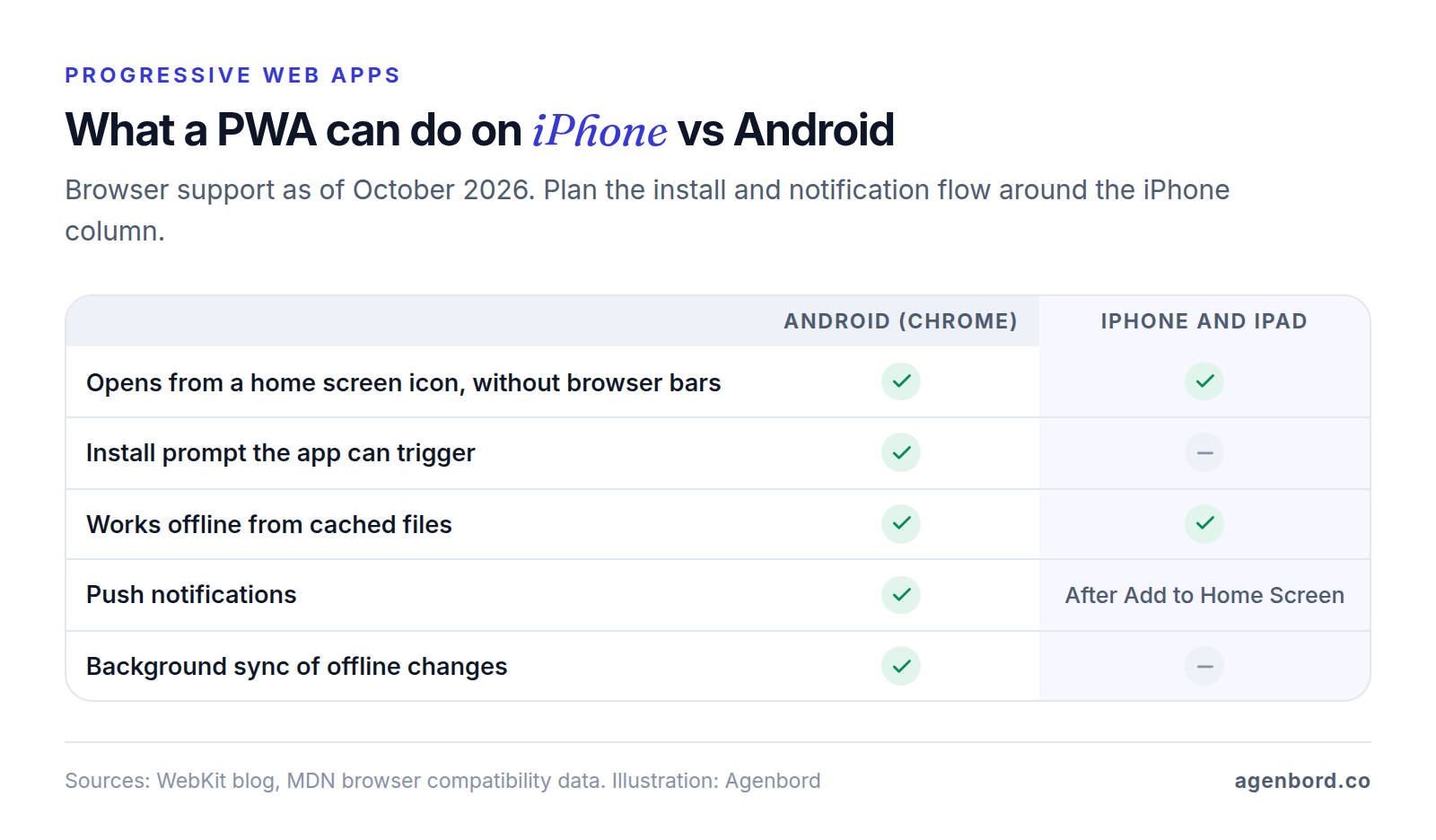
Plan around iPhone and iPad behavior, as of October 2026:
- No install prompt. Chrome and Edge let your app show its own install button. Safari doesn't support that, so iPhone users add the app themselves with Add to Home Screen in the Share menu, which MDN notes works in Safari, Chrome, Edge and Firefox on iOS 16.4 and later. Budget for a short how-to screen.
- Push only after install. Web push arrived in iOS and iPadOS 16.4 for web apps on the Home Screen only, and the app must ask for permission in response to a tap, such as on a "Turn on notifications" button.
- No background sync. Safari doesn't support the Background Sync API, so changes made offline upload when the user next opens the app.
- Unused data can be cleared. Under WebKit's tracking prevention, Safari deletes a site's stored data, service worker caches included, after seven days of Safari use without the user interacting with the site. Home Screen web apps keep their own count, based on actual use. Keep the server as the source of truth.
Installed use is easier to get than it used to be: since iOS 26, any site added to the Home Screen opens as a web app by default, manifest or not.
A PWA is the cheaper route when your users already work in a browser and want an installable, phone-friendly app with light offline use. Choose a native app for heavy offline field work, device hardware or an App Store listing, and don't plan on wrapping the website in an app shell: Apple's App Review Guidelines (4.2) say an app "should include features, content, and UI that elevate it beyond a repackaged website." Our mobile app development MVPs for iOS and Android start from $15,000 (8–12 weeks), plus Apple's $99-a-year developer membership and Google Play's one-time $25 registration fee; our mobile app cost guide covers the rest of that budget.
Worked example: a client portal for a 30-person firm
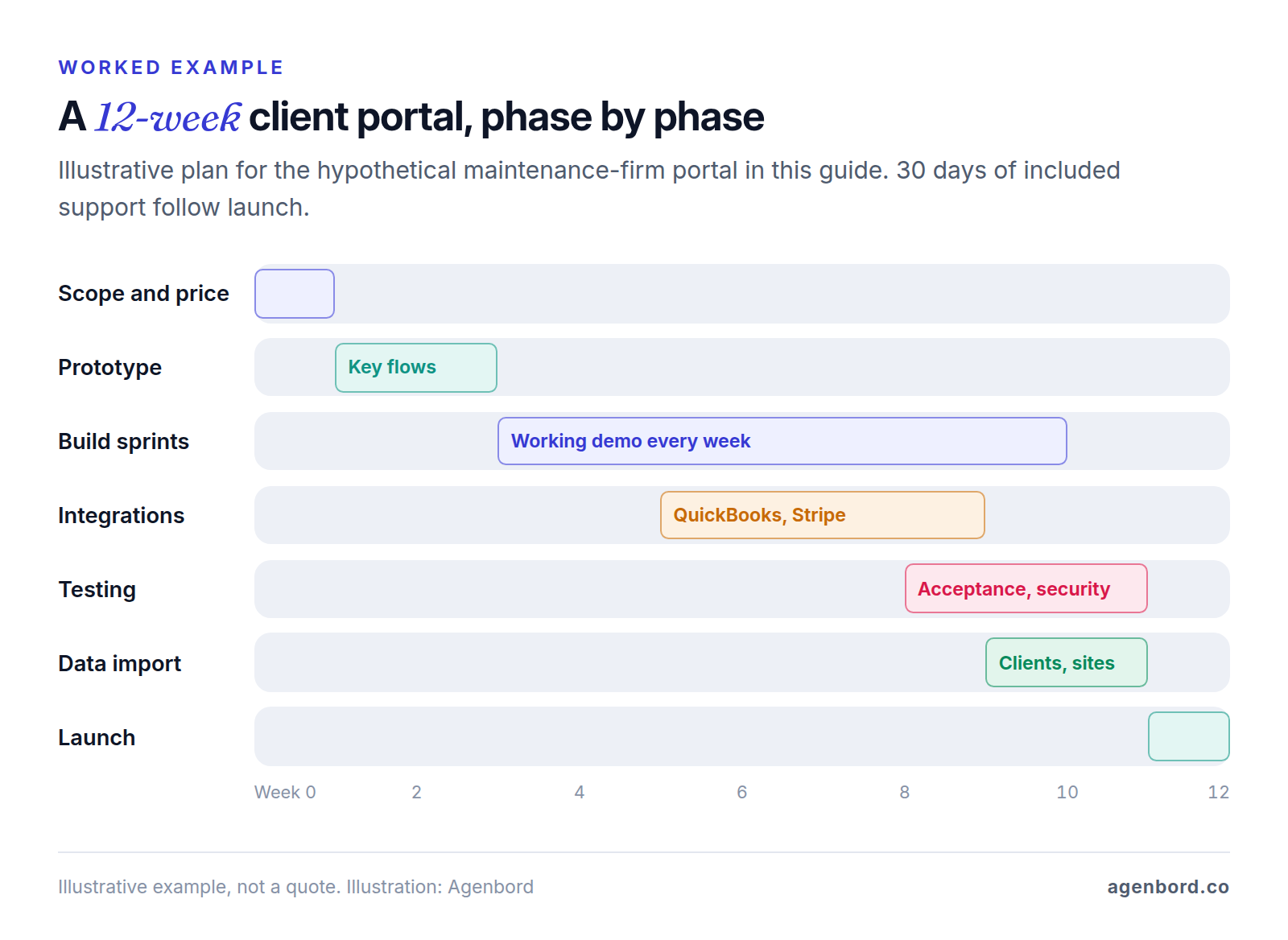
Here's how the bands apply to a hypothetical project. A 30-person facilities maintenance firm serves about 150 commercial clients: property managers, retailers and offices. Requests arrive by email and phone, quotes go out as PDFs, and invoices come from QuickBooks Online. The firm has checked off-the-shelf portals, which our client portal software guide compares, and none handles its per-client approval limits across multiple sites.
The v1 scope:
- Four roles: client admin, client requester, staff coordinator and manager, with each client seeing only its own sites.
- Service requests with photos, a status timeline and completion photos.
- Quote approval: quotes above each client's limit go to the client admin, and every approval is logged.
- Invoices synced from QuickBooks Online, payable by card or ACH on Stripe's hosted checkout, with the payment written back to QuickBooks.
- Email notifications for status changes and approvals; no SMS in v1.
- An admin panel and two reports: open requests by client and approval turnaround.
- The baseline: MFA, an audit log of approvals and payments, and WCAG 2.2 AA.
- Left out: a technician app, scheduling (the firm keeps its current tool) and access for subcontractors.
Where it lands: our customer portal band, $25,000–$60,000 over 8–14 weeks. Payments with reconciliation back to QuickBooks and the per-client approval rules put it in the upper half. Dropping online payment from v1, so clients keep paying the way they do today, would move it toward the lower half. Adding any of the left-out items, or selling the portal to other maintenance firms as multi-tenant SaaS, would make it a platform project.
Running it: hosting in the $50–$300-a-month range, Postmark's $15 Basic plan for up to 10,000 emails a month, QuickBooks reads that should stay well inside Intuit's free tier with a changes-only sync, and maintenance of 15–20% of the build a year. Payments are the variable that matters most. If clients pay 100 invoices of $2,400 a month by card, Stripe fees come to $6,990; by ACH Direct Debit, $500.
How to lower web app development cost without cutting corners
- Ship a smaller v1. Start with one user type and one workflow, such as a staff-only tool you open to customers in phase two. If you're testing a new product, an MVP built around the one workflow people will pay for is the cheapest real test.
- Use hosted building blocks. Sign-in, payments, email and file storage are solved problems. Stripe's customer portal, for example, lets customers update payment methods, pay and download invoices and cancel subscriptions, and you set it up in Stripe's dashboard instead of building it.
- Buy whole workflows that aren't yours. Integrate e-signature, scheduling, help desk and accounting tools rather than rebuilding them, and spend the custom budget on the process that's specific to you. Our build-vs-buy framework helps draw the line.
- Leave data where it already lives. Reading invoices from your accounting software is far cheaper than building invoicing.
- Go web first. A responsive web app or PWA serves phones too; add native apps when usage proves the need.
Don't cut permission checks, backups or accessibility: they're cheap to build in and expensive to add after a breach or a demand letter. And keep the maintenance budget, because unpatched dependencies are how a working app becomes a risky one.
How to get an accurate web app development cost estimate
A quote is only as precise as the scope behind it. Vague briefs get padded quotes, because every vendor prices the unknowns differently.
How a fixed-price proposal is structured
Our proposals are organized around five phases, and any vendor's should cover the same ground:
| Phase | What happens | What you get |
|---|---|---|
| Discovery | A 30-minute call, then 3–7 days to write up roles, screens, data model and integrations | A written scope with acceptance criteria, a timeline and one price |
| Design | A clickable prototype of the key flows, tested with real users | Screens agreed before engineering starts, while changes are cheap |
| Build | Two-week sprints with a working demo on a staging link every week | Software you can click through; changes written up, priced and opt-in |
| QA | Testing against the acceptance criteria on real devices, plus a security review | Defects fixed before launch, not after |
| Launch | Data migration, deployment to your accounts, team training | A live app, documentation and 30 days of included support |
Compare quotes only against the same written scope. Our guide to software development outsourcing covers the contract terms that protect you, including a written assignment of the code.
Red flags in a web app quote
- One number and no written scope: no roles, screens, integrations or acceptance criteria.
- A per-feature price menu, which ignores how roles and integrations multiply work.
- Missing line items: admin panel, testing, deployment, data migration or post-launch support. They come back later as change requests.
- One-line integrations, such as "QuickBooks integration" with no records, direction or owner for each field.
- No running-cost estimate for hosting, third-party services and maintenance.
- Production on free tiers. Vercel's Hobby plan is for personal, non-commercial use, and Supabase pauses free projects after a week of inactivity.
- Accessibility "guaranteed" by an overlay widget.
- Code, hosting or domains in the vendor's accounts, or a license fee to keep using what you paid for.
What to prepare before you ask for a quote
Our software requirements document template turns this list into a document every vendor can quote against.
- Who logs in: each type of user, roughly how many, and what each must and must not be able to do.
- The jobs for v1: three to five tasks the app must handle, step by step, including who approves what.
- Your systems: where the data lives today, which system owns each record, and admin access or API documentation.
- Samples: the spreadsheets, forms, PDFs and reports people use now.
- Data to bring over: what it is, how much and how clean.
- Constraints: phone and offline use, regulated data, customer security reviews and WCAG 2.2 AA.
- Priorities: must-haves versus later, a target date and a budget range.
- A decision-maker who can join a weekly demo.
Sources
- Stripe - Pricing (accessed October 2026)
- Stripe Docs - Integration security guide (accessed October 2026)
- Stripe Docs - Customer portal (accessed October 2026)
- Postmark - Pricing (accessed October 2026)
- Amazon Web Services - Amazon SES pricing (accessed October 2026)
- Twilio - SMS pricing for the United States (accessed October 2026)
- Vercel - Pricing (accessed October 2026)
- Supabase - Pricing (accessed October 2026)
- Intuit - App Partner Program guide, version 1.2, March 2026 (accessed October 2026)
- PostgreSQL 18 Documentation - Introduction to full text search (accessed October 2026)
- W3C WAI - What's New in WCAG 2.2 (accessed October 2026)
- W3C WAI - Understanding Success Criterion 3.3.8: Accessible Authentication (Minimum) (accessed October 2026)
- OWASP - A01:2025 Broken Access Control (accessed October 2026)
- HHS - Guidance on HIPAA & Cloud Computing (accessed October 2026)
- AICPA & CIMA - SOC 2 (accessed October 2026)
- MDN - Making PWAs installable (accessed October 2026)
- MDN - Window: beforeinstallprompt event, browser compatibility (accessed October 2026)
- MDN - Background Synchronization API, browser compatibility (accessed October 2026)
- MDN - PushManager, browser compatibility (accessed October 2026)
- WebKit - Web Push for Web Apps on iOS and iPadOS (accessed October 2026)
- WebKit - WebKit Features in Safari 26.0 (accessed October 2026)
- WebKit - Full Third-Party Cookie Blocking and More (accessed October 2026)
- Apple - App Review Guidelines (accessed October 2026)
- Apple - Apple Developer Program enrollment (accessed October 2026)
- Google Play Console Help - Get started with Play Console (accessed October 2026)
Prices, plans and regulations change. Figures were checked on October 2, 2026; follow the links for the latest. Nothing here is legal, tax or financial advice.
About the author
Founder, Agenbord
Muhammad Hamza is the founder of Agenbord, the Fort Lauderdale software company behind the construction ERP Smart Construction and a WhatsApp-first billing platform. He writes practical guides on buying, building and automating business software.