On this page
- Step 1: Validate demand before you build
- Step 2: Scope the MVP around one paid workflow
- Step 3: How to build a SaaS product without coding, and when not to
- Step 4: Get the SaaS foundations right
- Step 5: Decide who builds it
- Step 6: What it costs to build a SaaS product and how long it takes
- Step 7: Launch a private beta, then iterate
- Your pre-build checklist
You don't need to write code to build a SaaS product. You do need to make the decisions code can't make for you: who pays, what they pay for and what the first version leaves out. Get those wrong and good engineering just ships the wrong product faster.
Here's how to build a SaaS product in seven steps, whether you're starting from an idea or turning an internal tool into a subscription product: validate demand, scope a minimum viable product (MVP) around one paid workflow, choose between no-code tools and custom code, get the SaaS foundations right, pick who builds it, budget for the build and the running costs, then launch a private beta and iterate.
In our pricing, a SaaS MVP starts from $20,000 and takes 8–14 weeks after a one-week scoping workshop; a launch-ready v1 runs $45,000–$120,000 over 3–6 months. Our team designed, built and operates two subscription SaaS products of its own, Smart Construction and a WhatsApp-first billing platform, so this guide covers life after launch too.
Step 1: Validate demand before you build
Validation means collecting evidence that a specific buyer will pay to solve a specific problem. Compliments don't count. Commitments do.
Name the buyer, not just the user
In business software, the person who uses the product often isn't the one who pays. A dispatcher may love your scheduling tool while the owner signs the checks. Write one sentence naming the buyer's role, the type and size of company, and the budget the money comes from. "Operations managers at commercial cleaning companies with 20–100 staff" is a buyer; "small businesses" isn't.
Run problem interviews
Talk to 10–15 people who fit that sentence before you show anyone a design. Ask what they've done, not what they would do:
- "Walk me through the last time this happened."
- "What does it cost you today in hours, mistakes or money?"
- "What have you tried, and what do you pay for it?"
- "Who else would decide whether to change how this works?"
Don't pitch: people are polite about ideas and honest about their own week. Rob Fitzpatrick's The Mom Test is a practical handbook for these conversations.
Test the price and ask for a commitment
Once the problem checks out, show a one-page description or a clickable prototype with a real price, and ask for something that costs the buyer something:
- A pre-order or paid pilot: a discounted first year or a setup fee, paid now. Stripe's Payment Links let you sell a product or a subscription from a shareable link, with no code.
- A letter of intent (LOI): a short letter, which needn't be legally binding, saying the company intends to buy at a stated price once the product does an agreed job. It's weaker than money, but it names a price and a decision-maker.
- A waitlist page: one page with the outcome, the price and a sign-up form. It's good for collecting prospects and weak as evidence.
What counts as evidence
| Signal | Strength | Why |
|---|---|---|
| "Great idea, I'd use that" | None | It costs them nothing |
| Waitlist sign-up | Weak | An email address, often given out of curiosity |
| A second meeting, or an introduction to the person who signs | Medium | They're spending time and reputation |
| Letter of intent with a price | Strong | A named buyer, a price and a condition |
| Pre-payment, deposit or paid pilot | Strongest | Money has changed hands |
No universal conversion rate proves demand. Look for several buyers in one segment putting money or a signed letter behind the same workflow. If you can't get that, change the segment, the problem or the price before you spend on code.
If you're turning an internal tool into a product
Your team is customer zero, which is a head start and a trap: your process is one company's habits. Interview three to five peers who do the same work. What they do differently becomes a setting in the product or a reason to target a narrower market. Also list what the tool assumes about your company, such as your price list, accounting system or approval chain, because each assumption becomes a configuration screen.
Step 2: Scope the MVP around one paid workflow
An MVP is the smallest product that does the paid-for job from start to finish for one kind of customer. If customers still need a spreadsheet on the side, it isn't viable; if it has features nobody offered to pay for, it isn't minimal.
Write the workflow as five to eight steps in the customer's words, then split every feature idea into what the workflow can't run without and everything else. A hypothetical example: a 40-person commercial cleaning company built an inspection app for its supervisors, and other cleaning companies want it. The paid workflow is to schedule an inspection, complete a checklist with photos on a phone, send the client a report and turn failed items into tasks.
| In the MVP | Later, when customers pay for it |
|---|---|
| Sign-up, a workspace per company, team invitations | Single sign-on for large customers |
| Inspection templates and a phone-friendly checklist with photos | Native iPhone and Android apps |
| An emailed PDF report for the client | A client portal with its own logins |
| Tasks for failed items, with an owner and a due date | A custom report builder |
| A monthly subscription with a free trial | Usage-based pricing and invoiced annual contracts |
| An admin panel for you: accounts, plans, usage | Integrations beyond the one customers can't live without |
| Basic analytics on key actions | White-labeling and multiple languages |
A SaaS app doesn't have to start as a phone app; a web app that works well on phones is enough for most first versions. Native apps earn their cost when the product only works on a phone, for example with heavy offline use, and our mobile app cost guide covers what they add.
Make two decisions now, because they're expensive to change later: how you keep each customer's data apart (Step 4), and the unit you charge for, such as per user, per location or per inspection, which shapes both the data model and the billing. Our MVP development process starts with a one-week scoping workshop to make these cuts with you. To write the result down, use our software requirements document template.
Step 3: How to build a SaaS product without coding, and when not to
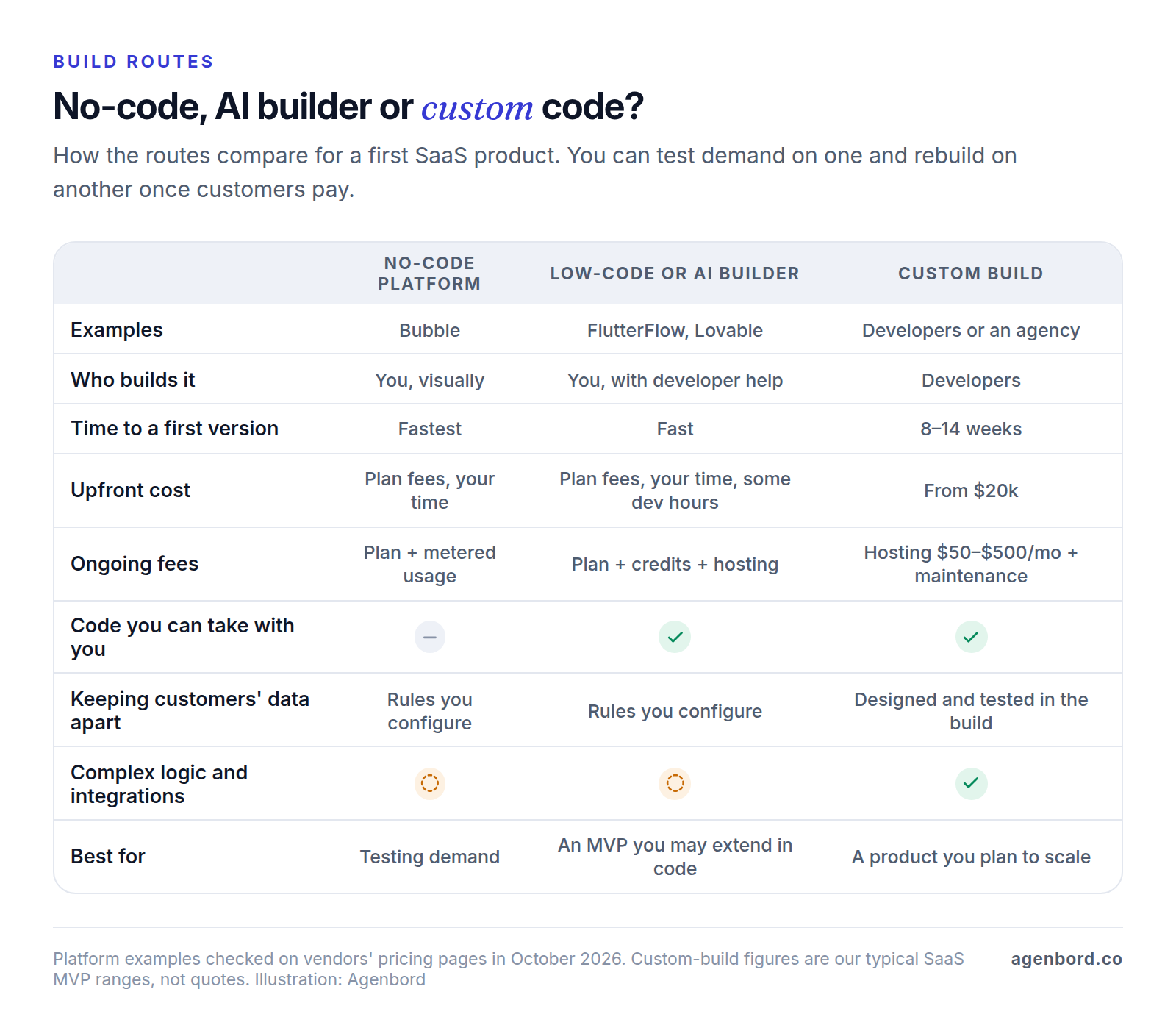
There are four routes: no-code platforms such as Bubble, where you build visually and the platform hosts the app; low-code builders such as FlutterFlow, which generate code you can download; AI app builders such as Lovable, which write code from plain-English prompts; and custom code that developers write and you own. You can combine them, testing demand on a builder and rebuilding in code once customers pay. Here's what three of these tools cost and what you keep, as of October 2026:
| Platform | What it is | Entry plan for a live app | Can you take the code? |
|---|---|---|---|
| Bubble | Visual builder for web and mobile apps, hosted by Bubble | Starter, $59 a month billed annually, with your own domain and 175,000 workload units (Bubble's measure of server usage); Growth is $209 on the same terms | No. Bubble says there's "no traditional codebase to export"; data exports as CSV files or through its API |
| FlutterFlow | Visual builder for mobile, web and desktop apps, with data in Firebase, Supabase or your own back end | Basic, $39 a month billed monthly (about 25% less billed annually), with code download and a custom domain | Yes, on paid plans; GitHub integration starts on Growth ($80 a month for the first seat) |
| Lovable | AI builder that writes a React web app from your prompts | Pro, from $25 a month billed monthly for 100 credits, which requests to the AI use up | Yes: Git sync on every plan, code download on paid plans |
Where they win: speed and cost while you're still learning. A working version in front of your Step 1 buyers costs tens of dollars a month in platform fees plus your own time, and you can change it daily.
What to watch:
- Security is still your job. Bubble protects data through privacy rules you set on each data type. A 2025 vulnerability record, CVE-2025-48757, said an insufficient row-level security policy in Lovable, through April 2025, let unauthenticated outsiders read or write generated sites' database tables. Lovable disputed it, stating that each customer "accepts a responsibility over protecting the data of their application." On any builder the rules are yours, so have someone technical confirm that one customer can't see another's data before your second customer signs up.
- Fees grow with success. Bubble meters server usage in workload units, and AI builders meter edits in credits.
- Leaving costs differ. Moving off Bubble means rebuilding. FlutterFlow and Lovable hand you code, which still needs a developer who can take ownership of it.
Signs you've outgrown the tool:
- A prospect's security questionnaire asks about controls you can't show.
- Plan limits start shaping the product. Softr, a no-code app builder, caps client users at 500 on its Business plan ($329 a month billed annually), for example.
- Workarounds take longer than features.
- Platform fees approach what hosting and maintaining a custom build would cost.
Step 4: Get the SaaS foundations right
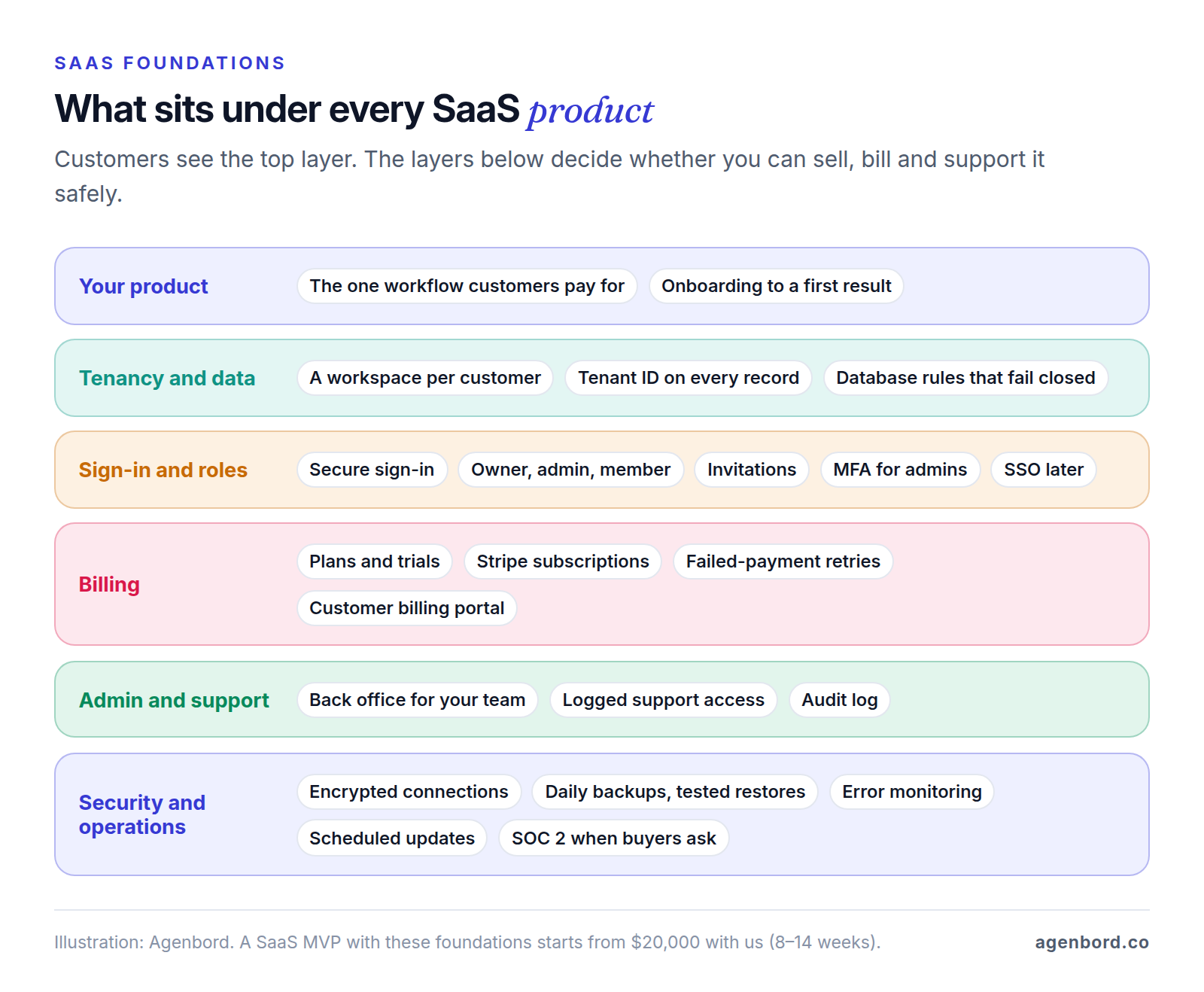
These parts turn an app into a product many companies can share safely, and each is cheaper to design in than to add later. Rent the solved problems, such as sign-in, payments, email and file storage, and spend your budget on the workflow customers pay for; our build-vs-buy framework helps draw that line.
Multi-tenancy: keeping each customer's data apart
Each customer account is a tenant, usually shown as a workspace. There are three common ways to keep tenants' data apart:
| Model | How it works | Trade-offs | Fits |
|---|---|---|---|
| Shared database, tenant ID on every row | All customers share the same tables; every row carries a customer ID, and every query filters by it | Cheapest and simplest to run; one missed filter exposes another customer's data, and a busy customer can slow the rest | Most B2B SaaS, especially MVPs |
| Schema per tenant | One database, but each customer gets its own set of tables (a schema, in PostgreSQL terms) | Clearer separation; every database change has to be applied to each customer's schema | Fewer, larger customers who want more separation |
| Database per tenant | A separate database for each customer | Strongest isolation, with per-customer backups and data location; higher cost per customer, and every update has to reach every database | Contracts that require isolation or a specific data location |
Microsoft's multitenant architecture guidance calls the shared approach the lowest-cost option; the other models earn their cost when customers need different security, backup, availability or storage-location settings.
With a shared database, enforce the tenant filter twice: in the application and in the database. Once PostgreSQL's row-level security is switched on for a table, no policy means no visible rows, so a forgotten rule fails closed instead of open.
Test this harder than anything else. Broken access control tops the OWASP Top 10 for 2025, OWASP found some form of it in 100% of the applications tested, and its example attack changes an account number in a web address to open someone else's account. In SaaS, that someone else is another company.
Sign-in, roles and single sign-on
Use a proven sign-in service rather than writing password handling yourself. Start with three roles per workspace, such as owner (billing and settings), admin (people and data) and member (daily work), plus email invitations, and require multi-factor authentication (MFA) on your own admin accounts. Single sign-on (SSO), where a customer's staff log in with their company account, tends to come up when you sell to larger companies. Build it when a deal needs it.
Subscription billing
As of October 2026, Stripe Billing costs 0.7% of billing volume on its pay-as-you-go plan, on top of Stripe's 2.9% + 30¢ per successful domestic card charge: about $3.86 a month on a $99 plan. It retries failed payments automatically (Smart Retries) and includes a customer portal, switched on in Stripe's dashboard, where customers update cards, change or cancel plans and download invoices.
Before launch, decide what each plan includes, whether there's a free trial, the annual discount and what happens when a card fails, such as a grace period followed by read-only access. Ask your accountant where your subscriptions are taxable; tools such as Stripe Tax monitor where you may owe tax and calculate and collect it.
Onboarding, admin tools and audit logs
Self-serve onboarding gets a new customer to a first useful result without a call with you: in the inspection example, a workspace, a template, one completed inspection and its report. Sample data and a short checklist on the first screen do more than a product tour. Track how many sign-ups get there; that's your activation rate (Step 7).
You also need a back office from the first customer: find an account, see its plan and usage, extend a trial, fix data and suspend access. An audit log records who did what and when, such as sign-ins, permission changes, exports and deletions, so you can answer support questions, investigate incidents and pass security reviews. If support staff can view the app as a customer sees it, require the customer's permission and log each session.
Backups and security basics
Automate daily backups and practice restoring one. Once customers depend on you, add point-in-time recovery, which restores the database to a chosen moment. On Supabase's $25-a-month Pro plan, for example, daily backups are kept for 7 days, and point-in-time recovery is an add-on at $100 a month per 7 days of history.
The rest of the baseline: encrypted connections, MFA on every admin and cloud account, least-privilege access, keys kept out of the code, scheduled dependency updates and error monitoring. Smart Construction, the construction ERP our team built and runs, has encrypted connections and off-site encrypted backups built in.
When buyers ask for SOC 2
SOC 2 is a report on a CPA's examination of a service company's controls relevant to security, availability, processing integrity, confidentiality or privacy, as the AICPA defines it. It usually comes up when you sell to larger companies, often in a security questionnaire. You don't need one for an MVP, but the habits auditors examine, such as access reviews, logged changes, tested backups and an incident plan, cost less to adopt early than to retrofit. This is general information, not compliance advice.
Step 5: Decide who builds it
| Option | Best when | Watch for |
|---|---|---|
| Technical co-founder | Software is the business, and you want a partner who owns the technology for years | Expect to share meaningful equity; agree on roles and vesting (equity earned over time) in writing |
| Freelancers | Small, well-defined pieces, or extending a no-code MVP | You become project manager, architect and tester, and one person is a single point of failure |
| Agency or studio | You need design, engineering, testing and project management on a fixed budget | The code, cloud accounts and domains must be yours from day one |
| In-house team | The product works and needs continuous development | Hiring takes months; the median US software developer wage was $135,980 in May 2025, per the BLS, before benefits |
You don't need a technical co-founder to build version one, but you do need someone technical whose judgment you trust: a co-founder, an advisor or a partner who explains trade-offs in writing. Combining options is common, such as an agency building the MVP and your first in-house developer taking over with documentation.
Whoever builds it, insist on a written scope, working software to review every week, and the code, cloud accounts and domains in your name. That's how we work: fixed-price proposals, weekly demos, phased delivery for bigger systems, and you own the code. Our guide to software development outsourcing covers engagement types and contracts, and how to choose a software development company lists the questions that reveal the most.
Step 6: What it costs to build a SaaS product and how long it takes
These are our typical ranges; you get a fixed price after a written scope.
| Scope | What's included | Typical price | Timeline |
|---|---|---|---|
| SaaS MVP | Sign-up, tenant workspaces, Stripe subscriptions, the core workflow and an admin panel | From $20,000 | 8–14 weeks |
| Launch-ready v1 | Adds roles, onboarding, integrations, analytics, audit logs and support tooling | $45,000–$120,000 | 3–6 months |
| Scale-up work | SSO, usage-based billing, data exports, performance and enterprise requirements | Quoted per phase | Ongoing phases |
Our SaaS MVP cost guide breaks down where the money goes. What pushes a build up the range:
- More kinds of users, such as your customers' own clients logging in
- Integrations, especially two-way syncs with accounting or other systems
- Native mobile apps alongside the web app
- Usage-based billing, SSO and enterprise security requirements
- Regulated data, such as health records
- AI features that need testing on real data
- Moving data and users from your internal tool
Our web app cost guide has a feature-by-feature effort table that shows how these multiply.
How long it takes
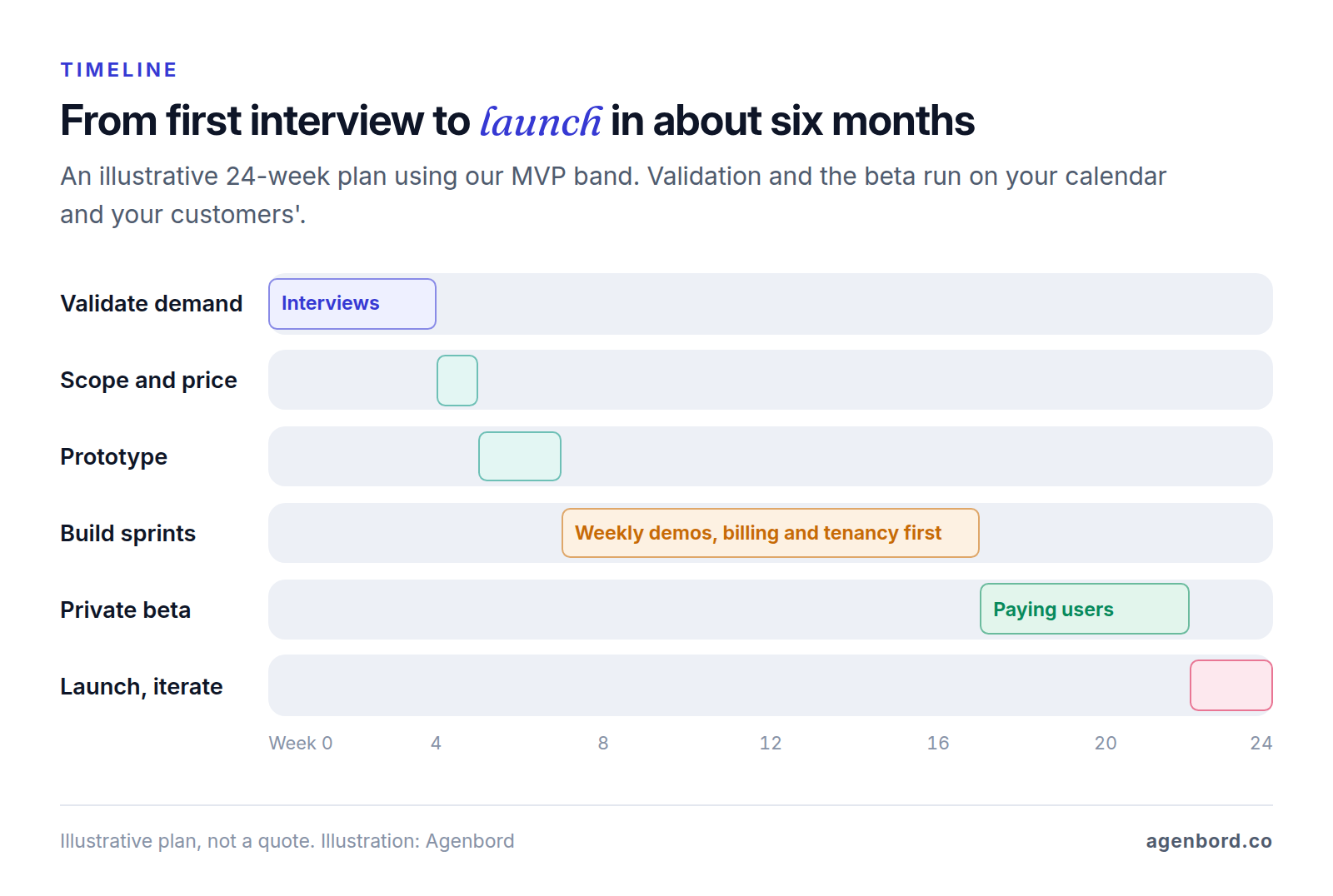
Engineering is only part of the calendar. A realistic plan from first interview to public launch: a few weeks of validation led by you, about a week of scoping and a fixed price, 8–14 weeks of prototype and build with a demo every week, then a 4–6-week private beta. That adds up to roughly four to six months. Slow decisions and late access to the systems you integrate with are common causes of delay, so name one decision-maker who joins every demo.
What it costs to run
Budget for these from day one and build them into your prices:
| Cost | Example | List price, October 2026 |
|---|---|---|
| Hosting and database | Vercel Pro for the app; Supabase Pro for the database, sign-in and files | $20 + $25 a month, plus usage beyond what's included |
| Transactional email | Postmark Basic | $15 a month for 10,000 emails |
| Error monitoring | Sentry Team | Listed at $26 a month |
| Payments | Stripe card processing plus Stripe Billing | 2.9% + 30¢ per charge, plus 0.7% of billing volume |
| Maintenance | Security updates, upgrades and small fixes | About 15–20% of the build cost per year |
| Support | Answering customers | Your time, from the first customer |
We plan on roughly $50–$500 a month for hosting an early SaaS product, depending on traffic, data and storage. Free tiers don't belong in production: Vercel's Hobby plan is for personal, non-commercial use, and Supabase pauses free projects after a week of inactivity.
For a hypothetical example, say you reach 40 customers on a $99 plan, or $3,960 in monthly recurring revenue. Stripe's fees come to about $155 a month, the stack above about $86 before usage, and maintenance on a $40,000 build at 15–20% a year works out to $500–$667 a month. That's about $740–$910 a month, or 19–23% of revenue, before your support time.
Step 7: Launch a private beta, then iterate
Launch first to a handful of the buyers from Step 1 as a private beta. Charge from day one, even at a discount, because payment is the clearest sign the product solves the problem. In return for the discount, ask for a short weekly call, honest feedback and permission to watch how they use it. Then measure for four to six weeks before you decide what version two is.
Set prices you can defend
Choose a pricing unit that grows with the value customers get, such as per user, per location or per inspection. Publish two or three plans so buyers can sort themselves, add an annual option, and price against the buyer's alternative (staff time, errors, another tool) rather than your costs. When you raise prices, keep early customers on their rate for a while.
The metrics that matter, in plain English
- Activation: the share of new sign-ups who reach the first useful result you defined in onboarding, such as a completed inspection within seven days. Low activation is an onboarding problem before it's a marketing problem.
- Retention: the share of customers still active and paying a set number of months after they started. Compare groups by sign-up month to see whether your changes help.
- Churn: the share of paying customers who stop paying in a period. Stripe's guide to the SaaS business model uses a simple example: 200 customers paying in January and only 190 of them paying in February is 5% churn.
- MRR (monthly recurring revenue): the total of all active subscriptions expressed per month, with an annual plan counted as one-twelfth of its price. One-time setup fees don't count.
Watch the trend in each one, not someone else's benchmark.
Close the feedback loop
- Track the few events that make up your workflow, such as workspace created, inspection completed and report sent.
- Read every support request and cancellation reason; Stripe's customer portal can ask customers why they're canceling.
- Talk to two or three customers a week, including one who's struggling or has left.
- Once a week, pick the few changes that move activation or retention, ship them and tell the customers who asked.
Your pre-build checklist
- One sentence naming the buyer, the company type and the budget
- 10–15 problem interviews, with notes on what people did and spend now
- Commitments: pre-orders, paid pilots or letters of intent with a price
- The paid workflow in five to eight steps, plus what's out of v1
- A pricing unit and two or three draft plans
- A build route, and the signal that would make you switch
- Tenancy model, roles, billing rules and backups decided in writing
- A budget for the build plus a year of running costs
- Code, cloud accounts and domains in your name
- Beta customers lined up and an activation event defined
Sources
- Bubble - Pricing (accessed October 2026)
- Bubble - FAQ: ownership, data export and code export (accessed October 2026)
- Bubble Manual - Protecting data with privacy rules (accessed October 2026)
- FlutterFlow - Pricing (accessed October 2026)
- FlutterFlow - Home: code export, Firebase and Supabase integrations (accessed October 2026)
- Lovable Docs - Subscription plans (accessed October 2026)
- Lovable Docs - FAQ (accessed October 2026)
- NIST National Vulnerability Database - CVE-2025-48757 (accessed October 2026)
- Softr Docs - Pricing and plans (accessed October 2026)
- Stripe - Billing pricing (accessed October 2026)
- Stripe - Pricing (accessed October 2026)
- Stripe Docs - Payment Links (accessed October 2026)
- Stripe Docs - Customer portal (accessed October 2026)
- Stripe - Tax pricing and features (accessed October 2026)
- Stripe Atlas - The business of SaaS (accessed October 2026)
- Microsoft Learn - Architectural approaches for storage and data in multitenant solutions (accessed October 2026)
- Microsoft Learn - Multitenant SaaS database tenancy patterns (accessed October 2026)
- PostgreSQL 18 Documentation - Row security policies (accessed October 2026)
- PostgreSQL 18 Documentation - Schemas (accessed October 2026)
- OWASP - A01:2025 Broken Access Control (accessed October 2026)
- AICPA & CIMA - SOC 2 (accessed October 2026)
- Supabase - Pricing (accessed October 2026)
- Vercel - Pricing (accessed October 2026)
- Postmark - Pricing (accessed October 2026)
- Sentry - Pricing (accessed October 2026)
- US Bureau of Labor Statistics - Occupational Outlook Handbook: Software Developers (accessed October 2026)
- Rob Fitzpatrick - The Mom Test (accessed October 2026)
Prices, plans and regulations change. Figures were checked on October 2, 2026; follow the links for the latest. Nothing here is legal, tax or financial advice.
About the author
Founder, Agenbord
Muhammad Hamza is the founder of Agenbord, the Fort Lauderdale software company behind the construction ERP Smart Construction and a WhatsApp-first billing platform. He writes practical guides on buying, building and automating business software.