On this page
- What a CRM does for a contractor, from first call to repeat job
- How the sales process differs by type of contractor
- Must-have CRM features for contractors, and how to test them
- Best CRM for contractors: 10 options compared (October 2026)
- Free CRM for contractors: what you actually get
- What follow-up is worth: a cadence and the math
- Integrations that matter for contractors
- When a custom CRM or custom add-on pays off
A CRM for contractors keeps every lead, site visit, estimate and follow-up in one place, so fewer jobs slip away between the first call and the signed contract, and past customers come back for the next one. For most contracting businesses, the CRM that wins the most work isn't a standalone sales tool. It's the one built into the software that already runs your jobs, or one built around the way your trade sells.
The short answer: service trades such as HVAC, plumbing and electrical should start with the CRM inside a field service platform like Jobber or Housecall Pro. Roofers and exterior contractors should look at JobNimbus, AccuLynx, Leap or Roofr, remodelers and home builders at JobTread or Buildertrend, and commercial subcontractors at a bid-tracking CRM such as Followup CRM. General CRMs like HubSpot and Pipedrive fit firms that sell more like a B2B company than a job shop. As of October 2026, prices run from free plans with tight limits to quote-based contracts.
We build custom CRMs and the automations around off-the-shelf ones, so we'll say where custom work pays. For most contractors it doesn't. The bigger win is following up on every unsold estimate, and we put numbers on that below.
What a CRM does for a contractor, from first call to repeat job
A contractor's sales pipeline has more steps than a typical office sale, and most of them happen in a truck or a customer's kitchen. A good CRM handles each one:
- Lead capture. Calls, website forms, ads, lead marketplaces such as Angi, referrals and door-knocking all land as one record with the lead's source, checked against existing customers.
- Speed to lead. The lead gets an immediate reply and an owner, and the owner gets an alert. Assume the homeowner asked other contractors too. AI phone answering can cover nights and weekends: Jobber, for example, sells an AI Receptionist that answers calls and texts around the clock for $29 a month.
- Site visit. The visit is booked with reminders, and photos, measurements and notes land on the record instead of in someone's camera roll.
- Estimate or proposal. Options (good, better, best), photos, e-signature, a deposit and a financing offer, ideally sent the same day.
- Follow-up on unsold estimates. Calls, texts and emails on a schedule until the customer says yes or no, with the reason recorded either way.
- Handoff. A signed estimate becomes a job in scheduling or production with the scope, price, deposit and documents attached, so nobody retypes it.
- After the job. A review request, thanks to whoever referred the customer, and reminders that bring the customer back.
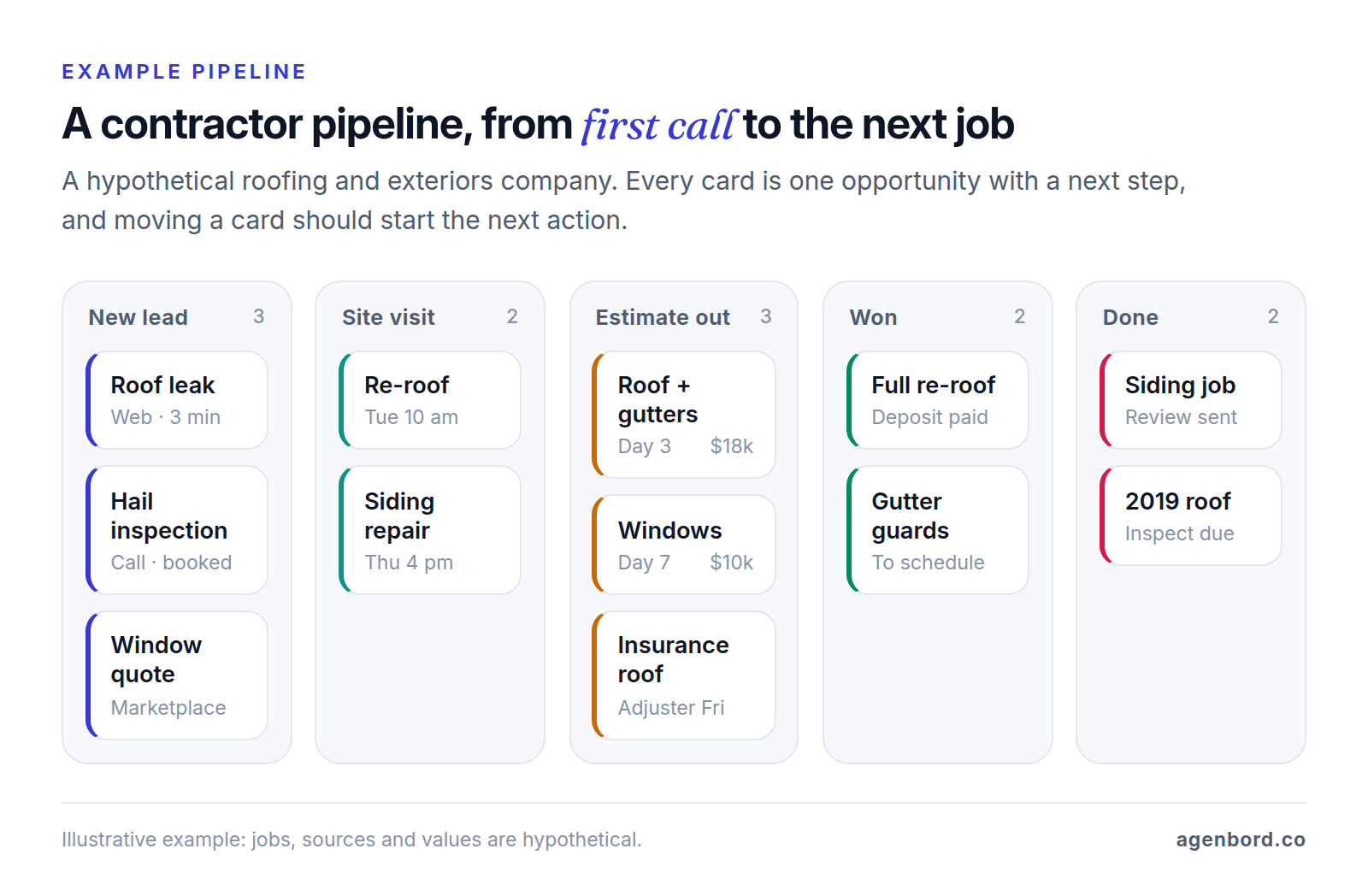
How a CRM brings in repeat business
Repeat and referral work comes from the record the CRM keeps after the job: what you did, where, when and for whom. That record lets you:
- Remind customers about maintenance based on install dates: tune-ups, roof and gutter inspections, deck sealing.
- Sell and renew service agreements, which some platforms bill and schedule automatically. Housecall Pro, for example, includes recurring service plans on MAX, its top tier.
- Ask every customer for a review when the job closes. Google's review policy prohibits offering incentives for reviews and selectively asking for positive ones, so send the request to everyone.
- Track referrals back to the customer who sent them, and thank them. Jobber's Marketing Suite tracks referrals and rewards automatically.
- Revisit old estimates before the season or a price change, and check in before your workmanship warranty runs out.
To measure it, tag every new lead's source, including "past customer" and "referral," and watch what share of revenue comes back.
How the sales process differs by type of contractor
The same seven stages look very different in a service company, a remodeling firm, a roofing company and a commercial subcontractor. That difference should drive your shortlist.
Service trades: CRM for HVAC, plumbing and electrical contractors
Service companies sell in hours, not weeks. Most calls become a booked visit, and the technician prices the repair on site and gets a signature before leaving. The CRM work is in the details: answering fast, keeping equipment and job history on every address, and following up on the expensive quotes, such as a system replacement with options and financing.
That's why the best CRM for HVAC contractors is usually the one inside the field service platform, where the customer, equipment, membership and job records already live. Add the platform's sales pipeline as replacement sales grow; our HVAC software guide covers memberships, flat-rate pricing and install job costing. For larger residential companies with a call center, ServiceTitan prices per technician by quote and sells marketing tools as Pro add-ons. Our home services page shows the lead-response and follow-up automations we build around these platforms.
Remodelers and general contractors
A remodel can take months to sell: a first call, a site visit, a rough budget, sometimes a paid design phase, selections and allowances, a detailed proposal, then a contract and a deposit. Several people decide, and one missed follow-up can cost a five- or six-figure job.
A CRM for general contractors needs a long pipeline with expected sale dates, follow-up tasks that don't expire, proposals with options and e-signature, and above all a clean handoff, because the scope you sold becomes the budget, schedule and selections you build. That's the argument for all-in-ones such as JobTread or Buildertrend, where the sale flows straight into the project. Our construction project management guide covers the build side of those tools.
Roofing contractors
Roofers run two pipelines. Retail jobs follow the usual path: inspection, estimate, signature, install. Insurance jobs add a claim: an adjuster meeting, the insurer's estimate, supplements (requests to the insurer for items its estimate missed) and insurance checks to track until the job is paid. Storms bring surges of leads, including from door-to-door canvassing.
A CRM for roofing contractors should order aerial measurement reports from inside the job (AccuLynx lists EagleView, GAF QuickMeasure and Hover, among others), track each claim's stage and money, send material orders to suppliers such as ABC Supply and SRS, and take leads from canvassing apps such as SalesRabbit and Spotio. Roofing CRMs such as JobNimbus, AccuLynx, Leap and Roofr cover most of that list; check claim tracking in particular, which AccuLynx puts on its Elite plan. A field service platform handles retail repairs, but not claims.
Commercial subcontractors
Commercial subs don't wait for leads. They receive bid invitations from general contractors, often from several GCs bidding the same project, and the work is deciding what to bid, getting the number in by the due date, following up after bid day and learning which GCs and project types you actually win.
That calls for a bid board more than a sales pipeline: every invitation with its due date, trade and documents, one project linked to every GC you bid it to so your pipeline counts the job once, and win rates by GC, estimator and project type. Followup CRM is built for this, and Autodesk's Bid Board Pro, part of its BuildingConnected bidding network, collects invitations from any source into one board with a bid calendar and win rates. When you win, the contract value should move to your project and accounting systems; our construction industry page covers the estimating, job costing and billing side.
Must-have CRM features for contractors, and how to test them
Demos run on tidy sample data. A trial with your own leads shows whether the CRM fits, so use the right-hand column as your test script.
| Feature | It passes the trial if... |
|---|---|
| Lead capture | Your website form and a forwarded marketplace lead each arrive with their source, and a past customer is matched, not duplicated |
| Speed to lead | A form sent at 9 p.m. gets a reply within minutes and alerts the right person, and a missed call becomes a task |
| Site visits | Your estimator books, moves and completes a visit on a phone, with photos and notes saved to the record |
| Estimates and proposals | A three-option estimate with photos, a deposit and a financing offer can be signed on a phone |
| Follow-up automation | A test sequence stops the moment you reply, and call tasks land on the right person's list |
| Pipeline view | A lost estimate shows its value, days in stage and lost reason in a report |
| Handoff | A won estimate opens in scheduling or production with scope, price, deposit and files, nothing retyped |
| Communication log | A text to your business number, and the reply, show up on the customer's record |
| Reviews and repeat work | Closing a test job sends a review request, and you can set a 12-month reminder |
| Reporting | The vendor can show won revenue by lead source and close rate by salesperson during the demo |
Run the trial on real leads for a week or two, on the phones of the people who sell, and ask what's switched off in trial mode: Jobber, for example, says its two-way texting isn't available during a trial.
Best CRM for contractors: 10 options compared (October 2026)
There's no single best CRM for contractors, only the best fit for how you sell. Start with the type that matches your work, then compare vendors within it.
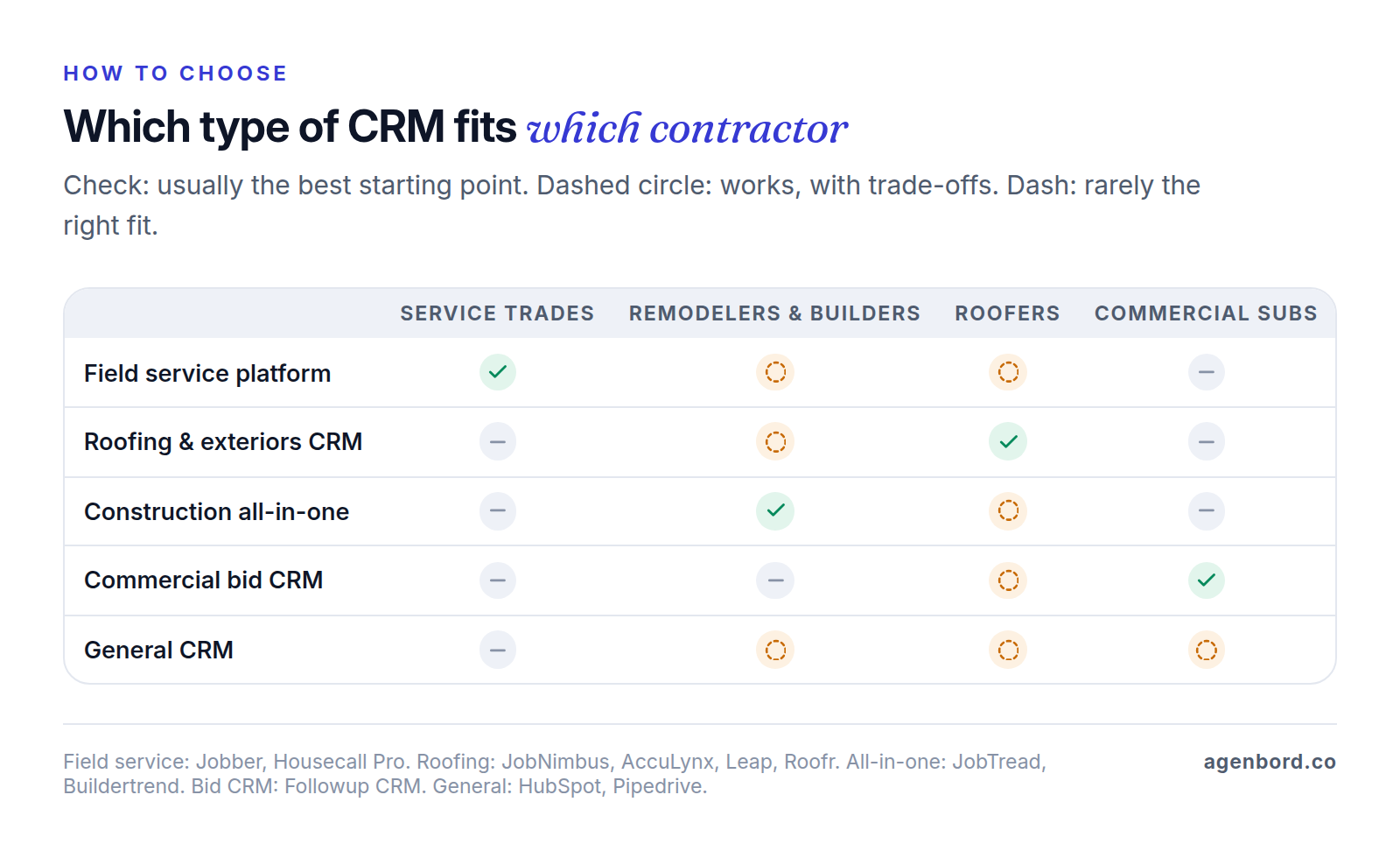
Prices are list prices from each vendor's site as of October 2026. "Best fit" is our read.
| CRM | Type | Best fit | Price as of October 2026 | Watch for |
|---|---|---|---|---|
| Jobber | Field service platform | Residential service and small project teams | Core $29/mo billed annually (1 user); quote follow-ups from Connect at $99/mo billed annually | Pipeline ($49/mo) and Marketing Suite ($99/mo) are add-ons below Plus |
| Housecall Pro | Field service platform | Residential service, solo to mid-size | Basic $59/mo (1 user), Essentials $149 (5 users), MAX $299 (8 users), billed annually | QuickBooks from Essentials; proposal tool and service plans on MAX |
| JobNimbus | Roofing and exteriors CRM | Roofing, siding, gutters, solar, restoration | Quote-based; plans for up to 3, 10 or 19 users, plus Enterprise | Automations capped by plan: 10, 30, 100 or unlimited |
| AccuLynx | Roofing CRM | Retail and insurance roofers | Quote-based (Pro and Elite) | Pipeline reports and supplement tracking need Elite; texting is an add-on |
| Leap | Home improvement CRM | In-home sales: roofing, windows, siding, kitchen and bath | Essential $79/mo (1 user); Team from $298/mo; Premium from $750/mo (6 users) | One-year contracts paid monthly; measurement integrations on Premium |
| JobTread | Construction all-in-one | Remodelers, builders, specialty contractors | $199/mo with 1 internal user, plus $20/user for users 2–10, billed monthly; annual saves 20% | QuickBooks Online only |
| Buildertrend | Construction all-in-one | Builders and remodelers running several projects a year | Quote-based; unlimited users and projects | No list price; QuickBooks Desktop sync in maintenance mode |
| Followup CRM | Commercial bid CRM | Commercial subs and GCs | $99 per user/mo billed annually, 5-user minimum; launch plan from $2,500 | One-year commitment; sits beside your estimating and project tools |
| HubSpot | General CRM | Marketing-led firms with an office sales team | Free for 2 users and 1,000 contacts; Starter $20/seat list ($7 new-customer offer) | No contractor estimates or job handoff built in; Professional is $90/seat plus $1,500 onboarding |
| Pipedrive | General CRM | Simple deal tracking for B2B-style sales | Lite $14/seat/mo billed annually | Email sync and automations from Growth ($39); e-signatures on Premium ($59) |
Field service platforms with a built-in CRM
Jobber gets its own answer below. Housecall Pro sends good-better-best estimates customers can sign on a phone, follows up automatically on open estimates, includes review management on every plan and offers Wisetack financing on jobs from $500 to $65,000 at a flat 3.9% per transaction. Its Pipeline tool, which its HVAC page lists on MAX, tracks leads and estimates by stage and drafts follow-ups with AI. Like Jobber, it's built for service visits and short sales cycles, not months-long bids or insurance claims.
Roofing and exterior CRMs
JobNimbus sells to roofing, siding, gutter, restoration, solar and remodeling contractors, among others. Every plan includes estimates, e-signature, invoices, payments, financing and QuickBooks (Online or Desktop); plans differ in user caps, boards, automations and the number of integrations, which include EagleView and Hover measurements, ABC Supply, SRS and QXO ordering, and Wisetack and Sunlight financing. Agreements are monthly or annual, with no required setup fee.
AccuLynx is built for roofing companies. Pro covers leads with AI lead scoring, aerial measurement ordering, estimates and contracts with e-signature, supplier ordering and marketing expense tracking. Elite adds sales pipeline and closing-percentage reports, supplement and mortgage-check tracking, embedded web forms and commissions. It syncs with QuickBooks Online and Desktop.
Leap is built for in-home sales. Its SalesPro app pulls measurements from Hover, RoofScope or GAF QuickMeasure, presents tiered options with margin floors and offers financing from up to 12 lenders through one application. Essential is single-user with five e-signatures; Team adds automations, a customer portal and unlimited signatures.
Roofr suits small roofing companies: a free Starter plan (details below), then Essentials at $209 a month billed yearly ($249 monthly) with unlimited users, proposals and e-signatures. QuickBooks needs Scale, at $299 a month billed yearly.
Construction all-in-ones for remodelers and builders
JobTread sells one plan with every feature. Its CRM has web-to-lead forms, a kanban lead pipeline, follow-up tasks and proposals that become contracts with e-signatures, in the same system as its estimating, schedules and job costing. Customers, vendors and subs use its portals free, and it integrates Acorn Finance for homeowner financing. Buildertrend captures leads from your website and phone calls, sets follow-up reminders, tracks projected sale dates by salesperson, sends proposals for e-signature and runs email campaigns, and a closed deal flows into the build. Its pricing page pitches builders running five or more projects a year.
Commercial bid tracking
Followup CRM reports on bids, close rates and pipeline for construction sales teams and lists integrations with BuildingConnected, Procore, STACK, The Estimating Edge, Outlook and Gmail, and accounting systems from QuickBooks to Sage, Foundation, Vista and Spectrum. Budget for the commitment: five Starter users cost $5,940 a year, plus the $2,500 launch plan for onboarding, data migration and training. If your invitations already arrive through BuildingConnected, compare Autodesk's Bid Board Pro, which is priced by quote.
General CRMs
HubSpot fits when marketing drives your leads, and its QuickBooks Online integration works on every plan, but you'd build estimates and the job handoff on top of it; our custom CRM vs. HubSpot guide covers that hybrid route. Pipedrive is a clean, low-cost deal pipeline. Both suit commercial or design-build firms that sell like B2B companies, connected to whatever runs the jobs.
Is Jobber a good CRM for contractors?
Yes, for residential service companies and small project teams whose sales take days, not months. Jobber keeps client, job and communication history on one record, lets you manage leads separately from active clients, and sends quotes customers can approve and sign online on every plan, with Wisetack financing offered on quotes for 3.9% per transaction. Automated quote follow-ups start on Connect, at $99 a month billed annually for one user, and optional line items for upsells on Grow, from $149. Pipeline adds stages, stalled-lead alerts and win-loss reasons for $49 a month; Marketing Suite adds automatic review requests, email campaigns and referral tracking for $99.
Watch the add-ons. Five users on Grow billed annually, plus Pipeline and Marketing Suite, come to $377 a month ($229 + $49 + $99), while Plus costs $399 a month billed annually for five users and includes both, plus the AI Receptionist. And know the limits: Jobber isn't built for insurance roofing or for tracking bid invitations from GCs, and remodelers running multi-month projects usually want the selections, change orders and schedules that JobTread and Buildertrend are built around.
Free CRM for contractors: what you actually get
Free plans are fine for getting leads out of a notebook. They aren't built to price, sell and hand off jobs.
- HubSpot's free CRM covers 2 users and 1,000 contacts with a deal pipeline. Starter lists at $20 per seat a month, and HubSpot was offering it from $7 to new customers in October 2026.
- Zoho CRM's free edition covers 3 users. Its Standard edition is $14 per user a month, billed annually.
- Roofr's free Starter plan gives roofers unlimited users, one basic job board, 10 trial proposals and measurement reports at $19 each.
What's usually missing: estimates with trade line items and options, deposits and financing, follow-up sequences that stop on a reply, two-way texting, and the handoff to scheduling or production. Budget for the first paid tier, because that's where you'll land. Free trials are the other way to start at no cost: Jobber, Housecall Pro, JobNimbus, Leap's Essential plan and Pipedrive offer 14 days, and JobTread offers a 30-day money-back guarantee on monthly plans.
What follow-up is worth: a cadence and the math
Every contractor has a pile of estimates that went out and were never answered. A CRM's most valuable job is working that pile on a schedule, so every estimate ends in a yes, a no or a recorded reason.
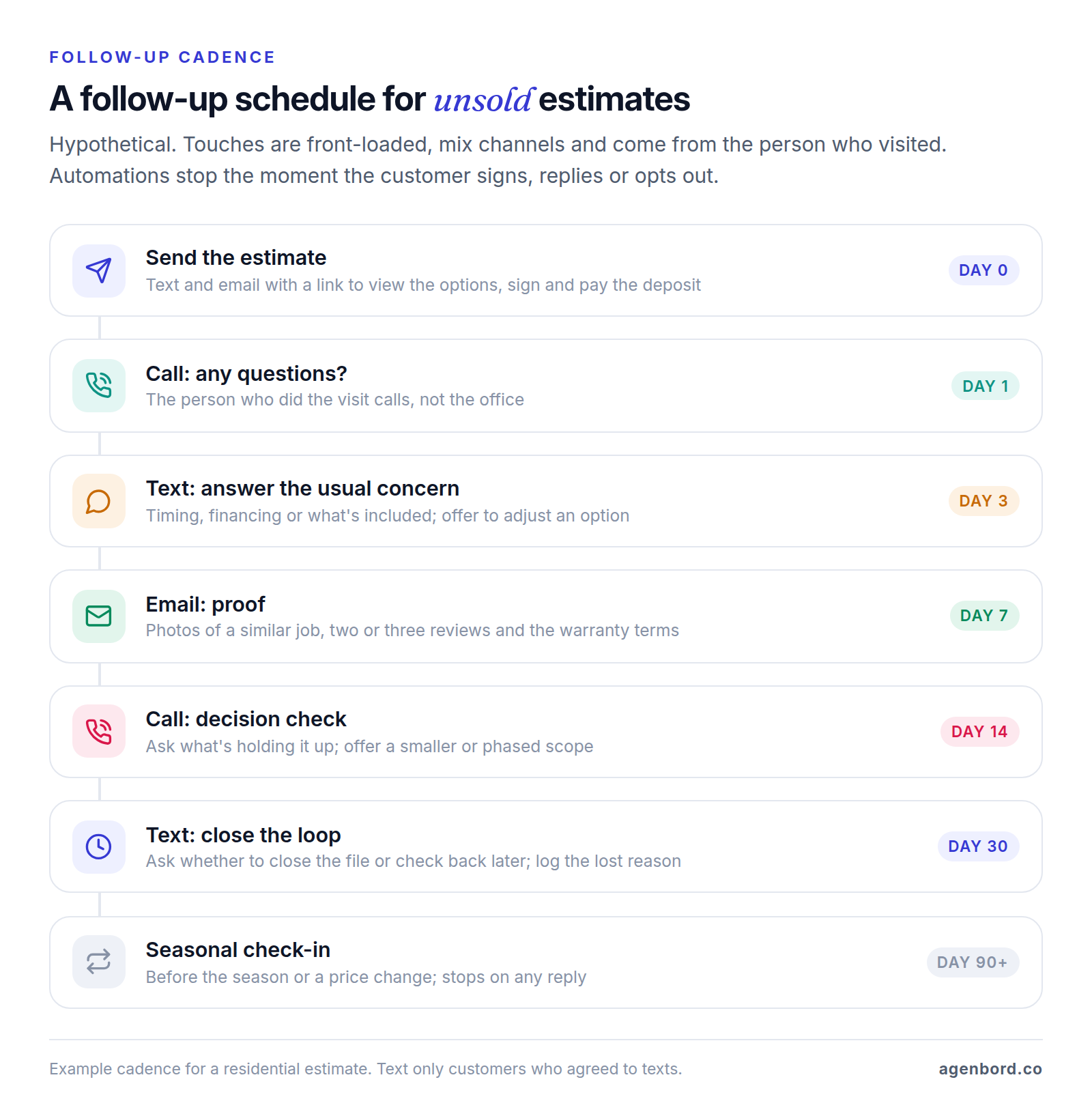
The rules behind the schedule matter more than the exact days:
- Front-load it. Most touches land in the first two weeks, while the project is still on the customer's mind.
- Keep it personal. Calls come from the person who did the visit, and texts and emails go out in their name.
- Stop automatically when the customer signs, replies or opts out, and route every reply to a person.
- End every estimate with an outcome: won, lost with a reason, or parked with a date to check back.
The math, with stated assumptions
Take a hypothetical replacement contractor selling roofs, windows or HVAC systems. These are assumptions to show the math, not industry benchmarks:
- 40 estimates a month at an average of $15,000.
- 12 signed today, a 30% close rate, with follow-up left to whoever has time.
- A 30% gross margin, so each job adds $4,500 of gross profit.
- With a consistent cadence, 1 in 10 of the 28 unsold estimates becomes a job.
| Today | With the cadence | |
|---|---|---|
| Estimates per month | 40 | 40 |
| Jobs won per month | 12 (30%) | 14.8 (37%) |
| Revenue per month | $180,000 | $222,000 |
| Gross profit per month | $54,000 | $66,600 |
| Extra gross profit per year | $151,200 |
If the cadence wins back only 1 in 50 unsold estimates, the gain is still about $30,000 a year in gross profit. Put another way, at these numbers every point of close rate is worth about $21,600 a year. Either figure is more than the first-year list price of any published plan above for a five-person team. To find your real number, tag jobs won after at least one follow-up and compare close rates for the 90 days before and after.
Integrations that matter for contractors
A contractor CRM sits between marketing and the systems that run and bill the work, so its connections matter as much as its features. Before connecting anything, decide which system owns each record; our CRM integration guide covers field ownership, matching and sync rules.
| Integration | What to check |
|---|---|
| QuickBooks | Your edition: JobNimbus and AccuLynx list Online and Desktop, Jobber and JobTread list QuickBooks Online, and Buildertrend's Desktop sync is in maintenance mode. A won job should create the customer and invoice once, and payments should flow back |
| Field service or project management | Scope, price, deposit and files arrive on the job at handoff, and one system owns the customer record afterward |
| E-signature | Signing limits on your plan (Leap's Essential includes five) and where signed PDFs are filed |
| Financing | The lender, your fee (Wisetack charges 3.9% per transaction through Jobber and Housecall Pro) and prequalification inside the proposal |
| Review requests | Sent automatically when each job closes, to every customer |
| Phone and texting | Calls and texts logged from a business number, call tracking by source (AccuLynx lists CallRail), missed-call tasks and stored text consent |
Two legal rules belong inside the workflow itself (this is general information, not legal advice). Under the FCC's TCPA rules, telemarketing calls and texts to cell phones made with an autodialer or a prerecorded voice need the person's prior express written consent, and an opt-out made by any reasonable means, such as replying STOP, must be honored within 10 business days, so store the consent wording and date on each contact. And if you sign homeowners in their home, the FTC's Cooling-Off Rule generally gives them three business days to cancel sales of $25 or more and requires a written notice of that right, so build it into the proposal you send for signature; states can add their own rules.
When a custom CRM or custom add-on pays off
Most contractors should buy one of the tools above and put the effort into setup, a follow-up cadence and training. Custom work pays off in three situations, usually built around the CRM you already have:
- Follow-up and speed-to-lead automation your platform doesn't do, such as a text-back on missed calls, marketplace leads pushed straight into the CRM, an estimate sequence that stops on any reply, or a review request when the final invoice is paid. A single automated workflow starts from $1,500 (1–2 weeks), and a program of 5–15 workflows runs $6,000–$20,000.
- An integration your vendors don't offer, such as a won deal in HubSpot or Followup CRM creating the job in your field service or project tool, a lead source with no connector, or QuickBooks Desktop when your CRM only supports Online. A custom integration service that keeps two systems in sync starts around $15,000.
- A custom CRM, when the way you sell is your edge: service, replacement and commercial divisions that no single product covers, insurance restoration with its own claim stages, or bids that tie into estimating and an ERP. A focused custom CRM starts from $12,000 (6–10 weeks), a CRM with a customer portal and integrations runs $30,000–$75,000, and multi-team systems $75,000 and up. Add hosting of roughly $50–$500 a month and maintenance of about 15–20% of the build cost a year, with no per-seat fees.
Price alone rarely settles it. Ten Followup CRM Professional users cost $17,880 a year at list price plus a $5,000 launch plan, about $58,600 over three years. A $30,000 custom CRM with $150 a month of hosting and 15–20% annual maintenance comes to $48,900–$53,400 over the same three years, but without the improvements a vendor ships every year. Choose custom for fit, not to save money.
If none of those situations applies, spend the money on the right tier, a clean import and a follow-up cadence your team actually runs.
Sources
- Jobber - Pricing (accessed October 2026)
- Jobber - CRM features (accessed October 2026)
- Jobber - Sales pipeline (accessed October 2026)
- Jobber - Consumer financing (accessed October 2026)
- Jobber - Marketing Suite (accessed October 2026)
- Jobber Help Center - Two-way text messaging (accessed October 2026)
- Housecall Pro - Pricing (accessed October 2026)
- Housecall Pro - Estimates (accessed October 2026)
- Housecall Pro - Pipeline (accessed October 2026)
- Housecall Pro - Consumer financing (accessed October 2026)
- Housecall Pro - HVAC software and package features (accessed October 2026)
- ServiceTitan - Pricing (accessed October 2026)
- JobNimbus - Pricing (accessed October 2026)
- JobNimbus - Integrations (accessed October 2026)
- JobNimbus - Home page, trades served (accessed October 2026)
- AccuLynx - Pricing (accessed October 2026)
- AccuLynx - Plan options (accessed October 2026)
- AccuLynx - Roofing CRM (accessed October 2026)
- AccuLynx - Integrations (accessed October 2026)
- AccuLynx - QuickBooks integration (accessed October 2026)
- Leap - Pricing and FAQ (accessed October 2026)
- Leap - Leap CRM (accessed October 2026)
- Leap - SalesPro (accessed October 2026)
- Leap - Integration partners (accessed October 2026)
- Roofr - Pricing (accessed October 2026)
- JobTread - Pricing (accessed October 2026)
- JobTread - Construction CRM (accessed October 2026)
- JobTread - Integrations (accessed October 2026)
- Buildertrend - Pricing (accessed October 2026)
- Buildertrend - Lead management (accessed October 2026)
- Buildertrend Help - QuickBooks Desktop integration overview (accessed October 2026)
- Followup CRM - Pricing and FAQ (accessed October 2026)
- Followup CRM - Integrations (accessed October 2026)
- Followup CRM - Home page (accessed October 2026)
- Autodesk - Bid Board Pro (accessed October 2026)
- Autodesk Construction Cloud - BuildingConnected (accessed October 2026)
- Autodesk Construction Cloud - Pricing (accessed October 2026)
- HubSpot - CRM pricing, free plan and Starter offer (accessed October 2026)
- HubSpot - Sales Hub pricing (accessed October 2026)
- HubSpot Knowledge Base - Connect HubSpot and QuickBooks Online (accessed October 2026)
- Pipedrive - Pricing (accessed October 2026)
- Zoho CRM - Edition comparison (accessed October 2026)
- eCFR - 47 CFR 64.1200, Delivery restrictions (TCPA rules) (accessed October 2026)
- eCFR - 16 CFR Part 429, Cooling-Off Rule for door-to-door sales (accessed October 2026)
- FTC - Buyer's Remorse: The FTC's Cooling-Off Rule May Help (accessed October 2026)
- Google - Maps user-generated content policy: prohibited and restricted content (accessed October 2026)
Prices, plans and regulations change. Figures were checked on October 2, 2026; follow the links for the latest. Nothing here is legal, tax or financial advice.
About the author
Founder, Agenbord
Muhammad Hamza is the founder of Agenbord, the Fort Lauderdale software company behind the construction ERP Smart Construction and a WhatsApp-first billing platform. He writes practical guides on buying, building and automating business software.