On this page
- What HVAC software has to do for each type of work
- HVAC features to test before you buy
- Refrigerant tracking and EPA Section 608 records
- Memberships, marketing and CRM for HVAC
- HVAC job costing for installs
- HVAC software and QuickBooks
- HVAC software vendors compared (October 2026)
- When custom add-ons pay off, and when to switch platforms
HVAC software is field service management software set up for heating and cooling work. Like any field service platform, it books calls, dispatches technicians, prices the job and takes payment. An HVAC company also needs it to run maintenance memberships, price repairs from a flat-rate pricebook, sell replacements with options and financing, keep equipment and warranty history for every address, and record the refrigerant your techs add and recover.
The right shortlist depends on your work. For a small residential shop, start with Housecall Pro, Jobber, FieldEdge and Service Fusion. For a bigger residential company with a call center, add ServiceTitan and Successware. For commercial mechanical work, look at BuildOps and ServiceTrade.
This guide covers the HVAC-specific half of the decision. For the generic job lifecycle, pricing models, an 11-platform price comparison and a two-technician trial plan, see our field service management software guide. We build custom software and integrations for service companies, so we'll also say where custom work pays and where it doesn't.
What HVAC software has to do for each type of work
HVAC work comes in four kinds, and each stresses a different part of the software. Weight your shortlist by where your revenue comes from, and make every vendor run the last column's test on your own data.
| Type of work | What the software has to handle | Make the demo show |
|---|---|---|
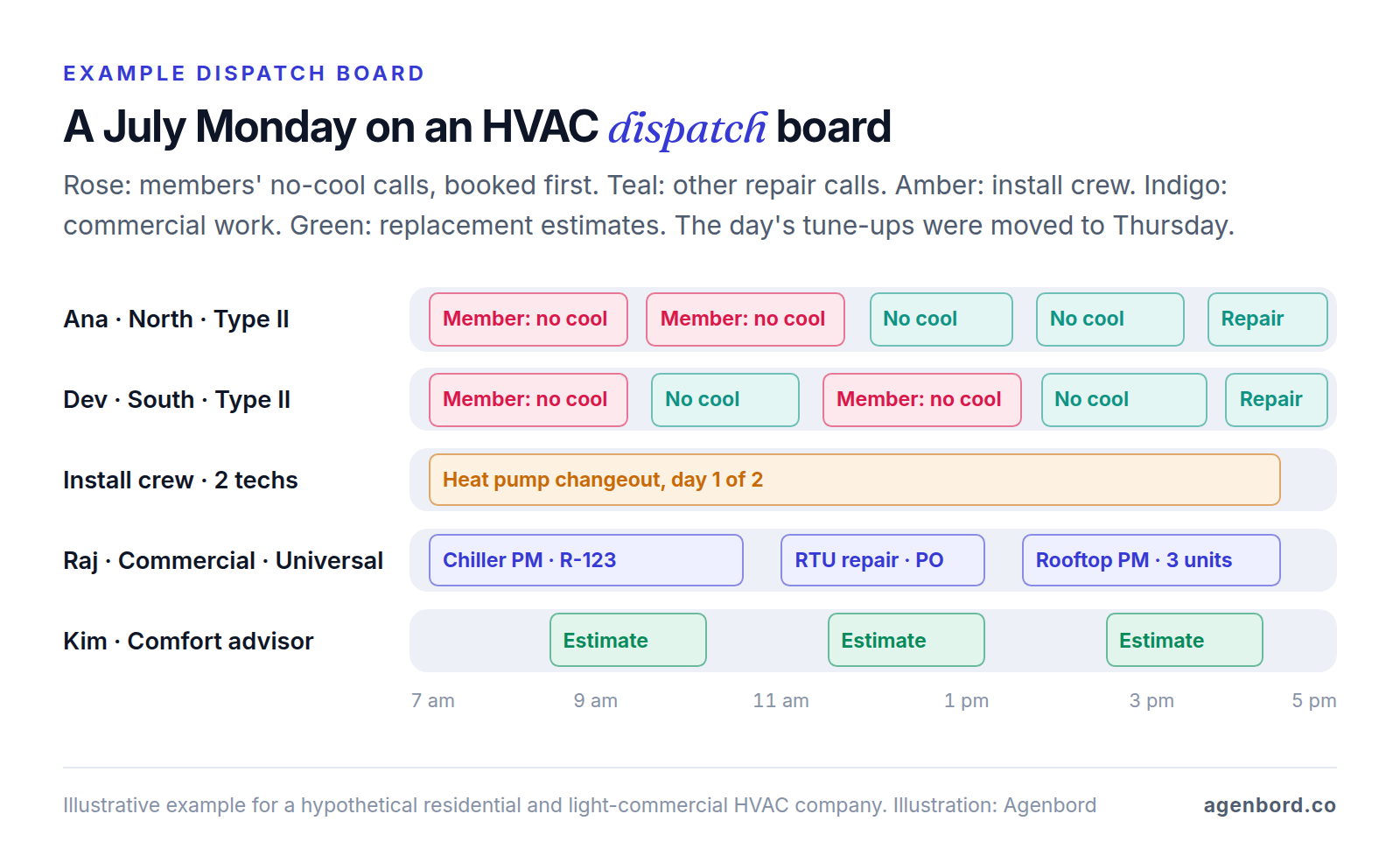
| Demand service (no cool, no heat) | Booking against real capacity, dispatch by skill and zone, flat-rate prices on the tech's tablet, payment before the truck leaves | Your busiest July day, with members' calls first and a day of tune-ups moved in one step |
| Maintenance agreements (memberships) | Plan rules, recurring billing, visits scheduled by season, member pricing and priority, renewals | A member with two systems, a failed card payment and a mid-year upgrade |
| Replacements and installs | In-home estimates with good-better-best options, financing, deposits, permits and inspections, multi-day crews, job costing, warranty registration | A financed heat pump changeout with a permit, a two-day install and a callback |
| Commercial service and new construction | Multi-site customers, maintenance by asset, POs and not-to-exceed limits, leak-rate records, progress billing | A customer with 12 sites, quarterly maintenance at each and a PO on every invoice |
Residential vs commercial HVAC software
Residential revenue runs on homeowners: memberships, flat-rate prices, good-better-best options, financing and reviews. Commercial customers are facility managers and property owners with many sites and assets. They buy preventive maintenance contracts priced per site, set not-to-exceed (NTE) limits, want a PO number on every invoice and expect quotes for deficiencies, the problems a tech finds during a maintenance visit. Some send work orders through their own facility management portal; BuildOps, for example, syncs work orders both ways with ServiceChannel. Check which side a platform was built for.
New construction works more like construction accounting: bids, change orders and progress billing with retainage, the share of each payment held back until the job is done. If it's a large share of your revenue, you need project cost tracking, which BuildOps includes, or a construction ERP such as Smart Construction, the one our team built, which calculates retention on every progress bill.
HVAC features to test before you buy
Generic features like booking and payments are covered in our field service guide. These are the ones HVAC companies lean on hardest.
Dispatch by skill, certification and zone
Good HVAC dispatch software answers three questions on every call: who is qualified, who is close and who has room.
- Qualified. Tag techs with their EPA Section 608 certification type, licenses, brand training and work type (service, installs, commercial), and have the board warn you before a job goes to the wrong person: a low-pressure chiller, for instance, needs a Type III or Universal tech.
- Close. Zones by ZIP code or map keep each tech in one part of town. Housecall Pro advertises routing the nearest tech to emergency repairs; Successware uses Google Maps to find the closest technician.
- Room. A heat wave brings more calls than any team can run. Look for daily capacity by job type, members' calls first, tune-ups moved in one bulk action with a text to each customer, and booking that checks capacity, such as ServiceTitan's Contact Center Pro (AI agents that book against real-time capacity) and Scheduling Pro add-ons. Before an AI receptionist takes your 2 a.m. calls, read our AI receptionist guide on emergencies and handing off to a person.
A flat-rate pricebook with member pricing
Many residential HVAC companies sell from a flat-rate pricebook: a fixed price per task, however long the tech is on site. It should show member and non-member prices side by side, carry photos and plain-language descriptions, build good-better-best options and calculate tech commissions per task, which Housecall Pro sets in the price book. Content comes from the platform or a partner: ServiceTitan's Pricebook Pro add-on loads common services and shows regional price averages, and Profit Rhino powers Service Fusion's flat rate and integrates with Successware. Ask how supplier cost changes reach your prices; Jobber, for instance, integrates Home Depot pricing.
Equipment and warranty history by address
Every service location should carry its systems: make, model, serial number, install date, refrigerant type and charge, filter sizes, a photo of the data plate, warranty dates and registration status, and every past visit with its readings. That record puts the right filter on the truck, shows what's under warranty and drives replacement campaigns by equipment age.
Registration has deadlines. Trane, for example, gives its Registered Limited Warranty (typically 10 years on parts, against 5 under its base warranty) only when equipment is registered within 60 days of installation, while Goodman lists states where registration isn't required for units installed after set dates, including California, Florida and Georgia. Make registration a task on every install and store the confirmation on the equipment record.
Load calculations, permits and inspections
Replacement sizing follows ACCA's manuals: Manual J for heating and cooling loads, Manual S for equipment selection and Manual D for duct design. ACCA notes that Manual J load calculations are required by national building codes and by most states and municipalities. They usually run in separate ACCA-approved software such as Wrightsoft Right-J8, Elite RHVAC or Cool Calc, so what matters is the connection: the report attached to the estimate and the permit application, and the selected model carried into the proposal and the equipment record.
Permits need the same structure: permit number, fee and inspection date on the job, inspections on the dispatch board, and a failed inspection logged as a return trip against the install. Don't close the job until the inspection passes.
Truck stock and parts
HVAC trucks carry capacitors, contactors, motors, filters and refrigerant cylinders. Inventory features track stock per truck, deduct parts as techs invoice them and trigger restocking; if you weigh cylinders in and out, the same records feed your refrigerant log. Expect tier gates: FieldEdge puts warehouse inventory on its Elite plan and ServiceTrade puts parts and inventory on Enterprise.
An app that works in attics, basements and on roofs
Attics, basements, mechanical rooms and commercial rooftops often have weak signal. Check that techs can open the job and equipment history, add photos and readings, log refrigerant, present options and capture a signature with no connection, and that everything syncs once they're back in range. Test each action in airplane mode on your techs' own phones.
Refrigerant tracking and EPA Section 608 records
Refrigerant is where HVAC software takes on a federal recordkeeping job, and what you must record depends on the refrigerant, the size of the system and the work. This is general information, not legal advice: check EPA's recordkeeping requirements and any state rules for your situation.
| Situation | Records required | Rule |
|---|---|---|
| Recovering refrigerant from a system holding more than 5 and less than 50 pounds so it can be disposed of, such as the old system at a changeout | For each system: company name, equipment location, date of recovery and refrigerant type. Monthly totals recovered by type, and amounts sent for reclamation or destruction, to whom and when. Kept 3 years | 40 CFR 82.156, since January 1, 2018. Covers HFCs such as R-410A as well as R-22 |
| Servicing a system with 50 pounds or more of an ozone-depleting refrigerant such as R-22 | An invoice to the owner showing refrigerant added, plus leak inspection and verification test records. The owner keeps service records at least 3 years | 40 CFR 82.157, Section 608 leak repair |
| Servicing a system with 15 pounds or more of an HFC (or a substitute with a global warming potential above 53), outside the residential and light commercial AC and heat pump subsector | For the owner: appliance and location, date, parts serviced, type of service, who did it, refrigerant type and amount added, full charge, and the leak rate with its method. Leak rate calculated every time refrigerant is added; records kept 3 years | 40 CFR 84.106 under the AIM Act, since January 1, 2026 |
| Any technician who opens a refrigerant circuit | Section 608 certification (Type I for small appliances such as window units, Type II for medium- and high-pressure equipment including R-410A split systems, Type III for low-pressure chillers, or Universal), with a copy kept at your place of business | 40 CFR 82.161 |
The AIM Act rule behind the third row was published October 11, 2024 and took effect December 10, 2024; its leak repair requirements began January 1, 2026. Covered systems must be repaired once their leak rate passes 10% for comfort cooling, 20% for commercial refrigeration or 30% for industrial process refrigeration. Residential and light commercial AC and heat pumps are excluded: EPA describes that subsector as equipment cooling individual rooms, single-family homes and small commercial buildings, while chillers and certain VRF systems sit in their own, covered subsectors. If you also do refrigeration, the rule adds automatic leak detection on commercial and industrial refrigeration systems of 1,500 pounds or more (new systems from 2026, existing ones by January 1, 2027) and reclaimed refrigerant for servicing supermarket systems, refrigerated transport and commercial ice makers from 2029.
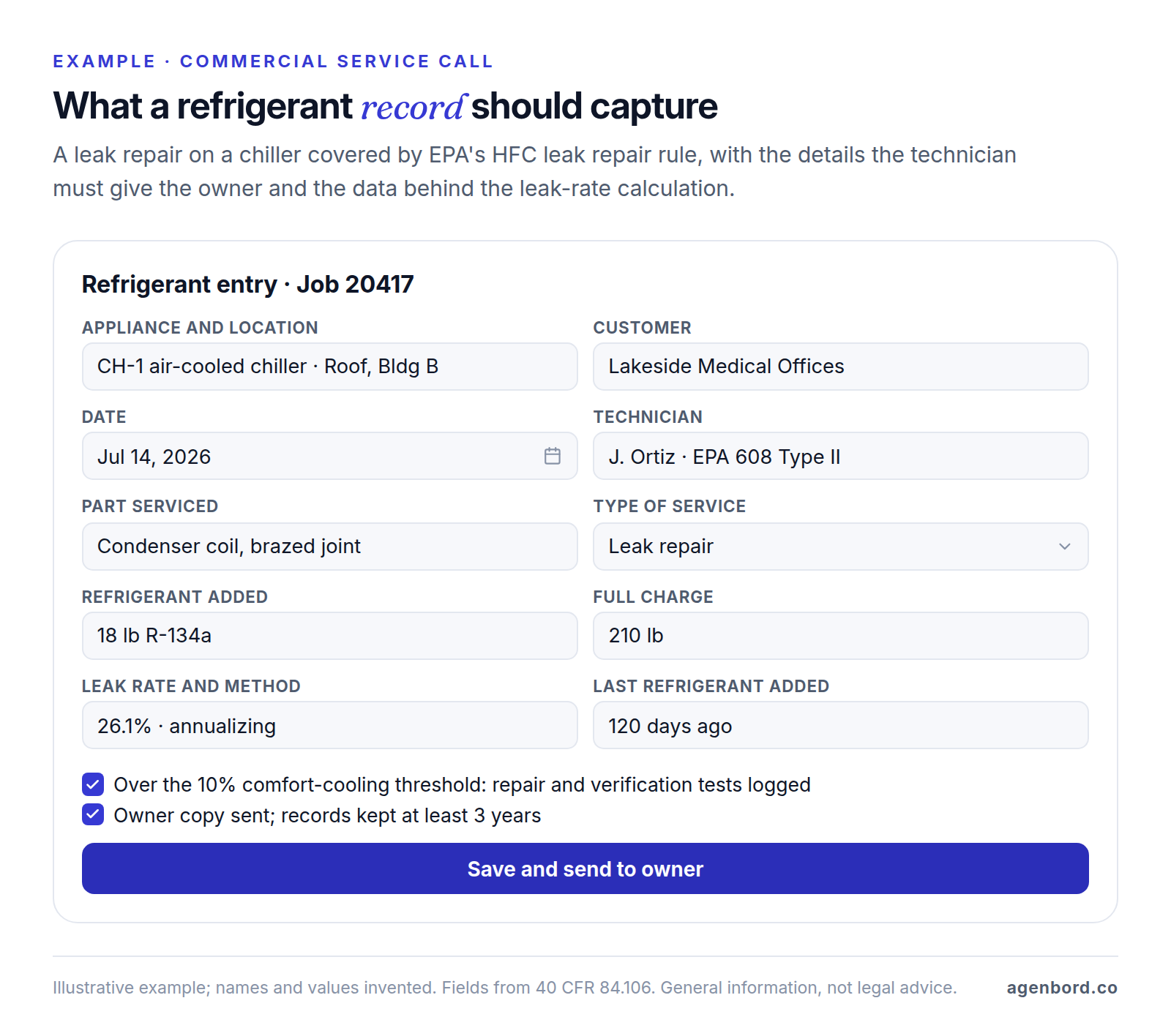
In software terms, every job that opens the circuit needs a refrigerant entry: the appliance, refrigerant type, pounds added or recovered and the cylinder used, with the tech's certification on file. For disposal records, add a monthly report of recovered refrigerant by type and the transfers to your reclaimer. Commercial work on covered systems adds the full charge per appliance, an automatic leak-rate calculation that flags anything over the threshold, inspection and verification test reminders, and a record for the owner. Ask every vendor to show both in the demo.
Memberships, marketing and CRM for HVAC
Memberships (maintenance agreements) deserve the hardest test, because the plan you sell at the kitchen table has to survive years of billing, scheduling and renewals. Set up your real plans in the demo and check:
- Plan rules: price per system, monthly or annual billing, included visits (say, a spring cooling and a fall heating tune-up), a member discount on repairs, and perks such as priority service or no after-hours fee.
- Visits: created automatically in the right season and zone, with visits used and remaining on the customer record.
- Renewals: automatic renewal with a card on file, reminders before a card expires and retries when a payment fails.
- Member pricing: member and non-member prices shown together, so the discount helps sell the plan.
- Reporting: active members, renewals due, cancellations and revenue per member.
Vendors package this differently. ServiceTitan's service agreement software automates renewals and sends reminders about upcoming visits, expiring services and expiring cards; Housecall Pro's HVAC page puts membership plans on Essentials and MAX; FieldEdge keeps advanced service agreements for its Premier and Elite plans.
The core HVAC campaigns run on data the platform already holds: spring and fall tune-up reminders to members and past customers; follow-ups on unsold replacement estimates until the customer books or says no (Jobber automates quote follow-ups from its Connect plan); replacement offers by equipment age, which only works if install dates are on the record; and a review request after every job, which Housecall Pro sends automatically and Jobber includes in its Marketing Suite add-on. Get consent before sending marketing texts, honor opt-outs and have counsel review promotional messages. Where your platform stops, workflow automation can fill the gap, for example renewal reminders with a payment link.
Do you need a separate CRM?
For residential HVAC, the best CRM is usually the one inside your field service platform. The customer, equipment, membership and job history behind every campaign already live there, and vendors sell sales and marketing tools on top, such as ServiceTitan's Marketing Pro, Jobber's Pipeline and Marketing Suite, and Pipeline on Housecall Pro's MAX. A separate CRM such as HubSpot or Salesforce earns its place in commercial sales, with long bid cycles and many contacts per account, as long as won bids become jobs without retyping. When that sales process is your edge, a custom CRM connected to your field platform is a third option. Our CRM for contractors guide compares the options by trade.
HVAC job costing for installs
Service calls are priced from the pricebook; replacements are where margin is won or lost one job at a time. HVAC job costing software ties every cost of an install to the job: equipment, materials, labor at its burdened rate (wages plus payroll taxes, insurance and benefits), permits, financing fees, commissions and callbacks under your labor warranty. Here's a hypothetical heat pump changeout sold for $14,800:
| Cost | Estimated | Actual |
|---|---|---|
| Heat pump, air handler and thermostat | $5,900 | $5,900 |
| Materials: line set, pad, electrical, filter rack | $650 | $870 |
| Install labor, 2 techs at $65 an hour burdened | $1,040 (16 hours) | $1,365 (21 hours) |
| Permit and inspection | $185 | $185 |
| Financing fee paid to the lender (hypothetical 6%) | $888 | $888 |
| Sales commission (5%) | $740 | $740 |
| Return visit under your labor warranty (2 hours) | $0 | $130 |
| Gross profit | $5,397 (36.5%) | $4,722 (31.9%) |
The $675 gap came from five extra labor hours, $220 of extra material and one callback, and the job costing report should show it line by line within days, not at month-end. Equipment warranties such as Trane's cover parts, not labor, so callbacks come out of your margin.
Three habits keep the numbers honest: techs clock time to the install in the app, equipment and material purchases carry the job number, and callbacks are logged against the original install rather than as new service calls. Jobber includes job costing from its Grow plan and Service Fusion from Plus, and ServiceTitan lists it too. For the method itself (cost codes, burdened labor rates and work-in-progress reporting on longer projects), see our construction job costing guide.
HVAC software and QuickBooks
QuickBooks keeps the books but has no dispatch board, technician app, pricebook or membership tracking, so HVAC companies on QuickBooks pair it with a field platform and sync the two. Start with your edition: ServiceTitan lists QuickBooks Online and Desktop (Premier and Enterprise), FieldEdge and Service Fusion list Online and Desktop, and Housecall Pro and Jobber list QuickBooks Online. Successware takes another route, with accounting built into the platform and QuickBooks Payroll or ADP for payroll.
Then agree five HVAC mappings with your bookkeeper before go-live, on top of the general sync checks in our field service guide:
- Departments. Use classes (QuickBooks Online Plus and Advanced have them) for service, maintenance, installs and commercial, so margins by department survive the sync.
- The pricebook. Map pricebook tasks to a handful of income accounts. Syncing thousands of tasks as separate QuickBooks items buries the item list.
- Memberships. Monthly plans are simple. Annual plans paid up front may belong in a deferred revenue account until the visits are delivered; ask your accountant.
- Deposits and financing. An install deposit should be applied to the final invoice, not counted as income twice, and a financed job should post at full price with any lender fee recorded as an expense.
- Equipment purchases. Bills and purchase orders should carry the job, so install job costing doesn't depend on matching supplier invoices by hand.
Service Fusion's description makes a useful benchmark: a two-way sync of customers, products and services, plus automatic sync of job deposits, invoices and payments. Ask every vendor for the same list.
HVAC software vendors compared (October 2026)
Here's how eight platforms that sell to HVAC contractors compare, based on their official sites in October 2026. "Built for" is our read; prices are list prices.
| Platform | Built for | HVAC strengths | Watch for | Pricing |
|---|---|---|---|---|
| ServiceTitan | Residential companies with a call center; also commercial and construction | Packages list call booking, pricebook, payroll, commission tracking and customizable memberships; QuickBooks Online and Desktop, Sage Intacct, NetSuite and more | Pro add-ons such as Pricebook Pro, Dispatch Pro and Marketing Pro | Quote-based, per technician |
| Housecall Pro | Small residential teams | HVAC package puts membership plans, equipment tracking, flat-rate pricing and a sales proposal tool on Essentials and MAX; consumer financing; review requests; QuickBooks Online | Its HVAC page shows higher prices than the general pricing page; confirm which you're quoted | Essentials $149/mo billed annually (5 users), MAX $299/mo (8 users), per the pricing page |
| Jobber | Owner-operators and small service teams | Recurring maintenance jobs scheduled and invoiced automatically; job costing from Grow; Wisetack financing; Home Depot pricing in quotes; QuickBooks Online and Xero | Maintenance runs as recurring jobs, so test member pricing and renewals; Marketing Suite (with review requests), Pipeline and AI Receptionist are add-ons below Plus | Core $29/mo billed annually (1 user); Grow from $149/mo billed annually |
| FieldEdge | Residential HVAC, plumbing and electrical companies that want guided onboarding | Flat-rate pricing on all plans; advanced service agreements and multi-option quotes from Premier; QuickBooks Online and Desktop; onboarding team moves your data | No free trial; Proposal Pro and MarketingEdge are add-ons below Elite | Quote-based, by team size and add-ons |
| Service Fusion | Teams with many office and field users | Unlimited users; flat rate powered by Profit Rhino; homeowner financing; QuickBooks Online and Desktop | Inventory and job costing from Plus; customer portal on Pro | $208–$533/mo billed annually; $245–$627 monthly |
| Successware | Residential service companies that want accounting in the same system | Built-in accounting; maintenance programs; flat-rate content from The New Flat Rate, Profit Rhino or NSPG; QuickBooks Payroll or ADP for payroll | Accounting lives in Successware instead of syncing to QuickBooks; involve your accountant early | Quote-based (demo) |
| BuildOps | Commercial mechanical contractors running service and projects | Asset history, preventive maintenance, refrigerant logged per asset, project cost tracking; QuickBooks, Sage, Viewpoint and NetSuite; two-way ServiceChannel work orders | Quote depends on crew size, trades and integrations; get the integration scope in writing | Quote-based |
| ServiceTrade | Commercial service contractors | Equipment history, deficiency capture, online quotes, QuickBooks integration and unlimited office users from the Select suite | Customer portal and project management on Premium; parts and inventory on Enterprise | Quote-based, mainly by technician count |
The best HVAC software for a small business
There's no single best platform, but there is a best shortlist for your size and work mix:
- 1–5 techs, mostly residential: Housecall Pro, Jobber and Service Fusion publish prices, and Housecall Pro and Jobber offer 14-day free trials, so you can test on real jobs this month. Get Housecall Pro's price for your plan in writing, since its HVAC page and pricing page differ.
- 5–20 techs with memberships and a dispatcher: add FieldEdge and ServiceTitan, and weigh membership, pricebook and dispatch depth above the monthly price.
- 20+ techs with a call center: ServiceTitan, or Successware if you want accounting in the same system.
- Mostly commercial: BuildOps or ServiceTrade.
Whichever you shortlist, make each vendor run the four scenarios from the table at the top of this guide. Our field service guide adds the rest: pricing models across 11 platforms (six of them in this table), what card processing adds to the bill, a scorecard and a trial plan.
When custom add-ons pay off, and when to switch platforms
Most HVAC companies should buy a platform and put the effort into setup and training. Custom work pays off at the edges, usually built on your platform's API, so check that your tier includes API access first:
- Membership rules your platform can't express, such as pricing by number of systems, prorated upgrades, transfers when a home is sold or member-only booking windows. A single automated workflow starts from $1,500 (1–2 weeks).
- A refrigerant compliance log for commercial work: full charge per appliance, automatic leak-rate calculations, inspection reminders and owner reports, fed by the entries techs already make. That's an internal tool from $12,000 (4–8 weeks).
- Integrations that carry load-calculation results into proposals, supplier price files into the pricebook, or jobs to and from customer work-order portals or an ERP. A custom integration service starts around $15,000.
- Owner dashboards combining your platform, QuickBooks and marketing data: revenue per tech, membership growth and cancellations, install margins and cash. A focused internal dashboard starts from $12,000.
- A commercial customer portal with every site's work orders, maintenance reports, quotes and invoices in one login: a custom web portal typically runs $25,000–$60,000 (8–14 weeks).
- A technician app for a field workflow no platform supports: a mobile app MVP for iOS and Android from $15,000 (8–12 weeks).
Add hosting of roughly $50–$500 a month and maintenance of about 15–20% of the build cost per year.
Switch platforms instead when the gap sits at the core of HVAC work: no real membership engine, no flat-rate pricebook, no multi-option proposals or no maintenance by asset for commercial customers. And sometimes the upgrade to a tier with the feature or the API is the cheapest custom option. Our build-vs-buy framework covers the general decision, and our home services page shows the automations and integrations we build around ServiceTitan, Housecall Pro and Jobber. We price custom software as a fixed-price proposal with a written scope and weekly demos, and you own the code.
The short version: buy the platform that fits your work mix, prove it on your busiest day, and build only what sits between it and the way you run memberships, refrigerant records or reporting.
Sources
- ServiceTitan - HVAC software, including FAQ on QuickBooks editions (accessed October 2026)
- ServiceTitan - Pricing (accessed October 2026)
- ServiceTitan - Pro products (accessed October 2026)
- ServiceTitan - Pricebook Pro (accessed October 2026)
- ServiceTitan - Service agreement software (accessed October 2026)
- ServiceTitan - Accounting integrations (accessed October 2026)
- Housecall Pro - HVAC software and HVAC package pricing (accessed October 2026)
- Housecall Pro - Pricing (accessed October 2026)
- Jobber - HVAC software (accessed October 2026)
- Jobber - Pricing (accessed October 2026)
- FieldEdge - Pricing and FAQ (accessed October 2026)
- FieldEdge - HVAC software (accessed October 2026)
- Service Fusion - Pricing and FAQ (accessed October 2026)
- Service Fusion - HVAC software and QuickBooks sync (accessed October 2026)
- Service Fusion - Flat rate powered by Profit Rhino (accessed October 2026)
- Successware - HVAC software (accessed October 2026)
- Successware - Integrations (accessed October 2026)
- BuildOps - HVAC software (accessed October 2026)
- BuildOps - Pricing (accessed October 2026)
- BuildOps - Integrations (accessed October 2026)
- ServiceTrade - Pricing (accessed October 2026)
- Intuit QuickBooks - QuickBooks Online plans and pricing (accessed October 2026)
- US EPA - Recordkeeping and reporting requirements for stationary refrigeration (accessed October 2026)
- US EPA - Stationary refrigeration leak repair requirements (accessed October 2026)
- US EPA - ER&R leak repair requirements fact sheet, January 2026 (accessed October 2026)
- US EPA - Emissions Reduction and Reclamation program fact sheet (accessed October 2026)
- Federal Register - Phasedown of Hydrofluorocarbons: Management of Certain Hydrofluorocarbons and Substitutes, 89 FR 82682 (October 11, 2024)
- eCFR - 40 CFR 82.152, Definitions (accessed October 2026)
- eCFR - 40 CFR 82.156, Proper evacuation of refrigerant from appliances (accessed October 2026)
- eCFR - 40 CFR 82.157, Appliance maintenance and leak repair (accessed October 2026)
- eCFR - 40 CFR 82.161, Technician certification (accessed October 2026)
- eCFR - 40 CFR 84.102, Definitions, including leak rate (accessed October 2026)
- eCFR - 40 CFR 84.106, Leak repair (accessed October 2026)
- ACCA - Technical manuals (accessed October 2026)
- ACCA - Approved software (accessed October 2026)
- Trane - Warranty and registration (accessed October 2026)
- Goodman - Warranty information (accessed October 2026)
Prices, plans and regulations change. Figures were checked on October 2, 2026; follow the links for the latest. Nothing here is legal, tax or financial advice.
About the author
Founder, Agenbord
Muhammad Hamza is the founder of Agenbord, the Fort Lauderdale software company behind the construction ERP Smart Construction and a WhatsApp-first billing platform. He writes practical guides on buying, building and automating business software.