On this page
- What an AI receptionist does on a call
- How an AI receptionist call flows, from ring to booking
- Where AI receptionists fail, and how to design around it
- AI receptionist options: software, answering service, hybrid or custom
- What an AI receptionist for small business costs
- Compliance basics: recording, consent, AI disclosure and HIPAA
- How to test an AI receptionist before you buy
- Rolling out: after-hours first, then overflow
You're under a sink, with a patient or in a client meeting when the phone rings, and a caller who reaches voicemail may simply call the next business on their list. An AI receptionist for small business is built for that moment: voice AI that answers your line, answers routine questions from information you've approved, books the appointment in your calendar or field-service software, takes messages and transfers the calls that need a person.
As of October 2026, the AI products we priced start at $49–$150 a month on monthly billing, and Jobber sells one as a $29 add-on. Human answering services start at $250–$300 a month. A full-time receptionist on the median wage costs about $3,170 a month before benefits, and does far more than answer the phone.
The voice is the easy part. What matters is what the AI may say, which systems it can book into and how fast it gets an emergency or an upset caller to a person. Get those wrong and it quotes prices you never set and asks someone with a flooded basement for their ZIP code.
What an AI receptionist does on a call
It isn't a phone menu ("press 1 for scheduling") or voicemail with a transcript. Speech recognition turns the caller's words into text, a language model decides what to say or do, and a synthetic voice replies. It can take actions, but only in the systems you connect and within the rules you set.
| Job | What good looks like | What it needs |
|---|---|---|
| Answer | Every call, nights and weekends, several at once | Your number forwarded or ported to the service |
| Identify intent | New job, reschedule, question or emergency, within a sentence or two | Your call reasons and what happens for each |
| Answer questions | Hours, service area and services, only from approved information | A written FAQ and, if you want prices quoted, a price list |
| Book | Real open slots, the right job type and length, a confirmation text | Live access to your calendar or scheduling software |
| Take messages | Name, number, address, reason and urgency, read back to the caller | A message template and who gets which messages |
| Text a link | Booking page, intake form, payment link or directions, once the caller agrees | Registered business texting |
| Transfer | A warm transfer that briefs your team member first | Staff numbers, an on-call schedule and a fallback |
| Log | Reason, outcome, summary, transcript and recording on the customer record | Your CRM or field-service software |
What it shouldn't do is give advice. A symptom, a legal or tax question, or a furnace making a strange noise goes to someone qualified to judge it. If more of your customers message than call, our customer service chatbot guide covers the text side.
How an AI receptionist call flows, from ring to booking
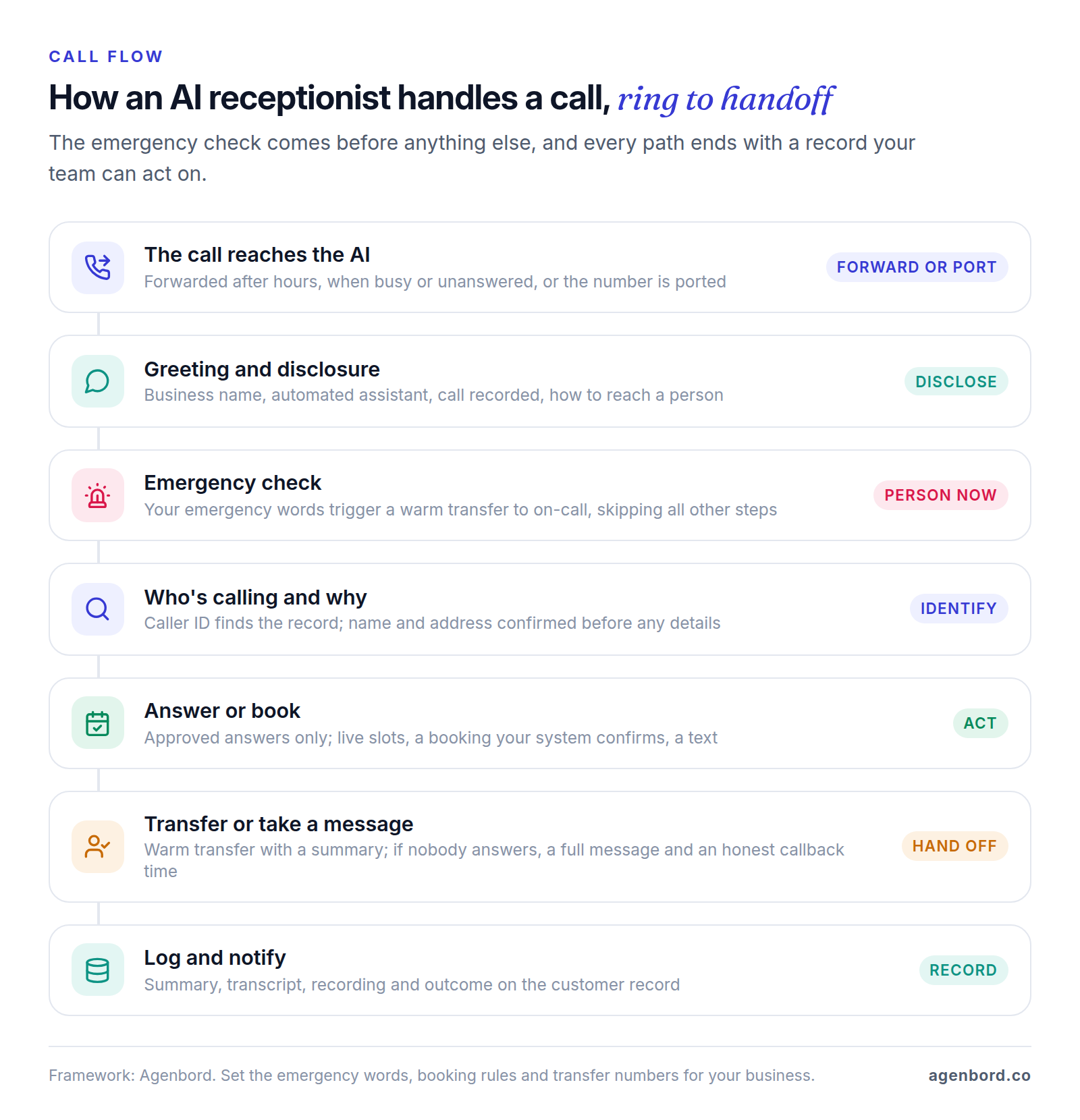
- The call reaches the AI, forwarded by your phone system (every call, or only after hours, when busy or unanswered) or on a number ported to the service.
- The greeting discloses that it's an automated assistant, that the call is recorded and how to reach a person.
- Emergencies come first: your emergency words trigger a transfer to on-call before any other question.
- It identifies the caller and the reason. Caller ID can find the customer record, but it isn't proof of identity, so the AI confirms name and address before discussing a job.
- It answers or books: approved answers only; for bookings, live availability, two or three offered slots, a booking your system confirms and a text.
- It hands off with a warm transfer that briefs your team member first, or takes a complete message with an honest callback time.
- It logs the call: summary, transcript, recording and outcome on the customer record, with alerts for follow-ups.
What it has to connect to
| Connection | Typical options | Watch for |
|---|---|---|
| Phone number | Conditional forwarding or porting | Porting to the AI vendor hands it your main line; test each forwarding rule from a cell phone |
| Calendar | Google Calendar, Microsoft 365, Calendly | Job lengths, travel buffers and sync delays that double-book |
| Field-service or practice software | Jobber, Housecall Pro, ServiceTitan; Clio for law firms | Whether it creates a confirmed job or a request someone must approve |
| CRM | HubSpot, Salesforce or a built-in CRM, directly or through Zapier or Make | Duplicate contacts and which fields get written |
| Texting | Confirmations and links | 10DLC registration, consent and opt-out words |
| Your team | Transfer numbers and an on-call schedule | What happens when nobody picks up |
Start with conditional forwarding: you keep your number, you can switch the AI off quickly, and a pilot doesn't put your main line in a vendor's hands. If you port later, port to a phone provider you control.
Booking is where products differ most. Some write a confirmed appointment into your calendar or field-service software; others text the caller a booking link or create a request for your office. Rosie, for example, texts appointment links on its $49 plan and books on your calendar from its $149 plan. A product that can't reach your schedule can only take messages, however natural it sounds.
Where AI receptionists fail, and how to design around it
Voice is harder than chat: the AI has to hear correctly over road and job-site noise, reply without awkward pauses and decide in real time. Plan for these failures before you pick a product:
| Failure | What it looks like | Design fix |
|---|---|---|
| Mishearing | A wrong digit in the callback number, "Elm" booked as "Elmhurst" | Read back numbers, names and addresses; confirm by text; after two misses, take a message or transfer |
| Emergencies | A caller with a gas smell gets asked for a ZIP code | Check for emergencies first, transfer to on-call and, if nobody answers, use a fixed script you wrote |
| Emotional or complex calls | Complaints, billing disputes, distress; the AI loops or sounds cheerful | Detect frustration and requests for a person, then transfer or take a priority message; never argue or negotiate |
| Latency | Long pauses; callers talk over it or hang up | Test on a weak cell signal, keep lookups fast, have it say "let me check the schedule" while it waits |
| Made-up answers | A price, warranty term or policy you never set | Approved information only; "I'll have someone confirm that" for everything else |
| Advice | "Is this rash serious?" "Should I sign this?" | Decline and route; a clinic's greeting tells callers with a medical emergency to hang up and dial 911 |
| Booking errors | A 30-minute slot for a three-hour job, an address outside your area | Durations, buffers and ZIP codes enforced by your scheduling system; never say "booked" until it confirms |
Test with accents, speakerphones and background noise, and in Spanish if your callers use it. Two rules cover the rest: everything the AI says is your business talking, and no caller should need more than one sentence to reach a person.
AI receptionist for home services
Typical home-services calls are new jobs, reschedules and "when will the tech get here?", often while everyone is on a job. Set up:
- Emergency words for your trade ("no heat," "burst pipe," "gas," "sparking") that transfer straight to on-call.
- Booking rules from your dispatch board: durations, arrival windows, service-area ZIP codes and which jobs need an estimate first.
- Prices only where you've approved them, like a diagnostic fee; otherwise "the technician will quote on site."
- A connection to your field service management software so the job lands on the schedule with its notes.
If you run Jobber or Housecall Pro, price their built-in options first. Jobber's AI Receptionist, a $29-a-month add-on, books into the Jobber schedule, creates a work request when a job can't be booked outright and listens for keywords you set, like "burst pipe," to transfer urgent calls. Housecall Pro's CSR AI books jobs into Housecall Pro and transfers callers to your number or to a Housecall Pro rep; its price isn't on the pricing page. HVAC companies will find dispatch, memberships and refrigerant records in our HVAC software guide, and our page on software for home services companies covers the rest of the stack.
Clinics, law firms, accounting firms and agencies
| Business | Let the AI handle | Always to a person |
|---|---|---|
| Medical, dental and therapy practices | Booking, hours, directions, insurance you accept, new-patient forms by text | Symptoms, prescriptions, test results; emergencies hear "hang up and dial 911" |
| Law firms | Intake basics and consultation booking, collecting only what your conflict check needs | Legal questions, urgent matters from existing clients, anything with a deadline |
| Accounting and tax firms | Booking, document checklists by text, published deadlines | Tax advice, notices from tax agencies, fee disputes |
| Agencies and B2B services | Lead qualification, discovery-call booking, routing | Pricing commitments, unhappy clients |
For law, accounting and other professional firms, the bigger risk isn't a missed booking but an AI that sounds like it's giving advice or taking on a client. Script that line before go-live; our law firm intake guide covers conflict checks and the ethics rules.
AI receptionist options: software, answering service, hybrid or custom
There are four ways to get calls answered without hiring, and many businesses combine two.
AI receptionist software. Goodcall, Rosie, My AI Front Desk, Smith.ai's AI Receptionist and the add-ons inside field-service platforms. They're the cheapest per call, and most can be tried first: Smith.ai's AI plan is free for 25 calls a month, Goodcall has a 14-day trial, and Rosie and My AI Front Desk have 7-day trials. Results depend on your setup, and booking depth varies by plan.
Human answering services. Ruby says people handle its calls, with AI behind the scenes for transcripts and call flows; Smith.ai sells human-first plans too. They cost several times more per call and do better with upset callers, sensitive intake and judgment calls.
Hybrid. The AI answers first and passes some calls to people. Smith.ai sells live-agent help with verification or scheduling as a per-call add-on to its AI plans, with no fee when the AI itself escalates. The simplest hybrid needs no extra vendor: AI after hours and on overflow, your team during the day.
Custom build on a voice AI platform. Retell AI and Vapi handle the voice layer (speech recognition, turn-taking, the voice and phone numbers) and bill per minute; a developer connects it to your systems, writes the rules and builds the test calls. Synthflow, another voice AI platform, now publishes a single enterprise plan starting at $30,000 a year.
When to build a custom AI receptionist
Buy a product if it books into the system that holds your schedule and follows your rules; it's cheaper and faster. Price a custom build when your schedule lives where products don't reach (a custom CRM, an older practice system), your booking rules are specific (technician skills, durations by job type, ZIP-code service areas), you want the call data in your own systems, or the call starts a bigger workflow, like creating the job and sending the estimate, which is AI automation work.
How to build an AI receptionist, in outline: the voice platform answers; a language model follows your instructions and approved information; tools call your systems to check availability, book, look up the customer, text and transfer; rules in code handle what the model must not decide, like emergency routing and booking limits; and every call is logged. It's an AI agent with a phone line, so the controls in our guide to AI agents for business apply: narrow permissions, limits in code and a measured pilot.
What an AI receptionist for small business costs
List prices as of October 2026, from each vendor's pricing page:
| Option | Type | Price | Billing unit | Worth knowing |
|---|---|---|---|---|
| Jobber AI Receptionist | Field-service add-on | $29/month plus a Jobber plan | Flat monthly | No usage cap listed on the pricing page |
| Goodcall | AI only | Starter $79/month per agent, Growth $129, Scale $249; 15% less billed annually | 100, 250 or 500 unique callers included, then $0.50 each | Unlimited minutes; call details kept 7 days on Starter |
| Rosie | AI only | Professional $49/month (250 minutes), Scale $149 (1,000), Growth $299 (2,000) | Minutes | Calendar booking and live transfers from Scale; English and Spanish |
| My AI Front Desk | AI only | $99/month, or $79 billed annually; 200 voice minutes | Minutes, then $0.25 each | 1,000 overage credits a month included; built-in CRM; says it signs BAAs |
| Smith.ai AI Receptionist | AI first, optional human help | Free for 25 calls, then $3 each; Pro from $150/month for 75 calls | Per call; $2.17–$2.50 per extra call on Pro | Known spam doesn't count; English and Spanish |
| Smith.ai Virtual Receptionists | Human first | $300/month for 30 calls, $810 for 90, $2,100 for 300 | Per call; $8.50–$11.50 per extra call | Month-to-month; 10% off for 12 months |
| Ruby | Human, AI-assisted | $250/month for 50 minutes, up to $1,725 for 500 | Receptionist minutes | 24/7, weekends and holidays included; overage rates not listed |
| Retell AI | Voice platform | $0.07–$0.31 a minute; numbers $2/month | Per minute | $10 free credit; HIPAA and BAA on enterprise plans |
| Vapi | Voice platform | $0.05 a minute plus speech, model and voice costs at cost | Per minute | Its estimate for 1,000 minutes: $82–$129; HIPAA add-on with a BAA $2,000/month |
The billing unit decides which plan is cheapest for you. Per-minute plans get expensive when calls run long. Per-call plans charge a 40-second wrong number the same as a 10-minute booking, though Smith.ai doesn't count known spam. Goodcall counts unique callers, so a customer who calls three times in a month counts once. Before comparing, pull a month of call logs: calls, total minutes, repeat callers and the share after hours.
A worked example, against a full-time receptionist
Take a hypothetical business with 150 calls a month averaging 3 minutes (450 minutes), every caller different, that wants bookings in its calendar. The chart shows the cheapest plan that fits each option, billed monthly at list price, with the math beside each bar. Rosie's $49 plan is out because it covers 250 minutes and only texts booking links.
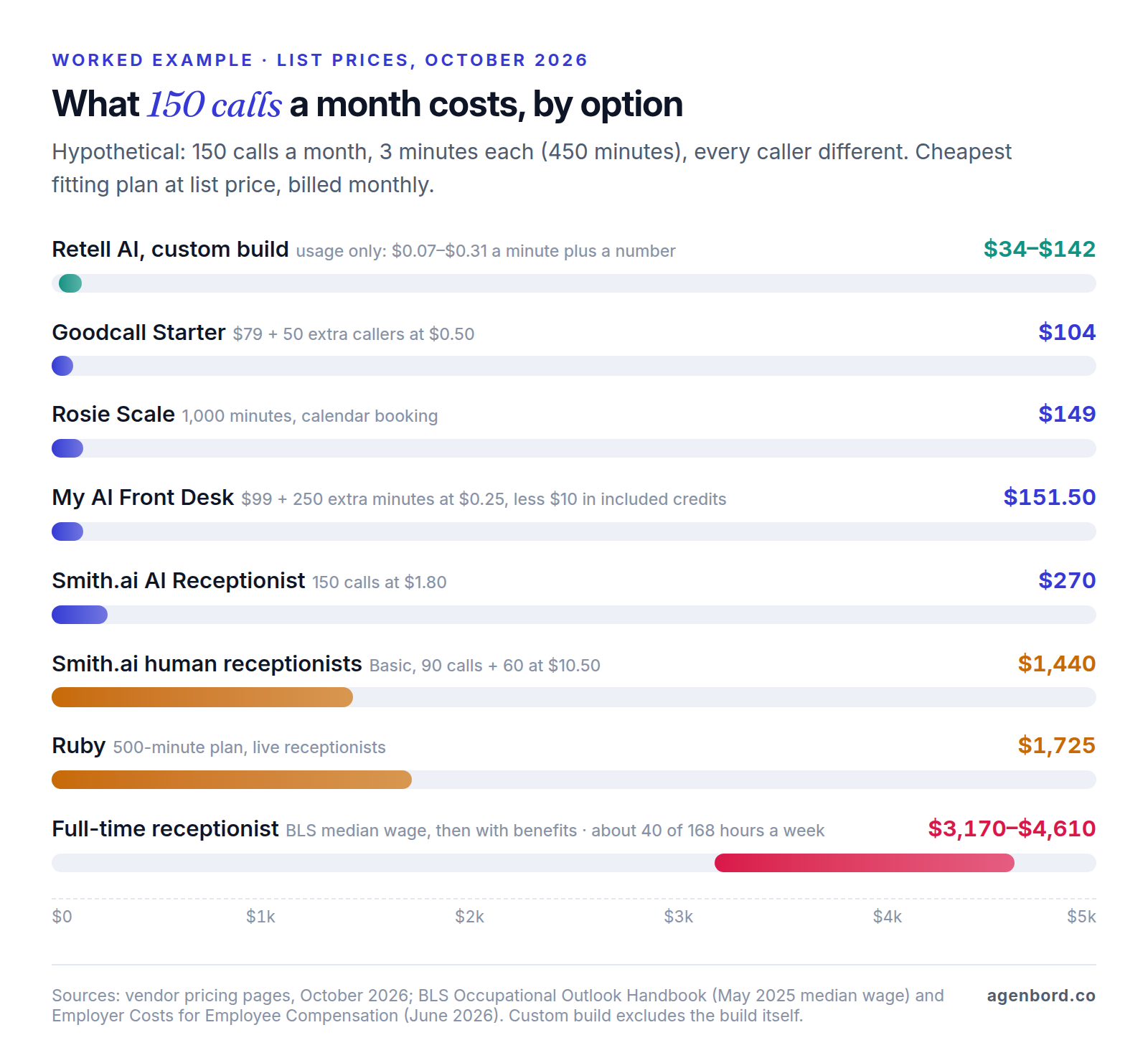
The receptionist row uses the BLS median wage for receptionists, $18.27 an hour ($38,010 a year) in May 2025, with benefits at the 31.3% share of compensation that BLS reports for private-industry office and administrative support workers in June 2026. It isn't like for like. A receptionist greets visitors, handles paperwork and makes judgment calls no AI should, but covers only about 40 of the 168 hours in a week. If you need someone at the front desk anyway, the real question is whether AI should take after-hours and overflow calls so that person isn't interrupted.
What a custom build costs
A custom receptionist adds a one-time build to per-minute usage like Retell's or Vapi's. We build AI assistants and the integrations behind them, and for a receptionist most of the work is the integration and the rules. Our AI chatbot development pilots start from $4,000 (2–4 weeks): one call flow, such as after-hours booking, on a voice AI platform, connected to your calendar, CRM or field-service system, with emergency routing and a scored set of test calls. Production assistants with integrations typically run $12,000–$35,000. Running costs are per-minute usage, hosting (roughly $50–$500 a month) and maintenance at about 15–20% of the build a year. Our AI chatbot cost guide and build-vs-buy framework go deeper on the math.
Compliance basics: recording, consent, AI disclosure and HIPAA
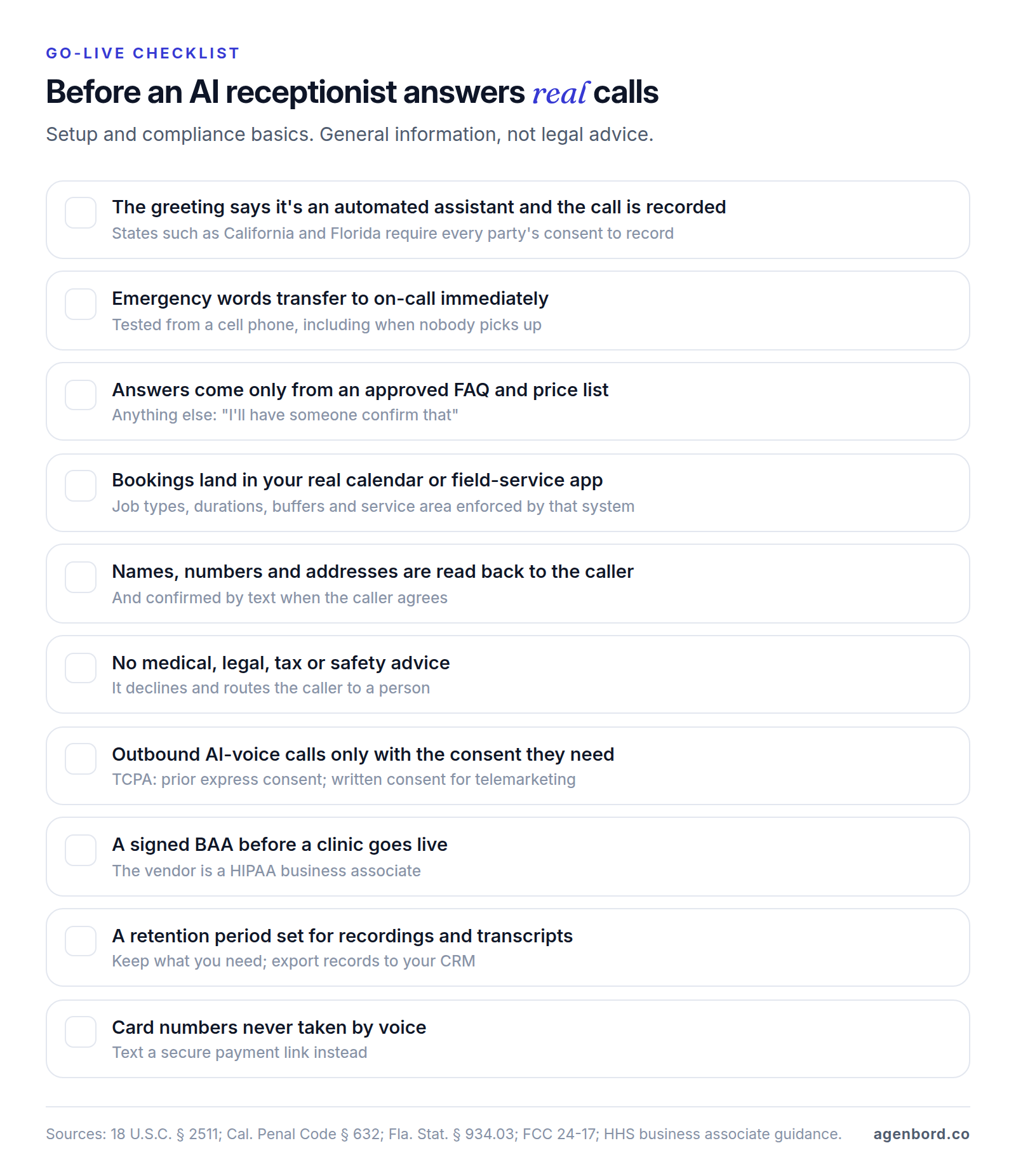
This is general information, not legal advice. Rules vary by state and industry, so have counsel review your greeting and setup.
Call recording consent
Most AI receptionists record and transcribe every call; Rosie includes recordings and transcripts on every plan. Federal law permits recording when one party consents (18 U.S.C. § 2511(2)(d)), but some states require everyone's consent. California bars recording a confidential communication without the consent of all parties (Penal Code § 632), with a separate rule for calls involving cell or cordless phones (§ 632.7), and Florida permits interception when all parties have given prior consent (§ 934.03). You can't control where callers are, so put a recording notice in every greeting.
AI voices and the TCPA
In February 2024, the FCC ruled that the TCPA's restrictions on "artificial or prerecorded voice" calls cover AI technologies that generate human voices (FCC 24-17), so those calls need the called party's prior express consent unless an emergency purpose or exemption applies. Telemarketing calls with an artificial voice need prior express written consent (47 CFR 64.1200).
The ruling concerns consent "to initiate such calls," so a customer calling you and reaching your AI isn't what it addresses. It matters the moment the AI dials out: callbacks to missed callers, reminder calls, lead follow-up, win-back campaigns. Confirm you have the consent each type of call needs, record how you got it, and treat texts with the same care.
Telling callers it's AI
Put it in the greeting, answer honestly when asked and never let the AI claim to be a person. In Utah it's also the law: a business using generative AI with consumers must disclose it when a person clearly asks, and licensed professions must disclose it verbally at the start of high-risk interactions, which include collecting health or financial information and giving personalized medical, legal or financial advice (S.B. 226, 2025). Check the rules in the states you serve.
HIPAA for clinics
A clinic's AI receptionist handles patient names, appointments, messages and recordings. A vendor that creates, receives, maintains or transmits protected health information for a practice is a business associate, so you need a signed business associate agreement (BAA) before go-live. The "conduit" exception covers transmission-only services like a phone carrier; HHS says a vendor that stores the information is a business associate even if it never looks at it. Ask for the BAA, not a "HIPAA compliant" badge: My AI Front Desk says it signs them, Retell AI lists them on enterprise plans, and Vapi sells HIPAA compliance with a BAA for $2,000 a month.
Recordings, transcripts and retention
Decide how long to keep recordings and transcripts, set it in the product and stick to it; the FTC's guidance for businesses comes down to keeping only what you need. If the CCPA applies to you, you must tell consumers how long you keep each category of personal information and can't keep it longer than reasonably necessary (Civil Code § 1798.100). Defaults cut both ways: Goodcall keeps call details 7 days on Starter and Vapi 14 to 180 days depending on plan, so export what you need to your CRM. And never take card numbers by voice; text a secure payment link.
How to test an AI receptionist before you buy
Demos follow the happy path. During a trial or on a free plan, make these calls from a cell phone, with someone playing the difficult caller:
- A question from your FAQ, then one that isn't, like a price you haven't listed.
- A standard booking, a long job, an out-of-area address and a reschedule.
- An emergency in a caller's own words, not your keyword list ("water's coming through the ceiling").
- An angry caller with a complaint.
- "Am I talking to a real person?" and, mid-booking, "Can I talk to someone?"
- A spelled name, a phone number and an address with a unit number, from a noisy car, and in Spanish if your callers use it.
- A transfer when nobody picks up, and a robocall.
| Criterion | Passes when |
|---|---|
| Accuracy | Only your information; everything else gets "I'll have someone confirm" |
| Booking | The right job, length and slot in your real calendar or field-service app, matching the confirmation text |
| Details | Name, number and address correct on the record, every time |
| Emergencies | Transferred at the first mention; the fallback works when nobody answers |
| Handoffs and disclosure | Warm transfers with a summary; says it's automated and recorded; honest when asked |
| Conversation | No long pauses; handles interruptions; never loops |
| Records and control | Summary and transcript on the record; you can edit answers, rules and retention yourself |
| Cost | Calculated from your own call log, including overage |
Set the pass bar first. A missed emergency or an invented price should rule a product out, however good the rest sounds.
Rolling out: after-hours first, then overflow
- Measure your baseline. Pull two to four weeks from your phone system: total calls, missed calls, after-hours calls and bookings from calls.
- Start after hours and on weekends, and read every transcript for the first two weeks.
- Add overflow: daytime calls when the line is busy or nobody answers within a few rings.
- Decide on first answer. Some businesses let the AI answer every call, with staff taking transfers. Many stop at overflow, and that's fine.
Compare against your own baseline, not vendor benchmarks drawn from other businesses' calls:
| Metric | How to calculate it | Watch for |
|---|---|---|
| Answer rate | Calls answered by a person or the AI ÷ all calls | Hang-ups during the greeting (keep it short) |
| Missed calls | Calls that rang out, hung up or reached voicemail | Gaps in forwarding rules, like lunch breaks |
| Booking rate | Bookings ÷ calls that wanted one | Bookings your staff had to fix or move |
| Transfer rate | Transfers ÷ all calls | Planned transfers versus the AI getting stuck |
| Wrong answers | Errors found in a weekly transcript review | Any invented price or policy: fix the source that day |
| Cost per booking | Monthly cost ÷ bookings the AI made | Overage in busy months |
Which option fits
- You run Jobber or Housecall Pro and mostly need bookings and after-hours coverage: try the built-in option first.
- Your calls are routine and your calendar is simple: an AI receptionist product on a monthly plan.
- Your calls are sensitive or emotional, like legal intake or complaints: a human answering service, or a hybrid where AI takes only after-hours and overflow.
- You run a clinic: shortlist only vendors that will sign a BAA.
- Your schedule lives in a system no product connects to, or your booking rules are complex: price a custom pilot, with an off-the-shelf trial as the benchmark.
Sources
- Smith.ai - AI Receptionist pricing (accessed October 2026)
- Smith.ai - AI Receptionist features and live-agent add-on (accessed October 2026)
- Smith.ai - Virtual Receptionists pricing (accessed October 2026)
- Ruby - Plans and pricing (accessed October 2026)
- Ruby - FAQ (accessed October 2026)
- Goodcall - Pricing (accessed October 2026)
- Rosie - Pricing (accessed October 2026)
- My AI Front Desk - Pricing (accessed October 2026)
- My AI Front Desk - AI receptionist features and HIPAA (accessed October 2026)
- Jobber - Pricing and add-ons (accessed October 2026)
- Jobber - AI Receptionist (accessed October 2026)
- Housecall Pro - CSR AI (accessed October 2026)
- Housecall Pro - Pricing (accessed October 2026)
- Retell AI - Pricing (accessed October 2026)
- Vapi - Pricing (accessed October 2026)
- Synthflow - Pricing (accessed October 2026)
- U.S. Bureau of Labor Statistics - Occupational Outlook Handbook: Receptionists, May 2025 pay (accessed October 2026)
- U.S. Bureau of Labor Statistics - Employer Costs for Employee Compensation, Table 4, June 2026 (accessed October 2026)
- GovInfo - 18 U.S.C. 2511, interception of wire, oral or electronic communications (accessed October 2026)
- Justia - California Penal Code section 632, 2025 code (accessed October 2026)
- Justia - California Penal Code section 632.7, 2025 code (accessed October 2026)
- Florida Senate - 2026 Florida Statutes, section 934.03 (accessed October 2026)
- Federal Communications Commission - Declaratory Ruling FCC 24-17 on AI-generated voices under the TCPA (February 2024)
- eCFR - 47 CFR 64.1200, delivery restrictions (accessed October 2026)
- Utah Legislature - S.B. 226 (2025), Artificial Intelligence Consumer Protection Amendments, enrolled (accessed October 2026)
- HHS - Business associates (accessed October 2026)
- HHS - Guidance on HIPAA and cloud computing (accessed October 2026)
- Federal Trade Commission - Protecting Personal Information: A Guide for Business (accessed October 2026)
- Justia - California Civil Code section 1798.100, 2025 code (accessed October 2026)
- The Campaign Registry - Introduction to 10DLC (accessed October 2026)
Prices, plans and regulations change. Figures were checked on October 2, 2026; follow the links for the latest. Nothing here is legal, tax or financial advice.
About the author
Founder, Agenbord
Muhammad Hamza is the founder of Agenbord, the Fort Lauderdale software company behind the construction ERP Smart Construction and a WhatsApp-first billing platform. He writes practical guides on buying, building and automating business software.