On this page
- What client intake software should do at each step
- Ethics and confidentiality rules that shape legal intake
- How intake differs by practice area
- Client intake software for law firms compared (October 2026)
- What to automate in legal intake, and where to stop
- Intake metrics worth tracking
- Build or buy: when a custom intake portal or integration pays off
- How to choose client intake software
Intake is where a law firm's process leaks: the call that reaches voicemail at 7 p.m., the web form nobody reads until Monday, the consultation booked before anyone checked whether the firm represents the other side. Client intake software for law firms closes those gaps. It captures every inquiry, screens it, runs a conflict check before the prospective client tells their story, books the consultation, sends the fee agreement for e-signature, collects the retainer and opens the matter in your practice management system.
The short answer on choosing: if your firm runs Clio, MyCase or Smokeball, test the intake built into it first, because your contacts, matters and billing already live there. Lawmatics, Law Ruler and Lead Docket (owned by Filevine) are built around lead conversion for firms that run on marketing and volume. Of these six, only MyCase publishes the price of a plan with intake as of October 2026; the rest quote.
What client intake software should do at each step
Intake is a sequence, and the order matters more than any feature list: names before facts, the signature before the money, and a letter instead of silence when the answer is no.
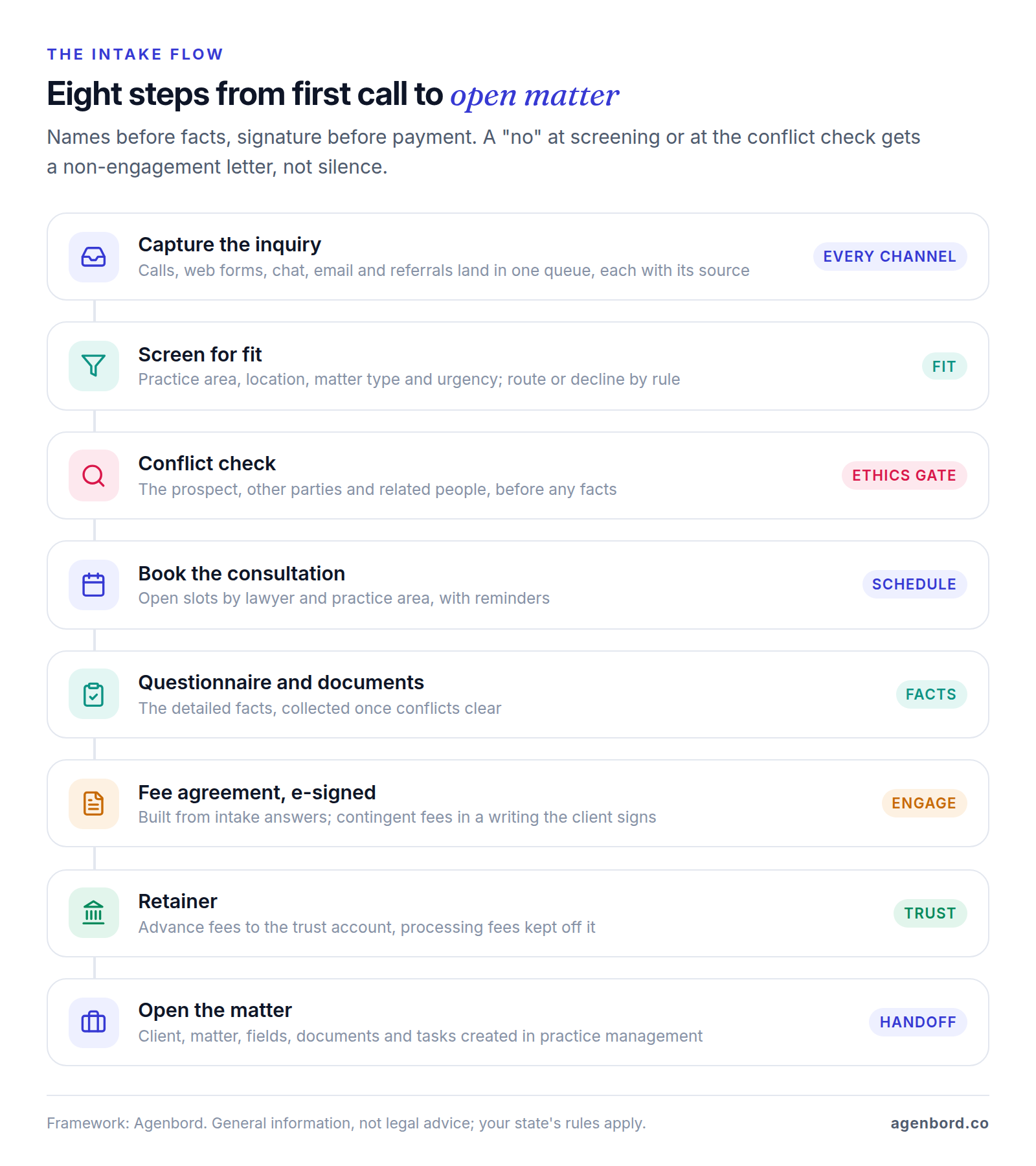
| Step | What the software should do | What to make the vendor show you |
|---|---|---|
| 1. Capture | Calls, web forms, chat, email and referrals in one queue, each with its source | A missed call and an after-hours form each creating a lead with no typing |
| 2. Screen | Practice area, location, matter type and urgency; route or decline by rule | What happens to an inquiry you can't take |
| 3. Conflict check | Search the prospect, opposing parties and related people across clients, matters and past inquiries | Whether it searches your practice management system or only its own leads, and who clears a possible match |
| 4. Schedule | Consultation slots by lawyer, practice area and office, with reminders | Booking rules, video links and reminders that respect contact preferences |
| 5. Questionnaire | Detailed facts and documents, collected after conflicts clear | Branching, save and resume, uploads, answers stored in matter fields |
| 6. Engage | A fee agreement or engagement letter built from intake answers and sent for e-signature | Templates by matter type and fee arrangement; signature status for staff |
| 7. Retainer | A payment link that deposits to the right account | Advance fees routed to trust, processing fees kept off it |
| 8. Open the matter | Client, matter, custom fields, documents and tasks created in practice management | A field-by-field map, nothing retyped |
| Decline | The right non-engagement letter, with the reason recorded | Lawyer-approved templates and a decline-reason report |
The decline path gets the least attention and carries real risk. The comment to ABA Model Rule 1.18 says that when information shows a conflict or another reason not to take a matter, the lawyer should tell the prospective client or decline. A non-engagement letter puts that in writing. Have your lawyers approve templates that say you don't represent the person and haven't evaluated their claim, and that time limits may apply, so they should see another lawyer promptly. Then let the software send and log them.
Ethics and confidentiality rules that shape legal intake
Four groups of rules shape how intake software should be set up. This is general information, not legal advice. The citations are to the ABA Model Rules; each state adopts its own version and some differ, so check your state bar's rules and opinions before you lock in a workflow.
Prospective clients and conflicts (Rule 1.18)
Under ABA Model Rule 1.18, anyone who consults a lawyer about possibly forming a client-lawyer relationship is a prospective client. Even if no relationship follows, the lawyer may not use or reveal what they learned. If the prospect shared information that "could be significantly harmful" to them, that lawyer, and by default the whole firm, can be barred from representing the other side in the same or a substantially related matter.
Three parts of the rule and its comment become software settings:
- Forms and chat can create prospective clients. A consultation is likely when a lawyer's advertising "in any medium" invites people to submit information without "clear and reasonably understandable warnings and cautionary statements" that limit the lawyer's obligations. ABA Formal Opinion 492 (2020) gives an example: a caution on a website intake link that sending information won't create a client-lawyer relationship and may not be kept privileged or confidential. Your lawyers choose the wording; the software must show it before the first free-text box.
- Names first, story later. A lawyer weighing a new matter "should limit the initial consultation to only such information as reasonably appears necessary" to decide, and the rule's screening exception requires, among other things, that the lawyer took "reasonable measures to avoid exposure to more disqualifying information than was reasonably necessary." A form that collects names, runs the conflict check and only then asks what happened builds that discipline in, and its timestamps record it.
- Conditional consultations. A lawyer may condition a consultation on the person's informed consent that nothing they share will prevent the lawyer from representing a different client in the matter. If your firm does this, intake must present the consent and store it.
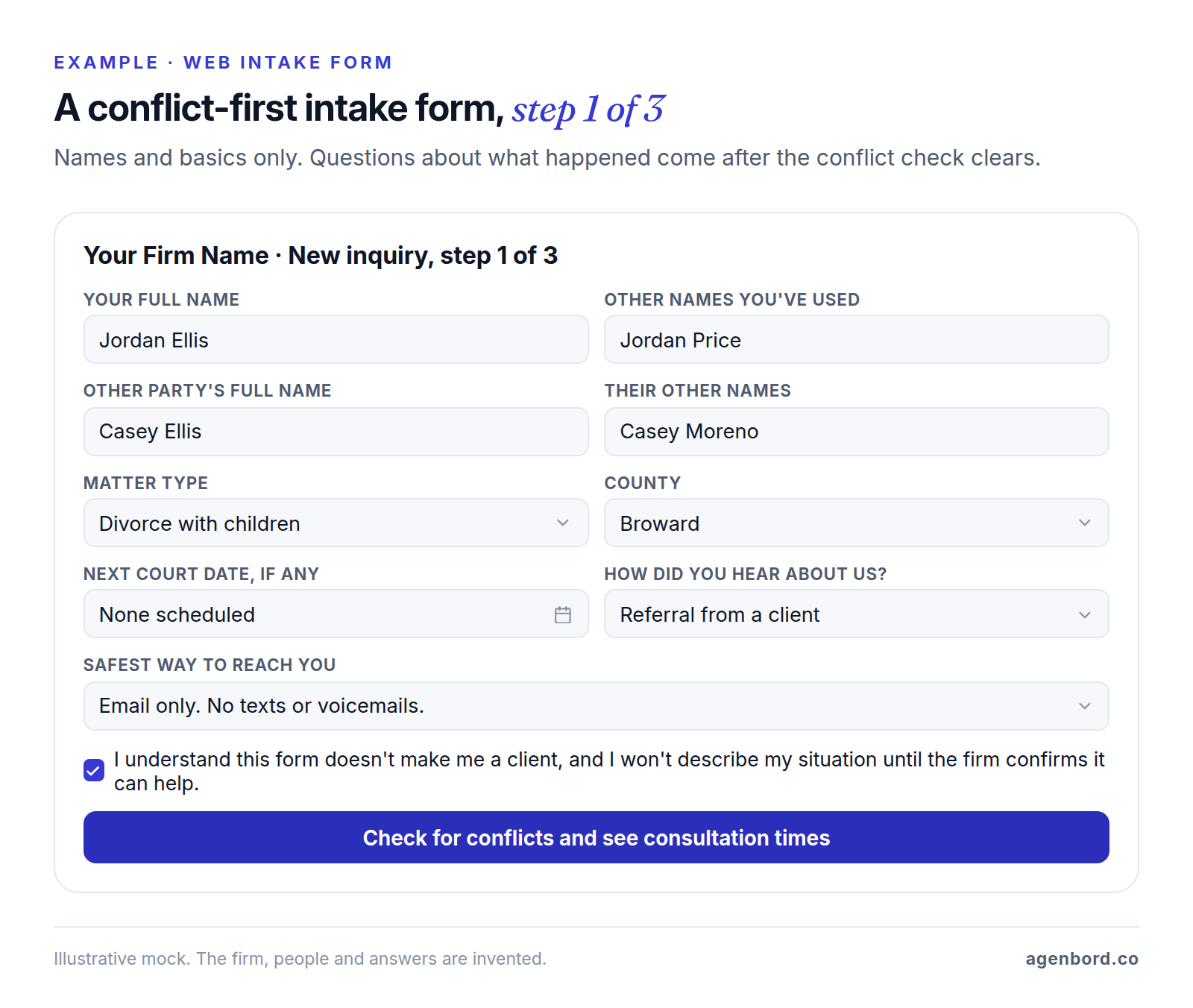
Behind the form, search the prospect, the opposing party and everyone else involved (spouses, businesses, insurers, co-defendants), including former names. Fuzzy matching catches "Jon" versus "Jonathan", but no software decides whether a match is a real conflict: send every possible hit to a lawyer, and store the result, who cleared it and when.
Confidentiality and security (Rule 1.6)
Rule 1.6 bars lawyers from revealing information relating to a representation without informed consent or another exception, and requires "reasonable efforts to prevent the inadvertent or unauthorized disclosure of, or unauthorized access to" it. Its comment lists what makes those efforts reasonable: the sensitivity of the information, the likelihood of disclosure without more safeguards, the cost and difficulty of adding them, and how much they would hamper your work for clients.
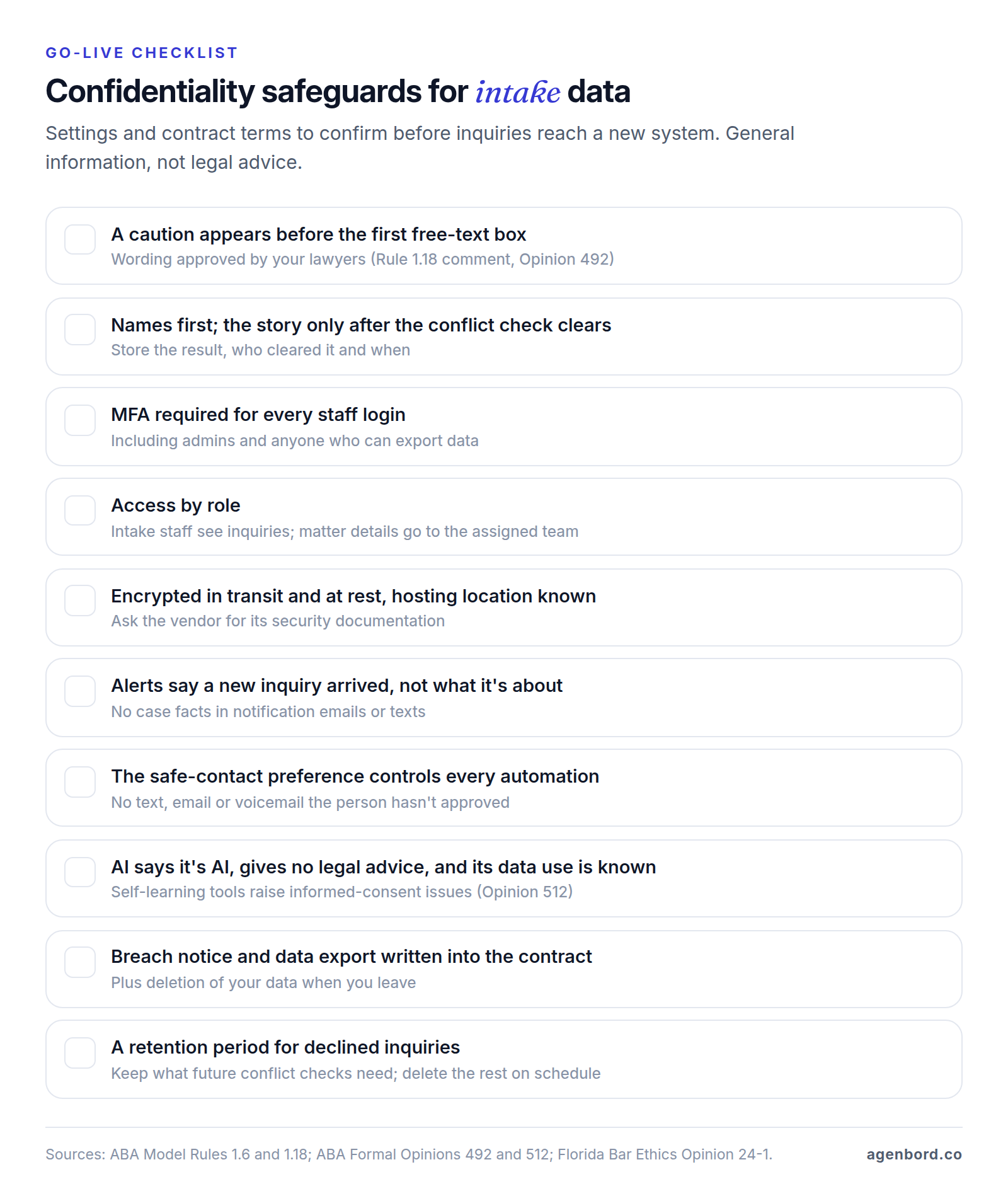
Cloud-based intake software keeps prospects' information on a vendor's servers, and intake adds risks of its own: notification emails that repeat the facts, reminder texts to a phone someone else reads, and declined inquiries kept forever. Confirm these settings and contract terms before go-live:
Generative AI in intake (Formal Opinion 512)
ABA Formal Opinion 512 (July 2024) covers lawyers' use of generative AI. It doesn't mention chatbots or intake, but three points apply to any AI that touches inquiries:
- For self-learning tools, which can reuse what's entered, "a client's informed consent is required prior to inputting information relating to the representation," and boilerplate in engagement letters "is not sufficient." The opinion notes that Rule 1.18(b) requires similar protection for prospective clients' information.
- Lawyers should read and understand the tool's terms of use and privacy policy, with IT or security experts if needed.
- Managerial lawyers "must establish clear policies regarding the law firm's permissible use of GAI." With an outside vendor, the opinion says to make sure the tool is configured to preserve confidentiality and that the lawyer will be notified of a breach.
Some states address intake chatbots directly. Florida Bar Ethics Opinion 24-1 (January 2024) says "a lawyer must inform prospective clients that they are communicating with an AI program and not with a lawyer or law firm employee." It warns against an "overly welcoming" chatbot that may give legal advice or fail to identify itself, and suggests screening questions for people who already have a lawyer. Check what your own bar has published.
Fee agreements, retainers and trust accounts (Rules 1.5 and 1.15)
Rule 1.5 asks lawyers to communicate the scope of the representation and the basis of the fee, "preferably in writing," and requires contingent fee agreements to be "in a writing signed by the client." Under the federal E-SIGN Act, a contract generally can't be denied legal effect solely because an electronic signature was used to form it, which is what lets intake tools send the agreement for e-signature right after the consultation.
Payments are where intake software can create a trust accounting problem by accident. Rule 1.15 requires fees and expenses paid in advance to go into a client trust account, withdrawn only as they're earned or incurred. Before you connect any processor to a trust account, ask where its processing fees and chargebacks are debited from. Clio says that with Clio Payments "processing fees are never debited from IOLTA accounts," and LawPay, which handles MyCase's online payments, lists "trust account protection and IOLTA compliance." As of October 2026, Clio lists card payments at 2.95% (3.75% for American Express) and eCheck at 1%; LawPay lists 2.99% plus $0.30 per card payment (3.90% plus $0.30 for American Express) and 1% for eCheck. Have whoever runs your trust accounting sign off on the setup, since states' versions of Rule 1.15 differ.
How intake differs by practice area
The flow is the same in every practice; what goes into each step isn't.
Family law
Client intake software for family law has to handle two risks at once. The first is conflicts: both spouses can call the same firm in the same week, and if the second tells their side before anyone checks names, the firm may lose the ability to represent the first. Ask for the other party's name, and any former names, in the first screen, as in the form above.
The second is safety. Before the system sends a single automated text, email or voicemail, ask how and when it's safe to make contact, and make that answer control every automation on the inquiry. Someone else may read the person's phone or inbox.
Estate planning
Client intake software for estate planning is mostly a questionnaire problem: family, assets, existing documents, beneficiaries and who should serve as executor or trustee. Long forms need save-and-resume, uploads for deeds and existing wills, and answers that flow into drafting templates, the job of legal document automation.
Couples raise a joint-representation question. The comment to Rule 1.7 says that in a common representation, the lawyer should tell each client at the outset that information will be shared and that the lawyer will have to withdraw if one client wants something material kept from the other. Run conflicts on both spouses and route the joint-representation engagement letter your lawyers use.
E-signatures have a limit here: the E-SIGN Act carves out laws governing the creation and execution of wills, codicils and testamentary trusts (15 U.S.C. 7003), so how the plan itself is signed depends on state law.
Personal injury
Personal injury intake is about qualifying fast and accurately: when and where it happened, injuries and treatment, who else was involved and which insurers are in the picture. Make the incident date a required field, since your lawyers calculate deadlines from it, and have the e-sign packet carry the right contingent fee agreement for the case type.
That packet usually includes medical records authorizations. A valid HIPAA authorization needs the elements in 45 CFR 164.508(c): a specific description of the records, who may disclose them, who receives them, the purpose, an expiration date or event, and the signature and date, plus statements about revocation and redisclosure. Have the template reviewed once and let intake fill in the providers; HHS says a covered entity may act on a copy of a valid signed authorization, including one sent electronically.
Personal injury is a core market for dedicated intake tools: Law Ruler lists personal injury and mass tort among its practice areas, and Lead Docket scores lead viability with AI.
Criminal defense
Client intake software for criminal defense has to work at 2 a.m. Calls come at night and on weekends, often from a parent or partner rather than the person charged. Route them to a person, through an answering service or an AI receptionist set up to recognize an arrest and reach the on-call lawyer, not a form that waits until Monday. MyCase and Lawmatics both list Smith.ai among their integrations. Collect the basics (who is in custody, where, the charge as the caller understands it, the next court date) and leave the facts for the lawyer.
The caller is often the one paying. Rule 1.8(f) lets a lawyer accept payment from someone other than the client only if the client gives informed consent, the payer doesn't interfere with the lawyer's independent judgment and the client's information stays protected. Record the payer separately from the client, and put your lawyers' third-party-payer consent in the engagement packet.
Client intake software for law firms compared (October 2026)
Two kinds of products compete for intake: practice management suites with intake built in, and dedicated intake tools that sit in front of your practice management system. Prices are as listed on each vendor's site in October 2026, and most are quote-based.
| Product | What it is | Intake highlights | Published price (October 2026) |
|---|---|---|---|
| Clio Grow | Clio's intake and CRM | Intake forms, conflict search across Clio, online booking with text reminders, engagement letters with e-signature | Included in the Elite plan, an add-on for Core and Signature; all three quote-based |
| MyCase | Practice management with intake | Conditional intake forms, lead tracking by practice area and channel, follow-ups, consultation booking, unlimited e-signature | Pro $100, Advanced $130 per user/month billed annually ($120, $150 monthly); no intake forms on Basic |
| Smokeball | Practice management with intake | Embeddable forms with conditions, voice-guided multilingual forms, a form library by practice area | Quote-based; intake included on Prosper+, an add-on on Boost and Grow |
| Lawmatics | Legal CRM and intake | Custom forms, conflict checking, auto-scheduling, e-signature, automations | Quote-based; 3-user minimum; Essential includes 500 contacts |
| Law Ruler | Legal CRM, intake and marketing automation | Logic-based forms, one-click e-sign, softphone, two-way texting, referral management | Quote-based, billed monthly on an annual term; one-time onboarding fee |
| Lead Docket | Filevine's intake platform | Intake scripts, AI lead summaries and viability scoring, automated messaging, retainer payments | Quote-based |
What sets each apart, and the catch:
- Clio Grow: leads sync to Clio Manage when they convert, and Grow AI answers after-hours calls and emails, screens for fit and conflicts and books consultations. Grow isn't available on the Starter plan ($49 per user a month), and the plans that include or allow it are quote-based.
- MyCase: the only published intake price here, with LawPay payments on every plan. Conflict checking isn't listed on its intake or pricing pages, so ask how it works.
- Smokeball: no separate CRM to sync. A converted lead carries its contacts, documents, emails and notes into the matter, and reports show lost-lead reasons and referral sources. Below Prosper+, intake is an add-on.
- Lawmatics: integrates with Clio, MyCase, Filevine, Smokeball, CARET Legal and PracticePanther. Premium adds advanced conflict checking, marketing automation and a client portal; the Merlin AI add-ons cost extra.
- Law Ruler: calling, texting and campaigns sit next to intake, with open API access on every plan. Pro allows 3 automations against Premium's 100, so match the tier to your workflows.
- Lead Docket: built for intake teams, with revenue-by-source reporting. It's the natural pick on Filevine and connects to other case management software too, but it publishes no plan details, so expect a sales process.
A general CRM plus a form builder, scheduler and e-signature tool can carry a solo practice, but nothing in that stack knows your matters, so conflict checks stay manual. A small integration that searches your practice management system before booking closes that gap.
What to automate in legal intake, and where to stop
Good intake automation removes waiting and retyping. It shouldn't make judgment calls.
- Instant acknowledgment. A web form or missed call gets a reply within a minute saying you received it and what happens next. Text only people who gave you their number for that purpose, from a registered number: under 10DLC, businesses register both a brand and a campaign.
- Forms that branch by practice area, with knock-out rules for matters you don't take and the conflict-first order shown above.
- Booking that waits for the conflict check. No possible match: show consultation times. Possible match: hold the inquiry for a lawyer.
- Reminders for consultations, unsigned agreements and unpaid retainers, all subject to the person's safe-contact preference.
- E-sign packets that bundle the fee agreement, authorizations and any third-party-payer consent.
- Matter creation once the agreement is signed and the retainer paid, through a native sync or an API. Our CRM integration guide covers field ownership, duplicates and error handling.
- AI chat and phone answering for after-hours coverage and basic intake. The handoff rules in our customer service chatbot guide apply: say it's AI, give no legal advice, and pass urgent and emotional conversations to a person.
Automation should stop short of deciding whether a match is a conflict, quoting or changing fee terms, telling anyone whether they have a case, and declining without a lawyer-approved template. Watch for silent failures too: a sync that stops creating matters looks fine until someone asks where a new client went, so set alerts on failed runs.
Intake metrics worth tracking
Measure your own baseline before changing tools. Other firms' benchmarks won't reflect your practice area, market or fee model, and these five numbers tell you whether intake works:
| Metric | How to calculate it | What it tells you |
|---|---|---|
| Speed to lead | Time from inquiry to first meaningful response, by channel, in and out of office hours | Whether inquiries wait, and where |
| Consult booking rate | Consultations booked ÷ qualified inquiries | Whether screening and scheduling turn interest into meetings |
| Conversion to signed engagement | Signed engagement agreements ÷ consultations held | Whether the consultation and the fee conversation work |
| Intake time per matter | Staff minutes from first contact to matter opened | How much retyping and chasing is left |
| Signed matters by source | Signed engagements and fees, grouped by lead source | Which marketing and referral sources to keep paying for |
Track decline reasons alongside them. A rising share of "practice area we don't handle" is a marketing problem, not an intake problem.
Build or buy: when a custom intake portal or integration pays off
Buy first: most firms should run the intake in their practice management system or one of the tools above, and build only the gaps. Building, or more often connecting, pays off when:
- Your practice management system is the source of truth but its intake falls short, and a second CRM would mean double entry. A small integration can take your website form, search for conflicts, offer booking and create the contact and matter.
- Intake spans several systems (phones, website, practice management, payments) and staff retype the same answers.
- Your intake logic is part of what you sell, like an estate planning questionnaire whose branching feeds your drafting templates, or several offices routing inquiries by language, location and case type.
- You want intake data in your own reporting across systems that don't share it.
Clio is the easiest case because its APIs are publicly documented: the Clio Manage API (v4) uses OAuth 2.0 and covers contacts, matters, custom fields, documents and webhooks, and the Clio Grow API can create inbox leads from outside sources. MyCase advertises an open API and Zapier connections, and Law Ruler lists open API access on every plan.
What this work typically costs, as we scope and price it:
| Project | Typical range | Example |
|---|---|---|
| Single intake workflow | From $1,500 (1–2 weeks) | Website form into Clio Grow's inbox, with an instant acknowledgment and a staff alert |
| Intake automation program | $6,000–$20,000 for 5–15 workflows | Acknowledgments, conflict holds, reminders, e-sign packets and matter creation |
| Custom integration service | From $15,000 | Two-way sync between intake and practice management, with conflict search across both |
| AI intake assistant | Pilot from $4,000 (2–4 weeks); production $12,000–$35,000 | After-hours chat or phone intake with disclosure, escalation and logging |
| Custom intake portal | $25,000–$60,000 (8–14 weeks) | Branded multi-step questionnaires, uploads, e-signature and payments |
| Intake CRM | From $12,000 (6–10 weeks); $30,000–$75,000 with a portal and integrations | A CRM built around your intake stages, sources and reporting |
Running costs are hosting (roughly $50–$500 a month for a small-business app), maintenance of about 15–20% of the build cost a year, and AI usage billed per use by the model provider. We price this work as fixed-price proposals with a written scope, show working software in weekly demos, deliver bigger systems in phases, and your firm owns the code.
Most of these projects are workflow automation around the system you already run; bigger ones are custom software or a custom CRM, and AI intake is AI chatbot development. Our page on software for law and professional firms shows how we build around practice management rather than replacing it, and the build-vs-buy framework helps you decide whether to build at all.
How to choose client intake software
- Map today's intake for a month: every channel, who answers it, response times and where data gets retyped. Those numbers are your baseline.
- Start with the intake you may already own. If your practice management system has it, write down exactly what it can't do before you shop.
- Give every vendor the same demo script: a conflict-first form, a possible conflict, an after-hours call, a declined inquiry with its letter, a fee agreement e-signed with the retainer paid into trust, and a matter created with every field mapped.
- Check the ethics settings in the product, not the brochure: the caution before free text, safe-contact controls, AI disclosure, access roles and the vendor's data-use terms.
- Price it at your volume: users and minimums, contact limits, texting and AI add-ons, onboarding fees and payment processing.
- Pilot one practice area for 30 days and compare speed to lead, booking rate and conversion with your baseline.
If the best tool still leaves a gap between intake and practice management, close it with an integration, not a second system your staff must keep in sync.
Sources
- American Bar Association - Model Rule 1.18, Duties to Prospective Client (accessed October 2026)
- American Bar Association - Comment on Rule 1.18 (accessed October 2026)
- American Bar Association - Formal Opinion 492, Obligations to Prospective Clients (June 2020)
- American Bar Association - Model Rule 1.6, Confidentiality of Information (accessed October 2026)
- American Bar Association - Comment on Rule 1.6 (accessed October 2026)
- American Bar Association - Formal Opinion 512, Generative Artificial Intelligence Tools (July 2024)
- The Florida Bar - Ethics Opinion 24-1, generative AI (January 2024)
- American Bar Association - Model Rule 1.5, Fees (accessed October 2026)
- American Bar Association - Model Rule 1.15, Safekeeping Property (accessed October 2026)
- American Bar Association - Comment on Rule 1.7, common representation (accessed October 2026)
- American Bar Association - Model Rule 1.8, Current Clients: Specific Rules (accessed October 2026)
- GovInfo - 15 U.S.C. 7001, electronic records and signatures in commerce (accessed October 2026)
- GovInfo - 15 U.S.C. 7003, specific exceptions (accessed October 2026)
- eCFR - 45 CFR 164.508, uses and disclosures for which an authorization is required (accessed October 2026)
- HHS - HIPAA FAQs on authorizations (accessed October 2026)
- Clio - Pricing (accessed October 2026)
- Clio - Clio Grow (accessed October 2026)
- Clio - Clio Payments (accessed October 2026)
- Clio Developer Docs - Clio Manage API reference (accessed October 2026)
- Clio Developer Docs - Clio Grow API reference (accessed October 2026)
- MyCase - Pricing (accessed October 2026)
- MyCase - Client intake and lead management (accessed October 2026)
- MyCase - Integrations (accessed October 2026)
- Smokeball - Pricing (accessed October 2026)
- Smokeball - Intake (accessed October 2026)
- Smokeball - Lead management (accessed October 2026)
- Lawmatics - Pricing (accessed October 2026)
- Lawmatics - Features and integrations (accessed October 2026)
- Law Ruler - Pricing (accessed October 2026)
- Law Ruler - Features and practice areas (accessed October 2026)
- Lead Docket - Legal intake platform (accessed October 2026)
- Lead Docket - Features (accessed October 2026)
- Lead Docket - Pricing (accessed October 2026)
- LawPay - Pricing (accessed October 2026)
- The Campaign Registry - Introduction to 10DLC (accessed October 2026)
Prices, plans and regulations change. Figures were checked on October 2, 2026; follow the links for the latest. Nothing here is legal, tax or financial advice.
About the author
Founder, Agenbord
Muhammad Hamza is the founder of Agenbord, the Fort Lauderdale software company behind the construction ERP Smart Construction and a WhatsApp-first billing platform. He writes practical guides on buying, building and automating business software.