
On this page
- What law practice management software does
- Trust accounting: the module you can't get wrong
- Security checks for cloud-based practice management software
- Law practice management software compared (October 2026)
- Which software fits your practice area
- How to switch without breaking a trust balance
- When to add custom integrations or software
- How to choose law practice management software
Law practice management software is the system a law firm runs on: matters and contacts, calendars and court deadlines, time and billing, the client trust account, documents and a client portal, all tied together. It replaces a patchwork of Outlook calendars, shared folders, spreadsheets, a timekeeping app and QuickBooks, where a deadline or a trust balance can live in one person's head.
The short answer on choosing: shortlist by how each product handles trust accounting and your practice area, then find the plan tier that actually includes what you need. As of October 2026, published prices start at $49 per user a month (Clio Starter, and PracticePanther Solo billed annually) and reach $145 (Rocket Matter Elite, billed annually). Smokeball, CosmoLex, Filevine and Actionstep quote.
The tier matters as much as the brand. Clio, MyCase and Rocket Matter include trust accounting on their entry plans; PracticePanther lists its trust ledger and reconciliation only on Business Pro, its top plan.
What law practice management software does
Every module hangs off the matter, the case or engagement that ties a client to deadlines, time, money and documents. When everything points to the same matter, an invoice knows what's in trust, a court date creates its own reminders, and a conflict check can search every party the firm has dealt with.
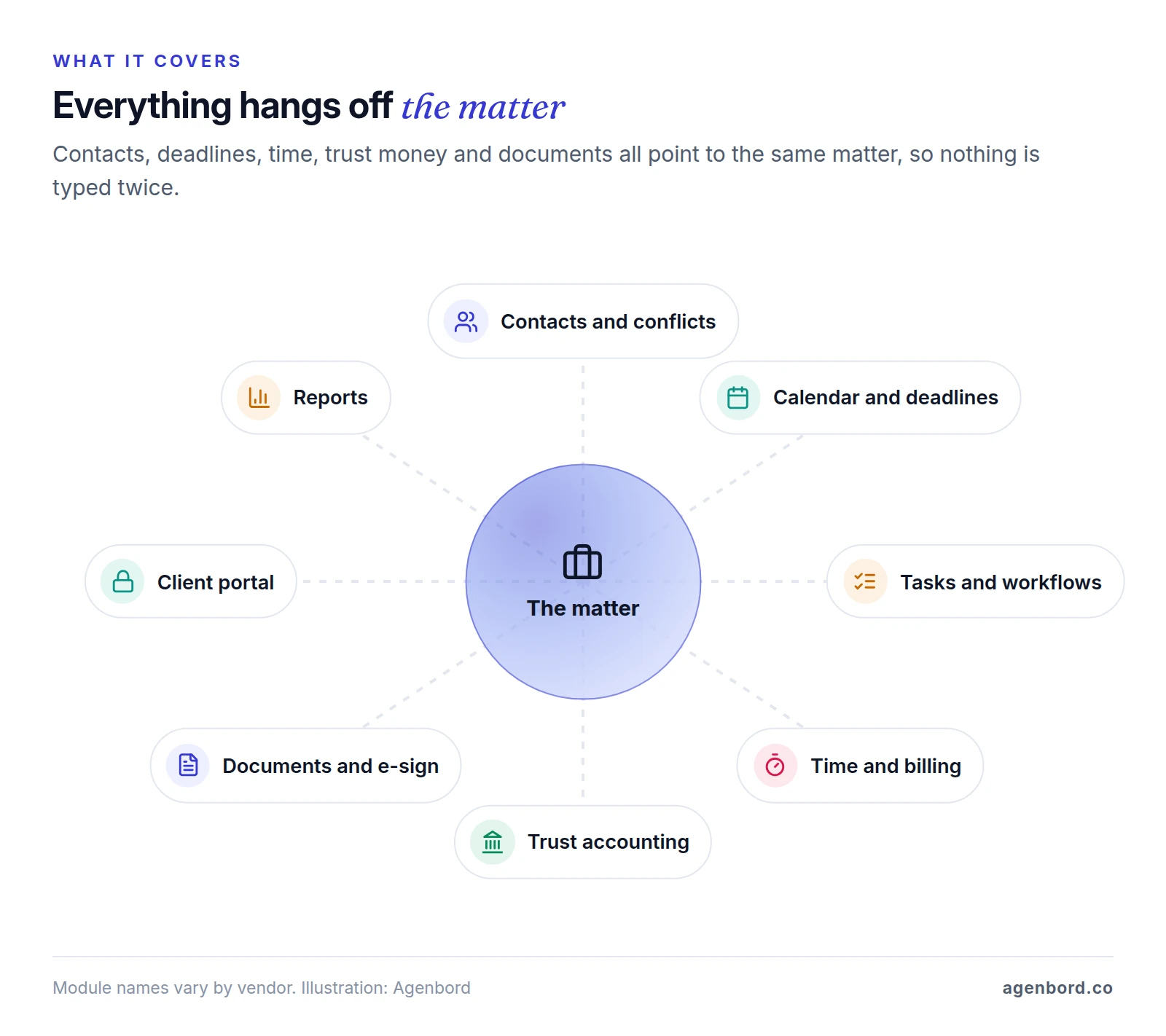
| Module | What it should do | What to check before you buy |
|---|---|---|
| Matters and contacts | One record per matter with clients, other parties, opposing counsel, custom fields and status | Conflict search across open and closed matters, including former names |
| Calendar and deadlines | Court dates and deadlines calculated from court rules, with reminders | Which courts' rules are covered and how many rule sets your plan includes |
| Tasks and workflows | Templates that create tasks and events when a matter opens or changes stage | Whether a stage change creates tasks, documents and reminders by itself |
| Time and billing | Hourly, flat-fee and contingency matters, split billing, and LEDES files for clients that require e-billing | Whether an invoice can be paid from trust in one step, with the transfer recorded |
| Trust accounting | A ledger per client or matter, earned-fee transfers and reconciliation reports | Whether it blocks a payment larger than the client's balance |
| Documents | Storage, templates, versions and e-signature | Storage and e-signature limits on your plan |
| Client portal | Secure messages, shared documents, invoices and payments | Whether your plan includes it |
| Intake | Web forms, lead tracking and consultation booking | Whether the conflict check runs before the prospect tells their story |
| Reports | Hours, collections, receivables and trust balances | Whether partners get them without exporting to a spreadsheet |
Two pieces often sit outside the suite, so price them in. Firm accounting is one: CosmoLex, Rocket Matter, Actionstep (in North America) and PracticePanther's Business Pro plan include a general ledger, MyCase sells an accounting add-on for $39 per user a month, and Clio connects to QuickBooks or Xero from its Core plan. Intake is the other: most suites include some, and our legal client intake guide covers what to test.
Trust accounting: the module you can't get wrong
Client money, from advance fees to settlement funds, sits in a trust account, and the software has to keep it straight to the penny. This section is general information, not legal advice. It cites the ABA Model Rules and, as one state example, Florida's trust account rules; check your own state's rules with your bar or your accountant.
ABA Model Rule 1.15 sets the baseline:
- Separate money, complete records. Client funds stay separate from the lawyer's own, in a separate trust account, and complete records are kept after the representation ends. The model rule leaves the period in brackets as "[five years]"; Florida sets six.
- Your own money only for bank charges. A lawyer may deposit personal funds in trust "for the sole purpose of paying bank service charges."
- Advance fees go in trust. Fees and expenses paid in advance are deposited in trust, and fees come out "only as fees are earned."
- Prompt notice and delivery. Clients, and third persons with an interest such as a lienholder, are told promptly when funds arrive and promptly paid what they're owed.
- Disputed funds stay put. Money in dispute is kept separate "until the dispute is resolved."
State rules add the mechanics. Among Florida's trust account rules, Rule 5-1.2 requires:
- A cash receipts and disbursements journal, a separate ledger for each client or matter, deposit records, canceled checks, wire transfer records and bank statements.
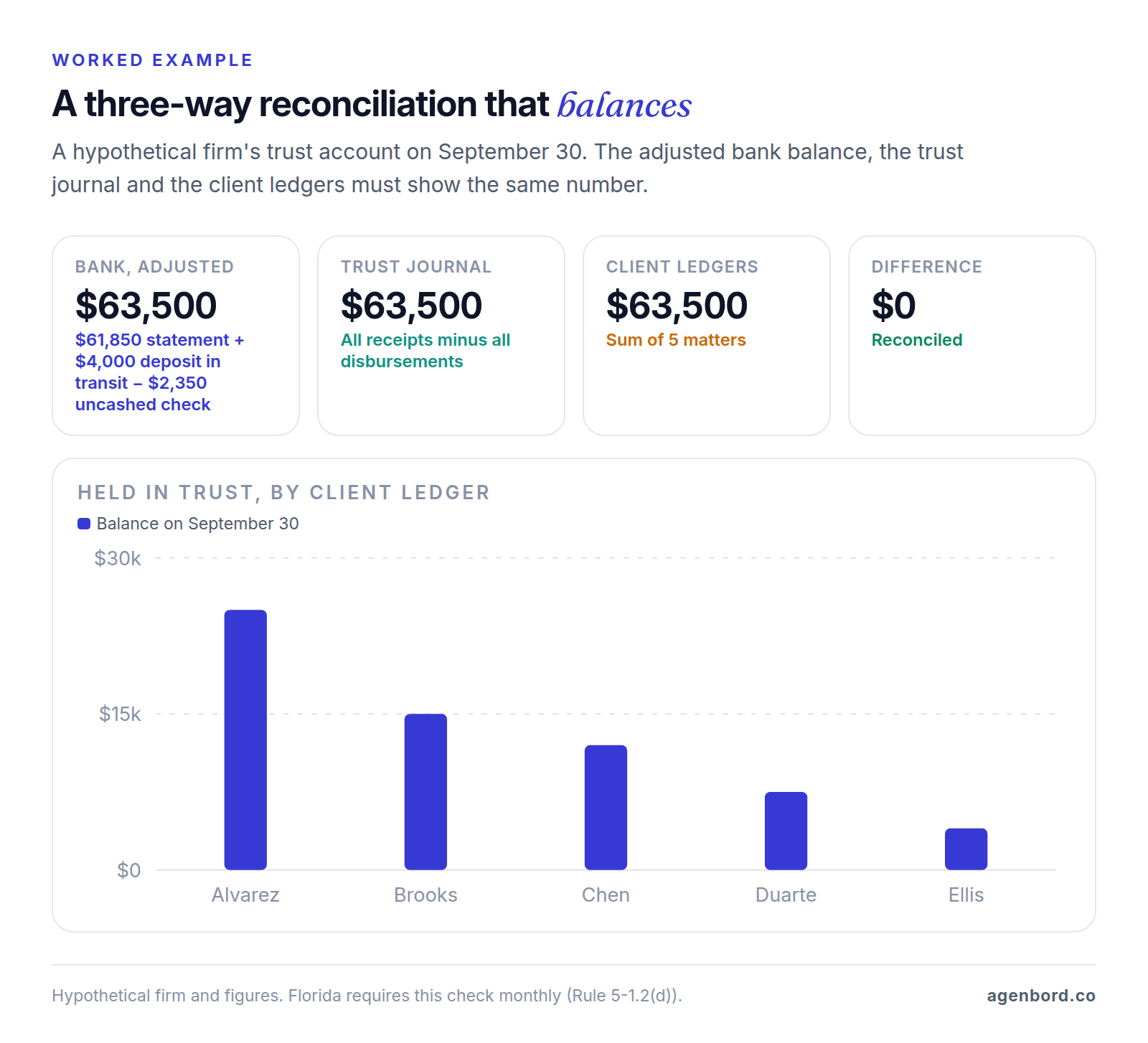
- A monthly reconciliation of each trust account showing the balance per bank, deposits in transit and outstanding checks, plus a comparison of the reconciled total with the total of the client ledgers. Software vendors call this a three-way reconciliation.
- An annual list of the trust money held for each client or matter.
- Six years of retention. Digital records are fine if they include all the data and can be produced.
Two more Florida rules translate directly into software settings. Under Rule 5-1.1(j), a lawyer may not disburse funds held for a client unless they are "collected funds," meaning deposited, finally settled and credited to the trust account, so a deposit that hasn't cleared shouldn't count toward the client's available balance. And deposits too small or short-term to earn the client net interest go into a pooled IOTA account (most states say IOLTA), whose interest is remitted to The Florida Bar Foundation.
Fee labels matter too. Florida's comment to Rule 5-1.1 describes a retainer paid to guarantee the lawyer's future availability as earned on receipt, and says it "may not be placed in the client's trust account," while fees paid in advance for work not yet done go into trust under Model Rule 1.15(c). Which one a payment is depends on your fee agreement and your state's rules; the software has to put it in the right account.
What good trust accounting software does with those rules:
- Keeps a ledger for every client or matter and refuses a payment or transfer bigger than that ledger's balance.
- Treats uncleared deposits as unavailable until they clear.
- Moves earned fees by invoice, recording the trust-to-operating transfer against the matter.
- Produces the monthly three-way reconciliation and the per-client listing, and keeps them.
- Takes card-processing fees and chargebacks from the operating account, so client money never pays them.
- Locks reconciled months and logs every change.
The comparison table below shows where trust accounting starts in each product's plans. The one to watch is PracticePanther, which lists "Trust Account Ledger & Reconciliation" only on Business Pro.
Security checks for cloud-based practice management software
With cloud software, a vendor holds your client files. That's allowed, with care. ABA Model Rule 1.6(c) requires lawyers to "make reasonable efforts to prevent the inadvertent or unauthorized disclosure of, or unauthorized access to, information relating to the representation of a client." Florida Bar Ethics Opinion 12-3 says lawyers may use cloud computing if they take reasonable precautions to ensure that confidentiality is maintained, that the provider maintains adequate security, and that the lawyer has adequate access to the information stored remotely.
AI features raise two more questions. The ABA's summary of Formal Opinion 512 (July 2024) reminds lawyers using generative AI of the duty to keep client information confidential "unless the client gives informed consent," so find out whether the vendor's AI trains on your data and what it keeps. On fees, a lawyer may charge for the time spent entering information into the tool and reviewing the result, but "in most circumstances" not for learning how to use it. Suites now draft with AI (Clio's Core plan lists AI that drafts bills; MyCase Pro includes 8am IQ writing and document tools), so set a billing policy before you turn those features on.
Ask every vendor for these in writing:
- Security evidence. A current SOC 2 Type 2 report or similar. CosmoLex, for example, cites SOC 2 Type 2 controls and encryption in transit and at rest.
- Logins. Multi-factor authentication for everyone, and single sign-on if you use Microsoft 365 or Google. Clio includes SAML single sign-on on its Signature plan.
- Permissions. Roles that limit who sees which matters and who can move trust money. Clio includes 2 custom roles on Core and unlimited roles on Signature; PracticePanther adds custom security roles on Essential.
- AI data use. Whether your data trains any model, and how long prompts and outputs are kept.
- Exit. A full export of matters, contacts, documents, time, invoices and trust ledgers in usable formats, and what happens to your data after you leave.
- Breach notice and backups. How fast they notify you, where data is hosted and how backups work.
Law practice management software compared (October 2026)
There's no single best law practice management software; there's the best fit for your trust accounting, practice area and budget. Prices below are list prices from each vendor's site, checked in October 2026.
| Product | Published price (October 2026) | Trust accounting | Also worth knowing |
|---|---|---|---|
| Clio | Starter from $49 per user/month; Core, Signature and Elite quote-based | Every plan | Portal and conflict checks from Core; court calendaring rules on every plan (3 per firm, 10 on Signature and Elite) |
| MyCase | Basic $50, Pro $100, Advanced $130 per user/month billed annually ($60, $120, $150 monthly) | Every plan | Intake forms and unlimited e-signature from Pro; conflict check tracking and open API on Advanced |
| PracticePanther | Solo $49, Essential $69, Business $89, Business Pro $114 per user/month billed annually ($59–$124 monthly) | Ledger and reconciliation on Business Pro only | Client portal on every plan; calendar rules, LEDES, intake forms and e-signature from Business |
| Rocket Matter | Essentials $59, Pro $95, Premier $115, Elite $145 per user/month billed annually | Every tier, with firm accounting | Conflict check, document assembly, LEDES and client portal on every tier; free data migration |
| Smokeball | Quote-based (Bill, Boost, Grow, Prosper+) | From Bill | Practice-area templates, calculators and advanced document automation from Grow |
| CosmoLex | No prices listed; free trial or demo | Built in, with firm accounting | Three-way reconciliation and audit trails; the trial is limited to one bank feed |
| Filevine | Custom quotes | Not detailed on its pricing page | Case management for litigation practices; LOIS AI tools; deadline and portal extensions |
| Actionstep | Per user plus implementation fees, on request | Included | Workflow automation; general ledger plan in North America |
Who each one suits, and the catch:
- Clio lists 300+ integrations (MyCase lists 70+ on Pro) and UTBMS/LEDES billing on every plan. Starter is its only published price and leaves out the client portal, conflict checks and document automation; everything above it is a sales conversation.
- MyCase publishes every tier's price and takes payments through LawPay with no monthly fee. Split billing, advanced document automation, conflict check tracking and the open API all need Advanced.
- PracticePanther starts cheap, with a client portal on every plan. If you hold client money, though, price it at Business Pro ($114), the only plan with its trust ledger, operating accounting and general ledger.
- Rocket Matter puts most features on every tier, so the tiers differ mainly in storage (25 GB on Essentials), e-signature limits, reporting and dashboards, and it migrates your data free. It belongs to ProfitSolv, as CosmoLex does.
- Smokeball suits document-heavy practices: Word and Outlook integration, practice-area templates and AutoTime automatic time tracking (an add-on on Grow, included in Prosper+). Intake is an add-on below Prosper+, Workflows an add-on on Grow, and the Archie AI assistant an add-on on every plan.
- CosmoLex is for firms that want practice management and firm accounting in one product rather than a separate accounting system.
- Filevine is case management for litigation-heavy work, from personal injury and mass torts to family, criminal defense, immigration and insurance defense, with LOIS AI tools for drafting and deposition summaries. Its pricing page describes billing as time tracking and invoices, so ask how trust money is handled.
- Actionstep is built around workflow automation and process management. Its Legal Accounting plan (general ledger, banking, payables and receivables) is sold only in North America, and pricing includes implementation fees.
None of the eight offers a free plan as of October 2026. Free trials are the closest thing: MyCase gives 10 days and PracticePanther 7, both without a credit card, and Rocket Matter and CosmoLex offer trials too.
Which software fits your practice area
The basics are the same everywhere. What changes by practice is how money moves, where deadlines come from and how many documents you produce.
Solo and general practice
Compare the cheapest plan that includes trust accounting, not the cheapest plan. Then check what it leaves out: Clio Starter has no client portal or conflict checks, and MyCase Basic's portal is limited.
Family law
Family law practice management software has to run conflict checks on both spouses, including former names, and handle trust deposits that clients replenish as the case goes on; Rocket Matter lists evergreen retainers among its billing features. Support and property calculations are worth testing too: Smokeball includes practice-area calculators from Grow and offers a FamilyPro add-on. Ask each vendor to walk through a financial disclosure from your state.
Criminal defense
Criminal law practice management software lives on court dates, so test rules-based calendaring for your courts: Clio includes court calendaring rules on every plan, PracticePanther from Business. Settle which account your flat fees land in before you configure billing, using the retainer distinction above and your state's rules. Fees may come from a family member, so record the payer separately from the client. Filevine lists criminal defense among its practice areas.
Personal injury
Contingency matters run on case stages, medical records, liens and settlements rather than hourly bills. Model Rule 1.5(c) requires a contingent fee agreement in a writing signed by the client and, at the end, a written statement of the outcome and, if there's a recovery, the remittance to the client and how it was calculated. Look for a settlement statement built from the trust ledger. Filevine targets personal injury and mass torts, and Clio sells a quote-based Clio for Personal Injury add-on for medical records, damages tracking and settlements, with a HIPAA business associate agreement.
Estate planning
Estate work is documents first: questionnaires that feed wills, trusts and powers of attorney. Compare Clio's Advanced Document Automation add-on, MyCase's advanced document automation on Advanced, Smokeball's templates and automation from Grow and Rocket Matter's document assembly. Our document automation guide covers how to judge template tools.
Insurance defense and corporate clients
Clients who audit bills want LEDES files with UTBMS codes: Clio includes them on every plan, Rocket Matter on every tier and PracticePanther from Business. If one invoice is shared between payers, such as an insurer and its insured, check split billing (Clio Signature, MyCase Advanced).
How to switch without breaking a trust balance
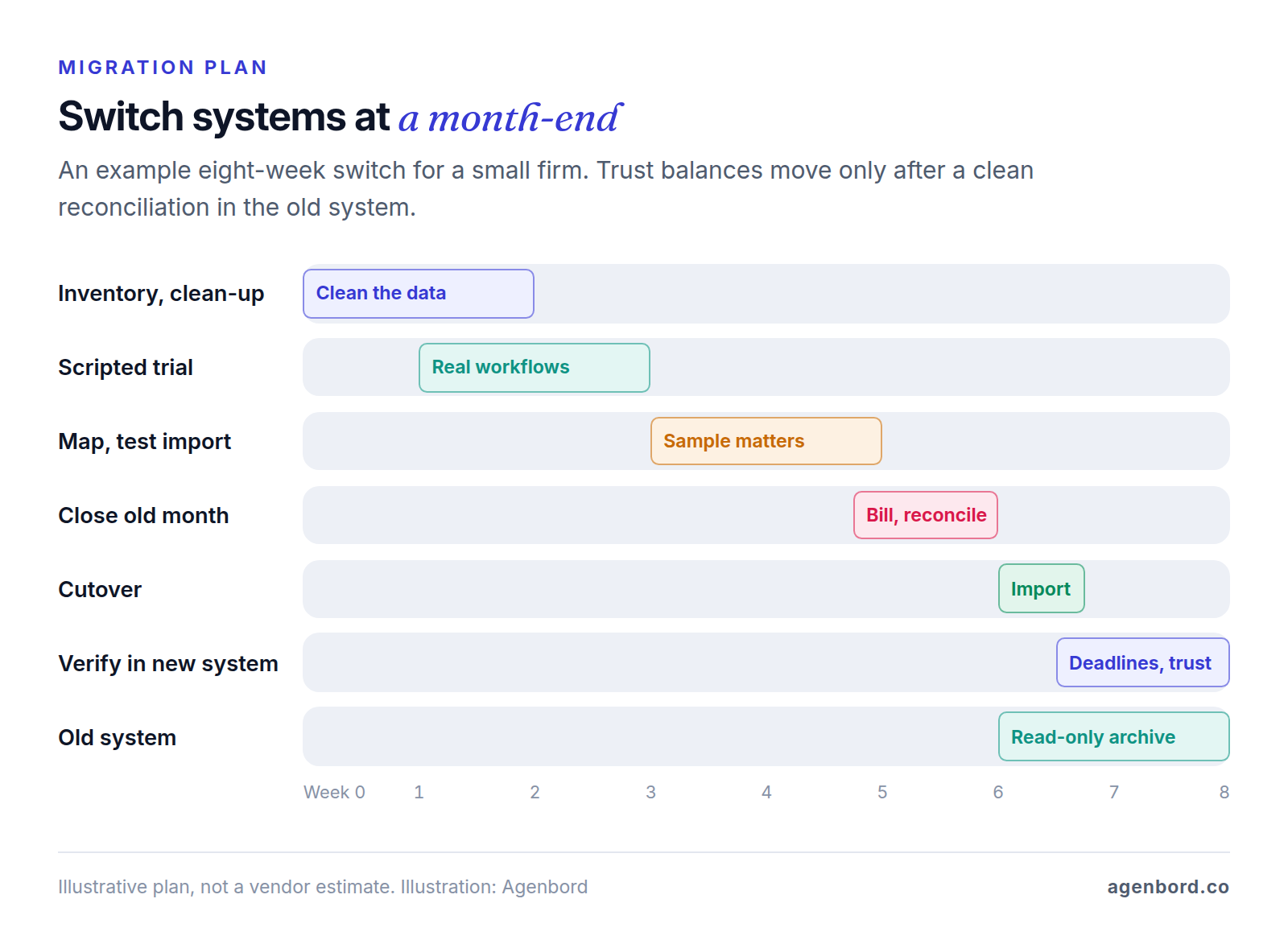
Migrations fail quietly: a deadline that didn't come across, a client ledger that no longer matches the bank. Plan the switch around a month-end.
- Inventory what moves. Open matters, all contacts and parties (closed matters too, so conflict checks still find them), future court dates and deadlines, document templates, unbilled time and expenses, open invoices and trust balances by client.
- Decide what stays behind. Old billing history and closed-matter files can stay in an archive, but trust records must remain available for your state's retention period: the model rule's bracketed five years, six in Florida.
- Run a scripted trial with your real workflows before you commit, using the demo script in the last section.
- Map fields and test-import a sample of matters. Check every custom field, contact role and document folder.
- Close the month in the old system. Bill, post payments and reconcile trust. Then import each client's trust balance as an opening balance on its matter and confirm the total equals the reconciled bank balance.
- Re-check every future deadline in the new calendar. Imported dates usually arrive as plain events, without the court rule that produced them, so they won't move if a trigger date changes.
- Reconcile in the new system at the next month-end, and keep the old system read-only, or a complete export, for the retention period.
Vendor help varies. Clio's migration is self-serve on Starter and guided from Core, Rocket Matter includes free data migration on every plan, PracticePanther says dedicated account managers help, and Actionstep charges implementation fees.
When to add custom integrations or software
Buy the practice management system. Building one from scratch rarely makes sense for a small firm: trust accounting alone is the hardest part to build and audit, and most products above already do it. Custom work pays for the gaps around it:
- Systems that don't talk. Your phones, website forms, payments, accounting or a case-specific tool don't sync with practice management, so staff retype.
- Reporting across systems. Partners want origination, collections and intake-to-revenue numbers that no single system holds.
- A portal built around your clients. A high-volume practice may need case-status updates, document checklists and payments beyond the built-in portal; our client portal software guide compares the options.
- Legacy data. A desktop system or Access database whose data no vendor importer handles.
Check the vendor's API before anything else. Clio supports an open API and Zapier, MyCase includes its open API on Advanced, and PracticePanther lists Zapier and API access on every plan.
What this work typically costs, as we scope and price it:
| Project | Typical range | Example |
|---|---|---|
| Single automated workflow | From $1,500 (1–2 weeks) | A website form creates the contact and matter and alerts the right lawyer |
| Automation program | $6,000–$20,000 for 5–15 workflows | Stage-based document requests, payment reminders and status updates |
| Custom integration service | From $15,000 | Two-way sync between practice management and accounting or a case tool |
| Legacy system to web app | From $12,000 | An old Access database rebuilt as a web app your team can reach from anywhere |
| Client portal | $25,000–$60,000 (8–14 weeks) | A branded case-status portal fed by your practice management system |
Running costs are hosting, roughly $50–$500 a month for a small-business app, and maintenance of about 15–20% of the build cost a year. We work from fixed-price proposals with a written scope, show progress in weekly demos, deliver bigger systems in phases, and your firm owns the code.
Most of this is workflow automation or custom software around the system you already run; portals are web app development, and legacy moves are cloud application development. Our page on software for law firms shows how we build around practice management rather than replace it, and the build-vs-buy framework helps if you're unsure whether to build at all.
How to choose law practice management software
- List your must-haves by practice area and by your state's trust rules: reconciliation reports, record retention and how flat fees are handled.
- Shortlist three and find the tier where each must-have starts. That tier's price is your real price.
- Run the same demo script with each: open a matter and run a conflict check on a former name; deposit an advance fee to trust, bill time and pay the invoice from trust; try to pay out more than a client's balance; run the month-end three-way reconciliation; calculate a deadline from your court's rules; share a document through the portal; export everything.
- Price three years at your headcount: the plan, add-ons (accounting, intake, AI, document automation), payment processing, onboarding and migration.
- Get the security and exit answers in writing before you sign.
- Pilot with one practice group for 30 days, then cut over at a month-end.
Pick the product whose trust reports you'd be comfortable handing to an auditor, at the tier you'll actually pay for. Fit and price come after that.
Sources
- American Bar Association - Model Rule 1.15, Safekeeping Property (accessed October 2026)
- American Bar Association - Model Rule 1.5, Fees (accessed October 2026)
- American Bar Association - Model Rule 1.6, Confidentiality of Information (accessed October 2026)
- American Bar Association - News release on Formal Opinion 512, generative AI tools (July 29, 2024)
- The Florida Bar - Rules Regulating The Florida Bar (accessed October 2026)
- The Florida Bar - Chapter 5, Rules Regulating Trust Accounts (October 2026 version)
- The Florida Bar - Ethics Opinion 12-3, cloud computing (accessed October 2026)
- Clio - Pricing (accessed October 2026)
- Clio - Clio Manage (accessed October 2026)
- MyCase - Pricing (accessed October 2026)
- PracticePanther - Pricing (accessed October 2026)
- Rocket Matter - Pricing (accessed October 2026)
- Smokeball - Pricing (accessed October 2026)
- CosmoLex - Pricing (accessed October 2026)
- CosmoLex - Practice management and accounting (accessed October 2026)
- Filevine - Pricing (accessed October 2026)
- Actionstep - Pricing (accessed October 2026)
Prices, plans and regulations change. Figures were checked on October 2, 2026; follow the links for the latest. Nothing here is legal, tax or financial advice.
About the author
Founder, Agenbord
Muhammad Hamza is the founder of Agenbord, the Fort Lauderdale software company behind the construction ERP Smart Construction and a WhatsApp-first billing platform. He writes practical guides on buying, building and automating business software.