
On this page
- Why businesses look for Zapier alternatives
- Same workload, different bill: a worked example
- When Zapier is still the best choice
- Zapier alternatives at a glance
- The 9 best Zapier alternatives, one by one
- Free and open-source Zapier alternatives
- Zapier AI agent alternatives
- How to migrate off Zapier
- When to stop using no-code tools and build a custom integration
Most searches for Zapier alternatives start with a bill. Zapier charges a task for every action step that runs, so a workflow that looks up a customer, updates the record, creates a deal and sends a text uses four tasks each time it fires. At a few hundred runs a month that's cheap. At a few thousand, it becomes a line item someone asks about.
The short answer: Make is the cheapest hosted alternative for most small businesses, n8n suits high-volume and code-heavy work and is free to self-host, Activepieces is the most approachable open-source option, Power Automate fits companies that live in Microsoft 365, and Pabbly Connect and Integrately sell large task bundles cheaply. Pipedream is for developers, IFTTT for personal automations, and Workato or Tray for enterprise IT.
We checked every price below on each vendor's site in October 2026. We build workflow automations in Zapier, Make, n8n and custom code, so we'll also say where Zapier is still the better buy.
Why businesses look for Zapier alternatives
Zapier publishes its pricing, so none of this is hidden. The friction comes from three places.
Task pricing grows with every step
Zapier counts a task each time an action step runs successfully. Triggers, filters, paths, Formatter, Delay and Zapier's other built-in tools are free, failed steps don't count, and AI steps use 1, 3 or 5 tasks depending on the model. As of October 2026, Zapier's pricing page lists:
- Free: 100 tasks a month, two-step Zaps only.
- Professional: $19.99 a month billed yearly ($29.99 monthly) for 750 tasks, rising to $49 for 2,000 tasks, $89 for 5,000 and $129 for 10,000 on yearly billing.
- Team: from $69 a month billed yearly for 2,000 tasks.
Run past your limit and pay-per-task billing charges 1.25 times your plan's per-task cost: a buffer, not a plan.
Polling delays on lower plans
Many triggers are polled: Zapier checks the app for new data on a timer, every 15 minutes on Free, every 2 minutes on Professional and every minute on Team and Enterprise. On Free, a web lead can wait 15 minutes for its follow-up text. Apps with instant triggers push new data right away, but not every app has them, and Zapier's general-purpose webhooks start on Professional.
Needs Zapier doesn't cover
- Data on your own servers. If client data can't pass through another vendor's cloud, n8n and Activepieces can run on servers you control.
- Heavier code. Code by Zapier runs JavaScript or Python with 30 seconds of runtime per step on Professional and Team, enough for small transformations. n8n and Pipedream are built around code.
- A Microsoft-centric stack. If you run on Outlook, Teams, SharePoint and Excel, many Microsoft 365 plans already include Power Automate for standard connectors.
Same workload, different bill: a worked example
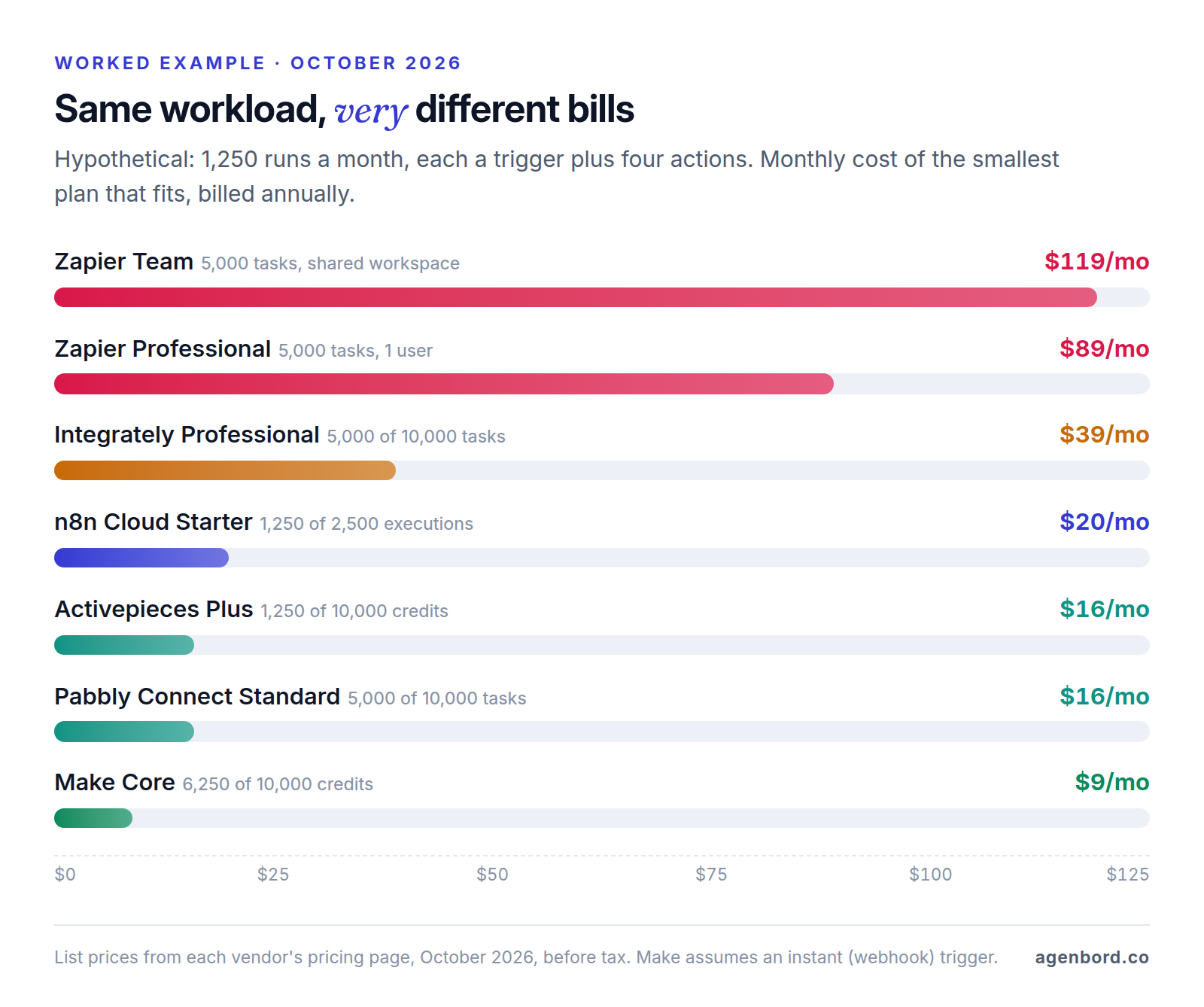
Unit prices only mean something against a workload, so here's a hypothetical one: a 15-person service company with three busy workflows (web leads, booked jobs and paid invoices) that together run 1,250 times a month, about 60 per working day. Each run is a trigger plus four actions: find the customer, create or update the record, create the deal, job or receipt, and notify someone.
| Tool | How it counts one run | Monthly usage | Smallest plan that fits | Per month, billed annually |
|---|---|---|---|---|
| Zapier | 4 tasks (trigger free) | 5,000 tasks | Professional, 5,000-task tier | $89 ($119 on Team) |
| Integrately | 4 tasks (trigger free) | 5,000 tasks | Professional, 10,000 tasks | $39 |
| n8n Cloud | 1 execution | 1,250 executions | Starter, 2,500 executions | $20 |
| Activepieces | 1 credit | 1,250 credits | Plus, 10,000 credits | $16 |
| Pabbly Connect | 4 tasks (trigger free) | 5,000 tasks | Standard, 10,000 tasks | $16 |
| Make | 5 credits (trigger counts) | 6,250 credits | Core, 10,000 credits | $9 |
Three things change the math:
- Make's scheduled triggers. Make uses a credit every time a trigger checks for new data, even when it finds nothing. Checking every 15 minutes instead of receiving a webhook uses about 2,900 credits a month in checks, and the total still fits Core. Checking every minute uses roughly 43,000, more than four times Core's allowance.
- Users. Zapier Professional and Integrately Professional cover one user; Zapier Team adds shared Zaps and connections. Every n8n plan includes unlimited users, and Activepieces Plus covers up to 5.
- Monthly billing. Without an annual commitment, Zapier's 5,000-task tier is $133.50 a month, n8n Starter $24 and Make Core $12.
Power Automate (per user) and Pipedream (a $90 production plan) price this work differently; see their sections below.
For the same comparison at higher volumes, see our Zapier vs. Make vs. n8n guide.
When Zapier is still the best choice
A cheaper bill isn't always a cheaper outcome. Rebuilding, retesting and retraining take time, and Zapier has real advantages:
- App coverage. Zapier lists 9,000+ apps. By each vendor's own count, Make has 3,000+, n8n's directory 2,000+ and Integrately 1,500+. If an app you depend on only connects to Zapier, that settles it.
- Ease of use. Non-technical staff can build and fix Zaps, with AI tools in the editor on every plan.
- Low volume. If your Zaps use a few hundred tasks a month, Professional at $19.99 is hard to beat once you count the cost of switching.
- Team features at small-business prices. Team covers 25 users with shared connections and SAML single sign-on from $69 a month billed yearly.
There's also a middle path: keep Zapier for low-volume Zaps on unusual apps, and move only the handful of high-volume workflows that drive most of your task count.
Zapier alternatives at a glance
Entry prices are per month, billed annually, as of October 2026. Self-hosting means running the software on a server you control.
| Tool | Bills by | Entry paid plan | Free option | Self-host | Code steps | Best for |
|---|---|---|---|---|---|---|
| Zapier (for reference) | Task: each action | $19.99, 750 tasks | 100 tasks, two-step Zaps | No | JavaScript, Python | Widest app coverage |
| Make | Credit: each module, trigger included | $9, 10,000 credits | 1,000 credits, 2 active scenarios | No | JavaScript, Python (paid) | Complex flows on a budget |
| n8n | Execution: one full run | $20, 2,500 executions | Self-hosted Community Edition | Yes | JavaScript, Python | Volume, code, data control |
| Power Automate | User or bot | $15 per user (Premium) | Standard connectors in many Microsoft 365 plans | No | Scripts in desktop flows; C# in custom connectors | Microsoft 365 companies |
| Activepieces | Credit: one full run | $16, 10,000 credits | 1,000 credits; Community Edition | Yes (MIT) | Custom TypeScript pieces | Open source without code |
| Pabbly Connect | Task: each action | $16, 10,000 tasks | 100 tasks, two-step | No | Code step | Cheap task bundles |
| Integrately | Task: actions, conditions, searches | $19.99, 2,000 tasks | 100 tasks, single-step | No | None listed | Ready-made templates |
| Pipedream | Credit: 30 seconds of compute | $90, 10,000 credits | Build and test only | No | Node.js, Python, Go, Bash | Developers |
| IFTTT | Applets | $2.99 (Pro) | 2 applets | No | Filter code (Pro+) | Personal and smart home |
| Workato, Tray | Quote | Quote-based | Not published | No | Python connector (Workato) | Enterprise IT |
The 9 best Zapier alternatives, one by one
1. Make: best for complex workflows on a budget
- Price: Core is $9 a month billed annually ($12 monthly) for 10,000 credits; Pro is $16 and Teams $29. Most modules use 1 credit per run, and code steps 2 credits per second of run time.
- Free plan: 1,000 credits a month and 2 active scenarios, running at most every 15 minutes.
- Strengths: a visual builder with routers, filters and error handlers, 3,000+ apps, AI Agents (in beta) on all plans, and scenarios that export as JSON blueprints.
- Limitations: a steeper learning curve than Zapier, and scheduled triggers use a credit on every check.
2. n8n: best for high volume, code and self-hosting
- Price: Starter is $20 a month billed annually ($24 monthly) for 2,500 executions; Pro is $50 ($60 monthly) for 10,000. An execution is one full workflow run, however many steps it has, and every plan includes unlimited users. Some regions see the same figures in euros.
- Free option: the self-hosted Community Edition, which n8n describes as free with almost the complete feature set.
- Strengths: JavaScript and Python code steps, an HTTP Request node for any API, agent and MCP nodes on every cloud plan, and workflows that export as JSON.
- Limitations: more technical than Zapier, and on n8n Cloud, code steps can't import outside npm packages or Python libraries (a self-hosted instance can be configured to allow them). Its Sustainable Use License covers internal business use, not reselling n8n.
3. Microsoft Power Automate: best for Microsoft 365 companies
- Price: Premium is $15 per user per month, paid yearly, with premium connectors and attended desktop flows (RPA: software that works an app's screens like a person). Unattended bots need the Process plan at $150 per bot per month.
- Free option: many Microsoft 365 plans include it with standard connectors, up to 6,000 actions per user per day.
- Strengths: 1,400+ prebuilt connectors, close ties to Outlook, Teams, SharePoint and Excel, and desktop flows for old software with no API.
- Limitations: licensing needs care. An automated flow with premium connectors needs a Premium license only for its owner, but an instant flow needs one for every user who runs it, or a Process license. Check whether each connector you need is standard or premium.
4. Activepieces: best open-source option for non-developers
- Price: Plus is $16 a month billed yearly ($20 monthly) for 10,000 credits and up to 5 users, then $0.007 per credit; Team jumps to $166 for 50,000 credits and 25 users. A run costs 1 credit however many steps it has, and AI steps 2, 10 or 20 credits by model (1 with your own AI provider key).
- Free option: 1,000 credits a month in the cloud, or the self-hosted Community Edition under the MIT license.
- Strengths: 760+ integrations (it calls them pieces), HTTP and webhook pieces for any other API, custom pieces written in TypeScript, and agents and tables from the free plan up.
- Limitations: a smaller library than Zapier or Make. The free self-hosted edition is the automation core only; access control, change history, team separation and agents need a paid plan.
5. Pabbly Connect: best for cheap task bundles
- Price: Standard is $16 a month billed annually for 10,000 tasks a month, as shown on Pabbly's site in October 2026, and plans stack for more. There's also an Unlimited plan and one-time "lifetime" plans.
- Free plan: 100 tasks a month, with workflows of up to two steps.
- Strengths: triggers and internal steps (filters, routers, text formatting) don't count as tasks, so linear workflows go a long way. There's a code step too.
- Limitations: lifetime plans still cap monthly tasks, at 3,000 to 20,000 depending on the plan, and the free plan is a test bed, not a production option.
6. Integrately: best for ready-made automations
- Price: Starter is $19.99 a month billed annually for 2,000 tasks; Professional is $39 for 10,000 and Growth $99 for 30,000. Taxes are extra.
- Free plan: 100 tasks a month and up to 5 single-step automations, checked every 15 minutes.
- Strengths: 1,500+ apps and, by its own count, more than 20 million ready-made automations you switch on in one click. Triggers are free, and updates run every 2 minutes from Professional up.
- Limitations: conditions, searches and data-formatting steps each count as a task. Starter and Professional cover one user, and no code step is listed on its plans.
7. Pipedream: best for developers
- Price: Startup is $90 a month billed annually ($99 monthly) with 10,000 credits, then $0.012 per credit. One credit is 30 seconds of compute at 256 MB of memory.
- Free plan: building and testing only; running in production needs a paid plan.
- Strengths: code steps in Node.js, Python, Go or Bash, managed sign-in for 3,000+ APIs, 10,000+ prebuilt triggers and actions, and MCP servers for AI agents.
- Limitations: it's priced for developers shipping integrations and agents inside their own products, so $90 a month is steep for a small internal workload.
8. IFTTT: best for personal and smart-home automations
- Price: Pro is $2.99 a month billed annually ($4.99 monthly) for 20 applets; Pro+ is $8.99 ($14.99 monthly) for unlimited applets.
- Free plan: 2 applets with unlimited runs.
- Strengths: the cheapest option here, with multi-action applets and webhooks on Pro, and filter code, AI services and multiple accounts per service on Pro+. IFTTT says more than 1,000 brands and services connect.
- Limitations: an applet is one trigger leading to one or more actions, with filter code as the main way to add logic. Check that your business apps are on its list.
9. Workato or Tray: best for enterprise IT
- Price: quote-based. Workato sells Standard, Business MCP and Enterprise MCP editions; Tray sells Pro, Team and Enterprise plans priced on usage, measured in tasks.
- Free option: none published. Tray offers a trial through its sales team.
- Strengths: governance small-business tools lack. Workato's Standard edition includes development, test and production environments, SAML single sign-on, MFA and role-based access control, and a Python connector runs custom code in recipes.
- Limitations: sales-led buying and enterprise contracts: usually more platform than a small business needs.
Free and open-source Zapier alternatives
Most free plans in the table cover a demo, not a business: Zapier, Pabbly Connect and Integrately give 100 tasks a month with two-step or single-step limits. Two go further. Activepieces Free allows 1,000 workflow runs however many steps each has, and Make Free gives 1,000 credits across 2 active scenarios.
For no license fee at real volume, there are two self-hosted options:
- n8n Community Edition: free under n8n's Sustainable Use License. It leaves out single sign-on, sharing workflows and credentials between users, Git version control and separate environments; SSO and Git come with the paid self-hosted Business plan.
- Activepieces Community Edition: MIT-licensed and installed with Docker Compose alongside PostgreSQL and Redis. Paid editions add access control, change history and agents.
What self-hosting really costs
The license is free; running it isn't. Before you self-host, decide who owns five jobs:
- The server. The machine is the cheap part: on DigitalOcean, for example, a basic server with 2 GB of memory is $12 a month and one with 4 GB is $24, with weekly backups adding 20%.
- Updates. n8n recommends a full backup before every update; Activepieces publishes breaking changes and rollback steps. Someone has to read release notes and test first.
- Security. Webhook triggers mean the server must be reachable from the internet. Use HTTPS, require MFA, turn off the public API if you don't use it, and restrict which hosts workflows can call (n8n calls this SSRF protection).
- Backups. Back up the database and, for n8n, the encryption key in the .n8n folder; without it, restored credentials can't be decrypted. In Activepieces, PostgreSQL is the system of record, and a lost Redis queue can drop webhooks that were accepted but not yet processed.
- Monitoring. When a self-hosted server stops, nothing runs and nothing alerts you. Add outside uptime monitoring and an error workflow that notifies a named person.
If nobody will own those jobs, a cloud plan at $16–$20 a month is cheaper than the hours. Self-hosting pays off when volume is high, data must stay on your servers, or you already run servers for other systems.
Zapier AI agent alternatives
If you need one AI step inside a workflow rather than an agent, our guide to AI workflow automation compares how each tool handles it. Zapier sells Agents as an add-on: 400 activities a month free (an activity is an action, a web search or a knowledge lookup), or 1,500 on Agents Pro at $33.33 a month billed annually. The alternatives build agents into the main product:
- n8n: agent, MCP and AI nodes on every cloud plan; Starter includes AI models without your own API keys.
- Make: AI Agents (in beta) on all plans, using Make's AI provider or your own model key.
- Activepieces: agents from the free plan up, with AI steps at 2–20 credits by model, or 1 credit with your own provider key on Plus and up.
- Pipedream: MCP servers and managed sign-in to APIs, for developers building their own agents.
Whichever you pick, start with one AI step inside a rule-based workflow (classify an email, pull fields from an invoice, draft a reply for review), and keep a person approving anything that moves money or messages customers. Our guide to AI agents for business covers autonomy levels and risks, and our AI automation projects start with that kind of small, reviewed step.
How to migrate off Zapier
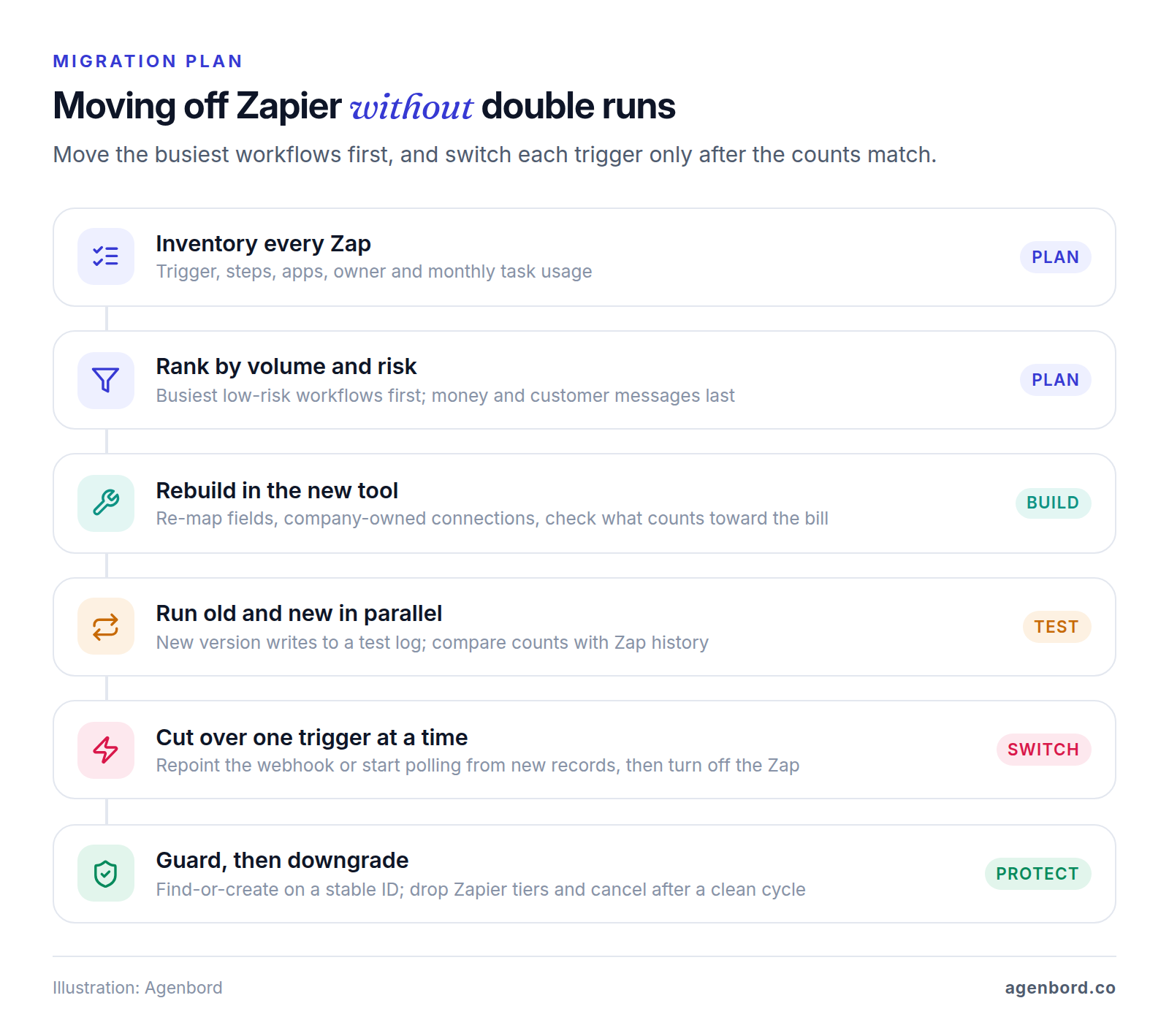
Most migration problems come down to double runs, missed runs and webhooks still pointing at the old tool. Work in this order:
- Inventory every Zap. Record the trigger, steps, apps, owner and monthly task usage (Zapier's Task Usage and Zap History pages show it). Turn off any Zap nobody can explain for a week before deleting it.
- Rank by volume and risk. The few Zaps behind most of your task usage hold most of the savings, so move them first. Leave money-moving and customer-messaging workflows until the new tool has proven itself, and leave low-volume Zaps on niche apps where they are.
- Rebuild, don't copy. Recreate each workflow the new tool's way, re-map every field, connect apps through company-owned accounts, and recheck which steps count toward the new bill.
- Run old and new in parallel. For a week, have the new version write to a test sheet or log instead of live systems, then compare its run counts and outputs with Zap history. Two live versions mean duplicate records and double emails.
- Cut over one trigger at a time. For a webhook trigger, point the sending app at the new URL, then turn off the Zap. For a polling trigger, make sure the new workflow starts from new records only, or it may reprocess old ones.
- Guard against duplicates, then downgrade. Use find-or-create steps keyed on a stable ID, such as an email address or order number, so a retry updates a record instead of adding one. Drop to a smaller Zapier tier as volume moves, and cancel after a full billing cycle with no misses.
Wherever you land, keep a plain-language description of every workflow outside the tool and export what you can (Make blueprints and n8n workflows export as JSON; you reconnect app accounts after importing). It's cheap insurance: Relay.app, which sold AI workflow automation to businesses, shut down in September 2026 and permanently deleted all accounts, workflows and run history. Our guide to workflow automation covers the error handling, logging and ownership that keep workflows running.
When to stop using no-code tools and build a custom integration
For most small businesses, one of the tools above is the right answer and cheaper than code. A custom integration service, meaning code you own running in your own cloud account, earns its cost when two or more of these are true:
- Volume is high and steady: tens of thousands of runs a month, where even per-run pricing adds up, or where you need guaranteed throughput.
- Money or sensitive data moves through it: payments, payroll, or client financial or health records that you want logged in your own systems.
- The logic is complex: updates across several systems that must all succeed or all roll back, or APIs that no connector handles well.
- The workflow is the product: customers depend on it directly, so it needs tests, versioning and monitoring like any other software.
That last case is how our own products work: payment approvals on WhatsApp are built into Smart Construction, our construction ERP, and our recurring billing platform sends monthly invoices on WhatsApp and reconciles payments into customer ledgers itself.
Typical ranges for our automation work: a single workflow from $1.5k (1–2 weeks), a program of 5–15 workflows for $6k–$20k, and a custom integration service from $15k (1–3 months), with tool subscriptions billed to you directly. A custom service adds hosting, typically $50–$500 a month for a small-business app, and maintenance of about 15–20% of the build cost a year. Our build-vs-buy framework helps with the wider decision.
The order that works: find out which Zaps drive your task count, move only those, and keep Zapier for whatever it still does best.
Sources
- Zapier - Plans and pricing (accessed October 2026)
- Zapier - Task usage rates (accessed October 2026)
- Zapier Help Center - How is task usage measured in Zapier (accessed October 2026)
- Zapier Help Center - Pay-per-task billing (accessed October 2026)
- Zapier - App directory (accessed October 2026)
- Zapier - Code by Zapier (accessed October 2026)
- Make - Pricing (accessed October 2026)
- Make Help Center - Operations (accessed October 2026)
- Make Help Center - Credits (accessed October 2026)
- Make Help Center - Blueprints (accessed October 2026)
- n8n - Pricing (accessed October 2026)
- n8n - Integrations (accessed October 2026)
- n8n Docs - Choose how to use n8n (accessed October 2026)
- n8n Docs - Compare editions (accessed October 2026)
- n8n Docs - Back up and restore (accessed October 2026)
- n8n Docs - Security (accessed October 2026)
- n8n Docs - Code node (accessed October 2026)
- n8n Docs - Export and import workflows (accessed October 2026)
- n8n on GitHub - Sustainable Use License (accessed October 2026)
- Microsoft - Power Automate pricing (accessed October 2026)
- Microsoft - Power Automate (accessed October 2026)
- Microsoft Learn - Power Automate licensing FAQ (accessed October 2026)
- Microsoft Learn - Requests limits and allocations (accessed October 2026)
- Microsoft Learn - Scripting actions in desktop flows (accessed October 2026)
- Microsoft Learn - Write code in a custom connector (accessed October 2026)
- Activepieces - Pricing (accessed October 2026)
- Activepieces - Pieces directory (accessed October 2026)
- Activepieces on GitHub - README and license (accessed October 2026)
- Activepieces Docs - Install options (accessed October 2026)
- Activepieces Docs - Disaster recovery (accessed October 2026)
- Pabbly - Pabbly Connect pricing (accessed October 2026)
- Integrately - Pricing (accessed October 2026)
- Integrately - Home page, app count (accessed October 2026)
- Pipedream - Pricing (accessed October 2026)
- Pipedream Docs - Pricing and credits (accessed October 2026)
- Pipedream Docs - Code steps (accessed October 2026)
- IFTTT - Plans (accessed October 2026)
- Workato - Pricing (accessed October 2026)
- Workato Docs - Python connector (accessed October 2026)
- Tray.ai - Pricing (accessed October 2026)
- Relay.app - Shutdown notice (accessed October 2026)
- DigitalOcean - Droplet pricing (accessed October 2026)
Prices, plans and regulations change. Figures were checked on October 2, 2026; follow the links for the latest. Nothing here is legal, tax or financial advice.
About the author
Founder, Agenbord
Muhammad Hamza is the founder of Agenbord, the Fort Lauderdale software company behind the construction ERP Smart Construction and a WhatsApp-first billing platform. He writes practical guides on buying, building and automating business software.