On this page
- What is business process automation?
- Map the process before you buy anything
- Types of business process automation software
- How to choose business process automation software: a scorecard
- What business process automation software costs at your volume
- Governance: owners, documentation, testing and shadow automations
- When custom automation is cheaper or safer, and when a packaged tool is plainly better
- Before you sign: a checklist
Business process automation software runs an entire process, such as procure-to-pay or employee onboarding, from the first request to the final record. It moves data between your systems, routes approvals and hands exceptions to someone who can resolve them. No single product does all of that well: the software comes in eight types, and you'll usually combine two or three.
So the real choice is the mix. Start with the automation your ERP, CRM or accounting system already includes, map the process to see where it stops, fill each gap with the simplest type that handles it, and price the result at your real volume before you sign.
What is business process automation?
Business process automation (BPA) is the use of software to run a complete business process across the people, systems and approvals involved, not just one handoff within it. Common business process automation examples:
- Quote-to-cash: quote, signed order, fulfillment, invoice, payment applied.
- Procure-to-pay: request, approval, purchase order, delivery, supplier invoice, match, payment.
- Employee onboarding: signed offer, accounts and equipment, payroll setup, training, 90-day check-ins.
- Claims: claim submitted, documents collected, reviewed, decided, paid or declined with a reason.
- Service requests: logged, triaged, assigned, worked, closed and followed up.
Each of those contains several workflows, and our 15 business process automation examples map them step by step, with the approvals, exceptions and metrics for each. For the basics of a single workflow (trigger, conditions, actions), see our guide to workflow automation. BPA adds what one workflow lacks: a status for every case, approvals with deadlines and escalation, an exception queue where people resolve what rules can't, an audit trail, and reporting on how long cases take. Those needs, more than any feature list, decide which software fits.
Map the process before you buy anything
The fastest way to waste money on automation is to automate a process as people describe it rather than as it runs. Sit down with the people who do the work and one recent case, and write one row per step:
- Step: a verb and an object, such as "approve purchase request".
- Owner: the role that does it, and who covers when they're out.
- System: where the work happens, including email, paper and spreadsheets.
- Handoff: how work moves to the next step, and what gets retyped.
- Exceptions: what goes wrong, how often and who fixes it.
- Volume: items per month and minutes per item, pulled from your systems rather than guessed.
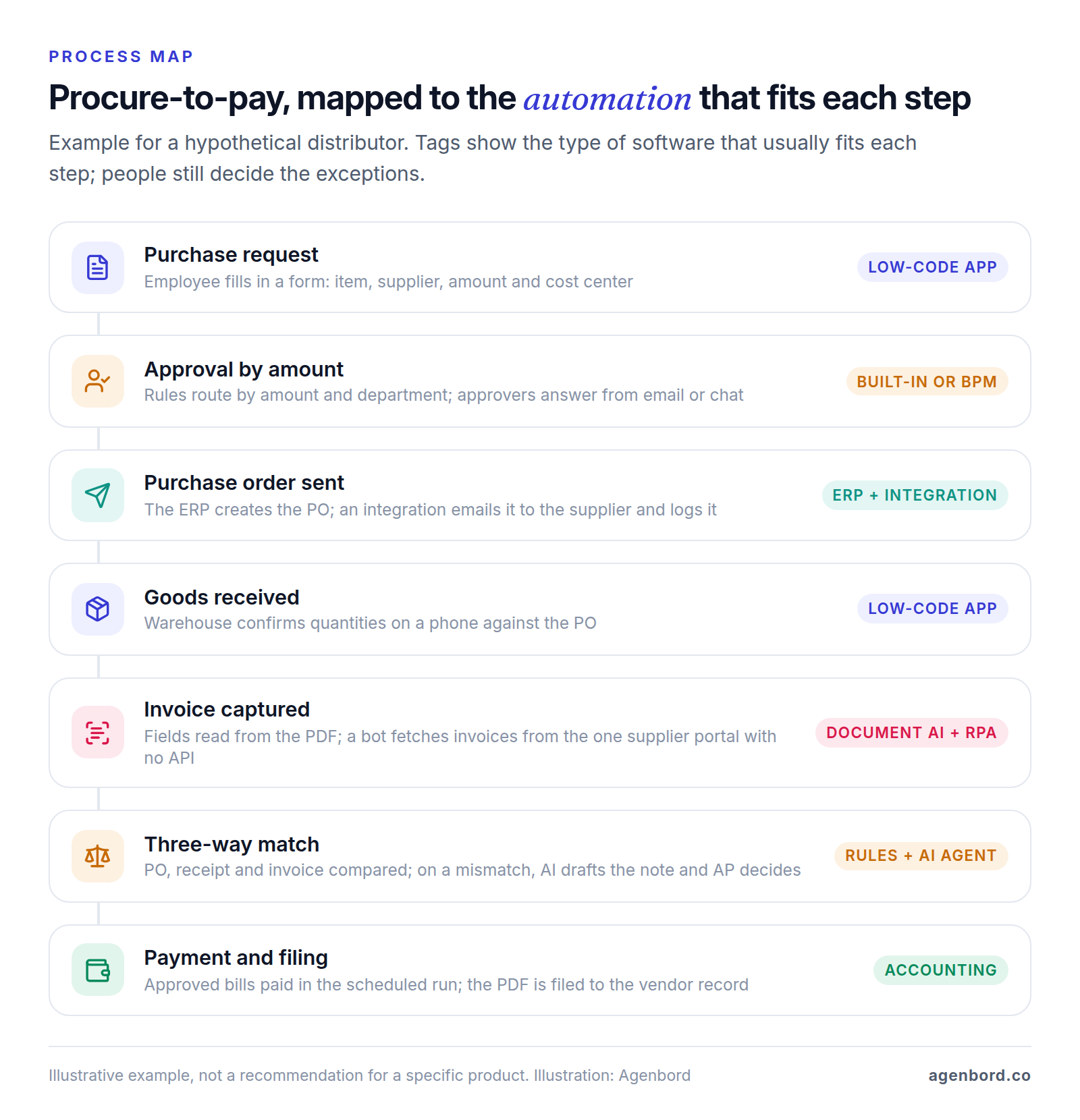
Here is procure-to-pay at a hypothetical 40-person wholesale distributor:
| Step | Owner | System today | Handoff | Exceptions | Per month |
|---|---|---|---|---|---|
| Request | Any employee | Email to a manager | Missing supplier or cost center | 450 | |
| Approve | Manager; owner above $5,000 | Forwarded to purchasing | Approver away; orders split to stay under the limit | 450 | |
| Purchase order | Purchasing | Accounting system | PDF emailed to the supplier | New supplier not set up | 450 |
| Receive | Warehouse | Paper packing slip | Slips go to AP weekly | Partial or damaged deliveries | 600 |
| Invoice | AP clerk | AP inbox; one supplier portal | Keyed into accounting | No PO number; duplicates | 900 |
| Match | AP clerk | Spreadsheet | Mismatches emailed to purchasing | Price or quantity differences | 900 |
| Pay | Controller | Accounting and bank | Weekly payment run | Early-payment discounts missed | 4 runs |
Then label every step: remove (it exists only because of an old constraint), automate (rules can do it), assist (software prepares, a person decides) or keep (judgment or relationships). Here, the weekly packing-slip handoff can go, receiving and invoice capture can be automated, matching assisted, and approvals above $5,000 kept with the owner.
The map now writes most of your requirements. The system column is your integration list, the exceptions column defines the approvals and exception handling you need, and the volume column drives the cost math below. Process-mining software can reconstruct the path from system logs, but Microsoft's process mining add-on for Power Automate is $5,000 per tenant a month, paid yearly, as of October 2026. For most smaller businesses, the conversation is enough.
Types of business process automation software
Business process automation tools fall into eight types. They overlap at the edges and vendors stretch their labels, so judge each product by what it does on your map, not by its category.
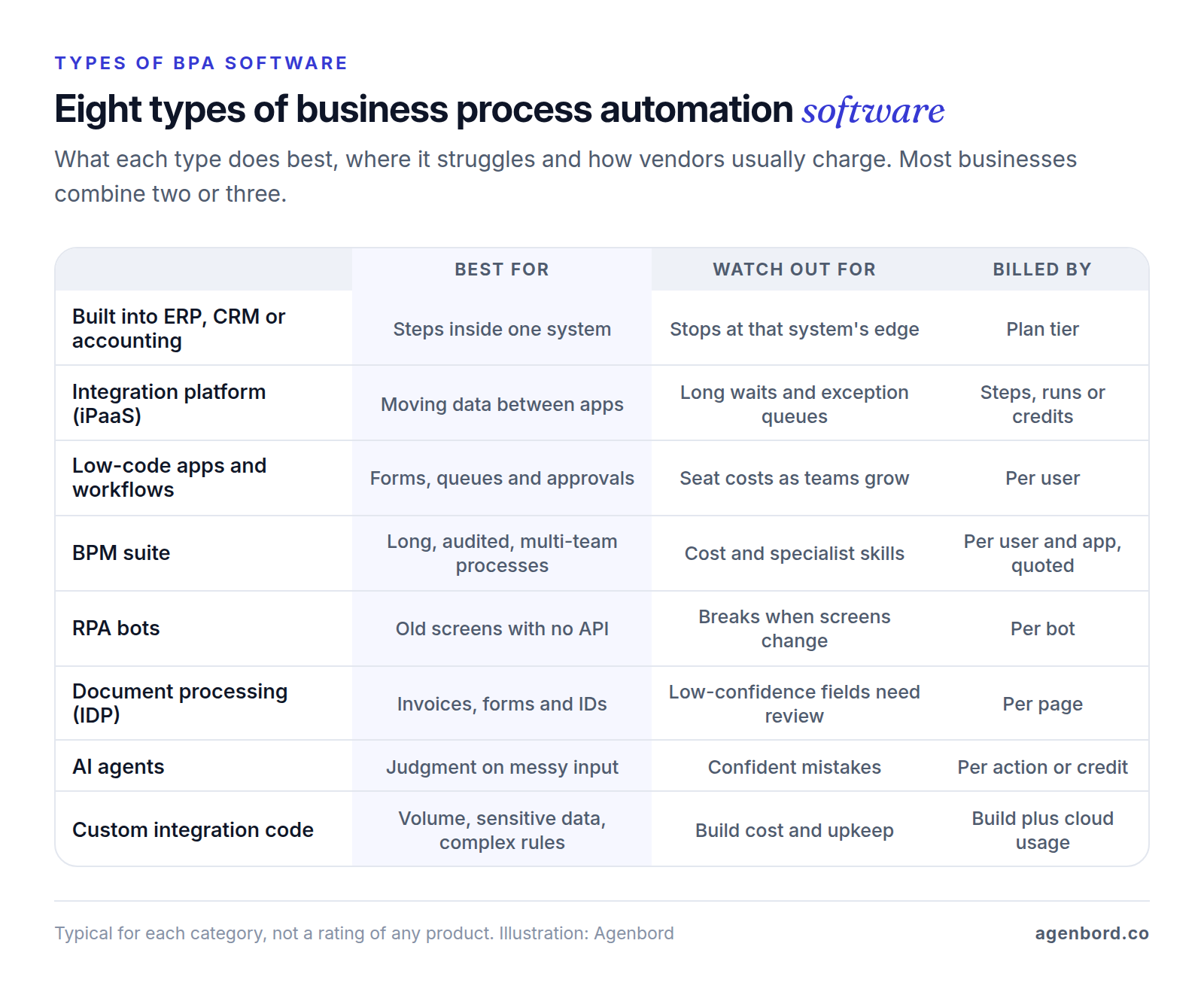
1. Automation built into your ERP, CRM or accounting system
The rules engine inside the system where the record lives: approvals, reminders, assignments and field updates. When your plan includes it, it's the cheapest and most dependable option for steps inside that system, because the vendor maintains it and there's no connection to break. It stops at the system's edge, and it's usually tied to plan tiers.
QuickBooks Online includes workflow automation only on Advanced ($340 a month list price as of October 2026, with 25 users). HubSpot workflows need a Professional or Enterprise subscription. NetSuite's platform includes no-code workflows for processes such as approvals, plus scripting for custom logic. In Smart Construction, the construction ERP our team built, payment approvals reach decision-makers on WhatsApp, so the approval stays with the payment record.
2. Integration platforms (iPaaS)
Connector tools such as Zapier, Make and n8n move data between apps through their APIs. They're quick to set up and strong at handoffs between cloud apps. They're weaker at what makes a process a process (waiting days for an approval, tracking each case's status, holding a queue of exceptions), which usually needs a table or app alongside.
Their pricing units differ, which matters at volume. Zapier counts a task for each successful action step (triggers don't count), Make counts a credit for each module action, and n8n counts one execution per full run however many steps it has (Cloud Starter is €20 a month billed annually for 2,500 executions). Our Zapier vs. Make vs. n8n guide compares them at higher volumes.
3. Low-code app and workflow platforms
These let operations staff build the forms, tables, queues, approvals and dashboards a process needs, which is what most people mean by low-code business process automation. Power Automate approvals, for example, can be answered from Outlook or Teams and can require the first response, everyone's approval or a sequence of approvers. The catches: per-user pricing as more people touch the process, and complex logic that gets hard to maintain.
- Microsoft Power Platform: Power Apps Premium is $20 per user a month and Power Automate Premium $15 per user a month, both paid yearly.
- Airtable: Team is $20 and Business $45 per seat a month billed annually ($24 and $54 monthly), with 25,000 and 100,000 automation runs per workspace a month. Failed runs count toward the limit.
- Smartsheet: priced per member, $9 on Pro and $19 on Business a month billed yearly ($12 and $24 monthly). Pro caps automations at 250 a month and members at 10; Business has unlimited automations and a 3-member minimum. Free Contributors can view, comment, submit forms and respond to update requests.
If the process lives in a spreadsheet or Access database it has outgrown, the other route is moving it to a cloud web app, from $12k with us.
4. BPM suites
Business process management (BPM) suites model a process, often in BPMN (Business Process Model and Notation, a standard maintained by the Object Management Group), then run it and track every case. They're the closest thing to a complete business process automation platform, with case status, deadlines, versioned process models and an audit trail for long, multi-team or regulated processes such as claims, applications and compliance reviews. The trade-off is licensing and implementation sized for larger organizations, plus trained developers or a partner.
Appian prices its Standard, Advanced and Premium tiers per user, per month, per app, without public prices; it offers a free Community Edition, and Standard includes five RPA bots. Camunda is free for development on your own machine, production needs an Enterprise license, and its SaaS version has a 30-day trial.
5. Robotic process automation (RPA)
RPA bots work an application's screens the way a person would: clicking, typing and downloading. Use them for systems with no API, such as older desktop software or a supplier, bank or government portal. Bots break when screens change, and unattended ones need a machine to run on, so treat RPA as a bridge, not a foundation.
Power Automate Premium includes attended RPA, where the bot runs on a person's computer while they work. Unattended bots cost $150 per bot a month on the Process plan, or $215 with a Microsoft-hosted virtual machine, paid yearly. UiPath has a free Community plan and sells Standard and Enterprise through sales; its Basic plan, from $25 a month, is hosted in UiPath's European region.
6. Document processing (IDP and OCR)
Intelligent document processing (IDP) reads invoices, receipts, forms and IDs and returns structured fields with confidence scores; OCR is the text-reading layer underneath. It's the front door for paper-heavy processes such as payables, claims and applications. Send low-confidence fields to a person, and check whether your AP or expense tool already includes capture; our invoice automation guide covers payables end to end. List prices per page, as of October 2026:
- Azure AI Document Intelligence: prebuilt models for invoices, receipts and IDs $10 per 1,000 pages; plain text reading $1.50 per 1,000; custom extraction $30 per 1,000.
- Amazon Textract: invoice and receipt analysis $0.01 a page for the first million pages (AWS's US West example).
- Google Document AI: Form Parser and Custom Extractor $30 per 1,000 pages; Enterprise Document OCR $1.50 per 1,000.
7. AI agents
AI agents are language-model steps that read messy input and decide or draft: classify an email, suggest why an invoice doesn't match its PO, draft the supplier reply. In practice, AI business process automation means rules for the predictable steps, AI for the unstructured ones and a person for decisions with money or legal consequences. Agents make confident mistakes, so give them narrow permissions and review their work; our post on AI agents for business covers autonomy levels and piloting.
Pricing is per action or credit. Copilot Studio is $200 a month for 25,000 Copilot Credits, or pay-as-you-go. Agentforce Flex Credits cost $500 per 100,000, and a standard action uses 20, about $0.10 an action. Custom agents add model usage billed per use; our AI automation pilots start from $4k.
8. Custom integration code
Code you own, running in your own cloud account: a small service that orchestrates the process, with its own database and a screen for exceptions. It fits high volume, sensitive data, complex rules, systems without connectors, or a process that's part of what you sell. The real costs are the build and an owner for maintenance, monitoring and security. Cloud usage is small by comparison: AWS Step Functions charges $0.025 per 1,000 state transitions in US East, with 4,000 free a month, and AWS Lambda $0.20 per million requests plus compute time. Hosting for a small-business app typically runs $50–$500 a month.
How to choose business process automation software: a scorecard
Shortlist two or three products from the types your map calls for, then score each from 1 to 5 on eight criteria. Double the weight of anything your map flagged, such as many exceptions, many systems or sensitive data.
| Criterion | What good looks like | Test it in the trial |
|---|---|---|
| Process fit | Your real steps, roles and statuses, no workarounds | Run 20 recent cases, including your five worst |
| Exceptions and approvals | Limits by amount and role, delegation, escalation, an exception queue with reasons | An approver on vacation; an invoice $50 over its PO; a rejected, resubmitted request |
| Integration coverage | Maintained connectors for each system on your map, with the actions you need, plus a generic API step | Check the exact actions in each connector's documentation |
| Error handling and monitoring | Retries, alerts to a named owner, searchable run history, replay of failed runs | Revoke a connection mid-trial; see who finds out, and when |
| Security and permissions | Single sign-on, roles, least-privilege service accounts, audit log, SOC 2 report | Read the SOC 2 report; check what each connection can access |
| Governance: who can build | Separate test and production, version history, admin control over builders and apps | As a regular user, try to connect an unapproved app |
| Total cost at your volume | Every seat, run, page, bot and add-on at today's and 3× volume, plus implementation | Get both volumes quoted in writing |
| Lock-in and exit | Data and process definitions export in a usable format | Export a workflow and your data during the trial |
Three features are often reserved for higher tiers, so check them before you fall for a demo:
- SAML single sign-on starts on Zapier's Team plan, n8n's Business plan (€667 a month billed annually) and Smartsheet's Enterprise plan.
- Admin controls and audit logs: Zapier's Enterprise plan adds app access controls, action restrictions and an audit log.
- Environments and version control: n8n's Business plan adds multiple environments and Git-based version control.
On exit, formats matter: n8n saves workflows as JSON and has a free, self-hosted Community Edition, and BPMN is a published standard rather than one vendor's notation. Power Platform solutions move apps and flows between Power Platform environments, not to other platforms, so plan that exit as a data export plus a rebuild. As for SOC 2, the AICPA describes it as a report on a service organization's controls for security, availability, processing integrity, confidentiality or privacy.
What business process automation software costs at your volume
Each pricing unit grows with a different part of your business. Seats grow with the people who touch the process, steps and runs with volume, pages with documents, bots with the systems that have no API, and credits with AI decisions. To estimate your running cost:
- Count each billed unit from your map: seats, runs, steps per run, pages and systems with no API.
- Price it at today's volume and at 3×.
- Add implementation and the staff time exceptions take.
- Divide by volume for a cost per case (per invoice, per new hire) and compare it with the manual cost.
A worked example (hypothetical). The distributor above automates payables: 900 supplier invoices a month at two pages each, one run of about eight steps per invoice, three AP staff on an exception queue, and managers approving in the accounting system they already use. One supplier, about 120 invoices a month, posts invoices only on a portal with no API. Each line uses one example vendor's list price as of October 2026; swap in your shortlist.
| Cost line | Example list price | 900 invoices a month | 2,700 a month (3×) |
|---|---|---|---|
| Invoice extraction, per page | Azure Document Intelligence prebuilt invoice model: $10 per 1,000 pages | 1,800 pages: $18 | 5,400 pages: $54 |
| Orchestration, per run | n8n Cloud, billed annually: Starter €20 (2,500 runs), Pro €50 (10,000 runs) | Starter: €20 | Pro: €50 |
| Exception queue, per seat | Airtable Team: $20 per seat, billed annually | 3 seats: $60 | 3 seats: $60 |
| Portal bot, per bot | Power Automate Hosted Process: $215 per bot, paid yearly | 1 bot: $215 | 1 bot: $215 |
| Software per month | $293 + €20 | $329 + €50 |
What the example shows:
- The bot is the biggest line, for 13% of the invoices. If that supplier emailed its invoices instead, the software bill would fall by more than half.
- Tripling volume adds little: seats and the bot don't grow with invoices, and pages and runs are cheap. A tool that bills every step would count 7,200 steps a month today and 21,600 at 3×, so price both models.
- Exceptions cost more than software. If 15% of invoices need a person for six minutes each, that's 13.5 staff hours a month today and 40.5 at 3×. Requiring PO numbers on invoices may save more than any tool choice.
Implementation is the other half of the cost. Typical ranges for our business process automation work are from $1.5k for a single workflow (1–2 weeks), $6k–$20k for a program of 5–15 workflows, and $15k+ for a custom integration service. If the process needs its own app or portal, a focused internal tool starts from $12k (4–8 weeks), and an ERP module from $25k (2–4 months).
Governance: owners, documentation, testing and shadow automations
Automations outlive the people who build them. Four habits keep them working:
- Two named owners per process. A business owner sets the rules, such as approval limits; a technical owner keeps the automation running and gets the alerts. Connections run under company-owned service accounts, never a person's login.
- A one-page runbook per process: the map, the rules, the systems and connections, what happens when a run fails, and how to fall back to manual. Update it with every change.
- Testing like software. Build in a test environment, run real past cases including the ugly ones, then run in parallel with the manual process before you switch it off.
- Rules on who builds what. Teams can automate their own low-risk tasks in a governed space; anything that moves money, touches customer data or spans departments gets a review.
That last habit is what stops shadow automations, the workflows on personal accounts that nobody knows about until they break. In Microsoft's platform, data policies sort connectors into Business, Non-business and Blocked groups so one app or flow can't mix groups, and the Power Platform admin center keeps an inventory of apps, flows and agents across your tenant. Whatever the tool, review quarterly: list every automation with its owner and last run, and switch off anything orphaned.
For the people involved, explain what changes in each role's day, train whoever works the exception queue, and measure cycle time, hands-on time and exception rate before and after.
When custom automation is cheaper or safer, and when a packaged tool is plainly better
A packaged tool is plainly better when:
- The process is standard (payables, e-signature, onboarding, expense reports) and a product already handles it the way you'd design it.
- Volume is modest and every system on your map has a maintained connector.
- You're still learning what the process should be. A visual workflow is cheaper to change than code.
- Nobody would own custom code after launch.
Custom automation is cheaper or safer over the long run when:
- Volume is high or climbing. As custom code, the payables example would cost from $15k to build, $50–$500 a month to host and about 15–20% of the build cost a year to maintain, while the orchestration itself stays under a dollar a month on AWS Step Functions even at 3× (about ten state transitions per invoice, after the free tier). At these volumes, that loses to the packaged stack. The math starts to tip when seat or step fees climb: 40 people on the queue at $20–$45 a seat is $800–$1,800 a month before anything else.
- Data is sensitive. Every vendor in the chain needs vetting. Under HIPAA, for example, a covered entity needs a business associate agreement with any vendor, cloud providers included, that creates, receives, maintains or transmits protected health information on its behalf. This is general information, not legal advice; see HHS guidance on business associates.
- The logic is complex: pricing rules, matching across several systems, steps that must all succeed or all roll back, or a process that's part of what you sell.
- A system has no connector, and the alternative is a fragile bot.
In practice, most business process automation solutions end up hybrid: keep the system of record and its built-in automation, buy document processing by the page, and write custom code only for the core of the process. Our build vs. buy framework works through that decision. If the core needs its own software, a custom software business platform typically runs $30k–$80k over 2–4 months. We quote fixed prices with a written scope and weekly demos, and you own the code.
Before you sign: a checklist
- Map one process with the people who run it: steps, owners, systems, handoffs, exceptions and volumes.
- Label each step remove, automate, assist or keep.
- List what your ERP, CRM and accounting plans already automate.
- Shortlist two or three products from the types your map needs.
- Trial each on 20 real cases, including your five worst exceptions.
- Price every option at today's volume and at 3×, implementation included.
- Name a business owner and a technical owner, and write the one-page runbook.
- Run in parallel with the manual process before you switch it off.
Sources
- Microsoft - Power Apps pricing (accessed October 2026)
- Microsoft - Power Automate pricing (accessed October 2026)
- Microsoft Learn - Get started with Power Automate approvals (accessed October 2026)
- Microsoft Learn - Manage data policies (accessed October 2026)
- Microsoft Learn - CoE Starter Kit and the Power Platform admin center (accessed October 2026)
- Microsoft Learn - Solutions overview (accessed October 2026)
- Airtable - Pricing (accessed October 2026)
- Airtable Support - Airtable plans overview (accessed October 2026)
- Airtable Support - Getting started with Airtable automations (accessed October 2026)
- Smartsheet - Pricing (accessed October 2026)
- Appian - Pricing (accessed October 2026)
- Camunda - Pricing (accessed October 2026)
- Object Management Group - Business Process Model and Notation (BPMN) specification (accessed October 2026)
- UiPath - Pricing (accessed October 2026)
- Microsoft Azure - Azure AI Document Intelligence pricing (accessed October 2026)
- AWS - Amazon Textract pricing (accessed October 2026)
- Google Cloud - Document AI pricing (accessed October 2026)
- Intuit - QuickBooks Online pricing (accessed October 2026)
- Oracle NetSuite - SuiteCloud platform (accessed October 2026)
- HubSpot Knowledge Base - Create workflows (accessed October 2026)
- Zapier - Plans and pricing (accessed October 2026)
- Make - Pricing (accessed October 2026)
- n8n - Pricing (accessed October 2026)
- n8n Docs - Export and import workflows (accessed October 2026)
- Microsoft - Copilot Studio pricing (accessed October 2026)
- Salesforce - Agentforce pricing (accessed October 2026)
- AWS - Step Functions pricing (accessed October 2026)
- AWS - Lambda pricing (accessed October 2026)
- AICPA & CIMA - SOC 2 reporting (accessed October 2026)
- HHS - Business associates under HIPAA (accessed October 2026)
Prices, plans and regulations change. Figures were checked on October 2, 2026; follow the links for the latest. Nothing here is legal, tax or financial advice.
About the author
Founder, Agenbord
Muhammad Hamza is the founder of Agenbord, the Fort Lauderdale software company behind the construction ERP Smart Construction and a WhatsApp-first billing platform. He writes practical guides on buying, building and automating business software.