
On this page
- What does membership management software do?
- Membership needs by organization type
- How much does membership management software cost?
- Membership management software compared (October 2026)
- How to choose membership management software
- Switching platforms: members, history and saved cards
- When a custom member portal or billing system makes sense
Renewals tracked in a spreadsheet, failed card payments nobody notices for weeks, classes booked in one tool and door access run from another: that's the mess membership management software replaces. It runs each member from sign-up to renewal in one system, with one record per member, their plan and dues, recurring billing, a self-service portal, the events or classes they attend and reports that show who's slipping away.
Associations, clubs, gyms, schools and coworking spaces all buy it, but they need different parts of it, so start your shortlist from your type of organization. As of October 2026, prices run from free plans that charge higher transaction fees, through published entry plans of $49–$99 a month, to $3,000–$18,500 a year for association platforms. The pricing model and your payment fees matter more than the sticker price.
We build custom software, and our team built a recurring billing platform of our own, so we'll also say when custom work is worth it. For most organizations, it isn't.
What does membership management software do?
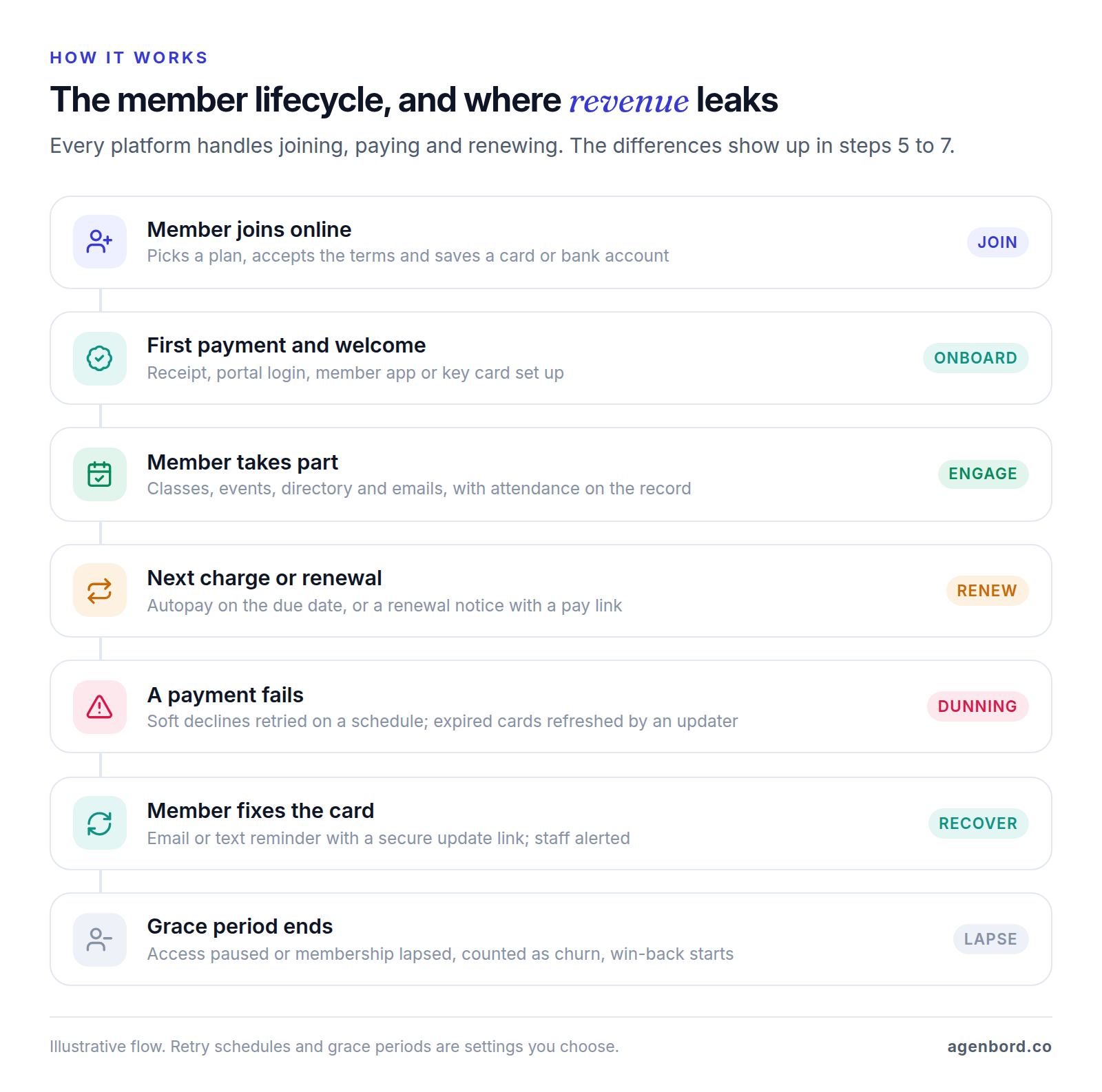
Everything hangs off the member record. These are the parts that matter, and the question each one should survive in a demo.
Member database and profiles
Contact details, membership type and status, join and expiry dates, payment history, attendance, registrations, notes and custom fields such as license numbers, belt ranks or company names. Two structures matter more than they look in a demo: households (one parent paying for two children, a family membership) and organizations (a company buying memberships for its staff). If the platform can't model who pays for whom, billing turns into a workaround.
Join, renewal and cancellation flows
Members should be able to pick a plan, accept your terms or waiver and pay in one pass on a phone, with your pricing rules applied (initiation fees, proration, student rates). Renewals either charge automatically or send a notice with a pay link before the expiry date.
Cancellation deserves equal attention. The federal Restore Online Shoppers' Confidence Act requires businesses selling recurring plans online to disclose the material terms before collecting billing details, get express informed consent, and provide simple mechanisms to stop recurring charges. Some states go further: California's automatic renewal law requires a business that lets consumers sign up online to let them cancel online, at will, through a prominently placed link or button or a ready-made termination email. This is general information, not legal advice; ask each vendor how members cancel and check your state's rules with your attorney.
Recurring billing and failed-payment recovery
Recurring billing charges saved cards or bank accounts on schedule, sends receipts and handles plan changes, pauses and proration. Failed-payment recovery, usually called dunning, is where platforms differ most. A good setup:
- Retries soft declines on a schedule. Insufficient funds today often clears next week. Stripe, for example, recommends 8 tries within 2 weeks as the default for its Smart Retries.
- Stops retrying hard declines. A lost or stolen card or an incorrect number won't succeed until the member adds a new payment method.
- Refreshes reissued cards. Processors such as Stripe update saved cards automatically when a member gets a new card number.
- Tells the member and your staff. An email or text with a secure card-update link, plus a staff alert for high-value accounts.
Then you choose what happens when recovery fails. Stripe Billing's options are a good model: cancel, mark unpaid, leave past due or pause. Ask each vendor to show you its version, including what happens to the member's door access and class bookings.
Member portal, app and directory
Members log in to update their details and card, renew, download receipts, book and see member-only content. Directories matter for associations and coworking communities, so check that members control what others can see. Branded apps are often an upgrade: Jackrabbit Class's Plus plan, for example, adds a branded app with a $169 one-time setup fee plus app store fees.
Events, classes and bookings
These are three different modules. Associations and clubs need event registration with member pricing, sessions and credits. Gyms and schools need recurring class schedules with capacity limits, waitlists and instructor assignments. Coworking spaces need room and desk booking with credits per plan. Check the one you'll use daily, end to end.
Check-in and access control
Gyms, studios, schools and coworking spaces record attendance at check-in by QR code, key fob, kiosk or app. For 24/7 facilities, the door should follow the billing: access switches off when the grace period ends and back on the moment the member pays. Ask which access-control hardware the platform supports and who you call when the door won't open.
Communications
Email, text and app messages segmented by plan, status or attendance, plus automated sequences: welcome, renewal reminders and win-back offers for lapsed members. Check the sending limits (Raklet's free plan includes 1,250 emails a month) and whether texting costs extra. For steps the platform can't automate, a tool like Zapier or Make can connect it to the rest of your systems; our workflow automation examples show how those connections are built.
Reporting: retention and churn
You want active members by plan, new joins, renewals due, lapsed members, revenue, outstanding dues, attendance and churn. Churn rate is the share of members you lose in a period: members who left during the month divided by members at the start of it. Split it into voluntary churn (members who cancel) and involuntary churn (failed payments never recovered), because the fixes differ: better programming and follow-up for the first, better dunning for the second.
Payments and accounting integration
Most platforms bundle payment processing, and some charge more if you bring your own. WildApricot adds a 20% Payment System Servicing Fee to the subscription for US and Canadian organizations that use a payment system other than WildApricot Payments. ClubExpress offers a Basic model, where payments go into your own Stripe account, and a Premium model, where funds flow through ClubExpress and are deposited three times a month.
Who holds the merchant account sets your rates, your payout timing and, when you leave, who controls your members' saved cards. On the accounting side, check how payouts, fees and refunds reach QuickBooks or your accounting system: one summary entry per payout, or every transaction.
Membership needs by organization type
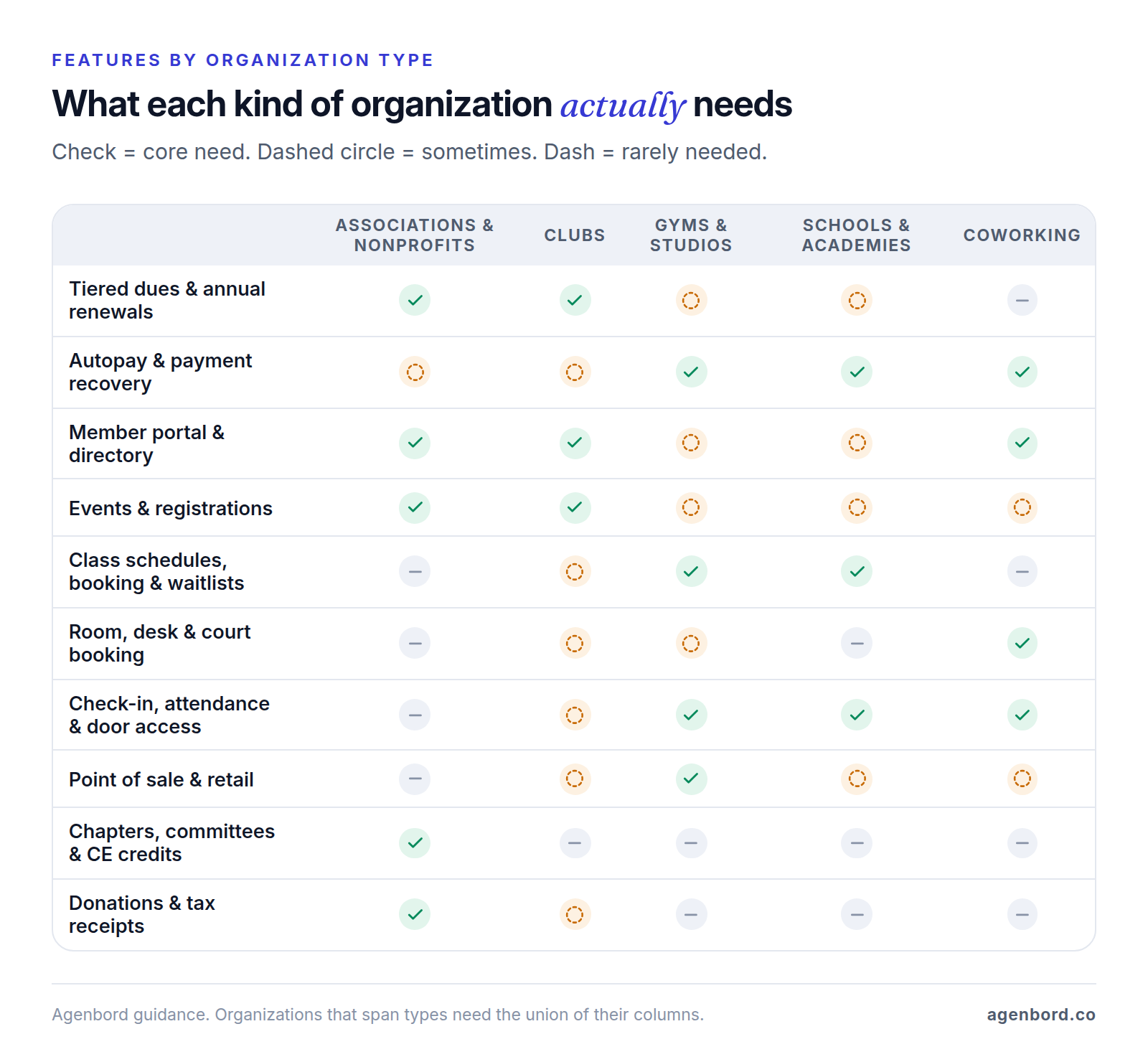
"Membership" covers very different organizations. The matrix shows where their needs split; the notes below explain why.
Association membership management software
Professional and trade associations usually buy association management software (AMS): tiered dues, individual and company memberships, chapters and committees, conferences, certifications and continuing education (CE) credits, job boards and directories. MemberClicks sells MC Professional for associations with individual members and MC Trade for organization-based memberships, chambers and large associations, with its Classroom LMS and job board as add-ons. Glue Up lists CPE/CPD credits among its features, alongside CRM, events and email marketing. GrowthZone runs three lines: MemberSuite for complex organizations, GrowthZone AMS for mid-sized associations and ChamberMaster for chambers.
Membership management software for nonprofits
Charities that sell memberships also take donations, so look for donor records, recurring gifts and receipts generated from the same member record. Neon CRM, for example, is a nonprofit CRM with memberships as an add-on module.
Receipts carry tax rules. If someone pays more than $75 and part of it buys benefits, the IRS requires a written disclosure with a good-faith estimate of what the benefits are worth. The exception is a payment of $75 or less a year for privileges members can use often, such as free or discounted admission. Separately, a donor needs a written acknowledgment from you to deduct any single contribution of $250 or more. Your software should produce both from the member record. This is general information; confirm the details with your accountant.
Club membership software
Social, sports, hobby and alumni clubs are usually run by volunteers, so easy handover matters more than depth: next year's treasurer must be able to run renewals. Typical needs are annual dues, family memberships, a members-only site and directory, events, and sometimes court or facility booking. Per-member pricing suits small clubs: ClubExpress charges 42¢ per member per month up to 200 members, with a $24 monthly minimum. Private golf and country clubs that also run dining, tee times and house charge accounts usually need dedicated club management systems instead.
Gym membership management software
Gyms and fitness studios live on monthly autopay, so billing and failed-payment recovery come first. After that: class scheduling with waitlists, check-in, door access for 24/7 locations, point of sale for retail and drinks, a member app and follow-up for trial leads. Processing is often built in and priced by plan. Mindbody says your processing rate depends on the plan you choose, and PushPress publishes card rates from 4.99% + 30¢ on its free plan down to 2.75% + 30¢ on Max.
Each platform has a focus. Mindbody's Starter plan includes a listing in its consumer booking app. Zen Planner targets martial arts, functional fitness and boutique studios, with belt and skill tracking. ABC Glofox lists access control and check-in alongside a branded member app.
Schools and academies
Dance, gymnastics, swim, music and martial arts schools bill families, not individuals: one parent pays for several students, enrollment runs by class and term, and attendance and skill levels live on the record. Look for family accounts, tuition plans with sibling discounts, class enrollment with age or level rules, waitlists and a parent portal. Jackrabbit Class, built for youth activity programs like these, prices by total student count, starting at $49 a month.
Coworking spaces
Coworking spaces sell desk and office plans, meeting-room credits and day passes, and often bill a company for its whole team. The core is booking, invoicing with add-ons, door access tied to membership status, and a member app. Nexudus prices each location by active users, and Cobot prices by paying members, from $89 a month for 10.
How much does membership management software cost?
Published starting prices run from $0 to $18,500 a year, and what you pay depends on the pricing model, your size and the fees around the subscription. The common models:
- Per contact: WildApricot prices by the number of contacts in your database, from $66 a month for 100 contacts on monthly billing. If you keep many past members or event guests, check how they count.
- Per active member or student: ClubExpress, Zen Planner (anyone with a membership or who attended in the past month), Jackrabbit Class (students at month end) and Cobot (paying members). Check each definition; ClubExpress, for example, doesn't charge for expired members or non-member contacts.
- Per location: Mindbody's price rises as you add locations, not people; Nexudus prices each location by active users.
- Revenue-based: Neon CRM starts at $99 a month and prices by your organization's revenue, with modules charged as a percentage on top.
- Annual contracts: MemberClicks and Glue Up publish starting prices from $3,000 a year; GrowthZone quotes.
- Flat tiers plus processing: PushPress and Raklet trade a higher monthly fee for lower transaction rates.
- Software licenses: WordPress plugins such as MemberPress sell yearly licenses (Paid Memberships Pro's core plugin is free); you also pay for hosting and upkeep.
Free membership management software and its limits
Free plans exist, and they charge you through fees instead:
- Raklet Free: $0 for up to 100 contacts and one admin, with a 4% + $0.60 transaction fee on top of payment gateway fees, and no custom domain.
- PushPress Free: $0 a month with unlimited members, but card payments cost 4.99% + 30¢, against 2.89% + 30¢ on the $159-a-month Pro plan. Free stays cheaper only until your members' card payments pass about $7,600 a month, roughly 125 members paying $60.
- Paid Memberships Pro: the core WordPress plugin is free and open source. You pay for hosting, maintenance and payment processing, and $49 a month or $499 a year if you want support and premium add-ons.
WildApricot has no free plan, but its 60-day free trial needs no credit card. Free is a sensible way to start a club or test a new studio; run the break-even math once you grow.
Costs beyond the subscription
For many organizations, the subscription is the smaller number.
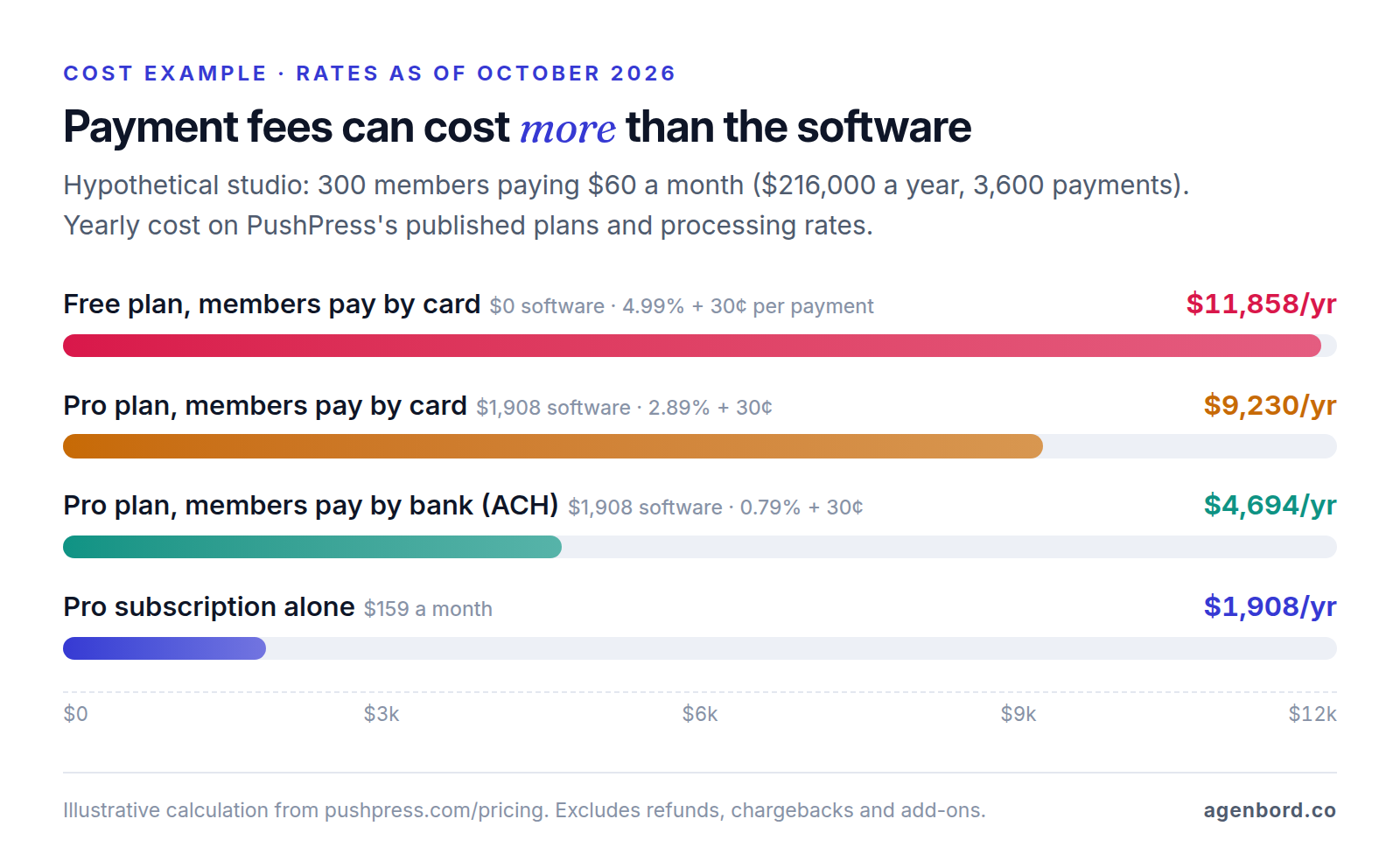
- Payment processing: in the example, card fees are almost four times the subscription, and moving members to bank payments (ACH) saves about $4,500 a year.
- Platform fees: MemberPress's Launch plan adds a 4.9% transaction fee, and Raklet's transaction fees sit on top of payment gateway fees.
- Add-on modules: Neon CRM charges 10% of the CRM price for Memberships and 20% for Events. Nexudus charges $150 a month for white-labeling (up to five locations).
- Setup and onboarding: none at Mindbody, free onboarding with data transfer at Zen Planner, and $150–$3,800 setup packages at ClubExpress.
- Contract terms: Glue Up bills annually, MemberClicks' typical contract runs one year, and Zen Planner is month to month.
Price the whole stack at the size you expect in three years, with your real mix of card and bank payments.
Membership management software compared (October 2026)
Prices are list prices from each vendor's pricing page as of October 2026. "Built for" is our read of each platform's focus.
| Platform | Built for | Published price | Watch for |
|---|---|---|---|
| WildApricot | Associations, nonprofits and clubs | From $66/mo (100 contacts, monthly); 10–15% off prepaid | 20% fee on the subscription with a third-party processor (US and Canada) |
| Neon CRM | Nonprofits combining fundraising and memberships | From $99/mo, based on revenue | Memberships +10%, Events +20% of the CRM price |
| MemberClicks | Professional and trade associations, chambers | MC Trade from $3,500/yr; MC Professional from $4,500/yr | LMS and job board are add-ons; typical one-year contract |
| Glue Up | Associations and chambers that want CRM, events and email in one place | Professional $3,000–$6,500/yr; Advanced $8,000–$18,500/yr | Billed annually; extra contacts, admins and events cost more |
| GrowthZone | Mid-sized associations, chambers, complex organizations | Quote-based | Payments and LMS are separate add-ons |
| ClubExpress | Volunteer-run clubs | 42¢/member/mo up to 200 members; $24/mo minimum | Setup from $150; card fees 2.99% + 30¢ (own Stripe) or 3.99% + 30¢ |
| Raklet | Small associations, clubs and alumni groups | Free (100 contacts); Essentials $49/mo billed annually | Transaction fees of 1–4% + $0.60 by plan, plus gateway fees |
| MemberPress | Paid content, course and community sites on WordPress | Launch $199.50 first year (regular $399) | 4.9% fee on Launch; hosting and upkeep are yours |
| Paid Memberships Pro | WordPress sites with members-only content | Free core plugin; Standard $499/yr | You run hosting, updates and security |
| Mindbody | Fitness, beauty and wellness businesses | Starter from $79/mo per location | Higher tiers and processing rates by quote |
| ABC Glofox | Boutique studios and gyms | Quote-based | Get processing rates and contract length in writing |
| PushPress | Gyms and fitness studios | Free; Pro $159/mo; Max $229/mo | Free plan's card rate is 4.99% + 30¢ |
| Zen Planner | Martial arts, functional fitness and boutique studios | Studio from $99/mo, by active members | Month to month; ask for processing rates |
| Jackrabbit Class | Dance, gymnastics, swim, cheer and music schools | From $49/mo, by student count | Branded app (Plus) from $93/mo plus $169 setup |
| Nexudus | Coworking and flexible workspace operators | Per location, by active users | White label +$150/mo (up to five locations) |
| Cobot | Small and mid-sized coworking spaces | $89/mo (10 members) to $599/mo (180) | 3–9% fees on non-member bookings, passes and tickets |
So what's the best membership management software? The one built for your type of organization, at a total cost you can live with in year three. A 40-member book club and a 4,000-member professional association should never be comparing the same shortlist.
How to choose membership management software
Start with your organization type and size:
- Volunteer-run club or small nonprofit: per-member or small-contact plans (ClubExpress, Raklet, WildApricot). Weight ease of use heavily, because the next volunteer has to run it.
- Nonprofit where donations matter as much as dues: a nonprofit CRM with a memberships module, such as Neon CRM.
- Professional or trade association: an AMS (MemberClicks, Glue Up, GrowthZone), plus time and budget for a formal implementation.
- Gym or studio: a fitness platform, with processing rates compared as hard as subscription prices.
- School or academy: software built around families and class enrollment.
- Coworking space: a workspace platform with desk and room booking and door access.
- Paid content or courses online: a WordPress plugin, if you already run WordPress and someone maintains it.
Then run the same scripted demo with each finalist and score it. Adjust the weights to your organization.
| Criterion | Weight (example) | What the vendor should show you |
|---|---|---|
| Billing and failed payments | 25% | A declined card: retry schedule, member reminder, card-update link and the access rule |
| Member experience | 15% | Joining, renewing, updating a card and canceling, all on a phone |
| Your must-have module | 15% | CE credits, waitlists, door access, family accounts or desk booking, run end to end |
| Payments and payouts | 15% | Card and ACH rates, who holds the merchant account, payout timing, accounting sync |
| Reporting | 10% | Churn split into voluntary and involuntary, renewals due, revenue by plan |
| Data and integrations | 10% | A full export including payment history, API access and the integrations you rely on |
| Three-year total cost | 10% | Subscription, processing at your volume, add-ons, onboarding and contract terms |
Score each criterion from 1 to 5, multiply by the weight and add it up. If two platforms finish within a few points, pick the one your front desk or volunteer treasurer preferred during the trial.
Switching platforms: members, history and saved cards
Member records are the easy part: export, clean up duplicates, map fields, import and spot-check. Payments are the hard part, because saved cards live with the payment processor, not with the membership software.
Card data can usually move between processors, but typically only at the account owner's request and only to a processor that meets security requirements. Stripe will only send card data to a processor that is PCI DSS Level 1 compliant (the highest validation level under the card industry's data security standard), and it doesn't export payment history, subscriptions or cards saved through its Link checkout. Braintree imports and exports customer and card records without fees, but can't migrate subscription or transaction information and excludes Apple Pay and Google Pay. What that means in practice:
- Find out who holds the merchant account. If your platform processes payments through its own account, your members' cards sit with it. Ask in writing, before you sign, how a future card export works.
- Rebuild billing schedules. Plans, prices and next charge dates don't travel with the cards. Recreate them and check a sample against the old system.
- Plan for re-entry. Members who paid with digital wallets, and any cards that fail to transfer, need a new payment method. Send them a secure update link early.
- Freeze or capture card changes. Stripe warns that card updates made with the old processor between the export and the import are lost.
- Don't mass-retry on day one. Stripe cautions that retrying many cards right after a migration can look suspicious to card issuers.
- Confirm the old system stopped billing. Run one cycle in parallel, compare the charge lists and make sure nobody is billed twice.
- Keep a full export of the history, including payments, attendance and notes, before you close the old account.
When a custom member portal or billing system makes sense
Most organizations should buy. The platforms above handle the standard lifecycle, and their payments, compliance and app work is expensive to rebuild. Our build-vs-buy framework walks through the general decision. Custom work pays off in three situations, usually built on a platform's API rather than replacing it:
- Billing the platforms don't fit. A multi-location operator mixing memberships, class packs, family plans and corporate contracts, or one payer across several businesses. A custom member portal or billing service can sit on top of your existing processor.
- Messaging-first collections. If members answer WhatsApp or texts faster than email, reminders with pay links belong there. Our team built a billing platform for this: automated monthly invoices on WhatsApp, digital payments reconciled into customer ledgers that update themselves, a shared WhatsApp inbox with an AI assistant, and biometric attendance and door access for gyms. If you only need reminders on top of your current system, a WhatsApp automation setup is much smaller (our WhatsApp Business API guide covers approval and template rules); a chatbot for routine member questions can share the same inbox.
- Data and hardware across systems. Access-control hardware your platform doesn't support, or members split across a fitness platform, an LMS and an accounting system that you want in one owner dashboard.
For budgeting, our typical ranges are a single workflow automation from $1,500, a WhatsApp setup with a shared inbox from $2,500, a member or customer portal at $25,000–$60,000 over 8–14 weeks, and a business platform at $30,000–$80,000 over 2–4 months. Add hosting of roughly $50–$500 a month and maintenance of about 15–20% of the build cost per year. We price custom software as a fixed-price proposal with a written scope, weekly demos, and you own the code. Our page on software for gyms, schools and membership businesses shows what we build for the industry.
If none of those three situations applies, put the money into the right plan, a cleaner payment mix and a careful migration instead.
Sources
- WildApricot - Pricing (accessed October 2026)
- WildApricot Help - Payment System Servicing Fee (accessed October 2026)
- Neon One - Neon CRM pricing (accessed October 2026)
- MemberClicks - Pricing (accessed October 2026)
- MemberClicks - Home page (accessed October 2026)
- Glue Up - Pricing (accessed October 2026)
- Glue Up - Home page (accessed October 2026)
- GrowthZone - Pricing (accessed October 2026)
- GrowthZone - Home page (accessed October 2026)
- ClubExpress - Pricing tiers (accessed October 2026)
- ClubExpress - Setup and payment processing pricing (accessed October 2026)
- Raklet - Pricing (accessed October 2026)
- MemberPress - Pricing (accessed October 2026)
- Paid Memberships Pro - Pricing (accessed October 2026)
- Mindbody - Pricing (accessed October 2026)
- ABC Glofox - Home page (accessed October 2026)
- ABC Glofox - Pricing (accessed October 2026)
- PushPress - Pricing (accessed October 2026)
- Zen Planner - Pricing (accessed October 2026)
- Jackrabbit Class - Pricing (accessed October 2026)
- Nexudus - Pricing (accessed October 2026)
- Cobot - Pricing (accessed October 2026)
- Stripe Docs - Automate payment retries (accessed October 2026)
- Stripe Docs - Revenue recovery (accessed October 2026)
- Stripe Docs - Request a payments data import (accessed October 2026)
- Stripe Docs - Request a payment data export (accessed October 2026)
- Braintree Docs - Data migration overview (accessed October 2026)
- Braintree Docs - Data migration exports (accessed October 2026)
- Cornell Law School LII - 15 U.S. Code 8403, Restore Online Shoppers' Confidence Act (accessed October 2026)
- Justia - California Business and Professions Code Section 17602 (2025) (accessed October 2026)
- IRS - Charitable contributions: quid pro quo contributions (accessed October 2026)
- IRS - Charitable contributions: written acknowledgments (accessed October 2026)
Prices, plans and regulations change. Figures were checked on October 2, 2026; follow the links for the latest. Nothing here is legal, tax or financial advice.
About the author
Founder, Agenbord
Muhammad Hamza is the founder of Agenbord, the Fort Lauderdale software company behind the construction ERP Smart Construction and a WhatsApp-first billing platform. He writes practical guides on buying, building and automating business software.