On this page
- What a nonprofit CRM tracks that a sales CRM doesn't
- Gift processing and receipts: the IRS rules your CRM must support
- Keep the database clean: duplicates, households and codes
- Fundraising reports that matter: retention, LYBUNT and SYBUNT
- Nonprofit CRM pricing and vendors (October 2026)
- Payment processing: the fee that can outweigh the subscription
- How to choose: make vendors run your scenarios
- Switching to a new nonprofit CRM, and your first 90 days
- When a custom nonprofit CRM or integration makes sense
A nonprofit CRM is the donor database your fundraising runs on. It keeps one record per donor and household, every gift and pledge coded to the campaign and appeal that brought it in, the acknowledgments you owe, and reports that show who gave last year but hasn't given this year. Sales CRMs are built around deals. Nonprofit CRMs are built around gifts, and that changes most of what sits underneath.
As of October 2026, nonprofit CRM prices run from free (tip-funded Givebutter and Zeffy, open-source CiviCRM, 10 donated Salesforce licenses for eligible nonprofits) through $45–$135 a month for Little Green Light, to starting prices of $99–$125 a month for Neon CRM, DonorPerfect and Bloomerang. Raiser's Edge NXT and Virtuous are quote-based. For most small and mid-size nonprofits, payment fees and setup work matter as much as the subscription.
We build custom CRMs, so we'll also say when that's worth it. For most nonprofits, it isn't.
What a nonprofit CRM tracks that a sales CRM doesn't
Every CRM stores contacts. A nonprofit CRM, often sold as donor management software, adds the records fundraising depends on:
| Record | What it holds | Why it matters |
|---|---|---|
| Constituents and households | People, companies and foundations, with people grouped into households | One letter per household, giving totals per family |
| Gifts | Amount, date, payment type, plus campaign, appeal and fund codes | Appeal results and restricted-fund balances |
| Soft credits | Credit to someone who influenced a gift but didn't pay for it | Fair credit for board members, fundraisers and advisors |
| Pledges | A promise to give over time, with installments and a balance | Money committed vs. money received |
| Recurring gifts | A schedule plus a payment method saved with your processor | Monthly donors, failed charges, expiring cards |
| Acknowledgments | Thank-you letters and tax receipts, with the date each was sent | IRS rules, and nobody thanked twice or not at all |
| Grants | Deadlines, amounts, restrictions and reports due | Your foundation pipeline |
| Volunteers | Shifts, hours, skills and screening status | Volunteers who also give |
| Events | Registrations, tickets, sponsors and the value of benefits | Deductible amounts on receipts |
Three of these are where spreadsheets and sales CRMs break down.
Campaigns, appeals and funds
Code every gift three ways. The campaign is the overall effort, such as your 2026 year-end drive. The appeal is the specific ask that prompted the gift: the November letter, the Giving Tuesday email, the gala. The fund is where the money goes (general operations, a scholarship fund) and should match your chart of accounts. Appeal codes tell you which asks work. Fund codes keep restricted money traceable from the gift to the books.
Hard credits and soft credits
The hard credit goes to whoever legally made the gift; a soft credit recognizes someone who influenced it. Donor-advised funds are the everyday example. The IRS describes a donor-advised fund as an account maintained by a sponsoring 501(c)(3) organization, which has legal control over the money once it's contributed, while the donor keeps advisory privileges. So when a $5,000 grant arrives from a donor-advised fund, the sponsoring organization gets the hard credit, and the person who recommended the grant gets a soft credit and your thank-you call. Employer matching gifts and peer-to-peer fundraising pages work the same way.
Revenue reports should count hard credits only; donor recognition lists can include soft credits. If a CRM can't keep the two apart, someone will count the same dollar twice.
Households
Jordan and Sam Rivera give from a joint account. In the CRM they're two people in one household, with an addressee ("Jordan and Sam Rivera"), a salutation ("Dear Jordan and Sam"), one letter per mailing and one household total that counts the gift once. Decide before you import who belongs in a household (do adult children at the same address count?) and how addressees are written, then hold everyone to it.
A sales CRM can be bent to do all of this. HubSpot's free CRM covers 2 users and 1,000 contacts, and you could log gifts as deals, but households, soft credits, pledges, receipts and fund coding become custom work you design and maintain yourself.
Gift processing and receipts: the IRS rules your CRM must support
Gift processing is the weekly routine a nonprofit CRM has to make fast: getting each gift onto the right record with the right codes, thanking the donor and matching the money to the bank deposit.
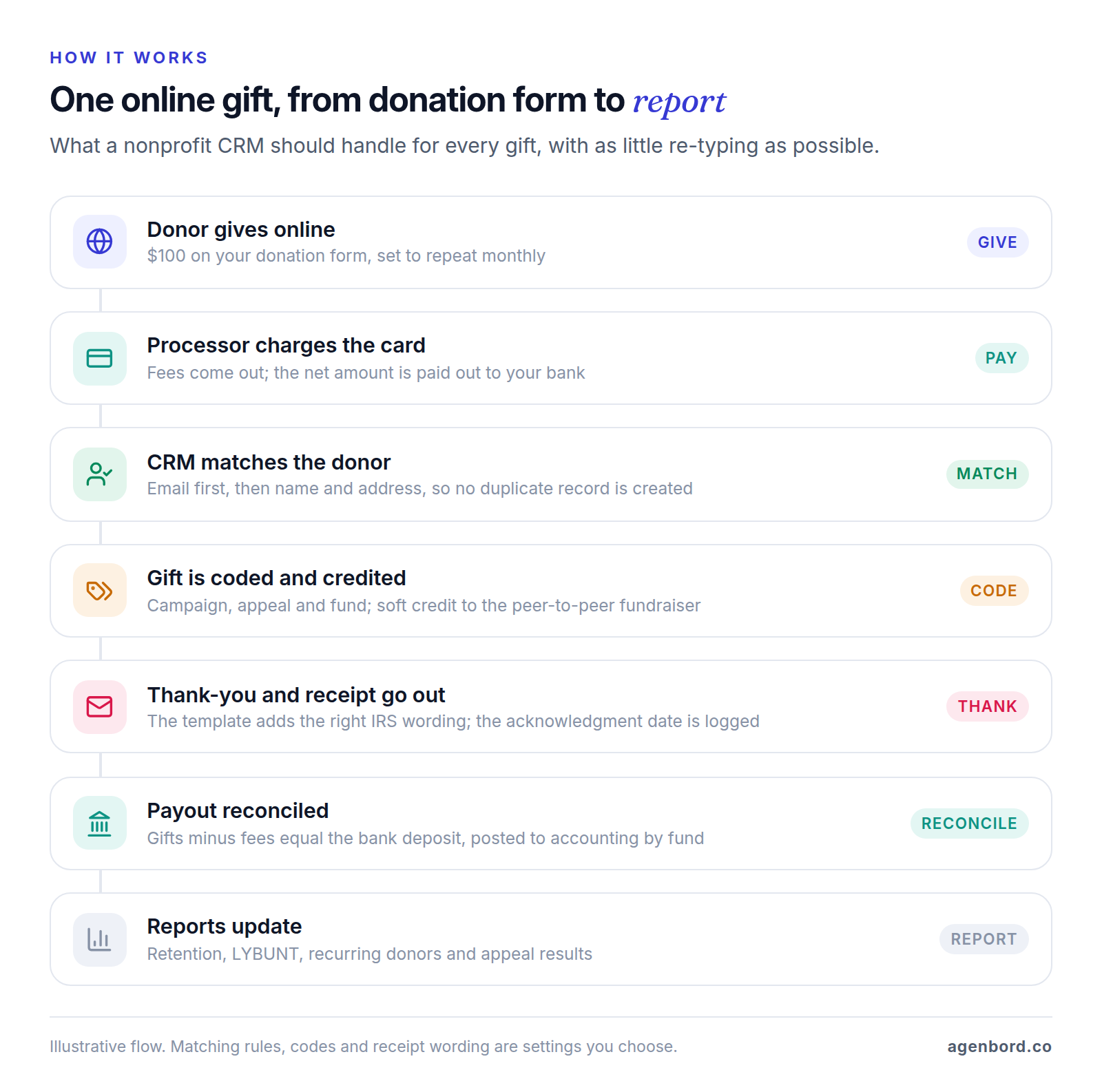
The tax rules live inside step 5:
- Gifts of $250 or more. A donor needs a written acknowledgment from you to deduct any single contribution of $250 or more. It must show your organization's name, the amount of a cash gift (or a description, but not the value, of a non-cash gift), and either a statement that you provided no goods or services or a description and good-faith estimate of what you did provide.
- Payments over $75 that buy something. When a payment of more than $75 is partly a gift and partly for goods or services, a quid pro quo contribution, you must tell the donor in writing that the deductible amount is limited to what they paid beyond the fair market value of what they received, with a good-faith estimate of that value. The penalty for skipping it is $10 per contribution, up to $5,000 per fundraising event or mailing.
In the CRM, that means a fair-market-value field on every ticket type, auction item and thank-you gift, receipt templates that pick the right wording for each gift, an acknowledgment date on every gift record, and year-end giving statements per donor. A $250 gala ticket that includes a $100 dinner should produce a receipt showing $150 as deductible without anyone doing the math by hand. This is general information, not tax advice: IRS Publication 1771 covers the details, and your accountant should review your receipt templates.
Keep the database clean: duplicates, households and codes
Donor data decays. People move, marry, die and give online with a new email address. A few written rules, applied every week, keep the database worth trusting:
- Match before you create. Every online form can create a duplicate. Have imports match on email first, then name plus address, and review near-matches (Jon and Jonathan Smith at the same address) weekly.
- Merge by policy. Decide which record survives and which address wins, and check that gift history, soft credits and recurring schedules move to the surviving record.
- Write down household rules and addressee formats, and apply them when records are created, not the night before a mailing.
- Lock the code lists. One person adds campaigns, appeals and funds; everyone else picks from the list. Free-typed codes make appeal reports useless.
- Flag, don't delete. Deceased, anonymous, do-not-mail, do-not-email and do-not-call flags keep the history and keep you from soliciting someone who has died.
- Update addresses before big mailings. The USPS NCOALink file holds about 160 million change-of-address records, and licensed providers can run your mailing list against it before you print.
- Reconcile every deposit. The gifts entered for a payout, minus fees, should equal what reached the bank, by fund, so the CRM and your accounting agree. Our guide to CRM integration covers syncing the two without double entry.
Fundraising reports that matter: retention, LYBUNT and SYBUNT
The reports that matter most answer one question: who is still giving?
- Donor retention rate: last year's donors who gave again this year, divided by all of last year's donors.
- LYBUNT (Last Year But Unfortunately Not This year): last year's donors who haven't given yet this year. It's your warmest prospect list, because these people already chose you once.
- SYBUNT (Some Year But Unfortunately Not This year): donors from earlier years who gave neither last year nor this year. Definitions vary, so check whether a vendor's SYBUNT report includes LYBUNTs.
- First-time vs. repeat retention: report them separately, because the fixes differ: a welcome series and a second ask for first-time donors, stewardship for repeat donors.
- The operating reports: recurring donors (active, new, canceled and failed each month), open pledge balances, and results per appeal (gifts, dollars, response rate, average gift).
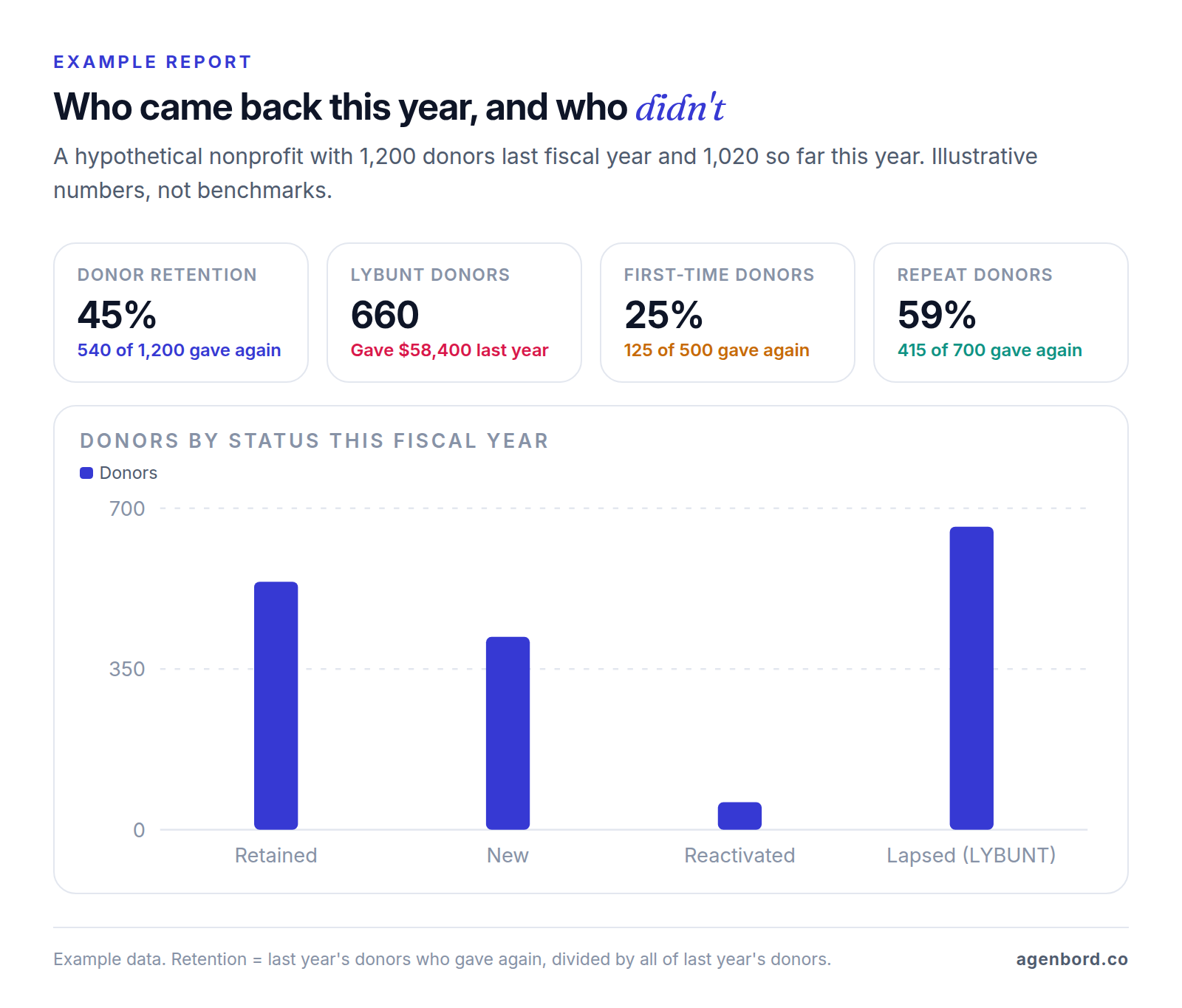
Run these by fiscal year as well as calendar year: your board reports on the fiscal year, while donors' year-end giving statements follow the calendar year. A good CRM handles both without a trip through a spreadsheet. In the example above, the 660 LYBUNT donors who gave $58,400 last year are the first list to work, starting with the largest and most recent gifts.
Nonprofit CRM pricing and vendors (October 2026)
Sales CRMs mostly charge per user (our CRM pricing guide compares them). Nonprofit CRMs price by records (Little Green Light, Bloomerang; ask which records count), by revenue (Neon CRM; Virtuous splits its tiers at $5 million of annual fundraising revenue) or by user (Salesforce, after 10 donated licenses), and several quote. Price each one at your own record count, revenue and team size.
| CRM | Best fit (our read) | Published price, October 2026 | Watch for |
|---|---|---|---|
| Little Green Light | Small teams that want every feature at a low price | $45/mo (2,500 records) to $135/mo (50,000); 10% off paid annually | Online gifts go through a separate processor (from 2.2% + 30¢, no LGL fee) |
| Bloomerang | Small and mid-size teams that want CRM, giving forms and volunteers from one vendor | CRM from $125/mo; Giving Platform from $242/mo; billed annually | Priced by records; the Fundraising module (from $40/mo) is sold only with the CRM |
| Neon CRM | Nonprofits that also sell memberships and events | From $99/mo, based on total revenue | Memberships +10%, Events +20%, Volunteers +10% of the CRM price |
| DonorPerfect | Development teams that want structured gift entry | From $99/mo; plans by custom quote | QuickBooks integration and batch gift entry start on Plus; API access on Pro |
| Salesforce Nonprofit Cloud | Organizations with an admin or partner and complex needs | 10 Core licenses free; then $70–$285 per user/mo, billed annually | Annual contract; setup and admin time not included |
| Raiser's Edge NXT | Larger teams working major gifts, planned giving and campaigns | Quote-based | Get implementation scope and contract length in writing |
| Virtuous | Mid-size and large nonprofits | Quote-based; Platform tier up to $5M fundraising revenue, Enterprise above | Giving forms, volunteers and analytics are separate products |
| CiviCRM | Teams with technical help or a hosting partner | Free, open source | Hosting, upgrades and support are on you |
| Givebutter | Small nonprofits starting with online fundraising | Free; Plus $29–$129/mo | With tips off: 3% platform fee plus processing |
| Zeffy | Small nonprofits that want no fees at all | Free | Funded by optional donor tips at checkout |
Prices are list prices from each vendor's pricing page as of October 2026. Kindful, which you may see in older comparisons, is now a Bloomerang product.
Free nonprofit CRM options, and the catch
- Givebutter is free with unlimited users and contacts. With donor tips turned on, Givebutter covers platform and processing fees; with tips off, you pay a 3% platform fee plus 2.9% + 30¢ per card gift. Givebutter Plus, which adds workflows, texting and custom reports, costs $29–$129 a month for up to 250–2,500 contacts.
- Zeffy has one plan, and it's free: Zeffy covers transaction fees and relies on optional donor tips. Its CRM tracks donor information alongside forms and newsletters.
- CiviCRM is open source and runs with WordPress, Drupal, Joomla or Backdrop, or on its own. The software is free; hosting, upgrades and help come from your own team or a CiviCRM partner.
With tip-funded platforms, the cost moves to your donors' checkout, so try the form yourself and decide whether you like how the tip request reads. With every free option, the catch is leaving later: test a full export of gifts, soft credits and recurring donors before you commit.
Salesforce Nonprofit Cloud and the Power of Us program
Through the Power of Us program, Salesforce gives eligible nonprofits 10 Nonprofit Cloud Core licenses at no cost, plus discounts on additional subscriptions. To apply, you need your tax ID and a 501(c)(3) or 501(c)(4) letter, a completed readiness survey and a Salesforce trial, and you submit the application within 30 days, in one sitting.
Beyond the free 10, Nonprofit Cloud lists at $70 per user per month for Sales & Service Core, $125 for Advanced and $285 for Sales Max or Service Max, billed annually on an annual contract. A 15-person team would pay for 5 Core licenses: $4,200 a year at list price.
The licenses are free; fitting Salesforce to your fundraising isn't. Budget for an admin, a consultant or an implementation partner to set it up and keep it running, because that time never shows on the pricing page. Salesforce makes sense when you have that capacity and need deep customization or many connected systems. Our custom CRM vs. Salesforce comparison breaks down those admin and partner costs.
Which nonprofit CRM fits your organization?
- Just starting, mostly online gifts, no software budget: Givebutter or Zeffy. Move up when you need gift batches, pledges and deeper reports.
- A small development team that wants a real donor database: Little Green Light, which includes every feature and unlimited users from $45 a month; Bloomerang for CRM, giving forms and volunteer management from one vendor; DonorPerfect for structured gift entry.
- Donations plus memberships and events: Neon CRM, which sells both as add-on modules.
- Many teams, complex programs and technical help on hand: Salesforce Nonprofit Cloud, or CiviCRM if you prefer open source.
- Large development teams working major and planned gifts: Raiser's Edge NXT or Virtuous, with time budgeted for implementation.
Payment processing: the fee that can outweigh the subscription
Every online gift pays a processing fee, and some platforms add a platform fee on top. For a hypothetical nonprofit raising $200,000 online a year in 2,000 gifts (a $100 average gift):
| Fee structure | Example | Yearly fees |
|---|---|---|
| Processing at 2.2% + 30¢ | Little Green Light's listed starting rate, paid to the processor | $5,000 |
| Processing at 2.9% + 30¢ | Givebutter's card rate with tips off, before its platform fee | $6,400 |
| 3% platform fee plus 2.9% + 30¢ | Givebutter with tips off | $12,400 |
| Optional donor tips instead of fees | Givebutter with tips on, Zeffy | $0 to you |
Compare that with the subscription: Little Green Light at 5,000 records costs $720 a year on monthly billing, and Bloomerang's CRM starts at $1,500 a year. At this volume, every percentage point of fees is $2,000 a year. Ways to bring it down:
- Steer large and recurring gifts to bank transfer (ACH). Givebutter, for example, lists 1.9% + 30¢ for ACH against 2.9% + 30¢ for cards.
- Ask for nonprofit rates. Stripe offers discounted processing to eligible nonprofits, but at least 80% of your Stripe volume must be tax-deductible donations; membership fees, tuition, ticket sales, registration fees and auction payments don't count.
- Let donors cover the fee with an optional checkbox on your donation form, if your platform supports it.
- Know who holds the merchant account. If your CRM bundles payment processing, your monthly donors' saved cards sit with that processor. Ask in writing how card data moves if you leave.
How to choose: make vendors run your scenarios
Feature lists look alike. Send each finalist the same scenarios a week before the demo, ask to see them run live, and bring the person who enters gifts every week:
- A $500 gift from a couple's joint account, with a soft credit to the board member who asked. Check the household total and the board member's soft-credit total.
- A $5,000 grant from a donor-advised fund: hard credit to the sponsor, soft credit and a thank-you to the advisor.
- A $1,200 pledge paid at $100 a month: the balance after three payments and the alert when the fourth fails.
- A $250 gala ticket that includes a $100 dinner, with a receipt showing $150 deductible.
- A monthly donor whose card expired: what the donor receives and what staff see.
- A LYBUNT list for your fiscal year, without deceased or do-not-mail records, exported for a mail house.
- Two duplicate records merged: what happens to gifts, soft credits and the recurring schedule.
- A full export of everything, including gift history and notes.
Then compare three-year cost: the subscription at the record count or revenue you expect in year three, add-on modules, processing at your volume, onboarding and migration help, and the staff or consultant time to run it.
Switching to a new nonprofit CRM, and your first 90 days
Migrations fail on history, not on contacts. Bring over:
- Every constituent, with the old system's ID stored in a field so you can trace any record back
- Households and relationships
- Every gift with its date, amount, payment type and codes
- Soft credits, matching gifts and tribute gifts (in honor or in memory)
- Open pledges with their schedules and balances
- Recurring gift schedules, and a plan for the saved cards behind them
- Acknowledgment history, so nobody is thanked twice
- Communication preferences and deceased, anonymous and do-not-contact flags
- Volunteer hours, event attendance, notes and tasks
Before you switch off the old system, gift totals by year and by fund must match the old system and your accounting. Saved cards are the hard part, because they live with the payment processor, not the CRM. If your processor changes too, our membership software guide explains how card data moves between processors and what doesn't. Ask each vendor what migration help costs; DonorPerfect, for one, advertises free data transfers from most CRMs.
Don't go live in the middle of your year-end campaign. If you choose a CRM in the fall, migrate after the year-end giving statements go out.
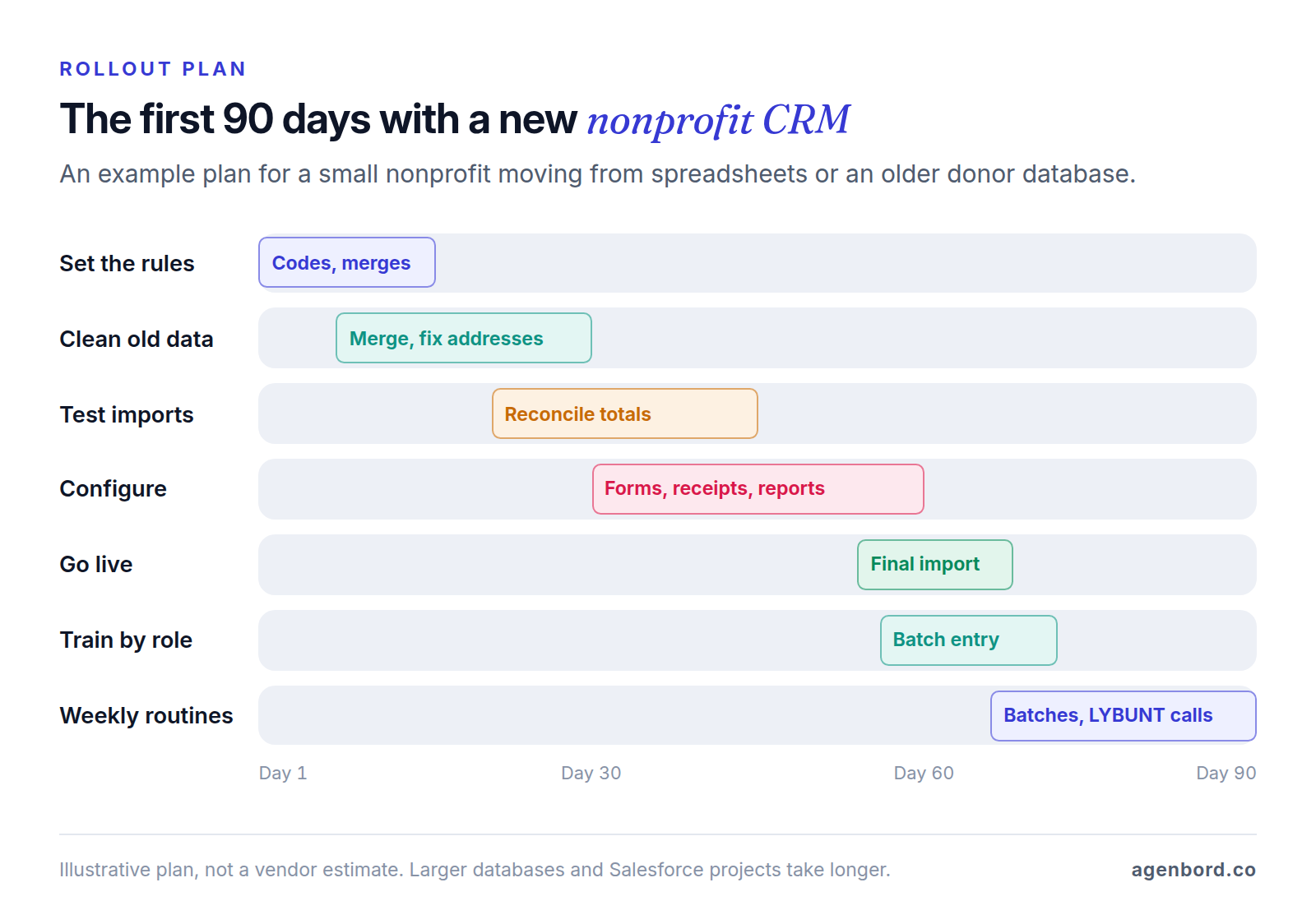
By day 90 you should have one clean record per donor, weekly gift batches that reconcile to the bank, receipts that go out without hand edits, and a retention baseline to beat next year.
When a custom nonprofit CRM or integration makes sense
Buy first. The platforms above already handle gift processing, receipts and fundraising reports, and rebuilding them is expensive. Our build-vs-buy framework walks through the general decision. Custom work pays off in three situations, usually connected to your donor CRM rather than replacing it:
- Program data your donor CRM can't hold: participants, cases and outcomes for funder reports. CiviCRM lists case management; if nothing off the shelf fits your programs, a custom module that shares records with your CRM can.
- Systems that don't talk. Gifts re-typed from a donation platform, an event tool or a payment processor into the CRM, then again into accounting. A workflow automation or a small integration service removes the re-typing.
- Portals your supporters use. A sponsor portal with updates on the project each donor funds, or volunteer sign-up with screening and hour tracking, built as a web app on top of your CRM.
For budgeting, our typical ranges are a single workflow from $1,500 (1–2 weeks), a focused custom CRM v1 from $12,000 (6–10 weeks), and a CRM with a portal and integrations at $30,000–$75,000. Add hosting of roughly $50–$500 a month and maintenance of about 15–20% of the build cost per year; our custom CRM cost guide explains what drives those numbers. We work from a fixed-price proposal with a written scope and weekly demos, and you own the code.
If none of those three situations applies, spend the budget on the right plan, a clean migration and the weekly habits above.
Sources
- Little Green Light - Pricing (accessed October 2026)
- Bloomerang - Pricing (accessed October 2026)
- Kindful - Home page, Kindful is a Bloomerang product (accessed October 2026)
- Neon One - Neon CRM pricing (accessed October 2026)
- DonorPerfect - Pricing (accessed October 2026)
- Salesforce - Nonprofit Cloud pricing (accessed October 2026)
- Salesforce - Power of Us program (accessed October 2026)
- Blackbaud - Raiser's Edge NXT (accessed October 2026)
- Virtuous - Pricing (accessed October 2026)
- CiviCRM - Home page (accessed October 2026)
- Givebutter - Pricing (accessed October 2026)
- Zeffy - Pricing (accessed October 2026)
- HubSpot - Free CRM pricing (accessed October 2026)
- IRS - Charitable contributions: written acknowledgments (accessed October 2026)
- IRS - Charitable contributions: quid pro quo contributions (accessed October 2026)
- IRS - Donor-advised funds (accessed October 2026)
- Stripe Support - Fee discount for nonprofit organizations (accessed October 2026)
- USPS PostalPro - NCOALink (accessed October 2026)
Prices, plans and regulations change. Figures were checked on October 2, 2026; follow the links for the latest. Nothing here is legal, tax or financial advice.
About the author
Founder, Agenbord
Muhammad Hamza is the founder of Agenbord, the Fort Lauderdale software company behind the construction ERP Smart Construction and a WhatsApp-first billing platform. He writes practical guides on buying, building and automating business software.