On this page
- Takeoff vs estimating vs bid management
- How a construction estimate is built
- Types of construction estimating software
- What construction estimating software costs
- AI construction estimating software: what it does well and what to check
- How to choose construction estimating software
- How to trial estimating software: re-estimate a finished job
- When an ERP module or custom estimating build pays off
Construction estimating software turns a set of drawings into a priced bid. It measures quantities from the plans (the takeoff), prices them with labor, material, equipment and subcontract costs, adds your markups and produces the proposal. The better tools also hand the winning estimate to your job budget, so the numbers you bid are the numbers you track.
There are five main kinds: digital takeoff tools, dedicated estimating platforms, residential all-in-ones that include estimating, trade-specific tools and spreadsheets. Remodelers and home builders usually fit an all-in-one, commercial general contractors an estimating platform with takeoff and sub-bid tools, specialty trades a tool built around their labor units, and heavy civil contractors one that estimates by crews and equipment.
We build software for contractors, including the estimating and bills of quantities module in our own construction ERP. This guide covers how an estimate is built, what each kind of tool does well, prices checked in October 2026, where AI helps, and how to test a tool against a job you've already finished.
Takeoff vs estimating vs bid management
"Estimating software" covers three jobs. Many products do two of them, and knowing which a product is built for keeps you from paying twice for the same step, or buying a tool that skips the one you need.
| Job | What it produces | Example tools | Where it overlaps |
|---|---|---|---|
| Quantity takeoff | Counts, lengths, areas and volumes measured from the drawings, grouped by condition (a wall type, a floor finish, a fixture) | Bluebeam Revu, PlanSwift, STACK, Togal.AI | Some takeoff tools also price what they measure; pure measuring tools pass quantities on |
| Estimating | The priced cost of the work: items and assemblies, general conditions, markups, alternates and the proposal | Sage Estimating, ProEst, Forma Estimate, HeavyBid, trade tools, spreadsheets | Most estimating platforms include takeoff or link to a takeoff product |
| Bid management | Invitations to subs and suppliers, their quotes compared scope by scope, and the number you submit on bid day | BuildingConnected Pro for GCs, Bid Board Pro for subs | Bid-day tools such as Sage's BidMatrix and HeavyBid's quote management sit inside the estimate |
Takeoff answers how much, estimating answers what it costs, and bid management answers whose prices you're carrying. A remodeler who self-performs most of the work and prices from a catalog may never need bid management. A commercial general contractor who subcontracts most of a job lives in it, because leveling sub bids (lining up each quote against the same scope, so one sub's exclusions don't make it look cheap) is where bids are won and lost.
How a construction estimate is built
Every estimating tool follows the same chain. Knowing it lets you see where a product saves real time and where it only moves the work.
1. Quantity takeoff
The estimator loads the drawings, sets the scale on each sheet and measures by condition: counts for doors and fixtures, linear feet for walls and pipe, square feet for drywall and flooring, cubic yards for concrete. Good takeoff tools color what's been measured so gaps stand out, and show what changed when a revised sheet arrives.
2. Assemblies and cost items
An assembly bundles everything needed for one unit of work. A hypothetical interior partition assembly, priced per linear foot of wall, might hold studs and track, drywall on both sides, screws, tape and joint compound, plus the labor hours to frame, hang and finish. Measure 1,000 linear feet once, and the assembly writes every line: material quantities with waste, labor hours and cost.
Assemblies built on your own production rates are the most valuable thing in your estimating system. They're also the hardest thing to move if you switch tools, so ask every vendor how they export.
3. Direct costs
- Labor: hours from production rates, times a burdened rate (wages plus payroll taxes, insurance and benefits). Price at the bare wage and every self-performed scope comes in low.
- Material: takeoff quantities plus waste, priced from supplier quotes or a price list, with sales tax where your state charges it.
- Equipment: lifts, rentals and owned equipment at internal rates, for as long as the job needs them.
- Subcontracts: leveled sub quotes, with a plug (a placeholder number) where no usable bid came in.
4. Where the prices come from
Estimating software stores costs; it doesn't know yours. Prices come from four places:
- Your own history: unit costs and production rates from finished jobs. It's the most accurate source, if you capture it.
- Quotes from suppliers and subs for this job.
- Published cost data. RSMeans data, now published by Gordian, is sold as online subscriptions and yearly cost books, and Sage Estimating integrates RSMeans and other third-party databases. Autodesk says ProEst carries more than 23,000 lines of regionalized cost data. Treat published data as a starting point and check it against your own costs.
- Trade labor units. Electrical and mechanical estimators often start from industry labor units and adjust them to their crews. McCormick Systems, for example, offers NECA labor units for electrical work and MCAA or PHCC units for mechanical.
5. General conditions and markups
Next come the job's own running costs, known as general conditions: supervision, temporary facilities, dumpsters, cleanup and permits. Then the markups:
- Contingency for risk you can't price yet, such as an unknown existing condition or a gap in the design.
- Overhead: the share of office costs that no single job carries.
- Profit.
- Bonds and insurance: a performance and payment bond premium when the job requires bonds, plus insurance charged to the job, at rates from your surety and agent.
Contractors apply markups differently. Some apply each one to cost, some compound them, and bond premiums are often figured on the final contract price. Your software should let you set the base for each markup and show how the bid moves when you change one.
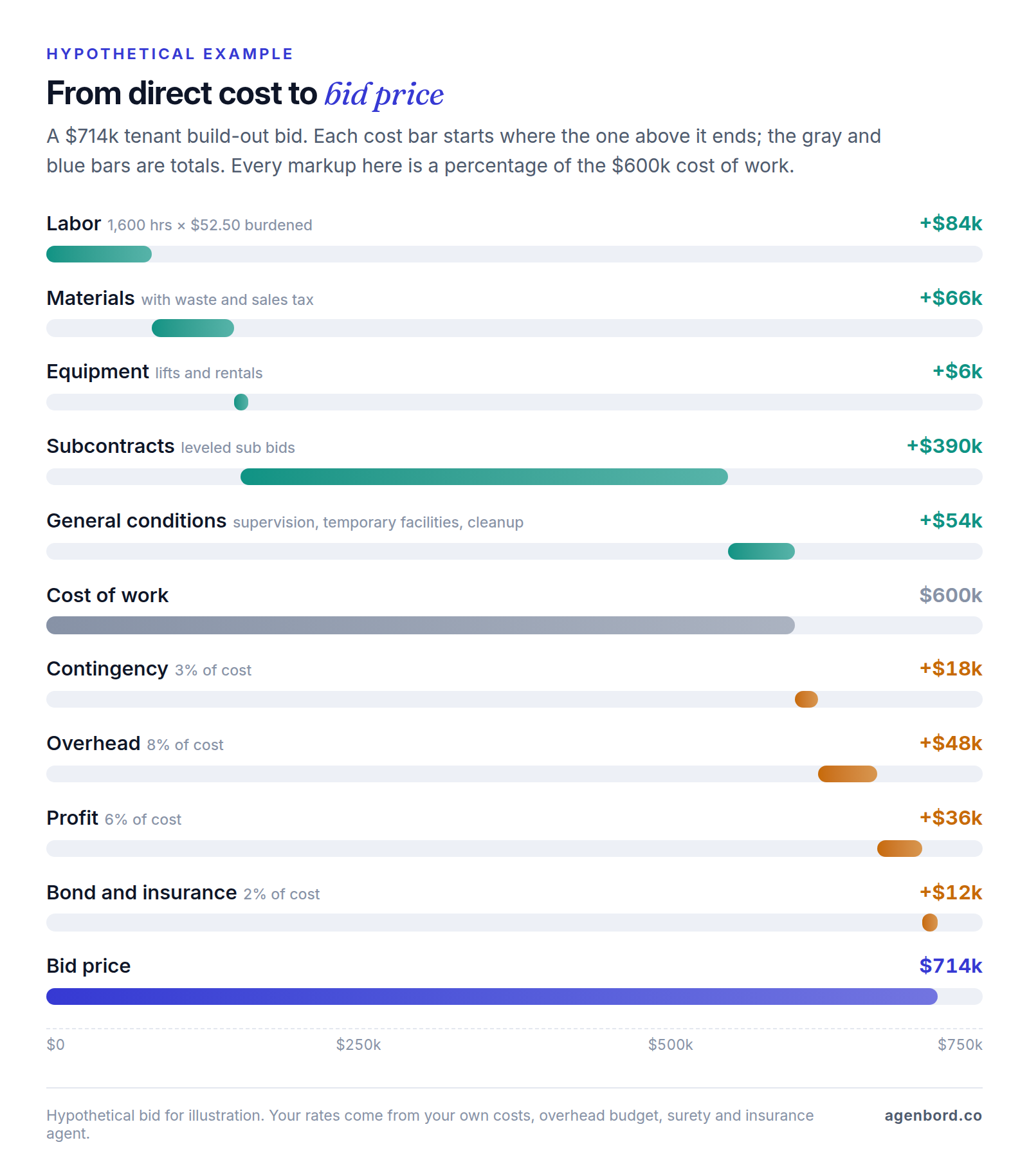
In this hypothetical bid, the 6% profit markup on cost is 5% of the price. If you read a 19% markup as a 19% margin, you'll overestimate what every job leaves you, which is why good estimating software shows markup and margin side by side.
6. The proposal
The proposal is what the owner or GC actually reads: the price, scope, inclusions and exclusions, alternates, allowances, unit prices, qualifications and how long the price holds. Vague exclusions turn into disputes, so keep a standard list in the software and review it on every bid.
7. From awarded estimate to job budget
When you win, the estimate should become the job budget without re-typing. That works only if both use the same cost codes. Commercial contractors often organize them by MasterFormat divisions, the structure CSI and Construction Specifications Canada maintain so drawings, specifications and estimates line up; trade contractors often code by phase instead (rough-in, trim, startup). Tag each estimate item with a cost code and a cost type (labor, material, equipment, subcontract, other), and the export lands in your accounting or ERP system by code.
The estimate's labor hours become the crews' hour budgets, its subcontract lines become the buyout list, and its totals seed the schedule of values you bill against. Tracking cost against that budget is job costing, which our guide to construction job costing software walks through with a worked example.
Types of construction estimating software
There's no single best construction estimating software, only the best fit for the work you bid. Five kinds cover nearly every product you'll see.
| Type | Examples | Best fit | Watch for |
|---|---|---|---|
| Digital takeoff | Bluebeam Revu, PlanSwift, STACK, Togal.AI | Anyone who measures from drawings | Measuring isn't pricing, unless the tool includes estimating |
| Estimating platforms | Sage Estimating, Autodesk ProEst and Forma Estimate, HCSS HeavyBid | Commercial GCs, larger subs, heavy civil | Quote-based; you build the database before it pays |
| Residential all-in-ones | Buildertrend, JobTread, Houzz Pro (Clear Estimates for estimating only) | Remodelers and home builders | Lighter on commercial bid-day work |
| Trade-specific tools | McCormick Systems, The Estimating Edge | Electrical, plumbing and mechanical; drywall, ceilings, painting, flooring, roofing | Fit drops outside the trade; check the accounting export |
| Spreadsheets | Excel, Google Sheets | Low bid volume, or a proven workbook | Formula errors, versions, re-typing |
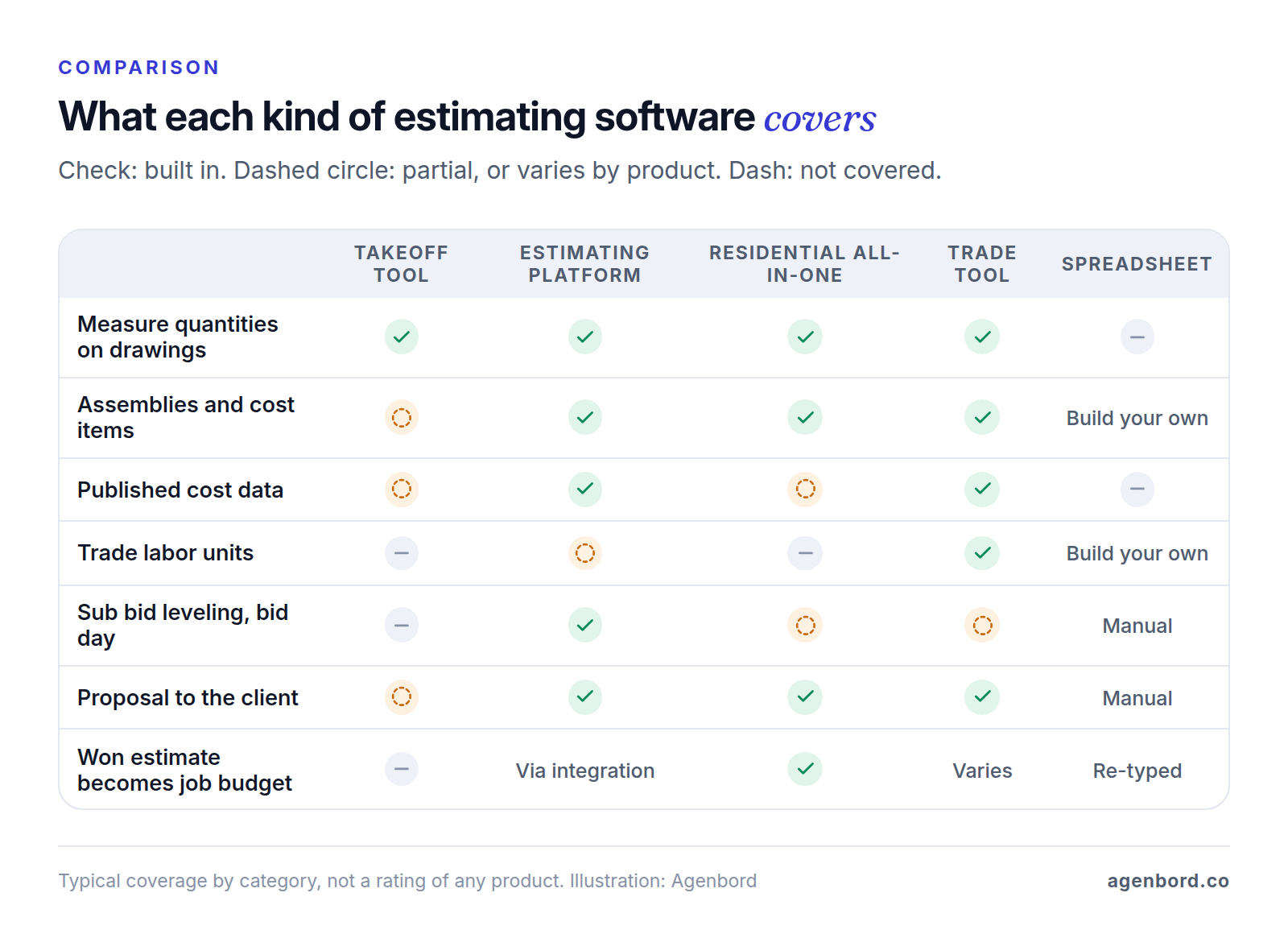
Digital takeoff tools
Bluebeam Revu is a PDF markup tool whose measuring features grow with the plan, all priced per user and billed annually: Basics ($260) measures length and area; Core ($330) adds perimeters, counts, angles and volume; Complete ($440) adds Quantity Link, which ties measurements to Excel, and Dynamic Fill for filling regions of a drawing; Max ($590, an introductory price) adds AI drawing reviews and comparisons. PlanSwift sells Essential at $2,000 and Core at $3,000 per seat per year, both with takeoff, estimating and automatic counting; Core adds automated takeoff. STACK is cloud-based takeoff and estimating with item and assembly libraries, from $249 per user a month, with a free version. Togal.AI is built around automated takeoff, at $299 per user a month billed yearly.
The strength is speed you can check: every quantity sits on a marked-up sheet. The limit is that a measuring tool doesn't know your costs. Pair one with a spreadsheet, and the copy between them is where errors creep in.
Estimating platforms
Sage Estimating is built for general contractors and construction managers, with trade-specific cost databases, RSMeans integration, eTakeoff Dimension for takeoff, a BidMatrix tool that finds the lowest combination of sub bids on bid day, and connections to Sage Intacct Construction, Sage 300 CRE and Sage 100 Contractor. Autodesk sells ProEst (cost data, 2D takeoff, bid-day analysis, proposals and reports by project type or estimator) only in its Forma for Preconstruction bundle, which also includes Forma Estimate (costs linked to 2D and 3D takeoff quantities), Forma Takeoff, BuildingConnected Pro and TradeTapp. The Forma names arrived when Autodesk Construction Cloud became part of Autodesk Forma. HCSS HeavyBid is for self-performing civil and infrastructure contractors, with quote management, pricing from historical data and productivity, links to owner bidding systems such as AASHTOWare and Bid Express, and interfaces to more than 30 back-office systems, including Vista, QuickBooks and Sage 300.
All three price by quote. Their strength is depth: assemblies, cost history, alternates, bid-day analysis and reports across estimators. The catch: they're only as good as the database and templates you build in them.
Residential and remodeler all-in-ones
These put estimating in the same system as proposals, selections, schedules and budgets, so an accepted proposal becomes the job. JobTread is $199 a month with one internal user, plus $20 a month for each user from 2 to 10 (20% less billed annually), and its single plan includes a cost catalog, takeoff, proposals, budgets and job costing. Houzz Pro includes takeoffs from its Pro plan at $199 a month, an annual subscription that starts after a 30-day trial. Buildertrend lists estimates, bids and takeoff among its tools, with unlimited users, priced by quote. For estimating only, Clear Estimates is built for residential remodelers: Standard is $79 a month ($59 billed annually), with a database of 13,000-plus line items updated quarterly and 400-plus templates, and Pro is $119 ($99 annually).
The strength is one record from estimate to invoice, with homeowner-friendly proposals. The limit is depth for commercial bidding. Our construction project management software guide compares these suites on the project side.
Trade-specific estimating tools
Specialty contractors estimate in their trade's own units. McCormick Systems serves electrical, plumbing and mechanical contractors; its electrical database holds 55,000-plus items and 25,000 prebuilt assemblies, and supplier pricing updates come from supply houses. The Estimating Edge covers drywall, acoustical ceilings, EIFS, painting, flooring, roofing, concrete and other trades, with preloaded manufacturer databases and its own takeoff. Both price by quote.
The strength is labor units and assemblies that match how your trade bids, and prices you'd otherwise type in by hand. The limit shows when you add a trade the tool doesn't cover, and the export to accounting varies, so test it.
Spreadsheets
A spreadsheet is still where many small contractors estimate, and a well-built workbook with your own rates beats software nobody trusts. The limits arrive with growth: one wrong cell reference misprices a bid, versions multiply in email, nothing links to the drawings, and the won estimate gets re-typed into the budget. If your workbook works, keep its logic and move it somewhere that adds measurement, version control and the hand-off.
What construction estimating software costs
Here's what one user costs for a year at list prices as of October 2026. Compare within a type, since a takeoff tool and an all-in-one do different jobs.
| Tool and plan | List price | One user, one year |
|---|---|---|
| Bluebeam Basics to Max | $260–$590 per user/year, billed annually (Max at an introductory price) | $260–$590 |
| Clear Estimates Standard, Pro | $59 and $99 per month, billed annually | $708–$1,188 |
| PlanSwift Essential, Core | $2,000 and $3,000 per seat/year | $2,000–$3,000 |
| JobTread | $199/month billed monthly, 1 internal user included | $2,388 |
| Houzz Pro, Pro plan | $199/month, annual subscription | $2,388 |
| STACK Takeoff & Estimate | From $249 per user/month | From $2,988 |
| Togal.AI Growth | $299 per user/month, billed yearly | $3,588 |
| Sage Estimating, ProEst, HeavyBid, McCormick, The Estimating Edge, Buildertrend | Quote | Ask for a three-year quote |
The subscription is usually the smaller cost. Budget for:
- Seats for everyone who touches a bid, including the project manager who checks takeoffs. Per-user prices add up faster than base fees.
- Cost data, such as an RSMeans subscription, if your tool doesn't include what you need.
- Setup: assemblies, cost codes, markup templates and proposal formats, built by your most experienced estimator.
- Integration with your accounting or ERP system, which may be an add-on or a partner project.
- Training, and slower bids for the first few weeks.
AI construction estimating software: what it does well and what to check
In estimating, AI mostly means faster takeoff. Vendors describe a handful of capabilities:
- Counting symbols: STACK's AI auto-counts symbols, and both PlanSwift plans include Auto Count.
- Finding and measuring areas: Togal.AI is built to detect, measure and label features on drawings automatically, and PlanSwift Core adds Auto Takeoff.
- Reviewing and comparing drawings: Bluebeam Max adds AI drawing reviews and AI comparisons between versions.
- Suggesting missed scope: STACK says its AI suggests scope you might miss.
- Drafting estimates: Clear Estimates includes AI estimates on every plan, plus AI image and plan uploads on Pro.
AI does well at repetitive counting and measuring on clean, consistent drawings (devices, fixtures, rooms, floor areas) and at flagging what changed between revisions. An estimator still has to check:
- Scale on every sheet, including enlarged plans and details drawn at other scales.
- Symbols against the legend: one fixture drawn two ways, or one symbol used for two things.
- Double counts where an enlarged plan repeats an area already measured on the floor plan.
- Scope that isn't drawn: specifications, general notes, addenda, alternates and existing conditions.
- Heights and wall types from sections and schedules, which a plan view can't show.
- Everything that turns quantity into cost: production rates, crew mix, access, phasing and prices.
Treat AI output like a junior estimator's takeoff: spot-check a sample of sheets by hand, compare totals with a similar past job, and sign off before pricing. Test any accuracy claim on your own drawings during the trial, not on the vendor's.
How to choose construction estimating software
Start with the work you bid, then narrow by bid volume and team size.
- Remodelers and home builders. Residential construction estimating software needs fast proposals with options and allowances, a cost catalog you maintain, and a clean path to the budget and invoices. Start with an all-in-one, or with a dedicated estimator such as Clear Estimates if your project system already works.
- Commercial general contractors. Construction estimating software for general contractors has to handle sub bids, alternates and general conditions. Shortlist an estimating platform, a takeoff tool your estimators like and a bid network for inviting and leveling subs.
- Specialty trades. Your margin lives in labor units and material prices, so start with tools built for your trade, then check the accounting export.
- Heavy civil and site work. You estimate by crews, equipment and production against owner bid items, which is what HeavyBid is built for.
- Small businesses bidding a few jobs a month. A takeoff tool and a solid spreadsheet, or a residential estimator, is often enough. Construction estimating software for small business should cost less each year than the hours it saves.
Beyond features, two things decide whether a tool lasts: what the seats will cost in year three at the team size you expect, and who on your team will own the cost database and assemblies. A database nobody maintains drifts away from your real costs, and then estimators stop trusting it.
How to trial estimating software: re-estimate a finished job
A demo on the vendor's sample project shows the software at its best. Re-estimating one of your own finished jobs shows whether it fits how you work, and gives you a number to judge it by.
- Pick a finished job with the drawings, your original estimate and a closed-out job cost report by cost code. Choose a typical job, not your strangest.
- Load the same drawings and addenda you bid from.
- Build the takeoff and estimate with your own assemblies and rates, and time it.
- Compare three columns by cost code: the original estimate, the trial estimate and the actual cost. Quantity gaps point to measuring; cost gaps point to rates and assemblies.
- Export the trial estimate by cost code, or have the vendor push it through their integration into a test copy of your accounting system, and check that cost codes and cost types land intact.
- Have a second estimator review the takeoff. The software should make checking someone else's work quick.
You're not trying to hit actual cost to the dollar. You're testing whether the tool gets you closer, faster, than your current process.
A short demo script
Send the vendor one of your drawing sets before the demo, and ask them to do this live:
- Set the scale on two sheets drawn at different scales.
- Take off one of your typical assemblies and show the cost items it creates.
- Swap in a revised sheet and show what changed in quantity and cost.
- If you're a GC, add three sub quotes with different exclusions and level them.
- Change overhead from 8% to 10% and show the new bid price.
- Produce your proposal with exclusions and an alternate.
- Export your cost database and assemblies, as if you were leaving.
When an ERP module or custom estimating build pays off
For most contractors, buy. Commercial estimating tools have years of takeoff features, cost databases and integrations behind them, and none of that is worth rebuilding. Custom work pays when one of these is true:
- Your assemblies are your edge and no tool models them well: production logic for a niche trade, prefabricated components, or unit-price work with hundreds of bid items.
- You want one data flow from estimate to job to billing. The awarded estimate becomes the budget, the buyout list and the schedule of values, with no exports in between. That's the case for estimating inside an ERP rather than beside it; our construction ERP guide covers that side of the decision.
- A spreadsheet already runs your estimating, it works, and it's outgrowing email and one person's laptop.
- The gap is a single hand-off, such as pushing an awarded estimate's budget into accounting.
Here's how we price that work. A single ERP module, such as estimating with the estimate-to-budget hand-off, starts from $25,000 (2–4 months); a connected multi-module platform runs $60,000–$150,000 over 4–9 months, delivered in phases; integrations are quoted per integration. Turning a proven estimating spreadsheet into a multi-user web app starts from $12,000, and a single automated hand-off from $1,500. Budget hosting at roughly $50–$500 a month and maintenance at about 15–20% of the build cost per year. Our build vs buy framework walks through the decision.
Smart Construction, the cloud construction ERP our team designed, built and operates, shows the one-data-flow version: estimating and bills of quantities share one data model with projects, procurement and subcontractor ledgers, materials and progress billing, across web, desktop and mobile apps. It shows what estimating looks like when it isn't a separate tool.
Sources
- Gordian - RSMeans Data (accessed October 2026)
- Construction Specifications Institute - MasterFormat 2026 (accessed October 2026)
- Bluebeam - Pricing (accessed October 2026)
- PlanSwift - Pricing (accessed October 2026)
- STACK - Pricing (accessed October 2026)
- STACK - Takeoff and estimating software (accessed October 2026)
- Togal.AI - Pricing (accessed October 2026)
- Sage - Sage Estimating (accessed October 2026)
- Autodesk - ProEst (accessed October 2026)
- Autodesk - Forma Estimate (accessed October 2026)
- Autodesk - Forma Preconstruction pricing (accessed October 2026)
- Autodesk - BuildingConnected (accessed October 2026)
- HCSS - HeavyBid (accessed October 2026)
- JobTread - Pricing (accessed October 2026)
- Houzz - Houzz Pro pricing (accessed October 2026)
- Buildertrend - Pricing (accessed October 2026)
- Clear Estimates - Pricing (accessed October 2026)
- McCormick Systems - Estimating and takeoff software for electrical, plumbing and mechanical contractors (accessed October 2026)
- The Estimating Edge - Takeoff and estimating software (accessed October 2026)
Prices, plans and regulations change. Figures were checked on October 2, 2026; follow the links for the latest. Nothing here is legal, tax or financial advice.
About the author
Founder, Agenbord
Muhammad Hamza is the founder of Agenbord, the Fort Lauderdale software company behind the construction ERP Smart Construction and a WhatsApp-first billing platform. He writes practical guides on buying, building and automating business software.