On this page
AI in construction is mostly software that reads, measures and drafts. On real jobs today it counts fixtures and measures floor areas on drawings, finds answers in spec books and contracts, drafts RFIs, submittal logs and daily reports, flags hazards and progress in site photos, and forecasts which schedule activities are likely to slip. In every one of those jobs, a person checks the output before it counts.
What it can't do matters as much. AI doesn't know your production rates, can't see what the camera missed, can't sign a bid or stop unsafe work, and gives weak answers from weak records. The way to get value from it is to pick one task where your team loses hours, clean up the records that task depends on, and measure the result on a live project.
This guide covers nine uses that work on construction projects now, with products that do each one (checked on the vendors' own sites in October 2026), where AI falls short, the data you need first, what it costs, the risks, and a one-project pilot plan. We build software for contractors, including the AI copilot in our own construction ERP.
How AI is used in construction today
Here are nine jobs where AI is useful now, roughly in the order they come up on a project. For each: what the AI does, products that do it, and what a person still has to check.
1. Takeoff and estimating
AI takeoff counts symbols (doors, fixtures, devices) and finds and measures areas (rooms, floor finishes) on PDF drawings, so the estimator starts from a marked-up set instead of a blank one. Togal.AI's Growth plan includes unlimited automated takeoffs, chat prompts and image or symbol searches. Bluebeam puts AI drawing reviews and AI drawing comparisons in its Max plan, which helps when a revised set lands in the middle of a bid.
A person still checks the scale on every sheet, compares symbols with the legend, removes double counts and adds the scope the drawings don't show: specs, general notes, addenda and existing conditions. Pricing stays yours, too. AI measures; it doesn't know your production rates, crew mix or supplier prices. Our construction estimating software guide walks through the full estimate build-up and how to trial a takeoff tool on a job you've already built.
2. Bid leveling
Leveling means lining up each subcontractor's quote against the same scope, so one sub's exclusions don't make it look cheap. The slow part is reading every proposal for inclusions, exclusions, alternates and qualifications, and that kind of reading suits AI well. A general-purpose assistant or a custom extraction step can pull each proposal into your leveling sheet line by line, with the source sentence beside every entry.
This is still emerging as a packaged feature. Autodesk's BuildingConnected Pro, for example, compares bids side by side, but its product page doesn't advertise AI for reading proposals. Whatever extracts the lines, the estimator decides what a gap means: a real exclusion, an oversight to call the sub about, or a plug number to carry.
3. Contract review
Contract review tools read a contract or subcontract against your own positions and flag the clauses that need attention: payment terms, notice deadlines, indemnity, liquidated damages and flow-down provisions. Document Crunch says every answer is "grounded to the exact clause," and it compares versions, summarizes differences and runs playbooks to surface obligations before work starts. Procore's Contract Review Agent reconciles contracts and drawings against internal benchmarks and flags potential conflicts inside the document.
The tool finds and quotes. Your project executive decides, and your attorney reviews anything unusual. Often the most useful output is the obligations list: every notice deadline, insurance requirement and reporting duty in the contract, loaded into the project calendar before work starts.
4. Spec and document search
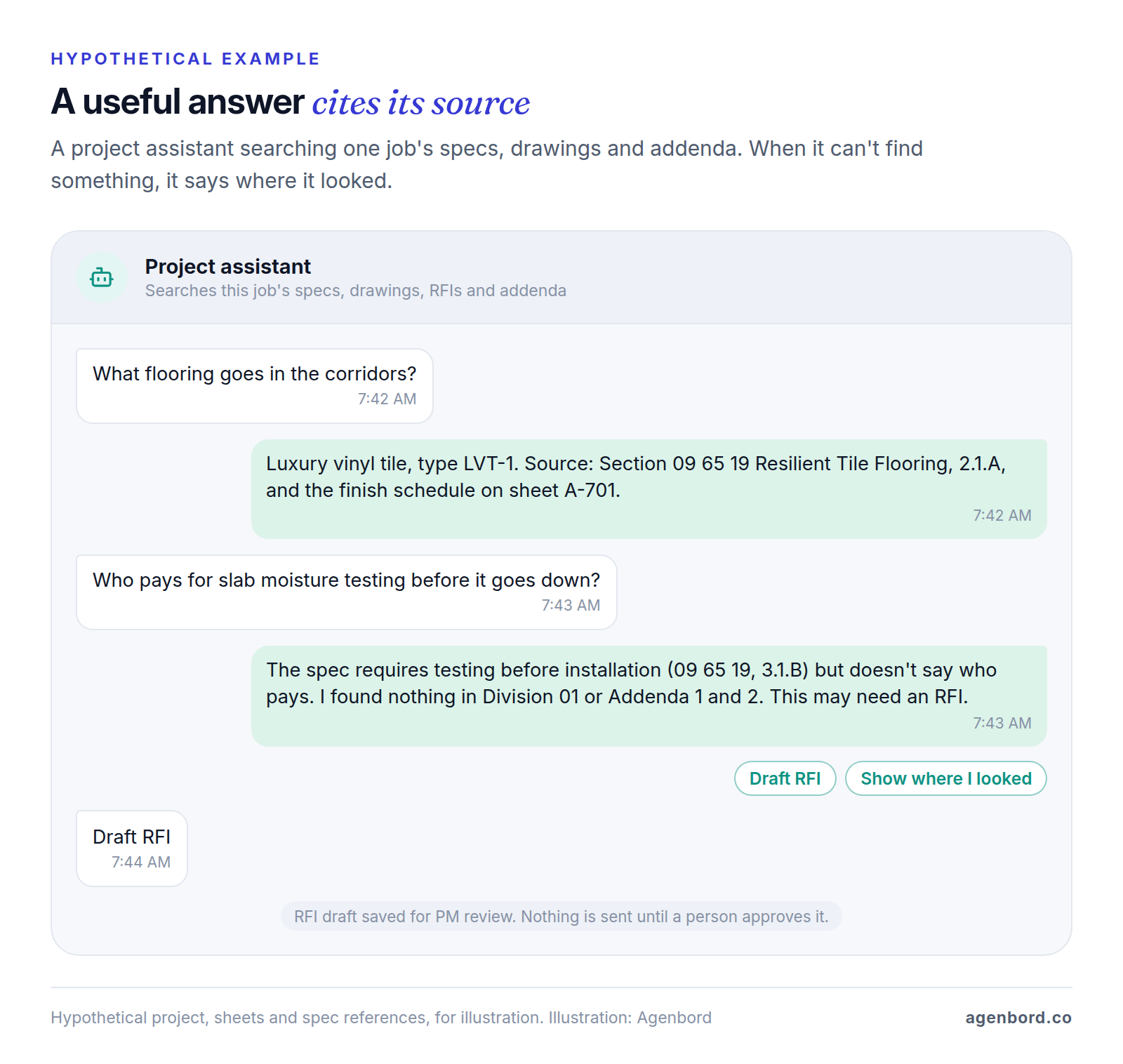
Search is the simplest use to try, because it needs only the documents you already have. Instead of paging through a spec book that runs to hundreds of pages, a project engineer asks a question in plain English and gets an answer with the section and page it came from. Procore's Deep Search Agent answers across specs, drawings, RFIs and submittals "with citations." In Autodesk's Forma Build, the Specifications tool uses AI to break spec books into sections, the Sheets tool pulls sheet numbers and titles out of multi-page PDFs, and Autodesk Assistant helps users find information and generate summaries.
The rule that makes search safe is simple: no citation, no answer. A good assistant quotes its source and says so when it can't find something, and the person opens the cited section before acting on it.
5. Submittals and RFIs
Building the submittal register means reading every spec section for what must be submitted, then keeping it current through addenda. Autodesk says Forma Build's AutoSpecs "analyzes specification documents and automatically generates submittal logs in minutes." Procore's Submittal Review Agent cross-checks submittals against specs and contracts to flag compliance gaps, and its RFI Agent analyzes drawings and data to draft pre-populated RFIs for review.
AI prepares the paperwork; it doesn't own the answers. The project manager checks the generated register against the spec before it goes to subs, reviews every flagged gap and decides which questions deserve an RFI. The architect or engineer still reviews the submittals and answers the RFIs.
6. Daily logs
Superintendents write daily logs at the end of long days, so the logs tend to be thin. AI turns what the field already captures into a draft: Procore's Daily Log Agent turns "field photos, emails, video, and voice into completed daily logs." A superintendent can talk through the day on the walk back to the trailer, then review a structured draft of crews, work performed, deliveries, inspections, weather and delays.
Someone still reads and approves every log. It's the record you'll lean on in a delay claim or a dispute, so the superintendent confirms headcounts, delays and who was told what before it's saved. If your field records don't live in one system yet, our construction project management software guide covers that step first.
7. Progress tracking from site photos
Reality capture tools record the site with 360-degree cameras, drones or phones on a regular walk, and let the team compare what's built with the plans and models over time. OpenSpace works with all three and says teams use it to "verify work, compare plans and models, track progress, resolve issues." Forma Build also uses machine learning to tag project photos so they're searchable.
The AI only knows what was captured, so someone has to walk the site on a set schedule. Confirm progress yourself before it feeds a pay application or a schedule update, and decide what a deviation means.
8. Safety: spotting hazards in site images
One practical use of AI in construction safety is reviewing site imagery for visible hazards. DroneDeploy's Safety AI reviews images from 360 walks, drones, ground robots and docked cameras and flags issues such as "missing guardrails, exposed edges, improper PPE, fall hazards," each linked to an OSHA standard with a confidence score. DroneDeploy adds that "your team always makes the final call on any finding." Working from project records rather than images, Autodesk's Construction IQ identifies and prioritizes risks across design, quality, safety and project management.
That final call can't move to software. OSHA defines a competent person as one "capable of identifying existing and predictable hazards" who "has authorization to take prompt corrective measures to eliminate them." A model sees one moment from one camera angle and can't stop the work. Use it as an extra set of eyes between walks, not a replacement for them.
9. Schedule risk
Schedule risk tools read your existing schedule and forecast how likely each activity and milestone is to finish late. nPlan says its model was trained on "a dataset of 750,000 historical schedules representing over $2Tn of construction spend," works with schedules from Oracle P6, Powerproject and Microsoft Project, and forecasts the uncertainty of every activity rather than only the finish date.
The input has to be a real schedule: activities tied by logic, so each one is linked to what must finish before it. A bar chart drawn to look right gives the model nothing to analyze. These tools suit larger projects with formal critical path schedules more than a six-week remodel, and the scheduler and project manager still decide whether to resequence, add a crew or warn the owner.
Where AI in construction falls short
The limits are as useful to know as the uses:
- Pricing the work. AI can measure, but a price comes from your production rates, crew mix, site access and supplier quotes, and it has nothing reliable to go on for a type of job you've never built.
- What isn't in the documents. Conditions behind a wall, the sub who's short-handed this week, the inspector's habits: none of that is in the drawings, so none of it is in the answer.
- Responsibility. A model can draft an RFI, a notice or a safety observation. It can't sign a bid, stop unsafe work or answer a design question; your people and the licensed design professionals do.
- Weak records. Scanned drawings with no text layer, spec books missing addenda, schedules without logic and daily logs on paper all produce weak output. AI amplifies the quality of your records, good or bad.
- Acting on its own. We wouldn't let an agent send RFIs, approve pay applications or issue contractual notices without a person approving each one. Notices carry deadlines and consequences, and a wrong one can cost more than the hours saved.
Data you need before AI can help
Every use above runs on a specific kind of record. Before you buy, check whether yours are in shape.
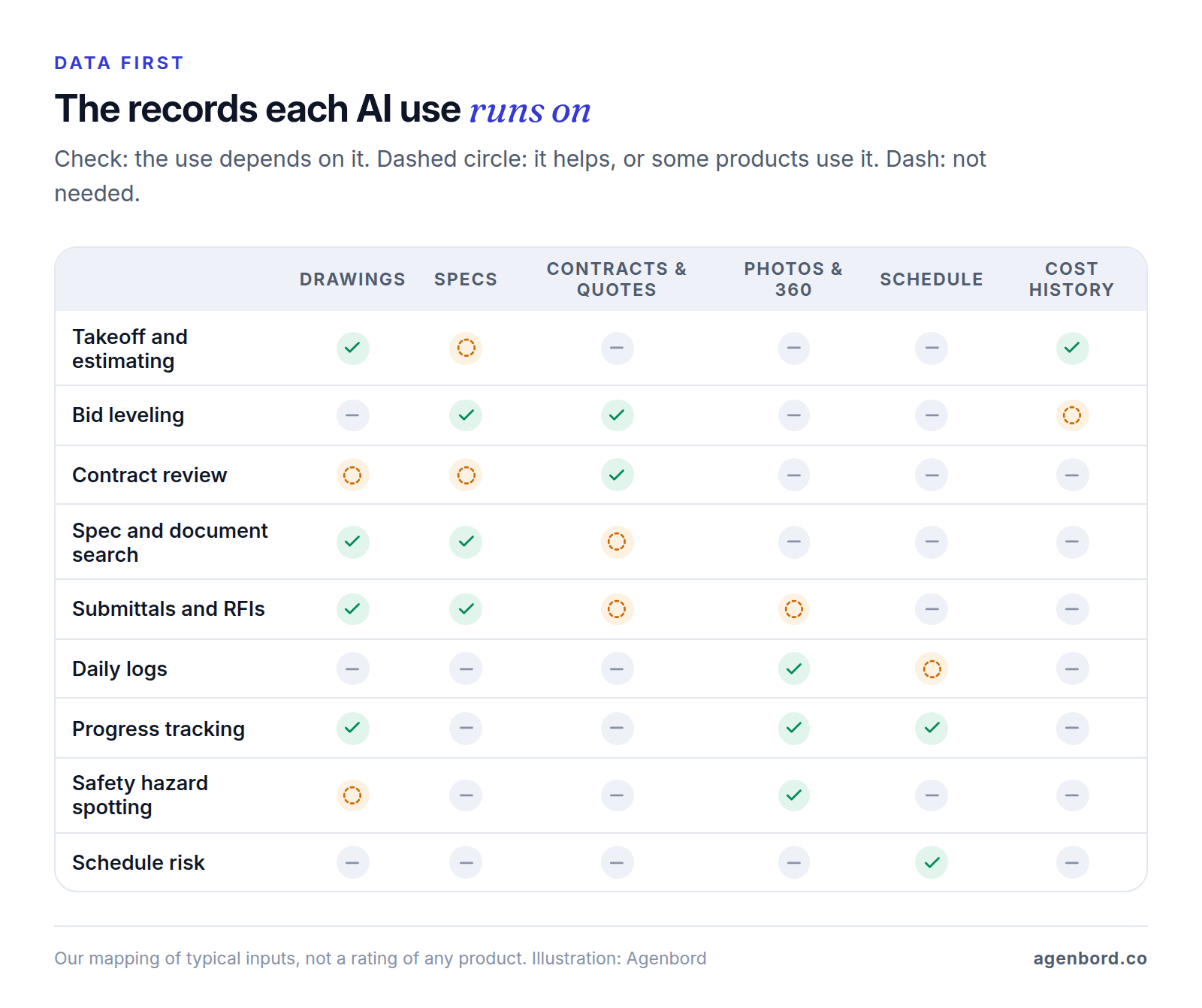
- Drawings as vector PDFs from the design team rather than scans, with consistent sheet numbers and the current revision clearly marked.
- Specs as searchable text, with every addendum included.
- Contracts, subcontracts and sub proposals as text PDFs, plus your standard positions written down: what you accept and what you push back on.
- Photos with dates and locations, stored in one system rather than on personal phones.
- A schedule with logic ties in P6, Microsoft Project or your project management software.
- Cost codes used the same way in estimates, budgets and job cost reports, with closed-out reports from finished jobs.
- Permissions by project and role, so an AI tool can't show a foreman the owner contract. Procore says access to its AI "mirrors Procore project permissions"; ask every vendor how theirs works.
What AI in construction costs
Construction AI is priced four ways: per user (takeoff tools and general assistants), per term or number of projects (some platform plans), by quote with credits or volume (enterprise platforms), and per use (custom builds, billed by the AI model provider). Here's what the vendors' own pages showed in October 2026.
| Tool | What the AI does | Price as of October 2026 |
|---|---|---|
| Microsoft 365 Copilot Business | AI assistant inside the Microsoft 365 apps | $21 per user/month paid yearly ($18 for the first year on annual plans bought July 1–December 31, 2026), on top of a qualifying Microsoft 365 plan; Copilot Chat comes with eligible plans at no extra cost |
| Togal.AI Growth | Automated takeoff, chat and symbol search on drawings | $299 per user/month, billed yearly; Business plan for 4+ users by quote |
| Bluebeam Max | AI drawing reviews and comparisons | $590 per user/year, billed annually (introductory price) |
| Autodesk Forma Build | AutoSpecs, Construction IQ, Autodesk Assistant, photo tags | Listed as starting at $117 a month; the page doesn't say per user or the billing term |
| Procore AI (Digital Coworker plans) | Agents for search, RFIs, submittals, daily logs and contracts | Quote. Starter Pack: 6-month flat-rate term, up to 3 projects. Pro and Enterprise: 12-month terms priced on credit usage |
| Document Crunch | Contract and document risk review | Quote; free trial offered |
| OpenSpace | Site capture and progress tracking | Quote |
| DroneDeploy Safety AI | Hazard detection in site imagery | Add-on; no public price |
| nPlan | Schedule risk forecasting | Quote |
| Custom AI feature (Agenbord) | AI inside your own systems and data | Pilot from $4k (2–4 weeks); production feature $15k–$50k (6–12 weeks); plus model usage and hosting |
The license is often the smaller cost. Budget for:
- Review time. Every output needs a person. Count those minutes in the pilot, or the savings look bigger than they are.
- Data cleanup before go-live: requesting vector drawings, merging addenda, tying schedule logic.
- Capture time and hardware for photo-based tools, since someone walks the site with a 360 camera on a schedule.
- Seats for everyone who reviews AI output, not only the people who start it.
- Model usage on custom builds, billed per use by the AI provider. Our guide to AI agents for business works through per-task model costs.
Risks of AI in construction, and how to control them
- Wrong quantities and missed scope. The bid is yours, not the software vendor's. Spot-check sheets by hand, compare totals with a similar finished job, and have a second estimator sign off before pricing.
- Confident wrong answers. Language models can produce fluent text that isn't in your documents. Require citations, open the source before acting, and test the tool on questions you already know the answers to, as in the pilot below.
- Data rights. Before you upload a drawing set, spec book or contract, read two documents: your contract (confidentiality terms, and who owns the drawings and specs) and the AI vendor's terms (whether your data trains models, where it's stored, what happens when you leave). Vendors differ. Procore says your data "is never used to train models like ChatGPT, Claude, or Gemini." OpenAI says that by default it doesn't train on business data from ChatGPT Business, ChatGPT Enterprise or its API, while its pricing page says content on individual plans (Free, Go, Plus and Pro) is used to train its models, with an opt-out. Keep project documents out of personal accounts.
- Records and notices. Daily logs, RFIs and notices are contract records. AI drafts; a named person reviews and sends. Keep both the draft and the approved version.
- Worker privacy. Cameras record people. Tell crews what's captured and why, prefer tools that detect conditions (a missing guardrail) over tools that identify individuals, and ask your attorney about your state's privacy rules before you turn on anything that recognizes faces.
- Lock-in. Ask how you'd export your documents, AI outputs and logs if you leave, and get the answer in writing.
This is general information, not legal advice. Your contracts, the vendors' terms and your attorney decide what applies to you.
How to use AI in construction: a one-project pilot
The cheapest way to learn whether AI helps your company is one use on one live project, measured against how you work today.
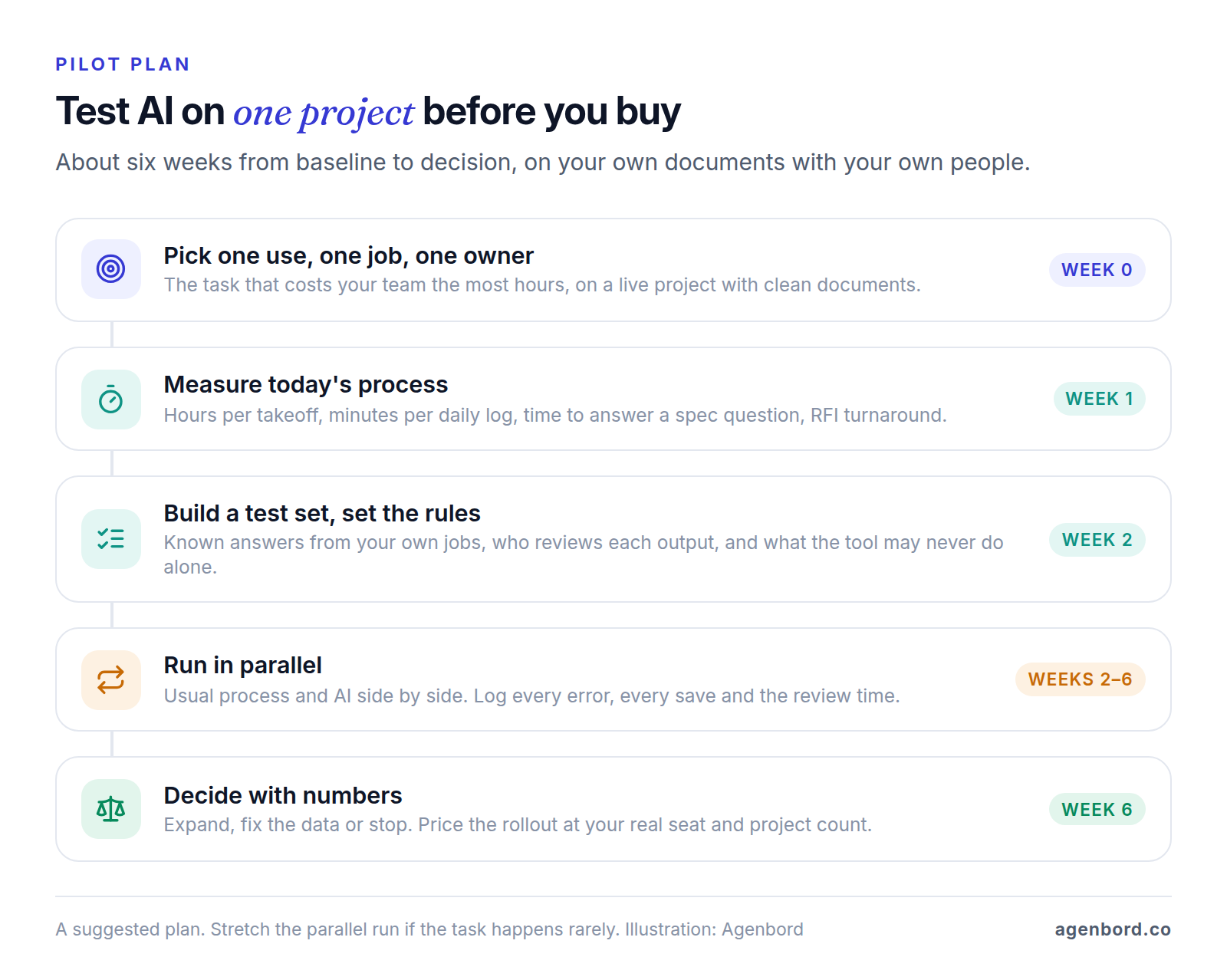
- Pick one use, one job and one owner. Choose the task where your team loses the most hours, on a project with clean documents, and name the person who'll judge the result.
- Measure today's process for a week. Hours per takeoff, minutes per daily log, how long a spec question takes to answer, RFI turnaround.
- Build a test set and set the rules. Gather work with known answers: a finished job's drawings and final quantities, 20 spec questions you've already answered, last month's daily logs. Then write down what counts as correct, who reviews each output, and what the tool must never do on its own, such as send anything outside the company.
- Run it in parallel for about four weeks. Do the work the usual way and with AI, side by side. Log every error and every save, and count review time against the savings.
- Decide with numbers. Expand if it saved time after review at an error rate you can live with, fix the data if that was the problem, or stop. Price the rollout at your real seat and project count.
Several tools above bill annually (Togal.AI, Bluebeam, and Procore's Pro and Enterprise plans), so ask for a trial or a short pilot term before you sign. Document Crunch offers a free trial, and Procore's Starter Pack runs six months on up to three projects.
When to build AI into your own systems
Buy first. If you run Procore or Autodesk, try their AI where your documents already live, and for a single task, a point tool is faster than any build. Custom work pays off when:
- The question spans systems. "Which jobs are over budget on labor and behind schedule?" needs job cost from accounting, hours from payroll and dates from the schedule.
- Your data lives in your own ERP, database or spreadsheets, where off-the-shelf AI can't reach it.
- Your process is the edge: a leveling template, a takeoff-to-assembly mapping or a report no product produces.
- AI should sit inside an approval flow. Extracted sub proposals land in your leveling sheet, and nothing moves until an estimator approves it.
Smart Construction, the cloud construction ERP our team designed, built and operates, shows the in-system version: its AI copilot answers questions over the company's own project and financial data, in the same data model that holds estimating, progress billing, procurement and site diaries.
Here's how we price AI agents and AI features. A pilot starts from $4k (2–4 weeks): one task, a test set from your data, a working prototype and an honest accuracy and cost report. A production AI feature, integrated with guardrails, monitoring and human review, runs $15k–$50k (6–12 weeks), and multi-agent systems run $50k+, phased. Model usage is billed per use by the AI provider, hosting runs roughly $50–$500 a month, and maintenance about 15–20% of the build cost a year. Our build vs buy framework helps you weigh the options.
Sources
- Togal.AI - Pricing (accessed October 2026)
- Bluebeam - Pricing (accessed October 2026)
- Autodesk - BuildingConnected Pro (accessed October 2026)
- Document Crunch - Construction document review and risk analysis (accessed October 2026)
- Procore - Procore AI (accessed October 2026)
- Procore - Procore AI plans (accessed October 2026)
- Autodesk - Forma Build (accessed October 2026)
- OpenSpace - Jobsite reality capture and progress tracking (accessed October 2026)
- DroneDeploy - Safety AI (accessed October 2026)
- DroneDeploy - Pricing (accessed October 2026)
- OSHA - 29 CFR 1926.32, Definitions (accessed October 2026)
- nPlan - Schedule risk forecasting (accessed October 2026)
- Microsoft - Microsoft 365 Copilot pricing (accessed October 2026)
- OpenAI - Enterprise privacy (accessed October 2026)
- OpenAI - ChatGPT pricing (accessed October 2026)
Prices, plans and regulations change. Figures were checked on October 2, 2026; follow the links for the latest. Nothing here is legal, tax or financial advice.
About the author
Founder, Agenbord
Muhammad Hamza is the founder of Agenbord, the Fort Lauderdale software company behind the construction ERP Smart Construction and a WhatsApp-first billing platform. He writes practical guides on buying, building and automating business software.