
On this page
- When is it time to redesign your website?
- How much does a website redesign cost?
- How long does a website redesign take?
- The website redesign process, step by step
- How to redesign a website without losing SEO
- Accessibility during a redesign
- Website redesign project plan template
- How to brief an agency for a website redesign
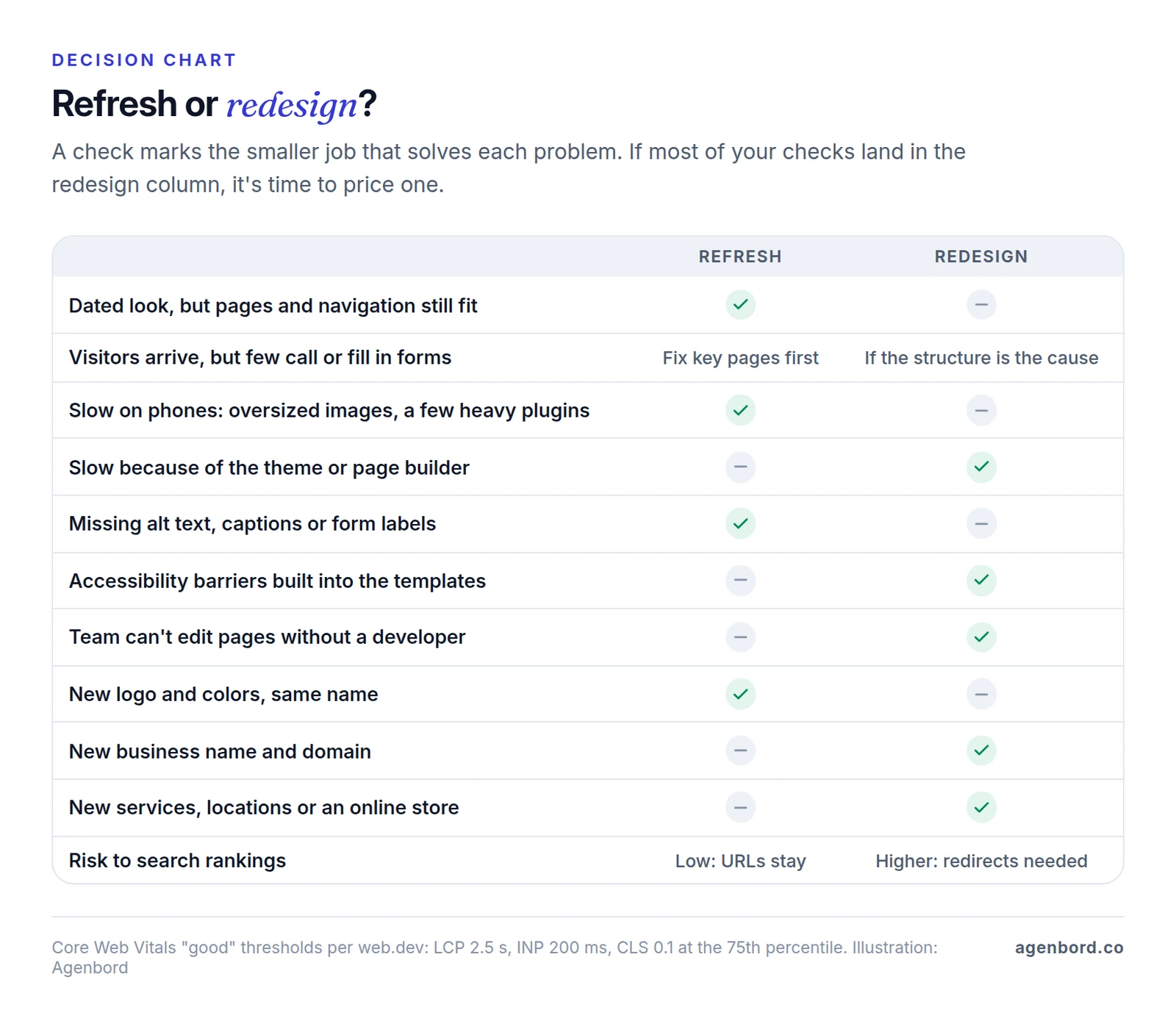
A website redesign is worth paying for when the site itself is holding the business back: visitors arrive but don't call or fill in forms, pages fail Google's Core Web Vitals on phones, the templates have accessibility barriers, your team can't change anything without a developer, or the site no longer matches your brand or what you sell. If the structure still works and only the look is tired, a refresh costs less and risks less.
With us, a custom site or redesign typically costs $8,000–$25,000 and takes 5–10 weeks. Smaller sites of 5–10 pages start at $3,500 (3–5 weeks), and e-commerce or complex sites start at $15,000 (6–12 weeks).
One rule protects the search traffic you already have: before launch, map every old URL to its new home and send visitors and Google there with a permanent (301) redirect. Redirects are how Google transfers an old page's signals to its new address. Without them, old URLs return errors and drop out of the index.
We design and build websites and redesigns. Below is the process we use, with an SEO checklist, a sample redirect map and a project plan you can copy.
When is it time to redesign your website?
Age on its own isn't a reason. These six signals are, and most can be checked with numbers rather than taste.
Visitors arrive but don't act. Your analytics show steady visits to service or product pages but few calls, form fills, bookings or sales. If the weak spots are a handful of pages, start with conversion optimization on those pages: clearer offers, a visible phone number, shorter forms. A redesign is the answer when the structure is the problem, such as navigation that hides what you sell or no clear path from a service page to contact.
Pages fail Core Web Vitals on phones. Google's thresholds for a good experience are a Largest Contentful Paint (main content visible) within 2.5 seconds, an Interaction to Next Paint (response to taps and clicks) of 200 milliseconds or less and a Cumulative Layout Shift (how much the layout jumps) of 0.1 or less, measured at the 75th percentile of real visits. Google recommends reaching them "for success with Search." Check the real-user (field) data in PageSpeed Insights. If oversized images or a couple of plugins are to blame, fix them in place. If the theme or page builder is, the templates need rebuilding.
Accessibility barriers are built into the templates. Menus that don't work from a keyboard, forms without labels and a color palette that fails contrast checks repeat on every page. Missing alt text or captions can be fixed page by page; template problems are cheaper to fix in a rebuild.
Your team can't update the site. Every new page needs a developer, the page builder fights you, key plugins are no longer maintained, or you can't publish the landing pages and forms marketing needs. That's a platform problem a refresh won't fix.
You've rebranded. A new logo and colors can often be applied to the existing templates. A new business name usually brings a new domain, which turns the project into a site move where every URL changes.
What you sell has changed. New services, locations, audiences or an online store that the current navigation and page types weren't built for. When the sitemap has to change, it's a redesign.
When a refresh is enough
A refresh changes how the site looks and reads without changing its structure: new colors, type and photos on the existing templates, rewritten copy and calls to action on key pages, compressed images and fewer plugins. URLs, navigation and page types stay where they are, so there's little search risk. It's the right call when the site is fast enough, your team can edit it and the pages still match what you sell.
How much does a website redesign cost?
How much does it cost to redesign a website? We price redesigns on the same bands as new sites, and the custom site or redesign band includes the work a redesign adds, content migration and SEO-safe redirects:
| Project | What it includes | Typical price | Typical timeline |
|---|---|---|---|
| Small business site, 5–10 pages | Mobile-first design, CMS, contact forms, on-page SEO and analytics | From $3,500 | 3–5 weeks |
| Custom site or redesign, 15–40 pages | Custom design system, integrations, content migration and SEO-safe redirects | $8,000–$25,000 | 5–10 weeks |
| E-commerce or complex site | Shopify, WooCommerce or headless builds with catalog migration, payments and integrations | From $15,000 | 6–12 weeks |
These are typical ranges, not quotes, and other firms price differently. Each project gets a fixed price against a written scope.
What moves a redesign quote
- How much content changes. Moving 60 blog posts as they are is import work. Rewriting 15 service pages is writing time, whoever does it.
- How many URLs change. If addresses stay the same, redirect work is small. If the structure or platform changes, every URL with traffic, conversions or links needs a mapped and tested redirect. On large sites, pattern rules (every
/blog/2019/...post to/blog/...) cover most URLs, and the exceptions are mapped by hand. - Changing platforms. Moving from a website builder to WordPress, or from WooCommerce to Shopify, means exporting and re-importing pages, posts, products and customer records, and not everything exports cleanly.
- Integrations to rewire. Forms that feed your CRM, booking, payments, chat, call tracking and email marketing each need reconnecting and testing end to end. Our CRM integration guide covers the ways to get web leads into a CRM.
- Speed and accessibility targets. Building to Core Web Vitals and WCAG 2.2 AA takes real design, build and testing time. If a proposal doesn't mention them, assume they aren't included.
After launch, budget for hosting (typically $20–$100 a month for a business website) and maintenance at about 15–20% of the build cost per year. Our small business website cost guide breaks down those yearly bills, and the website cost calculator gives a range for your own scope.
How long does a website redesign take?
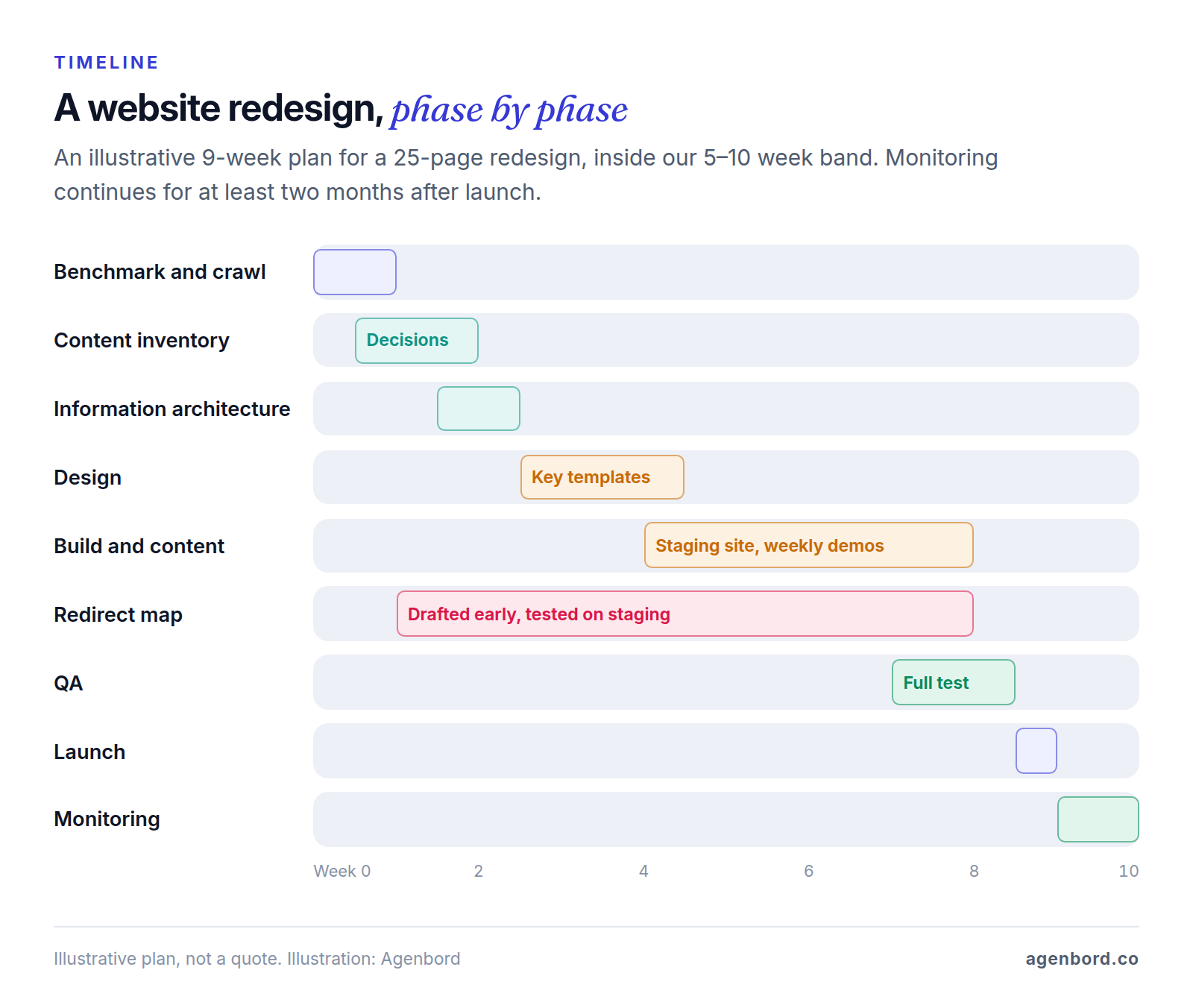
With us, a custom site or redesign typically takes 5–10 weeks, a small business site 3–5 weeks and an e-commerce or complex site 6–12 weeks. In our website process, the home page and key templates are designed in 1–2 weeks, build and content take 2–5 weeks, and a launch week covers speed and accessibility checks, redirects, Search Console setup and training. A redesign adds the benchmark, content inventory and redirect map up front.
The drivers that raise the price (more URLs, a platform change, integrations) also stretch the schedule. Three more are mostly about time:
- Content. Pages can't launch until copy and photos are approved, so content sets the pace. Put writing in the scope, or start it in week one.
- Approvals. Every extra approver adds review rounds. Name one person who signs off.
- Launch timing. Avoid your busiest season and the week before a campaign, and freeze edits on the old site in the final days so nothing gets lost in the move.
The website redesign process, step by step
Eight phases, each ending in something you can review. On a small site some take a day, but none should be skipped.
1. Benchmark and crawl
Record how the current site performs before anything changes: search clicks and impressions by page and query, landing pages and their conversions, Core Web Vitals field data and the pages other sites link to. Then crawl the site to capture every URL with its status code, title, H1, meta description and canonical tag. Screaming Frog's SEO Spider crawls up to 500 URLs free; a license is $279 per user per year as of October 2026. The baseline is how you'll judge the new site eight weeks after launch.
2. Content inventory
Give every URL a decision in a spreadsheet: keep, update, merge into a stronger page or retire. Pages with steady search traffic, conversions or links keep their substance, and ideally their URL. Thin, outdated and duplicate pages are candidates to merge or retire. Assign a writer and a due date to every page that needs new copy.
3. Information architecture
Plan the new sitemap: the page tree, navigation, page types and URL patterns. Keep existing URLs wherever they still make sense, and change them only for a reason, such as a platform with a different URL format or new sections for services and locations. Every URL that changes goes into the first draft of the redirect map now, not in launch week.
4. Design
Design templates, not every page: home, service or product, location, article, contact and landing pages. Put real headings and copy into the mockups so you approve the message, not placeholder text. Build accessibility into the design system so every template inherits contrast-checked colors, visible focus states and labeled form fields.
5. Build
Develop on a password-protected staging site: templates, CMS, content migration, forms and integrations, analytics and conversion tracking, structured data and the redirects themselves. You should see working progress every week; we demo ours weekly.
6. QA
Test staging as if it were live. Crawl it for broken links, missing titles and stray noindex tags, run every old URL in the redirect map, test speed and accessibility, and submit every form to confirm the lead arrives where it should. Fix, retest and sign off in writing.
7. Launch
Go live early in the week, when your team and the developers are around to fix problems, and work through the launch-day checklist below.
8. Post-launch monitoring
Check daily in the first week and weekly for at least two months, comparing search clicks and conversions by page against the baseline. Fix what breaks, then hand the site to whoever maintains it.
How to redesign a website without losing SEO
Website redesign SEO comes down to one idea: Google ranks pages at specific URLs, and a redesign can break that in four ways. URLs change without redirects, content that ranked gets cut or rewritten, titles and internal links change, or staging settings leak onto the live site. The redirect map handles the first; the checklist covers the rest. If search brings most of your leads, have whoever runs your SEO review both.
Build the redirect map
A crawl only finds pages that are linked, so build the list of old URLs from five sources: a crawl, your XML sitemap, landing pages in analytics, pages in Search Console's Performance report and pages with backlinks. Include PDFs and images that get traffic or links. Then give every URL one destination, following Google's site move guidance:
- One to one, to the closest match. Each old URL goes to the new page that answers the same question. Merged pages redirect to the page they were merged into.
- Don't dump URLs on the home page. Google warns that redirecting many old URLs to one irrelevant destination, such as the home page, "can confuse users and might be treated as a soft 404 error."
- Retire what has no equivalent. Let it return a 404 or 410. Google treats them the same and drops the URL from its index.
- Use permanent, server-side redirects. Set HTTP 301 or 308 redirects on the server, at your CDN or in your CMS's redirect manager. Google treats them as permanent, a strong signal to show the new URL; 302 and 307 redirects are temporary. JavaScript redirects are a last resort.
- No chains. Point each old URL straight at its final page. Google follows up to 10 hops but advises keeping chains to "ideally no more than 3 and fewer than 5." Check URLs from earlier redesigns too: a 2019 address that redirects to a 2022 one should now go straight to the new page.
- Keep redirects for good. Google says to keep them "for as long as possible, generally at least 1 year," which gives it time to transfer signals to the new URLs. They cost almost nothing to leave in place.
Here's part of a redirect map for a hypothetical HVAC company moving to a new site structure:
| Old URL | New URL | Action | Why |
|---|---|---|---|
/ac-repair.html | /services/ac-repair/ | 301 | Same page, new address on the new platform |
/Heating-Services | /services/heating/ | 301 | New section and a lowercase address |
/blog/2019/05/tune-up-tips | /blog/ac-maintenance/ | 301 | Two thin posts merged into one guide |
/blog/2021/04/spring-ac-checklist | /blog/ac-maintenance/ | 301 | Merged into the same guide |
/fort-lauderdale-ac-repair | /service-areas/fort-lauderdale/ | 301 | Moved into a service-areas section |
/financing.pdf | /financing/ | 301 | PDF replaced by a web page |
/spring-special-2021 | None | 410 | Expired offer with no equivalent |
/reviews/ | /reviews/ | Keep | Unchanged, so no redirect |
In your own sheet, add each old URL's clicks, conversions and backlinks from the baseline, plus a "tested" column for QA.
SEO-safe redesign checklist
Before the build
- Baseline saved: Search Console clicks and impressions by page and by query for the longest date range available, analytics landing pages and conversions, Core Web Vitals field data and your most-linked pages.
- Old URL list built from all five sources, each URL with a decision and, if it changes, a row in the redirect map.
On staging
- Staging is password-protected. A robots.txt block isn't enough: Google says robots.txt "is not a mechanism for keeping a web page out of Google," and a blocked URL can still be indexed if other sites link to it.
- Titles, H1s and meta descriptions for pages that rank are carried over or deliberately improved.
- Pages that rank keep their substance: the same topics and questions answered, not a shorter rewrite.
- Each new URL has a self-referencing canonical tag that points to the live domain, not staging. Redirects, canonicals and the sitemap all name the same URL, because Google advises against mixed signals.
- Structured data is carried over in JSON-LD, the format Google recommends, and passes Google's Rich Results Test.
- Internal links point straight to new URLs, not through redirects. On multilingual sites, hreflang annotations use the new URLs.
- The new XML sitemap lists only live, canonical URLs you want indexed.
- Analytics, conversion tracking and call tracking work.
- Every row of the redirect map is tested: the old URL returns a 301 to the right page, which returns a 200, in one hop.
Launch day
- Staging password, noindex tags and robots.txt blocks removed. Google's guide specifically reminds site owners to remove blocks that were only needed for the move.
- Redirects live and spot-checked on the production domain.
- New XML sitemap submitted in Search Console. Keep a sitemap of the old URLs too: in the Sitemaps report, indexed old URLs should fall toward zero as the new ones rise.
- Key pages checked with Search Console's URL Inspection tool, and a test form, call and order completed on the live site.
- Links you control updated: your Google Business Profile, social profiles, directory listings and ad campaigns' landing pages.
- If the domain changed: a Change of Address submitted in Search Console for the old domain and each verified variant (www, non-www and subdomains).
After launch
- Daily in week one: the Page indexing report, your 404 log and conversions. Check "Not found (404)" for URLs the map missed and "Soft 404" for old URLs redirected somewhere irrelevant. Old URLs moving into "Page with redirect" is expected.
- Weekly for at least two months: clicks and impressions by page against the baseline. For any page that drops, compare old and new versions: redirect, content, title and internal links.
- Core Web Vitals rechecked after a month. PageSpeed Insights field data covers the previous 28 days, so it takes about that long to reflect only the new site.
- Redirects kept, and the old domain renewed if it changed.
What to expect: Google says to expect temporary ranking fluctuation during a move, and that on a medium-sized site "it can take a few weeks or more" for the new URLs to replace the old ones in results. A sharp drop in the first days points to something technical, so check redirects, noindex tags and robots.txt first.
Accessibility during a redesign
A redesign is the cheapest time to fix accessibility, because the parts that are expensive to patch (menus, forms, color palettes and page builder components) are being rebuilt anyway. Write WCAG 2.2 Level AA into the scope as the target. It's the current version of W3C's guidelines, and content that conforms to 2.2 also conforms to 2.1 and 2.0.
Test templates and key journeys with a keyboard and a screen reader during QA, not after launch. Our guide to ADA-compliant websites covers what the law requires, the full checklist and how to test. This is general information, not legal advice.
Website redesign project plan template
Copy this into a spreadsheet or project tool. It assumes an agency builds the site and your team supplies content and decisions; change the owners to fit your setup.
| Phase | Owner | Deliverables | Sign-off before moving on |
|---|---|---|---|
| Kickoff | You and agency | Goals with numbers (calls, leads, bookings or sales), scope, budget, launch window, named decision-maker | Signed proposal and scope |
| Benchmark and crawl | Agency | Baseline report (search, analytics, conversions, Core Web Vitals) and full list of old URLs | You confirm which conversions count |
| Content inventory | Agency and you | Keep, update, merge or retire decision for every URL; writer and due date for each new or rewritten page | Content plan approved |
| Information architecture | Agency | Sitemap, navigation, URL patterns, template list, first redirect map | Sitemap approved |
| Design | Agency | Mockups of key templates with real content; design system with contrast and focus states checked | Designs approved within the agreed rounds |
| Content | You or a copywriter | Final copy, photos, bios, alt text, legal pages | Decision-maker approves each page |
| Build | Agency | Password-protected staging site, CMS, migrated content, forms and integrations, tracking, structured data, redirects | Weekly demos; feature-complete review |
| QA | Agency and you | Test log covering links, redirects, speed, accessibility, forms, browsers and devices | Written QA sign-off |
| Launch | Agency | Go-live checklist done, sitemap submitted, editors trained | Live site confirmed |
| Monitoring | Agency and you | Weekly report against the baseline for at least two months, fixes logged | Project closed; handover or care plan |
Name four roles before kickoff, even if one person holds two:
- Decision-maker: final say on scope, design and launch.
- Content owner: gathers and approves copy, photos and bios.
- SEO owner: owns the baseline, reviews the redirect map and watches Search Console after launch.
- Technical contact: access to the domain, DNS, hosting, analytics, Search Console and CRM.
How to brief an agency for a website redesign
The quote checklist and contract red flags in our website cost guide, linked above, apply to any website project: own your domain, code and accounts, and get running costs itemized. A redesign brief adds what can be lost in the move:
- What has to survive. Your top pages by search traffic and leads, URLs printed on vehicles, signs, brochures and QR codes, and integrations that feed your CRM or booking system.
- Access to the data. Analytics, Search Console, hosting and DNS, so bidders can study the current site before they quote.
- What's changing. New services, locations, brand or platform, and whether URLs may change.
- Targets. The conversion numbers you want to move, "good" Core Web Vitals on mobile and WCAG 2.2 AA.
- Timing. Busy seasons to avoid and campaigns that depend on the launch date.
Ask every bidder the same questions:
- Who builds the redirect map, from which sources, and how is it tested before launch?
- How do you protect pages that rank: their content, titles and internal links?
- How is staging kept out of Google?
- If launch goes wrong, how quickly can the old site be restored?
- What do you monitor after launch, for how long, and what's included if traffic drops?
Red flags in a redesign proposal
- "SEO-friendly" with no deliverables. If the redirect map, metadata carry-over and Search Console setup aren't listed, assume they aren't included.
- Redirects for "main pages" only. Every URL with traffic, conversions or links needs a destination, including blog posts and PDFs.
- No staging site, or one anyone can find. Review and testing need a private copy of the site.
- Content migration left vague. Moving 80 posts by hand can take days, so the proposal should say who moves what.
- A launch date with no content dates. If the plan doesn't say when copy and photos are due, the launch date isn't real.
- Launch is the finish line. Without a monitoring and bug-fix period, every problem found in week two becomes a change request.
If you're still shortlisting agencies, our guide to choosing a development partner covers what to check before you sign.
Sources
- Google Search Central - Site moves with URL changes (accessed October 2026)
- Google Search Central - Redirects and Google Search (accessed October 2026)
- Google Search Central - How HTTP status codes, and network and DNS errors affect Google Search (accessed October 2026)
- Google Search Central - Introduction to robots.txt (accessed October 2026)
- Google Search Central - How to specify a canonical URL with rel="canonical" and other methods (accessed October 2026)
- Google Search Central - Introduction to structured data markup in Google Search (accessed October 2026)
- Google Search Central - Understanding Core Web Vitals and Google search results (accessed October 2026)
- web.dev - Web Vitals (accessed October 2026)
- Google for Developers - About PageSpeed Insights (accessed October 2026)
- Search Console Help - Performance report (Search results) (accessed October 2026)
- Search Console Help - Page indexing report (accessed October 2026)
- W3C - WCAG 2 Overview (accessed October 2026)
- Screaming Frog - SEO Spider (accessed October 2026)
- Screaming Frog - SEO Spider license pricing (accessed October 2026)
Prices, plans and regulations change. Figures were checked on October 2, 2026; follow the links for the latest. Nothing here is legal, tax or financial advice.
About the author
Founder, Agenbord
Muhammad Hamza is the founder of Agenbord, the Fort Lauderdale software company behind the construction ERP Smart Construction and a WhatsApp-first billing platform. He writes practical guides on buying, building and automating business software.