On this page
- How to pick the first jobs for AI
- 12 practical uses of AI, by department
- Which AI is best for small business?
- Data privacy basics: training, settings and what not to paste
- Agentic AI and private AI for small business
- When to build custom AI connected to your systems
- How to use AI for small business: a 30-day rollout plan
Most small business owners don't need an AI strategy. They need a few hours back each week without new risks. The practical way to use AI for small business is to start from jobs, not tools: the replies, follow-ups, first drafts, meeting notes and document reading your team already does, with a person checking the output before it reaches a customer or your books.
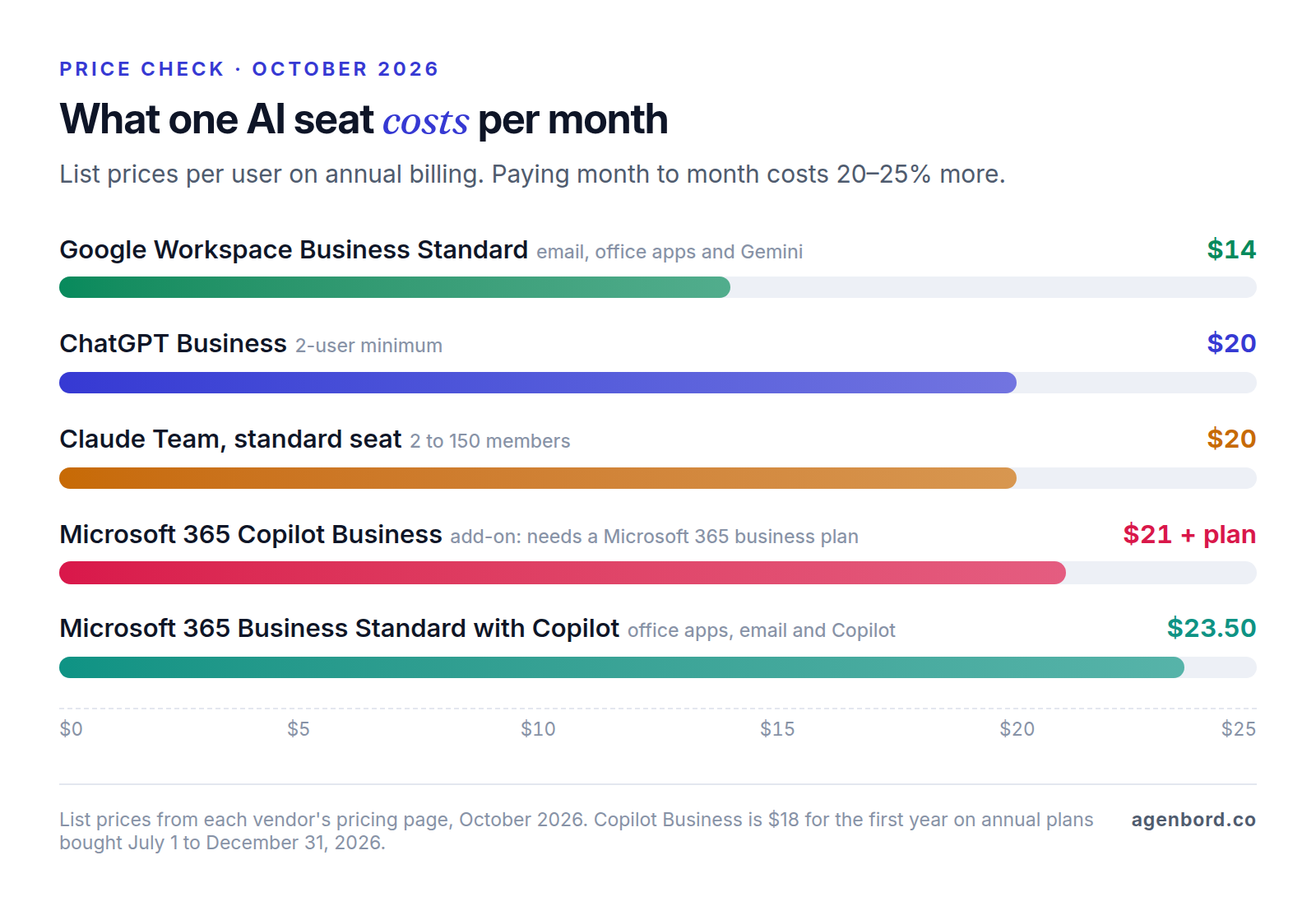
The tools themselves are inexpensive. As of October 2026, Gemini comes with Google Workspace Business Standard ($14 per user/month on an annual plan), Microsoft's Copilot Business costs $21 per user/month paid yearly on top of a Microsoft 365 business plan, and ChatGPT Business and Claude Team both list at $20 per user/month billed annually. The expensive mistakes happen elsewhere: a wrong answer sent to a customer, or customer data pasted into a personal account.
How to pick the first jobs for AI
Today's AI assistants run on large language models, which are good at reading, summarizing, drafting and rewriting. They're unreliable at exact arithmetic, at facts nobody gave them and at judgment calls with consequences. So the best first jobs pass three tests:
- Frequent. It happens every day or week, so small savings add up.
- Mostly words. Reading, writing or summarizing, not calculating or deciding.
- Quick to check. A person can verify the output in a fraction of the time the job takes.
A follow-up email after a sales call passes all three. Approving a refund or answering a tax question fails the third: checking it properly takes as long as doing it, and a miss is expensive.
Each use below lists the tool and its cost, what a person must still check, and the risk if nobody does. "AI seat" means one of the business plans compared further down.
12 practical uses of AI, by department
Customer service
1. Replies to emails, messages and reviews. Give the assistant the customer's message plus the facts it needs (hours, policy, price list) and ask for a reply in your voice that answers every question. For online reviews, ask for a short, specific thank-you or, for a complaint, an apology with a way to talk offline. Gemini in Gmail and Copilot in Outlook work inside the inbox, so nothing needs copying.
- Tool and cost: the assistant in your email, or any AI seat.
- A person checks: every fact, date, price and promise, then sends it.
- Risk: low while a person sends; higher once replies go out on their own.
2. Answering common questions and booking, on your website or phone. A chatbot that answers only from your pages and policies can handle "Do you service my area?" at 11 p.m. and book into your calendar under rules you set. An AI receptionist does the same on calls; our AI receptionist guide covers call flows and vendor prices.
- Tool and cost: a chatbot platform or receptionist service, priced by each vendor (our chatbot cost guide compares platform pricing with a custom build), or a custom AI chatbot with pilots from $4k.
- A person checks: a sample of conversations every week, plus every handoff.
- Risk: medium. Customers take its answers as yours, so a wrong price or policy becomes your problem. Give it a fast path to a person.
Sales
3. Follow-ups after calls and site visits. Paste your rough notes or the call transcript and ask for a recap email: the customer's problem, what you proposed, the next step and a date. Ask for a three-line CRM note in the same reply so the record stays current.
- Tool and cost: any AI seat.
- A person checks: names, figures and anything that reads like a promise.
- Risk: low.
4. First drafts of quotes and proposals. Save your proposal template, price list and two or three winning proposals in a reusable workspace (ChatGPT calls these Projects; Gemini's are Gems), then give it the job notes. It drafts the scope, exclusions and terms in your format.
- Tool and cost: any AI seat.
- A person checks: every line item, quantity and price. Do the math in your estimating sheet, not in the chat.
- Risk: high if unchecked, because a quote is a commitment.
Marketing
AI for small business marketing works best as a fast first-draft writer: the facts, the voice and the final edit stay yours.
5. Social posts, newsletters, web copy and ads. Give the assistant your facts and your voice: who you serve, what makes you different, a few posts you liked and words you never use. Ask for three versions and edit the best one. For visuals, ChatGPT creates images, and Google Workspace adds AI image and video tools (Pics and Vids).
- Tool and cost: any AI seat.
- A person checks: every claim (prices, guarantees, "best," results), the tone, and that images don't show real people, other companies' logos or products you don't sell.
- Risk: medium, with two rules to know. The FTC's final rule on fake reviews and testimonials bans reviews and testimonials that misrepresent who wrote them, including AI-generated fake reviews, and lets the agency seek civil penalties. And the U.S. Copyright Office concluded in January 2025 that AI output is protected only where a human author has determined sufficient expressive elements; prompts alone don't count. If you want to own a piece, a person has to shape it. This is general information, not legal advice.
6. Making sense of reviews and survey answers. Export your reviews, survey responses or support emails to a spreadsheet and ask for the five most common complaints and requests, each with example quotes. A pile of comments becomes a short list of fixes.
- Tool and cost: any AI seat that accepts file uploads.
- A person checks: the quotes it cites, and a few counts against the sheet.
- Risk: low. Remove names and contact details before uploading.
Operations
7. Meeting notes and action items. Gemini in Google Meet summarizes and takes notes (Workspace Business Standard and up), and Microsoft's Copilot plans include Copilot in Teams. Ask for decisions, owners and due dates in a fixed format, then paste them into your task list.
- Tool and cost: included with Workspace Business Standard and with Microsoft's Copilot plans.
- A person checks: decisions, numbers and who agreed to what, before the notes go out.
- Risk: low, with one legal catch: recording a conversation can require everyone's consent. Florida, for example, generally requires the consent of all parties (Fla. Stat. § 934.03). Tell participants, and check the rules where they are.
8. SOPs, checklists and training guides. Paste messy notes, or the transcript of a voice memo where you explain a task, and ask for a step-by-step procedure with a checklist and the three most common mistakes. New hires get a document, and you stop answering the same question.
- Tool and cost: any AI seat.
- A person checks: whoever does the job follows the SOP once, start to finish, and fixes what's wrong.
- Risk: low.
9. Pulling data out of PDFs, forms and photos. Upload a batch of supplier invoices, certificates of insurance or intake forms and ask for a table with the fields you need: name, date, amount, expiry. A chat assistant is fine for a handful a week. For dozens a day, an automated workflow with an AI step does it without copy-paste; our guide to AI workflow automation shows how to validate each extraction.
- Tool and cost: any AI seat with file uploads, or a single automated workflow from $1.5k.
- A person checks: every number against the source until the tool has proven itself on your documents, then a sample.
- Risk: medium. Misread digits look plausible, and these documents often carry account numbers.
Finance and admin
10. Bookkeeping prep and spreadsheet analysis. Export transactions or a sales report and ask the assistant to flag likely duplicates, suggest categories, explain a month-over-month change or write the formula you can't remember. Copilot in Excel and Gemini in Sheets work inside the spreadsheet.
- Tool and cost: any AI seat. Copilot in Excel comes with Microsoft's Copilot plans; Gemini in Sheets with Workspace Business Standard and up.
- A person checks: totals against the source. Your bookkeeper reviews categories, and tax questions go to your accountant.
- Risk: medium. Remove bank account numbers before uploading.
11. Contracts, leases and policies: summaries and key dates. Upload a vendor contract, lease or insurance policy and ask for a plain-English summary plus every date that matters: renewal, auto-renewal, notice period, price increases, termination terms. Put the dates in your calendar the same day.
- Tool and cost: any AI seat.
- A person checks: the clauses it points to, read in full before you act. Anything with legal consequences goes to your attorney.
- Risk: medium. A missed clause costs more than the time saved.
People and HR
12. Job posts, onboarding plans and policy drafts. Turn your notes on a role into a job post, build a first-week onboarding checklist, or get a first draft of a handbook policy (time off, phone use, remote work).
- Tool and cost: any AI seat.
- A person checks: pay, duties and requirements in the post. An HR professional or employment attorney reviews policies for your state.
- Risk: medium. Use AI to write, not to decide: screening and hiring decisions stay with a person.
Which AI is best for small business?
Usually the one inside the software you already use. Gemini in Google Workspace and Copilot in Microsoft 365 work on your email and files without copy-paste, and your admin already manages the accounts. The business plans, at list prices as of October 2026:
| Plan | Price per user/month | Best fit | Trains on your data? |
|---|---|---|---|
| Google Workspace Business Standard | $14 with a 1-year commitment, $16.80 monthly; includes email and office apps | Businesses on Gmail and Google Drive | No, per Google |
| Microsoft 365 Copilot Business | $21 paid yearly ($18 for the first year on annual plans bought July 1–December 31, 2026), $25.20 monthly; plus a Microsoft 365 business plan | Businesses on Outlook, Teams and SharePoint | No, per Microsoft |
| ChatGPT Business | $20 billed annually, $25 monthly; 2-seat minimum | A standalone assistant | Not by default |
| Claude Team | $20 billed annually, $25 monthly; 2–150 members | A standalone assistant | Not by default |
How to choose:
- On Google Workspace? Start with Gemini. Business Starter gets only limited Gemini features, so upgrading to Business Standard ($14 all in) costs less than a separate $20 assistant and adds Gemini in Meet.
- On Microsoft 365? Start with Copilot Chat, which Microsoft includes at no additional cost with eligible plans and describes as web-grounded. Add Copilot Business for people who live in Outlook, Excel and Teams: it brings Copilot into those apps and chat over your work data. Microsoft also sells Business Standard and Business Premium with Copilot built in, at $23.50 and $32 per user/month paid yearly.
- Want a standalone assistant? ChatGPT Business and Claude Team cost the same. Have two or three people run the same five real tasks through each for a week, then pick the one they prefer. Both sell premium seats with more usage at $100 per user/month billed annually.
- Mixing is fine. The suite's AI for everyone plus a few standalone seats for the people who write the most is a sensible setup.
Free plans are fine for learning and for public information, not for customer or company data. The next section explains why.
Data privacy basics: training, settings and what not to paste
Most AI data problems in a small business start the same way: someone pastes customer or company information into a personal account. What the vendors say, as of October 2026:
| Vendor | Free and personal plans | Business plans |
|---|---|---|
| OpenAI (ChatGPT) | Free, Go, Plus and Pro chats may be used to train models unless you turn off "Improve the model for everyone" | Business: not used for training by default |
| Anthropic (Claude) | Free, Pro and Max chats are used for training only if you allow it | Team and Enterprise: not used for training by default |
| Google (Gemini) | Personal accounts: chats help improve Google's services, a subset is read by human reviewers, and Google asks you not to enter confidential information | Workspace: company data is not used to train models |
Microsoft says prompts, responses and data accessed through Microsoft Graph aren't used to train the foundation models behind Microsoft 365 Copilot. Five rules cover most of the risk:
- Company work goes in company accounts. Personal accounts sit outside your admin controls, and their history leaves when the employee does.
- If a personal ChatGPT account gets used for work anyway, turn off "Improve the model for everyone" under Settings > Data controls, or use Temporary Chats, which aren't used for training and are kept for up to 30 days.
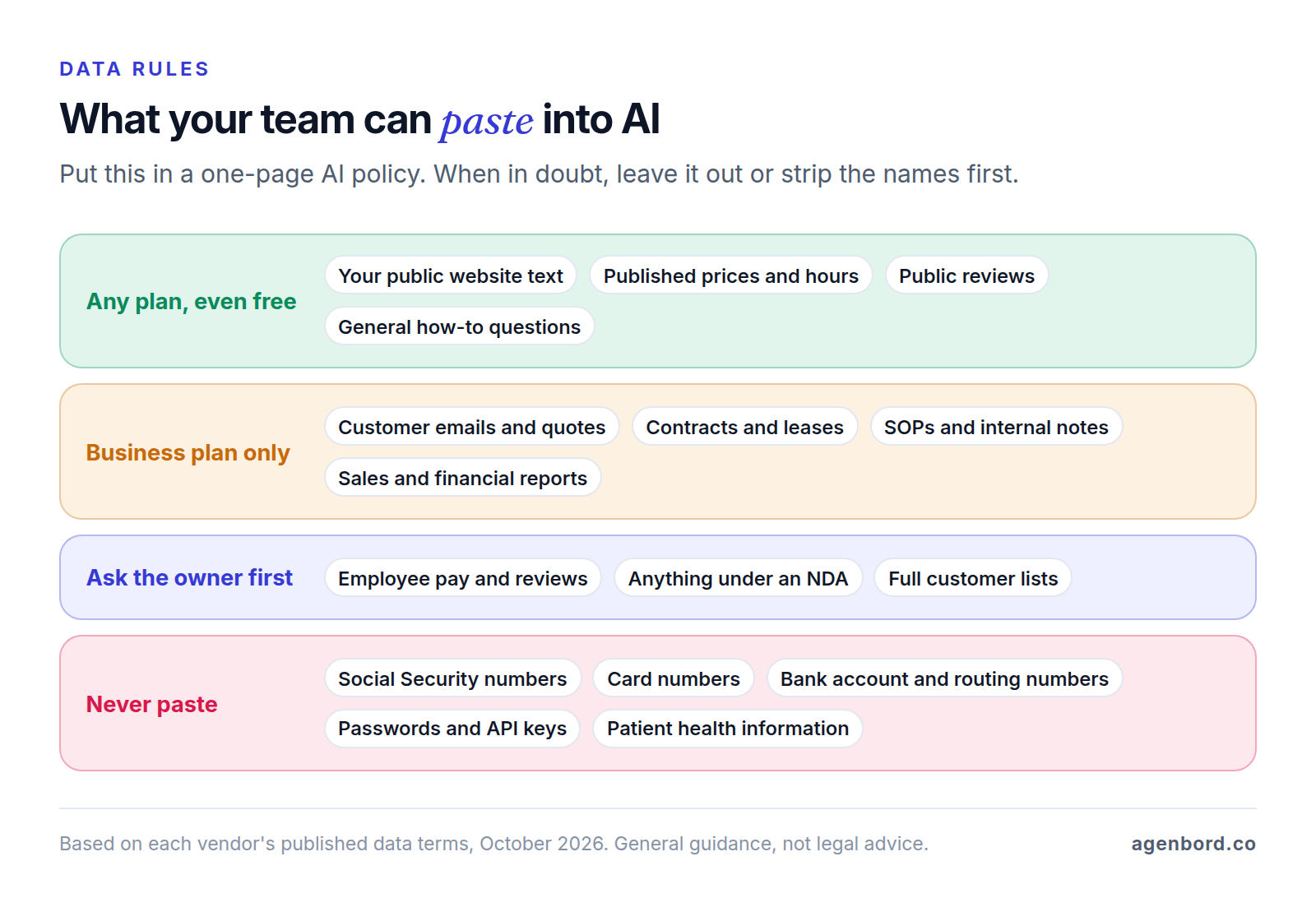
- Some data never goes in. No Social Security numbers, card numbers, bank account numbers, passwords or API keys, on any plan. If you're a clinic or another HIPAA covered entity, patient information needs a business associate agreement (BAA) with the vendor first. OpenAI offers its BAA to ChatGPT for Healthcare and API healthcare customers, so ChatGPT Business isn't the place for patient data; Anthropic lists a HIPAA-ready option on Claude Enterprise.
- Fix file permissions before you connect AI to your files. Microsoft says Copilot "only surfaces organizational data to which individual users have at least view permissions," and Google says Gemini only retrieves content the user can access. That cuts both ways: if everyone can open the payroll folder, everyone's AI can summarize it.
- Write it down. A one-page AI policy needs three things: the approved tools, what data goes where, and the rule that a person reviews anything going to a customer or into the books.
Agentic AI and private AI for small business
Agentic AI is an assistant that takes actions instead of only writing text: it searches, opens files, fills in forms and works through several steps on its own. Business plans already include some of it. ChatGPT Business includes ChatGPT Agent, Copilot Business comes with prebuilt agents such as Researcher and Analyst, and Workspace Business Standard includes Workspace Studio for building AI agents. Treat an agent like a new hire: it prepares, a person approves, and it gets more freedom only after its work on your real tasks has earned it. Our guide to AI agents for business covers 12 use cases and how to pilot one.
Private AI means keeping your data under your control. There are three levels:
- Business plans with no training by default and admin controls, as above. Enough for most small businesses.
- Your own software calling a model's API under business terms. OpenAI, for example, doesn't train on API data by default and lets qualifying organizations choose zero data retention. This is how custom AI features are usually built.
- A model on your own hardware. Open-weight models such as OpenAI's gpt-oss-20b, released under the Apache 2.0 license, can run on a machine with 16 GB of memory, so prompts never leave the building. You take on the hardware, updates, security and testing, so it suits narrow jobs on data that can't leave your premises.
When to build custom AI connected to your systems
Off-the-shelf assistants run out of road when the job needs data from your own systems, or rules that must hold every time. Signs you've reached that point:
- People copy records from your CRM, job system or accounting software into a chat, and the answers back, many times a day.
- The answer depends on live data the assistant can't see: stock levels, job status, balances.
- The output has to follow your rules every time: approved prices, discount limits, sign-off before anything is sent.
- Customers or field crews will use it, not just office staff.
- The same task runs hundreds of times a month.
A connected build gives the model access only to the records each task needs, enforces your rules in code and logs every step. Two examples from our own products: in Smart Construction, our construction ERP, an AI copilot answers questions over the company's own project and financial data, and our WhatsApp-first billing and collections platform gives teams a shared WhatsApp inbox with an AI assistant.
As we typically scope the work, an AI pilot starts from $4k (2–4 weeks) and a production AI feature runs $15k–$50k (6–12 weeks). Add model usage billed per use by the provider, hosting of roughly $50–$500 a month, and maintenance of about 15–20% of the build cost a year. Our build-vs-buy framework helps you decide whether a build beats another subscription.
How to use AI for small business: a 30-day rollout plan
A month is long enough to see results on real work and short enough that nobody signs an annual contract on a hunch.
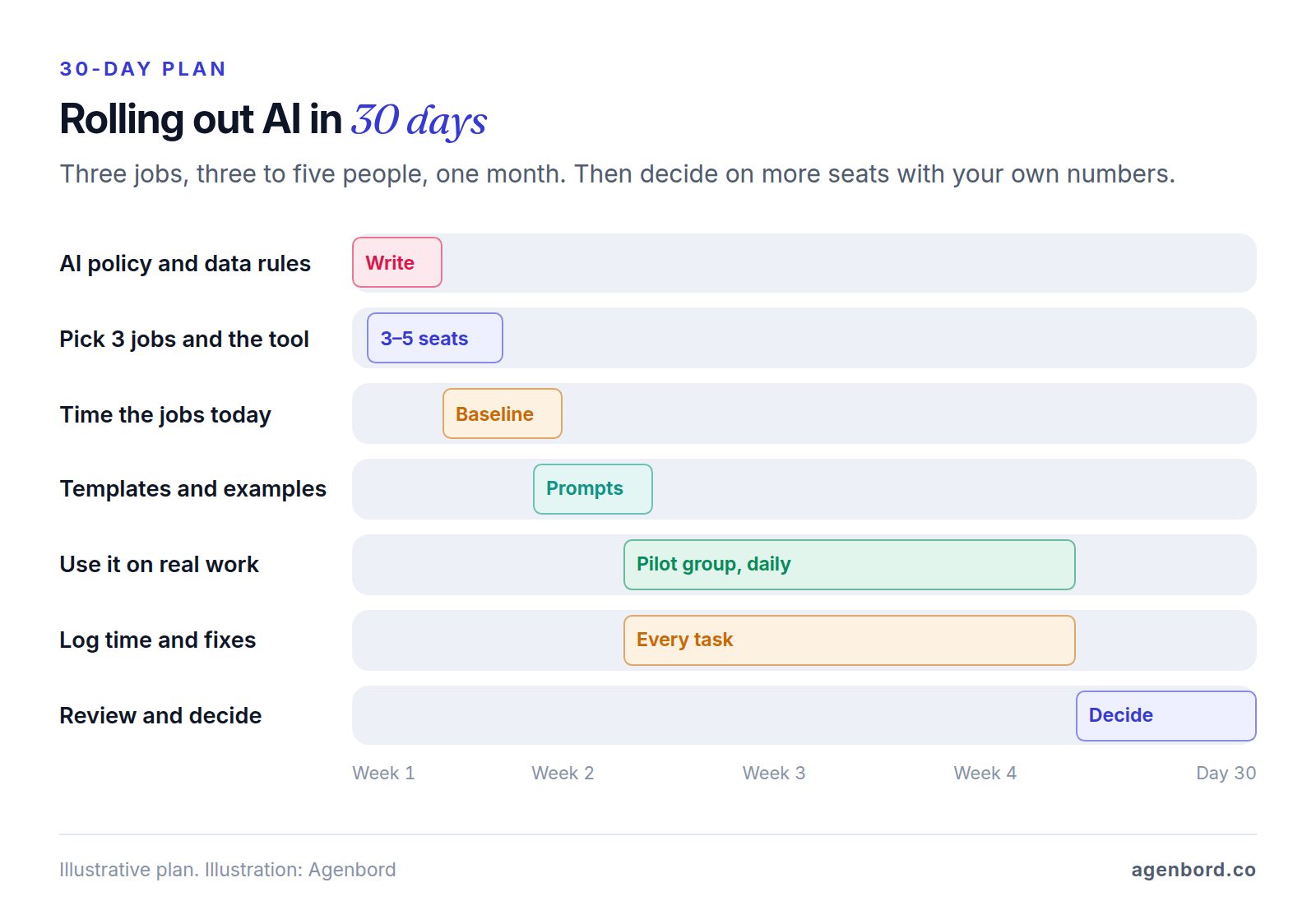
Week 1: rules, jobs and a baseline.
- Write the one-page AI policy in the first three days: approved tools, the data rules above, and who checks what.
- Pick three jobs from the list that pass the three tests, and the tool that matches your suite. Buy three to five seats on monthly billing.
- If the AI will read your shared files, fix folder permissions first.
- Time each job the way you do it today. Without a baseline, "it feels faster" is all you'll have at the end.
Days 6–10: templates and a short training.
- For each job, save the instructions, your template and two good examples in a Project or Gem, so nobody starts from a blank prompt.
- Walk the pilot group through the three jobs and the "person checks" rule for each. An hour is enough.
Days 9–24: real work.
- Use the AI on every instance of the three jobs, not just the easy ones.
- Log minutes per task and every fix a reviewer had to make, in one shared sheet.
- Collect the prompts that worked into one document.
Days 24–30: decide.
- For each job, keep it, fix the template or drop it, based on time saved and fixes needed.
- Buy seats for the people who used it, and switch to annual billing once you're sure: on the plans above, that's roughly 16–20% less than paying monthly.
- Pick the next three jobs, or flag the one that needs a connection to your own systems.
Sources
- OpenAI Help Center - What is ChatGPT Business? (accessed October 2026)
- OpenAI - ChatGPT pricing (accessed October 2026)
- OpenAI - Business data privacy, security and compliance (accessed October 2026)
- OpenAI Help Center - How your data is used to improve model performance (accessed October 2026)
- OpenAI Help Center - Data Controls FAQ (accessed October 2026)
- OpenAI - Introducing gpt-oss (accessed October 2026)
- Anthropic - Claude pricing (accessed October 2026)
- Anthropic Privacy Center - Is my data used for model training? Commercial products (accessed October 2026)
- Anthropic Privacy Center - Is my data used for model training? Consumer products (accessed October 2026)
- Microsoft - Microsoft 365 Copilot pricing for business (accessed October 2026)
- Microsoft Learn - Data, privacy and security for Microsoft 365 Copilot (accessed October 2026)
- Google Workspace - Plans and pricing (accessed October 2026)
- Google Workspace - AI in Google Workspace (accessed October 2026)
- Google - Gemini Apps Privacy Hub (accessed October 2026)
- Federal Trade Commission - Final rule banning fake reviews and testimonials (accessed October 2026)
- U.S. Copyright Office - Copyright and Artificial Intelligence, Part 2: Copyrightability (accessed October 2026)
- Florida Senate - 2025 Florida Statutes, section 934.03 (accessed October 2026)
Prices, plans and regulations change. Figures were checked on October 2, 2026; follow the links for the latest. Nothing here is legal, tax or financial advice.
About the author
Founder, Agenbord
Muhammad Hamza is the founder of Agenbord, the Fort Lauderdale software company behind the construction ERP Smart Construction and a WhatsApp-first billing platform. He writes practical guides on buying, building and automating business software.